
Why AJAX Isn’t Enough

Email Newsletter
Weekly tips on front-end & UX.
Trusted by 182,000+ folks.


 Celebrating 10 million developers

AJAX calls have moved user interaction on the Web a huge step forward: We no longer need to reload the page in response to each user input. Using AJAX, we can call specific procedures on the server and update the page based on the returned values, giving our applications fast interactivity.
What AJAX calls do not cover are updates from the server, which are needed for the modern real-time and collaborative Web. This need for updates covers use cases ranging from a couple of users collaboratively editing a document to the notification of potentially millions of readers of a news website that a goal has been scored in a World Cup match. Another messaging pattern, in addition to the response request of AJAX, is needed — one that works at any scale. PubSub (as in “publish and subscribe”) is an established messaging pattern that achieves this.
In this article, we’ll look at precisely how PubSub solves the updating problem, and we’ll look at one particular solution (the WAMP protocol) that integrates both the calling of procedures on the server and PubSub into a single API.
What AJAX Solved
Before AJAX, interactivity on web pages was terribly clunky. Any user interaction required an updated version of the page to be generated on the server, sent to the browser and rendered there. In this model, the fundamental unit of interaction was the page. Whatever the browser sent to the server, no matter how small the required update, the result was always a full new page. This was wasteful of both wire traffic and server resources, and it was slow and painful for the user.
AJAX broke this up by granularizing things: You could now send data, receive just the result for the interaction triggered by it and then update the relevant parts of the page based on this response. With AJAX, we went from a single generalized call (“Give me a new page”) to multiple interaction-specific calls. With AJAX, we had remote procedure calls (RPC) on the server.
Consider the following simple example of a web app for voting made possible by this:
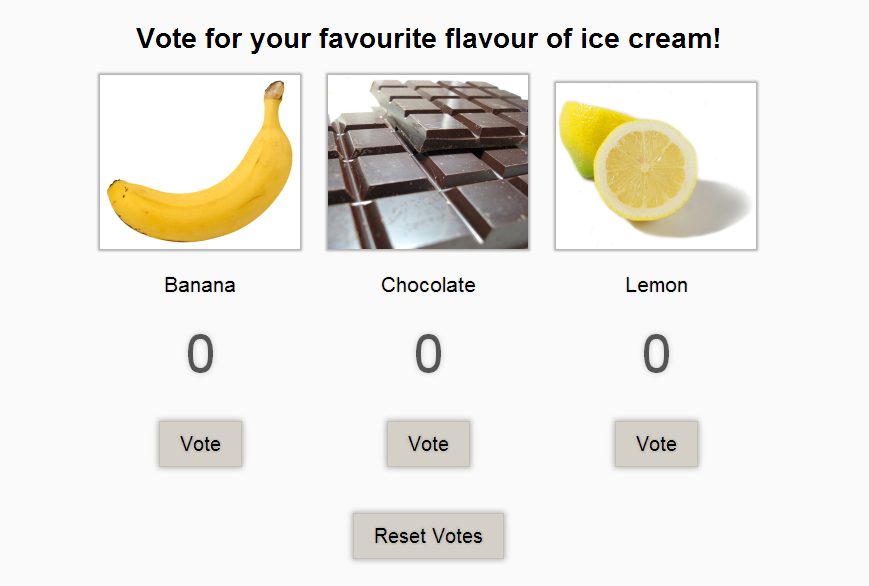
The user can vote for any one of the three ice cream flavors on offer.
Using AJAX, a clicked vote could lead to something like this:
var xhr = new XMLHttpRequest();
xhr.open('get', 'send-vote-data.php');

xhr.onreadystatechange = function() {
   if(xhr.readyState === 4) {
      if(xhr.status === 200) {

      // Update vote count based on call result
      } else{
         alert('Error: '+xhr.status); // An error occurred during the request
      }
   }
}
We would then change just the vote count for the flavor voted for by the user, according to the return of the AJAX call. We’ve gone from rendering an entire page to updating a single DOM element.
This means a lot less for the server to do, and less traffic on the wire. We’re getting a vote count instead of a full page. Most importantly, it enables a speedy update of the interface, dramatically improving the user experience.
What Remains Unsolved
In a real-world use case, something like this sample app would have a lot of users voting, often in parallel. Vote counts would change according to users’ combined interactions. Because AJAX calls triggered by a user’s interaction would be the only connection to the server, the user would see the current voting numbers when first loading the app, but they would be unaware of back-end voting changes unless they refreshed the page.
This is because AJAX enables us to update pages only in response to user action on the page. It does not solve the problem of updates coming from the server. It does not offer a way to do what we really need here: to push information from the server to the browser. We need an additional messaging pattern that sends updates to the client without the user (or the client’s code) having to constantly request them.
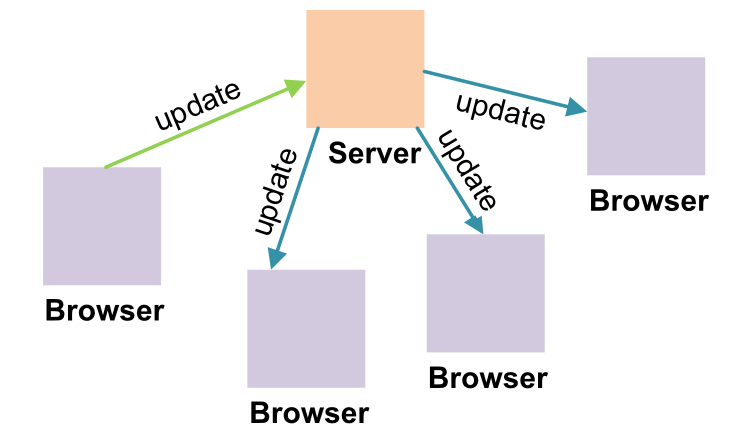
PubSub: Updates From One To Many
An established messaging pattern for handling updates to many clients is PubSub. Here, a client would declare an interest in a topic (“subscribe”) with a central broker. When the client sends an event for a topic to the broker (“publish”), the broker would distribute this event to all currently connected and subscribed clients.
One big advantage of the PubSub pattern is that publishers and subscribers are decoupled through the broker. A publisher does not need any knowledge of present subscribers to a topic, and subscribers similarly do not need any knowledge of publishers. This means that PubSub is easy to implement in both the publishers and subscribers and it scales well.
Numerous implementations of PubSub are available to choose from, depending on what back-end and front-end frameworks, libraries and languages you are using. For example, for Node.js or Ruby, you might use something like Faye. If you don’t want to run your own broker, web services such as Pusher will host the functionality for you.
Two Messaging Patterns, Two Technologies?
It isn’t difficult to find a PubSub technology that suits the needs of a particular app or website. But even for something as simple as our voting demo, we’ve seen that you need both RPC and PubSub — you need to send and request data as well as receive automatic updates. With any of the pure PubSub solutions, you have to use two different technologies for your application’s messaging: AJAX and PubSub.
This clearly has some disadvantages:
- You need to set up two tech stacks, possibly including two servers, and keep these updated and running.
- The app needs separate connections for the two messaging patterns, requiring more server resources. These two connections would also both require their own authentication and authorization, increasing implementation complexity and, with this, room for error.
- On the server, you would need to integrate the two technology stacks into your single application, coordinating between the two.
- For front-end developers, the concerns are similar: establishing and handling two connections and dealing with two separate APIs.
WAMP: RPC And PubSub
The Web Application Messaging Protocol (WAMP) solves the disadvantages above by integrating both RPC and PubSub into a single protocol. You have a single library, a single connection and a single API. It will handle all of your application’s messaging between the browser front end and the application back end.
WAMP is an open protocol, and it has an open-source JavaScript implementation (Autobahn|JS) that runs both in the browser and in Node.js, allowing you to do pure JavaScript-only applications. Open-source implementations exist for other languages, so you can use PHP, Java, Python or Erlang as well as JavaScript on the server (and the list of languages is expected to grow).
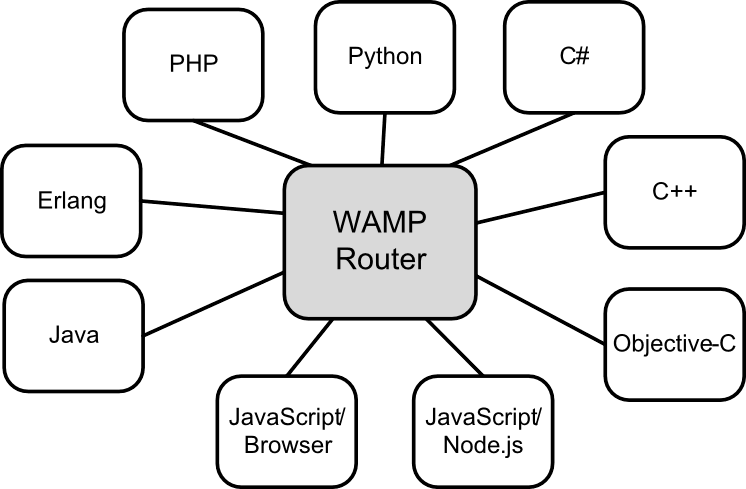
These other languages are not limited to the back end — you can also use the WAMP libraries for native clients, enabling web and native clients to be mixed using the same protocol. The C++ library, for example, is well suited to running WAMP components on resource-limited embedded devices — think sensors in an Internet of Things application.
WAMP connections are established not from the browser to the back end, but with a WAMP router, which does the message distribution. It handles the role of broker for PubSub, so that your server just publishes to the router, and this handles distribution of the event to all subscribers. For RPCs, the front end issues the call for a remote procedure to the router, and this forwards it to a back end, which has registered the procedure. It then returns the result from the back end to the caller. This decouples front ends and back ends just like with PubSub. You can spread your functionality across several back-end instances without the front end needing to know of the existence of any of them.
There are additional protocol features on top of the basic routing, such as authentication of clients, authorization based on roles and publication topics, and restriction of publications to particular clients. WAMP routers offer different sets of this advanced functionality.
We will look at how to solve our voting app’s updating problem using WAMP, and we’ll see precisely how WAMP handles RPCs as well.
Live Voting Updates: Vote Using WebSockets And WAMP
We will take a closer look at the messaging functionality required by the voting app and go over how to implement this in the browser and on the server. To keep things as simple as possible, the back-end code will also be in JavaScript and will run in a browser tab.
“Back end in the browser” is possible because browser clients can register procedures for remote calling just like any other WAMP client. This means that, persistence and performance considerations aside, browser code is equally capable as code running in, say, Node.js. For our demo browser performance is perfectly sufficient.
The full code for the voting demo is available on GitHub, including instructions on how to run it and the WAMP router used (Crossbar.io). Everything you need to run the demo is free and open-source.
Including A WAMP Library
The first thing to do in our code is include a WAMP library. We’ll use Autobahn|JS.
For development and testing in the browser, just include it like this:
<script src="https://autobahn.s3.amazonaws.com/autobahnjs/latest/autobahn.min.jgz"></script>;
(This version does not allow for deployment to a production website, and it is limited to downloads from pages hosted on localhost or on a local network IP, such as ones in the 192.168.1.x range.)
Establishing A Connection
We now need to establish a connection to the WAMP router:
var connection = new autobahn.Connection({
   url: "ws://example.com/wamprouter",
   realm: "votesapp"
});
The first argument is the URL of the WAMP router. This uses the ws scheme, instead of the http that we are used to, because WAMP uses WebSockets as its default transport. WebSockets provides a persistent, bidirectional connection, which enables push from the server without any hacks. Also, no HTTP headers are transferred with each message, which significantly reduces overhead on the wire. WebSockets is supported in all modern browsers.
For the second argument, we need to choose a “realm” that this connection is attached to. Realms create separate routing domains on the router — that is, messages are routed only between connections on the same realm. Here, we’re using a realm specifically for the voting demo.
The connection object we’ve created allows for the attachment of two callbacks, one for when the connection has been established, and one should establishment of the connection fail or should the connection close later on.
The onopen handler below is called upon establishment of the connection, and it receives a session object. We pass this to the main function that we’re calling here and that contains the application’s functionality. The session object is used for the WAMP messaging calls.
connection.onopen = function (session, details) {
    main(session);
};
To get things going, we finally need to trigger the opening of the connection:
connection.open();
Registering And Calling A Procedure
The front end will submit votes by calling a procedure on the back end. Let’s first define the function that handles a submitted vote:
var submitVote = function(args) {
   var flavor = args[0];
   votes[flavor] += 1;

   return votes[flavor];
};
All this does is increase the vote count for the ice cream flavor and return this incremented number.
We then register this function with the WAMP router to make it callable:
session.register('com.example.votedemo.vote', submitVote)
When registering it, we assign a unique identifier that is used to call the function. For this, WAMP uses URIs expressed in Java package notation (i.e. starting with the TLD). URIs are practical because they are a well-established pattern and allow the namespace to be easily separated.
That’s it for the registration. The submitVote function can now be called externally by any (authorized) WAMP client connected to the same realm.
Calling the function from our front end is done like this:
session.call('com.example.votedemo.vote',[flavor]).then(onVoteSubmitted)
Here, the return of the submitVote function is passed on to the onVoteSubmitted handler.
Autobahn|JS does this not by using conventional callbacks, but with promises: session.call immediately returns an object that eventually gets resolved when the call returns, and the handler function is then executed.
For basic use of WAMP and Autobahn|JS, you do not need to know anything about promises. As they’re used above, you can think of them as nothing more than a different notation for callbacks. If you are interested in learning more, however, then HTML5 Rocks’ article is a good place to start.
Subscribing And Publishing Updates
But what about updating the other clients? After all, that’s what AJAX doesn’t do, and it’s why we’re here in the first place.
To receive updates, a client needs to tell the WAMP router what information it is interested in by subscribing to topics. So, our front end does this:
session.subscribe('com.example.votedemo.on_vote', updateVotes);
We’re just submitting the topic (again, a URI) and a function to execute each time an event for the topic is received.
All that’s left to do is send the voting updates from the server. To do this, we just construct the update object that we want to send and then publish this to the same topic that our browsers subscribe to.
This needs to be a part of the processing of votes. So, let’s add this functionality to the submitVote function that we previously registered, which now looks like this:
var submitVote = function(args, kwargs, details) {
   var flavor = args[0];
   votes[flavor] += 1;

   var res = {
      subject: flavor,
      votes: votes[flavor]
   };

   session.publish('com.example.votedemo.on_vote', [res]);

   return votes[flavor];
};
Well, that’s it: both the submission of votes to the back end and voting updates to all connected browsers, handled by a single protocol. There really isn’t more to basic WAMP usage than this.
Summary
WAMP unifies your application messaging — with RPC and PubSub, you should be able to cover everything your application needs. With WebSockets, this is done using a single, bidirectional, low-latency connection to the server, thereby saving server resources, reducing wire traffic and enabling very short round-trip times. Because WAMP is an open protocol and implementations exist for multiple languages, you have a choice of back-end technology, and you can extend your application beyond the Web to native clients.
WAMP makes it easy to write modern, reactive web applications with great user experiences and live updates from the server — and to extend them beyond the Web.
Final Notes
- “Vote,” Crossbar.io A live version of the voting demo
- “Why WAMP?,” WAMP The reasoning behing the design of WAMP
- “Free Your Code: Backends in the Browser,” Alexander Gödde, Tavendo A blog post on how the symmetry in WAMP affects where you can deploy code
- “WebSockets: Why, What and Can I Use It?,” Alexander Gödde, Tavendo A quick overview of WebSockets
- “WAMP Compared” WAMP A comparison of this messaging protocol to others
- Crossbar.io Getting started with this unified application router
Further Reading
- A Simple Workflow From Development To Deployment
- Qualities Of Good Flux Implementations
- Simple Augmented Reality With OpenCV, Three.js And WebSockets
- Simple Augmented Reality With OpenCV, Three.js And WebSockets
 (ml, al, mrn)

