Smashing Magazine - we smash you with the information that will make your life easier. really.
Data Visualization: Modern Approaches
Data presentation can be beautiful, elegant and descriptive. There is a variety of conventional ways to visualize data – tables, histograms, pie charts and bar graphs are being used every day, in every project and on every possible occasion. However, to convey a message to your readers effectively, sometimes you need more than just a simple pie chart of your results. In fact, there are much better, profound, creative and absolutely fascinating ways to visualize data. Many of them might become ubiquitous in the next few years.
So what can we expect? Which innovative ideas are already being used? And what are the most creative approaches to present data in ways we’ve never thought before?
Let’s take a look at the most interesting modern approaches to data visualization as well as related articles, resources and tools.
1. Mindmaps
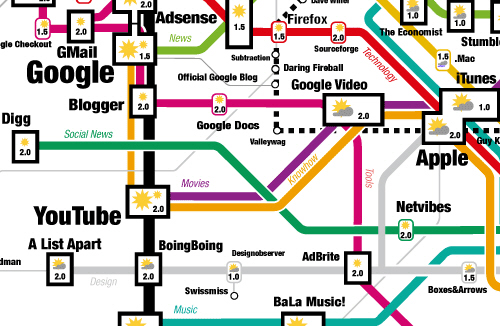
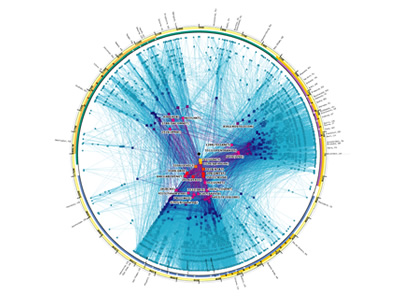
Informationarchitects.jp presents the 200 most successful websites on the web, ordered by category, proximity, success, popularity and perspective in a mindmap. Apparently, web-sites are connected as they’ve never been before. Quite comprehnsive.
2. Displaying News
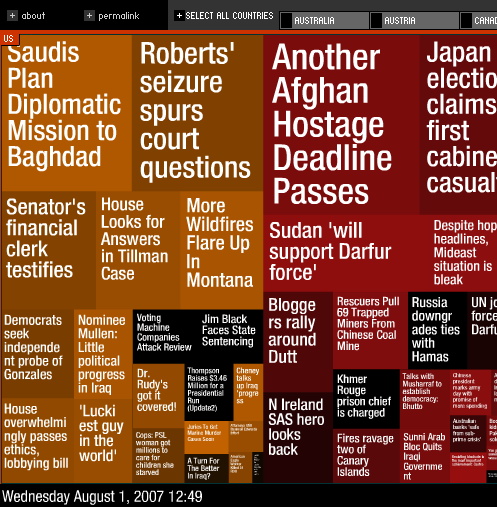
Newsmap is an application that visually reflects the constantly changing landscape of the Google News news aggregator. The size of data blocks is defined by their popularity at the moment.
Voyage is an RSS-feader which displays the latest news in the “gravity area”. News can be zoomed in and out. The navigation is possible with a timeline.
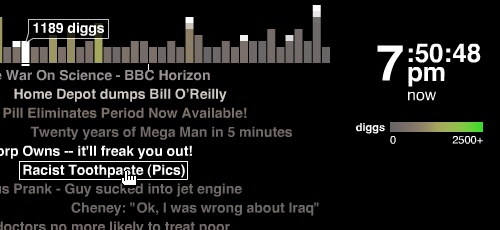
Digg BigSpy arranges popular stories at the top when people digg them. Bigger stories have more diggs.
Digg Stack: Digg stories arrange themselves as stack as users digg them. The more diggs a story gets, the larger is the stack.
3. Displaying Data
Amaztype, a typographic book search, collects the information from Amazon and presents it in the form of keyword you’ve provided. To get more information about a given book, simply click on it.
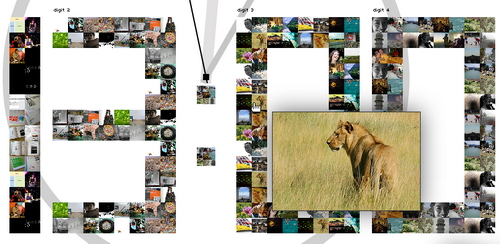
Similar idea is being used by Flickrtime. The tool uses Flickr API to present the uploaded images in real-time. The images form the clock which shows the current time.
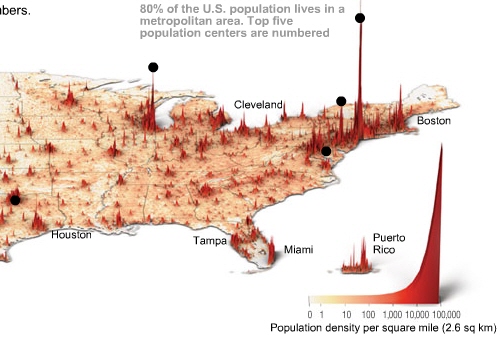
Time Magazine uses visual hills (spikes) to emphasize the density of American population in its map.
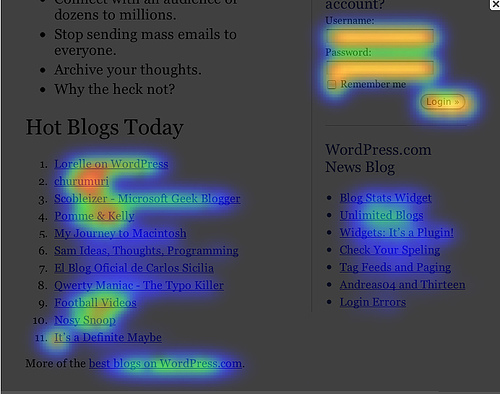
CrazyEgg lets you explore the behavior of your visitors with a heat map. More popular sections, which are clicked more often, are highlighted as “warm” – in red color.
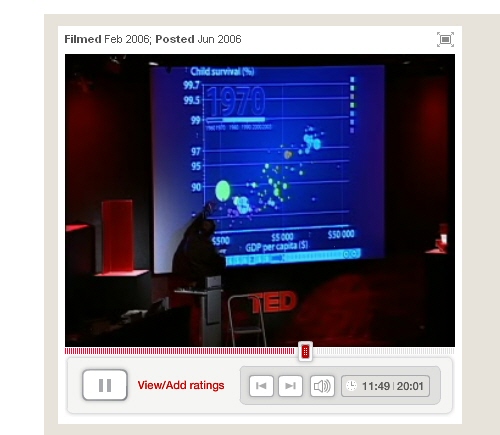
Hans Rosling TED Talk is a legendary talk of the Swedish professor Hans Rosling, in which he explains a new way of presenting statistical data. His Trendalyzer software (recently acquired by Google) turns complex global trends into lively animations, making decades of data pop. Asian countries, as colorful bubbles, float across the grid — toward better national health and wealth. Animated bell curves representing national income distribution squish and flatten. In Rosling’s hands, global trends — life expectancy, child mortality, poverty rates – become clear, intuitive and even playful.
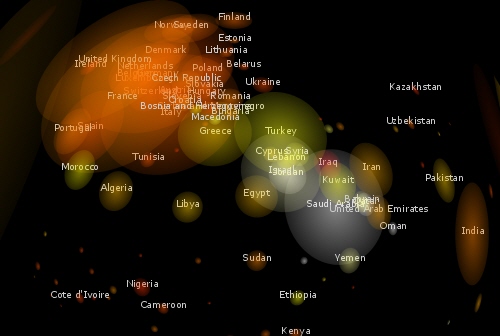
Three Views shows three views of the earth, in which each country is represented by a circle that shows the amount of money spent on the military (size of circle) and what fraction of the country’s earnings that uses (colour). Compact and beautiful presentation of data.

We Feel Fine shows human feelings, calculated from a large number of weblogs.
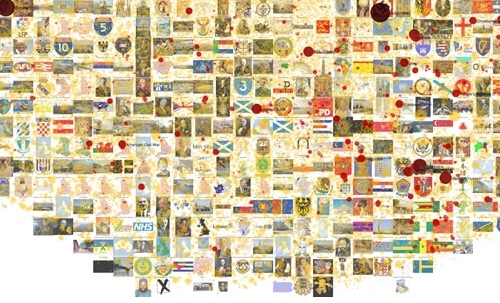
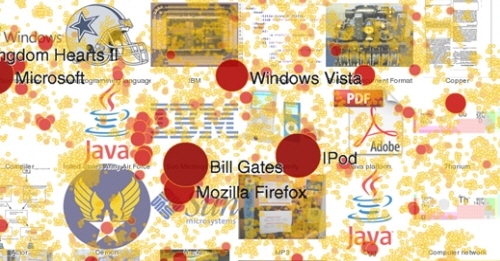
Visualizing the Power Struggle in Wikipedia displays the most popular articles and the most frequent search queries in the heatmap.
Websites as graphs. An HTML DOM Visualizer Applet, which displays sites as graphs depending on the amount of links, tables, div tags, images, forms and other tags.
Interactive History Timeline presents the history of Great Britain, divided into interactive data blocks. The density of events is displayed on the map.
Winning Lotto Numbers is supposed to present the frequency of appearance of every number from one year to the next one. This graph is definitely not one of the most clear ones.
Elastic Lists demonstrates the “elastic list” principle for browsing multi-facetted data structures. You can click any number of list entries to query the database for a combination of the selected attributes. The approach visualizes relative proportions (weights) ofmetadata by size and visuzalizes characteristicness of a metadata weight by brightness. Author’s blog regularly informs about new experiments in the area of data visualization. Nice to observe, useful to bookmark.
The JFK Assassination TimelineAn Ajax-based approach vor visual presentation of historical events. John F. Kennedy assassination as timeline with numerous presentation options. The related article with further examples.
4. Displaying connections
Munterbund showcases the results of research graphical visualization of text similarities in essays in a book. “The challenge is to find forms of graphical and/or typographical representation of the essays that are both appealing and informative. We have attempted create a system which automatically generates graphics according to predefined rules.”
Burst Labs suggests similar or connected items to your search queries (favourite artists, tv shows, movies, genres etc.) in a bubble. Not really new, but still inspiring.
Universe DayLife displays events, connections and news as circles which gravitate around the topic they are related to.
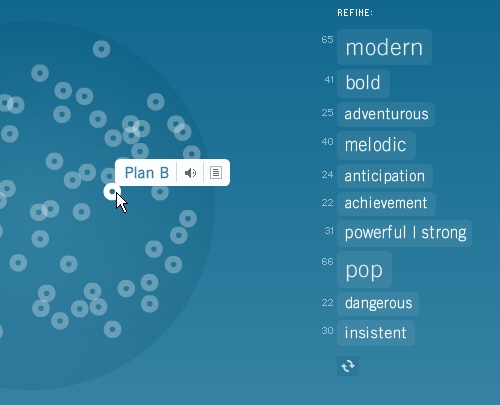
Musiclens gives music recommendations and presents your current mood and musical taste as a diagram.

Figd’t Visualizer allows you to play around with your network. You interface with the Visualizer through Flickr and LastFM tags, using any tag to create a Magnet. Once a Tag Magnet is created, members of the network will gravitate towards it if they have photos or music with that same Tag. Available for Mac OS X, Windows and Linux. Alpha-version.
What have I been listening to?: Lee Byron describes his approach of creating a histogram about his music listening history.
Shape Of Song: What does music look like? The Shape of Song is an attempt to answer this seemingly paradoxical question. The custom software in this work draws musical patterns in the form of translucent arches, allowing viewers to see – literally – the shape of any composition available on the Web.
Musicmap: connections are represented as connected lines; they create a web.
Musicovery displays music taste connections and lets you listen to the song and browse through similar songs.
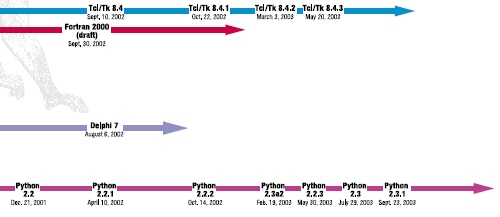
Lanuage Poster proves that even simple lines can be descriptive enough. The History of Programming Languages as an original timeline.
5. Displaying web-sites
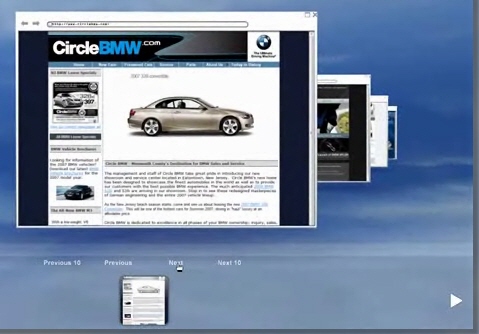
Spacetime offers Google, Yahoo, Flickr, eBay and images in 3D. The tool displays all of your search results in an easy to view elegant 3D arrangement. Company promises that the days of mining through pages and pages of tiny thumbnails in an effort to find the item you are looking for are over.
UBrowser is an open source test mule that renders interactive web pages onto geometry using OpenGL® and an embedded instance of Gecko, the Mozilla rendering engine.
6. Articles & Resources
- Visualcomplexity.com

The project presents the most beautiful methods of data visualization as well as further references and book suggestions. The gallery has over 450 entries. - In his article Infosthetics: the beauty of data visualization Andrew Vande Moere, well-known through his blog Infosthetics, discusses the aesthetics of data visualization and modern apparoaches in this area. Creative design ideas combine form and content and generate fascinating graphs – is it a new area in the art of next generation?


The article presents 13 new techniques of data visualization, with examples and further references. - 16 Awesome Data Visualization Tools
“From navigating the Web in entirely new ways to seeing where in the world twitters are coming from, data visualization tools are changing the way we view content. We found the following 16 apps both visually stunning and delightfully useful.” An extensive overview by Mashable.com. - Dataesthetics
Eric Blue provides some references to unusual Data Visualization methods. - infosthetics – information aesthetics

Andrew Vande Moere about data visualization, latest development and design ideas. - Visualizing Delicious Roundup
An overview of Del.icio.us tools you can use to visualize your bookmarks. - Periodic Table
A periodic table of visualization methods.

7. Tools and Services
- You can create your own timelines with Xtimeline and Circavie.
- IBM Many Eyes

This Java-based service visualizes data online and helps to create pie charts, diagrams, tree maps, bar charts and histograms. Registration is required. Some examples are simply amazing. - prefuse | the prefuse visualization toolkit
Presents the beta-version of a Java-based toolkit for programming of application with integrated data visualization methods - Swivel
This service creates pie charts, diagrams and histograms “on the fly”. It also provides a Swivel API you can use to improve already existing visualization methods. - You can find even more tools for designing your own diagrams and charts online in our article Charts and Diagrams Tools.
Vitaly Friedman, editor-in-chief of Smashing Magazine (www.smashingmagazine.com), an online magazine dedicated to designers and developers.
- 127 Comments
- 1
- 2August 2nd, 2007 6:56 am
Very cool indeed. I’d love to replicate some of them. ‘Experimental’ might be a better word than ‘modern,’ until they catch on and show their utility above a more standard (’traditional’) approach.
I don’t know if any are open source but some of the visuals are made with the help of Processing, which you should check out if you’re interested in doing something similar without a ton of programming.
- 3August 2nd, 2007 8:07 am
Wow! That’s a great list! I’d never seen a lot of those before! Thanks for putting it together – can’t wait to look into them some more!
- 4August 2nd, 2007 8:33 am
Nice list guys! Great work!
This is a pretty cool project to I found a couple weeks back, Human Brain Cloud, not quite as extensive as some of the above examples, but cool none the less. - 5August 2nd, 2007 9:51 am
one more time a nice list…
Keep going!
- 6August 2nd, 2007 10:00 am
Holy crap! That flickr clock is wicked and the Ubrowser is tripped out. Nice find on these.
- 7August 2nd, 2007 10:03 am
Until this article I was really unaware of how big “data visualization” was…to be honest…I’d never really heard the term. Great work!!
- 8August 2nd, 2007 10:55 am
Amazing! Where to learn some methods of data visualisation?
- 9August 2nd, 2007 11:28 am
i think you have put a wrong screenshot for musiclens ?
- 10August 2nd, 2007 11:33 am
Great!
- 11August 2nd, 2007 2:14 pm
Another great piece on Smashing :)
- 12August 2nd, 2007 2:48 pm
This is a pretty good list! I wasn’t aware of many of these sites. I also posted a collection of unique data/infoviz links last year:
- 13August 2nd, 2007 3:17 pm
great!
- 14August 2nd, 2007 3:17 pm
Brilliant list. I had no idea there were such ideas floating around. This isn’t just a smart way of displaying data but I think it is rather inspirational for other mediums.
- 15August 2nd, 2007 3:56 pm
back in 90x – http://textarc.org/
Java applet representing most usable words in book by it’s size. Before tag clouds were invented (discovered).
Check it out. - 16August 2nd, 2007 4:45 pm
i never knew data visualisation was such a big thing. We are manipulating so much of data daily [more the data, more happy we are :) ] and i never thought about its options…..
wonderful resource. so much to learn and understand. you have been doing a very nice job. its blocked here[they say you are a 'download' site :P ], sometimes i have to use a proxy site. but its worth.
thanx a lot :)
- 18August 2nd, 2007 5:56 pm
Absolutely great!
- 19August 2nd, 2007 6:07 pm
A really nice list of graphic data models and interactivity.
Congrats! - 20August 2nd, 2007 6:40 pm
It exists a french search engine which corresponds to your article subject:
KartooKartOO is a metasearch engine with visual display interfaces. When you click on OK, KartOO launches the query to a set of search engines, gathers the results, compiles them and represents them in a series of interactive maps through a proprietary algorithm
- 21August 2nd, 2007 6:58 pm
Very good article, thanks all
- 22August 2nd, 2007 7:43 pm
Superb. Your best list yet.
- 23August 2nd, 2007 8:15 pm
Uuuuu, great article..
- 24August 2nd, 2007 8:44 pm
Whenever SmashingMagazine so much as coughs it makes it to the Digg homepage, Delicious popular and generates hoards of comments and linkbacks.
Very nice!
- 25August 2nd, 2007 9:20 pm
Stunning collection – thanks for all the work you put into it…
- 26August 2nd, 2007 9:23 pm
You guys just don’t stop! Nice research, you guys dig like them google folks.
- 27August 2nd, 2007 9:41 pm
There was a visualization of the history of Linux distros…
http://www.cyberciti.biz/tips/linux-kernel-history-and-distribution-time-line.htmlAnd also about the Linux kernel…
http://funhouse.bubble.ro/569/3D_View_of_Linux_Kernel/ - 28August 2nd, 2007 9:55 pm
I loved this stuff, I think if will be a tremendous resource for K-12 teachers especially for learning disabled students, please try to present this material in teachers conventions and teachers publications.
- 29August 2nd, 2007 10:09 pm
Wow! All sorts of ways to render data impossible to read! Fantastic!
“As you can see by this picture, Chicago’s got a bigger circle than Boston. How much bigger? I’m not really sure. Pretty big. That means Chicago’s like 50 billion times betterer than Boston when it comes to widgets in the scuzzypond. Are widgets good or bad? I don’t know, but they’re represented in funny circles with hard-to-read overlapping text, so it MUST mean something important!”The only thing these graphs show is what data looks like when it is completely disorganized. Quit acting like this is a revolution in data representation.
- 30August 2nd, 2007 10:19 pm
Wonderful post, I love inventions in the field of data visualization. I think I will have to write a post referring to your post — it’s a great read!
- 31August 2nd, 2007 11:40 pm
Excellent article!! I worked on a Hurricane Katrina data-visualization project last year for my agency in New Orleans. It’s an oral history with compelling, raw video that offers an unedited look at people’s memories of the storm and the fallout. As each video plays, a simple visual device displays recurring themes by keyword; commonalitites between experiences are presented via lists of names headed by recurring topics. Thought your readers might be interested.
- 32August 2nd, 2007 11:42 pm
If any are interested in the Hurricane Katrina data-visualization project, here is the url:
- 33August 3rd, 2007 12:01 am
Smashing is the best!
- 34August 3rd, 2007 1:39 am
Thank you, these are grrreat!
- 35August 3rd, 2007 2:02 am
That is a fantastic list, very impressive.
- 36August 3rd, 2007 2:41 am
Kunal Anand also wrote a cool Python script for “Visualizing my del.icio.us tags“
- 37August 3rd, 2007 2:56 am
Despite the fact that my head exploded looking at some of these, thanks for the list :D
- 38August 3rd, 2007 4:17 am
Thank you, these are great visualization&(great view point). We”l live and see.
- 39August 3rd, 2007 5:20 am
Traditional graphics are dead, because they can’t handle the vast amounts of data we have today and they must be replace by a new set of tools.
There are some interesting examples here, but a large majority is more a form of art than useful tools, visualization -wise. We need data density, context, interaction and data integrity. Do they provide that? I am not sure.
- 40August 3rd, 2007 6:18 am
One more cool site for link visualization is a Walk2Web. It makes cool graphs of incoming and outgoing links. Every link has screenshots, tags, rating…
- 41August 3rd, 2007 12:59 pm
fascinating collection. thanks for taking the time to pull it together.
- 42August 3rd, 2007 2:15 pm
This is the first time I’ve been to some of these sites. A lot of them like Newsmap totally blew my mind!
- 43August 3rd, 2007 4:44 pm
I thought by the title that this one would be a bit boring..How wrong I was! Facinating and sometimes beautiful stuff. Cheers
- 44August 3rd, 2007 1:41 am
Good list.
Those interested in search visualization could find searchCrystal of interest, since it lets you search and visually compare multiple engines in one place. You compare, remix and share results from web, image, video, blog, tagging, news engines as well as Flickr images or RSS feeds. - 45August 3rd, 2007 5:45 pm
Perhaps you most ineresting and compelling post yet.
- 46August 3rd, 2007 6:43 pm
Beautiful stuff! Thanks for your interesting article. I also did datavisualisation as part of my degree in graphic design. Take a look at Data visualisation of a social network.
- 47
- 48August 3rd, 2007 8:00 pm
I love the Trendmap 2007! Cool! Keep up the good post!
- 49August 3rd, 2007 9:49 pm
great list!
I always thought that Etsy had some cool tools to explore their site http://www.etsy.com/time_machine.php and http://www.etsy.com/color.php
- 50August 4th, 2007 12:30 am
wow. absolutely impressing!!!
- 51August 4th, 2007 7:21 am
Love it. Nice one
- 52August 4th, 2007 4:08 am
Again a great collection of wonderful “Must see’s” out on the internet. I didn’t know that data can be such faszinating. Thank you for your great work, folks – I’m new to this blog but I must say: I really like it :-)
All the best from Salzburg, Austria
- 53August 4th, 2007 9:09 pm
Too many advertisement on this site. Won’t read it again. Sorry.
- 54August 5th, 2007 1:38 am
Wow, I wonder how long did it take to pull that list. Thanks for the resources.
- 55August 5th, 2007 2:22 am
interesting as always, but show some fucking restraint.
the outrageous magnitude of content in one article renders the entire thing useless. give us highlights of what you think is the best, not a list of everything under the sun.
- 56August 5th, 2007 3:15 am
Outstanding list!
- 57August 5th, 2007 3:42 am
Excellent list, The musicovery link is awesome!
- 58August 5th, 2007 7:36 am
Another good site for data visualization is Radical Cartography, which is not so much radical as informative. Example: mapping income to population of the largest 25 metro areas shows that some cities have “income donuts” of wealthier suburbs surrounding a poorer city core, while others have wedges that radiate out from one area:
- 59August 5th, 2007 12:14 pm
thanks a lot! this list is a dream of PR-manager doing a couple of presentations a week)))
- 60August 5th, 2007 1:50 pm
Wow that was brilliant,a good piece of collection.
- 61August 5th, 2007 2:46 am
Check out a few ‘old visualizations’ dating 1997 (1rst year post grad year …fooling around experimenting with stuff)
some viz look digg big spy
http://www.youtube.com/watch?v=K3wcLHMWd_Y
implemented in good old javascript
- 62August 5th, 2007 9:15 pm
Wow, this is an amazing resource. I have recently become interested in this field, and I am very excited about the directions that it is going.
- 63August 6th, 2007 1:40 am
rssvoyage is beatiful!
- 64August 6th, 2007 9:33 pm
Hi,
I’ve been passioned by data visualization for quite some time. Thanks for putting together this data, it’s quite useful to me. I think that you should add the Idea Line of Martin Wattenberg: http://www.whitney.org/arport/commissions/idealine.shtml
to the list.This is a very beatiful and concise method to display chronological information.
Best Regards,Cristian
- 65August 7th, 2007 5:08 am
Good, this is fantastic for design inspiration and turn-off for convensional design.
- 66August 7th, 2007 8:19 am
Wow!!
thanks for this list !!
simply fab! - 67August 7th, 2007 10:44 pm
Bravo !!!!
- 68August 9th, 2007 3:41 am
One I liked very much was this one: mapping all sorts of data to a world map, sizing countries to show the values for each country: http://www.sasi.group.shef.ac.uk/worldmapper/index.html
- 69August 9th, 2007 5:33 pm
Excellent list – thank you
- 70August 9th, 2007 11:46 pm
This is an excellent site for visual information. What I don’t see is something like FYI Visual or Fractal Edge. These would make for nice additions.
Along these lines, I have been noting a lone ranger with an axe to grind out in the blogs, who appears to consider himself keeper of the visual display…
What I mean is FYI Corporation has developed some interesting technology for displays of massive amounts of information. While it’s not an all encompassing visual technology (meaning it requires additional visual support for some kinds of information, particularly where proportion is important), it enables anomalies to become readily apparent from dense displays.
Seems there is a lone ranger out there with an axe to grind against this company and its product, and has single handedly launched a tirade and personal attacks against even its employees. It is unclear why he has such a personal vendetta against FYI Corporation, but it’s clear that he does.
I contacted FYI Corporation employees and they told me that when challenged, the lone ranger was unable to show example data they provided in dense form on a display, and instead retreated to the common convention of low density dashboard configurations. For instance, they said that when asked to show hundreds of multidimensional values on a single screen with his approach (as can be done with FYI Visual) he was unable to do it. An FYI Visual representative said that they invited him to participate in a study to compare his approach to showing 850 generators consisting of 6 metrics to their way he refused to participate. I think I see why…
He relies completely on anecdotes and references to other people’s work because he appears to be ill-equipped to address the problem. He appears to hold himself out to be an expert, but his education is in Religious Studies, which makes sense given his Crusade against FYI Visual.
We have been using FYI Visual for two years and the problem it solves is unparalleled by any other technologies we have examined for high display density of time-sensitive information -the kind that does not fit onto a dashboard or shown with hundreds of lines on a graph.
When ever I read such personal attacks as that of this lone ranger, I consider the source, and in this case, the source seems quite dubious.
I enjoy sites like this one that provides examples and let’s consumers pick what works for them.
- 71August 10th, 2007 1:26 pm
very useful resource.. I am wondering if there are similar input mechnasims as well!
- 72August 12th, 2007 11:54 pm
Wow, a great collection of stunning visualizations! One of the best blog entries I have ever read!
- 73
- 74
- 75August 16th, 2007 12:07 am
In reply to FYI Visual and Robert Christensen:
Yeah, I ran into that flaming rhetoric too (what’s up with that guy? -does anybody take him seriously? What a rant without a cause) –what caught me was that the “lone ranger” as you call him wrote in his paper that dashboards have two important characteristics to situational awareness: 1 Their visual nature, and 2 their integration into everything you must keep track of onto a single screen. I looked at the examples he gives and we cannot fit our metrics on a single screen using his suggestions either. His suggestions are obvious to 3rd graders. I will check out your suggestions about FYI Visual and Fractal Edge to see if those help us. The lesson here is that it’s easy to be a critic, not so easy to produce a solution. There are really great examples on this website too that we are going to try also. Thanks for the tip!
- 76August 16th, 2007 3:24 am
I like shape of song (aesthetically) but cannot figure out what that is supposed to represent?
- 77August 22nd, 2007 6:04 am
That’s a fantastic list – thanks.
- 78August 28th, 2007 8:05 pm
Looking good but not all of them seem to be convenient.
- 79August 29th, 2007 4:58 pm
Excellent thanks for the list. THe resource section is very valuable as well :)
keep up the good work! - 80August 29th, 2007 5:26 pm
Absolutely fantastic. Mind opening. Thanks.
_Marc - 81August 29th, 2007 5:55 pm
Totally amazing! Thanks for your effort
- 82August 29th, 2007 8:55 pm
Interesting list. After spending the last few months studying Edward Tufte’s “The visual display of quantitative information” and related works – I wonder what he would have to say about some of these?
Everybody’s mind works differently, and I suspect that men & women would find different aspects of these graphs intriguing,
I must be getting old. I found the websites and bubble-ups/mash-ups too hard to follow.
tom mayo
grand rapids, mi - 83August 30th, 2007 3:08 am
See this article on cartograms (another interesting visualization technique) and a related challenge.
http://www.ribbonfarm.com/2007/07/17/visualizing-the-2d-world-with-cartograms/ - 84August 30th, 2007 3:31 am
Go beyond the math and look at the science of visualization. Here is a periodic table of visualization techniques, categorized into different areas of specialization.
http://www.visual-literacy.org/periodic_table/periodic_table.html
It’s a great reference guide when trying to come up with the right diagram for a doc or presentation!
- 85August 30th, 2007 3:49 am
It’s really an interesting list! Thanks for your hard work on it.
- 86August 30th, 2007 11:50 am
This is a terrific list. Thank you. For finding data and traditional graphs of data, as well as a tool for displaying graphs of data in slideshow format, we have built Data360.
Best regards, Tom Paper
- 87August 30th, 2007 7:30 am
Great list.
- 88September 27th, 2007 8:44 pm
I can not believe it ! Even after I’ve look at it ! It’s so amazing ! Wonderful work !
- 89October 27th, 2007 3:56 pm
There’s a lot happening in the geosciences too – for example, 3D visualization of raw geological data to show the location of faults, seams of ore, mine shafts and vents etc. such as that produced by the FracSIS software from Fractal Technologies.
- 90October 27th, 2007 4:20 pm
Re: Comment #91: In the interests of full disclosure, I work as a contract technical writer for The Runge Group, the owners of Fractal Technologies and the FracSIS software product.
- 91November 7th, 2007 2:37 am
Two more related projects (by myself):
Base26 an interactive 4D visualization of all english four-letter words.
- 92December 29th, 2007 4:32 am
Heres a Name Wall that I made. Sadly it only works in FF:
http://tnw.animenetworx.net - 93January 21st, 2008 4:17 pm
I agree with Blix. It should be noted that Data Visualization in itself is a Modern invention. But a great collection of examples none the less.
- 94January 25th, 2008 2:18 pm
With these techniques, and by combining certain ones of them, we edge closer to bringing to life the Glass Bead Game of Hermann Hesse…
- 95February 19th, 2008 8:21 am
excellent posts! I have translate it into Chinese. I post it to my blog.Thank you very much.
- 96March 13th, 2008 2:05 am
(eye)nspiring.
- 97April 1st, 2008 10:00 am
These are great visualization examples! Check out also the following approach to visualization of a 1-week weather forecast for any location in the United States at .
- 98April 6th, 2008 3:39 pm
Great article. I’m also very interested in these ideas, as they really bring together social science, math, software and programming, and art. Interacting with data means a lot more than passively seeing it (like a standard chart) — you start to bring your own ideas and interests into what’s being collected and displayed. With so much information available, having holistic and dynamic ways of showing *your* interests is becoming more and more interesting :: Learning 2.0.
If anyone is interested in creating things like this, or if you like to work with sound, video, 3D, or MIDI, do yourself a favor and check out the program Max / MSP / Jitter. Originally designed around music and MIDI, with recent additions for manipulating video and images, this graphical programming environment deals with all data very simply and in an abstract fashion. That means one can route, mix, display, and save your data in any form you want, leading to all kinds of new understandings.
I used to work with code-based languages but have gladly made this switch — it is a graphical, interface-based environment, with the “programming” created in a flow-chart design for your data and logic “streams”. Since you have control over the media, the logic, and the interface objects, you quite literally can build just about any kind of application without knowing a line of traditional code. Particularly good at real-time interaction, tinkering of any parameter you want, and being able to record or generate activity, Max is a must-try for anyone with any interest in these wide areas of art, music, data, and math. If that isn’t enough, it also provides integrated support for Java, Javascript, and C, so that those things better done by text-based code can be used too — right in the midst of your interface.
The much-anticipated release of Max 5 — called by the company as “Max for the next 20 Years” — is slated for April 2008!
- 99June 18th, 2008 3:07 am
Very interesting !!
However, even here, I have not yet found what I saw 3-4 years ago – and have been actively hunting for – without success.
It was (sort-of) similar to the “Musicmap” above, but was displayed on a globe (sphere), and you could click a node and drag it around and explore the ‘mind map”.
It was visually quite impressive, definitely rather innovative… I’m looking for something like this to present some node linked data from a knowledge structure/database I’ve created.
Any comments, hints appreciated. - 100July 2nd, 2008 2:05 pm
Anyone know of any data visualization tools that will generate printable (press quality) results?
- 101August 30th, 2008 8:25 am
I love this article! Especial the graphs which shows connection between things are fascinating. Regarding to this entry I have created a graph with moowheels and have written about this in my blog (Link).
Thanks again for this great and inspiring article!
Tobi - 102September 5th, 2008 5:15 am
Hey have you heard the hottest reggae singer Ava Leigh’s new single called mad about the boy? .It’s available on I Tunes and at HMV.
- 103September 20th, 2008 11:58 pm
Thanks for putting together this comprehensive collection of links
- 104October 5th, 2008 2:16 pm
Thank you very much. Perfect.
- 105October 28th, 2008 1:22 am
Thank you for this post. I’ve discovered many data visualization approaches I didn’t know of at all. Some of them might be very engaging for presentations to the audience. Years ahead of pie charts and bar charts.
- 106
- 107November 4th, 2008 7:17 am
Is this data visualization really useful. Looks like scientific art. I just can’t think of any application of the information as presented.
- 108November 9th, 2008 10:51 am
reading above about the ‘Lone Ranger’- you should see the scathing article about his book! It’s an interesting read…you can view it at: http://www.fyivisual.com
titled: Information Dashboard Design- The Emperor Has No ClothesEnjoy!
- 109November 13th, 2008 8:16 am
Most of these visual representations look fit for a presentation in Narnia. Data is generally presented to people who care about the data, not to people who care about abstract art. There are very few examples above that represent data in a meaningful way, IMO.
Time Magazines visual hills look good tho – anyone know what software was used to do that?
- 110December 10th, 2008 9:03 am
I agree with BK, lots lovely beautiful ways to present data, but users of data need it to have more structure to it, to be able to report on their findings for different audiences – there is a showcase of examples on a site called instantatlas. I think there is a lot of practicle examples there of data represented geographically
- 111December 15th, 2008 11:24 pm
chartjunk! chartjunk! chartjunk!
- 112December 17th, 2008 8:00 am
Very interesting ;)
- 113December 19th, 2008 8:42 pm
In Second Life, 3 online virtual world, I have a Data Visualisation display/exhibition at
SLURL: http://slurl.com/secondlife/International%20Schools/28/89/25This area lists resources and landmarks relevant to Data Visualisation …. including importing data into Second Life to build 3D models in real time.
In this area you can also take several (free) 3D graphing boards that I’ve made and cubes that have a script in them to allow for easier stacking/building of 3D graphs in-world.
This area is on International Schools Island in Second Life
http://internationalschoolsisland.info
in the entrance of the Technology Tower - 114December 21st, 2008 3:31 pm
These are certainly attractive, and can be useful in comprehending large chunks of data in a meaningful way.
But of course there’s a double edge (or maybe several double edges). The value of any chart is constrained not just by the accuracy of the data, but the validity of the data, and even the simplest chart can mislead. When a chart is visually compelling, the capacity to mislead might be exponential.
So while I think these charts are lovely, I’d like to see function win out over form, and I’d like to see much more attention to the critical thinking that produces the most useful data.
The greater capacity for error or misinterpretation, the greater need for the higher development of critical thinking skills which underpin the data selection on which the charts are based.
These things over-ride every other consideration bar (no pun intended) purely artistic ones.
- 115December 23rd, 2008 7:21 am
When I saw Voyage, I could help but think of http://www.gecko9.com/, which was done years before.
- 116February 17th, 2009 7:08 am
Great article. The most innovative use of heatmap I have seen: http://www.scoregrid.com . These guys create heatmaps from the data derived during a soccer game.
- 117February 21st, 2009 4:34 pm
I don’t think these impressive visualization techniques help people
to solve real problems. It is normally pretty easy to come up with a different
fancy ideal to render/present data differently, but it costs a lot of resources
to implement and market them. - 118March 11th, 2009 6:40 am
Does anyone have suggestions for neat ways to represent family history / genealogical data?
Family Tree Maker is the most popular tool on the market. However, its built in tools for presenting a family tree are really low-budget. It is also very difficult to customize the family tree in a “high-design” way. Large data sets result in absolutely huge diagrams (30, 60, + pages of printed material).
The standard genealogical format is GEDCOM. I’ve been trying to create a contact list of living cousins, that also shows how we are connected via a single ancestor. I want the list to be printable on a single page. This is impossible to do on FTM, and I don’t want to type all the data again into a design tool like Adobe Illustrator. I’ll look at the tools here, but I’m guessing none of them support GEDCOM.
In addition, I’d be interested in how to best present this type of information online. The Elastic Lists thing looks promising.
- 119July 3rd, 2009 1:32 pm
Can someone update this list? It would be nice to see what applications are now available to organize unstructured data.
- 120July 20th, 2009 6:20 am
hey,,,great
- 121August 12th, 2009 11:28 am
Very inspiring article. I love it. Worked with visualizing data a little bit in the past, but these are fantastic applications. I’m really curious to see where this moves to in the future. Away from our typical cloud tags, but into other forms of visualization that are equally compelling.
Along the lines, I came across this site today: http://www.congressspeaks.com
It it’s a data visualization tool, but sort of a hybrid as well. The site lets the user compare states and congress persons and how many words were used and what was said. A little cheeky too. - 122August 18th, 2009 7:03 am
Awesome visuals! A lot of great sites I hadn’t heard of. To respond to a comment above, to make your own graph or map type visualizations you can use the (free) software http://www.sacmeq.org/statplanet/
its quite straightforward but you cannot use it to program your own visualizations. For that you could use something like Graphviz http://www.graphviz.org - 123September 14th, 2009 3:23 pm
A cool data visualization project that was presented at SIGGRAPH 2009 Information Aesthetics Showcase was STOC (Stock Ticker Orbital Comparison) data visualization. There is a demo at http://www.youtube.com/watch?v=J47OJ7scP-Q and you can download a fully functional demo of the program at http://www.uniformchaos.org/stoc.php
- 124September 18th, 2009 9:55 am
holy ballz, i can lern so moch frum deez
also, if you’re free thursdays, come to McHiggin’s Bar, and ill do ya right.
- 125September 18th, 2009 8:17 pm
Hey, Max Burr this is a serious website and comments like those are not appreciated.
- 126September 18th, 2009 8:19 pm
I for one would love to meet you Max Burr, and see your butt
- 127October 18th, 2009 7:59 pm
For interesting tools that can be used for a variety of visualizations try http://www.caida.org/home/ and look at the tools section. Walrus is my favorite for studying graph relationships.
- 00
There are no trackbacks at this time. If you are interested in leaving a trackback, please use this URL.
Leave a Comment
Make sure you enter the * required information where indicated. Please also rate the article as it will help us decide future content and posts. Comments are moderated – and rel="nofollow" is in use. Please no link dropping, no keywords or domains as names; do not spam, and do not advertise!
Interact
Popular
- 100 Wordpress Themes
- Photoshop Tutorials
- Fantastic Wallpapers
- 40+ Excellent Freefonts
- Dual-Screen Wallpapers
- Wordpress Themes for 2009
- Illustrator Tutorials
- Incredible Free Icon Sets
- High-Quality Free Fonts
- 30 Scripts For Galleries
- Photoshop Text Effects
- Useful Icon Sets
- Web Design Trends
- iPhone Wallpapers
- Before Launching a Website
- CSS Layouts And Templates
- Photoshop Actions
- Stunning Pictures and Photos
- Fantastic HDR Pictures
- Logo Design Tutorials
- Free Design Templates
- 10 Mistakes In Logo Design
- Photoshop Custom Shapes
- 40 Creative Design Layouts
- 8 Layout Solutions
- 53 CSS Techniques
- Photography Techniques
- Black & White Photography
- Styling Design Elements
- CSS-Based Forms
- 50 jQuery Techniques
- 50 Portfolio Websites
- 50 CSS Techniques
- Creative Logo Designs
- Desktop Wallpapers
- 25 Open Source Mac Apps
- 50 Free Icon Sets
- The Big Showcase Of Online T-Shirt Stores - http://bit.ly/5Tq8uA
- @ilmv oh ok then ;)
- @ilmv no, the SM Book will not be out of date :) We made sure it contains universal design, usability and marketing principles.
- Apple ad bombing Windows 7 on Google - http://bit.ly/28ctPq
- Atatonic - a fresh CSS framework - http://bit.ly/4oOV2w (via @umutm)
- @HrvojeKC yes, that's an interesting idea. Maybe when the waiting is over, we'll write a detailed post about it.


(2 votes, average: 4.50 out of 5)
Awesome! Whoa, didn’t think math could be so pretty :o
Wonder if any of these are open source and easily applied to other projects….