
Technical SEO – Fundamental Principles

Email Newsletter
Weekly tips on front-end & UX.
Trusted by 182,000+ folks.



 Celebrating 10 million developers
Ask ten people what SEO is, and you’re likely to get ten different answers. Given the industry’s unsavoury past, this is hardly surprising. Keyword stuffing, gateway pages, and comment spam earned the first search engine optimizers a deservedly poor reputation within the web community. Snake oil salesmen continue to peddle these harmful techniques to unsuspecting website owners today, perpetuating the myth that optimizing your website for Google or Bing is an inherently nefarious practice. 
Needless to say, this is not true.
Broadly speaking, today’s SEO industry is split into two related fields: content marketing and technical optimisation. The ability to create content that resonates with audiences and communicates a brand identity is vital to the success of any website, and articles exploring every intricacy of this art can be found on the web with relative ease.
When it comes to the latter field, however - technical optimization - the waters are often muddied by misinformation. This extraordinarily rich discipline is the key to realizing the organic search potential of your content, and despite being listed as a skill on many developers’ resumés, it is also one of the most frequently misunderstood areas of modern web development.
Today we’ll be exploring three of the fundamental principles of technical SEO. By the end, you’ll be armed with a wealth of techniques for organic search optimization that are applicable to almost all established websites. Let’s get started.
Crawl Accessibility
Search engines use automated bots commonly known as spiders to find and crawl content on the web. Google’s spider (‘Googlebot’) discovers URLs by following links and by reading sitemaps provided by webmasters. It interprets the content, adds these pages to Google’s index, and ranks them for search queries to which it deems them relevant.
If Googlebot cannot efficiently crawl your website, it will not perform well in organic search. Regardless of your website’s size, history, and popularity, severe issues with crawl accessibility will cripple your performance and impact your ability to rank organically. Google assign a resource ‘budget’ to each domain based on its authority (more on this later), which is reflected in the regularity and depth of Googlebot’s crawl. Therefore, our primary goal is to maximize the efficiency of Googlebot’s visits.
Architecture & Sitemaps
This process begins with the basic architecture of your site. Disregard hackneyed advice telling you to make all information accessible within three clicks, and instead focus on building a website in accordance with Information Architecture (IA) best practices. Peter Morville’s Information Architecture for the World Wide Web is required reading (the fourth edition is available since September 2015), and you can find a good introduction to the basic principles of IA as they relate to SEO over at Moz.com.
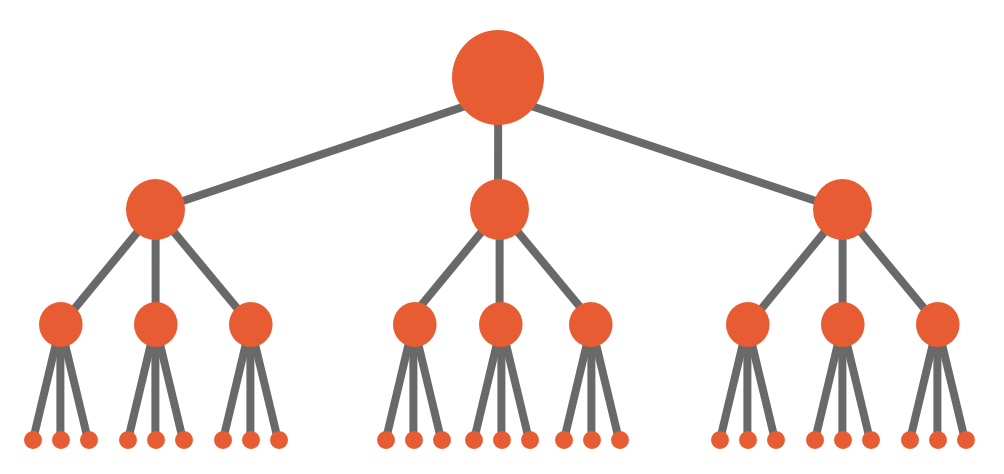
Site structure should be crafted following extensive keyword research into search behavior and user intent. This is an art in itself, and we’ll not be covering it here; as a general rule, however, you’ll want a logical, roughly symmetrical, pyramid-shaped hierarchy with your high-value category pages near the top and your more-specific pages closer to the bottom. Click-depth should be a consideration, but not your foremost concern.
This architecture should be reflected with a static and human-readable URL structure, free of dynamic parameters where possible, and which uses hyphens rather than underscores as word separators (see Google’s guidelines on URL structure). Maintain a consistent internal linking pattern, and avoid creating outlying, orphaned pages. Remember that search crawlers cannot use search forms, and so all content should be accessible via direct links.
Search engines can be told about the structure and content of a website by using XML Sitemaps. These are particularly useful for large websites and those with a significant quantity of rich media, as they can be used to indicate content types, change frequency, and page priority to search crawlers. They are not, however, a good fix for fundamental architectural issues such as orphaned content. Take a look through Google’s documentation to learn more about how sitemaps are interpreted.
Your sitemap - which can be broken up into multiple smaller sitemaps and a sitemap index file, if necessary - can be submitted to Google by using Search Console (formerly Webmaster Tools). In the spirit of search engine agnosticism, it’s also advisable to declare your sitemap’s location in a manner accessible to other crawlers. This can be done using robots.txt, a plaintext file that sits in the top-level directory of your web server, with the following declaration:
Sitemap: https://yourdomain.com/sitemap-index-file.xmlXML Sitemaps can be generated automatically using a variety of free tools, such as the Yoast SEO Plugin for websites running on WordPress (the relevant documentation is available here). If your sitemaps are being generated manually, be sure to keep them up-to-date. Avoid sending search crawlers to URLs that are blocked in your robots.txt file (see the next section), return 404 errors, are non-canonical, or result in redirects, since all of these will waste your site’s crawl budget.
We’ll explore these principles in greater depth and look at ways of diagnosing and fixing related issues in Section 2 of this article.
Blocked Content
At times, you may wish to prevent search engines from discovering certain content on your website. Common examples include customer account areas, heavily personalised pages with little value to organic search, and staging sites under active development. Our goals here are twofold: to prevent these URLs from showing up in organic search results, and to ensure they are not absorbing our site’s crawl budget unnecessarily.
Robots meta tags are a part of the Robots Exclusion Protocol (REP), and can be used to instruct search engines not to list a URL in their results pages. Placed within the page head, the syntax is very simple:
<meta name="robots" content="noindex,nofollow">
The tag accepts dozens of values, and noindex and nofollow are two of the best supported. Together they prevent spiders from indexing the page or following any of its links. These directives can also be applied via an HTTP header called X-Robots-Tag; this is often a more practical means of deployment, especially on larger sites. On Apache with mod_headers enabled, the following would prevent PDF documents from being indexed or having their links followed by spiders:
<FilesMatch ".pdf$">
   Header set X-Robots-Tag "noindex, nofollow"
</FilesMatch>
Finally there’s robots.txt. Contrary to popular opinion, this file does not provide a means of preventing URLs from appearing in search results, nor does it provide any kind of security or privacy protection. It is publicly-viewable and discourages specific spiders from crawling certain pages or site sections. Each subdomain on a root domain will use a separate robots.txt file.
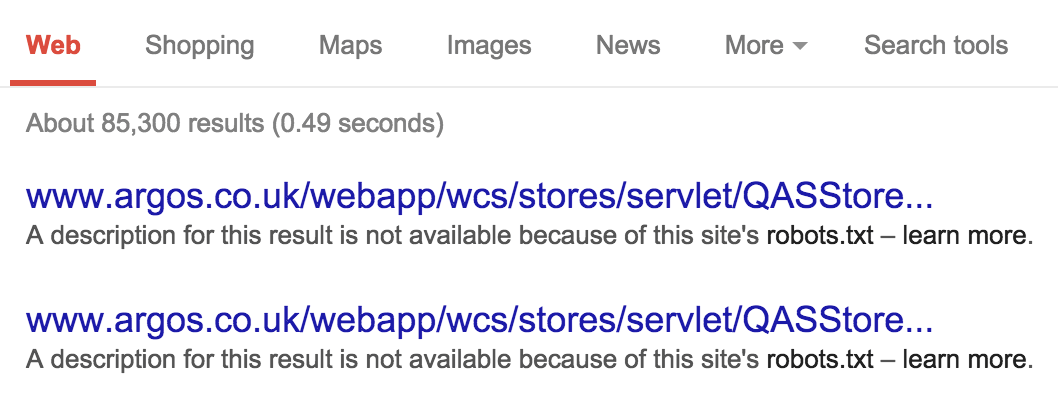
robots.txt will still appear in search results. (View large version)A basic robots.txt file specifies a User Agent followed by one or more Disallow rules; these are relative URL paths from which you wish to block crawlers. Overrides can be configured by supplementing these with Allow rules. Pattern matching can be used to construct more complex rules, thanks to Google and Bing’s support for two regular expressions: end of string ($) and a wildcard (*). A simple example is given below:
User-agent: *
Disallow: /blocked-directory/
Allow: /blocked-directory/allowed-file.pdf$
Google offers detailed guidelines on writing rules for robots.txt, and provides an interactive testing environment as part of Search Console.
Note that adding an on-page noindex directive to a page blocked in robots.txt will not cause it to stop appearing in search results. Crawlers that respect the disallow directives will not be able to see the tag, since they are prevented from accessing the page. You’ll need to unblock the page, then serve the noindex directive via an HTTP header or meta tag.
Another common mistake is to block crawlers from accessing CSS and JavaScript files that are required for page render. Google has been placing a renewed emphasis on this issue of late, and recently sent out a fresh round of warnings via Search Console.
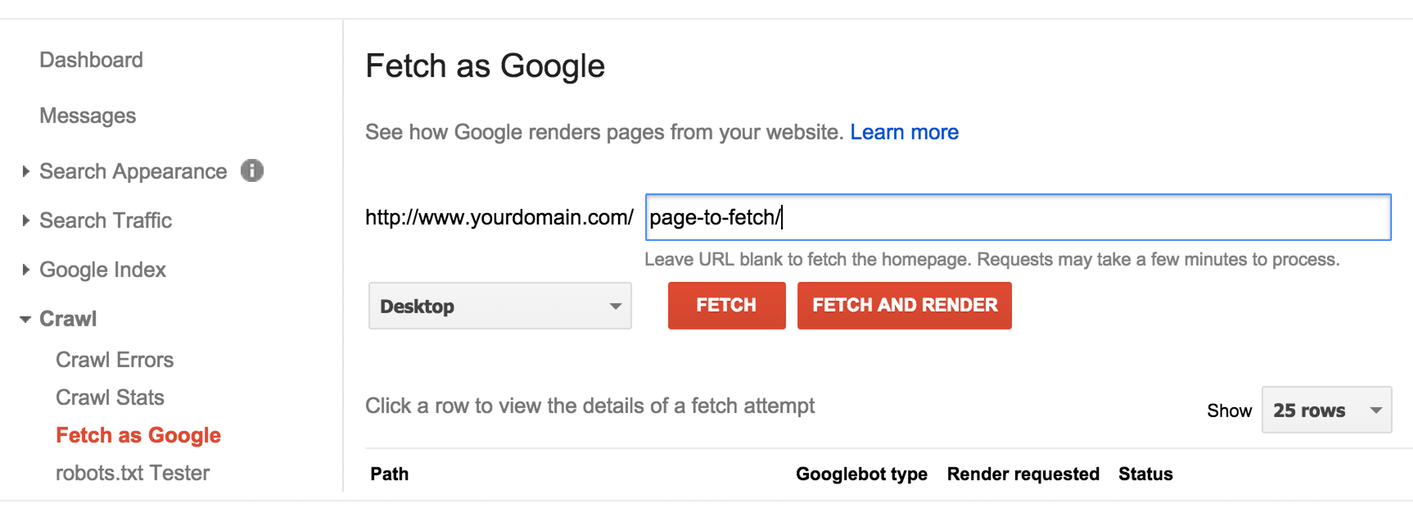
Historically, Googlebot has been likened to a text-only browser such as Lynx, but today it is capable of rendering pages in a manner similar to modern web browsers. This includes executing scripts. As such, preventing crawlers from accessing these resources can impair organic performance. You can check for blocked resources and view an approximation of what Googlebot ‘sees’ by utilizing the Blocked Resources and Fetch & Render tools in Search Console.
Remember that you can quickly view a snapshot of how a page ‘looks’ to Googlebot by entering cache:example.com/page into Chrome’s address bar and selecting Text-only version.
Unparsable Content
Despite advances in Googlebot’s rendering capabilities, it remains true that websites making heavy use of AJAX and client-side JavaScript frameworks such as AngularJS are at a fundamental disadvantage when it comes to SEO.
The problem arises as a result of their reliance on hash fragment (#) URLs. Fragment identifiers are not sent as part of an HTTP request, and are often used to jump from one part of a page to another. Client-side JavaScript frameworks watch for changes in this hash fragment, dynamically manipulating the page without the need to make additional round trips to the server. In other words the client does the heavy lifting.
Heavy lifting is not Googlebot’s strong suit. Workarounds do exist, but they require additional development time and should ideally be baked into your workflow from the start.
The solution proposed by Google back in 2010 involves replacing the hash (#) with a so-called hashbang (#!). Upon detecting that your site adheres to this scheme, Googlebot will modify each URL as follows:
Original: yourdomain.com/#!content
Modified: yourdomain.com/?_escaped_fragment_=content
Everything after the hashbang is passed to the server in a special URL parameter called escaped_fragment. Your server must be configured to respond to these kinds of requests with a static HTML snapshot of the dynamic content.
The flaws of this approach are numerous. Hashbangs are an unofficial standard which do nothing to advance accessibility, and are arguably destructive to the nature of the web. In short, it’s an SEO kludge which fails to fix the root cause of the problem.
HTML5 offers us a better solution in the form of the History API, a full introduction to which is available in Dive Into HTML5. The pushState method allows us to manipulate browser history by changing the URL that appears in the address bar without making additional requests to the server. As a result, we reap the benefits of rich, JavaScript-powered interactivity and a traditional, clean URL structure.
Original: yourdomain.com/#content
Modified: yourdomain.com/content
This solution is not a magic bullet. Our server must be configured to respond to requests for these clean URLs with HTML rendered server-side, something that’s increasingly being achieved with isomorphic JavaScript. With good implementation, it’s possible to build a rich, JavaScript-powered web application which is accessible to search crawlers and adheres to the principles of progressive enhancement. Browser support for pushState is good, with all modern browsers plus IE10 supporting the History API.
Finally, be wary of content that is inaccessible to robots. Flash files, Java applets, and other plugin-reliant content are all generally ignored or devalued by search engines, and should be avoided if you’re aiming for the content to be indexed.
Page Speed & Mobile
Search engine algorithms are becoming increasingly sensitive to usability, with page speed and mobile-friendliness being two of the most prominent examples. Thankfully, readers of Smashing Magazine should already be aware of the importance of these issues. Since it would be impossible to do these enormous subjects justice in the context of this article, we will limit ourselves to the basic principles of each.
Search engines support a variety of mobile configurations, including separate URLs for mobile users (via an m. subdomain, for example) and dynamic serving using the Vary HTTP header. Today, however, Google’s preferred approach to mobile is responsive web design. If you’re unfamiliar with modern front-end development, or have simply been living under a very large rock for the past five years, you could do worse than checking out Smashing Book 5 for a primer on modern RWD workflows.
Page speed, too, should be one of your foremost concerns. This is not simply because a longer load time results in a higher bounce rate; Google has indicated that page speed itself factors into the ranking algorithm.
There are dozens of tools available to help you identify issues that could be slowing down your website. One good option is GTmetrix; it has both free and paid options, conducts analysis based on both Google PageSpeed and Yahoo YSlow rulesets, and provides many helpful visualizations and simulations.
Good first steps include:
- Implementation of gzip compression on your server
- Minification of assets like stylesheets and scripts
- Leveraging browser caching with the
Expiresheader - Minimising the number of HTTP requests (although this recommendation in particular will make less sense as HTTP/2 adoption grows)
Perhaps the best introduction to performance and page speed currently available is Lara Hogan’s Designing For Performance. It’s a very practical guide to approaching projects with speed in mind, and it includes a great lesson on how browsers request and render content. It’s available for free online, but the sales proceeds go to charities focused on getting women and girls into coding, so you should definitely buy it.
Finally, be aware that search algorithms’ sensitivity to usability issues will only increase going forward. Even security is now a ranking factor; Google announced in late 2014 that sites using HTTPS encryption would now see a slight advantage over sites that don’t.
Crawl Efficiency & Indexation
With the site sections we want to appear in organic search now accessible to crawlers, it is time to assess how your content is being interpreted and indexed.
We’ll begin by exploring one of the key principles of SEO-friendly site design: duplicate content. Contrary to popular belief, this phrase does not refer solely to literal carbon-copies of pages within your own site. As always in SEO, we must consider our site from the perspective of a robot. Therefore, when we refer to duplicate or thin content, we’re simply referring to URLs that meet the following criteria:
- Return a
200 OKHTTP response status code, indicating that the requested resource exists - Return content that is available via other URLs (duplicate), or that offers no value to users (thin)
To help demonstrate the scope of these criteria, two examples from a prominent online UK retailer are provided below.

Here, each product category is accessible via an infinite number of nonsensical subcategories. This is an example of duplicate content; these URLs are being crawled and indexed by search engines, which constitutes a severe waste of the site’s crawl budget.
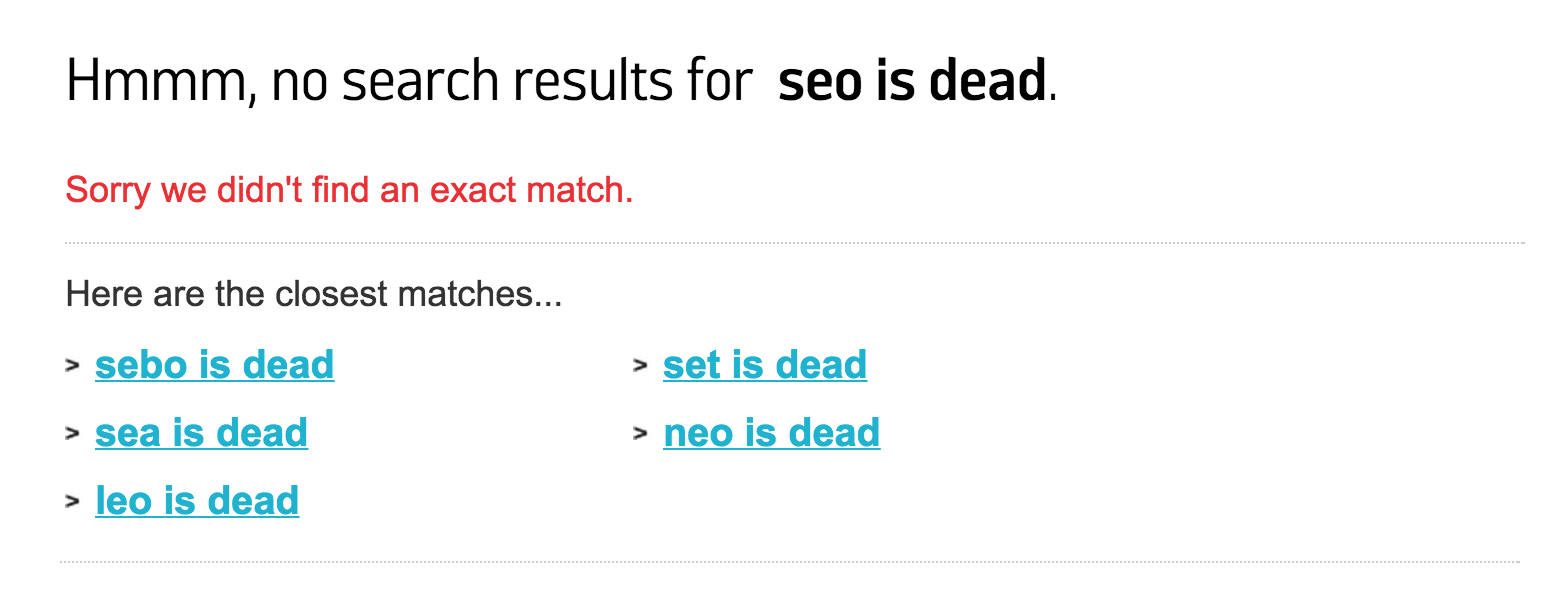
In this instance, search results pages - even those which turn up no product matches - lack any indexation directives and are completely open to search crawlers. This is a good example of thin content - these mostly-blank pages offer no value to users, and yet over 22,000 have been indexed at the time of writing.
It is well-known that Google’s algorithm penalizes sites for large-scale duplication of this kind, with faceted navigation systems being particularly problematic in this regard. However, even the smallest of issues can become exacerbated over time. Behavioral quirks in your CMS or server configuration problems can lead to serious crawl budget waste and dilution of so-called link equity (the SEO ’value’ of external links to your pages - more on this in Section 3). All-too-often, these issues go completely undetected by webmasters.
Our primary goal is to consolidate any duplicate, thin, or legacy content. One article could not begin to scratch the surface in terms of all the possible scenarios you might encounter, nor the approaches to their mitigation. Instead, we’ll be looking to arm ourselves with the tools to diagnose these issues when they occur.
Diagnostics
You can learn a remarkable amount about how your content is being indexed by using advanced search operators.
Entering site:yourdomain.com into Google will return a sample of URLs on your domain that have been indexed. Heading straight for the last of these paginated results - those Google deems least relevant - will often yield clues as to any duplication problems that are affecting your site. If you’re presented with a prompt to repeat the search with with “omitted results included” (see below), click it; the resulting unfiltered view is often a great way to uncover any particularly egregious problems.

The site: operator can be made yet more powerful when combined with the inurl, intitle, exact (”…”), and negative (-) operators. By using these and other advanced operators as part of your investigation, it’s possible to diagnose certain major issues fairly quickly:
Check for accidentally-indexed subdomains and staging sites. If your website is supposed to sit on a
www, for example, check for URLs missing that part of the URL.site:yourdomain.com -inurl:wwwCheck for multiple versions of your homepage by searching
<title>tags. It’s common to see both the root domain and document name indexed separately:yourdomain.comandyourdomain.com/index.html, for example.site:yourdomain.com intitle:"Your Homepage Title"Check for URLs appended with parameters that do not change page content, optionally within a particular directory. Session IDs and affiliate trackers are particularly common on large e-commerce platforms and can easily result in thousands of duplicated pages.
site:yourdomain.com/directory/ inurl:trackingid=
Google’s Search Console provides an excellent platform to monitor the overall health of your website. The HTML Improvements panel under Search Appearance is a good way of spotting duplicate content. Pay particular attention to the lists of identical <title> tags and meta descriptions, both of which help to diagnose issues with duplicate content and poorly marked-up pages.
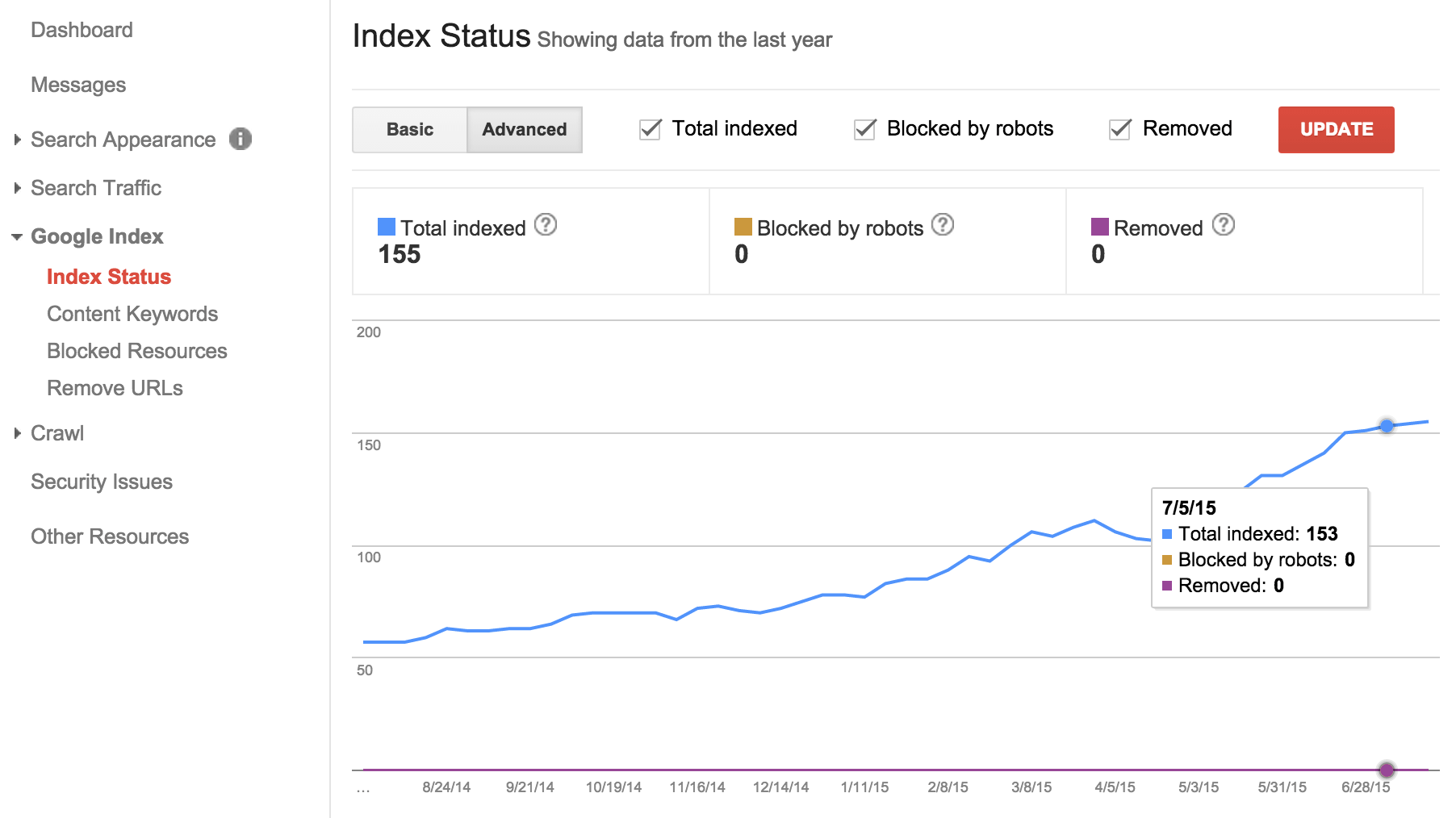
Navigating to Index Status under Google Index will provide a historic view of your site’s indexation. Hit ‘Advanced’ to overlay this information with data on the number of URLs you’re blocking via your robots.txt file.
robots.txt. (View large version)Be sure to also check for Soft 404 errors under Crawl - Crawl Errors. These are instances where a non-existent page is failing to return the appropriate 404 status code. Remember, from the perspective of a robot, page content is unrelated to the HTTP response returned by the server. Users may be shown a “Page Not Found” message, but with improper error handling your server may be telling robots that the page exists and should be indexed.
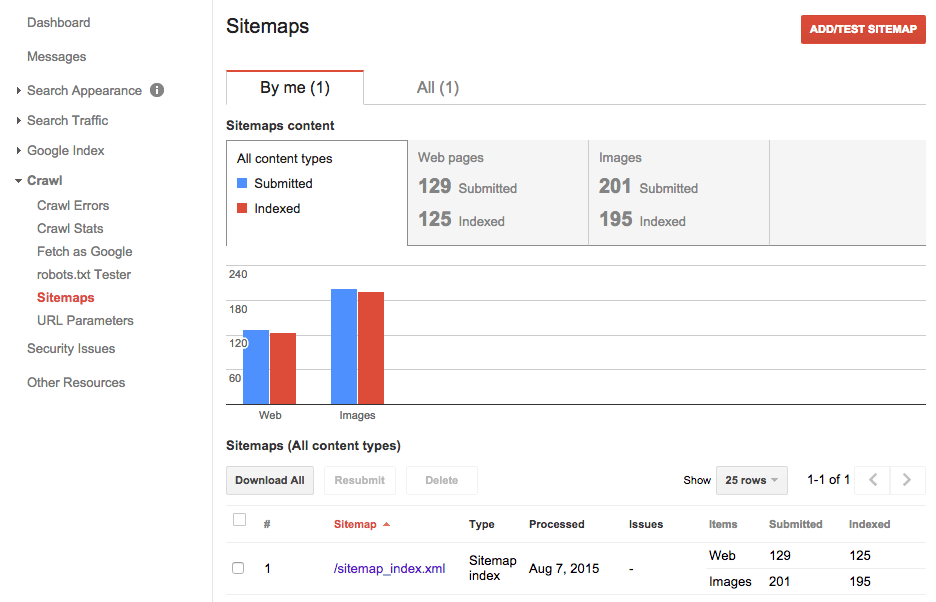
Finally, take a look at the Sitemaps section under Crawl. As well as allowing you to test individual sitemaps, it can provide valuable insight into how Google and other search engines are interpreting your site structure. Pay close attention to the ratio of URLs indexed to URLs submitted; a significant discrepancy can be indicative of a problem with duplicate or ’thin’ content.
Redirects & Rewrites
In situations where your duplicate or legacy content has an obvious ‘new’ URL - an old page which has been superseded, for example - the best course of action is generally to implement server side redirection. Human visitors will seamlessly arrive at the preferred URL, and search crawlers will understand that the original page has been moved.
Be sure to always return a code 301 (permanent) HTTP status response and not the Apache default, a code 302 (temporary). While humans won’t be able to tell the difference, robots interpret the two very differently. In contrast to a temporary redirect, a permanent redirect will:
- Cause the old URL to eventually drop out of the search engine’s index
- Pass on the link equity of the old page to the new page, a concept we will be exploring in more depth in Section 3
Implementation will obviously vary depending on your server setup, but we’ll demonstrate some simple examples in Apache using the .htaccess configuration file. Particularly complex redirect mapping will generally require use of the mod_rewrite module, but don’t underestimate how much you can achieve with the Redirect and RedirectMatch directives in the simpler mod_alias. The following lines would redirect a single file, and an entire directory plus its contents, to their new locations via a code 301 redirect:
Redirect 301 /old-file.html https://www.yourdomain.com/new-file.html
RedirectMatch 301 ^/old-directory/ https://www.yourdomain.com/new-directory/
Check the Apache documentation for more detailed guidance on implementing these directives.
In circumstances where we’re looking to address duplication of a more structural nature - the missing www issue mentioned above, for instance - we can use URL rewrite rules.
Our goal here is to ensure that our website is accessible only via our chosen hostname (www.yourdomain.com). Note that either is a valid choice, as long as we enforce it consistently. Requests for URLs which omit the www prefix should result in code 301 redirection to the corresponding canonical version. Users will seamlessly arrive on the correct page, and search crawlers understand which set of URLs should be indexed. We will achieve this with the following mod_rewrite directives:
RewriteEngine on
RewriteCond %{HTTP_HOST} ^yourdomain.com [NC]
RewriteRule ^(.*)$ https://www.yourdomain.com/$1 [L,R=301]
Once again, consult the Apache documentation for more detailed guidelines. There is also documentation available for the corresponding modules in Nginx and IIS.
The relevance of URL rewrites to SEO goes beyond simple fixes. Crucially, it allows us to make resources available over HTTP at URLs which do not necessarily correspond to their locations in the file system. This allows us to implement a static, human-readable URL structure which reflects our logical, IA-compliant site architecture.
- Original:
https://www.yourdomain.com/content/catID/43/prod.html?p=XjqG - Rewritten:
https://www.yourdomain.com/category/product/
The benefits of a clean URL structure in SEO cannot be overstated. In addition to providing an increase in crawl efficiency, a good implementation offers a huge usability advantage. Remember that the URL is one of the most prominent elements considered by searchers when deciding on which URL to click.
Given the sheer number of possible tech stacks, the methodology can vary greatly, but you can find a general summary of URL best practices at Google, and a helpful introduction to advanced rewrite conditions at Linode.com.
One final word on redirects: avoid chains where at all possible. Not only are they inefficient from a crawl efficiency standpoint, the amount of ‘value’ passed by a 301 (permanent) redirect diminishes with each sequential hop. Your goal should be to direct all variants and retired pages to the correct URL with a single permanent redirect. See Section 3 for more information on the concept of link value preservation.
The Canonical Tag
In situations where server-side redirection is impossible or inappropriate, there is another fix available to us: the rel=“canonical” link element.
First introduced in 2009 as part of a collaborative effort by Google, Bing, and Yahoo, the tag allows us to indicate to search engines the preferred URL for a page. Usage is simple: add a link element with the rel=“canonical” attribute to the head section of the ‘true’ page and all its variants.
To use a simple homepage example:
https://www.yourdomain.comhttps://www.yourdomain.com/index.htmlhttps://www.yourdomain.com?sessionid=1988
Marking each of these with the following tag would indicate to search engines which version to show users:
<link rel="canonical" href="https://www.yourdomain.com">
Unlike a redirect, the canonical tag does not affect the URL shown in the user’s address bar. Instead, it is simply a hint to search engines to treat particular variants as a single page. Be sure that the URLs in your canonical tags are correct; canonicalizing your entire site to a single page or implementing canonicals that point at 404 errors can be disastrous.
Note that in most instances server-side redirection is a more robust and user-friendly way of addressing major duplication problems. If you are in a position to control a site’s architecture, it’s generally possible to avoid many of the scenarios that require canonical tags as a fix.
That being said, there are advantages to including self-referencing canonical tags on every page. When implemented correctly, they make a good first line of defence against unforeseen problems. If your site uses parameters to identify specific user comments (…?comment=13, for example), the canonical tag can ensure that links to these URLs do not lead to the indexation of duplicate pages.
When dealing with duplicate content, you should always look to address the root cause of the problem rather than using a proprietary solution. For this reason, disabling a problematic parameter and handling its function via a cookie is often a preferable solution to blocking the parameter in a vendor-specific program like Google Search Console or Bing Webmaster Central. For a more detailed look into duplicate content and the approaches to tackling it, take a read of Dr. Pete Meyers’ article on Moz.com.
Multi-Regional & Multilingual
Websites that target more than one language or country can be particularly challenging from a search standpoint, given that such sites inherantly require multiplication of content. International SEO is an extremely broad subject that warrants an entire article to itself, and for this reason we will touch only on the basic principles here.
The structure of a multi-regional or multilingual website is worthy of careful consideration. Google’s own guidelines on internationalisation are a good starting point. There are dozens of factors to consider before opting for separate ccTLDs, subdomains, or subdirectories, and it is essential to consider the future of your site and plan implementation as thoroughly as possible before deployment.
Whichever route you choose, the rel=“alternate” hreflang=“x” attributes should be used to indicate to search engines the appropriate page to return to users searching in a particular language. These attributes are a signal, not a directive, and so other factors (server IP address or geotargeting settings in Search Console, for example) can override them.
Your hreflang annotations can be served via an HTTP header, by marking up your sitemaps, or by using link elements in the head of your pages. The syntax for the latter implementation is as follows:
<link rel="alternate" href="https://yourdomain.com/en" hreflang="en">
<link rel="alternate" href="https://yourdomain.com/de" hreflang="de">
<link rel="alternate" href="https://yourdomain.com/fr" hreflang="fr">
<link rel="alternate" href="https://yourdomain.com/fr-ca" hreflang="fr-ca">
The value of the hreflang attribute specifies the language in ISO 639-1 format, and (optionally) the region in ISO 3166-1 Alpha 2 format. In the example above, four versions of our homepage are specified: English, German, French (all non-region-specific), and finally French content localized for users in Canada. Each version of a page must identify every translated version, including itself. In other words, the above code block would be repeated on all four versions of our homepage. Finally, note that Google recommends not canonicalizing across different international page versions; instead, use the canonical tag only within the same version.
Internationalization can be notoriously complex, and as such it’s worth experimenting with tools such as Aleyda Solis’s Hreflang Tags Generator Tool and reading Google’s documentation in its entirety before even considering making changes to your website.
Finally, while we’re on the subject of region-specific content, it’s worth noting that SEO for local businesses carries with it a raft of additional opportunities. Matthew Barby’s primer on the subject for Search Engine Land is a good place to start.
Maintenance & Best Practices
In this section, we’ll be covering general best practices and housekeeping for SEO. This includes auditing your on-page meta data - titles, descriptions, headings, and so forth - and also checking for common internal issues which are easily overlooked.
In tandem with Google Search Console or Bing Webmaster Central, the most useful tool available for everyday on-site SEO is a simulated search crawler. This is a piece of software that can be used to crawl your website in a manner similar to that of a search robot. The Xenu Link Sleuth is a good freeware option, but for serious work you cannot beat the Screaming Frog SEO Spider.
‘The Frog’, as it is affectionately dubbed, is fully configurable in terms of user agent, speed, crawl directory & depth (including by regex patterns), and adherence to nofollow / canonical / robots.txt directives. The resulting data can be filtered and exported to CSV or Excel format, opening up countless avenues for exploration.
As a simple example, we’ll audit our on-page meta data. Actual content aside, a page’s title tag and meta description are the two most important on-page factors for modern SEO, so we’ll be looking to review these at scale.
Under Configuration - Spider, uncheck Images, CSS, JavaScript, SWF, and External Links. Then check Crawl All Subdomains to ensure that your entire domain is covered, and hit OK. Enter your domain in the URL to spider field, and hit Start.
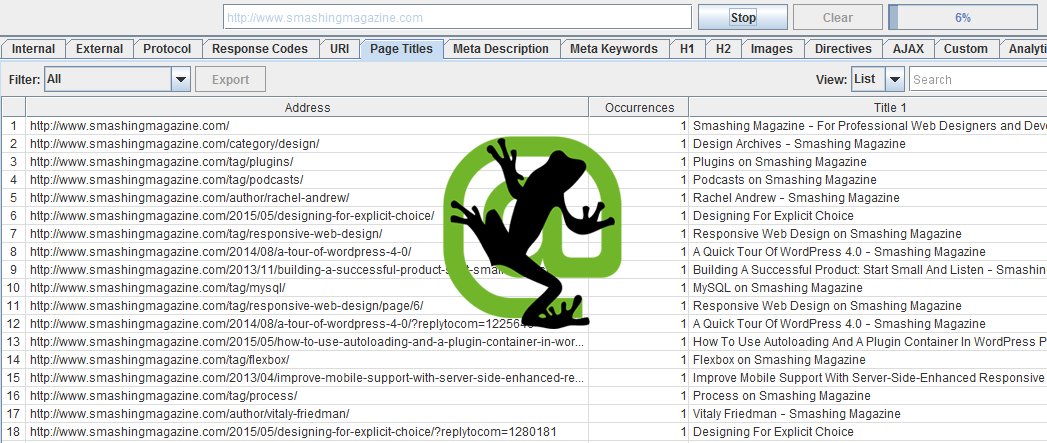
The Page Titles and Meta Descriptions tabs will allow you to filter the crawl data by issue; in the case of title tags, these are categorised as missing, duplicate, too short, or overly-long. Hit Export to save the data to a spreadsheet for manual review later.
If you’ve never before run a crawl on your website, it’s almost a guarantee that something in the crawl results will surprise you. It could be an unexpected duplication problem, a legacy site section you’ve forgotten about, or a high priority page with no meta data whatsoever. This is why tools such as Screaming Frog can be so valuable - they provide insight into how crawlers are likely interacting with your website.
The official documentation is very comprehensive, and Aichlee Bushnell wrote a great guide to advanced uses of the program for Seer Interactive.
A quick list of things to check for, most of which are inefficient from a crawl efficiency standpoint:
- Temporary (code
302) redirects, which do not pass value - Chained redirects - use the redirect chains report function
404error pages which are linked-to internally- Inconsistent internal linking - links to non-canonical URLs, for instance
- Use of deprecated tags like
metakeywords - these serve only to betray to competitors the keywords you are targeting!
Link Profile Maintenance
Google’s rise to power in the late 1990s is partly attributable to its use of external links as a ranking factor.
Company co-founder Larry Page invented a technology called PageRank, a way of measuring a page’s quality based on the number of other websites - and, crucially, the authority of those other websites - linking to it. In practical terms, this means that a link to your website from the BBC will have far more of an impact on your search rankings than a link from just about anywhere else.
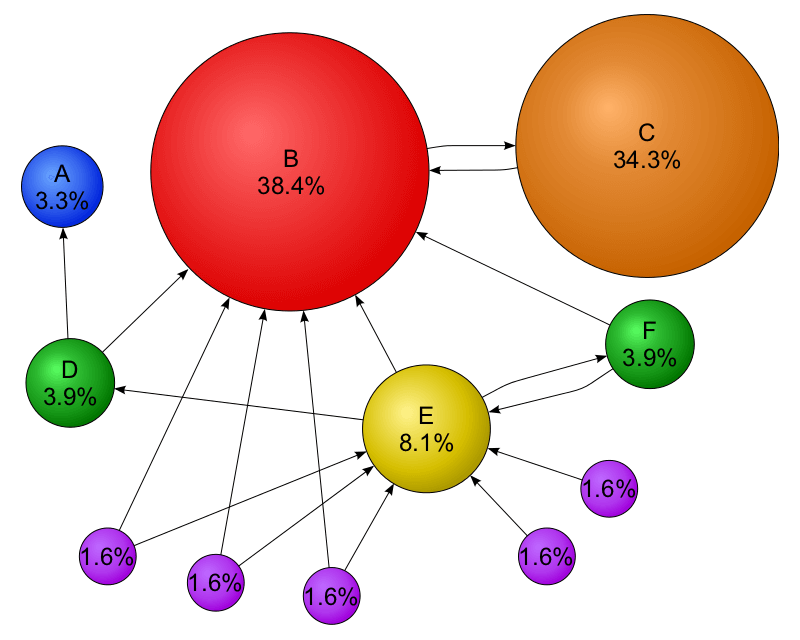
Google’s algorithm has evolved considerably in the years since its introduction, and today it incorporates dozens of metrics when determining how to rank a page. Nevertheless, external links remain the single most important factor for search rankings.
This has led to the messy saga of link spam and manual penalties, in which unscrupulous SEO practitioners discover a link building tactic which they can abuse at scale before Google’s inevitable clampdown. The series of so-called ‘Penguin’ updates are essentially Google’s major offensives in this ongoing war of attrition, penalizing websites that benefit from paid links, link spam, and other breaches of Google’s guidelines.
As a result, SEO link audits will typically focus on risks - evidence of previous attempts to manipulate PageRank - rather than on opportunities. It is true that webmasters in certain highly-competitive industries such as gambling and pharmaceuticals need to be aware of the possible effects of link spam and negative SEO on their site’s rankings; in some cases, regular and proactive use of Google’s Disavow Tool may even be necessary. These are extreme cases, however.
Link targeting, on the other hand, is relevant to all sites. By evaluating the health of a site’s link profile, it is possible to retain and reclaim link equity (the value which Google assigns to links) in a wide variety of ways.
Equity Loss
Think of link equity as a valuable liquid, and the links to your website as the pipes through which it is transported. A series of tubes, if you will. A normal link that points directly at a URL returning a 200 OK HTTP response code - a live page - transfers this value to your website perfectly. A link to a dead page that returns a 404 or 503 error sends this value down the drain, and your site does not benefit at all.
A single code 301 redirect is like a funnel, in that it catches most of the equity from a link and diverts it on to the new destination. It does the job, but it’s an inherently leaky process and by avoiding redirect chains you can prevent the losses from compounding.
A code 302 redirect is like a sieve. Although humans clicking on the link are caught and sent safely on to the correct destination, all the valuable equity is wasted. Links (or redirects) to pages blocked in your robots.txt file are similarly inefficient; humans won’t notice, but the equity is prevented from reaching your site. We’ll avoid stretching the analogy further, but you should also avoid redirect loops and soft 404 pages.
There are a handful of other factors to consider before we start fixing leaks. First of all, each subdomain has its own reserves of link equity. Despite some claims to the contrary, search engines still view forum.yourdomain.com and www.yourdomain.com as different websites, and links to one will not benefit the other. This is why blogs hosted on an external service such as Tumblr (yourblog.tumblr.com) do not inherit the authority of their root domain. For this reason, it is almost always worth the effort to install site components (forums, blogs, and so forth) in subfolders on your main domain.
Furthermore, it is possible to prevent equity from flowing through specific links by using the nofollow attribute. This can be applied at a page level by using the robots meta tag we discussed in Section 1.2, which instructs spiders not to crawl the page’s links or to attribute value to them. It is also possible to apply this property to a specific link by setting nofollow as the value for the rel attribute: <a href="/" rel="nofollow">.
Finally, the impact of the problems described above will be much worse for old websites and big websites. The side effects of historic migrations, rebrands, URL restructures, and internationalisation can become compounded over time. Thankfully, the cost to implement the necessary fixes stays relatively low, while the rewards in organic performance can often be remarkable.
Fixing Leaks
To identify and fix these problems we’ll need a list of all links to our website. There are a number of services that attempt to provide this, with two of the best being Majestic and Ahrefs. For the purposes of this guide, we’ll focus on the latter.
We’ll need to generate a raw export of our root domain’s link profile. Having entered the domain into the Ahrefs Site Explorer, hit Export - CSV. Download a Backlinks/Ref pages report in the encoding format of your choice (UTF–8 for Libre Office Calc, UTF–16 for Microsoft Excel).
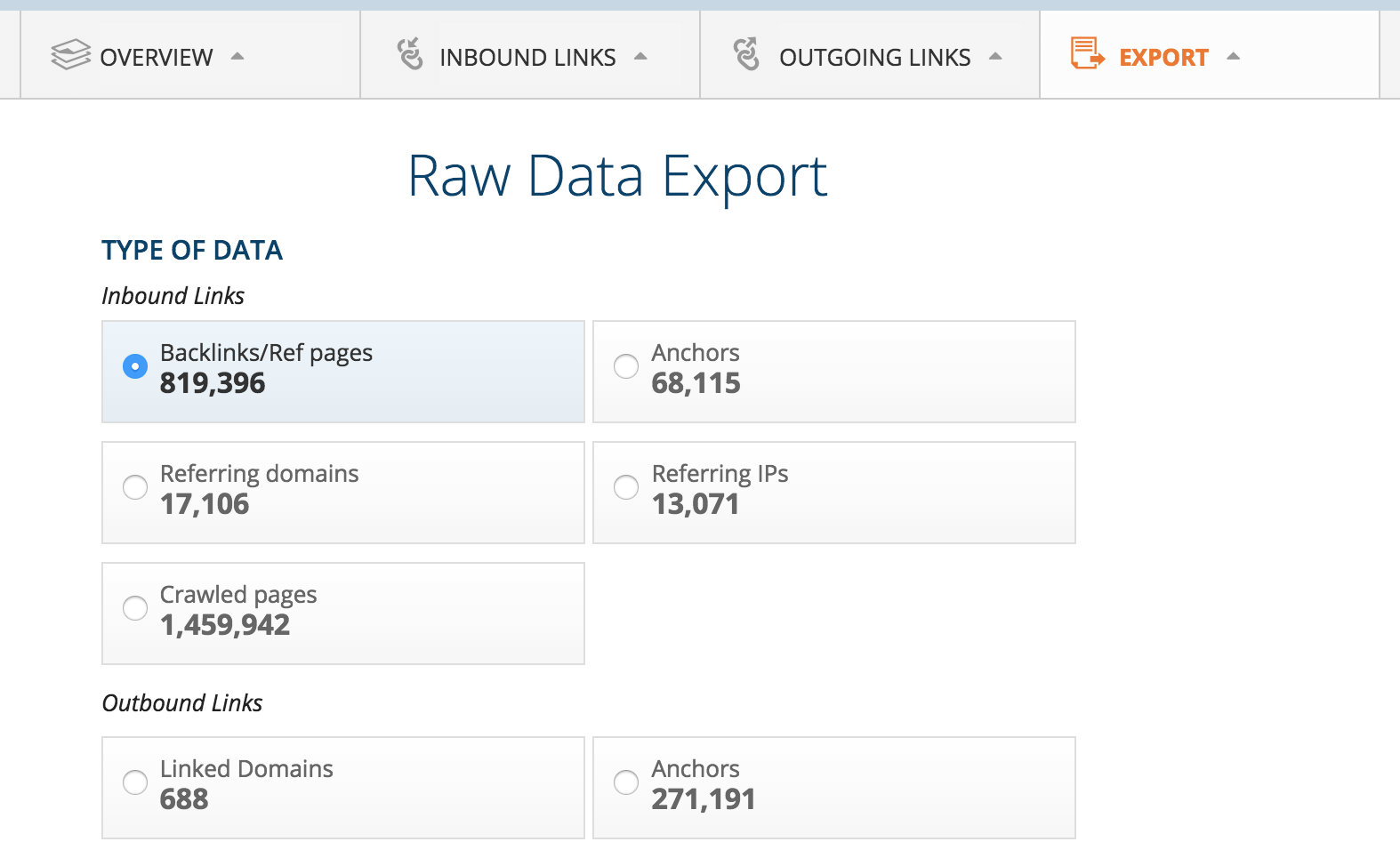
Use a spider such as Screaming Frog or the free SEO Tools for Excel to crawl the target URLs of your links. If you’re using Screaming Frog, make sure that your spider is configured to always follow redirects (no matter how long the chain!), and to ignore robots.txt disallow rules. Make use of the redirect chains report to export the full crawl path for each URL.
With the required data to hand, what exactly are we looking for? Oliver Mason wrote an excellent guide for Builtvisible on this very subject:
“What we are trying to do is ensure that Googlebot can crawl unhindered from external link to canonical page in as few steps as possible. To do this, we look for anything that interrupts crawl or link equity. Think about general guidelines for migrations and URL structures – they tend towards ‘make sure current structure is redirected to the new structure in a single hop’. This is fine in isolation, but every time new recommendations are put in place without consideration of past migrations, you’re guaranteeing link equity loss. Very often you’ll find that a number of structural changes have happened in the past without being handled quite correctly, leading to an abundance of inefficiencies.”
If you’ve made it this far, you should be able to guess the necessary fixes. Excluding the possibility of manual realignment (i.e. asking webmasters to update their outbound links to your website), you should look to address specific issues as follows:
- To reclaim the value of links to
404or503pages, implement permanent redirects to the most closely related live pages. - Update code
302temporary redirects to code301permanent redirects. - If resources blocked in
robots.txthave accrued links, either create anAllowexception or redirect the URLs to an unblocked page. - Remove all intermediate steps from redirect chains, ensuring that the path from external link to canonical page consists of no more than one permanent redirect.
If you’re dealing with a large website and have limited development resource, you can prioritise problematic URLs by the number of linking root domains pointing at them. Remember too that fixing instances of complete equity waste (e.g. redirecting a once-popular URL which is now returning a 404) will likely have bigger impact than fixing minor inefficiencies.
Harnessing Your History
Finally, consider the domain history of your website. If it has ever undergone a major migration or rebrand which involved changing root domain - moving from a .co.uk to a .com, for example - it’s worth checking that the process was carried out properly. Consult the Google Support guidelines on proper execution of a site move.
You’ll need to repeat the steps above for each domain property associated with your brand in order to ensure that each old page is properly redirecting to its corresponding new version. You’ll also want to submit a Change of Address request through Google Search Console.
Note that this needs to be done after redirects have been implemented, and will require you to verify ownership of both the old and the new domains. For particularly old properties, this will probably have to be done using a DNS TXT record. This may seem like an inordinate amount of effort, but the potential gain in organic performance is considerable.
Preservation and reclamation of link value is key to the reason why any kind of migration or restructure must be overseen by an experienced technical SEO consultant. This is especially true for e-commerce websites that rely to any degree on organic acquisition for their revenue stream. Careful planning and comprehensive redirect mapping must be carried out in advance to ensure that organic rankings remain as stable as possible.
The Tip Of The Technical SEO Iceberg
As this article has hopefully demonstrated, technical SEO is an extraordinarily rich discipline.
The principles and techniques we’ve explored are a good set of best practices, but - as with all areas of web development - there are exceptions to every rule. Tackling a migration for a huge e-commerce website running on an idiosyncratic CMS with a million pages, a separate mobile site, a faceted navigation system, and a colourful history of architectural changes and rebrands requires a different level of understanding.
For readers wishing to dive into advanced technical SEO, log file analysis is a great place to start. For particularly complex websites, adherence to guidelines can only take you so far; true organic optimisation requires an understanding of precisely how Googlebot and Bingbot are interacting with your site. By exporting raw server logs for analysis, it’s possible to ‘see’ each and every request made by search engine robots. This data allows us to determine the frequency, depth, and breadth of crawl behaviour, and reveals obstructions which may go unnoticed by even the most experienced SEO experts. I would strongly recommend Daniel Butler’s guide to anyone wishing to explore the possibilities of log file analysis.
What we’ve explored today is just the tip of the iceberg. Even websites that are technically well-optimised stand to benefit from a greater consideration of the possibilities of organic search.
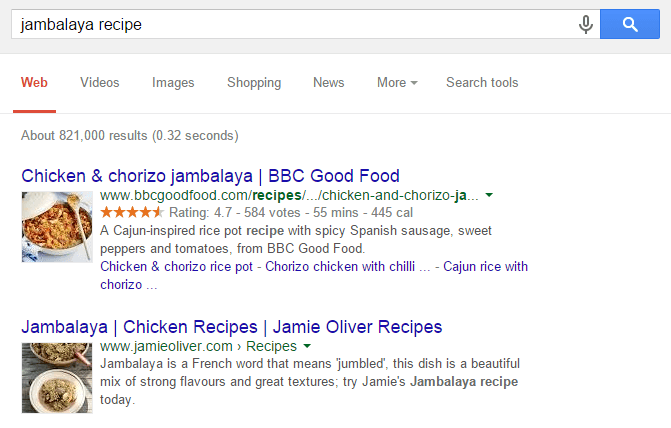
Much as social media meta tags can enrich the potential of your content on Facebook, Twitter, and Pinterest, structured data markup allows us to annotate our content for machine interpretation and enables search engines like Google and Bing to generate so-called rich-snippets. The Schema.org vocabulary and JSON-LD format are opening up a whole new frontier of possibilities, and allow an increasingly complex array of actions to be invoked directly from the search results themselves. This will have to wait for another day.
My primary goal in writing this article was to introduce fellow web developers to the principles of modern search engine optimisation. If I’ve succeeded in dispelling any of the myths that surround this subject, even better.
SEO is not a dark art, nor is it dying; much like site speed and mobile-friendliness, it is simply one of the many ways in which we will make a better, richer, and more discoverable web.
Special thanks to Oliver Mason for his invaluable suggestions and advice while this article was being written.
Further Reading
- SEO For Responsive Websites
- What The Heck Is SEO? A Rebuttal
- How Content Creators Benefit From The New SEO
- The Importance Of HTML5 Sectioning Elements
 (ml, rb, al, jb, mrn)


