
How To Raise Your Email Above Inbox Noise

Email Newsletter
Weekly tips on front-end & UX.
Trusted by 182,000+ folks.
 Celebrating 10 million developers
 SurveyJS: White-Label Survey Solution for Your JS App


 Register Free Now
If we look at email from a signal-to-noise perspective, then one-to-many emails are undeniably in the “noise” category; people are exceedingly good at ignoring them. Even Gmail and Hotmail are helping us ignore them by providing smart inboxes that sort incoming messages.
Emails from our families, friends and coworkers, however, are “signals.” We go out of our way to read them. But those emails aren’t the only ones — on occasion, we’ll happily read messages from businesses or complete strangers. Why? Because these emails are interesting, engaging and, most importantly, full of personality.
We’ve become very selective of what we consume in order to keep from drowning in our overfilled inboxes. Emails from Dad or a lifelong friend take priority, because they’re people we know and trust. Emails from outside our circle? Not so much. Our brains have an upper limit; we don’t have the capability to focus on an unlimited number of things, and our mental ability to care about the things that do interest us wanes over time.
But ultimately, we crave interaction, whether it comes from a trip to an unfamiliar part of the world, from conversations with friends or from the deluge of stories delivered by the 24-hour news cycle. We need to be engaged by ideas and people. It’s built into our psychology.
So, what can we do to make our email more engaging? How can we make sure that people are eager to read it? What gives an email personality? Before we can answer those questions, we have to overcome a couple of problems.
Information Overload
The first problem, as unintuitive as the notion might be, is the inability of humans to multitask. In “The Myth of Multitasking,” Christine Rosen shows that more and more evidence is being found to indicate that our brains simply aren’t wired for it. Despite what many believe, performing several tasks at once (like sitting at a computer and browsing the web while talking on the phone and taking notes) isn’t multitasking, because we aren’t actually doing all of those things simultaneously.
What we’re actually doing is moving laterally, and switching quickly from task to task. Because of this, we end up in a state of “continuous partial attention,” a term coined by Linda Stone to describe the broadening of our focus from one task to many. Whether or not this sort of divided focus is a bad thing depends on the context; it serves us well at our desks, but take that phone conversation behind the driver’s wheel, and the effect is detrimental.
Our failure to maintain a high level of interest in a subject can be traced to what’s known in psychology as “secondary traumatic stress disorder,” colloquially known as “compassion fatigue” (see the chapter by Charles R. Figley in the “Sources” section below). You’ll find compassion fatigue in just about any caregiving profession — therapists may eventually need therapists of their own, and doctors’ bedside manner might cool over the years. You’ll also find it in customer service, where burnout is common. The growing cynicism over the state of news media is another clear example, as people become wearier of the “always on, always a scoop” environment. To combat that fatigue, news outlets double down on their tactic, and the problem turns into a cycle. So, compassion fatigue is our second problem.
To capture someone’s attention, we have to overcome these issues. For email, it lies in convincing people to take that first look, and then getting them to care enough to hang on for the long term. As people become more exacting of what they allow in, we creators need to become just as discriminating about what we put out.
The Subject Line
Getting people to take that first glance at an email can be difficult. Inboxes all seem filled to the brim, so finding a good hook is important. Writing captivating email content arguably starts in one place: the subject line. There’s no shortage of theories on what tone works best, or which words to avoid, or how long a subject line should be. It’s not an exact science, and a wealth of studies out there prove it. One of the more interesting looks at subject lines comes from the recent re-election campaign of US President Barack Obama.
Back in November, Bloomberg Businessweek published an article by Joshua Green on the short, familiar subject lines used in the Obama 2012 campaign emails. “Would love to meet you,” “Do this for Michelle” and “Hey” are three examples of subjects the campaign used.
Some of them read more like subject lines you’d find in spam than anything from the President’s camp. They’re not much better than what I’m seeing in my own junk folder today: “Let’s hang out!”; “Check this out”; “Hey!” In fact, I recall receiving the “Hey” email from the Obama campaign and immediately marking it as spam. Seriously? The Obama campaign sending an email that opens with “Hey”? Get real. That’s absolutely spam.
As it turns out, I was in the minority.
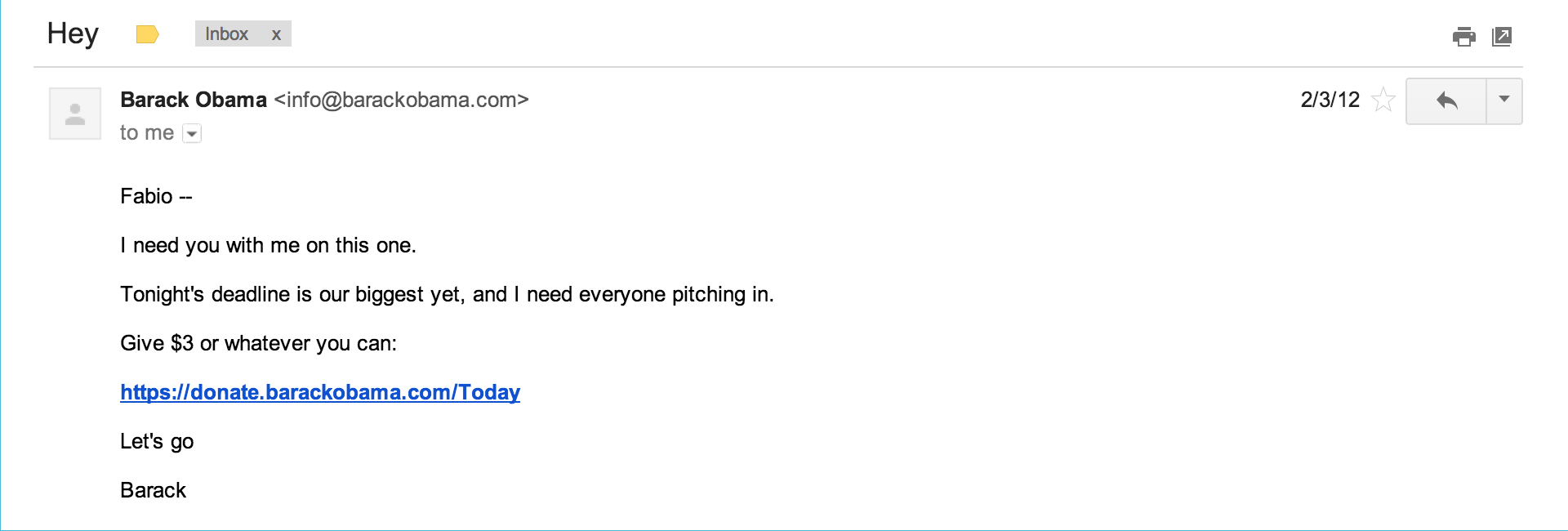
“Hey” was incredibly popular, and that email raised quite a bit of money for Obama. The single-word subject, incredibly light in tone considering its source, came out of left field and snagged the attention of millions of people. A casual tone for a decidedly non-casual topic worked as a hook and got people to open the email. Green goes on to highlight how the Obama campaign team didn’t stop there — it kept iterating and testing and running with different quirky subject lines, and in turn raised a large portion of its $690 million worth of online donations through emails. But the subject lines always kept that simple slant.
The Content
The success of the Obama for America emails didn’t just come from the subject lines, and the team didn’t reach everyone it targeted on the strength of “Hey” alone. The subject lines were the initial draw, but the content of the emails, written in a familiar and conversational tone that belied their lofty source and that subverted expectations, made them effective. (See “Message Machine: Reverse Engineering the 2012 Campaign” by Jeff Larson and Al Shaw in ProPublica.)
An archetypal example of an email driven by great content is Dave Pell’s NextDraft. Pell crafts each issue of NextDraft daily, with content curated from the day’s most important or interesting news, along with a smattering of related stories. What Pell does with NextDraft is undeniably successful: Today, the newsletter goes to more than 25,000 readers, and every month more than 2,000 new ones sign up. The open- and click-rate numbers for NextDraft remain so consistently high that they put the rest of his industry — media and publishing — to shame; the average open rate for NextDraft hovers around 57%, compared to an industry average that checks in at around 17%. Click rates are similarly impressive at around 30%, versus a industry average of just 4%. By all measures, Pell’s doing it right.
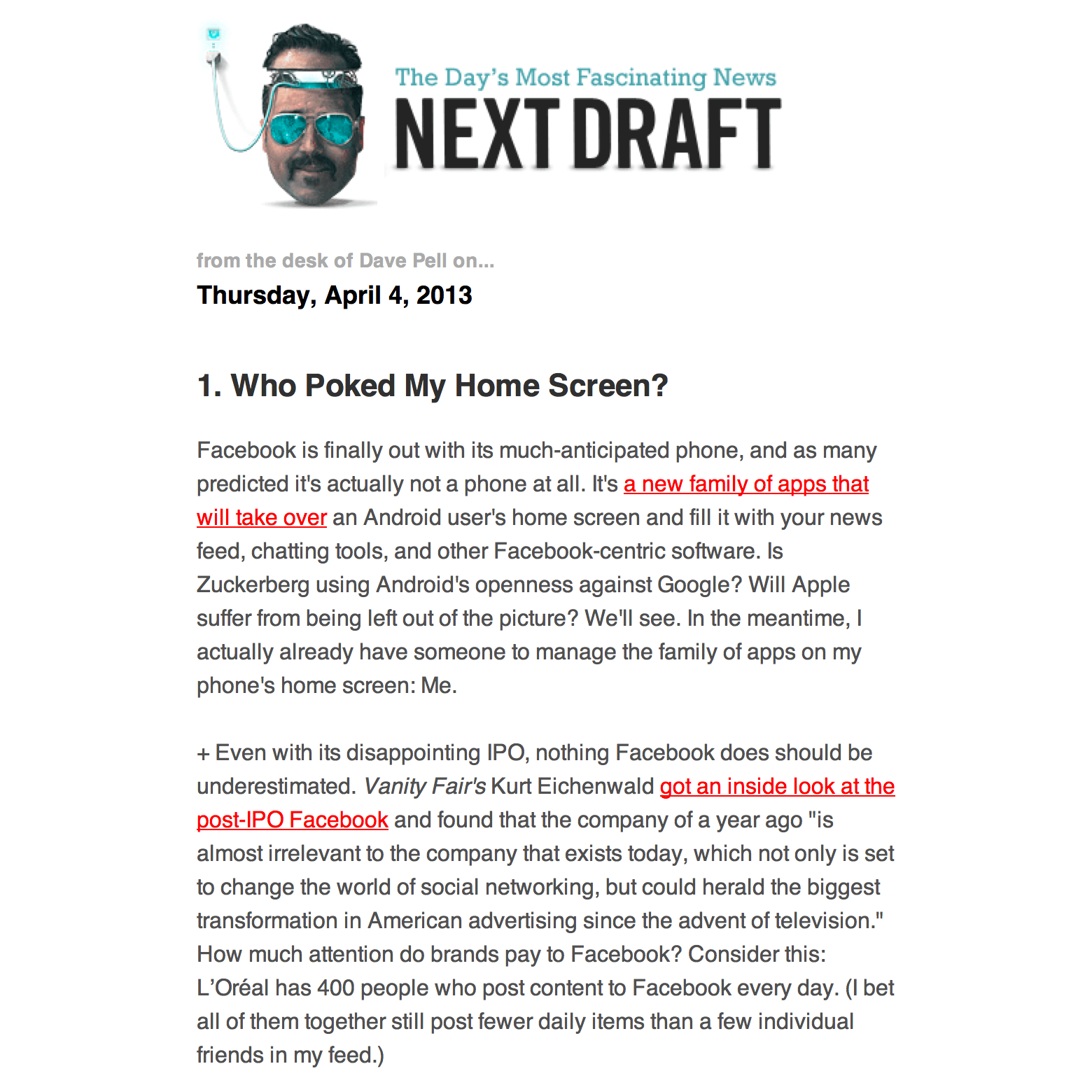
Much of the reason why NextDraft works so well comes down to the way he handcrafts each issue. Pell takes a different tack on writing, blurring the line between one-to-one and one-to-many emailing. “I am writing my content to be read as a newsletter,” he told me. “It’s not a repurposed blog. I write it as I would write an email to anyone.” The distinction that website and email content should be handled in fundamentally different ways is spot on. The contrast between the two is stark, yet many of the emails arriving in our inboxes today can be considered “website, extra small,” when they should instead be purpose-built to better suit the more personal environment that email makes possible.
Pell also likes the relative permanence of email “in this era of Facebook and Twitter streams, where the news seems to flow by in the blink of an eye,” and he says there’s a benefit to the fact that “a newsletter is right where you left it.”
The Audience
Crafting kick-ass subject lines and content won’t get you anywhere, however, if you’re writing to the wrong people. Recognizing your audience and what they expect is an important factor in crafting a successful email. In Pell’s case, NextDraft emails are written in a voice and tone of familiarity, which resonates with his readers and makes each issue valuable to them.
Knowing your readers is easier when you have a narrowly defined audience, like Pell does, but it’s not always clear from day one who your audience actually is; the readers of the Obama for America emails had all, at some point, opted in to receive the emails, whether through a petition, a donation or any of the million other ways there were to land on the campaign’s list. But over time, not everyone stuck around.
There’s a certain level of attrition in any audience. When I received my first Obama for America email, I immediately marked it as spam. Those “Hey” subject lines matched a pattern that I considered spammy, especially coming from a source that I didn’t believe would use such casual language. That doomed the endeavor from the start; working at MailChimp, I’m already preoccupied with junk email, so the notion that I’d mark the email as such isn’t really unusual (unless “Democrat 30-something user-experience designers working for an email service provider” is a segment of the population they’re specifically targeting — in which case, the subject line shows a lapse in judgment). So, admittedly, I’m probably not a good representation of who the Obama folks were trying to snag with those subject lines.
But the majority of their readers didn’t go anywhere. In this case, the remaining audience was very likely composed of Democratic and independent supporters of the President. That audience is part of what’s known in psychology as an in-group: a cluster of people who share a collective identity (see Henri Tajfel’s article listed below). Taking this into account, the notion that “Hey” worked makes a lot more sense when you also consider what your average email recipient expects. Obama’s “Hey” and a spammer’s “Hey” both work because we see “Hey” from our friends all the time; as an audience of social animals, people are already receptive to these short titles.
There’s a quote that reads, “I don’t know the key to success, but the key to failure is trying to please everybody.” The remaining readers were already predisposed to open any email coming from the Obama camp. They made up a more narrowly defined audience that was emotionally invested in these campaigns, and they were exactly the right group to target.
The Source
Over the long haul, the combination of a catchy subject line, interesting content and an ideal audience will certainly get an email opened and read, but it also nets something else that contributes to long-term success: trust. When people subscribe to a list, they’re actively seeking a relationship with the creator and trusting that the communication they receive will have some value.
Here again, NextDraft is the perfect example. Dave Pell’s readers rely on him to curate, summarize and deliver each day’s important or compelling news stories. That’s a big responsibility for Pell, especially considering that some of those readers might be using NextDraft as one of their few news sources.
In a world where everyone has too much to worry about, many people can’t keep up with current events by seeking out stories from specific news websites, and instead rely on aggregators — be they friends, blogs or half-hour comedy news shows like The Daily Show and The Colbert Report. Given this, we can see how Pell himself acts as a news source. He isn’t simply forwarding content from various sources; he’s selecting meaningful stories, offering commentary and helping the reader to digest each item — much like an anchor you’d see on a nightly news round-up.
Pell has developed a trustworthy voice with a sense of gravitas, but he can also be funny and lighthearted, and his tone changes to suit the news he’s summarizing. Pell’s personality, combined with his interesting and reliable emails, builds trust. His emails resemble something we’d receive from a friend. Pell says there’s “a certain level of intimacy to the exchange… People let me into their inboxes, and if they have something to say, they can just hit reply.” This openness to discussion makes his readers trust him even more, and his conversational style of writing makes him more accessible as a creator.
Practical Application
The principles followed by Obama for America and Dave Pell are building blocks that we can apply to any other email campaign.
Knowing the audience might be the most important piece of data to have before that first campaign goes out, although we may not know who exactly that audience is. In the beginning, casting a wide net is OK. Eventually, defining the audience more narrowly will be essential; that broad view that we start with makes it harder to find what works moving forward. Specialization is key. We can begin to focus on a more narrowly defined audience simply by asking ourselves who we’re writing for, by finding our in-group. Is that group comprised of industry peers? People with similar cultural interests? Friends? We can adapt our content and style based on this better understanding of the audience. We can come to a place where we’re sending them email they actually want to read over and over because, in the end, it’s something we’d read ourselves.
Once we’ve defined our audience, then crafting subject lines that work is about fitting the right peg in the right hole. It’s not an easy task, but we can home in on what piques our readers’ interests and develop a good hook by using our own preferences as a baseline. What would I like to see? What would get me to open this email? From there, we can iterate. Just talking to family, friends and coworkers to get an idea of what subject lines hit the right note for other people is a great place to start. Once the audience is a little larger, something more formal, like A/B testing, is a logical next step. With feedback from others, we then have a chance to develop our voice and tone and write in a way that keeps people interested and that fosters the relationship between creator and consumer.
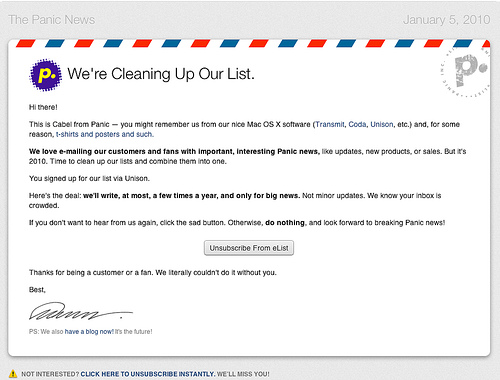
Panic uses beautiful emails with a friendly and helpful tone and voice. Larger version. (Image Source: Lucien W. Dupont)
Writing good email content is a craft of its own, and one that isn’t easy by any stretch of the imagination. We can start with some good baselines, however. Email isn’t a long-form medium, and in a world that’s becoming increasingly mobile, lengthy and wordy often does more harm than good. Write like the audience is distracted. We’re dealing with small screens, busy lives and short attention spans — every email benefits from being short and sweet. What we write should be focused, clear and concise. We can better serve our readers by formatting content into digestible sections. If we have a lot more to say, then linking to external content or even returning to the topic in the next email might make sense; the semi-permanent nature of email allows for some episodic risks to be taken. Remember, too, the importance of design in email. Presenting content in a beautiful way, whether through images or typography, can also improve how readers respond to emails.
Even given great content, the importance of creating a two-way relationship with readers can’t be overstated. Building a connection and making an email something that our subscribers have a stake in is necessary for success. Trust is at the root of that connection. If we’re able to provide readers with something of value that doesn’t just add to the background noise of life, then they’ll find the time and commit to hearing what we have to say. This bond is the ultimate goal for creators. A little personality goes a long way when it comes to making email interesting and worthwhile. People don’t want neutral email; they want intriguing and familiar. If the Obama campaign can get away with a “Hell, no” in its subject line, we can all find a way to pour a little bit of our own personality into what we write. Humans are social animals by nature, so why not make emails more sociable?
One-to-many mass email is, by definition, a largely impersonal venture, so email often ends up boring and lacking in character. But with care and attention, we can buck that trend and create emails that mean something to people. By getting to know your audience and writing to them in a personable and conversational way, your email can rise above inbox noise. It can be about human connection.
Sources
- “The Myth of Multitasking,” Christine Rosen, The New Atlantis
- “Beyond Simple Multi-Tasking: Continuous Partial Attention,” Linda Stone
- “Compassion Fatigue as Secondary Traumatic Stress Disorder: An Overview,” Compassion Fatigue: Coping With Secondary Traumatic Stress Disorder in Those Who Treat the Traumatized, Charles R. Figley, Routledge (1995): pages 1–20
- “The Science Behind Those Obama Campaign E-Mails,” Joshua Green, Bloomberg Businessweek
- “Message Machine: Reverse Engineering the 2012 Campaign,” Jeff Larson and Al Shaw, Pro Publica
- “Social Identity and Intergroup Behavior,” Henri Tajfel, Social Science Information, Vol. 13.2 (1972): pages 65–93
- “Mobile Email Opens Increase 123% in 18 Months,” Justine Jordan, Litmus
Further Reading
- The Ultimate Digital Clean-Up Checklist
- Taming The Email Beast
- 27 Email Newsletters Worth Subscribing To
- Useful Web Design E-Mail Newsletters
 (al, mrn)

