Smashing Magazine we smash you with the information that will make your life easier. really.
Pagination Gallery: Examples And Good Practices
November 16th, 2007 in Design Showcase | 134 Comments
Structure and hierarchy reduce complexity and improve readability. The more organized your articles or web-sites are, the easier it is for users to follow your arguments and get the message you are trying to deliver. On the Web this can be done in a variety of ways.
In body copy headlines and enumerations are usually used to present the information as logically separated data chunks. An alternative solution is pagination, a mechanism which provides users with additional navigation options for browsing through single parts of the given article. Parts of the article are usually referred to by numbers, hints, arrows as well as “previous” and “next”-buttons.
Search engines almost always use pagination; newspapers tend to make use of it for navigation through the parts of rather large articles. And there are situations when pagination is also necessary for weblogs. Additional navigation can simplify the access to some site pages — e.g. make it easier for users to browse through the archives of the site.
In most cases pagination is better than traditional “previous - next” navigation as it offers visitors a more quick and convenient navigation through the site. It’s not a must, but a useful nice-to-have-feature.
Let’s take a look at the good practices of pagination design as well as some examples of when and how the pagination is usually implemented.
Good Practices Of Pagination Design
(7 Aspects according to Faruk Ates)
- Provide large clickable areas
- Don’t use underlines
- Identify the current page
- Space out page links
- Provide Previous and Next links
- Use First and Last links (where applicable)
- Put First and Last links on the outside
Related References
- An ultimate article about pagination, Pagination 101, has already been written by Faruk Ates.
- Style sheets freely available for free download: Some Styles For Your Pagination.
- If your weblog runs upon Wordpress you can use WP-PageNavi plug-in to generate pagination “on the fly”. It’s easy to install, however, requires some changes in the source code of your Wordpress theme.
Mistake #1: Navigation Options Are Invisible
Since pagination’s primary purpose is to serve as an improved navigation, it is supposed to make it clear for the visitors where they are, where they’ve already been and where they can go next. These three facts give users a complete understanding of how the system works and how the navigation should be used.
But most importantly, the navigation options should be visible. Hugg.com doesn’t follow this guideline. The color of the links has a very low contrast with the white background. The hover-effect isn’t provided.
![]()
The color of the links on Hugg.com has a very low contrast with the white background. The hover-effect isn’t provided.
Mistake #2: Pagination Isn’t Intuitive
If you have to decide between a quite complex (but beautiful) pagination and a simple one with necessary functionality always prefer the simple solution. If users don’t understand the mechanism behind navigation they won’t be able to use it and therefore won’t use your web-site.
Helium.com is a perfect example for this mistake. Take a look at the screenshot below: what do the arrows stand for? For the page you’ve already visited or for the page you are currently on? And why does the link to the second page have a white background color? Why do the arrows have different colors? This is unintuitive.

![]()
Unintuitive pagination design on Helium.com
Unintuitive designs result from the lack of structure, hierarchy and well thought-out design decisions. “Blank” pagination is as unintuitive as overcrowded design solution.

![]()
Our favourite example: Helium.com
![]()
Not spaced out page links are harder to scan and to navigate through. Make-Believe.org as an example. The design is unintuitive.
Creative Solutions Can Be User-Friendly
The more frequently a design element is used, the harder it is for designers to introduce some creative approaches without risking to make the design less intuitive. Consequently, pagination designs have rather a variety of different patterns — revolutionary approaches are used very rarely.
However, creative approaches can be user-friendly. E.g. Dirty.ru uses a slider-based pagination menu; users can drag it to get more available options, that means links to the older pages of the site.

A slider on Dirty.ru
Erweiterungen.de, the German version of the official Firefox extensions web-site, provides more navigation options once the visitor clicks on the “…”-button.
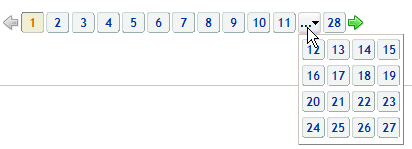
Further navigation options are displayed once the “…”-button is clicked. Erweiterungen.de.
Gallery
Although “standard” pagination — linked blue numbers following each other — is very common for most web interfaces, designers tend to experiment with colors, forms, backgrounds and shapes.
The pagination doesn’t need to look nice aiming to captivate users’ attention; as a part of site navigation it offers users an important functionality and as such has to be used effectively. Still, visual clues can be helpful. In most designs blue and grey colors dominate — colors traditionally used by services.
Simple Enumeration
Colors and Shapes In Use
Often designers use colors to highlight the current page and separate it from the other pages. The numbers of the pages are also given a shape: a rectangle, a circle or a button. The current page is usually not linked.

Pagination With Manual Page Input
In some cases users can provide the number of the page they’d like to see manually, via the input-element. This is common for paginations with the limited number of options — e.g. in these designs you can’t jump to the last page if you’d like to.

Unusual Solutions

Leave a Reply
Sponsors
- Advertise with us!
Smashing Links
Popular Posts
- 100 Wordpress Themes
- 83 Wordpress Themes
- 80 AJAX Solutions
- 53 CSS Techniques
- 40 Free Fonts
- 50 Beautiful Designs
- 50 Simple Designs
- 45 Fresh Designs
- 30 Dark Designs
- 65 Flash Designs
- Beautiful Icon Sets
- Beautiful Wallpapers
- Beautiful Photos
- Free Design Templates
- Free CSS Layouts
- Photoshop Tutorials
- Illustrator Tutorials
All Posts
- 35 Designers × 5 Questions
- 50 Designers × 6 Questions
- 404 Error Pages
- AJAX Libraries
- AJAX Solutions
- Badges and Pins
- Black & White Photography
- Block Quotes
- Blog Designs
- Blog Headers
- Book Covers
- Brochures and Booklets
- Browsers Round-Up
- Browser Test Suites
- Buzz-Monitoring
- Calendar Designs
- Charts and Diagrams: Tools
- Cheat Sheets
- Code Beautifier
- Copyright Explained
- CSS Coding Techniques
- CSS Designs 1, 2, 3, 4, 5
- CSS Editors
- CSS Expert Ideas
- CSS Float Theory
- CSS Frameworks
- CSS Free Templates
- CSS Footers
- CSS Forms 1, 2
- CSS Frameworks
- CSS Galleries
- CSS Ideas
- CSS Layouts
- CSS Menus
- CSS Print-Layouts
- CSS Specificity
- CSS Styleguides
- CSS Tables
- CSS Tutorials
- CSS-Techniques
- CSS Tools
- Data Grids and Tables
- Data Visualization 1, 2
- Date Stamps
- Design Books 1, 2
- Design Magazines
- Designer's Checkpoints
- Divine Proportion
- Domain Tools
- Dreamweaver Tutorials
- E-Mail Delivery
- Favicons 1, 2, 3, 4, 5, 6
- Firefox Themes
- Fireworks Tutorials
- Flash Designs
- Flash Slideshows
- Flash Tutorials
- Fonts 1, 2, 3, 4, 5, 6
- Form Design Patterns
- Forums
- Gadgets 1, 2, 3
- Google AdSense
- Google PageRank
- Graphics Design
- Grid-Based Design 1, 2
- Grunge Design 1, 2
- Hand-Drawing Style 1, 2
- Handwriting and Lettering
- Hotkeys
- HDR Pictures
- HTML Template Systems
- Icon Sets 1, 2, 3, 4,


Jeff Adans (November 16th, 2007, 1:48 am)
This article is great! I’m doing a step-by-step system for my own site so it really came in handy, I was using a basic links 1,2,3 etc but now I might add some CSS to them and make them more user friendly!
great article!
Aaron Stroud (November 16th, 2007, 2:07 am)
Great timing. I’m in the middle of a final redesign before launching and adding pagination was one of my final tasks. Does anyone know how to code pagination into a wordpress template? So far, I’ve only come across this Link [lesterchan.net].
Voltarex (November 16th, 2007, 2:24 am)
Guys, you’re outstanding! The magazine is a weekly blast of superlative, effective and useful articles. This one is perfect. And kudos to you right because is about a so important but too often underrated argument. Pagination is the core of this so overloaded world of informations and documents and answers that is the web today.
kidsinhalf (November 16th, 2007, 2:44 am)
The simplest is always the best. bold better than bord..er !
Nice exhaustive gallery
Josh Minnich (November 16th, 2007, 2:46 am)
I think facebook has some of the best pagination styles. Super easy to read and understand how to use it.
Ant (November 16th, 2007, 3:55 am)
I was just putting together a pattern library entry on pagination tools, this will be a great help. Thanks!
Jason (November 16th, 2007, 5:27 am)
I love the PHP pagination class at catchmyfame, Link [www.catchmyfame.com]
Stephen (November 16th, 2007, 6:36 am)
1..2..3..4..5 pagination is just not intuitive to begin with. Navigation is about context, and there’s no way to know what “3″ is, at-a-glance.
Keep the prev/next/first/last if you have to, but paginate, predominantly, based on something less-arbitrary than page number, like letter…
Aaron Pepper (November 16th, 2007, 7:47 am)
Great post! You guys have inspired me to take another look at Paging possibilities.
Another method of paging that I like is the simple dropdown. Tom’s Hardware, Anandtech and most other tech sites use this effectively.
Ahmad Alfy (November 16th, 2007, 8:23 am)
It never crossed my mind how important is the pagination thing!
Thanks for the great article
Justin Young (November 16th, 2007, 9:05 am)
YES! The UE is most important.
Yogi (November 16th, 2007, 10:00 am)
Wow..excellent pagination
bea (November 16th, 2007, 10:39 am)
That’s great! I must add it on my site SingleParentLoving.com
Ryan Feeley (November 16th, 2007, 10:53 am)
Sure I’m biased, but I really like my Link [www.masterfile.com]. I’ve never seen anything like it on the web, and I even Link [ryanfeeley.com] a few months ago. Compact and versatile it is. Funny how you have Veer listed.
Ben (November 16th, 2007, 10:56 am)
Great article, simple and easy to use is the best option for Paginations. But that doesn’t mean they have to be ugly.
Mike (November 16th, 2007, 11:42 am)
Thanx a lot for that wonderful list!
v1 (November 16th, 2007, 4:13 pm)
80% of the pagination examples are the same… =/
Christian (November 16th, 2007, 4:31 pm)
Thank you for this good source of ideas. It’s always a lot of detail work but the navigation is so important for any website!
Polo (November 16th, 2007, 4:32 pm)
Thanks a lot for this great article.
Gerd Wippich (November 16th, 2007, 4:45 pm)
I appreciate the range of themes that are shown and discussed on this blog. Pagination is so important and really worth to be thought about.
gterez (November 16th, 2007, 5:58 pm)
Something that is not covered in this post is the possibility of having different levels of “granularity” in the display of page numbers, to give a better overview of the number of results and some means to browse more effectively by moving forwards and backwards in chunks of different sizes.
This is useful especially in cases where the number of resulting pages is really big.
E.g. for a query that returns 3500 pages:
1 2 3 4…10…100…1000…2000…3000…3500 next >>
or when we’re in the middle of the results:
1…100…1000 … 2000 … 2234 2235 2236 2237… 2300…3000…3500 next >>
Another point: I think it is far better to get rid of the links to first & last page, but always provide a means to go to the first & last page by clicking their numbers. It is VERY frustrating to click “last” instead of “next” and they’re often placed right next to each other.
Of course, I do agree with Stephen that it is MUCH better to display something more relevant to the actual data than page numbers…
Justin Scheetz (November 16th, 2007, 7:35 pm)
Wow, thanks for using our pagination (designsnack.com) in one of your “good” examples. Love this site, too!
Chris Pemberton (November 16th, 2007, 7:45 pm)
Great article as always. One point for all to remember. The pagination design is important but design is nothing without function. Keep it simple keep it quick. So often I see people who grab all the data from the DB and then paginate the data object on the page, SLOW!! which then lets down the design.
I like that all the examples highlight a key to pagination design, correct spacing between the page numbers. I have seen sites which bunch them together making quick clicking harder for novice computer users…Yes there are some still out there :)
Jerald Rajan (November 16th, 2007, 8:55 pm)
Another Fine article from smashingmagazine.
Keep it UP friends.
Michael (November 16th, 2007, 11:19 pm)
When I grow up, I want to marry smashingmagazine.com.
helaene (November 16th, 2007, 11:34 pm)
these are great - thank you!
what really drives me crazy is when default positions and hover positions don’t match…. I just love clicking the wrong link because it moved under my mouse…don’t you?
David J. (November 17th, 2007, 2:19 am)
I’m fairly impressed with the list. Stylish Labs & apple’s store — both look great but with usability in mind
Ours at HostJury are good as well though, albeit we’re only using them on the blog: Link [hostjury.com]
pault (November 17th, 2007, 7:09 pm)
lets start a pagination hall of shame
my first nomination is
Link [www.eurekalert.org]
no next page widget and its hard to tell which page you
are currently on
baldo (November 17th, 2007, 7:27 pm)
I did something similar for the search forms:
Search forms examples
Mocker (November 19th, 2007, 2:17 pm)
Hey, that’s pretty cool - I checkout out the wordpress plugin.
I’m going to install it tomorrow, thanks for turning me on to it.
OverZero.it (November 19th, 2007, 4:20 pm)
Great inspiration for a very specific issue.
Thank you!
karaboz (November 20th, 2007, 1:16 am)
I was very proud discovering my paginator 3000 (paginator with slider created for dirty.ru) among creative examples (= After this I desided to publish it’s source files in my blog Link [karaboz.ru]. Maybe it could be useful for somebody else (=
Spencer Lavery (November 20th, 2007, 8:41 pm)
Google’s search results pagination should be in the article listed under “Unusual Solutions”. It’s probably the most used pagination in the world, too.
cos (November 21st, 2007, 1:53 am)
LAME :)
All are the same.
how about NOT conformist pagination:
inkdot.ro,
still in early alpha but layout looks cool.
Marie ALHOMME (November 23rd, 2007, 6:30 pm)
Hello, I’ve liked this article a lot and would like to translate it to French and publish it to my website alongside other translations, with all the due backlinks and credits to you of course…
Do I have your authorization ?
Thanks in advance,
Marie ALHOMME (webdesigner/front-end developer)
Steve (November 24th, 2007, 3:37 am)
Really fantastic analysis, could have used this about a month ago when we were designing our new pagination method. Although we’re using Flash and our content is all media, we think we figured out something new. We call it ‘Pagiscrolling’ ;) and I’d love to get opinions on it. Here’s a link to it’s use, Link [voicethread.com] and a place to critique it, Link [voicethread.com]
zeus (November 26th, 2007, 10:39 am)
Thank you for using our website’s pagination method, as an example, in this article! :)
kl3tte (November 29th, 2007, 9:46 pm)
Real good summary of this topic. Pagination is a very difficult thing in modern web technologies. thank you for this awesome article.
extreme webmaster (December 6th, 2007, 9:03 am)
Basically, the best ones are those with numbers inside a square. They are far more usable, because the user has a bigger area to click on (rather than going for a digit between two other ones). Also, the selection is far more visible when the square changes the background color. And they look elegant too, and can be integrated in different kinds of designs and layouts.
Chris (December 7th, 2007, 10:11 pm)
I am just now devising a paging system for a site - You couldn’t have timed this better!
Welcome back!!!
Diego (December 11th, 2007, 9:55 am)
The article forgot to mention the site with the best pagination: Google Reader.
Google Reader loads the older news while you are moving the scroll bar, no pagination links at all.
frosty_yul (December 22nd, 2007, 5:53 am)
Here’s my use of navigation buttons and a dropdown list to create a simple but effective paging system. Probably would not recommend it for pages over several hundred though.
Link [img265.imageshack.us]
imageshack is a disgusting service. (SM editor)
Rodrigo (January 4th, 2008, 11:01 pm)
Incredible analysis!
You Help-me!
Thank you very much! :)
Foxinni - Wordpress Designer (January 20th, 2008, 1:06 pm)
Ah. I’ve been looking for a article like this for ages. Great job once again SM!
bulklodd - developer (February 18th, 2008, 4:32 am)
imho, pagination isn’t a good thing for a user, i’d prefer not to have it at all but i’m aware of the impossibility to avoid it. it’d be much better just get all you need on the first page and let users set how many results they want on one page. as matter of fact it’s not the implementation of pagination which drives me mad but the impossibility to set a number of results for a page!
Subcide (February 27th, 2008, 7:07 pm)
bulklodd: no offence but thank god you dont develop for Digg. Some sites definately require pagination to be usable.
Sussex Web Design (March 18th, 2008, 3:30 am)
A great set of exaples, great job!
Igor Kryltsov (April 15th, 2008, 6:11 am)
Agree. Even though my pagination allows to go First/Last/Previous/Next and go to surrounding pages (like three ahead and three behind to current page) as well as enter arbitrary page number - I think (after 6 years of doing it) this is more programmer’s approach on showing all you can rather than asking why user ended up on that page. If user was looking for something why the hell he will go to page 25 even if he can do it? Than why to offer him this option?
Igor Kryltsov (April 15th, 2008, 6:41 am)
If youb think of it this is what Google does: Results 1 - 10 of about 5,350,000 for ‘pagination’
Have you ever clicked all 1-11?
What CNET downloads search results does:
Showing: 11-20 of 303 | Previous 10 | Next 10 … AND smart filters on top of table.
Do you really need more than first couple of pages and smart filters to search within search results and or smart pagination which is based not on page number which is (total/items_per_page) but say each pagination node is month/year or week or day - so you can jump to ‘Jan 2008′ without guessing that it could be 10 pages back?
This is what I call a creativity in ‘pagination’ :)
Pritam Shetty (June 4th, 2008, 10:27 pm)
This is completely useless. What is the difference between either of these pagination systems? You are only changing background color and font colors?
I would extract information from the documents and classify them and put a number next to that. Only then will a 1 2 3 pagination be of any use.
Ex: If you have 400 documents say about properties. Then classify them as below:
single family units: 200 | Multi family units:100 | Commercial:100
Make these 3 hyperlinks.
Then if someone clicks on href=”single family units: 200″ show these 1 2 3 pagination.
A user will be able to know that the documents he is clicking on one after the other are of similar type.
Cheers,
Pritam the great
adda4u (June 8th, 2008, 4:37 am)
Another Fine article from smashing magazine.
Keep it UP friends.
I wish u gr8 success in future …Plz provide a bit more articles
lefiath (June 18th, 2008, 3:05 am)
Thank you for publishing it, but there is a problem when i dont speak russian :(
roxana (July 8th, 2008, 7:06 am)
It’s a very useful article indeed. I am not sure I can agree though with the no no to underlines. Since underlined text has become so powerful in pointing out links, why not use it in pagination? I mean if it’s consistent with the rest of design elements on the website, why not use it?
Seyferf Hallendent (August 7th, 2008, 9:06 am)
oh.. talking like you know everything…
have you made programs before?
its better to have reference so quit blabbin your hurtful words..
these paginations were made to see if it fits for a website …
sid (August 26th, 2008, 3:30 am)
super collection
Martin (September 15th, 2008, 2:22 am)
thx!
please make a 2008 update!
blaszta (September 16th, 2008, 6:03 pm)
Agree! I can’t find the original article by Faruk Ates (Pagination 101). Anybody has a link for it?
Great article/reference anyway!