Smashing Magazine - we smash you with the information that will make your life easier. really.
10 Principles Of Effective Web Design
Usability and the utility, not the visual design, determine the success or failure of a web-site. Since the visitor of the page is the only person who clicks the mouse and therefore decides everything, user-centric design has become a standard approach for successful and profit-oriented web design. After all, if users can’t use a feature, it might as well not exist.
We aren’t going to discuss the implementation details (e.g. where the search box should be placed) as it has already been done in a number of articles; instead we focus on the main principles, heuristics and approaches for effective web design — approaches which, used properly, can lead to more sophisticated design decisions and simplify the process of perceiving presented information.
Please notice that
- you might be interested in the usability-related articles about 10 Usability Nightmares and 30 Usability Issues we’ve published before,
- we’ll cover more principles of effective design in our following posts. Therefore you might want to subscribe to our RSS-feed.
This article has been translated to Hebrew.
Principles Of Effective Web Design
In order to use the principles properly we first need to understand how users interact with web-sites, how they think and what are the basic patterns of users’ behavior.
How do users think?
Basically, users’ habits on the Web aren’t that different from customers’ habits in a store. Visitors glance at each new page, scan some of the text, and click on the first link that catches their interest or vaguely resembles the thing they’re looking for. In fact, there are large parts of the page they don’t even look at.
Most users search for something interesting (or useful) and clickable; as soon as some promising candidates are found, users click. If the new page doesn’t meet users’ expectations, the Back button is clicked and the search process is continued.
- Users appreciate quality and credibility. If a page provides users with high-quality content, they are willing to compromise the content with advertisements and the design of the site. This is the reason why not-that-well-designed web-sites with high-quality content gain a lot of traffic over years. Content is more important than the design which supports it.
- Users don’t read, they scan. Analyzing a web-page, users search for some fixed points or anchors which would guide them through the content of the page.
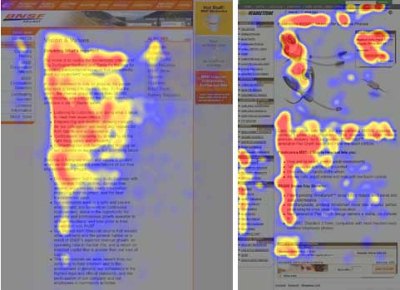
Users don’t read, they scan. Notice how “hot” areas abrupt in the middle of sentences. This is typical for the scanning process. - Web users are impatient and insist on instant gratification. Very simple principle: If a web-site isn’t able to meet users’ expectations, then designer failed to get his job done properly and the company loses money. The higher is the cognitive load and the less intuitive is the navigation, the more willing are users to leave the web-site and search for alternatives. [JN / DWU]
- Users don’t make optimal choices. Users don’t search for the quickest way to find the information they’re looking for. Neither do they scan web-page in a linear fashion, going sequentially from one site section to another one. Instead users satisfice; they choose the first reasonable option. As soon as they find a link that seems like it might lead to the goal, there is a very good chance that it will be immediately clicked. Optimizing is hard, and it takes a long time. Satisficing is more efficient. [video]
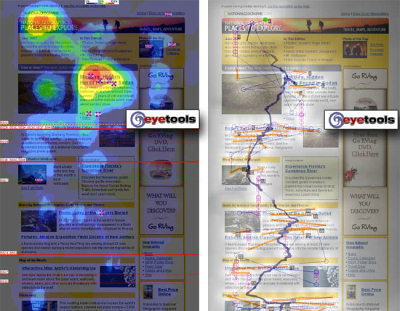
Both pictures show: sequential reading flow doesn’t work in the Web. Right screenshot on the image at the bottom describes the scan path of a given page. - Users follow their intuition. In most cases users muddle through instead of reading the information a designer has provided. According to Steve Krug, the basic reason for that is that users don’t care. “If we find something that works, we stick to it. It doesn’t matter to us if we understand how things work, as long as we can use them. If your audience is going to act like you’re designing billboard, then design great billboards.”
- Users want to have control. Users want to be able to control their browser and rely on the consistent data presentation throughout the site. E.g. they don’t want new windows popping up unexpectedly and they want to be able to get back with a “Back”-button to the site they’ve been before: therefore it’s a good practice to never open links in new browser windows.
1. Don’t make users think
According to Krug’s first law of usability, the web-page should be obvious and self-explanatory. When you’re creating a site, your job is to get rid of the question marks — the decisions users need to make consciously, considering pros, cons and alternatives.
If the navigation and site architecture aren’t intuitive, the number of question marks grows and makes it harder for users to comprehend how the system works and how to get from point A to point B. A clear structure, moderate visual clues and easily recognizable links can help users to find their path to their aim.
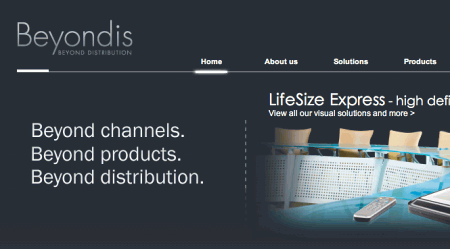
Let’s take a look at an example. Beyondis.co.uk claims to be “beyond channels, beyond products, beyond distribution”. What does it mean? Since users tend to explore web-sites according to the “F”-pattern, these three statements would be the first elements users will see on the page once it is loaded.
Although the design itself is simple and intuitive, to understand what the page is about the user needs to search for the answer. This is what an unnecessary question mark is. It’s designer’s task to make sure that the number of question marks is close to 0. The visual explanation is placed on the right hand side. Just exchanging both blocks would increase usability.
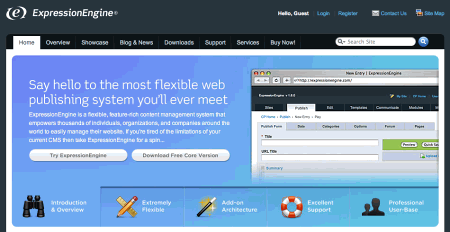
ExpressionEngine uses the very same structure like Beyondis, but avoids unnecessary question marks. Furthermore, the slogan becomes functional as users are provided with options to try the service and download the free version.
By reducing cognitive load you make it easier for visitors to grasp the idea behind the system. Once you’ve achieved this, you can communicate why the system is useful and how users can benefit from it. People won’t use your web site if they can’t find their way around it.
2. Don’t squander users’ patience
In every project when you are going to offer your visitors some service or tool, try to keep your user requirements minimal. The less action is required from users to test a service, the more likely a random visitor is to actually try it out. First-time visitors are willing to play with the service, not filling long web forms for an account they might never use in the future. Let users explore the site and discover your services without forcing them into sharing private data. It’s not reasonable to force users to enter an email address to test the feature.
As Ryan Singer — the developer of the 37Signals team — states, users would probably be eager to provide an email address if they were asked for it after they’d seen the feature work, so they had some idea of what they were going to get in return.
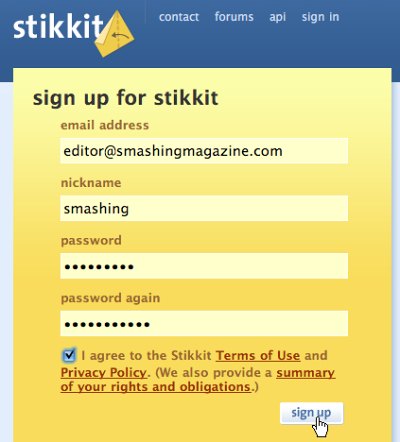
Stikkit is a perfect example for a user-friendly service which requires almost nothing from the visitor which is unobtrusive and comforting. And that’s what you want your users to feel on your web site.
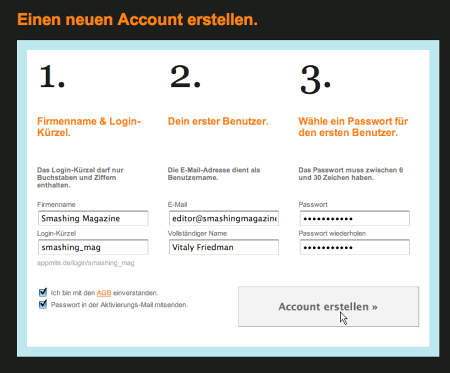
Apparently, Mite requires more. However the registration can be done in less than 30 seconds — as the form has horizontal orientation, the user doesn’t even need to scroll the page.
Ideally remove all barriers, don’t require subscriptions or registrations first. A user registration alone is enough of an impediment to user navigation to cut down on incoming traffic.
3. Manage to focus users’ attention
As web-sites provide both static and dynamic content, some aspects of the user interface attract attention more than others do. Obviously, images are more eye-catching than the text — just as the sentences marked as bold are more attractive than plain text.
The human eye is a highly non-linear device, and web-users can instantly recognize edges, patterns and motions. This is why video-based advertisements are extremely annoying and distracting, but from the marketing perspective they perfectly do the job of capturing users’ attention.
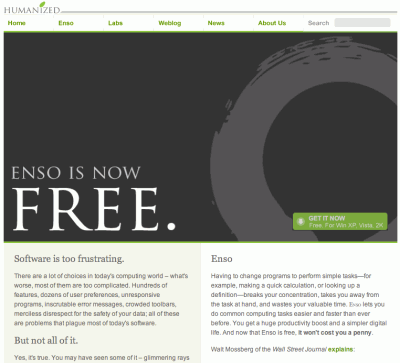
Humanized.com perfectly uses the principle of focus. The only element which is directly visible to the users is the word “free” which works attractive and appealing, but still calm and purely informative. Subtle hints provide users with enough information of how to find more about the “free” product.
Focusing users’ attention to specific areas of the site with a moderate use of visual elements can help your visitors to get from point A to point B without thinking of how it actually is supposed to be done. The less question marks visitors have, the better sense of orientation they have and the more trust they can develop towards the company the site represents. In other words: the less thinking needs to happen behind the scenes, the better is the user experience which is the aim of usability in the first place.
4. Strive for feature exposure
Modern web designs are usually criticized due to their approach of guiding users with visually appealing 1-2-3-done-steps, large buttons with visual effects etc. But from the design perspective these elements actually aren’t a bad thing. On the contrary, such guidelines are extremely effective as they lead the visitors through the site content in a very simple and user-friendly way.
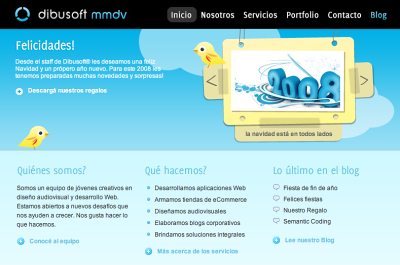
Dibusoft.com combines visual appeal with clear site structure. The site has 9 main navigation options which are visible at the first glance. The choice of colors might be too light, though.
Letting the user see clearly what functions are available is a fundamental principle of successful user interface design. It doesn’t really matter how this is achieved. What matters is that the content is well-understood and visitors feel comfortable with the way they interact with the system.
5. Make use of effective writing
As the Web is different from print, it’s necessary to adjust the writing style to users’ preferences and browsing habits. Promotional writing won’t be read. Long text blocks without images and keywords marked in bold or italics will be skipped. Exaggerated language will be ignored.
Talk business. Avoid cute or clever names, marketing-induced names, company-specific names, and unfamiliar technical names. For instance, if you describe a service and want users to create an account, “sign up” is better than “start now!” which is again better than “explore our services”.
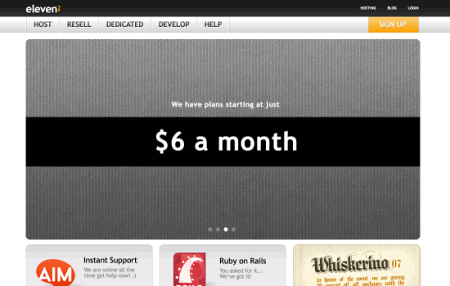
Eleven2.com gets directly to the point. No cute words, no exaggerated statements. Instead a price: just what visitors are looking for.
An optimal solution for effective writing is to
- use short and concise phrases (come to the point as quickly as possible),
- use scannable layout (categorize the content, use multiple heading levels, use visual elements and bulleted lists which break the flow of uniform text blocks),
- use plain and objective language (a promotion doesn’t need to sound like advertisement; give your users some reasonable and objective reason why they should use your service or stay on your web-site)
6. Strive for simplicity
The “keep it simple”-principle (KIS) should be the primary goal of site design. Users are rarely on a site to enjoy the design; furthermore, in most cases they are looking for the information despite the design. Strive for simplicity instead of complexity.
Crcbus provides visitors with a clean and simple design. You may have no idea what the site is about as it is in Italian, however you can directly recognize the navigation, header, content area and the footer. Notice how even icons manage to communicate the information clearly. Once the icons are hovered, additional information is provided.
From the visitors’ point of view, the best site design is a pure text, without any advertisements or further content blocks matching exactly the query visitors used or the content they’ve been looking for. This is one of the reasons why a user-friendly print-version of web pages is essential for good user experience.
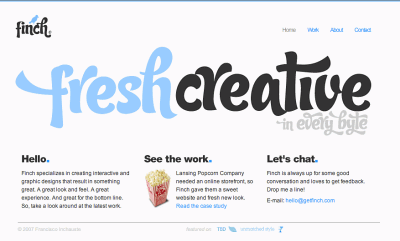
Finch clearly presents the information about the site and gives visitors a choice of options without overcrowding them with unnecessary content.
7. Don’t be afraid of the white space
Actually it’s really hard to overestimate the importance of white space. Not only does it help to reduce the cognitive load for the visitors, but it makes it possible to perceive the information presented on the screen. When a new visitor approaches a design layout, the first thing he/she tries to do is to scan the page and divide the content area into digestible pieces of information.
Complex structures are harder to read, scan, analyze and work with. If you have the choice between separating two design segments by a visible line or by some whitespace, it’s usually better to use the whitespace solution. Hierarchical structures reduce complexity (Simon’s Law): the better you manage to provide users with a sense of visual hierarchy, the easier your content will be to perceive.
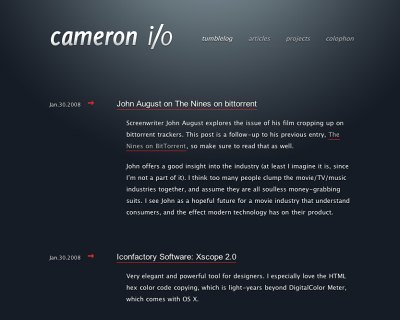
White space is good. Cameron.io uses white space as a primary design element. The result is a well-scannable layout which gives the content a dominating position it deserves.
8. Communicate effectively with a “visible language”
In his papers on effective visual communication, Aaron Marcus states three fundamental principles involved in the use of the so-called “visible language” — the content users see on a screen.
- Organize: provide the user with a clear and consistent conceptual structure. Consistency, screen layout, relationships and navigability are important concepts of organization. The same conventions and rules should be applied to all elements.
- Economize: do the most with the least amount of cues and visual elements. Four major points to be considered: simplicity, clarity, distinctiveness, and emphasis. Simplicity includes only the elements that are most important for communication. Clarity: all components should be designed so their meaning is not ambiguous. Distinctiveness: the important properties of the necessary elements should be distinguishable. Emphasis: the most important elements should be easily perceived.
- Communicate: match the presentation to the capabilities of the user. The user interface must keep in balance legibility, readability, typography, symbolism, multiple views, and color or texture in order to communicate successfully. Use max. 3 typefaces in a maximum of 3 point sizes — a maximum of 18 words or 50-80 characters per line of text.
9. Conventions are our friends
Conventional design of site elements doesn’t result in a boring web site. In fact, conventions are very useful as they reduce the learning curve, the need to figure out how things work. For instance, it would be a usability nightmare if all web-sites had different visual presentation of RSS-feeds. That’s not that different from our regular life where we tend to get used to basic principles of how we organize data (folders) or do shopping (placement of products).
With conventions you can gain users’ confidence, trust, reliability and prove your credibility. Follow users’ expectations — understand what they’re expecting from a site navigation, text structure, search placement etc. (see Nielsen’s Usability Alertbox for more information)

BabelFish in use: Amazon.com in Russian.
A typical example from usability sessions is to translate the page in Japanese (assuming your web users don’t know Japanese, e.g. with Babelfish) and provide your usability testers with a task to find something in the page of different language. If conventions are well-applied, users will be able to achieve a not-too-specific objective, even if they can’t understand a word of it.
Steve Krug suggests that it’s better to innovate only when you know you really have a better idea, but take advantages of conventions when you don’t.
10. Test early, test often
This so-called TETO-principle should be applied to every web design project as usability tests often provide crucial insights into significant problems and issues related to a given layout.
Test not too late, not too little and not for the wrong reasons. In the latter case it’s necessary to understand that most design decisions are local; that means that you can’t universally answer whether some layout is better than the other one as you need to analyze it from a very specific point of view (considering requirements, stakeholders, budget etc.).
Some important points to keep in mind:
- according to Steve Krug, testing one user is 100% better than testing none and testing one user early in the project is better than testing 50 near the end. Accoring to Boehm’s first law, errors are most frequent during requirements and design activities and are the more expensive the later they are removed.
- testing is an iterative process. That means that you design something, test it, fix it and then test it again. There might be problems which haven’t been found during the first round as users were practically blocked by other problems.
- usability tests always produce useful results. Either you’ll be pointed to the problems you have or you’ll be pointed to the absence of major design flaws which is in both cases a useful insight for your project.
- according to Weinberg’s law, a developer is unsuited to test his or her code. This holds for designers as well. After you’ve worked on a site for few weeks, you can’t observe it from a fresh perspective anymore. You know how it is built and therefore you know exactly how it works — you have the wisdom independent testers and visitors of your site wouldn’t have.
Bottom line: if you want a great site, you’ve got to test.
References
- Designing Effective User Interfaces by Suzanne Martin
- Summary on Web Design
- UID presentation (Flash)
- Research-Based Web Design & Usability Guidelines
- “The psychology of computer programming” by Gerald Weinberg
- “Designing Web Usability” by Jakob Nielsen [JN / DWU]
- “Prioritizing Web Usability” by Jakob Nielsen
- “Don’t Make Me Think” by Steve Krug
- “Usability for the Web: Designing Web Sites that Work” by Tom Brinck, Darren Gergle, Scott Wood
- A Summary of Principles for User-Interface Design
Vitaly Friedman, editor-in-chief of Smashing Magazine (www.smashingmagazine.com), an online magazine dedicated to designers and developers.
- 238 Comments
- 1
- 2January 31st, 2008 8:37 am
10. Test early, test often
This has to be the best tip!
Thank you for this smashing-roundup!
- 3January 31st, 2008 8:42 am
Wonderful. Bookmarked to use it for my next website design.
- 4January 31st, 2008 8:45 am
Super article. I really think that we as web developers must focus on keeping things simple. Remember the acronym KISS (Keep It Simple Stupid)!
- 5January 31st, 2008 8:55 am
Nice Article! Love the usability stuff!
- 6January 31st, 2008 9:00 am
Love the article, hits on some very important parts. Made may sit back and think of the things i’ve done in the past and how it affects things i do now. These type of articles makes a developer rethink the whole process of building a website. Which i think keeps your mind open to new methods.
- 7January 31st, 2008 9:04 am
Good advise. It’s always good to take a step back from design, personal taste etc to make sure that it is easy to use for the audience. My toughest critic is my dad ie someone who is not all that web saavy. But a lot of the time this is our audience, someone who is not all that good with computers.
Thanks for the article
- 8January 31st, 2008 9:10 am
I’m still amazed I wasn’t reading your website before. Thanks a lot.
- 9January 31st, 2008 9:29 am
Wow nice article. I didn’t think so much about these. Thanks for the article
- 10January 31st, 2008 9:41 am
Really helpful article.
- 11January 31st, 2008 10:18 am
GREAT STUFF.
This is definitively going on my post.
- 12January 31st, 2008 10:19 am
This article is frustrating for 10 + 1 reasons almost:
-1 “Usability and the utility, not the design, determine the success or failure of a web-site.”
Usability and the utility are the design. If by design you mean decoration, that too has a rich history filled with meaning.0 How do users think?
That’s like asking “How do people think?”. they think in all kinds of ways, rational, irrational, quickly, slowly, etc. There is no point in asking this question because the answers are infinite. I agree with this statement “users follow their intuition”, which is totally unpredictable.1 “Don’t make users think”
That’s right people. Strive for the status quo and the familiar. Do what has been done before and make sure people are comfortable. Wear your khakis and polo shirts.
Making something “obvious and self-explanatory” doesn’t hinge on simplicity or how much someone has to ‘think’.2 “Don’t squander users’ patience”
Okay. How will you know what will make them impatient?3 “Manage to focus users’ attention”
This is all adding up to a Target commercial.4 “Strive for feature exposure”
What?5 “Make use of effective writing”
Even if it us unnecessary. Just put it in somewhere.6 “Strive for simplicity”
Strive for whatever you want. Do something crazy. Do something dumb. Do something elegant. Do something messy. They are all valuable.7 “Don’t be afraid of the white space”
Don’t be afraid to dump everything you own into a pile on your living-room floor. It will probably be more interesting than lots of white space.8 “Communicate effectively with a “visible language” ”
9 “Conventions are our friends”
Here, Here, for mediocrity!10 “Test early, test often”
Just wing it. It will force you to be creative and maybe do something you’ve never done before. - 13January 31st, 2008 10:52 am
@theSupermarket: you have no idea what you are talking about.
- 14January 31st, 2008 10:59 am
The above poster proves the point that you can never make EVERYONE happy….but atleast they were able to get out their frustrations by posting that lengthy list.
Hope you feel better now.
:)
- 15January 31st, 2008 11:28 am
I agree with Thomassl
- 16January 31st, 2008 11:30 am
Great article even if the first part was featured in another article (that I actually printed in COLOR with my expensive HP printer, but I don’t care, totally worth it).
- 17January 31st, 2008 11:32 am
Amazing.. !! this is a real good reference for my upcoming projects !
- 18January 31st, 2008 11:39 am
I really love this stuff :)
- 19January 31st, 2008 11:49 am
Thank you for this article!
It’s really useful for new webdesigners!
- 20January 31st, 2008 12:07 pm
Great stuff, keep on the good work! :)
- 21January 31st, 2008 12:29 pm
Wonderful article…best one I have read this week (and I read a lot of them). Thank you for sharing such great information.
- 22January 31st, 2008 12:29 pm
If you need a good sample website for #6, you should use kokokaka.com as opposed to crcbus… especially considering when crcbus ripped off kokokaka, they documented it in their ’style of the day’ area. :)
- 23January 31st, 2008 12:58 pm
I don’t agree with you in that first point. Sometimes users have to think about websites. It’s about content that matters. And about development of our work. There has been a basic article by Larissa Meek at Devlounge about metaphors in website design and content. I really didn’t like it when i read it the first time. But actually i do think that we have to think about it. Maybe it’s up for transcending designs? How can we bring the web one step further without changing ourselves and our work?
Stefan
- 24January 31st, 2008 1:36 pm
This is what I call a Qualitative Post .
Great Job!
- 25January 31st, 2008 2:28 pm
Very good article! All communication professionals should read it.
- 26January 31st, 2008 3:00 pm
Outstanding article!
- 27January 31st, 2008 3:01 pm
Great article except I read #7 (don’t be afraid of whitespace) and I wonder whatever happened to the nice flow that SM used to be. The damn column is so narrow now that there’s either too much whitespace (on the right) or not enough (on the left).
- 28January 31st, 2008 3:34 pm
I’m sorry, I couldn’t possibly follow any web design suggestions from a site as poorly designed as this one. One narrow column and a page full of ads? You’ve got to be kidding me!
- 29January 31st, 2008 3:36 pm
Surely, usability is objective. What works for some people might not for others..and unless your data sample is huge, you cant make statements as such. That said, the trends above are a damn good basis to work from.
- 30January 31st, 2008 4:06 pm
Great, really great,
I’m especially amazed with the “don’t be afraid of the white space-part”; in the 11th and 12th century architects and artist put many paintings and sculptures in the interior of churches, not only to teach the illiterate folk, but also to avert the “HORROR VACUUI”, the fear of empty space, empty walls…. many centuries later Malevich did the complete opposite. The white square on white.
It’s obvious this article is made by a proffesional!!!
Marko, BA in arts+web designer
Croatia - 31January 31st, 2008 4:35 pm
nice article, does anyone know the font used for the finch logo fresh creative? Its pretty sweet. I wanna buy it.
- 32January 31st, 2008 4:42 pm
Great resource! Really useful stuff.
- 33January 31st, 2008 4:45 pm
I like the advice to strive for simplicity. I enjoy visiting sites that don’t over complicate things. Thanks for another great article.
- 34January 31st, 2008 4:54 pm
Useful stuff. Applicable in all areas where there is any human-machine interaction involved. And Steve Krug’s book rules. He is a master – he explained these concepts in a way so simple, entertaining and clear, that his book is really a classic.
- 35January 31st, 2008 5:00 pm
10 point you have to follow
- 36January 31st, 2008 8:41 pm
a great and comprehensive article, I’ve to keep in mind with my further designs
- 37January 31st, 2008 10:49 pm
Great article. Thanks for sharing. I have been a web developer for quite some time and ideas presented here are very much welcome.
- 38January 31st, 2008 11:11 pm
Nice Article!.. i really do find some sites that looks nice and eyecandies but its usability specially rule no.”1″.. many of them leaves questions like “what the hell does that mean?” and “what’s this site really do?”, this article is really a big help for me to understand more about usability. Thanks!
- 39February 1st, 2008 12:39 am
Yes, the people were impatient…
When see a site with great content, they wants to get a lot of information site fast…
So, it’s good to structured the navigation to help the people…This is really great explanation about web-design principle.
- 40February 1st, 2008 1:05 am
Great, all-around tips for designers!
- 41February 1st, 2008 1:08 am
The 4th bullet under the “How do users think?” headline reads:
“As soon as they find a link that seems like it might lead to the goal, there is a very good change that it will be immediately clicked.”Is it me or doesn’t it seem it should read: “… there is a very good chance that it will be immediately clicked.” ???
Great article though, Just wish authors would catch this kind of thing, it’s starting to get old.
– Micah
- 42February 1st, 2008 1:28 am
err… ok, so.. how you can have a note like this,, and not a “share it” link?.. i want to send this note to someone… didnt find the “share it” feature…..??!!!!
this is a “do what i say must not what i do” sample =P
- 43February 1st, 2008 1:38 am
Great article! Some things written in it had never crossed my mind.
Many thanks for this! - 44February 1st, 2008 1:48 am
I mean its simply great… really loved the article..
- 45February 1st, 2008 1:51 am
Superb Article.
Provides great insights into a subject which is usually not given much consideration. - 46February 1st, 2008 1:51 am
Good points! I’ve have a look to my site from this perspective! Thx
- 47February 1st, 2008 1:52 am
Good work! Interesting and complete.
- 48February 1st, 2008 2:02 am
I definetly will save this for future reference. Great writing guys! Thanks.
- 49February 1st, 2008 2:08 am
cool work! i enjoy it!
- 50February 1st, 2008 2:11 am
Awesome article! Comes right when i need it the most. Thanks SM!
- 51February 1st, 2008 2:32 am
Great post, many useful tips in here.
- 52February 1st, 2008 2:45 am
Beautiful stuff. Your articles are all starry in my Google Reader ;)
- 53February 1st, 2008 3:19 am
Good to point this out! Especially ”cos it’s tempting to create websites “flooded” by design. The websites nowadays are really appealing, but they lean more towards an experience. And that’s not the main point, if you are searching/browsing. Websites should be serving the main goal: giving information. Design shouldn’t cover it up. And therefore should be used effectively – usability and focus are key – design is in a supporting role (depending ofcourse – or just only make a sitemap without any design – just fonts – or is that design too?) :-P
- 54February 1st, 2008 3:35 am
I like this article, some very valid pointers, which, if followed can result in a well ‘designed’ project.
I also like the Supermarket’s comments from a ‘creative’ point of view….a messy unpredictable palette of ideas can always be good, to push the boundaries – but this articles lays foundations to ensure that however creative you feel, your user’s will still be able to easily use the machine you build.
- 55February 1st, 2008 3:39 am
great article for web designers… thanks…
- 56February 1st, 2008 4:49 am
Good principles in theory, but in real situations where the customer satisfaction is the goal of the design, some of this principles are not used.
- 57February 1st, 2008 4:56 am
Nice Article. Every web designer/developer must know this.
- 58February 1st, 2008 5:12 am
“Web users are inpatient and insist on instant gratification. ” Goes along with “Web gurus don’t edit themselves well.” Unless you meant to say that patients in the hospital want instant gratification while those on outpatient status are content to wait.
- 59February 1st, 2008 5:43 am
Thanks, the heat maps are really interesting, and useful tip about the F pattern, as for printed stuff a typical scan is a Z.
- 60February 1st, 2008 7:17 am
Great post! =]
- 61February 1st, 2008 7:50 am
Another poignant article — thanks! Regarding Principle #1, Steve Krug’s book is fantastic, and I strongly recommend reading it… “Don’t Make Me Think”
- 62February 1st, 2008 9:44 am
Really good article even if some of the points can be discussed… Really good sum-up for great designs!
- 63February 1st, 2008 10:31 am
“f you have the choice between separating two design segments by a visible line or by some whitespace, it’s usually better to use the whitespace solution”Good article, but I disagree with the above statement. Whitespace could be used to separate two design segments for sites with minimal content, but for sites with an abundant amount of content, lines are better because lines are visual cues of separation. Having whitespace to separate segments is like throwing a pile of clothes in a room. It just looks disorganized. Look at http://www.nytimes.com Can you imagine this site without lines?
- 64February 1st, 2008 10:37 am
Great article as always.
- 65February 1st, 2008 12:40 pm
This is a great summery. I also recommend “Designing Web Usability” and “Don’t make me think”. I guess your post is a great summary of boths books.
- 66February 1st, 2008 1:06 pm
Always a pleasure to read your articles, thanx for the amazing contributions to the web community.
- 67February 1st, 2008 2:52 pm
ThanX for this Article … it`s very useful for web designers. I`m new in this area of web design and I had really need this. Thank YOU Again
- 68February 1st, 2008 3:35 pm
Nice article. Good fundamentals matched with great grafix, who would have thought that could work?
Thanks, bookmarked! - 69February 1st, 2008 5:29 pm
Another great article. I wish I could convince all of the departments at my office that insist on being on the homepage of this.
To add on to this article, there are 5 things that I would consider are essential to a website;
1. Site logo – distinguishing feature across all pages of the site. Seems like a no-brainer, but you’d be suprised
2. Search Function – some users are search heavy, others are scanners. In addition, check your internal search just as you would with your external search. It will do wonders for your conversion rate.
3. Sections – Permanent navigation that corresponds and links to the main sections of your site. Navigation should be consistent and prevelent on all pages of your site.
4. Utilities – Utilities are those critical elements to a web site’s functionality that don’t necessarily add to the site’s content or sections. Examples include sitemap, about us, contact us and help.
5.Home Button and “You are Here” indicators – let the user know where they are in relation to the rest of the site. If they feel they are getting in over their head they will usually just leave.Good work again,
Bob - 70February 1st, 2008 9:56 pm
Great post. I wish I could brand the points on the behinds of a couple of clients I’ve had.
My only small quibble is with the statement, “the best site design is a pure text”.
This of course is not true and is easy enough to demonstrate. There are design elements that go beyond “pure text” and people expect and require them. Indeed, it’s be strange if they didn’t.
- 72February 2nd, 2008 12:33 pm
The comments about the white space are a great reference, I don’t think they are used enough. Check out A List Apart for another good white space article.
- 73February 3rd, 2008 9:52 am
I really appreciate the point of keeping things simple. Often clients want to slam as much content as humanly possible into every space of their pages. This is aggravating and most people do not wish to see this when visiting a website. Well spaced thoughtful layouts are always the best idea. Make use of your users screen real estate regardless of what resolution their at. Cluttered websites definitely aid to fickle traffic.
- 74February 3rd, 2008 2:59 pm
First of all, the website shouldn’t be displayed in a narrow column. This page layout is awful and makes the article painful to read…
- 75February 3rd, 2008 11:52 pm
your article remembering me with a book with the title “Dont Make me Think!” (author: Steve Kurg)
- 76February 4th, 2008 12:08 am
Good guidelines with great examples! Will sure keep them in mind when designing my next website.
- 77February 4th, 2008 12:51 am
Great stuff, article #7 sounds very interesting, good work guys!
- 78February 4th, 2008 2:08 am
Great! Usability in a Nutshell.
Rock on! - 79February 4th, 2008 7:43 am
Great post … I love the heat maps!
But when you say “Don’t be afraid of white space” I hope you’re not recommending people use only the left-most 20% of their page for content .. (bit like this page looks to me at the moment). Can’t you make your main content area a bit wider?
- 80February 4th, 2008 7:57 am
The first sentence is a bit off I think. Via good visual design you get good usability.
- 82February 4th, 2008 8:35 am
Quote:
I conducted a survey not so long ago (1500+ respondents) and about 80% said they want external links and documents (PDF, Word docs) open in a pop-up window, so they don’t go back to a page they were on through 10 “back” clicks.
Should I follow design advise on this page or what my users are asking?
- 83February 4th, 2008 10:02 am
I have to agree that the layout of Smashing seems to be unpleasant now, the right hand column is way too dominant. It takes at least 50% of the screen at my normal browser window size.
Have you changed layouts?I am forced to fullsize my browser window up to 1280×1024 before it becomes less unpleasant. At 1024×768 it must be unbearable.
I am actually considering writing my own custom CSS just so I can look at your site without wincing. I have already had to adblock your sponsors to try and balance the page up a bit.
- 84February 4th, 2008 10:22 am
Oh man I hate the 50/50 layout of Smashing magazine.
sure I could re-size my browser up to fill my whole screen in an attempt to get the right balance, but that still isn’t enough. I have to drag the browser window across two screens before the layout looks right. By that I mean , the right column is between 30% and 25% of the window width. 50% – 45% is ugly as hell.
Please, please, please reduce the width of your right column, it dominates the actual content.
I commented on this earlier but that one vanished .
- 85February 4th, 2008 4:00 pm
Good post, but I disagree with “If you have the choice between separating two design segments by a visible line or by some whitespace, it’s usually better to use the whitespace solution.” A line is a visual cue for separation. Using whitespace to separate segments with very little content is ok (still better to use a line), but not using a line to separate segments with abundant amount of content is like looking at a pile of clothes in my room. Can you imagine nytimes.com without lines?
- 86February 4th, 2008 8:30 pm
Dont make me think!!!!
this is the great book for a good web design!very nice summary.
- 87February 5th, 2008 12:46 pm
Regarding comment number 13 and 9 “’Conventions are our friends’
Here, Here, for mediocrity!” Conventions (”a collection of accepted knowledge”), a noun, are not the same thing as conventional (”unimaginative and conformist”), an adjective. It’s what the conventions are applied to that dictates whether the end result is mediocrity. - 88February 5th, 2008 7:20 pm
I liked point number 5 and I will have to consider changing one of my sites as a result.
Thanks a lot.
- 89February 6th, 2008 9:49 am
Like the first point very much.
User will go to some other site for sure if the interface is not user friendly.
Thanks for the great article buddy.
- 90February 6th, 2008 10:07 am
Hehe, I feel like people at my work should read this list over and over again every morning before they start doing anything! Thanks for gr8 article.
- 91February 7th, 2008 11:08 pm
This was by far the best article smashing magazine added in 2008, anyways, we also need to think the lives of the millions of graphic artists who survive because of the web as a medium. What I feel is the new trend is to make those Graphic artists get out of the web.
CSS started the trend and 3/4th of the people who were doing web sites have gone out of the same because of the big learning curve…
- 92February 8th, 2008 2:05 pm
awesome article. :)
- 93February 9th, 2008 1:53 pm
It’s all here, amazing.
- 94February 11th, 2008 1:50 am
Great article, I always try to apply these principles – if only clients always agreed ;)
- 95February 11th, 2008 2:49 am
Excellent article as always. =]. Great help.
- 96February 11th, 2008 3:18 am
Ditto, great tips!
- 97February 11th, 2008 3:51 am
@Vitaly Friedman & Sven Lennartz
still it doesn’t change the fact that in each window resolution you have the right side of the page full white with no content - 98February 11th, 2008 3:54 am
Good intro. Would be great to see more detailed article as well.
- 99February 11th, 2008 4:10 am
Really very good article…. going to help me alot…. to make my websites more popular
Thanks
:) - 100February 11th, 2008 5:48 am
Thanks this will help me!
- 101February 11th, 2008 5:57 am
I love pointseven but I think it’s also the hardest point to stick to!
- 102February 11th, 2008 8:04 am
What I really appreciated is that you used pretty much every technique you talked about in this article. Great examples!
- 103February 11th, 2008 8:30 am
You should consider taking your own advice. At 1024×768 the only thing about this article you see on the page is the headline. Other than that it’s just ads and a serious turn-off. Even at much higher resolutions it just looks awful and you’re lucky to see the first paragraph. You said you are using a liquid layout but if that’s true then you certainly aren’t looking at your site in all browsers.
- 104February 11th, 2008 8:41 am
Reasonable article, but when I find these articles on these sorts of sites I always ask myself “Why should anyone listen to advice from a designer who plasters his website with gigantic blinking ads?”
- 105February 11th, 2008 8:52 am
Many of these design ideas target first time users and are quite effective with that audience.
However, if you have a site with regular visitors, oversimplifying the design and having too few options wastes peoples’ time and annoys them. For regular visitors, feature-rich interfaces and more content is very important and helpful.
This is one of those cases where you need to consider one’s audience before choosing the design emphasis.
- 106February 11th, 2008 10:38 am
thanx for this great article. But I actually think you can omit your beginning google ad sometime
- 107February 11th, 2008 10:58 am
All in all a good article with lots of good info. However, I take exception to the first sentence, “Usability and the utility, not the visual design, determine the success or failure of a web-site.”
A study done by Gitte Lindgaard of Carleton University shows that Web users form first impressions of web pages in as little as 50 milliseconds (1/20th of a second). Through the “halo effect”, first impressions can color subsequent judgments of perceived credibility, usability, and ultimately influence our purchasing decisions.
I’m not arguing that usability is not important. It is. But so is the visual design of your site. You may have the best usability in the web, but if your site looks like it was designed by a 6th grader using FrontPage, then your credibility is going to be shot from the get-go.
- 108February 11th, 2008 11:00 am
well your right about content i dont like your site at all but the content keept me here.
- 109February 11th, 2008 11:03 am
This article features some great advice. However, I do have to agree with some previous posters about the layout of THIS site. My first impression was not the best: I’m finding it very hard to read this article on my 1600 x 1050 monitor: the text-rows are far too long. I much prefer a fixed column width (thats why print media use multiple columns). Of course I could resize the browser, but that surely isn’t very user friendly…?
- 110February 11th, 2008 11:06 am
They should have used a bullet list instead of a number list if items listed have equal value, or are not ordered by importance.
- 111February 11th, 2008 12:19 pm
I appreciate the eye path images. That’s a really interesting usability issue to consider.
- 112February 11th, 2008 1:04 pm
What blinking ads?
- 113February 11th, 2008 9:56 pm
Excellent article. Now if only your website could follow most of the Principles. What is that crap cluttering the right hand side of the page?
Even on my Widescreen monitor it’s a mess. I really don’t see the need of a list of the top 50 Popular posts, it’s just clutter.
Thankfully I see no ads around because of some blockers. - 114February 11th, 2008 11:15 pm
Interesting ideas but, ironically, I found your layout and presentation made me want to read less not more!
- 115February 12th, 2008 1:43 am
Well Steve, I was thinking the exact same here… :-)
- 116February 12th, 2008 3:30 am
Kind of useless I would say, on EVERY point you can find NUMEROUS and VERY SUCCESSFUL example for doing exactly the opposite, actually theSupermarket is very very right about what he said. The most absurd think is dividing content and design. First, the content don’t depend from the designer – if the client say “ok, I will put only this and this” you can’t do much in that direction. Second, and most important, please, write it somewhere: web design is about putting CONTENT online. Your content could be a single image, but this is your content. And it’s your job to design the visualization of THAT content instead of saying “crap, I need more content, I’ve read somewhere that content is more important than the design”. Third, the designing the content appearance is the differences between good and mediocre designers. Fourth, there are DIFFERENT type of web sites with DIFFERENT goals. And Fifth – THERE IS NO A BRILLIANT IDEA IN THE HUMAN HISTORY THAT COMES FROM FOLLOWING THE RULES.
In brief – crappy article for mediocre designers
- 117February 12th, 2008 5:11 am
Hi
Fantastic post, I really enjoy it, one my friend said to read and I am so happy to read it specially this section -”How do users think?”Thanks
Deb - 118February 12th, 2008 10:14 am
A very thoughtful and nicely presented article. Thank you.
- 119February 12th, 2008 12:25 pm
This is a fantastic article! Content like this is what has finally convinced me to subscribe to Smashing Magazine feed after more than a year of occasional readership. Great work!
- 120February 12th, 2008 1:45 pm
What the hell is the product in #3? Lack of questions marks, you must be joking!!
- 121February 12th, 2008 9:23 pm
Helpful words, you make it sound easier than it is in practice.
- 122February 13th, 2008 9:44 am
Nice points, all the things we tend to forget over time….
- 123February 13th, 2008 1:44 pm
Good article I completely agree with the principal that useabilty not visual design makes a website. Combing both is an obvious bonus. For example these web designers in cheltenhamfollow the same pricipals. great article.
- 124February 13th, 2008 1:48 pm
Good article although most great designers should design from the aspect of the end user. One of my biggest greivances with web sites are the fact that finding a companies contact details can be a real pain,
- 125February 14th, 2008 5:34 am
Glad to see The Supermarket website places such a huge emphasis on usability…
Good primer, thanks. - 126February 15th, 2008 11:12 am
An article from which many could learn.
- 127February 16th, 2008 6:50 pm
Enjoyed reading through this article. Good job.
- 128February 17th, 2008 8:21 am
i would add another point here – links to external sites should open in new window
- 129February 18th, 2008 7:38 pm
Kudos on you for a fantastic article. I have to disagree on one thing though:
“Once the icons are hovered, additional information is provided.”
‘Mystery meat’ navigation is never excusable, and I find it quite surprising you would ‘endorse’ it. Otherwise, nice work.
- 130February 21st, 2008 3:34 am
wow…thanx a lot
- 131February 21st, 2008 5:11 am
Some amazing tips! Very nice article…one I will send immediatly to my gfx-co-worker.
- 132February 21st, 2008 3:25 pm
Hey theSupermarket,
It’s obvious you design for yourself. Your satisfaction; your ego; your creative urges.
If you have spent any time with actual users you would endorse these “rules” (oh, no, not that word) and help your audience and client to have a good experience while visiting one of your sites.
Nah, you should keep doing what you’re doing and piss off your users (see Web Credibility Report by B.J. Fogg at Stanford University).
- 133February 22nd, 2008 10:57 pm
I really like the article. Thanks a lot!
- 134February 24th, 2008 12:31 am
interesting and useful
- 135February 26th, 2008 8:43 am
Hi Great and intresting article.
- 136February 29th, 2008 9:02 am
OUTSTANDING article. Indeed, the user wants the best possible experience, so we must be careful, as webmasters, to provide them with an interface that is not overloaded with junk that might spoil their visit. Good observations here! Regards, Keith Johnson, Webmaster “FreeMathRescue.com”.
- 137March 6th, 2008 9:37 am
nice!!Helped Gett the teacher of my back its great!!
- 138March 11th, 2008 12:31 am
Ia have to disagree a little bit with this statement… Sometimes- if the user is browsing through a large website, they tend to like it if a link to an external website opens in a new window. In this case it will be possible to browse around on the new website and close it if the user didn’t find what he or she was looking for. And they are happy that the original webpage isn’t gone…
Am I right?
- 139March 16th, 2008 11:14 am
Awesome article. I’ve learned a lot.
- 140March 17th, 2008 2:36 am
this is cool guys!
- 141March 22nd, 2008 5:34 pm
how can one possibily consider the article crediable from a page designed this poorly… I guess it’s a matter of do what I say not what I do….
- 142March 31st, 2008 12:26 pm
Well done……..very clear, practical and useful information for the beginners!!!
Greetings from Macedonia! - 143March 31st, 2008 2:42 pm
Nice article thanks !
- 144March 31st, 2008 10:12 pm
Hierarchical structures reduce complexity (Simon’s Law): the better you manage to provide users with a sense of visual hierarchy, the easier your content will be to perceive
That’s my favorite part, under #7. Whitespace is so great when used well.
- 145April 1st, 2008 7:23 am
This was really helpful. Thanks for the information!
- 146April 1st, 2008 10:44 am
great post
- 147April 9th, 2008 3:39 am
Nice post.! it’s quite good and i’ve learn a lot.. Thanks…
- 148April 13th, 2008 12:56 am
Good blog
- 149April 17th, 2008 7:49 pm
Number 10 I would say is probably the most important. It is through testing that you really determine whether your design is a winner or a loser.
- 150April 22nd, 2008 10:49 pm
Really informative!
- 151May 1st, 2008 9:44 am
Great article. I used it as the basis for a post on my own blog, heavily harvesting the points above to discuss.
I really appreciated the references to Nielsen tenants strongly supported with the eye tracking studies. Excellent points and even better presentation.
Now if those reading both your and my post would only follow said advice … but I digress.
- 152May 1st, 2008 12:31 pm
This minimal design? Only crashing concept …
- 153May 6th, 2008 3:19 pm
This is a great article on site user behavior, which is something that most web designers ignore. It’s important to know how people’s attention span works on your site, and to look at analytics data to see exactly what works for your page design and what doesn’t. The key is testing everything to see what works best, because you never know until you test it.
- 154May 8th, 2008 12:49 am
Web designer should always offer an audience a user friendly website. When an audience visit a site which is poor in web design, it would surely leave a bad impression.
- 155May 24th, 2008 12:40 am
Oh man, you just helped me out an insane amount – I’m off to design a new layout, I definitely need one.
Maybe now my girlfriend will let me test my design on her, finally.
- 156May 31st, 2008 4:13 am
Brilliant!
- 157June 18th, 2008 9:42 am
Good Article. !!
- 158June 22nd, 2008 12:55 pm
It’s really mind blowing information for any web developer
Thank you very much.
Love this Site, Each Article so important that i can’t explain. wonderful.
Thank you again. - 159July 10th, 2008 12:37 am
very usefull information ….
- 160July 29th, 2008 12:30 am
Ya you gave right suggestion by your article.I have get full enjoy from your article.
- 161August 4th, 2008 8:44 am
Thank you, will keep it in mind.
- 162August 6th, 2008 1:47 am
When I read post #13 from Supermarket and other bitter posters I get a feeling these guys just feel left behind with their year 2004 flash skills and, back then, fresh and creative minds that was something new on the web.
This article shows how to create the typical web 2.0 site by todays “web rules”. The flash-site dogma that ruled the Internet a few years ago does not really apply in todays web 2.0 climate where usability is more important than clever flashbased graphic solutions.
I guess they have to realize that todays web is becoming more about whats best for the user and not whats best for the designers ego.
The real conflict lies in that this article is more focused on how to produce web sites that are usable services with the purpuse of selling things or providing correct and quick information to the users rather than addressing other webbased graphic designers where the creative sollitions is the primary goal, like designers portfolios etc.
Fredrik
- 163August 23rd, 2008 2:06 pm
Nice writing. You are on my RSS reader now so I can read more from you down the road.
- 164August 26th, 2008 9:38 pm
Great article!
- 165October 18th, 2008 6:29 pm
You use the word “scan” when you mean “skim”. “Scan” means to read closely, that is, with attention to detail, the opposite of what you we were wishing to express. Users skim read web pages, they don’t scan them. Lots of people make this mistake. It is, in fact, so common, that perhaps over time “scan” will change meaning (to its opposite!)
- 166October 24th, 2008 11:13 pm
Good information ….
- 167November 4th, 2008 5:01 am
Excellent! A big help, thanks very much.
- 168November 10th, 2008 1:13 pm
People want information fast and will not always do what you expect. I agree that usability is much more important than making a flashy site. People are only on your site to gather information, learn, or buy something not to guess which pretty button they need to click to find an address.
I’m working on adding more features to mine with better picture displays and maybe more little menus while still having an interesting usable layout. Thanks for the refresher.
- 169November 10th, 2008 10:09 pm
First of All Thanks for the wonderful articles and also very thankful for the people providing such a nice platform to interact and share thoughts and suggestions………..very nice……..
Thank u so much………. - 170November 26th, 2008 10:47 pm
Great Tips…thanks for posting this information.
- 171November 27th, 2008 7:45 am
This is very usefull information thank you , great tips A**
- 172November 29th, 2008 2:09 am
Excellent article, great tips. Thanks for writing such an informative post on web designing.
- 173December 3rd, 2008 11:55 pm
Great writing. Useful tips. Thanks for all the information that you have provided in your post. Its really going to help the website designers.
- 174December 8th, 2008 2:04 am
Thanks for providing all these useful tips. All the web designers should definitely read this post.
- 175December 12th, 2008 9:45 pm
What a fantastic article! Who is the author? I didn’t see it listed, specifically. Is it Vitaly and/or Sven, who are listed below, or someone else?
- 176December 12th, 2008 9:45 pm
The tips you have provided are very useful. Thanks for writing such a good post.
- 177December 16th, 2008 8:52 pm
I find all the tips to be very useful. Thanks for writing such a nice post on website designing.
- 178December 18th, 2008 7:56 pm
Awesome article.
It has been bookmarked and i will definitly use it while i develope my website. - 179December 18th, 2008 8:48 pm
All the tips are really useful. Thanks for writing such an informative post.
- 180December 21st, 2008 9:11 pm
Great post. I think this article is really going to help me. So, I have bookmarked this page. I find all the information provided in this post are useful. Thank you so much.
- 181December 24th, 2008 8:02 pm
You have considered each and every topic web usability to design an effective website.
- 182January 13th, 2009 4:41 am
6. Strive for simplicity
I think this is very important! Huge Sites with many pictures that a overloading the hole thing…
clean, small design are the best! Give the user that what he wants: INFORMATION!
i really use this rule for all of my projects!
- 183January 14th, 2009 6:49 am
This website is soo amazing!
- 184January 14th, 2009 6:50 am
I wish I was smart enough to make a website
- 185January 16th, 2009 12:23 pm
Great article, thanks a lot. Many amazing ideas and tips.
- 186January 19th, 2009 11:55 pm
great article
- 187January 20th, 2009 4:43 pm
Incredible article – I bookmarked it and gave it a rave review, and now I plan on implementing all I learned on my manifest passive income website.
Thank you so much for the generous amount of valuable info!
to your continued success…kim - 188January 22nd, 2009 7:54 am
I Rofled, this article is loltastic………..
- 189January 28th, 2009 10:29 pm
Excellent post. The tips are really helpful. So, I have bookmarked the page. Thank you so much for writing such an interesting as well as useful post.
- 190January 30th, 2009 12:23 pm
Fantastic article as always. The important of white space and simplicity are my favourite points – there’s nothing more pleasing to the eye than minimal, spacious web sites. You just need to turn down the ‘visual noise’ sometimes to allow the user to think clearly.
All the best.
- 191February 3rd, 2009 10:27 pm
What an interesting post. Thanks so much for providing such useful tips on website designing. I think its really going to help me and so have bookmarked the page.
- 192February 4th, 2009 11:35 am
how interesting blog post.. thanks for the article written in this blog, i learn a lot. my thoughts is so nice to help, that is the reason why i have bookmarked in this page. hope you grant it and more more articles are post.
its really cool…
- 193February 5th, 2009 4:41 pm
this really helped me out. NOT. this site was fuckin hopeless. i cant believe u nerds think that this shit was usefull.
- 194February 9th, 2009 9:20 pm
Now i know why is this article the most popular for the phrase ” Effective Web Design ” in Google. I wish each designer know this 10 principles, it’ll make the web a better place.
Thanks for the great article.
- 195February 17th, 2009 3:35 am
super
thankx
- 196February 18th, 2009 1:31 am
You will be glad to know that just after reading your post I have bookmarked it for future use. Actually I find your article to be a very informative one. Those who are pursuing a course on website designing must go through it.
- 197March 2nd, 2009 4:35 pm
I’m going to second some of the comments here, and then I’ll go back and actually try to get past your glaringly incorrectly first sentence. Color, look and feel are as much a part of the functional design of an interface as the functionality and behind the scenes programming. To separate any of those components out and discard it is erroneous.
- 198March 8th, 2009 2:38 pm
A very good article, but something that turns visitors off are spelling and grammar errors. You, in fact, have at least one yourselves. Challenge: find it.
- 199March 14th, 2009 5:00 am
Just now I have read your post and have bookmarked the page. Actually, my sister is pursuing a course on website designing and I thought that this post will help her a lot. Let’s see.
- 200March 18th, 2009 8:04 am
I have to admit, I scanned your page for info, very little reading good job!
- 201March 19th, 2009 5:28 am
This article gives very good information to the reader. The article is very informative and very helpful. These 10 rules will help and relate to all web sites. These 10 rules are very good and should be used to help create every web site because it helps to make the site better and easier on the reader’s eyes.
- 202March 19th, 2009 11:31 pm
This post is really useful for those, who are pursuing course on website design. One of my sisters is doing this course so I have suggested her to read your post. All the best.
- 203March 20th, 2009 9:26 pm
The post is no doubt helpful for all those who are doing a course on web design. Some of my cousins are pursuing this course. So, I have suggested them to go through this article. Let’s see what happens.
- 204March 20th, 2009 10:57 pm
Great articles, working on a web site my self
- 205March 30th, 2009 3:29 am
Awesome ! I’ve only just stumbled across it. When I was designing My Blog Site – I was really concerned about people being able to get to articles quickly. On the back of this I think i’ll need to add a better tag search function as some content is not accessible in 3 clicks…
Cheers !
- 206April 3rd, 2009 10:23 pm
Useful tips. Thanks for choosing this topic. I think all the website designers should atleast go through it once.
- 207April 19th, 2009 8:23 am
I run a professional web design and SEO company and have come to appreciate simplicity in web design over the last 5 years.
1) Simplicity: not to flashy or too much text (and)
2) Easy Navigation are two critical success factors. - 208April 21st, 2009 2:39 am
I think this website blog is well good, i LOVE (L) it sooooooooooooooooooo much :) x
- 209April 27th, 2009 12:52 pm
Great article…thanks!
- 210May 3rd, 2009 5:43 am
This article is good ,but i think user need to grow as web technology does.
- 211May 4th, 2009 6:50 am
Not a good article, but a good summary of Don’t make me think and some other stuff
- 212May 7th, 2009 9:33 pm
Thanks for all the tips.
- 213May 8th, 2009 8:47 pm
I must say that all the tips you have provided here are useful.
- 214May 8th, 2009 8:50 pm
All your tips are useful. Thanks for that.
- 215May 15th, 2009 6:06 am
Thats an excellent piece of information provided. May be some point may vary for different users, but over and all a good knowledge transfer to us. Thanks a lot.
- 216May 21st, 2009 9:09 pm
I went through your entire post and find all the tips mentioned here to be useful. Thank you so much. I think this post will really help me in future. So, I have bookmarked it.
- 217June 6th, 2009 9:35 am
Very useful and – what is even more important – practical information!
Your samples show that there is to find a consensus between design and usability – thats the way it should go!I think Nielsen-esque usability testing (at least that of around year 2000) finds what it is looking for and ignores what it is unable to measure. For example most usability tests are unable to evaluate the success of a site in terms of conveyed emotion, because emotion is something that most users have difficulty articulating…
Would like to read more of it :)
Sandro - 218June 17th, 2009 2:10 pm
Wonderful article, redesigning my site based on the points presented.
You may desire to check your links to various web pages used for reference as they have changed or are no longer available.
- 219
- 220July 12th, 2009 7:40 pm
Thanks for the article!!
I learned a lot today - 221July 19th, 2009 8:30 pm
i wana find out who is writing those comments above me
- 222August 9th, 2009 11:58 pm
I love this article..I learned a lot of today ^_^
- 223August 30th, 2009 8:31 pm
Thx man, good advice
- 224September 7th, 2009 9:34 pm
Good article…
This page itself is well designed, not due to layout but because of content.
Leave a reply section must be before the posts.
- 225
- 226September 15th, 2009 7:31 pm
i love my life
- 227October 3rd, 2009 1:09 pm
Don’t make people think and simplicity are my 2 favorites! =)
- 228October 19th, 2009 2:10 am
HI,
Thanks for the reference always a good to get an idea on how to do good website design ! - 229October 27th, 2009 10:48 am
Instead users satisfice… Satisficing is more efficient.
What the heck is “satisfice”? Did you mean “instant gratification”? LOL
- 230October 27th, 2009 11:35 am
It’s a good article though… don’t mean to imply that it’s not. J
- 231October 27th, 2009 6:23 pm
heeey, this article is hot! call me
- 232October 27th, 2009 6:24 pm
okay whats your number babe
- 233October 27th, 2009 6:27 pm
1800-screw-me
:D - 234October 27th, 2009 6:29 pm
ohh kinky
- 235October 27th, 2009 6:32 pm
hey baby why did you hung up on me your voice is sooo sexy
:D - 236October 27th, 2009 6:32 pm
im sorry sexy
it cut out. call me back whore (: - 237October 27th, 2009 6:36 pm
:) im talking to you.
dude wanna sextext? - 238November 4th, 2009 8:26 pm
thats okay
- 00
There are no trackbacks at this time. If you are interested in leaving a trackback, please use this URL.
Leave a Comment
Make sure you enter the * required information where indicated. Please also rate the article as it will help us decide future content and posts. Comments are moderated – and rel="nofollow" is in use. Please no link dropping, no keywords or domains as names; do not spam, and do not advertise!
Interact
Popular
- 100 Wordpress Themes
- Photoshop Tutorials
- Fantastic Wallpapers
- 40+ Excellent Freefonts
- Dual-Screen Wallpapers
- Wordpress Themes for 2009
- Illustrator Tutorials
- Incredible Free Icon Sets
- High-Quality Free Fonts
- 30 Scripts For Galleries
- Photoshop Text Effects
- Useful Icon Sets
- Web Design Trends
- iPhone Wallpapers
- Before Launching a Website
- CSS Layouts And Templates
- Photoshop Actions
- Stunning Pictures and Photos
- Fantastic HDR Pictures
- Logo Design Tutorials
- Free Design Templates
- 10 Mistakes In Logo Design
- Photoshop Custom Shapes
- 40 Creative Design Layouts
- 8 Layout Solutions
- 53 CSS Techniques
- Photography Techniques
- Black & White Photography
- Styling Design Elements
- CSS-Based Forms
- 50 jQuery Techniques
- 50 Portfolio Websites
- 50 CSS Techniques
- Creative Logo Designs
- Desktop Wallpapers
- 25 Open Source Mac Apps
- 50 Free Icon Sets
- The Big Showcase Of Online T-Shirt Stores - http://bit.ly/5Tq8uA
- @ilmv oh ok then ;)
- @ilmv no, the SM Book will not be out of date :) We made sure it contains universal design, usability and marketing principles.
- Apple ad bombing Windows 7 on Google - http://bit.ly/28ctPq
- Atatonic - a fresh CSS framework - http://bit.ly/4oOV2w (via @umutm)
- @HrvojeKC yes, that's an interesting idea. Maybe when the waiting is over, we'll write a detailed post about it.


(4 votes, average: 4.00 out of 5)
Great Article!