Smashing Magazine - we smash you with the information that will make your life easier. really.

Creating A Successful Online Portfolio

Advertisement

Your portfolio is the showcase of your work, your skills and your potential for your future employers. The more time and effort you dedicate for a usable and nice-looking design, the higher are your chances for getting better account balance in the end of the month. So how can you make sure your portfolio is better than the portfolios of your competitors? How can you point employer’s attention to your works?

Creating a successful portfolio is easier than you think. Focus on simplicity, ease of use, hitting your objectives, professionally managing the project, and you’ll end up with a successful portfolio. In this article we’ll review 5 pitfalls that commonly plague portfolio design. Then we’ll cover Portfolio Tips that if carefully considered and well executed will deliver quality results for your portfolio.

There are some common mistakes designers make in their portfolios. Let’s review these common pitfalls first to make sure you don’t fall into one of these traps.

Pitfall #1: Obfuscation

Clarity and focus should permeate your portfolio. With language don’t use twenty words when seven will do. Push your best content to the front. When possible place your important content above the fold. Avoid meandering in your language or paths in your website. Keep your portfolio to the minimum of levels deep, while still accomplishing your goals.

Over at Copyblogger there is an article that covers a simple list of writing tips from the man known for cutting out the fluff from writing in the early twentieth century. See the article Ernest Hemingway’s Top 5 Tips for
Writing Well
. Hemingway championed using short sentences, strong forceful language, and clarity. All principles that make for effective writing on the Web.
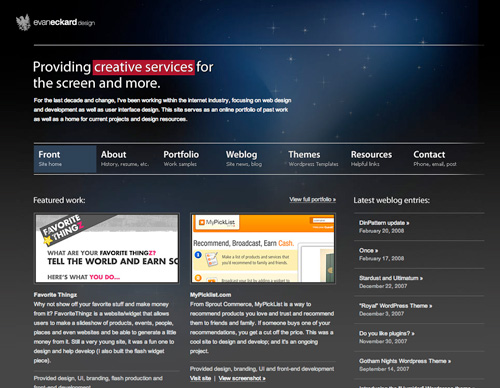
Evaneckard in Creating A Successful Online Portfolio
The Portfolio of Evan Eckard is an example of a website that promotes the work from the first page and Gets to it quickly.

In the article Creating The Perfect Portfolio author Collis Ta’eed offers portfolio advice from the perspective of a potential employer. One of his section titled Get to it on the reasons to limit the number of portfolio pieces you have and make finding your best portfolio pieces easy. A potential employer needs to review many potential applicants quickly. You are more likely to make the cut if your best work is promoted prominently. The Portfolio of Evan Eckard is an example of a website that promotes the work from the first page and Gets to it quickly.

Pitfall #2: Information Cramming

There is an issue of wanting to say too much in too little space when creating your portfolio. There is a balance that needs to be achieved with how many pages deep you have users clicking for more information and how much information you try to fit on a page. This is an issue to be aware of when constructing your portfolio.

The tighter you pack your portfolio the more likely it will appear cluttered. If you do need to put a large amount of information on a page see the post Grid and Column Designs over at Web Designer’s wall. It will give you some great ideas on how you can use the grid to your advantage when presenting a vast amount of information.
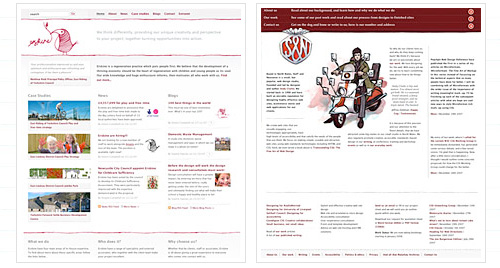
Webdesignerswall Grid in Creating A Successful Online Portfolio
This article will give you some great ideas on how you can use the grid to your advantage when presenting a vast amount of information.

Pitfall #3: Overdoing It

You’re less likely to go wrong if you keep things simple and organized. You can apply this mindset to all areas of your portfolio. Less is more. The more you try to do in your portfolio the more chances there are for things to go wrong.

If you’re trying to showcase eighteen services you offer you’ll have less success than promoting a few prominently. If you show too many types of work or try to show too much work of any type than you’ll likely to drown the user. They won’t find your prominent pieces that show how great your work is.

Pitfall #4: Uncommon Navigation

Designers have an urge to stand out as unique. The last place to follow this urge is in your site’s navigation. It’s a matter of numbers. If a large number of people coming to see your portfolio will have difficulty navigating through it, your portfolio will fail to meet its goals.

On the blog Astheria in the post My Last Portfolio Sucked, Yours Might Too the author points out some excellent examples of navigation choices to avoid. In this article Kyle Meyer reviews 200 portfolios and points out the problems with using them. Navigation problems made up over 32 percent of the issues encountered.
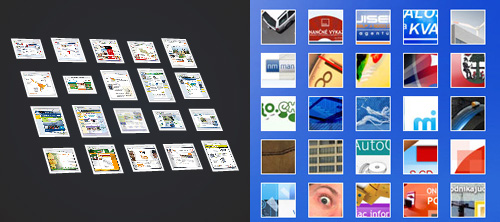
Astheria Thumbs in Creating A Successful Online Portfolio
This article presents some excellent examples of navigation choices to avoid.

Pitfall #5: Visual Clutter

Consider the purpose of any decorative element you bring to your portfolio. If they fit your goals and compliment your work that’s great. Otherwise remove them. White space helps to give a professional feel to your portfolio. The more visual elements you try to push into an area the more difficult it will be to maintain a feeling of professionalism.

Consider visual hierarchy as a way to lead your viewing through the page. At Boxes and Arrows the article Visible Narratives: Understanding Visual Organization explains the principles of visual Hierarchies.

Hierarchy Changes in Creating A Successful Online Portfolio

In the interview Where Visual Design Meets Usability – An Interview with Luke Wroblewski, Part II both page hierarchy and visual clutter are addressed. In the article he summarizes some of Edward Tufte’s teachings on avoiding superfluous data.

12 Principles of Effective Portfolio Design

Below you’ll find 12 suggestions which you can use to improve your portfolio or get it right first time when designing from scratch. Please keep in mind that some of these suggestions require patience, time and quite a lot of planning. However, it’s worth it. And the examples provided below show that one can achieve outstanding results with just following these 12 simple rules.

1. Define your Criteria and Strategies for Success

As with any project it will help you to clarify your goals before you begin. Once you know your goals then it will effect every decision you make about creating your portfolio.

Below are some common portfolio goals. Also, be aware that often portfolios try to accomplish more than one goal. Or, consider creating more than one portfolio that serves a different purpose.

  • The Hire Me Portfolio focuses on getting you a job. If you are actively searching for a job then the current goal of your portfolio is to get hired. In this type of portfolio you can target the work you show to the type of company you want to work for.

  • The Sales Generation Portfolio focuses on keeping a flow of work always coming in the door. The goal here is to generate leads. And move potential customers through your sales channel.

  • The Reputation Building Portfolio focuses on building your name in the industry and online. This may take the form of an artist’s showcase. Or tie your work together with a blog on your portfolio site.

  • The Networking Portfolio focuses on building relationships. There are many networks that have excellent portfolio building tools. They have some advantages to placing your portfolio on their website. Chiefly among them is to leverage the site space for networking.

2. Consider Using Multiple Portfolios

There are multiple reasons to have more than one portfolio. You may have more than one skill set that you would like to promote separately. You may want to create a portfolio that is targeted to landing a specific job and send it to a marketing director at a company. They’ll appreciate that. It saves them time and shows you really want the job. Even if its a one page portfolio.

Even if you are filling the portfolio with the same work you will still benefit by having multiple portfolios within different groups online. Take the case of Nik Ainley, a UK-based designer and illustrator. He has multiple portfolios that all serve complimentary goals. He chose to participate in multiple portfolio-based communities to build his reputation and network with other designers. His website Shiny Binary has received over 1 million visitors.

Shinybinary in Creating A Successful Online Portfolio

He has a Portfolio on Behance. He’s involved in numerous groups there and has a large Inner Circle. And it prominently displays that he is available for Freelancing, Long-Term Contract, Full-Time Hire, or Consulting work.
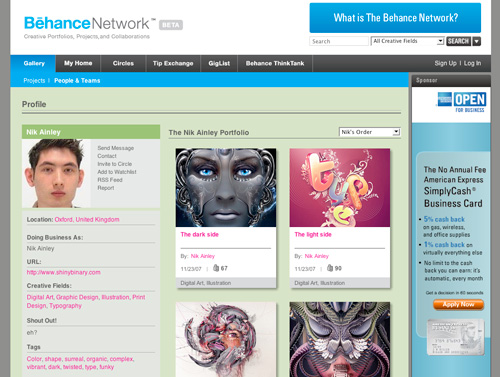
Shiny Behancenetwork in Creating A Successful Online Portfolio

Nick has a very popular Portfolio on DeviantArt. He’s been a member there since 2004. He has over 80 Portfolio pieces and over 1,000 comments on his work there. He has a lot of fans that have his works marked as favorites.
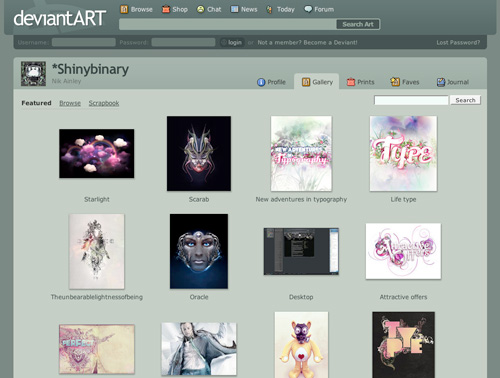
Shiny Deviantart in Creating A Successful Online Portfolio

He is less active though he does have a Gallery on CPLUV. His Portfolio on Depthcore is really good. This site features artists that have to be invited to contribute. So, the quality of work on this site is really high.
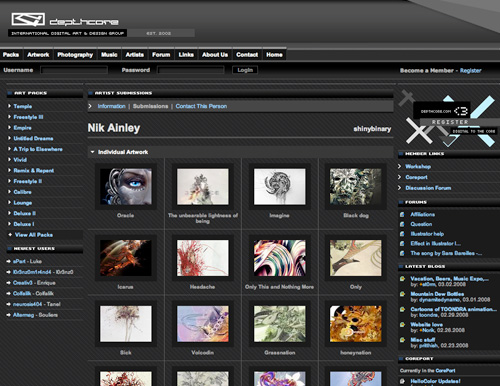
Shiny Depthcore in Creating A Successful Online Portfolio

Overall Nik Ainley shows how you can benefit from having multiple portfolios online even when the work you are showcasing is similar in each portfolio. That is because you are taping into a different community with each portfolio you create. You’re meeting people, exposing them to your work, and making new connections by placing your portfolio within different communities.

Some portfolio communities to look at:

3. Target Your Market

The more you target your design to a specific market the more it will speak to the visitor within that market. If you are looking to land corporate clients in a conservative industry than present them with work that is clean, marketable, and looks successful. Don’t showcase edgy, grungy, or arty work unless that’s the market you’re going after.

In the article The Secret to Getting a Lot of Web Design Work the author has a section “Design the portfolio you think your clients want to see”. This is the point. Make your portfolio focused on your target market. If you’re trying to get clients then design keeping these clients in mind.

There are more benefits outlined to targeting a specific market. In the article Finding a Target Market the author Barbara Pellow discusses both Vertical and Horizontal Approaches to target marketing. She identifies some of the additional benefits of target marketing. Speaking to a specific audience allows you to become a recognized expert in the field easier. Targeting your market can differentiate your services.

Consider this example: a web designer that specializes in designer Law Firm websites has a different target market than a company that builds Rock Band websites. The language, graphics, and approach sch portfolios take will differ greatly. If a web designer has numerous successful Law Firm websites in their portfolio it will make it easier for a potential law firm client to choose them over another designer or design agency.
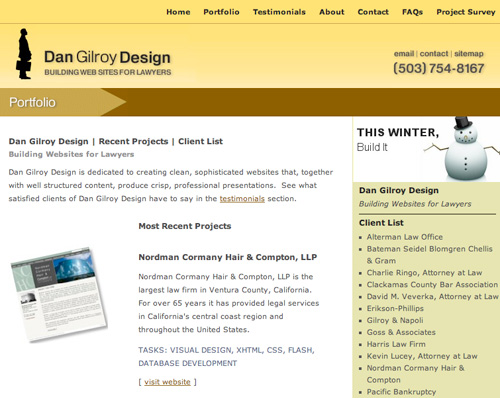
Dan Gilroy Portfolio in Creating A Successful Online Portfolio

A designer is more likely to stand out by targeting a specific market. Their success rate at landing jobs in a specific niche and being perceived as an expert in that area will increase. Take a look at the Dan Gilroy Design Portfolio for an example of a website that successfully targets a specific market.

Having a target market in mind is essential to choosing your portfolio pieces and your approach to designing your website.

4. Make Usability a Top Priority

Navigation is a top consideration as a user being able to view your portfolio is of paramount importance. See the point about Uncommon Navigation above. Some other considerations are using web standards. This is especially true if you’re looking for a job as a web designer today. Read this article Five steps to a better design portfolio by Jefferey Veen. In it he discusses some issues around best practices in your portfolio in relation to how you will be perceived by a potential employer.

Also, don’t discount the search bots. Work toward better Search Engine Optimization. The blog at SEOBook is a rich resource on this topic. Good SEO will improve the ability for potential clients to find you through the major search engines.

5. Utilize the Right Technology

If there are technologies inherent in your job description then it may make sense to build your portfolio with that technology. Sure Flash is cool, but is it right for your website. Probably not if you’re a logo designer. Though if you’re trying to land a job as a Flash Designer at a top notch Interactive Design Agency like Story Worldwide than its the right choice.

The New Media Designer Portfolio of Mathew V. Robinson presents an easy to use navigation. Essential to the success of a Flash site, it’s fast loading. His portfolio is highly usable and looks great.
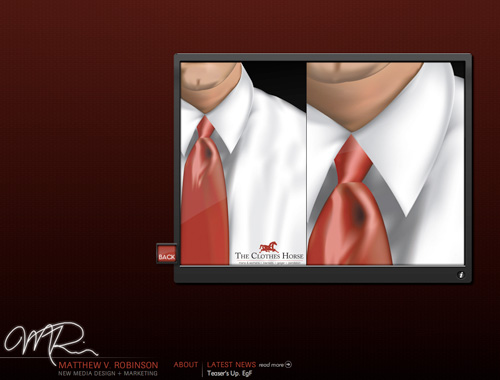
Mathew Robinson in Creating A Successful Online Portfolio

Consider maintainability when deciding on technologies. Simplifying your portfolio as much as possible will ease the time you’ll have to spend on upgrading or making changes to the website. You should consider how easy it is to add and remove portfolio pieces.

The easier it is the more likely it is you’ll update your portfolio on a regular basis. Jamie Gregory has an simple, elegant, and effective one page portfolio. He would have no trouble adding or swapping out pieces from this portfolio.
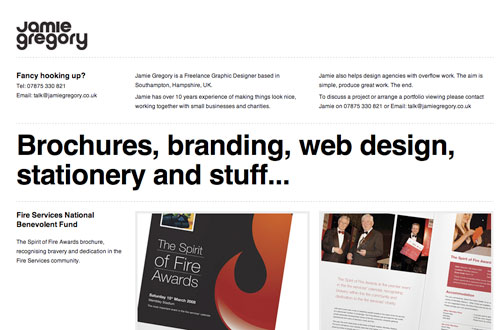
Jamie Gregory in Creating A Successful Online Portfolio

Consider enhancement when looking at technology. Often a wise choice is to add a little Javascript or other technologies rather than rely on them. It can help you to achieve your goals without overly complicating your portfolio design. When visiting Marius Roosendaal’s Portfolio take a moment to explore how clean the source code is. This is done while providing elegant Javascript-based solutions.
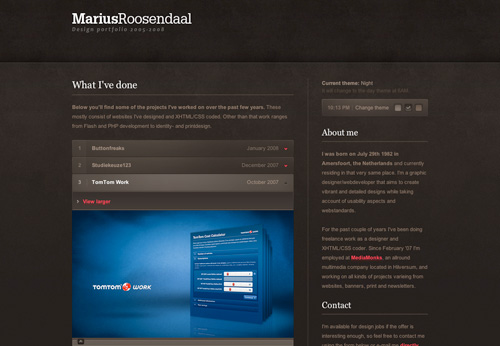
Marius Roosendaal in Creating A Successful Online Portfolio

Choose between creating a static site or utilizing a CMS (Content Management System). One page portfolios are really easy to update and a good way to quickly show your best work. You’ll also have no issues with navigation, as there is only one page. Though there is little flexibility there and you’re not leveraging some additional features that content management systems have for promoting your work, like having a blog.

6. Plan Your Portfolio Project

One of the key ingredients to creating a successful portfolio is to approach it like you would a client project. Manage this project as professionally as you would any other web project you take on. Set aside the time needed to achieve the goals you’ve outlined for the portfolio. Make sure you set up deadlines so that you have key targets to hit.

7. Narrow the Scope and Type of Work Promoted

Your portfolio should be limited to the best work you will promote within the scope of your goals. If you are taking on website redesigns then your portfolio should consist only of that, not logo designs or print work that you’ve done. If its not the work you’re targeting than don’t include it. You will be more successful.

Jesse Bennett-Chamberlain redesigned his website 31three.com back in May of 2007. Before doing so he used to have print and logo designs in his portfolio. In the redesign he clarified his target market by focusing on assisting developers with design. His current portfolio only presents website and interface designs he has created because that is the type of work he is looking for. This portfolio is very successful on many points and has been referenced in many articles throughout the blogosphere.

31three in Creating A Successful Online Portfolio

That doesn’t mean he doesn’t do logo or identity design. He does do that, but he’s recognized that logo design is not why people come to him. They come to him for website designs for new or existing sites and logo design may be a part of the package. See more about his process at this article Redesigning the ExpressionEngine Site.

Certainly some designers or firms will have mixed bag portfolios. The more types of work you do successfully the greater challenge you’ll have in promoting that work. When possible keep the work on display to a minimum. Displaying 10 of your best pieces of work is often better than displaying 50 good pieces.

8. Provide Adequate Contact Information, Documentation, and Explanations

Contact information should be easy to find and in the case of contact forms they should be easy to use. Prominently place this kind of information. The Hicksdesign Portfolio has contact information displayed well on every page.

Hicks Design in Creating A Successful Online Portfolio

It helps to build confidence with your target market to clarify your role in the projects you present in your portfolio. If you designed the website, but someone else coded it, then state that. If you did everything then confidently declare that as well.

The Portfolio of Cameron Moll employs this strategy on each portfolio piece.
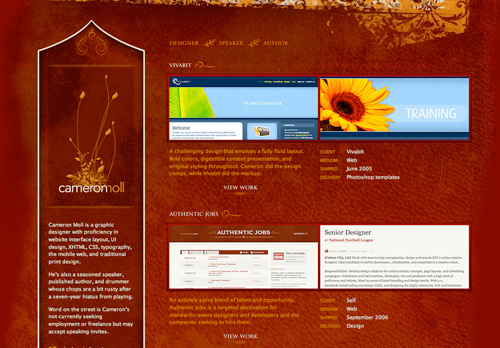
Cameron Moll in Creating A Successful Online Portfolio

Providing case studies gives a deeper view into your process. Once a potential employer or client has narrowed down their list they may come back and start to take more time with your portfolio. Case studies will show how competent and thorough your process is. David Airey does a good job of providing easy to find case studies on his portfolio pieces.
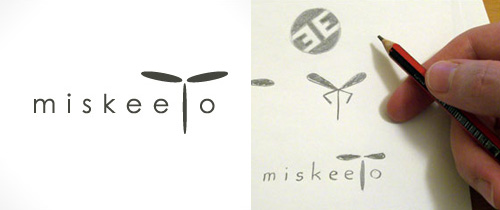
Miskeeto Process in Creating A Successful Online Portfolio

Client testimonials are effective for persuading those that visit your site that you will deliver on your promises. It increases the level of professionalism when tastefully incorporating testimonial into your portfolio. David Airey has an article titled The Importance of Client Testimonials that has useful information on this subject.

9. Present Your Work Within the Confines of Your Goals

Your work needs to stand out foremost in your portfolio. If your portfolio site design overpowers the work on display then you’re not likely to meet your site goals. Consider carefully every visual element you add to the design. When unsure shoot for simplicity.

10. Infuse Your Personality Into Your Design

Nick La has a portfolio design that shows his design style and interests. The unique background illustration stands out. It doesn’t interfere with the usability of the site, but it gives it a beautiful wrapper. For some this would be to much and interfere with the work being presented. Though the work presented in his portfolio works fine. He sets the portfolio pieces against a solid white background in a strong column-based design. The work presented fits with the style of the sites background illustration. Pulling off this kind of personal infusion into the design of your site is difficult to achieve.

Doing this well makes your portfolio not only memorable but remarkable! Nick La achieved tremendous success with his portfolio for N.design Studio. Being remarkable in the design of your portfolio often means bringing to fruition the personal design taste unique to you that has been cultivated over the years.

Ndesign in Creating A Successful Online Portfolio

Seth Goden has some excellent points about being remarkable in his post How to be remarkable. Here is a quote from the post “Remarkability lies in the edges. The biggest, fastest, slowest, richest, easiest, most difficult.” This is a good point, but there is a huge risk involved in that pursuing the remarkable edge you ride right off the cliff.

Carefully consider how you will blend your remarkable personal elements into your portfolio without sacrificing usability and without misaligning the balance between the prominence of your portfolio and the design of the site itself.

11. Promote and Leverage Your Work

There are many techniques for promoting your portfolio. Consider joining professional online communities and networking with other community members. We’ve already looked at some communities that you can place a portfolio on. Place a thread in a design forum about your portfolio. Submit your design to gallery websites. Almost any technique that can be used to promote a website can be used to promote your portfolio.

Add a blog to your website. The more traffic you can pull to your website the more exposure your portfolio will receive. Dan Cederholm was an early adopter of this technique and achieved fame with his blog Simplebits. His portfolio resides successfully on the same site.

Simplebits in Creating A Successful Online Portfolio

Leveraging your work involves linking to it when you send emails. Include a link to your portfolio site in your Facebook profile or any other community you belong to. Infuse your portfolio site within your communications and your online identity.

12. Develop Your Long-Term Portfolio Goals

It always helps to have a view toward the future. Your portfolio needs are likely to change many times as you develop different projects over the course of your career. Though even looking at the whole of 2008 and not only at the next week can make a big difference in the choices you make when creating your portfolio.

Putting it all together: a successful portfolio finds that perfect blend of your personality, prominence of work, simplicity, and ease of use that makes your portfolio stand out from the crowd and achieve your goals.

Sean Hodge is the creative mind behind AiBURN, a weblog about design, creativity, inspiration and graphics.

Post Rating
1 Star2 Stars3 Stars4 Stars5 Stars (5 votes, average: 5.00 out of 5)
Loading ... Loading ...

Tags: ,

Advertising
  1. 1
    Jerome Gravel-Niquet
    March 4th, 2008 11:04 am

    If you actually want to make usability the top priority, then there goes any fancy way of displaying information.

    Usability relies on commonly used and familiar elements on web pages. Yet, in my opinion, portfolio should look fancy.

    I’m not saying usability should be completely ignored, but you can certainly experiment and try it yourself or make a friend try it real quick just to see if your website is truly intuitive to use or not.

  2. 2
    Fran
    March 4th, 2008 11:19 am

    Sorry, but if I´m a client and I don´t undertand your experimental portfolio, you don´t work for me.
    Really, I´m interaction design specialist and when we have looking for a web designer and see his portfolios, the first thing than I do, is looking theirs diferents works, for diferents clients, no only style.

    Believe me, follow the steps of this article.

    PD: sorry for my english.

  3. 3
    Daniel Holter
    March 4th, 2008 11:21 am

    Great advice and links, as always….

    Thanks!

  4. 4
    ben
    March 4th, 2008 11:26 am

    Great article, definitely some tips I want to be sure to keep in mind!

  5. 5
    Thomas Maurstad Larsson
    March 4th, 2008 11:36 am

    Just working on one myself acctually! This was very apriciated!

  6. 6
    Mike
    March 4th, 2008 11:47 am

    I’ve always been a developer interested in design, likewise, I’ve always thought a portfolio is important, but there doesn’t seem to be any sites offering guidance on what to show and what not to show for a developer (as showing off the graphical side doesn’t really sell me), any tips?

  7. 7
    imaginepaolo
    March 4th, 2008 11:56 am

    Really good, great collection of portoflio tecniques.. .

  8. 8
    Reginald
    March 4th, 2008 12:35 pm

    I read your post, and I think I get the bottom line of your article.

    You have certainly addressed some fundamentals for online businesses and writing in general that any individual can put to practical use.

    What I would have hoped that you would expand upon is the focused definition of portfolio, especially with regards to the context you associated it with in your post.

  9. 9
    Fariez
    March 4th, 2008 1:12 pm

    Very clear explanation about making Port Folio.. I like this post.. digg it … next

  10. 10
    Lindsey
    March 4th, 2008 1:34 pm

    @Mike

    Maybe you should hire a designer to do the graphic elements and layout . Ad a developer you probably shouldn’t have anything over the top. Just something clean and elegant that shows off your coding accomplishments. Communicate to them how your coding or your projects are innovative and a good designer can communicate that through design.

  11. 11
    Kyle Meyer
    March 4th, 2008 1:44 pm

    Thanks for including my article. : )

  12. 12
    Evan Meagher
    March 4th, 2008 1:54 pm

    Great tips, regardless of industry. Love the example sites. Wonderful post!

  13. 13
    Polo
    March 4th, 2008 2:10 pm

    Very cool post, I love your review on your blog from your last folio.
    Thank !

  14. 14
    Matt Radel
    March 4th, 2008 2:59 pm

    Great tips – thanks. Now I just need to get around to actually creating my portfolio site…

  15. 15
    Wojtek S.
    March 4th, 2008 3:32 pm

    Great article as always, thank you Smashing Magazine!

  16. 16
    Kristian
    March 4th, 2008 3:47 pm

    I agree that usability has to be the top priority. I beleive that a porfolio page is one of the most critical pages on any website. The portfolio link is what a reader clicks on after they like what they see on your home page. I beleive that if the user didn’t like what they saw on the home page they would not have gone to the portfolio page at all.
    So I think that if a user is at your portfolio page there is no need to be doing any showing off. The showing off all happened on the home page, and it worked.
    Now its a time where I would like to get serious and tell my clients how I have helped other people. I like to see the portfolio as a page where I build trust with my potential clients. If they are at my portfolio they already like my skill level. If I can just build enough trust I am on the way to landing a client.
    I think that building trust with your client isn’t a time to be using gimics, fancy navigations and other novelties. I like to just give them the information that they want to see. In a very straight forward manner.

  17. 17
    Braintrove.com
    March 4th, 2008 4:14 pm

    Very nice list. Very useful information. Thank you.

  18. 18
    Benjamin David
    March 4th, 2008 4:46 pm

    Great article, as usual ! Thank you !

  19. 19
    John Faulds
    March 4th, 2008 7:17 pm

    Another tip for success? Using good grammar. Reading this article made me cringe.

    I’ll admit to being a bit of a grammar nazi, but I think a bit of leeway should be given when the authors’ original language isn’t English.

  20. 20
    Alex
    March 4th, 2008 7:34 pm

    Oh perfect, i was creating an online portfolio just now! Thanks!

  21. 21
    Eric Kelsey
    March 4th, 2008 8:49 pm

    If your goal is to get hired by a company, you shouldn’t make your portfolio look like it is a business. This is one of the biggest mistakes I see from designers who are seeking employment. I wish they would have included that in this article.

  22. 22
    Eric
    March 4th, 2008 8:56 pm

    I agree 100 percent! No matter how good your site is, bad spelling and grammar make a person look unintelligent.

    Spelling and grammar are especially important when dealing with print design. Proof reading is part of the job and mistakes can be expensive.

  23. 23
    Mithun
    March 4th, 2008 9:42 pm

    I was wandering for good advice for creating a portfolio! Thanks, Great stuff!!

  24. 24
    matt
    March 4th, 2008 10:29 pm

    Great article…

    I am working on a free online portfolio website for Artists, Designers, and Activists, where users share their Creativity, Activism, Travel Adventures, and Activities with each other.

    It is still in development so it would be great to get some feedback as we continue to refine the site.

    I have always believed that art and design has the power to make the world a better place. As an artist and a industrial designer, I try to do my part every day.

    Matt

  25. 25
    Ian Loew
    March 4th, 2008 10:37 pm

    There is a consistent language to the web which should be broken now and then. However when trying to display your portfolio it should be as easy as flipping through a book. Potential clients want get in and out of your website asap. If a website catches their interest then they might be willing to go back and delve further.

  26. 26
    alex harris
    March 4th, 2008 11:22 pm

    I redid my portfolio last weekend and not knowingly (I think) I followed these guidelines. But instead of separate portfolios I used different blogs to create verticals of the niche I design for.

  27. 27
    gr8pixel
    March 4th, 2008 11:27 pm

    Thanks for the wonderful article SM!
    I’m sure if you’re following these steps, you can make a big impact in your life!

  28. 28
    stewe
    March 5th, 2008 2:58 am

    Great article!

  29. 29
    OverZero.it
    March 5th, 2008 3:12 am

    Another GREAT article.
    Iteresting and useful, thank you!

  30. 30
    dragoshell
    March 5th, 2008 5:48 am

    great article ;)

  31. 31
    microoweb
    March 5th, 2008 6:07 am

    Great recolecttion as always, thank you SM!!!

  32. 32
    Pete Marshall
    March 5th, 2008 7:24 am

    I wrote an article in a similar vein around crafting a great portfolio and I believe the most important factor is letting the work speak for itself.

    http://petemarshall.wordpress.com/2008/02/08/8-steps-to-crafting-a-great-portfolio/

  33. 33
    superxtian
    March 5th, 2008 8:11 am

    great work

  34. 34
    lica
    March 5th, 2008 9:13 am

    I always have great ideas for clients, but when it comes down to my own portfolio I usually get ’stuck’! This article is a great way to get ‘unstuck’! Thanks

  35. 35
    Jonathan
    March 5th, 2008 11:04 am

    Really really good article.

    Very timely as I’m in the process of finally putting together my own portfolio.

    Thanks again!

  36. 36
    Jeff
    March 5th, 2008 12:07 pm

    Some great tips here.

  37. 37
    Lukas
    March 5th, 2008 12:44 pm

    Very nice list… thanks for this. You got my bookmark!

  38. 38
    Vernon
    March 5th, 2008 3:28 pm

    Great list of ideas. I’ve tried to condense my site to include the necessary info right on the homepage. This gives me an opportunity to display a list of sites right from the get go and also include information about how I can help as well as a contact form.

  39. 39
    Ginger
    March 6th, 2008 2:36 am

    Usability as your top criteria for designing your portfolio sit is THE WORST mistake you can make. People should find easy their way to navigate the site, no doubt of that, but if you try to attract people the worst you can do is be part of the crowd. If you take a look at some of the most successful web studios you will see they are doing more visual appealing sites instead of “do it simple”. Making a simple portfolio design and you will get simple clients with simple ideas. That’s a little bit exaggerated but you get my point.

    Actually Jerome Gravel-Niquet was right about it. If you want people to notice you that be creative. Since most of the people just follow steps in online tutorials you have the best chance to get ahead of them:-)

  40. 40
    Shane
    March 6th, 2008 5:37 am

    An interesting article – usability needn’t kill how interesting something is; we should always keep usability in mind.

    Sure, a Portfolio should be interesting, but not at the expense of a user’s goals and objectives.

  41. 41
    Kelly Shaw
    March 6th, 2008 2:02 pm

    Great Article, I’ll be sharing this with our team here.

    Points 8 and 9 cannot be over emphasized.
    I regard a portfolio as a collection of stories about problems and solutions.
    The case study approach shows both creative and business acumen.
    Revealing role in these stories is also essential as it shows prospective employers what you’re ready for.

    Portfolios are great at affirming tacit knowledge, in turn boosting confidence in developed skills.

  42. 42
    Richard
    March 6th, 2008 7:23 pm

    Good ideas, but painful to read. I agree with John Faulds @23 about the cringe factor. If language is not a strength of yours, then keep the writing on your site to a minimum. You will be judged by your attention to detail in your writing as well as your designs. And if you’re writing an article, please at least learn the differences between “your” and “you’re”, “then” and “than” and “its” and “it’s”. There were too many sentences like the following in this article:

    “Though if your trying to land a job as a Flash Designer… than its the right choice.”

  43. 43
    Yogi
    March 7th, 2008 5:09 am

    Great article, will need some times to read the whole package.
    Thanks!

  44. 44
    Palmer
    March 7th, 2008 9:02 am

    This has been very helpful! Thanks SM!

  45. 45
    Sean Hodge
    March 7th, 2008 9:04 am

    Thanks for all the feedback everybody. I’m glad the topics presented in the article are helpful to the community. Some commenters have given some helpful links and portfolio suggestions as well and that’s great.

    I appreciate the grammar criticism. Embarrassingly, I am from the US and a native English speaker. I’ll edit with more care in the future. Lesson learned.

    The specificity of @48 Richard’s comment is especially helpful. It pinpoints simple mistakes I made. Shows me what to look for next time. And thanks to @23 John Faulds for bringing this issue up.

    In the future I’ll put the article aside for a couple hours and come back to it with fresh eyes. Then check for errors I commonly make. That should minimize mistakes. Thanks.

  46. 46
    Todd Hill
    March 7th, 2008 6:48 pm

    Very interesting article as always. I will make sure to keep these ideas in mind when designing a portfolio.

  47. 47
    Razvan
    March 8th, 2008 8:28 am

    Good article, I’ve just created a simple, 1 page portfolio using carbonmade.com

  48. 48
    Mohodin
    March 8th, 2008 4:00 pm

    Eric Kelsey at comment 25 hit the nail on the head. No company boss in his right mind would employ someone who can potentially steal away his clients. So if you want company to hire you, don’t make your portfolio look like A BUSINESS.

    Eric, well said.

  49. 49
    Ezequiel
    March 9th, 2008 6:48 pm

    hi!

    any cms specialy for portfolio?

    any idea?

  50. 50
    dharma
    March 10th, 2008 3:51 am

    Amazing tips… that does make me have a second look at my folio site.

  51. 51
    Clear Ice
    March 11th, 2008 1:05 am

    I’ve always wanted to have my own portfolio- something that will attract potential clients at the start for my freelance work. I’ve done one up, but your tips here will sure give it a proper focus and direction. And I love it so much! I’m working on my new portfolio again, thanks. Back to the drawing board!

    I’ll keep you updated! Thanks!

    -clearice

  52. 52
    oneheart
    March 12th, 2008 2:59 am

    your tips are useful!
    most websites are either too cluttered or not reader-friendly. i like the way you structured your content, and utilize visuals to illustrate your points and capture readers’ attention =)

    -=oneheart=-

  53. 53
    details
    March 14th, 2008 4:56 pm

    thanks much for this post, i found it pretty interesting. i’m in the process of redesigning my portfolio, so this is all very helpful.
    .details.

  54. 54
    James
    March 25th, 2008 4:51 am

    Very useful content. Thank you. Building a target audience is such an important part of any business.

  55. 55
    Tina
    April 2nd, 2008 10:05 am

    Can anyone recommend a good software to use to display my work? I’d like one that allows me to show multiple project images and add captions or a description of the work that was done.

  56. 56
    julos
    April 10th, 2008 3:24 am

    Very interesting article !

  57. 57
    sanza
    June 4th, 2008 1:32 am

    thanks for the tips, more like the lessons (”,) you dont get such advise for free

  58. 58
    Daryn St. Pierre
    July 15th, 2008 2:21 pm

    Great article! I’m actually in the process of planning mine. This will definitely help out.
    One website that should be added to the list of portfolio websites, is Shadowness.com. The quality of work there is unbelievable.

  59. 59
    Nita
    August 6th, 2008 2:58 am

    I’ve returned this article for the 20th time and I always find something new and useful. Vey provacative and inspiring.

  60. 60
    Tijs Teulings
    September 3rd, 2008 12:43 am

    I guess you could follow most of the guidelines here and still rather easily setup your portfolio by using our hosted portfolio service fresh.li. All our portfolio templates have been created with visual and informational clarity in mind, the navigation structure is simple, the urls work well for SEO purposes and your clients won’t be distracted by the community ‘features’ offered in some of the other portfolio services mentioned. Give it a spin is all i’m saying :)

  61. 61
    Eddie Zhang
    September 22nd, 2008 9:15 pm

    I’m going to read this article ten times, after that, update my web site.
    thank you very much

  62. 62
    Manish K Goel
    September 24th, 2008 10:55 pm

    Gr8 article… keep going!!

  63. 63
    Vanessa Tran
    December 18th, 2008 12:15 am

    Great article – I will keep all these poignant points in mind when I create mine… Thanks for this!

  64. 64
    Paul O'Donovan
    February 16th, 2009 5:25 pm

    Thanks, this page has exactly what I’ve been looking for. I am excited now about choosing an industry, e.g. telecommunications or gardening, then researching the competition. Also.. focusing the content, approach and designs, then looking in the phonebook under that industry ;) Great job!

  65. 65
    smashingmagazine_fan
    February 26th, 2009 8:53 pm

    I’m a convinced fan. great article! Thank You.

  66. 66
    Creamy CSS
    February 27th, 2009 5:06 am

    Thanks a lot for really helpful post! ;)

  67. 67
    Nick
    February 27th, 2009 9:15 am

    I don’t know why but I love design… I just can’t explain it.

    It controls my life!

  68. 68
    Thomas108
    February 27th, 2009 10:55 am

    Great article (of course, its smashing magazine). Found some good ideas to improve a little bit here and there

  69. 69
    Tim
    March 1st, 2009 12:52 pm

    This is a very great article and very helpful indeed. One of the most important points I have gotten about putting a portfolio together is that if you have great work, show off your work, if not, show off your skills and personality. Do do you guys think? Now, the hardest struggle I have is getting a good understanding of where I stand.

  70. 70
    mahmoud bizri
    March 2nd, 2009 4:12 am

    been trying to look for a while for such an article and its great, one of the mistakes i used to do before is displaying my experimental artistic work to employers seeking * a neat / pro designer* then i realized that its the grungy / artistic work that is pushing them away although those artwork shows my creativity so iam working on another set of artworks and ads formal yet creative .

    this article is 10/10

  71. 71
    Scott
    April 9th, 2009 2:40 am

    Really helpful thanks so much :)

  72. 72
    Ximena
    April 24th, 2009 7:17 am

    Hi Sean, I just found this post and I found it very informative and helpful. I was wondering if you had any tips, or more importantly any good pre-built portfolio websites for amateurs that hope to get professional. I’m in college right now but I hope to get a job writing creatively for a magazine. I’m not well versed in HTML, XML or any of that to make a site from scratch but I would like a good presentable place to exhibit my work. If you have any tips I’d appreciate it.

    Thanks.

  73. 73
    Faisal
    April 28th, 2009 4:23 am

    This is one of the best portfolios i have ever seen online
    http://www.designers-den.co.in/web_portfolio/

    I think that should also be in list

  74. 74
    tim
    May 20th, 2009 8:00 pm

    great post. i’ve tried a number of the suggestions you proposed and found behance online portfolios to provide the most traffic/views; but it is probably best to have as many places as possible to showcase your work, no?

  75. 75
    cris
    June 7th, 2009 2:29 am

    it’s Seth Godin, not Seth Goden.

  76. 76
    Roberto Blake
    July 28th, 2009 3:04 am

    This was a great post. I think it covered a lot of ground, and to be honest I’ve seen some very poor examples of online portfolios lately. I developed my own prior to reading this article, but somehow managed to intuitively cover most of these bases. I think the course I had back in college some years ago on client media relations helped in how I approached my portfolio. The key I was told was to answer “buying” questions immediately in this type of design.

    In terms of “buying questions” when hiring a graphic designer, they would go like:
    “I like your work, how do I contact you?”
    “Are you available for freelance work, commissions, do you work on location?”
    “I see you have a lot of print work here, how are you with web design?”

    Allowing your portfolio to answer as many “buying questions” as possible in as little time as possible is something I think is very overlooked.

  77. 77
    Javan Rushton
    July 30th, 2009 10:45 am

    I must say that a lot of time and effort was placed into getting this article together like this. For me- a freelance developer/designer a little over a month now-with an upcoming website and portfolio, this information was priceless. It not only tells you what to do in order to get your website/portfolio up and running, but it also gives you advice as to where to go to promote and market yourself and work. Infinity amount of thanks for all the heads and hands on deck responsible for this more than amazing work!

  78. 78
    Rach
    August 5th, 2009 1:49 pm

    good tips. I’m creating my first portfolio website, and I will keep this all in mind as I create the design.

  79. 79
    Juliet
    August 22nd, 2009 7:59 am

    Great ideas thanks. Another way of building up your portfolio that a friend of mine recommened, is entering in website design and logo competitions, this way you have a chance to have your work used and also the opportunity of cash and other prizes. Take a look at this link, http://en.guerra-creativa.com/

  80. 80
    ReKieM-art
    August 26th, 2009 10:37 am

    Great post, thank you for your informations.Please take a look at my portfolio; http://rekiem-art.fr
    I’d like to have your opinion.

  81. 81
    ravi
    September 24th, 2009 1:09 pm

    This was a great post. I think it covered a lot of ground, and to be honest I’ve seen some very poor examples of online portfolios lately. I developed my own prior to reading this article, but somehow managed to intuitively cover most of these bases. I think the course I had back in college some years ago on client media relations helped in how I approached my portfolio. The key I was told was to answer “buying” questions immediately in this type of design.

    In terms of “buying questions” when hiring a graphic designer, they would go like:
    “I like your work, how do I contact you?”
    “Are you available for freelance work, commissions, do you work on location?”
    “I see you have a lot of print work here, how are you with web design?”

    Allowing your portfolio to answer as many “buying questions” as possible in as little time as possible is something I think is very overlooked.

  82. 82
    Roberto Blake
    October 15th, 2009 3:10 am

    This was an excellent and well thought out wrap up what a portfolio should be.

  1. 00

    There are no trackbacks at this time. If you are interested in leaving a trackback, please use this URL.

Leave a Comment

Make sure you enter the * required information where indicated. Please also rate the article as it will help us decide future content and posts. Comments are moderated – and rel="nofollow" is in use. Please no link dropping, no keywords or domains as names; do not spam, and do not advertise!


Advertisement Advertise with us!
Join in Smashing Forum
  • Re: Correct way to learn PHP

    Start off by reading all the 15 parts of PHP 101 on Devzone.

  • Re: Using Tutorials?

    I say you're okay. I wouldn't straight up jack someone else's design and present it as my own, even if it was a tutorial, but it's certainly acceptable to learn some…

  • Correct way to learn PHP

    So, I'm a designer but I wanna expand my abilities and learn PHP, to be more exact I wanna learn CI - Codeigniter!

  • I wanna make comics!

    Hello,I'm designer but I've never involved in vector painting so I need your help

  • Re: Twitter

    @gatorwebdesignShould tweet something really...

Post your job

