
Smashing Magazine we smash you with the information that will make your life easier. really.
Five More Principles Of Effective Web Design
By Smashing Editorial, April 24th, 2008 in How-To | 109 Comments | Forum
Web design has significantly improved over the last years. It’s more user-friendly and more appealing today — and there is a good reason behind it: over the years we’ve found out that design with focus on usability and user experience is just more effective. Modern cut-edge design isn’t filled with loud happy talk and blinking advertisements. We’ve learnt to initiate the dialogue with visitors, involve them into discussions and gain their trust by addressing their needs and speaking with them honestly and directly.
Few weeks ago we’ve presented 10 Principles Of Effective Web Design — a comprehensive article about effective web design and provided you with insights about how users actually think as well as with some examples of how effective designs can be achieved.
This article highlights 5 further principles, heuristics and approaches for effective web design — approaches which, used properly, can lead to more sophisticated design decisions and simplify the process of perceiving presented information.
Please notice that you might be interested in the following usability-related articles:
- 10 Usability Nightmares showcases usability nightmares you should avoid when designing functional and usable web-sites,
- 30 Usability Issues explains important usability issues, terms, rules and principles which are usually forgotten, ignored or misunderstood.
1. Use an effective marketing principle
In order to sell a product or a service you need to be able to effectively inititate the dialogue with random visitors of your site. Since your visitors have actually come to your site, they are willing to hear to you and learn what you have to offer. So how do you approach this potential clientele to maximize your earning at the end of the month?
Suggested by Strong in 1925, AIDA is the effective marketing model which describes a common list of events that are very often undergone when a person is selling a product or service:
- A - Attention (Awareness): attract the attention of the customer.
- I - Interest: raise customer interest by demonstrating features, advantages, and benefits.
- D - Desire: convince customers that they want and desire the product or service and that it will satisfy their needs.
- A - Action: lead customers towards taking action and/or purchasing.
- Nowadays some have added another letter to form AIDA(S): S - Satisfaction - satisfy the customer so they become a repeat customer and give referrals to a product.
In this context customers should notice that AIDA is usually the way how potential buyers are tricked into buying products or services they actually don’t need. To gain users’ trust designers need to make sure that the site provides genuine information and there is no hidden context in which the content can be understood in a different way.
It’s also more effective to offer visitors concrete arguments, situations and ideas of how a product or a service can be used instead of bombarding them with loud and empty ad-slogans.
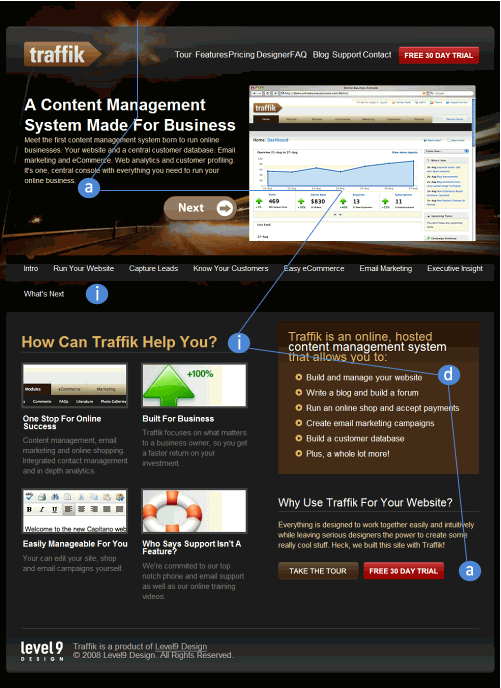
Consider the example presented above. traffik follows the AIDA principle. If the visitors expect some information about a Content Management System they expectation is immediately confirmed with a brief introduction at the top of the site. Thus, potential customers are attracted and remain on the site (Attraction, a). The interest is then raised by showcasing features and benefits of the product (Interest, i).
To communicate how the service will satisfy user’s needs the brown info-block at the right hand at the bottom of the page is used (Desire, d). Finally the users are guided to “Take the tour” and “Free 30 day trial” buttons which attempt to lead customers towards purchasing (Action, a).
A lot of other models are known in order to sell, e.g. the BOSCH-Formula (developed by Peter Hubert):
- Be inquisitive, ask open questions
- Offer solutions, talk about the endresult benefits for the customer
- Stimulate the senses, let the customer test your product
- Cross your sales, think of all the necessary accessories
- Hit the closing point, sell when the customer is ready to buy.
2. Experiment with few colors
Dark body copy on white background and light body copy on black background are passive. Vibrant colors can help to highlight some specific elements of the site which you’d like to point users’ attention to.
However, you don’t need to use a vibrant palette to create an effective web design. Sometimes it’s useful to pick a moderate number of colors and use them efficiently. Thus your visitors will immediately see what’s more important. It will also be easier for you to focus their attention on the most important areas of the site.
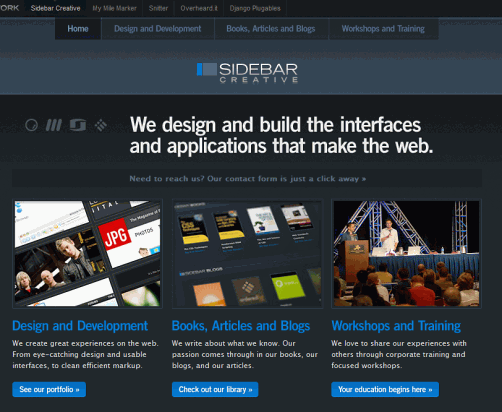
Sidebarecreative.com uses only one dominant vibrant color — blue color stands for links, buttons and clickable elements. White stands for important information which summarizes the content of the current page. The rest is the content of the site with some light blueish hover effects. Excellent, modest and expressive use of colors. That’s effective.
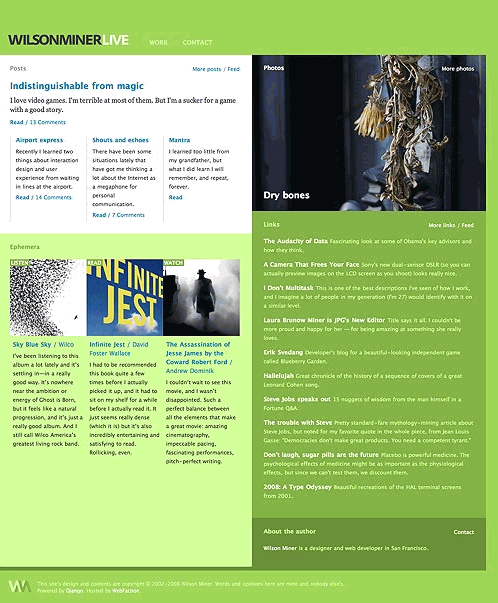
Wilson Miner uses green, blue and pink. The dominating green color looks fresh and comforting. Blue stands for the links and pink for the hover effect. Notice the structure of the site. Although only few colors are actually used, one can immediately recognize clickable areas and detect the different sections of the site.
3. Strive for Balance
In web design balance is important because it provides users with some sense of closure and gives the feeling of permanence and stability. Balanced designs are easier to digest and to understand, because they create a visual hierarchy which clearly displays what is more important on the web-site and what is less important.
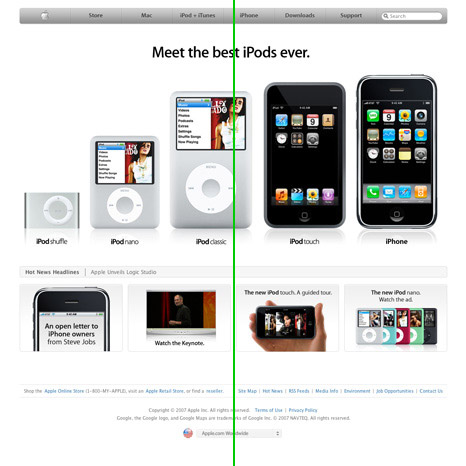
Source: The Elements of Design Applied to the Web
Apple’s design is probably one of the best examples of the symmetrical (also called formal) balance. Single design elements have either very distinctive (above) or very similar (below) weight. They are placed on both sides of an imaginary vertical line on the page which goes through the middle of the user’s screen. The design is rather static and restful which makes it easier for the visitors to comprehend the information which is presented through it. Result: balance creates a simple visual harmony.
Why is Apple’s design so efficient? Because it’s user-centric and product-centric. The design of Apple’s site resembles a theatre stage where visitors are the audience and the product is the entertainer. Notice that the site presents only the product and nothing else. Apple manages to initiate the dialogue offering only most important options.
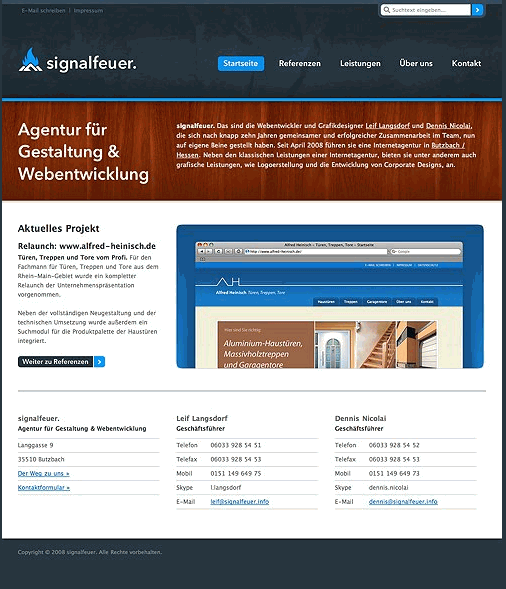
Signalfeuer.info uses an asymmetrical (informal) balance which allows for the more dynamic use of white space (and this is probably the main advantage of asymmetrical balance). The left block is smaller than the right one, however the site offers a very strong balance by using an impressive and balanced grid. Also the choice of colors is quite impressive.
According to the article Principles of Design, “asymmetrical balance may be unequal in position and intensity. To create asymmetrical balance, there must be an increase in intensity to compensate for the change in position. Intensity can be increased by changing size, shape, or tone. For a particular job, the designer might choose to position the elements to one side of the picture plane. The white space opposing must then act as a counter-balancing force.”
This is exactly what has been done on Avalonstar.com. Notice the different shapes of blocks and “hanging” heading of the blocks. White space functions as a counter-balancing force to the content presented on the right.
Grid-based approach can be helpful or even necessary for achieving balanced design layouts.
4. Strive for Clarity
Independently of the design approach, the clarity of both layout and presented information should be given one of the highest priorities in the design process. If there is any chance of misunderstandings and ambiguious titles make sure to get rid of them or specifiy explicitly what is meant. Being more specific is usually better than being less specific.
To achieve clarity you don’t need to make use of “standard” design layouts or basic templates. Risk design experiments if you want to, but keep the clear visual hierarchy and structure of the site’s content in mind. The more organized your categories are, the easier it will be for your visitors to find their path through your site.
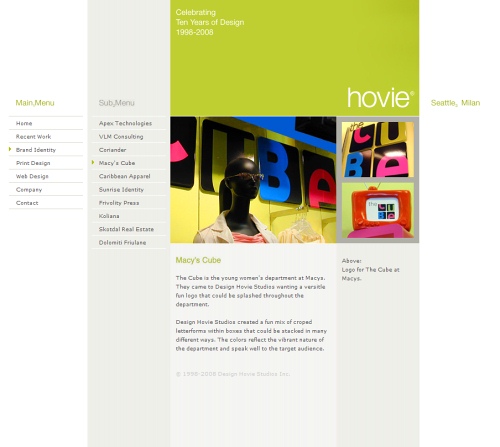
Hovie.com displays an unusual yet very clear design solution. The site consists of five blocks; the first one stands for the main menu which appears when the site is loaded. Sub-menu appears when some section in the main menu is selected.
The current position is displayed by arrows next to the selected option in the navigation menu. In the content area a brief description and the caption of the images displayed above is presented. The design is consistent throughout all pages. Is there any possibilty to somehow misunderstand the design? Not really. That’s simple, clear and effective.
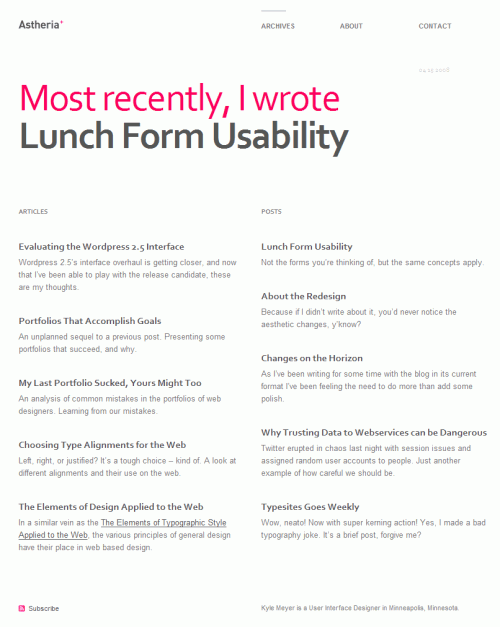
Another example: Astheria.com focuses on white space and has a balanced grid-based design solution. Although the design is rather subtle and uses only one appealing color, you can see immediately where you are now and what options are available. Power of typography at its best. Unfortunately, the site doesn’t display which links have already been visited (Update: Kyle Meyer has added :visited-state now).
5. Address your users’ needs
As web-developer you have the primary task to comfort your visitors, addressing their needs and providing them with sufficient clues for seamless and intuitive navigation. However, to achieve this you need more than just considering an average profile of your users and stick to the decision he/she will be happy with.
To maximize your exposure you have to consider various types and profiles of your visitors. You need to identify major groups and offer each group the functionality its members would be comfortable with. That doesn’t mean that you need to create multiple versions of your web-site; it rather means that you can integrate multiple levels of user interaction in one single design layout.
For instance, according to Shneiderman’s principles of User Interface Design, it’s important to enable frequent users to use shortcuts — to increase the pace of interaction use abbreviations, special keys, hidden commands etc.
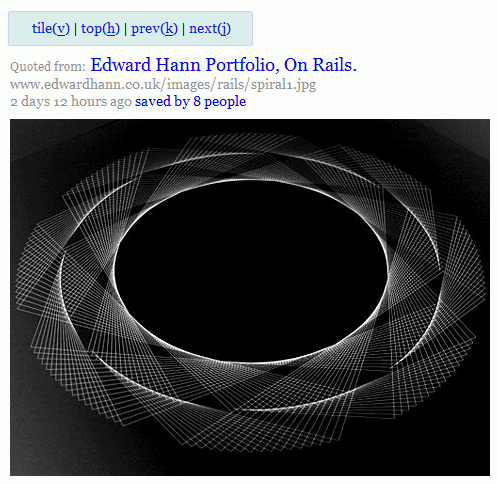
Ffffound.com offers both usual navigation and a Javascript-based keyboard navigation. This functionality is not directly seen to newbies who can browse through the site in a usual manner. Advanced users, however, are able to navigate more efficiently. Of course, you need to make it explicit and clear how to use any advanced functionality and what benefits it offers.
Another possibilities would be bookmarklets, toolbars or some specific tools such as e.g. Flickr uploader. Offering these tools you’ll offer your users easier ways to use your service and they’ll have no need to search for alternatives.
Conclusion
Effective web design doesn’t have to be colorful and pretty — it needs to be clear and intuitive. Make sure you help your visitors to understand the benefits of your web-site and offer them an easy way to explore and use your site.
Symmetrical and asymmetrical balance can be helpful in achieving a solid and clear design solution and thus provide a foundation for rich user interaction. To maximize your exposure, consider different types of users and offer them multiple levels of user interaction which would bring them back to your site.

Sponsors
- Advertise with us!
Smashing Links
Stay in touch
Popular Posts
- 100 Wordpress Themes
- 83 Wordpress Themes
- 80 AJAX Solutions
- 75 JavaScript Techniques
- 70 Best Photoshop Tutorials
- 70 Best Illustrator Tutorials
- 53 CSS Techniques
- 50 Blog Designs
- 50 Graffiti Artworks
- 50 Brilliant Photos
- 50 Movie Posters
- 40 Free Fonts
- 40 Creative Layouts
- 35 Beautiful Icon Sets
- Beautiful Desktop Wallpapers
- Beautiful Macro Photos
- Beautiful Underwater Photos
- Free Design Templates
- Free CSS Layouts
All Posts
- 35 Designers × 5 Questions
- 50 Designers × 6 Questions
- 404 Error Pages
- AJAX Libraries
- AJAX Solutions
- AJAX Tutorials
- Badges and Pins
- Batch Image Processing
- Black & White Photography
- Block Quotes
- Blog Designs 1, 2, 3, 4, 5
- Blog Headers
- Book Covers
- Brochures and Booklets
- Browsers Round-Up
- Browser Test Suites
- Buzz-Monitoring
- Calendar Designs
- Charts and Diagrams: Tools
- Cheat Sheets
- Code Beautifier
- Copyright Explained
- CSS Coding Techniques
- CSS Designs 1, 2, 3, 4, 5
- CSS Clean Code
- CSS Editors
- CSS Expert Ideas
- CSS Float Theory
- CSS Frameworks
- CSS Free Templates
- CSS Footers
- CSS Forms 1, 2
- CSS Frameworks
- CSS Galleries
- CSS Ideas
- CSS Layouts
- CSS Menus
- CSS Print-Layouts
- CSS Specificity
- CSS Styleguides
- CSS Tables
- CSS Tutorials
- CSS-Techniques
- CSS Tools
- Data Grids and Tables
- Data Visualization 1, 2
- Date Stamps
- Design Books 1, 2
- Design Magazines
- Designer's Checkpoints
- Divine Proportion
- Domain Tools
- Dreamweaver Tutorials
- Drupal
- E-Mail Delivery
- Favicons 1, 2, 3, 4, 5, 6
- Firefox Themes
- Fireworks Tutorials
- Flash Designs
- Flash Slideshows
- Flash Tutorials
- Fonts 1, 2, 3, 4, 5, 6
- Font Management
- Form Design Patterns
- Forums
- Fractals
- Gadgets 1, 2, 3
- Google AdSense
- Google PageRank
- Graffiti
- Graphics Design
- Grid-Based Design 1, 2
- Grunge Design 1, 2
- Hand-Drawing Style 1, 2
- Handwriting and Lettering
- Hotkeys
- HDR Pictures
- HTML Template Systems
- Icon Sets 1, 2, 3, 4, 5
- Icons, Templates 1, 2, 3
- Illustrator Tutorials 1, 2
- JavaScript Techniques
- jQuery
- Laptop Sleeves
- Laptop Designs
- Link Building
- Links in New Windows?
- Macro Photography
- Mascots
- Moleskine Art
- Motion Graphics
- Motion Blur Photos
- Movie Posters
- Music Videos
- Navigation Menus
- Newspaper Designs
- Online Converters
- Online Generators
- Packaging Design
- Pagination
- PDF Magazines
- Photoshop Actions
- Photoshop Tutorials 1, 2
- Pixel Art
- Podcasts
- PNG Transparency
- Portfolios
- Pricing Tables
- Product Designs
- Rain Photography
- RSS Best Design Practices
- RSS Feed Icons
- Screencasting
- Screensavers
- SEO Tools
- Shopping Carts
- Short Movies
- Slideshows & Lightboxes
- Smoke Photography
- Source Code Editors
- Splash Pages
- Start Pages
- Stock Icons
- Space, Nebula wallpapers
- Tab-Based Interfaces
- Tag Clouds
- Textures
- Textures & Backgrounds
- Texture Design
- Tooltips Scripts
- Tutorials
- Typefaces 1, 2
- Type Setting Principles
- Typographic Posters
- Typography In Motion
- Typography Showcase 1 2, 3
- Underwater Photography
- Usability Books
- Usability Glossary
- Usability Nightmares
- Usability Principles
- User Interfaces
- Version Control Systems
- Vintage & Retro Posters
- Vintage & Retro Designs
- Vintage & Retro Tutorials
- Wallpapers 1, 2, 3, 4
- Web 2.0 Tutorials
- Weblog Engines
- Whitespace & Simplicity
- Wordpress Plugins
- Wordpress Themes 1, 2, 3, 4
- Wordpress Toolbox
- WYSIWYG Editors
Fresh Bookmarks
25 Beautiful Logos with Sequential Concept
Sequential logos maybe is a new trend among logo designers.
Designing a blog with HTML5
Much of HTML 5’s feature set involves JavaScript APIs that make it easier to develop interactive web pages.
20+ CSS Data Visualization Techniques
Get inspired.
CSS3 – a big storm is coming
With CSS3 media queries and multi-column layouts it will be a whole new ballgame.
Woodgrain: A Free Social Media Icon Set
With 18 social networks represented alongside astandard RSS icon in PNG format,
Webdesign: Five Minute Upgrade
Making Your Design Pop.
45 Stylish Typographical Desktop Wallpapers
These beautifully designed wallpapers are not solely about typography.
The Light CMS Trend
A new trend in CMSs I’m calling “light” CMSs.
10 Impressive JavaScript Animation Frameworks
Create stunning and eye-grabbing animation and transition effects.
Linux System Monitoring Tools Every SysAdmin Should Know
Need to monitor Linux server performance?
Blogroll
- Bittbox
- CatsWhoCode
- Colorburned
- Design Disease
- Designm.ag
- Deziner Folio
- Dr. Web Magazin (.de)
- Dr. Web Shop (.de)
- Freshome Blog
- FudgeGraphics
- I Love Typography
- MakeUseOf.com
- Naldzgraphics
- Noupe.com
- Pro Blog Design
- Search-This
- Six Revisions
- SmileyCat
- Spoon Graphics
- Typesites
- Usability Post
- Walyou
- Webdesigner Depot
- Weburbanist
- Wellmedicated


Spaksu (April 24th, 2008, 9:24 am)
Awesome design. Looks great. Thank you, Smashing Magazine.
Kyle Meyer (April 24th, 2008, 9:30 am)
Hey there, thanks for the links to Astheria. I’m miffed that I missed the visited link styling! I’ve added it now. Thanks again for the feature. :)
Jason Dugmore (April 24th, 2008, 9:36 am)
Great article, thanks for the interesting read. They are all things I will take into account when making a design.
Devin Boyle (April 24th, 2008, 9:38 am)
Great break down, I use most of these practices in my web design. I wasn’t aware of the AIDA acronym. I’ve always used the Keep It Simple Stupid. My main focus is on User Interface, Simplicity, Color, and Grid layout. I try to use the Golden Ratio and everything in 3 rule, but it’s not always possible.
Thanks for the wonderful posts, keep it up.
K.Brown (April 24th, 2008, 10:18 am)
Very useful. I’ve always used the CRAP acronym. Contrast, Repetition, Attention, Proximity.
Josh Clements (April 24th, 2008, 11:48 am)
I believe the full acronym is FCRAP. Focal Point is often left off but I find it to be one of the most important aspects.
Tonamel (April 24th, 2008, 12:43 pm)
A nice article, but I always feel like this kind of article could benefit from some “how NOT to” to contrast with the rest of the content. Seeing something done poorly, with an explanation of why it’s poor is almost always more instructive, in my opinion.
Sandrups (April 24th, 2008, 12:56 pm)
Felicitaciones, muy interesante articulo, es un gran material que hay que tomar en cuenta a la hora de comenzar un nuevo diseño.
Craig Teel (April 24th, 2008, 2:33 pm)
Thanks for the mention of Traffik! All of us at Level9 Design appreciate your review.
Bryan Veloso (April 24th, 2008, 3:48 pm)
I really owe you guys a few beers. I at Avalonstar and we at Sidebar really appreciate the mention. :D
dhanesh (April 24th, 2008, 5:15 pm)
day by day this site is becoming AWESOME!!!!!!
ptamaro (April 24th, 2008, 6:04 pm)
…Smashing’s been awesome from the get-go. Period. :-)
Dustin Boston (April 24th, 2008, 6:48 pm)
I really like this post because it brings up some principals that don’t get heard all the time. One trick that I just learned in establishing balance is to flip your design upside down (either in Photoshop or take a screenshot and flip it). Practical and revealing.
Craig Teel (April 24th, 2008, 9:53 pm)
Great tip Dustin. I’ve always flipped typography upside down to look for kerning issues, but I’ll have to keep that in mind for future site designs.
RedesignYourBiz.com (April 24th, 2008, 11:09 pm)
Thanks a lot for the amazing points… this will surely help me in my web designing business.
thanks again.
tsauri28 (April 24th, 2008, 11:34 pm)
Cool… thanks …
Shane (April 24th, 2008, 11:40 pm)
Inspiring post with some great advice and ideas. Many thanks for posting.
Zoe (April 24th, 2008, 11:48 pm)
great article!
just got the thought, is AIDA today the marketing principle for the web?
imsraaia (April 25th, 2008, 1:50 am)
informative article… thanks..
chopeh (April 25th, 2008, 3:12 am)
Great article.
Also great to see some of Ed Hann’s work in there
Inspirational fella.
Ed’s website
Pachecus (April 25th, 2008, 3:54 am)
Excellent article.. descriptive and useful
Vitaly Friedman & Sven Lennartz (April 25th, 2008, 4:37 am)
@Zoe: yes, AIDA is still being applied. Both in real-life and in the Web.
web design (April 25th, 2008, 5:06 am)
I have done my best by landing here. The stuff on 24.
-
25.
-
26.
-
27.
-
28.
-
29.
-
30.
-
31.
-
32.
-
33.
-
34.
-
35.
-
36.
-
37.
Andre (April 25th, 2008, 6:47 am)
Wow great advice.. I do absolutely agree with your conclusion! thanks.
Bitrix (April 25th, 2008, 12:14 pm)
AIDA is a powerful tool that we use to describe the impact of Web2.0 on web design. The old sites just got Attention. Well designed sites with WEB2.0 functionality brings people through the process to action. Our philosophy of building tool for advanced web design at Bitrix is founded on this.
TheMadnessAxis (April 25th, 2008, 4:15 pm)
great post :)
keep em coming!
Easily Amused, Inc. (April 26th, 2008, 9:47 am)
Great Article!
Coming from a print-design background, I need all the info I can get when designing for the web.
But that’s the best part about it - the web is the ultimate marrage of aesthetics, usability and functionality.
This article makes some great points, and interestingly enough with the way they poing out key points on a website, that translates over to print desing.
I believe the idea is since people read from lefft to right, it’s always better to design key information or points in a Z pattern.
- James C.
Link [www.easilyamusedinc.com]
Rick (April 27th, 2008, 5:44 pm)
The Traffic site is pretty much a partner/rebranding of the original software developers site (www.businesscatalyst.com) and (www.goodbarry.com). You should feature their sites.
Nout - Blog (April 29th, 2008, 7:17 am)
I like this article very much!
Thank you for all information, Smashing Magazine!!!
I live your unburdened and useful articles about webdesign!
Excellent!
maga (April 29th, 2008, 9:41 pm)
I have done my best by landing here. The stuff on…
Mickey (May 5th, 2008, 11:10 pm)
This article is very useful, I always focus on usability and good desing
Benedikt R (June 15th, 2008, 8:27 am)
Nice article and very good examples.
Nancy (July 28th, 2008, 11:50 pm)
Yes your five ways to really good to make your site looking user friendly your tips really helpful for making a site user-friendly.
cwittner (August 7th, 2008, 5:30 am)
very interesting !
Johan Adam (September 23rd, 2008, 5:10 pm)
hello all, i am a student developing an internet website, still in the “drawing board phase”, do share if you have any interesting ideas on effective content approach and design.. thank you =)
Roberta Ruthless (November 19th, 2008, 11:26 am)
I like Yo site ;]
google (January 27th, 2009, 8:22 am)
Nice Article
Leave a Reply

