Smashing Magazine - we smash you with the information that will make your life easier. really.

Applying Divine Proportion To Your Web Designs

Advertisement

Effective web design doesn’t have to be pretty and colorful — it has to be clear and intuitive; in fact, we have analyzed the principles of effective design in our previous posts. However, how can you achieve a clear and intuitive design solution? Well, there are a number of options — for instance, you can use grids, you can prefer the simplest solutions or you can focus on usability. However, in each of these cases you need to make sure your visitors have some natural sense of order, harmony, balance and comfort. And this is exactly where the so-called Divine proportion becomes important.

This article explains what is the Divine proportion and what is the Rule of Thirds and describes how you can apply both of them effectively to your designs. Of course, there are many possibilities. Hopefully, this post will help you to find your way to more effective and beautiful web designs or at least provide some good starting points you can build upon or develop further.

Divine Proportion

Since the Renaissance, many artists and architects have proportioned their works to approximate the golden ratio — especially in the form of the golden rectangle, in which the ratio of the longer side to the shorter is the golden ratio. The rationale behind it is the belief that this proportion is organic, universal, harmonic and aesthetically pleasing. Indeed, being evident everywhere in the universe (in fact, many things around us can be expressed in this ratio), divine proportion (which is also called Golden ratio, divine section, golden cut and mean of Phidias) is probably the most known law of proportion which can dramatically improve the communication of your design.

As Mark Boulton states in his article Design and the Divine Proportion, “one of the key components in the vehicle of communication is composition, and in design schooling it is something that is taught as something you should feel rather than create logically.” Hence, to comfort your visitors with a pleasing and intuitive composition it is often worth considering the Golden ratio. So what exactly is Golden ratio? Basically, it is a proportion 1.618033988749895 ≈ 1.618 which holds between objects placed within some context.
Divine in Applying Divine Proportion To Your Web Designs

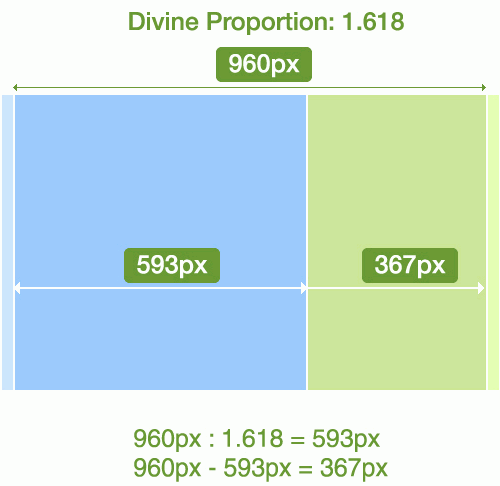
Consider the example above. You would like to create a fixed width layout. The width of your layout is 960px. You would to have a large block for your content (#content) and a smaller block for your sidebar (#sidebar). How would you calculate the widths of your columns?

  1. First, calculate the width of your #content-block. You need to make sure that the ratio between this block and the overall layout width is 1.62. Hence you divide 960px by 1.62 which results in approximately 593px.
  2. Subtract 593px from the overall layout width (which is 960px) and get 960px – 593px = 367px.
  3. Now if you calculate the ratio between the #content-block and the #sidebar-block (593px : 367px ≈ 1.615) and the ratio between the container-width and the width of the content-block (960px : 593px ≈ 1.618) you have achieved almost the same ratio.

This is the whole idea behind the “Golden” proportion. The same holds for fluid and elastic layouts, too.

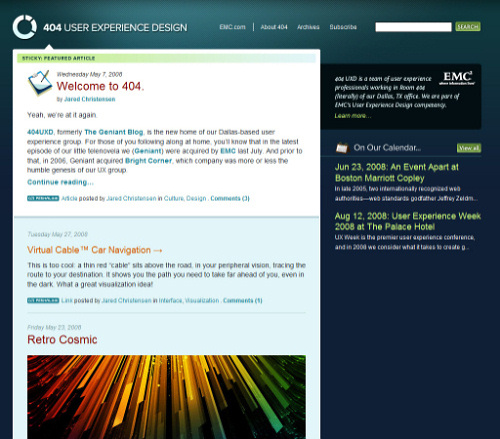
Of course, a web design doesn’t need to be organized according to the Divine proportion. However, in some cases it can improve not only the communication of your design, but also improve further details of your layouts. As an example consider The 404 Blog. The design itself is visually appealing, provides calm and supporting color scheme and has a nice composition.
404user1 in Applying Divine Proportion To Your Web Designs

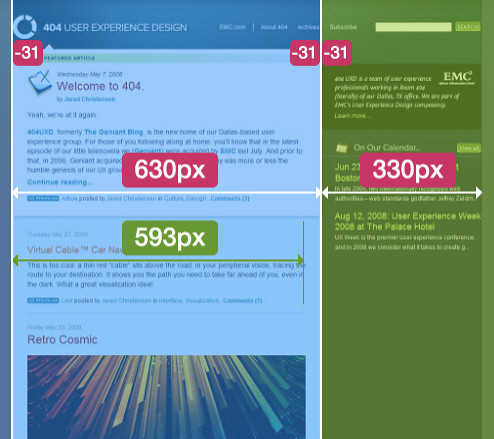
However, the design does not correspond to the Divine proportion as you can see from the image below. Actually, users don’t necessarily feel it, because they intuitively split the layout in two separate blocks of the width 583px (630px – 31px – 31px) and 299px (330px – 31px). The reason behind it is that white space of the main area is passive (three columns, each 31px wide), it clearly supports the content next to it rather than being the content itself.

The ratio between the layout blocks is 630 : 330 px ≈ 1.91 ≠ 1.62, and the ratio between the content blocks is 583 : 299px ≈ 1.92 ≠ 1.62. The reason why the layout looks almost perfect although it doesn’t stick to the Divine proportion is the simple fact that it is balanced — both the layout blocks and the content blocks have the same proportion. Hence the design provides some sense of closure and structural harmony.

The interesting thing is, however, that due to a suboptimal layout length visitors are offered a suboptimal text length of over 90 symbols per line. However, an optimal number for comfortable reading lies between 60 and 80 symbols per line. The improvement of the layout would therefore lead to the improved readability of the content, too. That’s a useful side-effect of getting things done according to the laws of nature.
404user2 in Applying Divine Proportion To Your Web Designs

For some quick’n'dirty drafts you may use the ratio 5 : 3 which is not exactly the Divine proportion, but can turn out to be a useful rule of thumb in case you don’t have a calculator near you. Divine proportion usually provides bulletproof values one can perfectly incorporate in almost every design. When working on your next project you may want to consider using the following tools to calculate the widths “on the fly”:

  • Phiculator
    Phiculator is a simple tool which, given any number, will calculate the corresponding number according to the golden ratio. The free tool is available for both Win and Mac.
  • Golden Section Ratio Design Tool
    Atrise Golden Section is a program, which allows avoiding the routine operations, calculator compilations, planning of grouping and forms. You can see and change the harmonious forms and sizes, while being directly in the process of working on your project.

The Rule of Thirds

Basically, the Rule of Thirds is a simplified version of the Golden ratio and as such poses a compositional rule of thumb. Dividing a composition into thirds is an easy way to apply divine proportion without getting out your calculator.

It states that every composition can be divided into nine equal parts by two equally-spaced horizontal lines and two equally-spaced vertical lines. The four points formed by the intersections of these lines can be used to place the most important elements — the elements you’d like to give a prominent or dominant position in your designs. Aligning a composition according to Rule of thirds creates more tension, energy and interest in the composition than simply centering the feature would.

Thirds in Applying Divine Proportion To Your Web Designs
This photograph demonstrates the principles of the rule of thirds. Source: Wikipedia

In most cases it is neither possible nor useful to use all four points to highlight the most important functions or navigation options in a design. However, you can definitely use some of them (usually one or two) to properly place the most important message or functionality of the site. The left upper corner is usually the strongest one, since users scan web-sites according to the “F”-shape.

So how do you split a layout into 9 equal parts? Jason Beiard states the following method for applying the Rule of Thirds to your layouts:

  1. To start the pencil-and-paper version of your layout, draw a rectangle. The vertical and horizontal dimensions don’t really matter, but try to keep straight lines and 90-degree angles.
  2. Divide your rectangle horizontally and vertically by thirds.
  3. Divide the top third of your layout into thirds again.
  4. Divide each of your columns in half to create a little more of a grid.
  5. You should have a square on your paper that looks similar to the rule of thirds grid.

Let’s consider the following situation. Assume you have a layout of fixed width 960px. Consider the area above the fold which is likely to have the height between 750 and 950px.

  1. Divide the width of your layout by 3. In an example you get 960px / 3 = 320px.
  2. Divide the height of your layout by 3. In an example you get ( (750 + 950 px) / 2 ) / 3 ≈ 285px.
  3. Each rectangle should have the size of 320px × 285px.
  4. Construct the grid of the rectangles described in step 4 by drawing lines going through the ends of rectangles.
  5. Place the most significant elements of your designs in the meeting points of horizontal and vertical lines.

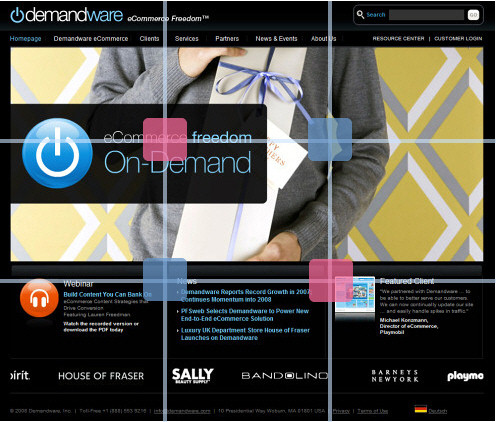
Consider the design of demandware.com presented below. Although the design uses a number of vibrant colors, it is not noisy and seems to be both simple and clear. The navigation options are clearly visible and the structure of the site seems to be easy to scan.

Demand in Applying Divine Proportion To Your Web Designs

However, if you consider the effectiveness of this design, you might find a perfect balance the design actually has. Indeed, it almost perfectly uses the Rule of Thirds as two out of four intersections of the lines (pink blocks in the picture below) contain exactly the information which the company wants its users to see — namely what the site is all about and an example of their work. Note also how perfectly the main sections are placed on the second horizontal axis. That is effective.
Demandw in Applying Divine Proportion To Your Web Designs
Rule of Thirds in use: two out of four intersections of the lines (pink blocks) contain exactly the information which the company wants its visitors to see.

Summary

In some cases, applying the Divine proportion and the Rule of Thirds may significantly improve the communication of your design to your visitors. Offering your users an almost natural balance in proportion 1 : 1.62 you literally impose the natural order on it and force your design layout to become more scannable and well-structured.

Using the Rule of Thirds you can also effectively highlight important functions of your site providing your visitors with a design they can easily work with and effectively delivering the message you want to deliver in the first place.

Vitaly Friedman, editor-in-chief of Smashing Magazine (www.smashingmagazine.com), an online magazine dedicated to designers and developers.

Post Rating
1 Star2 Stars3 Stars4 Stars5 Stars (2 votes, average: 5.00 out of 5)
Loading ... Loading ...

Tags: ,

Advertising
  1. 1
    First
    May 29th, 2008 8:52 am

    first!

  2. 2
    Maurivan
    May 29th, 2008 8:57 am

    cool! ;)

  3. 3
    M.Senthil Kumar
    May 29th, 2008 9:04 am

    Useful tips for Beginner’s…
    From India-Chennai

  4. 4
    denhartenweg
    May 29th, 2008 9:07 am

    Awesome. Thank you for this insights. I alway make proportions by my feeling ;)

  5. 5
    Roy
    May 29th, 2008 9:14 am

    Thanks great article and really well written and easy to understand. To use grid is truly one of the most important things in a great design.

  6. 6
    keobs
    May 29th, 2008 9:21 am

    good stuff… again… will keep in mind for next design.

  7. 7
    Nyamari
    May 29th, 2008 9:26 am

    Very nice. loving it.

  8. 8
    Michael
    May 29th, 2008 9:29 am

    Golden proportion is probably the most overrated (thanks to its name) concept in design. It remains a guideline and not something that you should apply blindly.

    And no offense SM (I love your articles) but this demandware example for the rule of thirds is just bad. The intersections highlighted here have no impact on clarity nor “leading the eye”. The example doesn’t even apply to a real case because the vertical area for content scales with browser size. The other design concepts (colors, contrast, emphasis, etc.) have far more influence on leading the eye than the rule of third (on this design).

    That being said, the picture has a fixed size (you would not show a part of the picture, but all of it – unlike web designs where users have to scroll) so the rule of thirds is much more applicable. It is certainly a good application of it, but many other factors come into play as well : the colors (orange/blue complementarity + black/white), contrast the shape of the clouds, and the “trailing” part of the tree, to name a few.

    To sum it up, I think a showcase article on examples of nice divine proportion applications could have been nice, but attempting to teach it in such a short article is nothing more than mystifying those who ignore the “rule”.

  9. 9
    Michael
    May 29th, 2008 9:33 am

    *mystification of the common beginner mind, I should say.

  10. 10
    JeremieSpoken
    May 29th, 2008 9:39 am

    hey thanks! been looking for this hehe

  11. 11
    Marco
    May 29th, 2008 9:49 am

    I was talking about this over 2 months ago..

    There isn’t scientific evidence that the divine proportion is better than other proportion system.

  12. 12
    Benjamin
    May 29th, 2008 10:03 am

    Cool article. I think thet could be a part 2 to it with more examples.
    I have an old copy of the Divine Proportions book from Luca Pacioli… and always try to keep that kind of things in mind when designing… it gives clues and ideas and provide solutions to certain design problem we may be facing.

  13. 13
    daflai
    May 29th, 2008 10:18 am

    great post

  14. 14
    Lipton
    May 29th, 2008 10:24 am

    Nice, I always wondered what or if there was a standard people were using a lot…

  15. 15
    Mhihen
    May 29th, 2008 10:56 am

    That’s silly. Every site would look the same if they all used the ‘golden ratio’. No one notices that, I think there are more important elements of design than a arbitrary ratio. This is just trying to apply some rules to what designers and artists simply see as: ‘knowing what looks good’

  16. 16
    eod
    May 29th, 2008 11:15 am

    good article, thank you, I was looking for more about this, hope will be a second part of this :)

  17. 17
    Yorick
    May 29th, 2008 11:34 am

    Demandware, when i saw the image i thought, nice design.Then you got the raster out, rule of thirds, 2 points straight on!
    So our eye should be guided into the right direction.
    But oh god when you click on it, all the nice rules, ideas, rule of thirds they get blasted away by this HUGE flashing center text, with stock photo’s fading in and out. I’m no pro but in my opinion this site went from beautiful to horrible.

  18. 18
    Hannes
    May 29th, 2008 12:22 pm

    Thanks alot for this interessting information

  19. 19
    Julius Orias
    May 29th, 2008 12:33 pm

    This is a great tool for everyone..great job guys…

  20. 20
    Julius Orias
    May 29th, 2008 12:34 pm

    This is a great tool, great job guys…

  21. 21
    Mark
    May 29th, 2008 1:20 pm

    Awesome post. That will give me something new to try with my next design – Thanks!

  22. 22
    Waf
    May 29th, 2008 1:34 pm

    The word “however” appears 8 times in the article. That’s quite a lot. However, it doesn’t appear to be too many. ;-)

  23. 23
    Mr Kuzio
    May 29th, 2008 1:58 pm

    Questi sono concetti che un grafico editoriale acquisisce nei primi anni di formazione. Si parte SEMPRE dal formato per determinare le dimensioni delle colonne di testo e della gabbia, la griglia, eccetera.

    Comunque è sempre bene ricordarle certe cose ^_^

  24. 24
    Amanda Fazani
    May 29th, 2008 3:20 pm

    This has been one of the most interesting and compelling articles I’ve read on Smashing Magazine so far. While this rule isn’t always practical to apply to web designs (especially when considering blog design) it’s certainly given me some food for thought :)

    Thank you for this insight!

  25. 25
    nerdski
    May 29th, 2008 5:19 pm

    feels like my fundamentals of design class all over again :)

  26. 26
    mayur
    May 29th, 2008 5:24 pm

    gr8 post , looking for it man

  27. 27
    stfalx
    May 29th, 2008 9:24 pm

    Did you guys saw the episode from south park where a lawyer was using the cehwbaka defense to win a trial. That’s exactly what you guys did. You used a simple logicaly remarc to justify something that’s not entierly usefull. I’m just wondering why 1.618. I usually partition my designs acording to the client’s needs. And i prefer 550px (main column) 40px (margin) 310px (sidebar).

  28. 28
    sandie sørensen
    May 29th, 2008 10:56 pm

    Devine proportions is not about the exats size of the webpage. Instead it is about at grid, you can use in your design, that is hamonic in an unconcious sort of way.
    Its a magical proportion that calmes the eye. The number is represented numerous times i nature (hence the name: Devine proportions-God made it! If you believe in that…?) For examble the “math behind” snails twists in their snailhouse.
    The Fibonacci numbers are also closely related to “the golden lines” as we call it in Denmark. :)
    Da Vinchi also calculated, the the devine proportions have something to do with the way we humans look:

    http://images.google.com/imgres?imgurl=http://www.goldenmeangauge.co.uk/images/devine2.jpg&imgrefurl=http://www.goldenmeangauge.co.uk/luka.htm&h=283&w=191&sz=23&hl=da&start=15&um=1&tbnid=duPFQRmiwj9pPM:&tbnh=114&tbnw=77&prev=/images%3Fq%3Dda%2Bvinchi%2Bdevine%2Bproportions%26um%3D1%26hl%3Dda%26rls%3Dcom.microsoft:da:IE-SearchBox%26rlz%3D1I7GGLJ%26sa%3DN

  29. 29
    Scott
    May 29th, 2008 11:23 pm

    For those who don’t understand what this is, let me try to explain. The Golden Ratio (http://en.wikipedia.org/wiki/Golden_ratio) is a ratio that produces rectangles of equal aspect ratio but of different scale, forever, starting from a base rectangle. It is “a” compositional strategy, not “the” compositional strategy and I think that as designers we have an obligation to understand what the strategy is and what it is trying to solve.

    I have seen people diagramming how this ratio is found throughout nature, architecture etc. Sometimes it seems to be like the “Number 23″ (Jim Carrey movie) and arbitrary.

    My argument for not bashing it is that it is just a rule and an attempt at clarifying composition. I like when people give me design rules because it gives me a starting point. Many great musicians, artists, scientists actually had an education in the rules of their profession and it confuses me when people try to scoff at people showing rules and strategies. By knowing more about the rules, you are able to intelligently break them and have more control over your own output rather than accidentally making something wonderful (or not).

    Sorry for the rant. I’ve gone through a tough semester of being criticized by teachers who are expecting me to produce great new things without actually teaching…

  30. 30
    Tom
    May 30th, 2008 12:19 am

    Good post, and thanks for the golden ration tools.

  31. 31
    Marcello
    May 30th, 2008 12:29 am

    I already used the divine proportion and the rule of thirds, but I have to say your article is very clear, and good explanations are never enough!

    Great work!

  32. 32
    Neil Skirrow
    May 30th, 2008 12:31 am

    Great post as always!

    Just a thought… By using a design width of 960px surely you immediately break the rule? Wouldn’t a 100% width design with a 62% (61.804…) to 38% width proportion be more appropriate? Therefore adjusting the design to suit the users screen resolution…

  33. 33
    John
    May 30th, 2008 12:37 am

    I have never heard of “Devine Proportion” before but I have used the idea before without knowing its terminology. As a designer, you definitely need to feel the harmony of items on your design rather than placing it logically. But sometimes, logical placements of items on the design make sense too. I hope that made any sense.

  34. 34
    Constantin
    May 30th, 2008 12:48 am

    Unlike the majority of designblogs you provide knowlege instead of unreflected ime-so-hot-right-now bullshit. I like that.

  35. 35
    buzz
    May 30th, 2008 12:50 am

    You may have a look at this article, very interesting and complete but in french.

  36. 36
    dkourk
    May 30th, 2008 2:15 am

    wicked!
    thanx guys

  37. 37
    Vitaly Friedman & Sven Lennartz
    May 30th, 2008 2:35 am

    @Neil Skirrow: you are right. Fixed width layout was used only as an example. But you can apply the Divine proportion to fluid and elastic layouts, too.

  38. 38
    Jason Beaird
    May 30th, 2008 5:12 am

    I was reading this excellent article and then I saw my name in there! Thanks for the mention, guys!

    The word “however” appears 8 times in the article.

    I know from experience that it’s pretty hard to find examples of design (even in my own work) that perfectly apply divine proportion. The same is true about examples of perfectly matched color schemes. The funny thing about design principles and color theory is that while being aware of them will make you a better designer, you shouldn’t always follow them verbatum. For me, they’re a great starting point and troubleshooting tools, however rules are always made to be broken. ;) Great post, as always!

  39. 39
    Jennifer Kyrnin
    May 30th, 2008 7:24 am

    Good overview of an important design concept that is often forgotten!

  40. 40
    Tyler @ Building Camelot
    May 30th, 2008 8:24 am

    Now – are there any wordpress themes using this principle?

  41. 41
    Christoph
    May 30th, 2008 3:20 pm

    There are many Websites out there using the golden ratio, not exactly but approximately. There are many Designer who use it without knowing about it. This article shows very well how you can work with it and what the advantages are.

    One word to the golden ratio:
    3:5 is a good rule of thumb, but you can go further. The summation of 3 and 5 is 8, which is the next number in the sequence that is called “Fibonacci sequence”. The next higher number is always the summation of the last two numbers in the sequence. So the next numbers are 13 (5+8), 21 (8+13) and so on. All these pairs of numbers have approximately the ratio 1.618, which is the golden ratio.
    So, what can you do with it. For example, you can divide your page into a grid of 21 sections. Then you can build two columns, one with 8 and one with 5 sections. First you have your page divides by the golden cut, second you can use the remainig sections for the grid within the two columns.

  42. 42
    Elizabeth
    May 30th, 2008 3:48 pm

    Excellent! Thanks so much for the tutorial…I was able to use the divine proportion at work today. It transformed a “blah” ad to something much nicer looking. Cheers!

  43. 43
    Htoo Tay Zar
    May 30th, 2008 11:39 pm

    Useful Post!! Thanks

  44. 44
    Sanjay Bisht
    May 31st, 2008 12:49 am

    Great post,

    Just one thing; When you talk about the rule of thirds, then is it not somewhat necessary that the whole page/design has to be visible in one go ?? On the DemandWare website, although the first intersection point is visible straightaway, but to get to the second intersection point that you mentioned about, I have to scroll down the page; which then effectively places the shiny orange button in competition with it. And, due to the brighter color, the orange is more visible to the user (at first go)

    I’m new to this, so I might be incorrect. Just an observation

    :)

    Thnxs

  45. 45
    Vitaly Friedman & Sven Lennartz
    May 31st, 2008 1:54 am

    @Tyler: yes, Information Archites offer an “Ideal” Wordpress-theme which is based upon the Golden Section for free download: The Ideal Wordpress Theme.

  46. 46
    Luca
    May 31st, 2008 5:01 am

    very interesting, especially for me that I have a website focused especially on this aspect.

    You may like to take a look at my site Lab 1,618 and find out some more things about this subject

  47. 47
    JustChris
    May 31st, 2008 11:29 am

    960 pixels definitely seems like the right size for any website (that should be displayed on a 1024×768 res), because it factors into so many numbers. This article reminds me a lot of http://www.960.gs which uses a grid to break down the 960 layout into 12 or 16 chunks, and then grouping the chunks to create completed (if somewhat arbitrary) columns.

  48. 48
    Stathis
    June 1st, 2008 1:03 am

    smashing article as always. Web development just gets more interesting with this website

  49. 49
    Peter Pocklington
    June 1st, 2008 11:53 am

    This article (and example site) don’t make sense—the dividing-up of the sample layout using the “divine proportion” rule doesn’t support the articles claims at all.

    Most designers will agree I would think: this “golden rule” comes from the gut, eye, and brain. You either naturally have the ability to balance layouts, or you don’t. You can learn, but nothing will replace your gut instinct as a designer.

    These rules don’t apply to the millions of possible variables that exist with design for the screen, browser, and web.

  50. 50
    Napolux
    June 2nd, 2008 2:15 am

    Really useful! Thanks a lot!

  51. 51
    Leon Paternoster
    June 2nd, 2008 3:46 am

    Using the ‘golden rule’ or dividing a text up into 9 sections might work for static texts such as posters, but there are too many factors that affect the size of flexible text such as a web page.

    Another problem is that this fad for grids will lead designers to make decisions about the organisation of their site that might not be appropriate. For example, if you’re following the ‘golden rule’ then you’re more likely to use at least two columns when one might suffice. More so if you’re dividing the page up into 9 sections (and placing elements in an absolute horizontal position is very difficult).

  52. 52
    Stanium
    June 2nd, 2008 4:01 am

    Agree with Jason Beaird. One can hardly follow the rules of thirds and divine proportion ALL the time, but keeping them in mind will make you a better designer, indeed.

  53. 53
    mr_designer
    June 2nd, 2008 2:54 pm

    very bad example. Demandware.com blows. it’s nice looking but the UI is bad. The Call to Actions are not clear. the top header navigation isn’t that great. Why do you think this site is a good example? please tell me. I know others do NOT agree with this as being good. Can someone shead some light on this please.

    thanks!

  54. 54
    Ryan Bollenbach
    June 2nd, 2008 5:01 pm

    I found this article to be extremely useful.

    I have heard about the rule of thirds in the past but never the divine proportion. I will definitely keep this in mind for the next website I’m creating.

  55. 55
    Vargas
    June 2nd, 2008 7:03 pm

    In terms of the “feeling” the harmony vs. the “logical” approach. To be on point or to be a master designer you have to be logical. The divinity nature of the Phi ratio (1.618) is that it “harmonizes” with nature. So you use it logically because only in its structure and precision will you tap into the frequency in which all things in nature have been designed. From the flowers to the university. The relational space between the roots to a trees branches to one plant to another even to the frets on a guitar. All are DESIGNED.

  56. 56
    Webdesign
    June 3rd, 2008 12:23 am

    I almost always enjoy what I read on this site. :)

  57. 57
    w1sh
    June 3rd, 2008 4:42 am

    I’ve been reading up on the Divine Proportion in web-design for a while now, and though I understood it before, this article and your comment put it in perspective for me.
    I completely agree though, I’d love to see a ton of examples where Phi and the Rule of Thirds is put into good use.

  58. 58
    Audrey Viviana
    June 3rd, 2008 8:19 pm

    very interesting … i recently attended a short workshop on photography and had learned about this golden proportions and rule of thirds …

    it’s interesting in a way to see how these two concepts can actually be applicable to websites – even if to just serve as a basic guideline …

    i am learning to create my own website and will keep this in mind, thanks for sharing !!

  59. 59
    innovati
    June 4th, 2008 6:56 am

    Well before every newbie starts following it religiously and every ‘mature’ designer takes person pride in refuting it. At least understand what it was. Yes, it’s scientifically proven, that number is what it is because of science.

    The greeks tried to figure our what looked best esthetically so they made shapes of all sizes and explored all ratios, and they, using their eyes, voted on what looked best. That number won’t make EVERYTHING MAGICALLY BETTER, but to humans, it looks ‘right’ or natural. and no amount of nay-saying can change that.

    You may use it in your work or composition or not, but I think it’s odd that of those designs that don’t use it, the most perfect ones are the ones that approach the Golden Section on their own, where among those designs that do use it, it’s hard to find a failure. Sure they may not be stellar, but it’s a good rule of thumb and it can’t possibly hurt.

  60. 60
    Richard Morton - Web Accessibility Auditing
    June 4th, 2008 8:20 am

    I’m not convinced. These may be useful for inspiration and ideas but I think that the only real way to know if one design layout works better than another is through usability testing.
    The rule of thirds is very commonly quoted for photography but it is only a guideline and I have often found that the “rule” can be broken, and of course with digital photography it is much easier to include everything and crop later (bearing in mind compromising quality).

  61. 61
    Francisco
    June 4th, 2008 11:31 pm

    Good article, thanks.

  62. 62
    Web Design Company
    June 5th, 2008 8:11 am

    Wonderfull idea.

  63. 63
    Ashrith
    June 5th, 2008 11:51 pm

    Cool
    :)

  64. 64
    SchattenMann
    June 13th, 2008 2:44 am

    great article!

    does the design of demandware.com is free?

    where can i find it or someone similar?

  65. 65
    SchattenMann
    June 13th, 2008 3:03 am

    great article!

    btw does the design in on-demand is free?

    im searching for something very similar….does anyone knows something?

  66. 66
    monk
    June 14th, 2008 12:50 pm

    good

  67. 67
    atrioom
    August 5th, 2008 9:25 pm

    funny…
    about a year ago or so i looked up golden ratio on wikipedia. i though it might be interesting to use it on webdesign… now this :)
    guess my unique idea isnt so unique at all :D
    thx for the tips!

  68. 68
    AvantisOne
    August 13th, 2008 4:51 pm

    1.618 is my lucky number.

  69. 69
    Dhane Diesil
    August 26th, 2008 9:19 pm

    This was great. Definitely information you want to keep in the “front” of your mind when designing and developing a site.

  70. 70
    Hönk
    September 29th, 2008 4:59 am

    nice

  71. 71
    CJ.MoBiX
    November 29th, 2008 8:57 am

    Good :)

  72. 72
    Timothy
    December 2nd, 2008 12:52 pm

    Ha! I’ve been using golden ratios before I read this. Still, it is good knowledge to have. Nice post!

  73. 73
    Esteban
    December 22nd, 2008 10:19 pm

    Marcos said above that there isn’t scientific evidence that proves that the Divine proportion is better than any other proportion. But, there is a little property about the number phi, or as you call it Divine Proportion. Given the definition of irrational number, it is possible to prove that phi is the “most” irrational of all the irrational numbers. Obviously, we have to define an irrational number and also define what we understood by “most”, but that is another story.

  74. 74
    Vargas
    January 4th, 2009 12:49 pm

    I’m glad to see other website designers wanting to apply the power of the Golden Section. My concern is that most people on the internet that I have found only know the .618 part of the Golden Section. Since they have not read or be trained in the use and practices of the Golden Section.

    This tutorial heads in the right direction but has much more to go.
    Tip … When dealing with the PHI ratio .618 or any Golden Section rectangle you have to respect the “Rectangle”. If the width is 960px wide and 593px is your .618th measurement and 367px is your .382th measurement then you need the height of the rectangle to be exactly 593px high. Now you have a Golden Section Phi ratio Rectangle. If you change the high (like extendable website do) then you need to change the width according – if you don’t you will not have the Phi 1.618 Ratio any longer and therefore your not using the Golden Section (of that rectangle.) This become tricky for a web designer working on a dynamic website. It’s much much easier to engineer a great design for an illustrator, painter, architect or for a web site designer dealing with a static design.

    I look to the drawings of architect Otto Wagner you could also look at the drawings of Frank Loydd Wright or the paintings of Gustave Klimt… because they composes with different Golden Section rectangles on top of each other. And like module based website such as Joomla sites this can works very nicely with some code tweaks.

    Here is a some examples Otto Wagner: http://tinyurl.com/ottowagner
    Also there is an Art Studio in PA ( http://www.barnstonestudios.com ) that has trained artists in the practices of the Golden Section for the last 30 years. There you can find Video Lectures, Podcasts with past students and over 1700 images of power artwork and articles on the use of the Golden Section : goto http://www.barnstonestudios.com and click the video – Pablo Picasso & The Golden Section.

  75. 75
    dinesh singh rawat
    January 20th, 2009 10:51 pm

    I loved this post, although I knew few rules but the way you guys explained here is really easy to get. (Proving the first law of usability: Don’t let user think :) ).
    Great one
    Thanks .. :)

  76. 76
    dinesh singh rawat
    January 20th, 2009 10:58 pm

    Hi! I’m looking that few people are criticizing the post. I admit their views, everyone has their own level of knowledge. And I must say that there’s no harm in learning the rules either for design or something else, they always help in some way. Use them where you need or use your own where you don’t need. Simple guys!!!!

  77. 77
    scanner
    January 26th, 2009 9:57 am

    Cool! Didn’t know that the Golden Ratio could be used in web design. Am gonna try it out on my website.

  78. 78
    Ashish Mittal
    February 18th, 2009 6:41 am

    Gr8 post….

    Cheers

  79. 79
    granula
    February 18th, 2009 3:08 pm

    All this fawning over the use of a system which was designed for static proportions in geometry. Basically boils down to “looks pretty”, “I can do THAT in CSS” and “I’m not a coder, I’m an artist! look! see! An Artist!”.

    The golden proportion, no matter how many straw men are flung at it, is not meant for communication of anything but aesthetic. How can a golden section be justified for Japanese textual content, or content that is displayed on a device with a 90×120 screen area, or content that scrolls? And how does it consolodate multiple viewpoints to nonrelated images?

    Interfaces, specifically web designed, (and also like game design, while we’re at it) is stuck in the unholy aura of other media and needs to get some cohonas.

    Computer interface art will have its davinci’s and boticellis, but going by the excessive fan boi-ness of most of the comments on this and most other web design “best practices” pieces we’re going to be waiting a long while yet.

  80. 80
    bee
    February 23rd, 2009 6:19 am

    It’s great to think about this topic – but I would not like to have the template above for free.

    In photography I love the golden ratio! But in this example (and many other blogs) I don’t like it.

    In this example the golden ratio shall be the place for a border of dark and bright parts. The dark part is used for the navigation – which generally should not be the main content of the blog, but more a supportive part.
    As dark parts appear more intense anyway, through its size of ~3/8 it becomes such intense, that it catches my attention and I first look there and need several seconds to look at the content. That’s why for many blogs I don’t see the advantage in using the golden ratio. The navigation simply gets too intense, angles for my attention. I’d rather say that a smaller navigation would center the content more and therefore would better guide the attention there.

  81. 81
    steve blood
    May 24th, 2009 10:42 am

    Some people want to tell others what to do. Some people want to be told what to do. Decide which camp you’re in and act accordingly. Me? I want contemporary web design to be less formularised, less templated, less constrained by rules. And so do clients. So, break out from all these constraints and see where you end up. The divine rule, (and other ‘rules’) in my opinion, has absolutely no rlevance to screen based interactive design. Web design is a new medium so ‘go boldly …’ etc etc. But that’s my opinion.

  82. 82
    Raf
    August 23rd, 2009 12:47 pm

    I’ve been using another golden ratio calculator for a while already.
    It’s the one created by “Design By Ninjas”, doing the trick nice and easy.
    Strange that no one mentioned this one before… http://goldenratiocalculator.com/

  83. 83
    Marc
    September 17th, 2009 8:23 am

    thanks for sharing, i do have a few questions though.

    a) how do i apply the golden ration corectly? &
    b) how do i (re)balance the golden ratio?

  84. 84
    gene Mater
    November 17th, 2009 10:28 am

    Hey, great article… the Golden Section is an excellent tool, in the right (conscious) hands, of course… it is thoroughly taught and used at the Barnstone Studios (http://www.barnstonestudios.com/) where I spent many years as a student… We were taught a far more simple way to set up the Golden Rectangle: draw a square based on the height your (landscape) rectangle is to be. With a compass with the point set at the lower left corner, and the lead set at the opposite corner, scribe an arc down to the horizontal (base) line, extended. From that intersection point, draw a vertical line the same length as the height of the square. Extend the top horizontal line to meet the vertical line and VOILÀ, you have the Golden Rectangle. No calculator needed!

    ~ Gene in Bethlehem, Pennsylvania

  1. 00

    There are no trackbacks at this time. If you are interested in leaving a trackback, please use this URL.

Leave a Comment

Make sure you enter the * required information where indicated. Please also rate the article as it will help us decide future content and posts. Comments are moderated – and rel="nofollow" is in use. Please no link dropping, no keywords or domains as names; do not spam, and do not advertise!


Advertisement Advertise with us!
Join in Smashing Forum
Post your job

