
Smashing Magazine we smash you with the information that will make your life easier. really.
Should Links Open In New Windows?
July 1st, 2008 in How-To | 244 Comments
No, they shouldn’t. At first glance the decision to open links in new windows or not depends on the given site and the preferences of its visitors. Visitors of the sites with heavy linking are more willing to have links opened in new windows than open dozens of links in new windows manually. Visitors of less-heavy-linkage-sites are more likely to open some specific link in new window to remain on the site and continue to browse through it afterwards. However, this is not true.
Users also don’t like to deal with dozens of opened tabs and some visitors tend to quickly become angry with the disabled back-button. Furthermore, some visitors may not even realize that a new window was opened and hit the back-button mercilessly — without any result. That’s not user-friendly and that’s not a good user experience we, web designers, strive for.
Place users in control
From the usability point of view the decision to enforce opening links in new windows violates one of the fundamental principles of the user interface design: users should always be in control of the interface they are interacting with.
Leading user interface and usability researchers such as
- Ben Shneiderman (8 Golden Rules of Interface Design),
- Theo Mandel (User Interface Design Principles)
- Jakob Nielsen (Top Ten Mistakes in Web Design) and
- Bruce Tognazzini (First Principles of Interaction Design)
claim that a user-friendly and effective user interface places users in control of the application they are using.
Users need to be able to rely on consistency of the user interface and know that they won’t be distracted or disrupted during the interaction. Users must know, understand and anticipate what is going on and what will happen once user interface elements are used. Any deviations from this convention result in a more design-oriented and less user-oriented design.
As Shneiderman claims, experienced users strongly desire the sense that they are in charge of the system and that the system responds to their actions. As designers, it is our duty to design the system to make users the initiators of actions rather than the responders.
Designers are tempted to enforce users to actually use the interface or browse through the site they have created. Although the rationale behind stems from some clear commercial objectives and therefore often preferred by project managers, it is the designer’s duty to make clear to managers that users do not care.
In fact, developers often tend to forget a simple, almost elementary fact: if users want to close the application or leave a site, they will — doesn’t matter which obstacles are placed on their path to the exit-button. The more obstacles there are the more negative the user experience will be.
As designers, it is our decision to provide users with a clear, unambiguous choice, but we have no right to decide for users which choice they make.
Why enforcing opening links in new windows is wrong
Since users need to be placed in control of the interface they are interacting with, it is wrong to make decisions for them as designer’s decisions don’t necessary match users’ decisions. The main problem with enforcing links to open in new windows is that this decision overrules user’s decision to control the view in their browser.
Since large web-sites (Google, Amazon, AOL, Yahoo & Co.) open links in the same window (unless it is explicitly stated that links are opened in new windows), users tend to assume that the link on an unknown page will be opened in the same window. So users expect the link to be opened in the same window.
Let us now consider the following two situations where a user doesn’t know upfront if the site opens links in new windows or in the same window:
- user wants to open link in a new window, but the site opens links in the same window,
- user wants to open link in the same window, but the site opens links in new windows.
In the first situation users can choose to open a link in the new window using context-menu or shortcuts described in the next sections of this article. In this situation users are the initiators of actions as they decide how the linked page should be displayed. Here site’s behavior meets user’s expectations resulting in a good user experience.
In the second situation users would simply click on the link and suddenly find out that the link is opened in a new window. In this situation users are the responders of actions as they need to react on the way how the linked page is displayed — for instance close the windows which was opened automatically. Furthermore, here site’s behavior doesn’t meet user’s expectations resulting in a bad user experience.
Users find it annoying when the site does something without asking them to do so. If users want to open new windows let them do so and don’t indulge their intelligence by making decision for them otherwise. Don’t force a new window upon users unless there’s a very good reason to do so.
Every rule has an exception
Of course, there are exceptions: in some situations it is right to open links in new windows and wrong to open links in the same windows. Jakob Nielsen suggests to use new windows in case the linked document is not a .html-document. In this case he recommends to use a pop-up-windows without browser control toolbar. In such case it is reasonable to let the user know upfront how the links will be opened.
A small warning-icon usually suffices, however you need to make sure that the link is unlikely to be misunderstood. After all, it is a common practice to use icons to inform the visitors that links lead to external web-sites. An additional or similar icon may produce irritation. Small usability tests may be helpful and necessary in this situation.
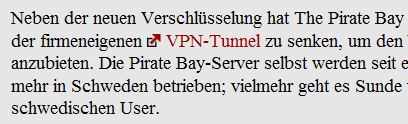
Telepolis lets its visitors know that a link leads to the external page. However, the icon used may be misunderstood as it can also symbolize opening links in new windows.
It is appropriate to enforce opening links in a new window in case
- the link provides assistance or help. If you are on a shopping cart page and users click on a “help” link. In that case, users don’t want to navigate away from the cart page, so a new window is acceptable. In such cases dynamic tooltips are usually better than pop-ups which are again better than opening new windows.
- the link may interrupt an ongoing process. For instance, if users are filling a web-form and the form provides the link to terms of service or privacy policy below the form it is reasonable to enforce this link to open in a new window to not interrupt the ongoing process. This is important in sign-up forms and crucial in checkout-forms. Otherwise users may lose the information they’ve already typed in and close the browser window in response.
- the link leads to a non-html-document. E.g. .pdf-file, .xls-file, .mp3 and so on. Warn users in advance that a new window will appear. When using PC-native file formats such as PDF or spreadsheets, users feel like they’re interacting with a PC application. Because users are no longer browsing a website, they shouldn’t be given a browser UI. Best of all, prevent the browser from opening the document in the first place. Jakob Nielsen explains how it can be done.
- the link leads to a large image which takes time to load. Opening this image in a new window allows user to focus on your content while the image is being loaded in the background.
Forgive them, for they don’t know what they do
Unfortunately, we weren’t able to find any recent research findings which would provide us with a better understanding of how users actually open links if they want to open them in new tabs or windows. However, it is likely to assume that most users don’t know shortcuts and prefer more intuitive, straight solutions. More experienced users are more likely to use shortcuts which are described below as well.
There are three reasonable ways for opening links in new windows. Most users use the first option — not because it is the most effective one, but because it is the most obvious one. These options are implemented in all modern browsers; older browsers may have problems with the second and third options, though.
- visitors use the context-menu: users click with the right mouse on the link and select the option “Open link in a new tab/window”. If the link is opened in a new tab, the active window remains the same as it was before the click. If the link is opened in a new window, new window appears and the new window becomes the active window.
- visitors use the Ctrl+click-shortcut: users press the Ctrl+key and click with the left mouse button on the link. The link is automatically opened in a new tab. The active window remains the same as it was before the click. This shortcut can vary depending on the operating system and the browser implementation.
- visitors use the middle-click: users point the mouse pointer to the link and press the middle-click of the mouse. The link is automatically opened in a new tab. The active window remains the same as it was before the click.
The first option is definitely the most ineffective yet most popular one. It requires more clicks and more concentration, therefore more time and more cognitive load on the user. The third one is the quickest one as users don’t need to permanently switch between the context-menu and the page itself.

Most users seem to use the context-menu to open links in new tabs or windows. Image source.
The main irritation from the users’ side comes from the fact that most users know only the first option. Consequently, if they want to open links in new windows they need to use the context-menu, with multiple clicks, switching the view back and forth again and again. That’s stressful and unpleasant. Still, opening links in the same window (by default) is the lesser of two evils. And if users don’t know how to do it quickly, tell them explicitly — they will be grateful for your help.
But I can force visitors to stay on my site, right?
No. Even if you enforce the external links to open in new windows users will find their way around to open the link in the same page if they want to:
- users can copy the link, paste it in the address bar and hit the return button; the link will be opened in the same window.
- users can drag the link to the address bar; the link will be opened in the same window.
Unfortunately, not every single browser allows users to do that. However, modern browsers have this functionality implemented since years. If users don’t want a link to open in a new window they’ll try to find the way to circumvent designer’s decision.

Firefox enables its users to decide how the links designer has decided to open in new windows should be opened.
Therefore, from the designer’s perspective, it is better to provide users with a clear and clean way to do so respecting their interests and not neglecting their time. If you want your visitors to come back, assist them, guide them, help them, but never impose on their patience and willingness to browse on your site.
Optimal solution
In our opinion the most effective and user-friendly solution is to allow users to select how the links should be opened. However, they don’t have to do that via their browser. Designers can provide users with a small check-box which “decides” how the links should be opened. You need to make sure that the checkbox is visible and users understand what it is good for.
This can be done via JavaScript. Once the box is checked all links will be opened in a new tab / window. Just check the box yourself and try it out:
Source code for the check-box:
<form> <input type="checkbox" onclick="linkopener(this.checked)" id="linksnewwin"> Open external links in a new tab? </form>
Source code for the JavaScript (you’ll need to replace domain.com with your web-site’s URL; thus the browser will be able to distinguish between internal and external links):
<script language="javascript">
function linkopener(a) {
var b = a ? "_blank" : "_self";
var c = document.links;
for (var i=0; i < c.length; i++) {
if (c[i].href.search("domain.com") == -1) c[i].target = b;
}
}
</script>
This JavaScript doesn’t use cookies so if users browse from one side to another their preference won’t be stored. If you’d like the checkbox to work throughout your site you’ll have to consider using cookies to store users’ preferences.
Bottom line
It is important that users are placed in control of the user interface they are using. Since users expect the link to be opened in the same window, set your links to open in the same window. Don’t force a new window upon users unless there’s a very good reason to do so. For the latter purpose, consider opening links in new windows if the link provides assistance or help, if it may interrupt an ongoing process or it leads to a non-html-document.
Allow users to select how the links should be opened on a given web-site. Opening links in the same windows the lesser of two evils. And if users don’t know how to do it quickly, tell them explicitly — they will be grateful for your help.
Let us know!
Sources and Resources
- Beware of Opening Links in a New Window (Sitepoint)
- Open New Windows for PDF and other Non-Web Documents (Jakob Nielsen)
- Should Links Open in a New Window? (Problogger)
- New Window for a New Link? (Pro Blog Design)
- Avoid forcing to open in a new window (Webnauts)
- Debate: Should New Links Open in New Tabs/Windows? (GracefulFlavor)
- Should links open in a new window? (David Airey)
- DontOpenNewWindow (CSS-Discuss)
- Open External Links in New Window Automatically
- Using JavaScript instead of target to open new windows

Bouke (July 1st, 2008, 6:27 am)
first! good information
Tadd (July 1st, 2008, 6:36 am)
See, I don’t know. I don’t know if users really want to THINK about it. Whether to open in a new window or stay in current. And honestly, if you’re scaling through a slew of links you’ll want to have everything in a new window so it’s simple to go back to the originating text.
It just seems more good practice to me to open any link that’s not part of your website in a new window/tab. It’s more friendly and keeps your website in the loop so they can go back to see other links. Using sites like Google/AOL/Yahoo really isn’t applicable since they’re search engines. There is less need to stay their if someone is searching for a specific page. Not to mention - just because Google does it doesn’t mean it’s good practice. hehe
So I suppose my opinion using _blank is a better idea. If it’s not part of your site it shouldn’t be in the same window. My website (www.taddmencer.com) has all internal links staying internal and all external opening in new windows.
The thought is good, but I don’t know if it’s all that accurate.
Vitaly Friedman & Sven Lennartz (July 1st, 2008, 6:45 am)
@Tadd: you make a point. Indeed, if Google does it doesn’t mean that it’s right. However, it is not what Google does, it is about what users are used to. The thing is that users need to expect something; and they expect the links to open in the same window rather than that links all are opened in the new windows.
Barbara (July 1st, 2008, 6:46 am)
I’m a designer. And I’m also a user. As a designer, I generally have links open in the same window. For all the reasons sited above, as well as for accessibility. AND, because, as a user that is how I prefer the world to work. I generally use both Safari and Firefox. They have had tabbed browsing for years. All I have to do is press Command while clicking a link and it opens in a tab in the same window. I don’t really want dozens of windows open, thank you very much.
There should be no tricks to keep people on your site. They don’t work. And they only irritate the visitors.
Xavier (July 1st, 2008, 6:49 am)
Great Info, However, I disagree. Opening external links in new windows is good practice. As a web designer and web application developer for many years, I agree that the user needs to feel in control of the interface. The UI need to be designed and developed in a simple and effective manner, dare I say “Idiot Proof”. Opening links in a new window, however, is not the dark fiend it is made out to be in this article. I can’t remember the last time I purposely clicked on a link, it opened in a new window, and I felt I had a “negative” experience. Involuntary popups and windows are evil, external links in new windows are not. I like the Optimal Solution provided in this article but question two things. Is it worth the extra few seconds to implement this and how many users would actually see/use it. All in all, designers and developers need to stop bending over backwards to accommodate even the dumbest user. I think users are getting more savvy and experienced with slightly more complicated User Interfaces. Lets help them move forward by not holding their hands.
David Airey (July 1st, 2008, 6:57 am)
Well written, Vitaly, and thanks for the mention in the resources.
I quickly realised, after the discussion on my blog post, that opening links in the same window was the most suitable method, and set about removing those target=”new” tags I’d previously coded.
Keep doing what you’re doing with the magazine.
Tom Sieron (July 1st, 2008, 6:57 am)
Your “optimal solution” is imho a pretty bad design decision. You shouldn’t make users decide whenever you’re in doubt about some UI related feature (ie. you generally should, but during design research process and not on runtime!). It’s your job as the UI designer. If you fail to recognize that you’ll end up with myriads of settings & options that no one will ever use. As you wrote users don’t care. It’s your job to make the UI simple and transparent for them.
This is the kind of stuff that differentiates great design (like Apple products) from poor design (im not pointing fingers here). KISS.
Remy Sharp (July 1st, 2008, 7:00 am)
Good article. I’m in the club of users who prefer to open new windows when I choose to.
Aside, here’s a generic version of your script and a teeny bit faster (given the reverse loop):
function linkopener(a) {var b = a ? "_blank" : "_self", c = document.links, i = c.length;
while (i--) { if (c[i].href.indexOf(window.location.host) === -1) c[i].target = b; }
}
Remy Sharp (July 1st, 2008, 7:02 am)
Doh - missed a trailing brace there if anyone copies the code!
David Airey (July 1st, 2008, 7:03 am)
….or Sven (whoever pieced this one together). :)
Simon (July 1st, 2008, 7:03 am)
As a designer and sometimes developer I’m with the ‘open external link in a new window’ bunch. A user may want to follow a link to another site, but still return to the main site to continue browsing. This becomes a problem if a site uses javascript to prevent the back button being used.
When I’m reading blogs in particular, which frequently link externally, I don’t want to have to keep pressing ‘back’ to return to the site. It’s much easier closing a window or tab. I also often browse around an externally opened site - making it harder to return to the original site that I may still want to browse.
The new window icon is really good practice - but only if its a new window! But if you only use these for external sites and use a new window then there’s no confusion. They are getting the experience that is sign posted to them.
Users are also getting used to using tabs, which aid this style of navigation/browsing.
Will (July 1st, 2008, 7:04 am)
I actually prefer links to open in a new window. I find that if they don’t and I don’t realise I then loose the original page too far back in my history to be bothered to return. I middle click on nearly all links now because I got fed up of it. Because of that, on my own site external links are target=”_blank”
Gopic (July 1st, 2008, 7:05 am)
I only link to new pages when the user is being sent to another webpage other then mine. I want that user to always be at my page no matter what area or section they are in. The only time a new tab or window should be opened is if there is a PDF, DOC, or any external publication you allow the user to view. Thanks just my idea I guess.
Jonathan (July 1st, 2008, 7:05 am)
I dig that JS code you’ve provided. I like that idea and am going to put it near the top of my site and have them decide what they want to do with the links. I’m tired of decided for them.
Vitaly Friedman & Sven Lennartz (July 1st, 2008, 7:06 am)
@Remy Sharp: thank you, fixed.
@David Airey: thank you, the article was written by both of us, we have written it together.
SonicHedgehog (July 1st, 2008, 7:14 am)
I’m strictly against to open pages in new windows …
Pez (July 1st, 2008, 7:16 am)
I never get designers who force new windows to ‘keep users on their site’. I’ve been a webmaster / designer / developer for over 5 years now, and I have never felt the need to keep users on my site. Users go to my site, they get the info they need, they leave. No amount of tricksiness is going to keep users on your site if they don’t want to.
firdaus riyanto (July 1st, 2008, 7:17 am)
it depends for me. if i’m navigating through the same site i don’t like it when i go to a different page it opens up in a new tab or window. but when i go to a site then have a link to a different site, such as here in smashing magazine, i’d rather have it open up on a new tab or window. why?? because if it’s a list of samples i’d like to be able to be able to click on the next link without having to press the back button. i’d rather find the original window or tab and quickly find which link i clicked last. sometimes when i have to click on the back button it automatically reloads from the top again and it’s very annoying if it’s a long list and the last link i clicked is somewhere in the middle.
Anne (July 1st, 2008, 7:24 am)
generally i don’t like opening new windows unless i want to
i’d go with tabs, they work perfect for me
i guess it depends on where the link goes to
for instance here, id prefer opening links in new tabs, if there are like 20 links to great websites, i never know if i’ll ever get back to the article (tired of going to the back button all the time…), so i open in new tab, makes me feel saver
… guess this would be a good improvement ;-)
Joe (July 1st, 2008, 7:25 am)
As soon as you mention Jakob Nielsen a post becomes null and void.
Nick (July 1st, 2008, 7:25 am)
Watch your non-Web savvy friends and family navigate Web sites that pop up new windows. They often don’t notice the new window opened up in the task bar. When trying to go back with the browser’s back button, they often are confused as to why they cannot and get annoyed.
kailoon (July 1st, 2008, 7:26 am)
I prefer open in new tab. So, I can continue to browse the current page. :)
Sue (July 1st, 2008, 7:28 am)
To all those posting about having links open in a new window being good: It’s NOT. Let the user decide.
The only thing I open in a new window is a .pdf file and the reader will be warned. The reason for doing this is because they take so long to open, and if it’s in a same window, people don’t necessarily remember to hit the back.
If you think you’re doing good practice by opening external links in a new window, think again. That’s so 1990s, and people will be annoyed. And no matter what your site is about, annoying your readers is the LAST thing you want to do.
Htoo Tay Zar (July 1st, 2008, 7:32 am)
Great Article!! I always want to know should I do new windows link or not. Now, I understand what should I do.
Cafeine (July 1st, 2008, 7:33 am)
guys, how about open in new tab?…
When I read a blog or searching on google, yahoo etc, I always open the interesting stories / search results in new tabs cause I want to be able to return to main list in case the chosen ones did not match my criteria….But never on new window…! too much cpu, possible system crashes from too many windows, desktop chaos and such!…
Tadd (July 1st, 2008, 7:33 am)
Just a note: I’ve been design for about a decade for the web - and really it’s not just about “tricks to keep people on your site” but about making it easier for them. As stated, who wants to hit ‘back’ several times to return to the originating content? Even if your website is ‘good enough’ I think you’ll lose a lot of the client base simply because people are too lazy to try and get back.
I know you’re what you’re saying. You say that users expect everything to stay in one window. But again - I disagree. I don’t know what users you know but those I work with all expect new windows for new web pages. Maybe it’s the people I’ve worked with, but really - that’s what they expected. For myself, I expect external links to load in a new page. Not that I’m the ’standard’ but that’s my preference.
Just because they’re used to it doesn’t mean it’s good practice. I remember mid-90s when all websites had crazy animated GIFs. Even on large corporate sites had the little animated email buttons and all this crap. Now a days we all say “a slew of animated GIF are distracting and unnecessary” but then it was expected by users to see those and everyone wanted it.
Just my thoughts. I guess it doesn’t matter one way or the other if I agree with the article, eh? hehe
Raul Riera (July 1st, 2008, 7:37 am)
Users can still decide to open the link in a new tab even if your link has a target of “_blank”.
Command + Click will open the link in a new tab regardless of what the target says.
Tadd (July 1st, 2008, 7:38 am)
heheh … just wanted to point something out that I thought was ironic.
Your ads on this site are all target=”_blank”
Meaning they open in new windows/tabs without the users choice .. hehe, sorry. I just thought it was funny in light of the article.
gnome (July 1st, 2008, 7:39 am)
“it is wrong to make decisions for them as designer’s decisions don’t necessary match users’ decisions”
You’re already making a decision one way or the other, for your end-users, so it is a matter of opinion and there needs to be a certain amount of logic involved… and gmail opens new links in new windows. What does that say for this golden rule?
Tadd (July 1st, 2008, 7:40 am)
@Raul: A majority of web servers are not as net savvy as the rest of us. Command (or ctrl)+ click is unknown to these people. Even people who surf around some have no idea. So yeah, so those of use who make our living via the internet may know a lot of shortcuts and tricks but the average user may (and probably) do not.
Max (July 1st, 2008, 7:42 am)
Smashing is just opening opened doors thru this post
Thomas Milburn (July 1st, 2008, 7:44 am)
I’m not strongly against links opening in a new window. It all depends on the context. Links in an article are sometime best opening in a new window so users can easily return to where they left off.
I don’t think the JavaScript technique works very well. I agree with Tom Sieron: users can’t be bothered to customise the behaviour of the page. If users know they want to open external links in a new tab they will do so in their own way.
Marie (July 1st, 2008, 7:45 am)
In certain instances, I’m annoyed when external links don’t open in a new window. Take Smashing Magazine, for example, on some of your showcase pages you may have a ton of content with lots of images on one page, each linking to the site that they’re from. To me, it feels intuitive that when I click on the picture to see the showcased website that it would open in a new window. When I forget that it does not, and click on it, I then have to click “back” to return to where I was on Smashing Magazine’s page - this concept alone is fine, but, what’s most annoying is that when I return to SM’s page, it has to reload all of the content, all of the images, and all of the advertisements, and THEN return me to where I was reading about 20 scrolls down the page or so. That, to me, is more annoying than having to close an external window when I wish to return to where I was. So, I would say that this is an instance when opening in a new window is not only acceptable, but helpful for usability.
Michael (July 1st, 2008, 7:46 am)
Hmm not sure, any is better.
I hardly ever left click on links always middle click to open in tabs.
My girlfriend however opens everything in a new window.
dzw (July 1st, 2008, 7:50 am)
I for one find it really irritating that site don’t link external sites externally.
This is something i ALWAY do on my own sites
It’s a simple rule: Internal links internally etc
And for good measure in case it hasn’t been mentioned already Google Reader linsk externally
anti-pixel (July 1st, 2008, 7:54 am)
where is my $ 5000 ???!!! no i joke, nice article ^^
Victor (July 1st, 2008, 8:03 am)
You bring up an interesting point about the back button becoming disabled. Why is this? Why does opening a new window put me in a new “timeline”? As long as I’ve been clicking links to get somewhere, there should be a way for me to backtrace my steps, but there just isn’t.
THIS is not user friendly and sadly a behavior which is standard among web browsers.
superBadGirl (July 1st, 2008, 8:06 am)
I get irritated when I am reading a blog/site with a lot of links to external content and they don’t open in a new window. I dislike having to navigate back to the original site, especially when I am looking at a list of links (like “10 Best *whatever* resources”) and then every single link is a great site in itself with many more links I want to check out.
The people who are advocating so strongly against this practice say that users hate it. Where is your research data to back that up? What kind of audience are you talking about? Just saying “people don’t like it” over and over isn’t a compelling argument against it.
I am in the internal links=same window, external links= new window camp.
designaddict (July 1st, 2008, 8:09 am)
I perfeer external links to open in ‘new tabs’. Why? because I like to visit the links while im reading a article at for example here. But the option to choose wether they should open in a new window or on that same site is almost alpha omega ;-)
sneev (July 1st, 2008, 8:14 am)
i still think all the links on smash mag should open in new windows …
its a pain in the butt to keep going back to smash mag from another site .
fijis (July 1st, 2008, 8:26 am)
Let’s not forget the majority of poor unfortunate soles who are still using IE6. ctrl-click and middle-click doesn’t work for them. Just thought I’d point out that the majority of us web-savvy folks use Firefox (IMO) but the majority of our users are not web-savvy folks. And even those that we’ve convinced to switch to FF are still not using all the functionality they are given. So we can argue about same window, new tabs and new windows but for the majority of our users it’s really about same versus new window.
Ben James (July 1st, 2008, 8:29 am)
To the users posting about how having external links not opening in a new windows is irritating: learn how to use your browser. You can choose the target of the link when you click it.
Open plea to browser developers: Make it easier for those users to configure their browsers so that the rest of us don’t suffer from poor usability decisions designed to cater for their lack of control over their browsing experience. Consider making it a default option to open links which point to a different domain in a new tab. Then people who have the cognitive capacity to use more than one mouse button for opening links can turn this off and carry on choosing ourselves.
Daniel Blass (July 1st, 2008, 8:31 am)
Great article! I just hope more web designers read it through, but considering the comments, there are still some “web designers” that think they know better. For those, one peace of advice of someone that is not a web designer, its not your decision to make, it should always be the user choice. As a user, I HATE (yeah! that much!) when a link opens in a new window when i don’t want it to. Again, great article! and if i may suggest a new topic, what about another offenders like browser resizing and background music on sites.
frankenbike (July 1st, 2008, 8:32 am)
Just a small comment but the Sources and Resources of this article open into a new window. Could this be classed as trying to keep somebody on this site? It just seems to go against what is said in the article.
I personally have internal links in the same window and external links and other documents such as PDFs open into a new window.
@Victor: I believe that if you keep the existing timeline in the new browser window then the user would only become confused. If the user does not realise that a new window is opening then after a couple of hours browsing the amount of memory being used by open browsers would prob crash a slow machine. I would say that this would be less user friendly.
Josh (July 1st, 2008, 8:34 am)
Safari—the version for Windows at least—does feature tabs, but
target="blank"links always open in a new window. Something to consider.Hermitcrab (July 1st, 2008, 8:34 am)
As a user, I never let the site decide for me. I am always choosing whether to open the next link in a new tab, new window or current one. I protect my current window’s back-track this way. When doing research, I can launch all the links I’m checking out into new tabs, and quickly scan and dispatch them, or let them become the start of a new search.
Anything a site does to force me into compliance is a turn-off and more than once has caused me to abandon a site immediately.
dzw (July 1st, 2008, 8:37 am)
ben i know full well how to use my broswer and and do out of practive open almost everything in a new tab out of habit… the thing is that habit has developed BECAUSE of poorly thought out and designed sites.
This is my most irritating thing about the internet second only to adverts
Revital Salomon (July 1st, 2008, 8:38 am)
Interesting point, but as a user - I tend to disagree. I consume vast amounts of info and use many aggregators. I first scan for interesting headlines and links, and then force-open them in new tabs. I also do that when I read an interesting article. I open the external link for later browsing, or just to check it out and get back to the main article.
dzw (July 1st, 2008, 8:38 am)
exactly hermitcrab !
One of the worst things is java links. These should rot in hell
Blaise Kal (July 1st, 2008, 8:45 am)
As a website visitor, I really don’t care if a link opens in a new tab/window, as I open all links in a new tab myself. The Firefox addon Tab Mix Plus also has an options to ignore the target attribute.
To me as a webdeveloper, an unwanted new window/tab seems less worse than losing a website because the linked website broke the back-button.
In the end, it all depends on the target audience. Smashing Magazine should let the user handle windows, AOL should decide for the user. Unexperienced users (like my parents) don’t know how to open a link in a new window or tab.
Otafu (July 1st, 2008, 8:51 am)
Hi! Nice article and really helpful.
We are actually opening only PDF links in a new window. Unless strictly required, all navigation is made in the same window.
Cheers!
Otafu
Brandi (July 1st, 2008, 8:52 am)
Whoa, quite the debate. Definitely don’t agree with this article. I don’t think most average web users know anything about the options they do/do not have for opening content in new windows or tabs. So in essence, you’re not giving them any more or less control at all. It then comes down to your preference as a developer and designer…and as a web designer who is also a normal reader of blogs, etc., I like to have off site content open in a new tab/window by default. It’s much easier for me, and it does the owner of the original site a favor by keeping their content open. In fact, I’ve gotten into the habit of right clicking and choosing to open anything in Smashing, etc. into a new tab just in case the “obvious” choice was not already coded in.
Marty (July 1st, 2008, 8:54 am)
I’ve gone back and forth with this on my own site, wanting to open external links with
_blankso that the user can easily get back to my site. However, I realize that this can potentially confuse some people, so I’ve abandoned the process more recently.On projects at work, we generally advocate not opening in new windows - that everything should remain in the same window to maintain the back button, avoid popup blockers,etc. (I guess it’s “Do as I say, not as I do”, huh?). I’m somewhat torn about taking users to 3rd-party sites in the same window because they often don’t realize until they are a couple clicks in that they have left the main site. Yes, I’ve tried to get ‘external link’ icons implemented, but clients are wary.
I started a similar write-up a few months ago, although I was focused on how people use tabs to manage their browsing. Granted, tweaking the browser settings are still more in the space of experienced users but I’d be curious if having tabs has changed the default behavior for some users - after all, a new TAB instead of a window is more manageable because you can still see your origination point. But I don’t know that most browsers have settings to force new windows into a tab by default - users would have to know to change it for this to be an effective method.
It’s still a developing process in my opinion, but your article definitely gives some strong food for thought - I’ll be passing it around our UX department here.
Rich (July 1st, 2008, 8:55 am)
Great article. In the end you really have to think of the end user. Some of the comments about not catering toward the dumbest user does not make sense because aren’t you making the website for them? I don’t believe that would be a good decision to make a site just for the more advanced users, especially if you are trying to run a company. Even the dumbest user will pay money for a product.
Thank you for writing about this topic. I hate it went tabs open all over the place. I can do that myself!
furley (July 1st, 2008, 9:09 am)
Very very interesting. I work as a web developer and I always try to talk clients out of this but cant always refute their stubborn “dont let people leave my site” logic. Excellent read. I know plenty of people I’m going to be forwarding this to.
antpaw (July 1st, 2008, 9:14 am)
i hate newwindow links…
new tab links are fine, i really would love if every link would open in the same window becouse so i can deside myself what i wonna do, if i klick it with left button i stay in the same window, if i click on it whit the mousewheel button (its realy handy if you got used to it) i get in the new tab. really love this…
window mangment is a task of the user not of the coder in 99% of the cases
Victor (July 1st, 2008, 9:15 am)
@frankenbike:
Agreed, there are performance factors related to this and a lot of users don’t notice when new windows open (sigh, people and computers…). I would however at least appreciate the option.
Doug S. (July 1st, 2008, 9:16 am)
I have to disagree with this article on a very large number of points. First, there is nothing wrong with opening links in a new window when appropriate. For instance, on my website, I make references to people I’ve worked for and such as part of in-line text. Now I open these in a new window because it is more user friendly. Why do I say that? Because as much as users hate new windows they hate leaving a site by accident more.
Of course there was the suggestion that the developer/designer provide a check-box to allow users to choose. However, this is almost as bad in terms of usability. When presented with a long list this is a viable option. But what about in-line links? Where would you put it? Up in the heading? You then are faced with two options, put it somewhere prominent where it will be seen but where it will distract users from other infinitely more important elements or put it somewhere a bit hidden where it will never be used.
Now, don’t misunderstand me; I’m not a major proponent of new-window links. Quite the contrary. I find them extremely annoying when they’re just randomly there. Sites that open all content in a new window, for instance, I leave those almost immediately. However, I get equally annoyed if I hit an in-line link and it throws me onto a new site.
Am I expected to know to open it in a new window on my own? Am I supposed to check the link to make sure it won’t do it for me? If the developer follows the XHTML Strict valid method as defined by the W3C then the link would actually be JavaScript powered so it wouldn’t be instantly clear that it opens in a new window.
So, I guess my point is they may not be ideal and they may be overused at times but they are most certainly not a “no-go” in every instance. And for the love of god can we cite some more contemporary experts? Avoid Neilsen. He stopped being relevant half a decade ago. Try Steve Krug, he at least follows his own advice and avoids buzz words to attempt to make it sound like he knows.
firdaus riyanto (July 1st, 2008, 9:17 am)
i’m voicing my opinion as a user and not as designer.
when i navigate through a site, say a portfolio site, i would be annoyed if the sections are opened in different windows or tabs. but if i’m opening a link to a different website, say their sample of work, then i prefer opening it in a different windows. simply because i’d like to continue to browse the website after visiting some of the samples of work.
it goes the same for visiting resource websites, such as smashing magazine. when i ‘m reading an article of list of something, i would like it to open in a new tab or window for the simple reason of wanting to continue the list without having to click on the back button, but just simply changing tab or window or closing it all together when i’m done. one of the reasons i would prefer opening it in a different tab or window is when i browse a site on the list several pages deep, that means i have to press and hold the back button to open up the history then search for the site that i came from. on top of that, sometimes the original article would reload from the top and the last link i clicked on is somewhere in the middle of the list. very annoying.
so does that make me a masochist for, according to the article, liking the “bad user experience” practices?? hehe.
Sqril (July 1st, 2008, 9:18 am)
Great article - nice to see this subject discussed.
1) With the advent of tabbed browsing we have to be careful about terminology. New window vs. new tab I hate to have links open up in new windows, but as I do a lot of online research I love opening up each link in a new tab (which I do manually). I also group windows according to subject (sometimes).
2) Didn’t know about the middle button trick (I’m a Firefox user)- love it - no more right click for me.
3) I like #32’s comments: internal links - within window; external links - new window/tab as default design. But ultimately it should be under the control of the user.
Thanks!
Ian (July 1st, 2008, 9:43 am)
On one of the sites I recently created all external links would take you to that page but at the top of the page I inserted a bar with a link back to the page they came from. I think this is a good solution since people don’t wander off and forget to come back to your site, yet you don’t have to open new tabs or windows.
Sean (July 1st, 2008, 9:48 am)
I think what most people are missing here is one simple fact in web usability: Unless you are a high traffic site, 99% of your user’s time is spent on someone else’s website. So the best answer to this question is to look at high traffic sites (not search engines) and see what they do. For these purposes, an offsite link is any link that is not part of the original domain.
amazon.com: Links off site open in the same window
ebay.com: Links off site open in the same window
cnn.com: Links off site open in the same window
espn.com: Links off site open in the same window
theonion.com: Links off site open in the same window
newyorktimes.com: Links off site open in the same window (though some internal links open in new windows for some reason)
So we can see that, across the board, these sites do not force open a new window.
I think the fallacy here in the argument to open new windows on external links is that people are so interested in your site that they want to return, so to ensure that, you keep it open for them. Problems with that line of thought:
1. They aren’t really that interested. Users are task driven. Your site just happen to complete that task, which is probably how they found it in the first place. This leads us directly to…
2. If they happen feel that your site will help them in future tasks, they will take it upon themselves to be sure they can get back to it by bookmarking it.
Forcing users to open a new window does not guarantee that they will return to your site after their initial task is completed. I have observed this many time with non-computer-savvy family members. A site opens a new window to another site. The user keeps plugging away, usually oblivious to the fact that they are in a new window. When they complete their task, they close the window, and will usually close the original window that spawned the new window without a second thought, because they are finished with the computer.
What is boils down to is this: You should not be making the decision for your user if your site is worth coming back to…they should. Yes, this makes your job harder…you have to make it more visually appealing, structurally logical, and ensure that the content is worth coming back to. But if you invest your time in those things, you will find your user return rate significantly higher than just popping new windows.
Gregory Bloom (July 1st, 2008, 9:48 am)
It is arrogant to open links in the same window. By doing so, you’re stating that your new content is more valuable than the previous content, which the user may have gone to some effort to find. Links should always open in a new tab, by default. Browsers should offer a way to specifically request overwriting existing content, if that is what the user desires. This follows the content management paradigm of most windowing systems. If saving a new file would overwrite existing content, the OS will ask before trashing the old content.
Lady with 6 daughters (July 1st, 2008, 9:50 am)
Personally, I prefer every click to open in their own tab. I have my browser set up that way. I HATE clicking on something and having to use that stupid back button to find where I came from. On my site, clicks AWAY from my site open in new tabs and clicks within my site open in the same tab. New windows piss me off to high hell- I just close them, forget about the content. The only exception is if I have a personal window open and a work window open in which case, one of them is minimized for several hours at a time.
Tadd (July 1st, 2008, 10:01 am)
Ryan (July 1st, 2008, 10:09 am)
I also agree with not opening links in new windows, this is a choice the user should make (in most cases) not the designer/developer.
Joel (July 1st, 2008, 10:16 am)
Sorry, but this article is completely idiotic. I have been developing websites for over 10 years, with external links ALWAYS opening in a new window and never once has anyone complained, or had end-users complain, that this somehow puts them in less control of their browser. Ridiculous. To the contrary, almost every client ASKS to have external links open in new windows - and most of these people are not in the least bit computer savvy, but at the very least they know this is one thing they want.
I’m not sure who your “sources” are, or what exactly makes you an authority on the subject, but for you to decide for the rest of us that forcing new windows is “bad user experience” is completely asinine. Respect -1. Shame on you for writing such an absurd article, and shame on all the sheep here who are praising you for it.
John Rodler (July 1st, 2008, 10:51 am)
Guys,
Awesome article, especially considering I sent in an email to you a week or two back that complained a little bit about the fact that some of these more weighty pages were not marked up with taget-blanks and when navigating back to the SM article (especially before the article pages images were entirely loaded) would cause a pretty significant gap in time before the page auto-scrolled back down to where the initial click took place.
However, after reading this article, I can now see the light. The CTRL or Middle Mouse Button Clicks are more then appropriate and still preserve the User Experience.
Thanks,
JRodler
Link [fojoware.com]
Sean (July 1st, 2008, 10:55 am)
@Joel
My client could also ask for dancing pink bears on their site, because their daughters think it’s pretty.
Just because they want it doesn’t mean it is the right thing to do. In fact, most of the time, they don’t know what they should be asking for, because, as you pointed out, they aren’t computer savvy. They have no idea why certain sites do it one way and other sites do it another. They have no idea of the process that went into those decisions. They don’t realize that just because it works for one site doesn’t mean it will work for theirs. They only know that they like it.
That is why we are there, to help them make the right decisions, and to talk them out of the bad ones.
Chris (July 1st, 2008, 11:07 am)
Internal links I allways have in the same window. External links I sometimes have in a new tab. Never in a new window if I can help it.
Joel (July 1st, 2008, 11:20 am)
@Sean
Just because a client wants something that you don’t like, doesn’t make it a bad decision. Pink dancing bears aren’t a bad decision. You may think they’re ugly, but that’s just your opinion - NOT your client’s. It is that exact mentality that makes this article so absurd. It’s all about preference, plain and simple. There’s no authority on preference. There is no “good” or “bad” involved, period.
GuyWithDogs (July 1st, 2008, 11:34 am)
I’m with Sue on this … I open PDFs in a new window, and all links have a “(opens in new window)” warning in italics next to them. I don’t have a lot of them, though, and they are typicalyl clustered in a “library” area on the site.
PoLR (July 1st, 2008, 11:52 am)
Great post. We were always taught that opening in a new window was the way to go but I’ve recently been trying to work out if this is still the best option so good to see someone discussing it in depth.
Sam Zaiss (July 1st, 2008, 11:53 am)
Yeah, it looks like this article is getting mixed reviews, but really, it’s completely unfounded.
For starters, you have absolutely zero usability data backing this up, and you say as much. Citing that folks like Schneiderman and Mandel say users should be in control doesn’t suffice, because you don’t equate the problem of links opening in new windows to a lack of control. Nielsen is the only one that has a gripe targeted toward opening new windows, but you’ll notice that he doesn’t even comment on modern tabbed browsers, which have the same behavior but rein in the chaos of multiple windows.
Frankly, forcing windows to open in a new window may remove control from experts (like you, presumably), but not doing so removes controls from beginners who don’t rely heavily on context menus (there’s actually data to support that statement, btw).
Joel is exactly right - it is a pretty common convention these days to open external links in new windows. So common that I (personally) find I expect it for external links. I also expect help links in forms to open small pop-ups so they don’t disrupt my task (because I don’t want to risk my data getting erased if I navigate to a new page).
This article is another example of why absolute claims are rarely, if ever, correct. You should have focused on designing for good feedback for when links open in new windows, and using this convention sparingly - those parts were brilliant, and fully backed up by common design sense.
Instead you took a pet peeve of expert users (however common), assumed that every site is designed for experts, and presumed to say that the behavior is wrong without justification. That’s not the quality I’m used to on this site.
Joel (July 1st, 2008, 12:20 pm)
The solution is actually quite simple. Ideally, all browsers would have the following option:
When navigating a website, clicking on a link to an external website:
[ ] Opens the link in the same window
[ ] Opens the link in a new tab
[ ] Opens the link in a new window
[ ] Ask me when I click on an external link
[ ] Surprise me
All browsers that don’t contain this preference are then guilty of bad user-interface design. All users who fail to set their preference are guilty of being bad users, and should have their birthday privileges revoked.
Now there’s a great article for discussion!
Fernanda S. (July 1st, 2008, 12:41 pm)
I am with Joel and Sam on this one - I have a 12 year experience, so I should be considered an expert, I think- and guess what? I like to have external links opened in new windows. That’s it. I want to keep track of what I am reading without having to use a back button, that is just the way I like to have it. I am even right-clicking links to open them in new windows because more and more the experts are doing it the way I DON’T like!!!!
I am not saying that they are WRONG, you see? I am totally for standards on the web, but I also believe in the relativity of things rather than dichotomies like “right/wrong, good/bad” and so on. Gotta be flexible sometimes. Absolutism, bléh.
Fernanda S. (July 1st, 2008, 12:49 pm)
@Sean: Who is your client, the Grateful Dead? (just kidding….)
Steve Dustin (July 1st, 2008, 1:21 pm)
@Joel (#67): you see you completely miss the point. You believe that designing sites for clients is more important than designing sites for users. It doesn’t matter what the client asks for; it’s your job to convince them of the best design solution. Maybe you should reconsider your design decisions since you seem to have the same opinion as 10 years ago.
Robnelp (July 1st, 2008, 1:28 pm)
I always open external links in a new window, especially affiliate links.
I think a perfect example of the downside of opening all links in the same window is Smashing Magazine..it has many external links in almost every article and its a pain to go check out the link and then come back to smashing to check out the next link, plus its very likely that I may find an external link on that site and end up 2-3 sites down the line and because every link opened in the same window it becomes a nighmare to get back to where you want to be..which is smashing mag..so you can explore the rest of what it has to offer.
gizze (July 1st, 2008, 1:34 pm)
Robnelp: you know how to use the middle-click to open links in new tabs? What I always do is just going through the post using middle-click to open links in new tabs and then close the Smashing article. And it wasn’t hard to figure that out :)
Sean (July 1st, 2008, 2:09 pm)
I thought everyone knew about middle clicking to open in new tab/window
Niki Brown (July 1st, 2008, 2:42 pm)
simple answer: No. It should be left up to the individual user.
Link [nikibrown.com]
Joel (July 1st, 2008, 2:48 pm)
@Steve Dustin
No, I believe it is you that has missed the point. It is completely unfounded for Smashing Magazine (or anyone else, for that matter) to claim that opening links in new windows creates “bad user experience”, or to say things like “Since users expect the link to be opened in the same window…”, when such statements are completely baseless and utterly absurd. THAT is what I’m talking about.
I create websites for clients who are also end-users. Why is there such a disconnect there for some of you? I prefer external links to open in new windows, as do 98% of my clients. And now there is some need for me to reconsider my decisions, especially because I’ve been doing it for so long?
So, when you go to get your haircut and you tell the barber you just want a trim, and he shaves your head bald because he’s the expert and you’re not, you are OK with this? Oh, and the reason he did it is because that’s what he thinks other people expect you to look like? You’re OK with this? Apparently your clients are OK with similar treatment from you, since it is your job to “convince them of the best design solution“, or however you put it. In the world I come from, we try to give the client what they want, not convince them that they want what we want. Because really, that’s all it is. You’re no more an expert than any other shmoe who’s shlepping websites. You just have more of a need to control what your client wants. The end-user doesn’t care about your design decisions - unless he/she is a designer. End-users figure out how to use what you make.
Back to point: to sheepishly support a baseless claim that that opening links in new windows is now considered to be infringing on users’ ability to be in complete control over their browser is simply ridiculous.
Felicity (July 1st, 2008, 2:51 pm)
I’ve long been frustrated that Smashing links open in same window especially with the web-roundup style posts. Lots of rigth clicking and selecting new tab. However armed with the middle click my web browsing has now taken on a new lease of life!
John (July 1st, 2008, 2:53 pm)
@Joe
That’s a bit harsh. Jackob Nielsen has some very very good insights and constantly reviews the user experience. when was the last time you ran a usability test on a site deisgn and actually watched what users did?
Joobs (July 1st, 2008, 2:58 pm)
Some novice PC user tend to have small monitors and only a basic grasp of the taskbar. My dad gets confused when a new window appears blocking out the old content. He isn’t used to having multiple windows open at once and application switching, so i can understand the argument for opening links in the same window.
I don’t really agree with the “offering the user a choice” thing since i don’t think most users know they have a choice. It would be interesting to know what percentage of users actually know how to open up a link in a new window.
P.S. Your sponsor ads open in a new windows :)
Joel (July 1st, 2008, 3:18 pm)
@John (#85)
I can appreciate what you’re getting at, let’s take a look at an example from Jakob’s site….
Microsoft left-justifies (or centers) their buttons like this:
[Ok] [Cancel]
Apple right-justifies (or centers) their buttons in the reverse order:
[Cancel] [Ok]
Who’s right? Who’s wrong? People figure out what you’re doing and adapt. The same holds true to this silly discussion we’re all having. There is no right or wrong way, it is all preference.
I still think it should be determined by a preference that is built into all browsers, and then it wouldn’t matter what the expert designers wanted the external links to do. That is how you solve the problem, not by claiming one way is bad practice while the other is hailed as good.
Michael Martin (July 1st, 2008, 3:56 pm)
Great write-up, and thanks for including me in the sources!
Using a new window for help snippets is an interesting one. When the help links are on a form (Where I’ve been entering data), I always worry that the link will be in the current window and I’ll lose what I’ve typed. Because of that, I middle click the link. But if they’ve used javascript to make a pop-up, then that gives me an empty tab that I have to close, before clicking the link again. (e.g the PayPal website)
I’m not sure what the right solution to that would be. I agree that tool-tips are the ideal solution though, if the help content is small enough to fit.
greven (July 1st, 2008, 4:40 pm)
I have do disagree with the Article even though I think it’s a really nice article talking about something very important.
In my website I link to a new window when I link to an external link. It makes more sense to me, I like to navigate that way when I’m on other websites and I don’t like when I’m taken way from my “focus windows”. Every modern browser has tabs so… why not put them to good use? I think this question of not linking to new windows would be true if Tabs hadn’t been invented, but they were. So rejoice.. and keep the focus! ;)
Ben (July 1st, 2008, 5:04 pm)
I’m with Gopic (13.) on this one. Links to external sites as well as to .doc/.pdf would benefit from opening in a new window (external link icon notifier would be nice of course), due to the fact that a lot of users (from personal experience) are NOT expecting what all the “experts” claim they do.
I’ve seen dozens of users (not the super savvy 24/7 web surfing type) get confused and “lost” especially when following document links, which their favorite browser (yes .. i’m looking at you IE) brings to them in their browser window, rather than launching the application it should be opened with. This is especially a problem with documents slightly heavier than average and users on bad/slow connections. The don’t necessarily know what’s happening, then tend to forget it’s the same window and either close it and drop from the site they were just on or fail to use the back button.
Just personal experience over the last 9 years as I said, but it does happen quite frequently and as long as the user is made aware what’s going on, no dramas.
And for the “hardcore” crowd, a target=”_blank” hardly matters when we open almost every single link in a new tab anyway.
p.s. Jakob Nielsen … so overrated it’s not even funny anymore.
Ralph (July 1st, 2008, 5:20 pm)
It seems to me that the proposed rule “don’t open links in new windows” propounded here is based on ideology rather than on real world experience. Nowhere in the post is user input or testing mentioned.
It would be just as sensible, and just as useless, for me to write, “One should never write essays about how web sites should be designed. This takes away the designer’s sense of control.”
But of course the previous sentence is surely nonsense.
We might argue back and forth, around and around. about who is “right” in one of these ideological struggles, but there is no way to decide anything in that fashion.
That’s why I think testing by real users, under carefully designed observation, along with asking users about their preferences, are the only workable tools to use in deciding such (earth-shaking!!) questions.
Robnelp (July 1st, 2008, 5:39 pm)
sigh…gizze
Not sure why you assumed I don’t know the multitude of ways to open a new tab or window.
I don’t believe I asked for tips..I was making a statement and offering an example, obviously there are options available user side and always have been…
nevermind..not worth the energy
Charles (July 1st, 2008, 5:39 pm)
Great article, thanks for getting into this small but important topic in such depth!
I agree entirely with your analysis.
Aaron Mills (July 1st, 2008, 6:11 pm)
I am just not sure if I agree.. I do think that in most cases open in new window is a bad thing.. but for link lists.. I think it really comes down to “would I want this to open in a new window as a web surfer?”
If the answer is yes.. and my usability testing does not pick up a problem with the new window links, they were an important part of the user interface..
to say users are not used to new window links is probably not true.. They did not pop up yesterday!
Nicole (July 1st, 2008, 6:20 pm)
As a user:
I usually open all links in new tabs. Apparently, I’m an exception. My logic is that I may want to go back to the page I was previously viewing and I don’t want to wait for it to load on my amazingly slow connection.
However, it’s a huge pet peeve of mine when stuff opens in a new window. It’s just really really awkward!
John (July 1st, 2008, 6:40 pm)
I know its not scientific in any way, but take from it what you will.
I just did a quick poll in my office. Out of 8 staff (who range from early 20’s to late 50’s and are medium to long term PC users, most with a PC at home) they all said they expected a link to an external site to open in a new window. Thats 8 from 8. External links not opening in a new window annoy the hell out of me.
I see also that some of you have used your parents as examples to support your arguments. Ive also seen mine make the same mistakes with getting lost with new windows for external links, BUT, they only made it once. To suggest or imply that they always get confused or lost is wrong. Who bangs their thumb with a hammer and then tunrs around and does it again. Live and learn.
Jazman (July 1st, 2008, 7:01 pm)
I always followed the rule that internal site links open in same window, links to other sites opened in a new window.
Some research we did recently with our target audience - Australian Doctors, showed that they preferred links to open in new windows as they liked to have lots of information open at the same time in order to cross reference. So although the usability guru’s would say this was wrong, our users actually want this.
Jason (July 1st, 2008, 10:12 pm)
I use the same rule internal links in the same window and 3rd party in a new window.
I’ve noticed lately that when I’m browsing I often right click on the link and make it open in a new window. Especially on really large pages that take a long time to load. If I don’t do it that way then I have to wait again for it to load when I click the back button.
Alex (July 1st, 2008, 11:29 pm)
Thank you for the article. I usually tend to use the rule of opening site-wide links in the same window and 3rd party links / off-site information in a new tab, usually followed with a “(link opens in a new tab)” line after the link.
However this has changed and more and more users and clients of our sites are used to the mouse-wheel click or the CTRL+click options and tend to open any link in a new window if they have not yet finished looking at a page (or to pre-load the next page) rather than using the “go back” links or the back button. So in effect, the research of these usability experts is a bit outdated I’d think.
Cheers,
ALEX
Celeste (July 1st, 2008, 11:29 pm)
I always have multiple browser windows open, overlapping (not completely maximized like most people seem to do, although probably at about 95% of screen size). Regardless of how the link is targeted, I open almost all links in either a new window or the 2nd window I have open (dragged from the first). It simplifies things SO much.. I don’t have to have a million windows open, but I still open things in “a new window” each time. Then I can browse th

