Smashing Magazine - we smash you with the information that will make your life easier. really.

Web Form Design Patterns: Sign-Up Forms, Part 2

Advertisement

Last week we have presented first findings of our web forms survey. The main objective of the survey was to provide designers and developers with some intuition of how effective web forms are designed; we also presented some guidelines of how an effective and user-friendly web form can be achieved.

We have focused on sign-up forms as we wanted to consider further crucial forms (e.g. checkout forms) separately. Afterwards we’ve gone through each and every one sign-up form of the selected sites and analyzed the design approaches implemented in these forms. Below we present the second part of our findings — the results of our survey among web-forms of 100 popular web-sites where web-forms (should) matter.

Please notice that this post is not about checkout forms — that’s a topic for another discussion, we may consider them separately in one of the upcoming posts. We would like to thank Wufoo for providing us with a framework to conduct our survey.

3. Functionality of the forms

In the first part of our research we have considered the placement of the sign-up links and sign-up forms as well as on the visual appearance of forms. However, no matter how nice a design looks like, if the form doesn’t work properly, the completion rates will remain low. Let us now consider the functionality of the sign-up forms as well as typical problems, patterns and solutions used when it comes to the design of these forms.

3.1. Hover, active, focus – effects in use?

Apparently, to improve form completion rates designers try to avoid all kind of distractions and offer a clear, unambiguous and simple web form. This is essentially the reason why any visual effects are used very moderately — if used at all.
Hover in Web Form Design Patterns: Sign-Up Forms, Part 2

  • 84% of the web forms which we’ve reviewed didn’t have any kind of hover, active or focus-effects,
  • 16% used very subtle hover-effects.

3.2. Help, support, tooltips: static or dynamic?

Sometimes the label of the input fields isn’t concrete enough; however, users need to have a sufficient understanding of the information they need to provide. Which characters are allowed in the username? How many characters should a password have? Does a provided e-mail automatically become login to use the service?

Hints and tooltips provide assistance helping users to minimize the number of times an input should be reconsidered. Besides, there is nothing more annoying that some input field which doesn’t accept user’s input although it seems to be perfectly correct. To avoid it, designers make use of (usually) unobtrusive and clear hints.
Help-support in Web Form Design Patterns: Sign-Up Forms, Part 2

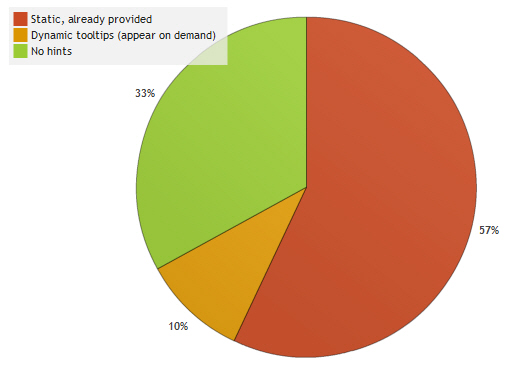
57% of the reviewed web forms provided “static” help — tips which are supposed to explain what is expected from the user’s input; these tips are obviously placed next to the input field. 10% of the tooltips appear on demand – usually after some help-icon is clicked or when the user is typing the information in the input field.

3.3. Help, support, tooltips: where are they placed?

When providing users with assistance it is necessary to make sure not that the help is simply provided, but that it can be easily found and understood by users. It is crucial to make sure that users don’t make mistakes associating a hint to an input field. To achieve it you need to know where users expect hints to appear. So where are hints and help usually placed within the form?

Help in Web Form Design Patterns: Sign-Up Forms, Part 2

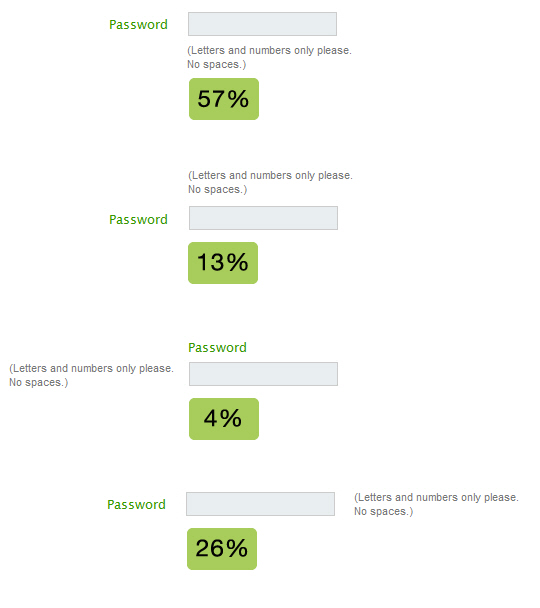
If hints and help appear, they appear…

  • below the field (57%)
  • on the right side of the field (26%)
  • above the field (13%)
  • on the left side of the field (4%)

We have observed a strong trend toward hints placed directly below the input field. Usually such hints have a slightly different color, in most cases lighter than the main content.

3.4. Input validation: static or Ajax?

Although Ajax seems to have literally flooded web sites with a rich user interaction over the last years, it still hasn’t managed to reach a critical mass among popular web-services. Surprisingly, we weren’t able to identify a trend toward Ajax. The “classic” validation techniques which validate input after the user has clicked on the submit-button are more popular than real-time-validation with JavaScript.

According to our research,

  • 30% of the forms displayed only an error-message at the top of the form (no input fields were highlighted),
  • 29% had highlighted input fields with corresponding messages next to the input field (no error-messages were provided at the top of the page),
  • 25% used both error-messages and input fields,
  • 22% used real-time validation with Ajax,
  • 14% used JavaScript-error warnings,
  • 1% used a system-message with a “go back”-link.

3.5. Design of error messages

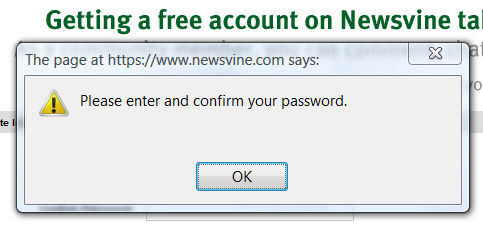
As you can see, we have identified six different types of error validation. It is remarkable that 14% of the forms still use Javascript-error-windows to communicate problems (e.g. YouSendIt, Mail.ru, Newsvine, Clipmarks, Yandex, see screenshot below) while only 22% had at least partial Ajax-validation (usually for checking available user names). It is also remarkable that not a single site had no validation whatsoever.
Newsvine in Web Form Design Patterns: Sign-Up Forms, Part 2
Newsvine uses JavaScript-error warnings to communicate problems.

Usually designers tend to report mistakes using a) error messages appearing after the submit-button is clicked and / or b) highlighting “incorrect” input fields visually. In the first case errors are usually bulleted and presented as a list at the top of the page, before the form. In the second case usually the color of the border of the “wrong” input field is highlighted together with the label of the field (in most cases with a red text color and red background color).

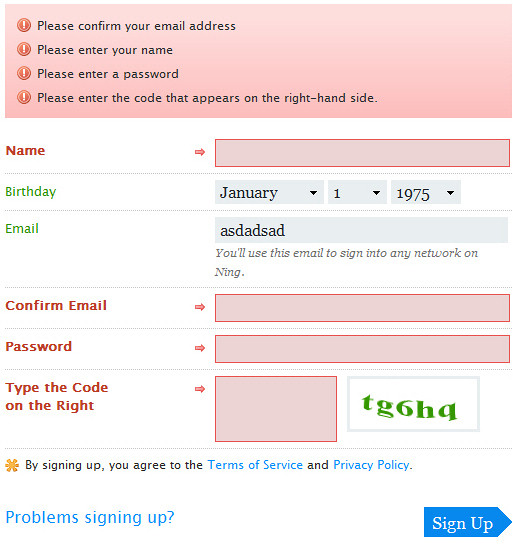
Sometimes designers combine both techniques and use error message as well as the input field highlighting. For instance, consider the sign-up form on Ning (see image below) which combines both techniques.
Ning-3 in Web Form Design Patterns: Sign-Up Forms, Part 2

Usually, red is used to indicate mistakes; however it is not necessarily the case. Tickspot, Mixx.com and Furl use yellow to communicate problems occurred during the form completion.
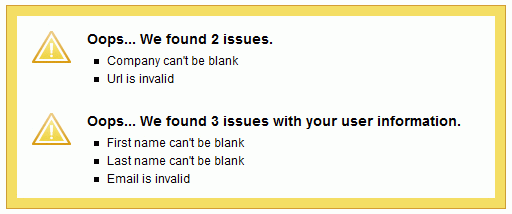
Tick4 in Web Form Design Patterns: Sign-Up Forms, Part 2

However, if any color is used at all to communicate a successful registration, then it is green. It was the case in 97% of web-sites where success was highlighted visually.

Tick5 in Web Form Design Patterns: Sign-Up Forms, Part 2

3.6. Is it necessary to confirm the e-mail?

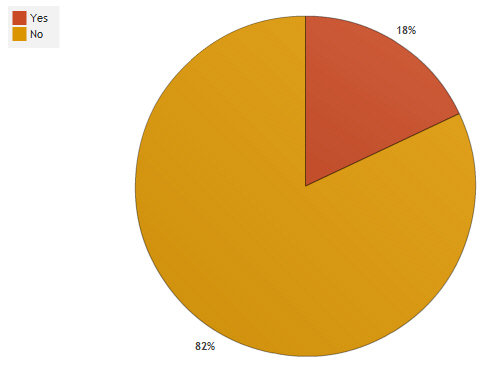
Only in 18% of the cases it was necessary to confirm the e-mail (e.g. Odeo, Ning). To be honest, we don’t really see any rationale in asking users to re-type the e-mail — after all, users can see what they input because the e-mail field is not starred out (updated). Do you?
Re-type-email in Web Form Design Patterns: Sign-Up Forms, Part 2

3.7. Is it necessary to confirm the password?

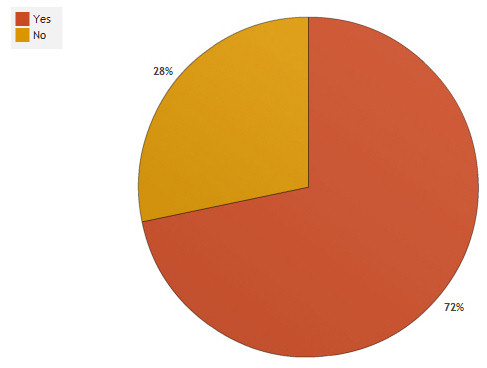
It sounds reasonable to ask the user to confirm the input as the user doesn’t see the information typed in (he/she sees asterisks instead). However, many sited decide to remove one input field to minimize the time required to complete the form.
Re-type-pass in Web Form Design Patterns: Sign-Up Forms, Part 2

In 72% of the cases it was necessary to confirm the password. However, many large sites such as Facebook, Friendster, LinkedIn, Stumbleupon, Pownce and Twitter don’t require password confirmation.

3.8. Is captcha in use?

While users would definitely be glad if captchas were gone, they are necessary in practice, because web-sites need to make it impossible for spambots to create numerous accounts as otherwise they would need to filter spam accounts in the database.

According to our research,

  • 52% of the sites don’t use captcha,
  • in 39% of the cases it was impossible to reload the captcha without reloading the whole form. This is really dramatic from the usability point of view.

However, we couldn’t identify a trend toward sign-up forms with or without captchas. In any case, if you use a captcha, please make sure that it is either always easily readable or users can reload the image in case it is not readable. Some sites haven’t offered the possibility to reload the captcha, but Digg, AOL, Slashdot, Google and Last.fm have made it possible to the users to listen to it in case it is hard to recognize.

3.9. Cancel-button in use?

When we were coming up with the design problems to consider when designing web forms, we have expected sign-up forms to not have a cancel-button, as it doesn’t really make much sense for the users to abort the form completion after all fields have been typed in. Yet we were partly wrong.

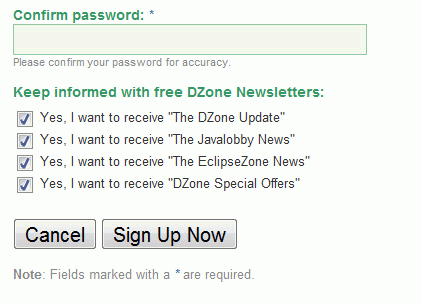
The cancel-button was used only in 8% of the cases. In some of these cases the “cancel”-button came right after the “terms and conditions”-section (e.g. Zoho Writer). Consequently, if users do not want to agree to the service conditions, they could abort the process. On the other side, some services offer a payment plan before the registration (e.g. Crazyegg). In case users have selected the wrong payment plan they can get back with the cancel-button and select another plan they prefer.
Dzone in Web Form Design Patterns: Sign-Up Forms, Part 2

Apart from that: we just don’t understand why Dzone has a cancel-button placed on the left in its sign-up form.

If the cancel-button is used, it is placed on the right side of the submit-button (4%). Among the sites reviewed in the post cancel and submit-buttons didn’t have a strong visual difference and were placed next to each other. From the usability point of view it makes more sense to use a clear visual distinction between primary action buttons and secondary action buttons and introduce a significant amount of space to clearly separate them.

3.10. Alignment of the submit-button

Depending on the form layout it may make sense to align the submit-button on the left, on the right side or place it in the middle of the layout. Designers seem to have a strong preference toward left-aligned submit-buttons (56%), followed by centered buttons (26%).
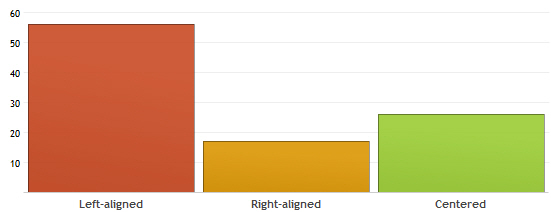
Submit-alignment in Web Form Design Patterns: Sign-Up Forms, Part 2

Right-aligned submit-button is still popular (17%), however it is often used when designers want to indicate the next step of the registration. In such cases submit-buttons are often titled “Continue” or “Next”. Reason: in usual desktop-applications “Next”-button is also often right-aligned.

3.11. Thank-you message

While few years ago most services offered a simple, basic thank-you message after a successful registration (usually with a link to the login-page), now most sites try to motivate users to explore the service immediately.

  • 45% of the forms asked just registered users to proceed with submitting further information, finding friends in the networks, suggesting the site to friends or filling out his or her profile.
  • 33% of the forms presented “places to go” and functions to explore in an engaging, user-friendly-tone,
  • 4% offered a basic “thank you”-message,
  • 2% had a redirect to the homepage.

Further findings

  • tab index was used correctly in 99% of the cases (the only exception was Habrahabr)
  • 24% of forms used conversational talk, trying to address users needs by speaking with them through labels. Informal phrases such as “What’s your name?”, “Your e-mail, please?” or “I’d like to…” are common in this context.
  • 38% of sites prefer to remain formal and use business talk, asking users the required information user-friendly (e.g. “Your name”, “Confirm password” etc.),
  • 38% of sites use system talk; here visitors are asked for their “Login”, “User password”, “Location” etc.

Bottom line

Let’s conclude with a brief overview of the findings presented above. Please keep in mind that we have considered only sign-up forms.

  • sign-up forms don’t have any hover, active or focus-effects (84%),
  • hints and help are either static (57%) or dynamic (33%) and appear below the input field (57%) or on the right side of the field (26%),
  • static validation is as popular as dynamic validation — no trend toward Ajax;
  • e-mail confirmation is not used (82%),
  • password confirmation is used (72%),
  • captcha can be used or not used (48% vs. 52%),
  • cancel button is not used (92%),
  • the submit-button is left-aligned (56%) or centered (26%),
  • thank-you message motivates users to proceed with exploring the services of the site (45%).

Vitaly Friedman, editor-in-chief of Smashing Magazine (www.smashingmagazine.com), an online magazine dedicated to designers and developers.

Post Rating
1 Star2 Stars3 Stars4 Stars5 Stars (No votes yet)
Loading ... Loading ...

Tags: , ,

Advertising
  1. 1
    Luís Carvalho
    July 8th, 2008 10:37 am

    More like these, pleeeeease…

    Thank you guys!!!

  2. 2
    Nikola Krstevski
    July 8th, 2008 10:39 am

    As always, the SM did a fine job… I’m impressed. I mean, I always take care when making web forms… Never thought I’d see somebody neglecting to, for example, put a tip next to a form field or something like that. It is so good to have a website that actually reminds people what they are forgetting to do.

  3. 3
    Wes
    July 8th, 2008 10:52 am

    This is an interesting post…but I do have one question. What are the conversion rates for all of these different methods? I mean it’s cool to observe how popular websites are doing things, and we can assume that they must be doing something right, but just because a method is the most popular doesn’t mean it is the most successful.

    Any thoughts?

  4. 4
    antpaw
    July 8th, 2008 10:55 am

    ajax validation is a great thing, i dont understand why php is more popular

  5. 5
    Vitaly Friedman & Sven Lennartz
    July 8th, 2008 10:56 am

    @Wes: of course, you are absolutely right. If many popular sites use some design pattern, it doesn’t necessarily mean that this pattern is the best option to choose (particularly, from the usability point of view). In fact we are going to make a comprehensive research and present guidelines for effective web form design in one of our upcoming articles – based on recent research findings and eyetracking studies. However, first we wanted to get a better understanding of how current design patterns look like. Please stay tuned.

  6. 6
    Davin
    July 8th, 2008 10:56 am

    Love it :D Thanks Smashing!

  7. 7
    Diego
    July 8th, 2008 10:57 am

    gracias por los tips

  8. 8
    Vitaly Friedman & Sven Lennartz
    July 8th, 2008 11:00 am

    @all: please keep in mind that the results presented above are not our suggestions: this is how it is done in practice, not necessarily how one should do it in practice.

  9. 9
    Cosmi
    July 8th, 2008 11:07 am

    Nice. Thanks.

  10. 10
    Scott Brandon
    July 8th, 2008 11:16 am

    As always, wonderful article. I was thinking about asking you guys (and gals) ;-) to do a study on signup forms. You guys are eerily timing.

    Great Job!

  11. 11
    Niki Brown
    July 8th, 2008 11:40 am

    IMO cancel/reset buttons are just redundant. If the person wanted to change something on the form they could just click the field and change it. Hopefully this is a trend that will die out completely.

    Niki Brown Niki Brown

  12. 12
    Joseph Maguire
    July 8th, 2008 11:52 am

    As a studying professional of web design architecture tips and tools like this are crucial to my self education. I hear it from web developers routinely about how to make something like this that is seen as simple. And we all routinely make mistakes that people before us have already figured out and made standard. So when you see it in action like this it becomes that simple. Thankyou!

  13. 13
    depe
    July 8th, 2008 12:22 pm

    How about doing this in pdf, to download?
    I would appreciate it

  14. 14
    Ben Carlson
    July 8th, 2008 12:38 pm

    Thanks for the info! As always, a well thought out and presented study. It’s a great analysis of how some companies do things, but that doesn’t mean they are the best ways. So, for a follow up, how about a “best sign up forms” post?

    -Ben Carlson

  15. 15
    K.Brown
    July 8th, 2008 12:46 pm

    Great information! Thanks a lot! I’d like to see the effectiveness of these different styles charted too, if possible. :)

  16. 16
    Gary
    July 8th, 2008 12:48 pm

    Keep these coming! Very interesting!

  17. 17
    Lee
    July 8th, 2008 12:52 pm

    Is it necessary to confirm the e-mail? In my opinion, it is very necessary to confirm the email.

    If you flub your email address, you’re communication line is screwed, especially if the service you’re signing up for has a “Click this link to confirm your account”.

  18. 18
    Steven
    July 8th, 2008 1:07 pm

    Whatever server you’re grabbing the screenshots from is REALLY slow.

  19. 19
    Tony Chester
    July 8th, 2008 2:02 pm

    Great post guys. As for the annoying captchas, we have been implementing this CSS trick from ModernBlue. Basically it hides a text field so humans don’t see it but bots do. If a bot completes the form, it goes nowhere. You can read more on it here – http://www.modernblue.com/web-design-blog/fighting-spam-with-css/

    Anything to streamline a form submission is awesome.

    - Tony Chester | OnWired

  20. 20
    Ben Rogerson
    July 8th, 2008 2:25 pm

    great writeup but where’s the stats on whether they used or as submit buttons?

  21. 21
    Ben Rogerson
    July 8th, 2008 2:26 pm

    thats – ‘ or as submit buttons?’

  22. 22
    TJ
    July 8th, 2008 2:39 pm

    Regarding Captchas, I interviewed a blind person a couple of weeks ago and he said, graphic captchas aren’t exactly barrier free. A better use would be a simple addition i.e. write down the answer of 11+7. Some captchas have audio files, but why go to all the trouble.

  23. 23
    Les
    July 8th, 2008 3:48 pm

    Agreeing with Lee…

    Confirming the email might be the single most important function of the form. An account without a correct email address can lead to very serious consequences – depending on the nature of the website. The small extra step of re-entering an email and/or confirming activation through email can prevent major aggravation later, especially with paid services, renewals, classified ads, etc.

    And believe me, people mis-type their email addresses all the time…

  24. 24
    Laura
    July 8th, 2008 4:15 pm

    Hi guys, great article, what were your sources for this and how many sites did your survey/research?
    Cheers
    L

  25. 25
    Shaytaan
    July 8th, 2008 5:26 pm

    One who follow others footsteps, never comes forword.

    I allways do things my way, but I do enjoy researching. Very nice article

    Thanks

  26. 26
    neliason
    July 8th, 2008 6:04 pm

    One thing I dislike is the use of red text for errors. I am colorblind so red does not stand out to me. I realize it does for most people. But there are a good number of folks like me for whom simple red text is not sufficiently noticeable.

  27. 27
    Gaurav_M
    July 8th, 2008 9:23 pm

    Eye opening article… great work as always.. Thanks guys

  28. 28
    Johnson
    July 9th, 2008 12:09 am

    this article could not have come at a better time! We’ve just finished a very unsuccessful online competition with data capture and we think our form may have put people off. We’re just working on the next one and we’ll be taking this article into account. Thanks for the great info guys!

  29. 29
    Andy Gongea
    July 9th, 2008 12:17 am

    This entire article was by far the best article on Smashing Magazine

  30. 30
    Endji Hesham
    July 9th, 2008 12:19 am

    thanks alot :)

  31. 31
    MPV
    July 9th, 2008 12:29 am

    Very thorough article, keep up the good work!

    Too bad this is only “how many sites do today”. I would love some additional information on “recommended best practice”.

  32. 32
    Stanium
    July 9th, 2008 1:59 am

    ah-ha! just as i thought, tooltips rule when placed under input field.

  33. 33
    John Faulds
    July 9th, 2008 2:01 am

    tab index was used correctly in 99% of the cases

    Does that mean that form elements were tabbed through in the correct order or that 99% of the forms you looked at used the tabindex attribute?

  34. 34
    Tephlon
    July 9th, 2008 2:07 am

    Great article. Learned some valuable lessons.

    One small thing though: In the figure for 3.10, why isn’t the “centered” column in the middle?
    It would make a lot more sense…

  35. 35
    Vitaly Friedman & Sven Lennartz
    July 9th, 2008 2:21 am

    @John Faulds: it means that form elements were tabbed through in the correct order.

  36. 36
    Lennie
    July 9th, 2008 2:31 am

    Great Posting. That’s the reason why I am visiting SmashingMagazine regulary. Free Icons can be found on Google, too. More of this content, please.

  37. 37
    tfe
    July 9th, 2008 2:40 am

    Thank you !

  38. 38
    Geert van Grunderbeek
    July 9th, 2008 3:33 am

    Sorry, i don’t need statistics. i need recommendations instead of getting to know what most people do

  39. 39
    Vitaly Friedman & Sven Lennartz
    July 9th, 2008 3:43 am

    @Geert van Grunderbeek: please take a look at comment #5.

  40. 40
    sempsteen
    July 9th, 2008 4:57 am

    thank you for this great article!

  41. 41
    Jon
    July 9th, 2008 5:10 am

    This was useful, but I have to agree with Lee about asking the user to confirm his/her email.
    A simple typo could lead to something far more serious, as well as being a right pain if you ever forget your password.

  42. 42
    Steve Dunlap
    July 9th, 2008 5:33 am

    Geez. Smashing Magazine has for the longest time and still continues to be the first thing I look at every morning (even before email). Keep up the good work.

  43. 43
    Jez
    July 9th, 2008 6:29 am

    Now this is the kind of content I like, not just a list of other people’s content.

    I’m not sure about the massive charts though.

  44. 44
    Bobby
    July 9th, 2008 6:59 am

    I always wanted to know how many websites require email verification, in which they sent you an email and you have to click the link to verify that it is actually your email.

  45. 45
    adjwilli
    July 9th, 2008 7:49 am

    @Vitaly Friedman & Sven Lennartz

    This is great collection of research, but I’m interested in seeing the follow up articles that relate these design patterns to conversion rates and how users actually feel about the patterns. Right now, this says very little about what designers should do, but it definitely has the potential with enough user research to be a great source for the “ought to”.

  46. 46
    ChrisMerkel
    July 9th, 2008 9:35 am

    @neliason, RE: colorblindness & error messages

    One thing I dislike is the use of red text for errors. I am colorblind so red does not stand out to me. I realize it does for most people. But there are a good number of folks like me for whom simple red text is not sufficiently noticeable.

    Some of the examples above use icons. Are the shapes of good icons useful to you for highlighting errors or important information from the rest of a form page’s content, or would you rather see more contrast such as error messages in bold, italicized, or surrounded by a border? What has been the most useful to you as you’re using sign-up or order forms yourself?

  47. 47
    Zach Katkin
    July 9th, 2008 4:08 pm

    Pretty nifty article, but do you have any metrics related to the actual effectiveness of these placements? Percentages of placements is great, but effectiveness would be even better. (And why did you put this allowed tags tip above the input box… jk)

  48. 48
    Marcis Gasuns
    July 9th, 2008 4:19 pm

    Fantastic as always

  49. 49
    Poramaporn Suwakon
    July 9th, 2008 5:44 pm

    Great article! give a new insight for a new web developer.

  50. 50
    Roy
    July 9th, 2008 9:29 pm

    Awesome article!

    Very useful for designers and developers around the globe!

    It’s always nice seeing what other’s opinions are on a given topic in survey (straight to the point) form.

    Cheers!

  51. 51
    Kanchan Tamhankar
    July 9th, 2008 11:35 pm

    Very informative and useful as ever.. Good job..

    Just bumped on this article when I was about to start with a new form design. So can say it was more than the “timely” help.. :))

    Looking forward to more articles..

  52. 52
    Jurjen74
    July 9th, 2008 11:43 pm

    Decent article!

  53. 53
    Simon
    July 10th, 2008 1:39 am

    As someone who’s been creating websites and developing forms since the 1997 it is nice to see that there are some parts of the web that still maintain the KISS principle (Keep It Simple Stupid). Forms have become much more visually appealing but without the need to clutter or confuse. If forms can acheive this balance then more thought really should be going into what you put on a page. “Just because you can doesn’t mean you should” is the motto I live by and it has served me very well.

    Nice topic!

  54. 54
    Eduardo Sasso
    July 10th, 2008 2:37 am

    Great research! This is a very helpful article! Congratulations

  55. 55
    sunny beach
    July 10th, 2008 5:13 am

    Excellent article.. Love all the stats about web forms..

  56. 56
    Carlos Eduardo
    July 10th, 2008 6:06 am

    I love it!

    I think it’s very important to us, know more about some patterns when we will design a new form.

    Thank you for this new post series :)

  57. 57
    Jason Lav
    July 10th, 2008 9:07 am

    Excellent article.

  58. 58
    Brett
    July 10th, 2008 9:25 am

    If I’m looking for a ‘good’ way of doing something, SM is the page I hit first, always! With articles like the above, it’s a no-brainer. Conversion rates would be the icing on the cake… nice.

  59. 59
    xTremeRacer
    July 10th, 2008 10:34 am

    @neliason
    Could you suggest a color other than red?

  60. 60
    Mike Ritchie
    July 10th, 2008 12:27 pm

    This is very timely as I’m in the middle of undertaking my first serious storefront application. Please do follow up with the article on checkout forms. This is consistently one of the most useful blogs I’ve seen. Thanks!

  61. 61
    pju
    July 11th, 2008 2:37 am

    I would like to echo everyone elses sentiment, very good article.

    In responce to antpaw (comment #4), I think the reason people use a backend script is because you can use ssl or something like that to encrypt the traffic, I believe simple ajax requests go un-encrypted / plain-text.!!?

    If anybody knows different I would be interesting in finding out to acheive a level of encryption with ajax.

  62. 62
    Nick Hoffman
    July 11th, 2008 8:00 am

    Thanks for the great write-up; very informative! I’ve noticed one inconsistency though. Section 3.2 says:
    57% use static hints.
    33% use no hints.
    10% use dynamic hints.

    However, the conclusion (”Bottom Line”) says that dynamic hints occur 33% of the time.

    Cheers,
    Nick

  63. 63
    Jeremy Nicoll
    July 12th, 2008 5:48 am

    The reason most sites still use the server side validation is that the AJAX validation is really easy to bypass. Rather than writing and maintaining two sets of identical functionality, most sites are simply focusing on keeping it where it’s most important: on the server.

  64. 64
    neosheet
    July 12th, 2008 6:36 am

    i follow it since part 1. thx for this good article, very usefull data

  65. 65
    DanMan
    July 13th, 2008 5:51 am

    Anyone have an opinion about using the “obscured” password fields in a sign-up form? I mean, this is a pain for users (often requiring a second, confirmation field to confirm you typed it the way you intended to), and seems a little outdated. Really, are people peeking over your cubicle trying to read your password while you’re signing up?

  66. 66
    Geert van Grunderbeek
    July 14th, 2008 12:54 am

    @Vitaly Friedman & Sven Lennartz: tx, i will stay tuned! :-)

  67. 67
    Heam
    July 15th, 2008 7:55 am

    Really Impressing .. Thanks SM

  68. 68
    marvens
    July 16th, 2008 9:53 pm

    Me Gusto Bastante el Articulo.. sobre todo el buen estudio que realizaron.. acerca del boton cancelar si no se usa nada mejor sacarlo :D

    Saludos de Chile!!!
    Viva chile Mierd….a

  69. 69
    Chris
    July 18th, 2008 7:28 am

    Very informative thanks

  70. 70
    arni
    July 21st, 2008 2:05 pm

    Can’t disagree more with the couple of folks that want people to type in long emails (that they can actually see) twice.
    Would you then ask ppl to fill EVERYTHING in twice? No you wouldn’t, because you know they can type pretty accurately and when they DO mistype, they can actually SEE it (as opposed to a ‘hidden’ pwd) and correct it.
    So don’t think people are more stupid than they really are, all you’re gonna do is p*ss the large majority right off, just because of the 1% that don’t care enough anyway… Bad move, mister.

  71. 71
    OliveBiz
    July 21st, 2008 9:59 pm

    I really think the input validation functionality is most important. Through your post, I did get to learn some interesting stuff. Thanks

  72. 72
    Cher
    September 15th, 2008 10:58 am

    Any information on how many of these sites require new members to leave the site after signup to retrieve an email sent to them and then re-enter through a link in that email so their email address is fully confirmed? Our web designer thinks this is common but I’d like some outside confirmation.

  73. 73
    Nick
    October 12th, 2008 8:03 am

    You guys are always on top of it. Thanks for the great article!

  74. 74
    Adriatic Web Design Company
    October 25th, 2008 6:27 am

    Thanks for the research, this info is useful!

  75. 75
    Jelle Vervloessem
    October 29th, 2008 1:44 am

    When can we expect the guidelines for effective web form implementation?
    Is it also possible to give us some information about the Login forms and Password Retrieve/Reset systems and lay-out ?

    Grtz

  76. 76
    Kirill
    November 26th, 2008 5:55 am

    Really useful survey, good and objective work. Thanks guys!

  77. 77
    Miriam
    November 26th, 2008 10:42 am

    Designers seem to have a strong preference toward left-aligned submit-buttons (56%), followed by centered buttons (26%).

    I wonder if that’s really about the design-approval-process, rather than the designers. In my (completely anectodal, unscientific) research, designers prefer the right side for save/continue; possibly as a result of Mac dialog boxes, or an association of right with “future” (turning the page, sliding along a timeline, etc.). The business-types, who often have the final approval, seem to like it on the left.

    I’m a designer with the final word, so mine are on the right ;)

  78. 78
    AV
    November 27th, 2008 7:17 am

    This is comman but really help full things

  79. 79
    Trina Orr
    April 30th, 2009 11:13 am

    o9kuwvlethd0w00s

    管理博客

  80. 80
    Maureen Potts
    April 30th, 2009 7:58 pm

    8n9mhkef4ylj6qe1

    管理博客

  81. 81
    Sachin Datta
    May 2nd, 2009 4:15 am

    Thanks for this article, i have really enjoyed reading articles like these

  82. 82
    Belle Chua
    May 14th, 2009 7:44 pm

    This article is quite useful especially when looking on the usability of the form versus design…like it!!!

  83. 83
    ScottAnkeny
    May 17th, 2009 11:40 am

    Any word on when the “check out” form how-to is coming out
    Did I miss seeing it?

  84. 84
    Marie
    June 4th, 2009 4:02 am

    These are all really great and useful tips. But one problem I, as a user, run into all the time are forms that are based around images. if I’m dial-up (yes, it still exists in a few places) and I’m surfing without images because they slow the process down…I won’t be able to see the form elements if they are images. Care is always made to make sites accessible but often this is forgotten when it comes to forms. Just sayin.

  85. 85
    idont
    June 12th, 2009 1:58 pm

    My 2 cents about the email confirmation: On my website, I need to authenticate the email with an activation email.
    The problem is the 1% of users without computer skills who often do not know their exact email address (typos, mixing the domains (.com instead of .ch), adding “www.” at the beginning, …). Requesting an email confirmation has dropped the error rate.
    But I still have not found a bullet proof system to get the correct email each time and I still have to manage support emails…
    (People do not read the confirmation page (2 sentences!) on which I write where the activation email is sent….)

    Thanks for this great article!!!

  86. 86
    driver75
    October 22nd, 2009 2:18 am

    While each state has its own rules of evidence, many states model their rules on the Federal Rules of Evidence, which themselves relate closely to the common-law mode of examination. ,

  1. 00

    There are no trackbacks at this time. If you are interested in leaving a trackback, please use this URL.

Leave a Comment

Make sure you enter the * required information where indicated. Please also rate the article as it will help us decide future content and posts. Comments are moderated – and rel="nofollow" is in use. Please no link dropping, no keywords or domains as names; do not spam, and do not advertise!


Advertisement Advertise with us!
Join in Smashing Forum
  • Re: Correct way to learn PHP

    Start off by reading all the 15 parts of PHP 101 on Devzone.

  • Re: Using Tutorials?

    I say you're okay. I wouldn't straight up jack someone else's design and present it as my own, even if it was a tutorial, but it's certainly acceptable to learn some…

  • Correct way to learn PHP

    So, I'm a designer but I wanna expand my abilities and learn PHP, to be more exact I wanna learn CI - Codeigniter!

  • I wanna make comics!

    Hello,I'm designer but I've never involved in vector painting so I need your help

  • Re: Twitter

    @gatorwebdesignShould tweet something really...

Post your job