Smashing Magazine we smash you with the information that will make your life easier. really.
Top 10 Usability Highs Of Mac OS
August 12th, 2008 in Events | 257 Comments
By Juul Coolen
Although I’ve been a Windows power user for years, the transition to Mac couldn’t have been easier and more pleasant. I don’t want to turn this article into some endless rambling about how great Mac is, but as the user of both systems I can speak from my own experience quite objectively. Let’s take a look at some of the spots where Apple really has done it better in terms of user interface and usability.
1. Consistency
The whole OS and almost every application looks and feels the same, as if a single team developed the whole thing, thanks to Apple HI Guidelines. Official guidelines for user interface design made it possible for users to actually use most Mac-applications in a very same way, creating a seamless and comfortable experience in the end. Users are able to anticipate how system behaves and what to expect from its applications. In fact, consistency dramatically improves learnability and usability of interacting with the system.
2. Intuitiveness
Installing and uninstalling applications is simply drag-and-drop. It can’t get much simpler and more intuitive than that. In fact, it’s hard to make any errors here, e.g. selecting some wrong option in a drop-down menu or clicking occasionally on the cancel-button. Quick and simple.

3. Effective and appropriate metaphors
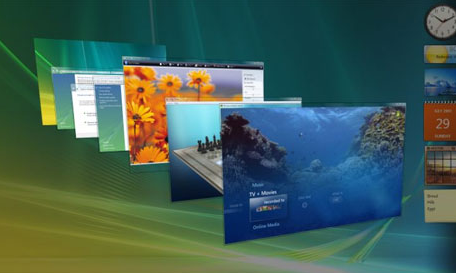
Mac effectively uses the power of unambiguous metaphors. The different overviews in the OS just work. Exposé does the right thing, Time Machine uses a 3D view where appropriate (none of that 3D-flip ‘just for the sake of it’-nonsense of Vista). Depth in Time Machine represents the location in time and therefore uses a neat metaphor helping the user, and browsing your albums with Cover Flow in iTunes (and Finder) feels almost like the real thing.

4. Informative error reporting on-demand
Contrary to other user interfaces, Mac-applicatinos display user notifications only when something goes wrong, not permanent baloons when some process is being started or finished. Think of it, do we really need someone to tell us when something goes the way it should?

5. Hiding the technical details
Manually having to defragment a hard drive? Hmm, not here. On Mac users use technical tools by communicating with simple and memorable metaphors. Most users are not savvy and they have no clue how to take care of technical details so why should a user interface prompt them to do this?

6. Fitts’ Law
Essentially, the famous Fitts’ Law says that users are more productive with the mouse when they have less distance to travel and a larger target to click on to do their tasks. Mac’s design engineers have incorporated this rule in their design: almost all application menus are attached to the top of the screen, rather than to the applications’ windows. It improves the usability and reduces screen clutter. Compared to other user interfaces, regarding Fitts’ Law Mac performs better.

Source (mock up)
7. User input feedback
Mac applications have no useless “OK” and “Apply”-buttons and changes are applied immediately and on the fly. Thus the system seems to be more responsive and requires less input from the users, making user feedback as effective as possible.

Clicking the checkbox here makes the tab bar show up in the browser window instantly. (Firefox)
8. User support and navigation
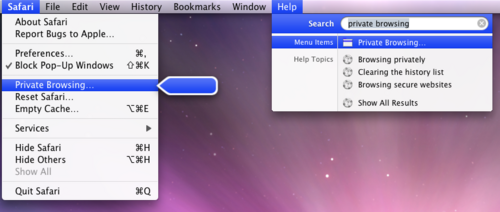
Remember Clippy? Mac has its own (OS wide) version as well, called Spotlight. The only difference is that it’s actually a lot more helpful and versatile. And damn speedy too! Really, navigating an OS hasn’t ever been that straightforward. It does calculations as well and launching applications is as easy as typing in its name and hitting Enter (see screenshot below).

9. Workflow
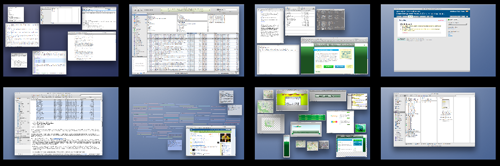
Mac doesn’t force you to focus on a single window, but keeps them all visible in the background ensuring a more efficient workflow. However this might be a thing of taste and getting used to.

10. Even kernel panic looks nice!
A funny but still nice example of Apple’s attention to detail. On the rare occasions when Mac crashes, it still does so in a respectable manner. Usability-wise it’s not perfect, since it doesn’t let the user know what went wrong and only asks the user to reboot the system. Still, beautiful and elegant.
I’m not saying Mac’s user interface is perfect. There is probably no perfect solution which would satisfy everyone. Yet Mac has done it right a lot of times, at least from the usability perspective. What do you think? Do you have examples when Mac fails from the usability point of view? And how exactly is Mac’s user interface better than other interfaces?
About the author
Juul Coolen is a web-designer living in The Netherlands. Apart from some freelance work he is still studying computer science at the university. His dream is one day to have a first-class design and development agency called Imaginized.
Editor’s note
This post is one of the finalists of our guest author contest. Over three weeks selected top-10-lists and discussion articles will be published. To rate the articles we’ll analyze their popularity, users activity, quality of backlinks, traffic and further data.


Attitude (August 12th, 2008, 6:59 am)
Nice read. Mac’s have their backdrops too but definately a professional’s os it is.
Marc (August 12th, 2008, 7:01 am)
I have a Mac, and I’m very happy with it. Thanks for this great article, I love you guys.
Justus Blümer (August 12th, 2008, 7:01 am)
Makes me want to buy one of Steve’s machines…
Michael Thompson (August 12th, 2008, 7:10 am)
As a Windows user since 3.1, a Mac user since 7 (I think it was 7), and a Linux user back when Red Hat was (remotely) cool I’d like to say that this post summarizes my reasons for feeling most comfortable on a Mac.
Essentially, it’s the UI. Of course, access to a BSD underbelly via a proper terminal and the ability to run CS3 apps at the same time is another huge selling point for me.
h-a-r-v (August 12th, 2008, 7:10 am)
Hmm. First of all, I don’t find it fair, that there was no limit for top-ten articles, ’cause this one is a good example of using it the other way around. It’s actually a discussion article just using the top-10 list form. And I didn’t know we discuss operating systems here (and hardware in case of the HD). I guess SOMEHOW we might consider it as description (not a top-10) of a tool for designers.
I don’t like Macs and their “cool and colorful” design, however that’s only my personal taste. E.g. I prefer HTC Touch Flo 3D design to iPhone’s interface. Apple just doesn’t look serious to me, it’s rather lil’ infantile. It’s nice, it’s fancy, it’s clear, but it lacks class (imho). I also think all the stuff from #1 to #10 simply doesn’t matter at work, otherwise I’d have a Mac, I guess. So I don’t get the point of the article, unless we treat it as mentioned in the previous paragraph.
Y.Li (August 12th, 2008, 7:10 am)
I actually have real issues with the fact that menus are always at the top of the screen. I don’t want to choose my windows and THEN go to the menu bar. I like the fact that I can click the Edit (or whichever) menu of the window next to mine without needing to change to that window first.
And the Apple OS minimize/maximize/non-max size buttons? Drives me nuts. When I want a window maximized, it means I want it to take up my entire screen, not leave a smidge of pixels open here or there.
I’ve used Windows and Macs for equal amount of time for school and work, and I can safely say that despite the many issues I also have with Windows, I will never buy a Mac. (Have you ever tried doing a serious hardware upgrade with a Mac machine? I’ve never experienced such a headache in my life.)
Sonali Agrawal (August 12th, 2008, 7:14 am)
Cool Article. All rightly said. I am recent mac user too. And I am just loving it so much. It’s become a daily source of inspiration to me somehow!!
James Finley (August 12th, 2008, 7:14 am)
How did you get a tabbed Finder? Do want!
Daniel (August 12th, 2008, 7:18 am)
I so want to get a mac, but waiting till the new macbooks come out in september.
Link [dtsn.co.uk]
Jeff (August 12th, 2008, 7:21 am)
true. they even “designed” the blue screen of death.
Link [fultondesign.net]
Vitaly Friedman & Sven Lennartz (August 12th, 2008, 7:23 am)
@h-a-r-v (#5): we understand your concerns, however, these were the rules. We understand that this article is somehow a combination of a top-10-article and a discussion article. But it is a top-10-list while usual discussion articles are not.
Chustar (August 12th, 2008, 7:27 am)
“I don’t want to turn this article into some endless rambling about how great Mac is,”
No, it feels like you turned into an article about how bad Windows is. I love the article, but it has an anti-windows vibe.
h-a-r-v (August 12th, 2008, 7:30 am)
No problem, just pointing the fact. I just thought for I could somehow make the one I sent you the same way and use as many chars I want to share every detail and idea just by the way, instead of decreasing my little thesis into some blog note. But dura lex, sed lex. :-)
sam (August 12th, 2008, 7:30 am)
Thanks for this article. It just convinces me one more time that Macs are way overrated. In the whole list I can’t see a single thing that would make me want to change to a Mac. Most of that stuff might be nice to have, but I can’t see anything that would essentially help me getting more work done. I had to work on a Mac in the past and I found it tedious and uncomfortable, so I guess I’ll stay with my Windows PC. It is not perfect either, but it works for me and I paid only a quarter of what I would have had to pay for a comparable Mac.
Anthony Bruno (August 12th, 2008, 7:30 am)
Anyone want to tell me how to make my finder look like that with breadcrumbs and tabbed windows?
Matt (August 12th, 2008, 7:31 am)
Great article, its true that the Mac OS has some great usability. A few thoughts:
“(none of that 3D-flip ‘just for the sake of it’-nonsense of Vista).”
I don’t see how Vista’s Flip-3D is doing it just for the sake of it, I think it is a nice way to lay out all the windows and look through them. I like using it much better than Alt-Tab as I can find what I need much faster.
“Mac doesn’t force you to focus on a single window, but keeps them all visible in the background ensuring a more efficient workflow. However this might be a thing of taste and getting used to.”
I’ve been using a Mac (along with a PC) for about two years now and one of the things I hate most about it is window management. Sure, it may be good when you have two or three windows open. But I usually have at least 10 different programs open and running and they can all just get lost. There isn’t a way to quickly get to what you need as its difficult to immediately see what has been minimized and the Command-Tab will only bring up a certain program, not a certain window. I feel that the Windows task bar and Alt-Tab (or Window-Tab) does a much better job at keeping your windows organized. I’m so glad that Leopard has Spaces now though, it makes it a little easier to keep track of everything.
But don’t get me wrong, I like both Mac’s and PC’s and use them both just about equally.
Onyeka (August 12th, 2008, 7:33 am)
i’lll have to disagree here. especially with the menu and workflow options. First, on another OS, if none of your windows are open at maximum size, you’d kinda still be able to see the other windows, maybe it’s me, maybe I didnt use a MAC long enough, I don’t know, but I don’t see the difference. And it drove me crazy with that menu up there. And the stress required to actually CLOSE an app is no fun either.I can’t count how many times I hit the ‘x’ button and remembered that I had to do something else to end it. Not a user high, thanx. It’s all aesthetics IMO. I’m yet to see that really spectacular thing about a mac.
Vitaly Friedman & Sven Lennartz (August 12th, 2008, 7:33 am)
@h-a-r-v (#13): we can always offer you the opportunity to become a guest author in our magazine - we don’t have size limits there ;-)
@sam (#14): probably it’s just a matter of taste. It’s not the tool you have but the way you use the tool to achieve best possible results. It doesn’t matter if you use Windows, Mac or Linux as long as you get things done (imho).
Jason (August 12th, 2008, 7:35 am)
Wow, I wonder how long until this becomes the usual Windows Vs. Mac comment flaming marathon.
Regardless, I’m not taking much away from this article.
Daniel (August 12th, 2008, 7:36 am)
Sorry for posting again, but I studied Fitt’s Law at university in great deal. It also states that buttons should get exponentially larger as you move away from the starting point towards the target. Therefore i wouldn’t say that they are incorporating Fitt’s law. By forcing the buttons to the top they are increasing the distance a user has to travel to a target. Depending on where the window is they could be effectively nullifying any advantage they get from placing them at the top.
Link [www.dtsn.co.uk]
Damien (August 12th, 2008, 7:36 am)
I tend to agree the maximize/restore button are behaving weird sometimes… for example finder will only take full vertical space while itunes will switch compact form on/off and some other software will simply take the full screen…
But the window mangement is good enough to forget that :P
Jeffrey (August 12th, 2008, 7:40 am)
Yeah, where did the screenshot of the finder with tabs come from? I’m guessing that must be a mistake and your showing a picture of someone’s concept interface for finder… if only it were real, that would by my #1 usability high of os x!
Vitaly Friedman & Sven Lennartz (August 12th, 2008, 7:43 am)
The image comes from here: Link [apeatling.wordpress.com] the link was just added.
elm (August 12th, 2008, 7:45 am)
ooh… really a tabbed finder including breadcrumbs…. not a mock .. or is it? and surprisingly no cover flow view icon…..
anyone knows more?
kasakka (August 12th, 2008, 7:47 am)
And then the low points in my experience. I use both Vista and OS X a lot, so comparisons are inevitable. OS X does a lot of things right but it has it’s own set of issues.
- Finder’s file sorting is just plain unintuitive. Folders mixed with files is just confusing to pretty much anyone and sorting by file type doesn’t work that well either. I use Path Finder as an alternative file browser and it’s miles better. Still, it’s nowhere near as good as Directory Opus for Windows… but if we’re simply comparing default file browsers, IMO Vista does better than OS X in this area.
- Mouse acceleration is terrible. Ironically I had to buy a Microsoft mouse to get proper mouse movement. See Link [db.tidbits.com] for details. My previous mouse was Logitech and even with alternative drivers it didn’t work that well and IMO the Microsoft mouse still doesn’t move the cursor as nicely as it does in Vista.
- The lack of Apply/OK buttons can be confusing. For example when editing Mail accounts it often asks “don’t you want to save the changes” and of course I do, but there doesn’t seem to be a Save button to be found anywhere else! This also sometimes means I’m not quite sure if the selections I made actually did anything unless something changes on the screen. That’s why the Apply/OK button is IMO a good thing. However, I don’t think we really need Apply, OK and Cancel buttons for this. Just Apply would be enough.
- Click to activate window. Especially annoying on multi-monitor setups. For example I’m working in another program on monitor one and notice a new article popped up on my RSS reader, to read it I have to first click once to select the RSS reader program window, then click again to select the article. On Windows I can do this with just one click. I wish Apple gave us the option to do this. The way OS X does it results in accidental doubleclicks quite often.
- Static top toolbar. Again mostly a multi-monitor issue. Having a program on the second screen and accessing its menus on another screen isn’t what I’d call user friendly or intuitive. Personally I’d rather have the top bar on both monitors and depending on which programs are on which monitor the menus would be shown there.
- Small version of the program toolbar (with the three balls for close, maximize, minimize). Some programs use this and on high resolution monitors it’s pretty tiny and hard to click. Why Apple included this in the first place I have no idea. It doesn’t serve a purpose IMO.
Jordy (August 12th, 2008, 7:48 am)
I think that screenshot from finder with tabbed states (and also the selected viewing state is different from the one in the current leopard release) is from Snow Leopard, which is the new and improved version of leopard .. you can prolly find stuff yourself about this..
please confirm?
Tobias Varland (August 12th, 2008, 7:58 am)
I’m a Mac user, but some of the things on this list just aren’t correct. #1 for example… Go to Google and search “OS X user interface inconsistency”. I think you’ll find a few results. This is a primary complaint of many longtime Mac users. Apple is making strides toward consistency, but for years they’ve been ignoring their own HIG to make applications look the way they want.
#2 is another interesting one. I agree that drag-and-drop installation is nice, but more and more things on the Mac are moving to installer packages. Even the drag-and-drop installations aren’t simple for new Mac users, because they don’t understand the idea of disk images. I don’t know how many times I’ve seen a user double-click a disk image to mount it, double click an application to run it from the disk image, and then restart their computer to find the disk image no longer mounted and the application no longer available.
That said, there’s not a single task I do on a computer that I wouldn’t rather do on a Mac.
bolbolbol (August 12th, 2008, 7:58 am)
the tabbed finder is not a real finder, is a mockup taked from here: Link [apeatling.wordpress.com]
Toby (August 12th, 2008, 8:05 am)
one of the poorest written article in smashing in a while. promising itself to be objective in the intro, but then the 10 points are really random and personal. there are lots of other points if we wanted to promote the mac os while sounding more objective. i’m just relieved this is just a guest author contest.
keep your excellent compilation articles, smashing. and leave the random personal tastes at each of our personal blogs.
John (August 12th, 2008, 8:07 am)
I think one of the best features is Expose. I don’t think you can hype it enough. It allows for very high efficiency.
Nathan Beck (August 12th, 2008, 8:08 am)
I’ve used Windows all my life, then made the change to Mac when I started working at my current company. I’d never really used one before and was so blown away I wasted my first month’s wages on an 24″ iMac. One of the best rash decisions I’ve ever made.
It makes my productivity far better, it’s much nicer to look at and just easier to use in every way. Plus I’m constantly finding neat little touches every day. I don’t have to install and run anti-virus software all the time, I don’t have to defrag my HDD every month, I most likely won’t have to reformat every year.
Yes this article is nothing but a ramble about how great Macs are, and yes it does have an anti-Windows vibe. But hey ho - I agree with every point!
h-a-r-v (August 12th, 2008, 8:10 am)
#18: Vitaly Friedman & Sven Lennartz: Then do it :-) Otherwise, I’ll send my application later on. Just don’t make me write a motivation letter and include pictures, hehe. I have some ideas, including the extended version of my contest article showing lots more of my point (as a blog note it’s all more like “if you know what I mean” or “try guessing”). Also, I’ve just become an official IE8 beta tester, so maybe I’ll be able to share some constructive thoughts after a while with MS on my back.
Thibaut (August 12th, 2008, 8:14 am)
@Tobias : true on #2, the first I’ve seen these disk images, it was confusing. I’ve mostly used Windows, lightly used OS9 and my first time on OSX was disappointing, these images were totally new (I’m now using OSX and XP equally, depending on my working place).
But, I’ve also seen windows users downloading programs and think it’s done and they can just launch the thing (they would be happy on a Mac, btw ;-)). Well, no, they have to install it, and guess what, after installing, figure out where it is (sometimes they try to launch the setup again, you’d better remove it from the desktop very soon if you were in charge of the setup ;-))
I think there’s no perfect solution, a computer is a computer, if you’re not comfortable with it, well, take some courses or stick with pen and paper ;-)
Jeroen Mulder (August 12th, 2008, 8:15 am)
Very nice, but I’d like to share you my top annoyances with OSX. I’ll stick to things I think are just plain wrong.
Disclaimer: I switched to an all Mac workflow a year ago.
1. Lack of user feedback. Apple has a nice set of HI Guidelines, but fails to enforce proper user feedback in the simplest type of interactions in their applications. For example, many buttons in their applications do not change the cursor or are highlighted on hover (see iTunes). However, when they do provide feedback, the clickable area does not necessarily correspond to the area providing feedback (see the window controls in the top left corner).
Aggreeing with kasakka that providing no feedback when changing application options is not always a good thing. A simple slide in confirmation similar to Firefox 3’s would work wonders.
2. Identical results for wrong and right interactions. For me this mostly comes from the stupid fact that ‘miss-clicking’ between items in a menu results in the menu disappearing, which is identical to succesfully clicking a menu item. Compared with often the lack of feedback on whether the system is actually doing system, it can take a second to realize you ‘were doing it wrong’.
3. Inconsistent application installation procedures. I’ll be honest here, Apple did an absolutely brilliant job on providing the foundation of an incredibly easy installation procedure. However, many software developers fail to actually provide a consistent experience.
The drag and drop to Applications interaction is often explained in the Finder window showing both the application icon and the Applications folder. Some applications allow you to move it to exactly that folder you’re seeing, some of them force you to drag it to your dock or a new Finder window.
I actually prefer the more wizard type as it doesn’t require me to think. Just hit Next till it’s done.
4. Mystery Meat Navigation! Come on. The design of the window controls are just horrible. A user is not able to know what those balls will do, unless they actually move the mouse.
5. Fitt’s law. The opposite can be said to say Window’s implementation is better, as it requires less mouse travel. Added to that is that the proximity of the bar and window contents enforces the connection between the two, something which OSX’s design does not. I don’t remember a convincing study proofing one is better than the other.
I love OSX, but some basic things are so incredibly broken, it boggles my mind.
auctoris (August 12th, 2008, 8:16 am)
The tabbed Finder and breadcrumbs most likely come from Link [www.cocoatech.com].
auctoris (August 12th, 2008, 8:17 am)
The previous link is for the application “Path Finder”.
Mathiz (August 12th, 2008, 8:19 am)
useless article.
I’m an apple lover myself but this just looks like a very bad apple commercial.
So please let try to keep it interesting!
Nick Husher (August 12th, 2008, 8:32 am)
#5: No, you don’t have to defragment your hard drive, but try filling your hard drive beyond about 80% and watch your system performance tank for each percentage point your usage increases. Fragmentation is still a problem on Mac hard drives, it just appears in different ways.
#6: The primary benefit of the menu options at the top of the screen is that you can “throw” your mouse to the top of the screen and click without slowing down to prevent overshooting your click target. Even throwing your mouse into the corner will activate those corner menus (”Apple” menu and Spotlight)
JanB (August 12th, 2008, 8:35 am)
I won’t read this article because it will only make me feel bad… I already know Apple kicks ass, but I don’t have the money and indispensable need *yet* to change.
mave (August 12th, 2008, 8:57 am)
This is a terrible article - I’m a bit shocked you’d post this, even in the context of a contest. It’s poorly written, highly biased and full of innacuracies and absurdities. It reads like the ramblings of a 16 year old kid who had to throw together an argumentative essay for English class and left it to the last minute. For shame!! Besides-which, Mac vs PC is just such a tired topic, and one professionals wouldn’t waste their time over. Everyone should know by now that platform is entirely a personal choice - especially since the actual software used (Adobe CS, etc) is almost identical between the two. We should worry more about the outcome of the work we do and less on which tools others are choosing to use.
I love Smashing Magazine, but if you’re going to start culling poor quality content for free from your readers, I will have to remove you from my Reader. *sigh*
nate (August 12th, 2008, 8:59 am)
pretty superficial stuff in this article there are a lot of abilities that are not discussed.
I like off the top of my head.
1.color coding files on my desktop then sorting by color when i want to file them or archive them
2. working full screen in illustrator with no menu bars - then squeezing my mouse to minimize the application and do whateva. 1 motion instead of 5 or so.
Tobias Varland (August 12th, 2008, 9:04 am)
I think my previous post may have been misinterpreted a little bit… I absolutely love the disk image, drag-and-drop installation type. Why? Because it allows me to try out applications I download on the disk image sandbox environment before actually running the application from the HDD. It’s just not explained very well to new users.
Also, I’ve heard that Vista is improved over XP in this area (although I’ve never used Vista), I think the biggest usability benefit to OS X is Spotlight. Sure, it could be faster, but it’s my favorite service. Need to do quick math? Spotlight. Need to look up a word? Spotlight. Need to launch an app? Spotlight. Need to find a document? Spotlight. I’d be completely lost without it.
Justin (August 12th, 2008, 9:44 am)
I have too say that I agree with everything you have said. Thanks =]
D. Cellucci (August 12th, 2008, 9:45 am)
This isn’t a particularly bad article. Compared to the other finalists I have seen thus far, it is better written and somewhat more applicable to smashing’s audience.
That said, in terms of what Smashing normally delivers this article is not very good. Its subject matter has already been tirelessly spouted by tech columnists, and its insights are not particularly innovative. This article didn’t teach me anything, I would have liked it more if it showcased some of the more obscure features of OSX, the little things that make the OS shine rather than the really obvious stuff.
Anonymous (August 12th, 2008, 9:46 am)
@JanB (#39) wrote:
“I won’t read this article because it will only make me feel bad… I already know Apple kicks ass, but I don’t have the money and indispensable need *yet* to change.”
Well..
I’m too saving up for a Mac (a Macbook Pro) and I thought: “Wow! Can’t wait to I’ve got the money”…
So - People is different. :p
Craig (August 12th, 2008, 9:55 am)
Great, another Cult of Mac post, except it’s now infiltrated Smashing Magazine.
Personally, I consider this another dull Mac-fanboy opinion piece at best. I thought SM was about design? As a designer I couldn’t care a less whether someone is using a Mac or a modified toaster to do the job. A good workman never blames his tools, so there should be absolutely no reason why any designer should have to use a Mac (or Windows).
The only time OS’s matter in terms of design is getting whatever it is that you’re designing displaying correctly. If anything, the mark of a good designer is someone who uses both and understands the needs of all possible systems out there.
sorin (August 12th, 2008, 9:58 am)
If someone can tell me how can I REALLY test the websites in all the browsers (FF2&3, Opera 9.2, 9.5, Safari2,3, IE6,7, FF under linux) under a Mac, I’m switching NOW! I love everything about Mac, but unfortunately life is not that good to me :)
btw, great article
cheers!
h-a-r-v (August 12th, 2008, 10:10 am)
#47 sorin: my guessing is that in case of FF and Opera there’s no real need of testing your sites under older versions, for these are browsers that inform their users ’bout updates constantly and they usually click “OK”. 6.201.804.26 downloads of FF3 at the moment, so I wouldn’t worry ’bout the rest. If they haven’t switched yet, they’ll certainly do. Same with Opera and Safari.
In case of IE 6 and 7 - that’s another story. Google for something called “Multiple IEs” and install it. The only source available was down few weeks ago, so if that haven’t changed yet, lemme know, I’ll upload it for you. That’s a pack of all IE versions (6.0, 5.5, 5.0, etc.). Works well for me.
For design purposes only you might find that site useful: Link [browsershots.org] - it takes snapshots of your site under every browser you pick. The only disadvantage of it is that you have to wait ’til they’re done and published, so it’s useless for monitoring little changes.
Lee (August 12th, 2008, 10:11 am)
@Daniel, re Fitt’s Law … Actually, by placing the menus against the top edge of the screen, they’ve made them essentially infinitely tall. The user can throw their mouse up and it will stop on the menu. Since Fitt’s Law basically states that the time to move to a target is a function of how large the target is (the larger the better) and how close it is (the closer the better), this larger target should – in theory, at least – result in quicker mousing to menus.
In practice, after switching to a Mac at my current job from a lifetime on Windows, I can say that this does translate to quicker mousing.
I’ve also gotten used to the contextuality of this single menu placement, though there is certainly some transition time from the every-window-has-a-menu world of Windows.
(I studied Fitt’s Law at school, too, hence the high-brow pontificating :D)
jeffgtr (August 12th, 2008, 10:36 am)
Parallels is your answer. You can run windoze an linux right along with osx.
Great article. I use Windoze at work and a mac at home. Using both OS’s day in and day out my opinion is that the Mac is far superior in many more ways than was listed in this article. Don’t want to come across as a Mac fanboy, but just saying that’s the way it is for me.
fagosu (August 12th, 2008, 10:42 am)
Well, when I have a lot of windows open in OSX and want to quickly find one I just press F9 and I can see thumbnails of all of them. If I don’t know what a particular window is a quick mouseover reveals information about it and with one click I can change to it. It’s pretty simple imho.
antpaw (August 12th, 2008, 11:05 am)
i agree with 25. and 34.
John Ellenich (August 12th, 2008, 11:11 am)
Everyone do me a favor and set your middle mouse button to activate exposé “all windows”– this single feature alone will never let me switch back to windows, I couldn’t live without it…
lnguyen (August 12th, 2008, 11:19 am)
Has anyone mentioned that Mac OSX search function really really sucks??? (at least it does in Leopard. To be fair, I have to give Apple some credits for search function in the previous OS version. It used to be OK)
Brian Artka (August 12th, 2008, 12:21 pm)
Nice article. As a fellow windows to mac convert, I agree with all of the topics you touched upon. I’m still using a PC for some items, but grow frequently more frustrated with windows each time I use it.
Harris (August 12th, 2008, 12:37 pm)
A ‘lil bit more depth in each of the items wouldn’t have gone amiss, but I’ve got to be honest I am a Windows software developer and I use a MacBook Pro and wouldn’t change it for the world. Thanks to the Intel cores, work = windows; play = leopard
Oh and incidentally, I’ve had mine over 2.5 years and I’ve never seen the Kernel warning (no crashes in all that time….)
Nice tempo to your article - but you are bias ;)
adijux (August 12th, 2008, 12:40 pm)
Gosh, if I could just switch to Mac OS *drools*. It’s really user-friendly OS.
Daniel (August 12th, 2008, 1:26 pm)
@lee I do understand that placing the links at the top are making them infinitely high, but that only works if the mouse travels in a direct horizontal/vertical line, from the source to the target. However this is not often the case, the window is often minimized into the centre of the screen. That combined with the behaviour of the mouse, if the angle is over a certain point the mouse pointer will start moving sidewards at the extremities of the screen, which causes the nullifying effect.
Compare this with the big button in Microsofts Office 2007, that button is both infinitely high and infinitely wide. Plus there menus are designed so that the more important actions have bigger buttons. Something which is also lacking in Mac OS.
Ideally buttons should be placed at the edges of the screen and as they get further away from the source (i.e. a dropdown) they should get logarithmically larger in the direction of the mouse movement.
It’s been a long time since i’ve done Fitt’s law in that much detail, but i think i am right.
Link [dtsn.co.uk]
Bryan (August 12th, 2008, 2:06 pm)
Finally. I have been waiting for a Smashing Magazine to piss me off. Essentially I just read, in a nutshell, that OS X was designed for people who aren’t smart enough to use more powerful OSs (ya know, such as *nix or Windows (and dont point out that OSX is a *nix variant please))
I have a 17″ MacBook Pro with 4gb and I run Vista on it. Sure, I left a little room on there for those times when I need to boot Leopard to test in Safari, but Vista all the way. By the way, my Vista PC has never had a single crash or anything. In my book, Vista
Martin (August 12th, 2008, 2:11 pm)
Aww, come on, this is just propaganda!
michel basilieres (August 12th, 2008, 2:17 pm)
Try dragging a folder from the Finder to the desktop. Poof, it dissapears, and you’ve lost your files. There’s even an animated icon to go with this bug. Slickly designed, stupidly engineered. And the way the finder slides out to the right, hiding the folder of origin, makes it impossible to keep track of where you are. Couple this with high cost, incredibly slow performance and regular crashes on networked macs, and I gotta say, wake up, folks.
by the way, “I can speak from my own experience quite objectively” marks this as the ramblings of an uneducated internet troll.
JIm McDish (August 12th, 2008, 2:54 pm)
What I like about MAC is no lock ups, no rebooting every other day, I can go on and on.
JT
Link [www.Ultimate-Anonymity.com]
Bad Apple (August 12th, 2008, 2:55 pm)
Mac is pretty intuitive for newbies. But if you have to do stuff with mac, it’s a pain in the arse. What’s with this less crash BS? When programs on mac crashes, it just disappears not telling you what’s going on. I use a mac only because I have to at work. Windows XP is definitely the way to go.
RMD (August 12th, 2008, 2:59 pm)
Ah, what a gushing and useless blog entry.
Ya know, if you ignore the problems with something, they’ll never be fixed.
Please see: Link [chris.pirillo.com]
Or: Link [www.aquataskforce.com]
v_krishna (August 12th, 2008, 3:09 pm)
rather than #8 being spotlight, i’d highly recommend you look into quicksilver. once you start using it, you’ll wonder how you ever lived without it!
(and if anybody can suggest a good gtk clone of quicksilver for *nix/bsd/opensolaris systems i’d really appreciate it!)
adidas1200 (August 12th, 2008, 3:17 pm)
the only thing that really bugs me about the mac os is that you can’t fully maximize and lock the screen you are currently working on. minor I know, but it bugs me.
Arnold Morelli (August 12th, 2008, 3:25 pm)
Bullshit on #6. With a large, high-resolution screen, it’s a pain in the ass to have to go to the top of the screen every time you want to access the menu bar.
chrispc88 (August 12th, 2008, 3:25 pm)
I’ve used PC’s since Dos 3.0 was new, and Mac’s since OS 9 first came out. At first I didn’t like Mac’s simply because I couldn’t find what I wanted… e.g. Wallpaper is Desktop picture on a Mac. But within a few weeks of actually USING a Mac I ended up really liking them more than anything else. I now use Mac for everything, both at home and at work. My only complaint with a Mac that I think Apple should fix is that closing a window doesn’t always close the program. This is an inconsistency even within Apples applications e.g. open a window in preview, and close it and the program is still running - open system preferences and close the window - and the program closes (I know some would argue that’s not a true program) but it is the best example I could think of off the top of my head.
I would also agree that clicking the ‘+’ or maximize button should maximize the window to fill the entire screen (except perhaps the area where the dock is showing, it it’s showing). Otherwise though, all of the other little features in a Mac that you illustrate here, really do save time. I get extremely frustrated now a days when I set down to XP or Vista and everything doesn’t ‘just work’ immediately.
Also, to Y.Li - I have to say that if you were upgrading a ‘PowerMac’ or ‘Mac Pro’ you shouldn’t have had much trouble. The first new Mac I purchased was a Quicksilver 867Mhz in 2001. It now has a 256Meg Video card, 1.5Gigs Ram, a SATA card with 2 500Gig HDD’s, and a 1.8Ghz CPU. None of these upgrades were any harder than they would have been with a PC - and many upgrades are easier than with a PC. If you were trying to upgrade an iMac or Mac Mini - well they weren’t really ‘designed’ to be upgraded in any respect other than maybe a RAM upgrade and connecting add on’s to USB or Firewire.
Chris (August 12th, 2008, 3:30 pm)
Umm, I’ve just tried that, and no you haven’t lost your files. My guess is that you just dragged a folder from the sidebars - those are simply aliases, that you can put there for quick access. The original folder is wherever the original folder was.
If you don’t like the column-mode in finder (I’m not a great fan) you can always use list view. But command-click on the icon at the top of the Finder window will reveal the whole path to where you are now.
Hope that helps.
addi ninja (August 12th, 2008, 3:34 pm)
@matt: You can use expose to find your window, its alot better then alt tab on both windows and os x.
koolaid? (August 12th, 2008, 3:45 pm)
Wow. Only an Apple customer could take a glaring failure of the operating system (kernel panic, a system wide crash) and somehow claim that it’s a great feature.
Suck Jobs’ dick some more.
Bob (August 12th, 2008, 3:59 pm)
You contradict yourself in #6. If “Fitts’ Law says that users are more productive with the mouse when they have less distance to travel and a larger target to click on to do their tasks.”, how then could having almost all application menus attached to the top of the screen, rather than to the applications’ windows improve the usability? You have to move right past the top of the application you are working in to get to the menu. This goes directly against Fitts’ Law. I hate apple fanboys.
Ben Rasmusen (August 12th, 2008, 4:01 pm)
I’ve tried many times to explain to my Windows using friends the advantages and joys of using OSX and it’s often hard to put it into words, but this article sums it up nicely. Well done!
Mac Sux (August 12th, 2008, 4:02 pm)
Newbee
Q (August 12th, 2008, 4:02 pm)
The best thing about Apple products is that they help me get chicks. Nothing says “this guy has a lot of money and is easily parted from it” like a iPhone, Macbook and a schweet set of white earbuds. Q
Daniel Whyte (August 12th, 2008, 4:04 pm)
great, article except that when my mac crashes i get funny colours on my screen and it happens slowly, giving me at least some time to make sure everything is saved :P
i have a 15″ macbook pro intel model :D
Nik (August 12th, 2008, 4:14 pm)
for me half of these are the things that piss me off most about OSX and only 1 or 2 are features that would matter the slightest bit to me.
i definatly agree with the windows=work, apple=play (except most games are out on pc months/years before mac if at all haha! :) )
Okibi (August 12th, 2008, 4:21 pm)
I’ve been using macs since 84 but primarily use PCs because I deliver content for the web.
For something that should read like a sales promo for Mac it falls very short.
Perhaps the writer was angling to win that mac book air by bobbing for apples?
upside (August 12th, 2008, 4:41 pm)
I JUST HAD TO TAKE A SECOND TO COMMENT HERE….
Its actually sad that people, like the author of this article for example, are only JUST NOW noticing just how SIMPLE the Mac is to use.
ALMOST ALL of the 10 reasons listed above are features that existed all the way back to some of Apples EARLIEST versions of their operating system WELL OVER 10 years ago….
#9 and #6 are features that existed all the way back even earlier to 1990.
PEOPLE THAT HAVE BEEN PC USERS (i.e. bill gates / windows) HAVE BEEN MISSING OUT ON THE SIMPLEST, CLEANEST, SMOOTHEST, MOST INCREDIBLE OPERATING SYSTEM EVER WRITTEN FOR ANY COMPUTER.
mike (August 12th, 2008, 4:44 pm)
INTUITIVITY?!?!?!?
Not a word.
*vomit
Monk (August 12th, 2008, 5:24 pm)
I agree with #71 — the part about Fitts’ law is an obvious and boneheaded contradiction. Didn’t anyone at Smashing edit this piece? Didn’t anyone stop to think about what item 6 says and means?
Also, I’ve always found Cover Flow to be pointless except for fun factor. I mean, who would actually look for an album by its cover design these days? Most people don’t even know what the covers to their albums look like.
steve (August 12th, 2008, 5:34 pm)
The position of the min max close are a major violation of Fitts’ law.
The finder is ridiculous.
jeff (August 12th, 2008, 5:49 pm)
Agree with #79 INTUITIVITY???? Intuitiveness.
Crap article. Smashing is better than this. 9 is just idiotic.
Mac Fanboy Plant.
Sunz (August 12th, 2008, 6:03 pm)
I would have to agree with Sonali.
Macs are simply great…thanks to the wonderful OS and Steve’s marketing policy
mcavoy (August 12th, 2008, 6:20 pm)
lnguyen asked: “Has anyone mentioned that Mac OSX search function really really sucks???”
Yes, Spotlight was actually #8 in the article. Except the author used the words “helpful”, “versatile”, and “damn speedy”. Frankly, I agree with the author.
Seth Brundle (August 12th, 2008, 6:21 pm)
I just got a (ridiculously overpriced) Mac Mini for iPhone development. I am a Linux developer but usually work under Windows (via ssh), I also used to have an Intel Macbook but didnt like it, but in general I feel the differences between Windows, Mac (sometimes even Linux), are all terribly exaggerated - they all do things in very much the same way.
There are, however, several small things I don’t like about MacOS, but they are mostly minor and some I have been able to work around.
1. Lack of support for back and forward mice buttons. I have always used them constantly. I had to install 3rd-party software to enable, this should not be necessary.
2. Default implementation of Home and End keys. There is no way people would want to move to the top and bottom of a document more often then the front or end of a line - that doesn’t even make sense. Again, I had to install third-party software to enable.
3. The inability to full screen apps, especially Firefox.
4. The universal menu bar. The main issue I have with this is that it makes identifying what application a window belongs to by being able to see their menu bars - the windows all look alike, making switching between apps harder.
5. The dock, which combines a program launcher and indicates which are running with a tiny blue dot, is just confusing. Also, the icons are large and are not able to show status information about the running program like Windows status bars (e.g. % complete) - all they can do is bounce up and down when they have a new dialog.
6. There is no built-in support for Mac’s favorite compression, StuffIt, whereas Windows and Linux has built-in support for zip (and in Linux’s case gzip).
7. Darwin disposes of enough conventions of Linux and FreeBSD that developing Linux or FreeBSD apps under MacOS is more trouble than its worth.
8. Actually, the first time I was confronted with an icon to move a new application into the application folder, I had no idea what to do - it was not intuitive for me, since I could not imagine an installer needing the user to move one icon over another (I now understand this, but it wasn’t intuitive)
9. Many Mac programs have a bad habit of not implementing the busy icon when they are busy (something any Windows user can experience on iTunes). I think this gives some users the illusion that things are faster, whether they are are not, but also frequently results in a lot of confusion as to what state your application is in.
10. In general I find Mac gives the user a lot fewer options on customization than Windows and certainly KDE. For example, Apple allows you to change your desktop background to one of only 6 (?) colors. In some apps I look for preferences I would find on Windows but not Mac. I get the feeling that MacOS development is more difficult than Windows, which is why some apps dont go deep on features.
As an aside, MacOS program installs are NOT drag and drop - most you download as an unintuitive dmg file, and after expanding them they become a mounted disk image - after that, you may drag and drop, but some have more traditional installer routines - also some come originally zipped, or stx’d, and as I mention need to have StuffIt installed beforehand - with Windows, in general, you double click the installer and go.
Grimmygrim (August 12th, 2008, 6:52 pm)
Mac OS X is pretty darn good but it also has it’s cons.
First of all, fanboys. Nobody cares how cool or shiny your OS looks, 120 fanboys already told us in the last hour.
Second: people are actually paying for operating system updates.. they call them panther, tiger leopard.. but it’s the same damn operating system with some new stuff.
Third: most people who are buying a mac are transitioning from a pc world where people use a right-click instead of a keystroke (right-click more usable and ergonomic?) and they have the application’s menu bar IN the actual application among other things, so intuitiveness? certainly not, at least not for me.
Fourth: Lack of tech support from the almighty apple. People end up searching in forums where the thing they find the most is other people saying how apple tech support won’t answer.
Fifth: “10. Even kernel panic looks nice!” Seriously? This is one of the things fanboys show off about their macs, it never crashes! (among other claims like “no virus!! yay”). Fail.
“Think of it, do we really need someone to tell us when something goes the way it should?” It’s called feedback, like when you hover your mouse over a button and it lights up.
Gerard Godin (August 12th, 2008, 6:52 pm)
Ever try Expose?
Billco (August 12th, 2008, 6:54 pm)
I have to agree with Seth. As a long time Windows user, the Mac experience is very alienating to me. There’s a definite case of “information underload” going on, as I frequently get irritated at the Mac when things get sluggish and I have no way of knowing what’s going on… Or when I click on a button and there’s no immediate feedback, forcing me to wait like an idiot, hoping the program has indeed started working on something. This wouldn’t be half as bad if not for the fact that programs seem to go braindead on a regular basis; the interface “works”, in the sense that I can jump to different tabs and pull down the menus, but nothing happens when I click any action items. If there were some sort of feedback to let me know when the CPU is pegged or the disks are thrashing, I think that would go a long way toward earning my respect for the platform.
Perhaps Apple could design a “power user” mode in future versions of its OS. Keep the default nice and simple for the common folk, but give me the hacker insights I need to keep my totalitarian mind at ease! Linux is king in this regard, and Windows medium-mediocre. It’s nice that they want to hide the computer wizardry from normal users, but it should still be accessible for those who want/need that info.
Crud O Matic (August 12th, 2008, 7:06 pm)
Number 6: Yeah, going to the TOP of the screen sure is less distance than the menubar in Windows apps… please.
Number 10: Rare event that the Mac crashes… lol. Funny thing is, I’ve never owned a Windows machine that was subject to all these CRASHES everyone talks about. Let me give you some advice - Cheap hardware/Failing hardware/Crappy drivers are responsible for MOST Windows crashes, not the OS itself. In other words - STOP BUYING CHEAP HARDWARE!
In other news, every Mac I’ve ever had the misfortune of using has crashed. BAD.
Macs are computers for stupid peop…. errr… I mean Mommies and Daddies.
Matt Walsh (August 12th, 2008, 7:22 pm)
I got my first Mac just under 2 years ago and have to say I’m largely satisfied. I love the readability of the text. I like little things, like how most keyboard shortcuts use the ‘cloverleaf’ key vs. Windows where it’s a crazy mix of CTRL and ALT. I love how it is truly a *nix machine.
But I have to say that one of the most important things about an OS - the file browser - is in many ways inferior on Mac vs. Windows. On a Windows machine, every file open/save dialog is a fully functional Explorer instance - I can quickly move, rename or delete files without having to back out and go to Explorer. On Mac, all I can do is create a new folder. There also is less support for the concept of picking files, then doing a cut or copy/paste with the keyboard. This can really be handy. Mac has ‘Copy’, but not ‘Cut’ (move) and it seems to lose your ‘clipboard’ selection.
It may be cleaner and more pure, certainly, but not more productive. I get by, and believe me I hate all the Windows explorer cruft you get unless you revert it to ‘Windows classic’, but there’s a lesson in here.
Dave (August 12th, 2008, 7:28 pm)
I use to be a windoze user. Had it with windoze, had it with windoze users, had it with spam, had it with viruses, had it with helping windoze users recover their system, had it with forever upgrading just to run windoze, Now, I don’t have it and couldn’t be happier.
Bobby12 (August 12th, 2008, 7:51 pm)
Good article. For once a Mac user has some positive things to say about Macs instead of bashing Windows with FUD.
That said, I won’t ever move away from Windows Vista because I prefer it to any alternative.
@Dave (above)
Spam is bnot Windows specific.
Viruses are pretty hard to catch these days on Windows unless you do something stupid
System recovery on Windows is mostly a thing of the past. Vista is incredibly stable.
Why would you ever upgrade to run Windows? Wouldn’t it be easier to keep the version that works best on your hardware? You shouldn’t upgrade your OS unless you have a good reason, such as new hardware or software.
Writing ‘Windoze’ is very immature.
spongepuppy (August 12th, 2008, 7:59 pm)
The fact that this was the winner of the guest author competition speaks eloquently of the paucity of quality entries.
blaszta (August 12th, 2008, 8:01 pm)
I think the article title is misleading. The author only compare it to Windows interface. There many other operating system out there. If we’re talking about Gnome & KDE, many points of the article has already built in.
I hope the author realize his mistake. Don’t say high usability OS if you only use 2 OS.
scott b (August 12th, 2008, 8:02 pm)
Assuming this article was authored on a Mac, it seems spell-check should be instituted on the OS level. =)
Bobby12 (August 12th, 2008, 8:02 pm)
@ Crud O Matic
I have to agree with you on the cheap hardware often used in Windows systems. My media center PC was crashing every couple of weeks randomly, and then eventually started crashing every time I used it (i.e. every day). In the end it turned out to be the cheap motherboard (faulty PCIe slot causing the video card to crash). I replaced it with a (slightly) more expensive, better brand motherboard and since then it has been 100% stable for a couple of months, and I actually get a little more performance out of the whole system.
It’s funny how people will buy software and spend hours tweaking settings to get the same effect as simply buying better hardware in the first place.
Mac has the advantage of strictly controlled hardware. Windows users have the freedom of choosing whatever hardware they want, but many people will choose the cheapest option and then blame any problems on their operating system.
Anonymous (August 12th, 2008, 8:03 pm)
Wow. I didn’t realize it was the 90’s all over again.
To each is own. But really, Windows still sucks.
gaurav_m (August 12th, 2008, 10:03 pm)
blue screen of death in mac rocks
Jigar (August 12th, 2008, 10:25 pm)
Really a great article.
i never miss to read smashing magazine..
thanks for posting the articles.
PC (August 12th, 2008, 10:30 pm)
Re point 5 “Hiding the technical details” I would agree that “Most users are not savvy and they have no clue how to take care of technical details”.
So how can the UI icon be intuitive to most users when it shows a physical hard disk drive (which non-tech people are unlikely to recognise) labelled “Macintosh HD” (similarly, many non-tech people could interpret this as meaning “Macintosh High Definition”)
Juul (August 12th, 2008, 10:40 pm)
Thanks for all the nice and constructive replies.
First of all I’m sorry for any spelling or grammatical mistakes. English isn’t my first language, but I try my best to act like it is :)
I’m sure some of you people might be ‘offended’ by how Apple and Mac-focused this article is. Really my intention wasn’t to be biased, to bring other OS’s down (I’ve used Windows myself since my childhood). But I tried to write it in a somewhat informal and loose manner and just pointing on the usability highs of the particular operating system. Number 10 is basically a joke.
Someone mentioned this hasn’t anything to do with design? Well it does, usability design is also design.
NeoSheet (August 12th, 2008, 10:41 pm)
nice article, i’m Leopard user when i was a designer, but however i still cant living the MS Windows OS for college needs. its about software compatibility
Juul (August 12th, 2008, 11:05 pm)
I agree with all of you that is doesn’t matter really what tools you use, but it matters what you get out of them. I really don’t believe using Mac makes you a better designer slash developer. However I appreciate the little things about it, some of them which I pointed out in the article.
Again, this is about usability and how we might learn of it. Also when there was more space I could’ve added a top 10 of lows of usability design of the Mac OS as well. I think most of the 10 topics are valid and of course there are others as well.
Juul (August 12th, 2008, 11:29 pm)
Sorry for double posting, but after reading back the article, I noticed some of my original contents to have been altered. I’m not sure all of it was for the good. And one or two spelling mistakes aren’t my fault :)
m_dzo (August 13th, 2008, 12:10 am)