Smashing Magazine we smash you with the information that will make your life easier. really.
15 Useful Batch Image Processors
October 2nd, 2008 in Developer's Toolbox | 139 Comments
Whether you’re a Web developer, Web designer or blogger, you’ve probably had to deal with the headache of converting many images to different sizes and formats. It’s not much fun if you have to convert all of them by hand. Batch image processing can reduce this process from hours of work to just a few simple clicks.
With batch image processing, you can specify a size or file type, and then a script runs to convert the images. You can process hundreds or thousands of images with just a few clicks. And nearly every image processor comes with a unique feature set.
Many of the articles here on Smashing Magazine have screenshots that have to be resized and configured to fit within the website’s layout. We use batch image processors to quickly resize all of the screenshots and larger images that we feature in the articles.
Types of Batch Processors
Batch image processors usually come with some very standard functions:
- Resizing images,
- Scaling images,
- Converting to different image formats.
Some image processors also perform some advanced functionality, such as graphic editing (rotating, blurring, borders, adding watermarks), and some can even create slideshows, display other types of multimedia and perform other advanced functions.
Image processors are worth their weight in gold if you’re a designer or developer spending a good chunk of time converting images by hand in Photoshop. Let’s take a look at 15 useful batch image processors for both Mac and PC.
BIMP Lite (Win, free)
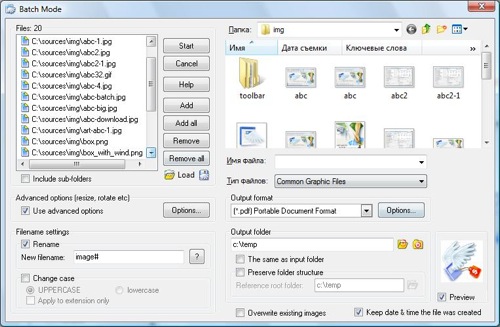
BIMP Lite is a compact, small and simple Windows-application which performs batch processing at its best. The tool allows you to create thumbnail images, add a prefix/postfix (with meta variables such as image width, image height, sequential number etc.), rename using a sequential number, change the case of filenames, replace/remove spaces & underscores, flip or rotate images and also apply anti-aliasing, inverse, greyscale and bevel effects. An FTP-Manager is integrated as well.
The thumbnail resizing allows you to force a specified width or height and keep the proportions, or define fixed image dimensions. In addition, the program can also convert the file format to GIF, JPG, PNG, BMP, MIFF, TIFF, PCX or TGA. All of the actions can be performed individually, or combined. BIMP Lite is freeware and contains no spyware.
Phatch (Mac, Windows, Linux, free)
Phatch (which is a combination of the words photo and batch) is an open-source batch photo editor that can be used on Linux, Mac OS X and Windows. Phatch features an excellent user interface that’s easy to use and understand. What makes the tool different from other batch image processors is its extensbility. If you know Python, you can create Phatch scripts to perform some common Phatch actions on the fly.
Phatch handles all popular image formats and can duplicate (sub)folder hierarchies. It can batch resize, rotate, apply shadows, perspective, rounded corners and perform 35 further actions automatically. The Phatch website has extensive documentation and also allows you to install specific extensions. Because of Phatch’s excellent documentation, any user from beginner to advanced will find the software easy to use and extend.
ResizeMe
ResizeMe is a batch image processor for Mac users. ResizeMe is simple and sleek, a no-frills application. It was created using the Cocoa framework, so it really feels like a Mac application.
With scaling you can create thumbnails for your website, decrease the file size of your photos, or resize your images to fit a certain size. If your images are all in portrait-mode, but you need landscape or you want to add a new angle to your photos, ResizeMe offers rotation effects as well. You can also batch flip your images horizontally and vertically.
The software gets the job done and does it well. You can download a free 10-day trial or purchase the software for $19.95.
photo Drop (Mac)
photo Drop is a powerful application for bulk resizing images on a Mac. Essentially, you create “droplets,” which are specific configurations for photo resizing. This is perfect for saving presets that you’ll need over and over again, such as for resizing screenshots down to a 500-pixel width to fit blog layouts.
photo Drop is a free application and comes with almost every feature you’d ever need to quickly process a large amount of images.
Use Photoshop CS3 to Batch Convert Images
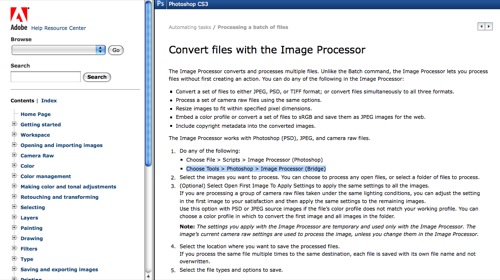
Adobe Photoshop is far and away the most popular image processor for designers, so some might prefer the option of using the native tools provided by Photoshop. Photoshop comes with many advanced features, and one of them is the ability to batch convert image files. According to the Photoshop documentation, it’s as simple as choosing either:
- File > Scripts > Image Processor (Photoshop) or
- Tools > Photoshop > Image Processor (Bridge),
and then selecting the images or file that you want to convert. Once you’ve selected them, select a location where you would like to save the files, select the file types you’d like to convert to along with any other configuration options and click “Run.”
You can read more about batch image processing at the Adobe website.
Advanced Batch Converter (Win)
Advanced Batch Converter is a Windows-only program that can convert images to over 120 different file formats on the fly and can convert over 25 different types of images. Aside from the ability to convert images, the software can also do basic photo editing, such as cropping and resizing images. There is a 30-day free trial, and after that the software costs $49.95.
Irfran View (Win)
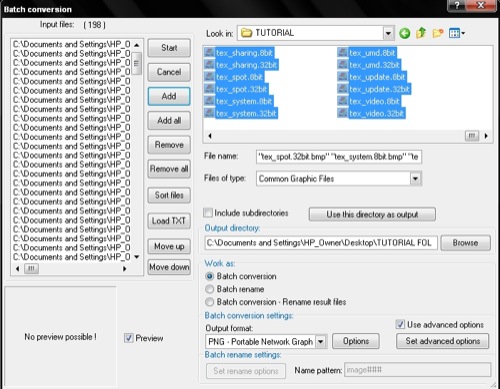
Irfran View is a freeware application for Windows users. Aside from converting images, Irfran View has many unique features, like a multimedia player, hotkeys, and many more. Infran View also allows you to extend the software by using plug-ins.
DBP - David’s Batch Processor (Linux, Mac OS X, Win)
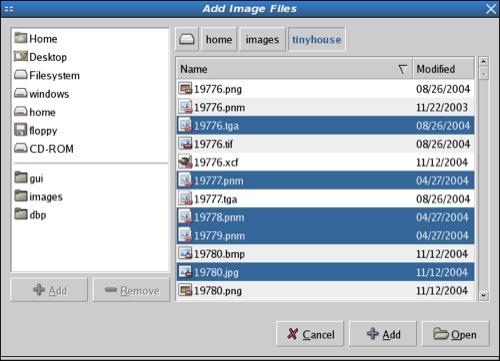
David’s Batch Processor is a Gimp plug-in that performs batch editing functions on images. Instead of having to download a separate program, Gimp users can simply call the plug-in from within Gimp. The user simply selects the images that he or she wants to resize and creates a quick ruleset that will process the images.
However, the plug-in is only intended to resize RGB images, not indexed images. The plug-in is licensed under the open-source GPL license.
FotoBatch (Win)
FotoBatch is a quick Windows batch photo processor that offers all of the basic photo editing capabilities and additionally some nifty features. You can create scripts so that all of your images have the same enhancements and adjustments made to them. The tool offers over 30 imaging functions such as resize, rotate, blur, add border, text watermark, image feather, etc. The tool offers batch conversion, can be integrated in context menus and can generate slideshows and PDF-files.
A user license costs $39.95, but you can try the software first with a 15-day trial.
Image Converter.EXE (Win)
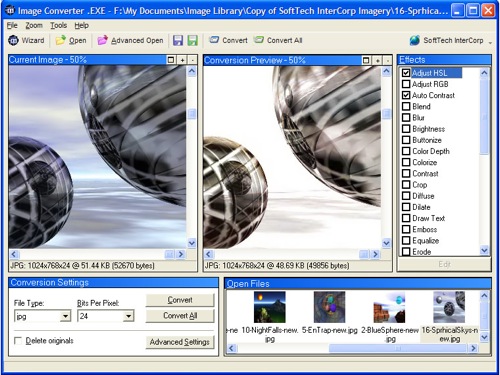
Image converter.exe is a free image converter that is set up slightly differently than other batch processors in that it offers a Conversion Wizard. The Conversion Wizard allows users who don’t have much experience with batch image processing to quickly and easily convert and rename images.
EasyBatchPhoto (Mac)
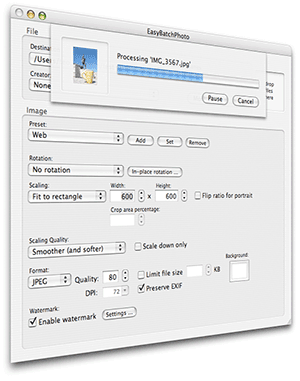
EasyBatchPhoto is a fast and responsive batch image processor for the Mac. EasyBatchPhoto can easily watermark images as well, which is a function that many image processors don’t have.
The tool takes care of many repetitive tasks by processing images with a single drag-and-drop. A single license costs $24.
Using Automator on a Mac
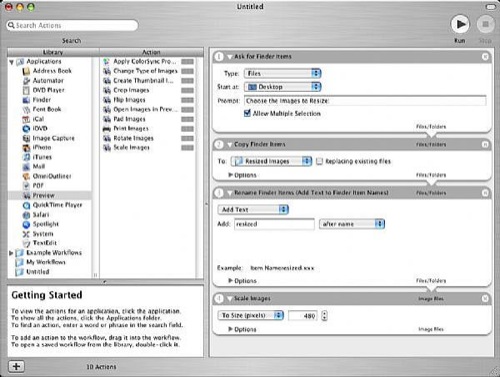
If you’re a Mac user, you can batch edit images using a program that comes bundled with OS X: Automator. Automator essentially allows you to create tiny applications for specific purposes, and you can create one of these applications just for resizing images. eHow has an excellent tutorial on how to create an Automator action that resizes, names and saves your images to a folder, without having to open Photoshop.
Sizerox (Mac)
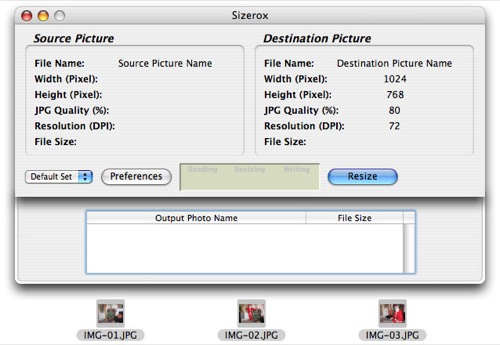
With Sizerox you can drag and drop images or folders into a simple graphical interface, and it will convert the images quickly and rename them if you’d like. You can use Sizerox to resize, rename, crop, rotate and watermark hundreds or thousands of images with a single Drag-and-Drop.
Sizerox uses Apple Quicktime to save the resized images, so the quality of the resized images is high. You can also use the Renamer engine to rename the images while resizing them. Because the software costs only $10, it won’t break the bank either. It’s simple, yet effective.
QuickScale (Mac)
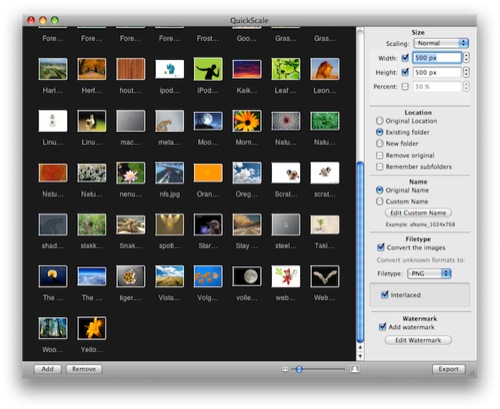
QuickScale is another Mac-only application that is simple and easy to use. Like photo Drop, QuickScale has the ability to create “droplets” (saved resize presets). It may not have as many features as some other batch image processors, but it has all of the basics and has a short learning curve. It’s perfect for the user who only needs basic batch image processing functionality. A license for QuickScale costs $15.
FastStone Photo Resizer (Win, free)
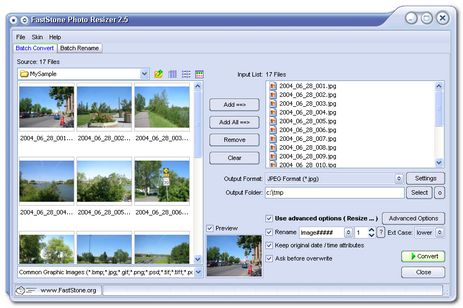
FastStone Photo Resizer is a fairly robust image processor. The software is free for home users and runs on the Windows platform. It offers a nicer graphical interface than some of the other image processors and also supports droplets.
The tool can convert and rename images in batch mode, resize, crop, change color depth, apply color effects, add text, watermark and border effects and rename images with a sequential number.
Pixillion Image Converter (Win, free)
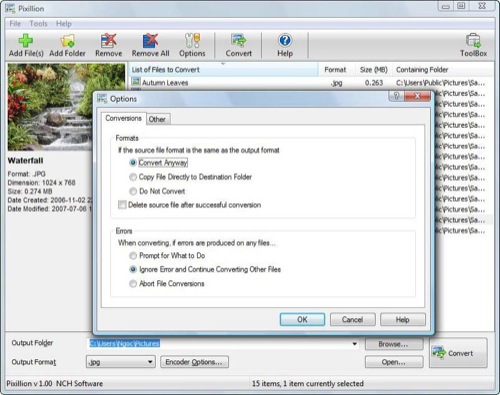
The Pixillion Image Converter can convert just about any image file type, including PDF. It has a few nice features that other batch image processors don’t have, like allowing you to right-click an image and resize it from anywhere. Pixillion is a free application for Windows users. (al)


Vitaly Friedman & Sven Lennartz (October 2nd, 2008, 2:32 pm)
Please respect Smashing Magazine and our Smashing community. If you comment on the post, post your ideas, remarks or suggestions. All comments with “first”, “second”, “third” etc. will be marked as spam and removed.
J Persson (October 2nd, 2008, 2:37 pm)
Interesting and helpful, Thanks!
Josh (October 2nd, 2008, 2:39 pm)
I’ve been using CacheCrop to handle basic resizing for websites. It’s a much smarter way of handling this problem, IMO, and is fairly easy to set up.
Link [cachecrop.stolen.la]
wael (October 2nd, 2008, 2:47 pm)
There was a very good program from acd systems called pica view later they name it mpowertools the they discontinued it :S why i mention it here is that it can convert images /resize them by right click
I dont know why ACD discontinued this program it was very good. and it can patch process images by right click!
—————————————–
Link [www.webdesign4me.com]
dgo (October 2nd, 2008, 2:50 pm)
hey out there, whats up with imagemagick?
i use it and i think im not alone :D
Praveen Sewak (October 2nd, 2008, 2:53 pm)
I find that Photoshop CS3 is very mature Batch converter. Hope all suggestions made regarding Image Batch Processing is integrated in CS4. Lets wait to see…
chris (October 2nd, 2008, 2:58 pm)
Thanks for a great list of resources! I’d like to add two more:
For windows, Format Factory
Link [www.formatoz.com]
For Mac, iResize
Link [www.macupdate.com]
I have used iResize in the past with great success, and recommend it. Format Factory is something I just learned about and while it’s interface is a little goofy, and some settings can be difficult to find, its laundry list of image and video format conversion capabilities are almost exhaustive.
GeorgeC (October 2nd, 2008, 3:00 pm)
It’s called Irfanview not Infranview!! Otherwise nice set.
Nick (October 2nd, 2008, 3:10 pm)
I’ve been using IrfanView for many years. Honestly, it’s the best and fastest one I’ve ever come across. Very small footprint too. (By the way, it’s “IrfranView” not “Infan View”)
leszek pietrzak (October 2nd, 2008, 3:22 pm)
You better check what is in “Infran View”s domain :-P
Personally i am using irfanview - perfect in viewing images and batch converting. It is much better than PSCS2 Batch function which I tried few times :-)
Bill Beckelman (October 2nd, 2008, 3:29 pm)
The batch processor that comes with Link [www.techsmith.com] works pretty well for general stuff plus you have SnagIt’s features.
raxxx (October 2nd, 2008, 3:33 pm)
irfanview 4ever. ^-^
Bluelade (October 2nd, 2008, 3:46 pm)
This app is FREE!
iResize
Link [www.daniele.ch]
Jeffrey (October 2nd, 2008, 3:57 pm)
I hope’d to see ReaConverter. I use it and it works everytime.
Anyways, Thanks for providing this list. I’ll take a look at the other applications.
jimbo_jones (October 2nd, 2008, 4:32 pm)
irfanview is SO awesome. one of the best free programs ever & yes, its batch processing is even better and way more easier to use than, e.g., Photoshop’s.
it’s a real shame that even under linux there is nothing like it =(
i’ve tried out about all free batch processors for osx recently and none gave me the results i needed.
Purwa Suajaya (October 2nd, 2008, 4:37 pm)
FInally Smashing Magazine take action with the “first”, “second”, “third” comments. It really annoyed me too when I read that kind of comments.
Thank you for the batch processors, I usually only use batch processor from photoshop, so now I have reference for another batch software.
Thanks
ombre (October 2nd, 2008, 4:42 pm)
I can’t believe you guys didn’t mention XnView.
TORN (October 2nd, 2008, 4:46 pm)
I preferre acdsee more than IrfanView.
ACDSee has/hed the best combination of batch resizing AND batch renaming functions.
It’s great for a huge amount of pics when getting them from a digicam i.e.
I never was satisfied by any other tool, although acdsee sometimes lags …
Diego Chavez (October 2nd, 2008, 4:53 pm)
i use (shrink o matic) air app
Christelle (October 2nd, 2008, 5:07 pm)
Would you not classify lightroom and aperture as batch processors?
Brekk (October 2nd, 2008, 5:41 pm)
If you can get your hands on it, Photoshop is far and away the best for batch processing if you know the interface. You can record really complicated actions and apply them to anything. I wouldn’t ever use anything else.
Brandon S Adkins (October 2nd, 2008, 7:09 pm)
Don’t forget the AIR app - Shrink O’ Matic - Link [toki-woki.net]
I’ve been using this for weeks and love it.
T Williams (October 2nd, 2008, 7:17 pm)
A couple of days ago I really needed to do batch processing and ended up one that I wasn’t really satisfied with. This list will help me find one that meets my needs. Thanks
wvpv (October 2nd, 2008, 7:30 pm)
Dude, at least spell “Irfanview” right. Sheesh.
Irfanview is standard equipment for me, that’s for sure.
Andy (October 2nd, 2008, 8:10 pm)
I can only second some comments above mine: IrfanView forever. The features of this little app outshine anything I’ve used _ever_.
The batch processor alone is so powerful, it’s uneblievable that it fits in such a small app…
Nikesh ponnen (October 2nd, 2008, 8:42 pm)
i think it is very much helpful to me….
chip (October 2nd, 2008, 8:46 pm)
Irfanview vote for me! I’ve been using it to batch convert/rename for a long time now - and not just for images (just the renaming bit)!
The only downside with Irfanview is that it’s not a color management app otherwise it’d be be my one stop shop for converting client supplied images to the correct format.
Tom (October 2nd, 2008, 9:12 pm)
I’m using Photofiltre, batch is in TOOLS -> AUTOMATE/BATCH so it is not hard to find! :)
greetz
edhel (October 2nd, 2008, 9:49 pm)
Many thanks for letting me know about Phatch for Linux… I can’t believe I missed this gem.
Thomas (October 2nd, 2008, 9:52 pm)
can anyone tell me how i can automatically add watermarks, borders and so on in photoshop?
the article is great and helpful, thank you :)
Dré (October 2nd, 2008, 9:57 pm)
Thnx for taking action on the FiPo fools..
I think u forgot one very usefull free tool for windows (xp only?): PowerToy image resize, only with a right click on a image.
But again a nice list :D
bob (October 2nd, 2008, 10:11 pm)
What the hell. I didn’t see a single thing there that couldn’t be done with a 5 line bash script and imagemagik.
Mr. Xn (October 2nd, 2008, 10:17 pm)
What?! No mention of Link [www.xnview.com]? It is absolutely awesome!
dirk (October 2nd, 2008, 10:20 pm)
back in 98 there was Paint Shop Pro (jasc, now Corel) who is doing a good job, Also ACD See is one of the better ones with a solid batch functions like rename.
Pitty these are not mentioned here while they were all earlier on the market and free , at least the first 30 days.
labmice (October 2nd, 2008, 10:38 pm)
Microsoft PowerToys for Windows XP has an Image Resizer ( direct download from Link [download.microsoft.com] ) and you can right click and resize from the explorer (from anywhere)
ImageMagick is opensource and has A LOT of features, if you have time to learn them all !!!!
Probable the best whoice for webmasters (integration with PHP etc, autogenatating captchas etc)
Does anyone knows how can I resize the “print size” of a photo/ many photos ???
(print size is the size of the photo when you print it)
Jared Sikora (October 2nd, 2008, 10:49 pm)
Nice List…..Thanks a lot for it.
What About ThumbsPlus ?
The one I use most for batch processes.
Sue (October 2nd, 2008, 11:16 pm)
Nice list!! Even SnagIt can be added to this list.
fito (October 2nd, 2008, 11:32 pm)
ey!, wath about
XnView ?
I think it is great and free!
Keri (October 2nd, 2008, 11:48 pm)
Ez Thumbnail has always done the job for me on windows Link [www.fookes.com]
Will have a play with the mac ones as i’ve been looking for one for my mac for a while :-)
Vince (October 2nd, 2008, 11:53 pm)
You should also try Pixer on Mac : Link [homepage.mac.com]
Nathan (October 2nd, 2008, 11:53 pm)
Always the way - I needed this two days ago! Thanks though, really useful for next time.
Ronny (October 2nd, 2008, 11:57 pm)
Very intresting! I was looking for this some time back.
Thanks a lot. I do wonder why the ‘Picture Resizer Powertool’ for Win XP is not mentioned.
It’s very powerfull, and straight forward. Even better, it goes into you right click context menu which means you don’t need to start another application.
I don’t know if there is a similar tool for Win Vista, though.
Photo drop looks intresting. Might give it a try later on.
Thanks for the intresting post.
Good job, guys! :)
theGrimm (October 3rd, 2008, 12:59 am)
Nice Article!
but the Program is called “Irfan View” not “Infran View”
Tobi (October 3rd, 2008, 1:00 am)
I miss also XnView. This is the best Viewer with many many features. And it is also free.
Bernhard H. (October 3rd, 2008, 1:03 am)
For KDE users i would recommend KIM (Kde Image Menu)
Link [www.kde-apps.org]
It’s as easy as selecting the files and selecting scale, compress, convert from the menu.
Mario (October 3rd, 2008, 1:16 am)
Batch Watermark Creator - great watermarking suite
Milinda (October 3rd, 2008, 1:24 am)
What about Link [www.imagemagick.org]. It’s great command line tool. But I don’t think that it’ll support effects like blurring specific area which available in GUI tools.
Link [mpathirage.com]
Justin (www.DotNetMushroom.com) (October 3rd, 2008, 1:33 am)
I use Irfanview - which is mentioned here too but I think I will have a look at the other tools cause they really seem useful ! Great Post indeed !
Link [www.dotnetmushroom.com]
masilli (October 3rd, 2008, 1:43 am)
I’ve been using “FastStone Photo Resizer” for a couple of years and does the job perfectly, i think it’s the best for windows :)
Must try those mac apps now :P
masilli (October 3rd, 2008, 2:06 am)
EH EH EH… just tested Automator and it works!! Very good tutorial by eHow!
strooker (October 3rd, 2008, 2:29 am)
Another good program is MIR (Multiple Image Resizer):
Link [www.multipleimageresizer.net]
dix-huit (October 3rd, 2008, 2:34 am)
No love for Fireworks?
a (October 3rd, 2008, 2:35 am)
Vote up for imagemagick
to me, its the command line photoshop!
Matthias (October 3rd, 2008, 2:41 am)
Also astounded that there’s no mention of Link [www.xnview.com]. IMHO it outrivals IrfanView in many aspects. Though IrfanView is a decent tool as well, used it for many years.
Lachlan (October 3rd, 2008, 2:52 am)
Photoshop’s “actions” offer some fantastic batch operation functionality, but the silver bullet is definitely its support for JavaScript/AppleScript/VB to tell Photoshop how to process files; which allows for conditional operations and more scenario specific behavior.
For those who work with Windows cursors and icons, IcoFX offers fantastic batch creation and export of cursors and icons. Its free and has saved me so much time. So much in fact I’ve donated to the project.
gr8pixel (October 3rd, 2008, 3:26 am)
Use Photoshop CS3 to batch convert images! It Rocks!!!
Jackson Hyde (October 3rd, 2008, 3:35 am)
ditto to Lachlan’s previous comment, PS is all I need for batch work. I’ve assembled a library of actions for common stuff like reflections, transparencies - I’ve even created a button builder that grabs text from an XML file and creates nice neutral rounded buttons which I can then colourize with a second set of other actions.
Bernhard Munz (October 3rd, 2008, 4:29 am)
Thanks for this inspiring list. I have been trying out a couple of them as I desperately needed such a tool. I found Phatch the king of all. It has the power of Photoshop batch actions but it is much more focused and dedicated to batch processing which makes it a breeze to use. You can easily add effects/actions and reorder them by drag and drop. I recommend everyone the extensive documentation, especially the tutorials:
Link [photobatch.wikidot.com]
My favorite was 3d thumbnails with perspective and shadows with a few mouseclicks.
Bramme (October 3rd, 2008, 4:32 am)
It’s Irfanview, not irfran… As for the rest, nice list !
tms (October 3rd, 2008, 4:49 am)
this is the best: Resize! (all platform) - Link [www.kstudio.net]
GMB (October 3rd, 2008, 5:11 am)
Xnview all the way. Link [www.xnview.com]
Personally I find it the best and most reliable.
TimeTraveller (October 3rd, 2008, 5:59 am)
I’ve always used the little Windows Powertools resizer. It installs as a right click context menu item which is nice if you don’t want have to launch a separate application. I’m also a huge Irfanview fan.
ACDSee had an nice duplicate finder which I don’t see any of these apps having, which can be handy if your picture collection has grown with a more or less adhoc organic organizational structure over the year and you can’t remember what you already have copies of.
Mark Christianson (October 3rd, 2008, 6:40 am)
Did anyone mention VSO image resizer. Free tool that does a great job.
Link [www.vso-software.fr]
MiSc (October 3rd, 2008, 6:42 am)
IrfanView rocks, most of the time. It’s super fast and light-weight, unlike Photoshop.
jason (October 3rd, 2008, 6:43 am)
Obligatory Quicksilver comment: If you’re on a mac and you use quicksilver, you can enable the image resize plugin, then you can invoke quicksilver and do stuff like “resize -> 200w as jpg”. You can even do it with multiple files selected. Really handy for quick stuff!
Brow (October 3rd, 2008, 6:56 am)
Nice! I’ve been using BatchImageResizer for awhile and it looks like its time to make the switch to get better results.
Link [www.tooncave.com]
Moises (October 3rd, 2008, 7:28 am)
Another vote for imagemagick. It should be in the list
james (October 3rd, 2008, 7:34 am)
I just had to resize a photo yesterday and found an option inside Picasa2. Just go to: File - Export Picture to Folder. There you can change quality and pixels, etc. I haven’t tried it with more then one photo but I would imagine that it would work since Picasa also has more complex photo batch editing. (and of course it’s free too!)
Gil (October 3rd, 2008, 7:59 am)
Are there any programs out there that do batch conversion but look for patterns int the photos? The problem is, I have loads of pictures of people I have to convert to one size (a profile pic), and the pictures are all different sizes. I’m wondering if there is a program out there that searches for where the head is and then crops and re-sizes the image.
Thanks!
Sean (October 3rd, 2008, 9:04 am)
Fireworks, folks… great batch processing.
mikemike (October 3rd, 2008, 10:41 am)
Nice post.
willow (October 3rd, 2008, 10:45 am)
Anna (October 3rd, 2008, 11:03 am)
I use XNview for basic image editing It offers also script and renaming capabililities
Another application with batch capability it is photoscape - it is not so strong with optimizing but have nice borders no only the classical margin
Binny V A (October 3rd, 2008, 11:04 am)
For linux users, there is the Image Magik application. You can convert a number of images from the command line using the Link [txt.binnyva.com].
matt (October 3rd, 2008, 11:14 am)
personally, i use bridge. but, if i didn’t already have it, i wouldn’t pay for software that comes free as part of osx. namely, Link [blog.mattmaier.com]. which can also flip, rotate, etc. see
man sipsfor all options.Gopal (October 3rd, 2008, 12:39 pm)
Thanks, that was helpful!
Regards,
Gopal
Link [www.productivedreams.com]
Roshan (October 3rd, 2008, 12:41 pm)
Thank you for info. Although I am not a batch worker but I like to keep links on my side coz you never know when you need it. I generally use batchrename pro for renaming files etc. But dont edit in batch. I can probably use some references here.
Roshan
Freelance Developer
Link [www.instantshift.com]
web design company (October 3rd, 2008, 1:35 pm)
How to rescale images for blog posts in an easy way
Moksha (October 3rd, 2008, 2:07 pm)
Really nice thanks for sharing
averen_z (October 3rd, 2008, 2:18 pm)
Very much well compiled but i would like to add Arles Image Web Page Creator in your list, im using it for years and very much helpful in making thumbnails
Erica (October 3rd, 2008, 5:23 pm)
I’ve always used Link [stuntsoftware.com], which works for Mac.
chokilala (October 4th, 2008, 5:43 am)
thanks for the tutorial. i always do it by manual. now that i know, i can use it :)
Malcolm Almeida (October 4th, 2008, 8:40 am)
Great Thanks Guys,
This is really interesting.. was looking for batch converters like this from a long time now
Cheers :)
shamoon (October 4th, 2008, 8:56 am)
very nice:) i like Phatch Photo editor …works fine for me
Zitter (October 4th, 2008, 2:01 pm)
I use ImageMagick tool to create thumbnails, resize, change format, rotate, apply filters and so on. Look how to use it Link [www.ibm.com]
La (October 4th, 2008, 5:26 pm)
I’m an Easy Thumbnails user too. Easy no hassle image resizer.
Link [www.fookes.com]
deesh (October 4th, 2008, 11:57 pm)
I am fan of Smashingmagazine.com ….Very nice :) it’s very useful to us. thanks for sharing.. keep sharing………
Chuong (October 4th, 2008, 11:58 pm)
nice post, thanks ;)
Sebastian (October 5th, 2008, 1:38 am)
One of my favorite batch processing tools, because I often use Fireworks: Link [factorycity.net].
NaldzGraphics (October 5th, 2008, 3:22 am)
this is very useful.thanks a lot for this list
Ronald
Link [www.naldzgraphics.com]
sesebian (October 5th, 2008, 6:29 am)
thanks
rh (October 5th, 2008, 11:13 am)
For simple batch resizing Preview works great too.
Martin (October 5th, 2008, 11:47 am)
It’s been mentioned before, but I’ll say it again: ImageMagick makes nearly all of this redundant. Try it.
Glenn (October 5th, 2008, 12:18 pm)
Very good collection of tools. On the Mac, Link [www.acqualia.com] Picturesque by Acqualia (relatively new) is a fast and elegant image tool that does batch jobs easily. Won an Apple Design Award.
Jason (October 5th, 2008, 3:12 pm)
I use the Batch Process tool in Fireworks. It’s got plenty of useful options and you can save oft-used sequences of edits to your desktop as quick shortcuts. I’ve not needed another batch editing tool.
Jason King
jing (October 5th, 2008, 6:52 pm)
xnview.exe is the best image manager and convert tool for me :) its small and usefull
brusselsaway (October 5th, 2008, 10:27 pm)
Another one: Link [www.feroxsoft.com]
Matthew Wilson (October 6th, 2008, 1:49 am)
Yea that o{ne tw{o tree business was getting annoying lol
Bart (October 6th, 2008, 11:52 am)
Hey Smashings you used just the standard file open dialogue for the Gimp-Plugin DBP review. DBP looks this way:
Link [members.ozemail.com.au]
Anyway again a good selection, just XnView is missing :)
glnster (October 6th, 2008, 12:21 pm)
RapidoResizer for Mac (free)
Link [www.apple.com]
Yong Sung, Kim (October 6th, 2008, 11:56 pm)
photoescape is good for img tool
Link [www.photoscape.org]
freeware
Devilsapprentice (October 7th, 2008, 1:00 am)
Photoshop lets you set up ‘Droplets’ (File>Automate>Create Droplet) Which created a shortcut that you just drag your images onto from any file or folder and it’ll batch process them for you.
Just record your actions, go to automate>create droplet, define what actions and locations of start/end files and save your droplet where you want it - its simplicity in a teacup.
I have a droplet set up for each batch process I have - then drag drop and go, don’t even need to open Photoshop first
strexy (October 7th, 2008, 1:35 am)
hey guy, really useful post! but..
what about a tool to automate the banner production? Everyday I have to create many wap banner, many files of different dimensions in many different folders. Have you got any advice? Thanx a lot! :)
Christian Menniss (October 7th, 2008, 6:09 am)
Great collection!
I think any batch image tool which includes an FTP is super useful for photographers who share their photographs online. It used to take ages to download from camera, edit and resize manually and then upload. Now it can be done automagically!
Thanks!
Owain (October 8th, 2008, 2:23 am)
Great article.. If only I had known of some of these earlier, would of saved me hours resizing images.
I used to run an e-commerce store where resizing images was a tedious job that had to be done.. I manually edited thousands of photos… What a waste of time! I wish I had known about these back then…
Link [www.icomcreative.com]
Swani (October 8th, 2008, 3:50 am)
Thank you for this helpful article.
I’m on a Mac and I was longer looking for a good batch resizer for mac.
Now, with this article I find my favorite tool. It is Link [www.sizerox.com]. Greate Interface without clutter. It can rename, watermark, rotate, crop images in a batch while resizing the images.
Diptanshu (October 8th, 2008, 12:13 pm)
Any one app cannot meet all the various batch image processing requirements. Unfortunately none of the new tools are quite that good. Most of these are ideal for just one or two processes.
If you count out the two biggies, Photoshop and Fireworks, there are some that have stood the test of time.
Compupic Pro hasn’t been updated for some time but is one of the best. It’s fast and has some very powerful batch processing functions, some of which are absent in the others. ACDsee is one of the fastest image management tools–though it doesn’t have as many features as Compupic.
Among the new ones, Faststone image viewer is very fast and has some excellent functions. This is the only one that gets my vote today.
Ivan (October 9th, 2008, 12:23 am)
I stick with Photoshop when resizing large quantities of photos…thanks for the list anyway…might help someone
Steve (October 9th, 2008, 12:41 pm)
I frequently use the free tool “Power Batch” from Link [www.unidreamtech.com]
It will resize, rename, watermark, crop, rotate, and a bunch of other stuff I rarely use.
Really fast and efficient.
dora (October 9th, 2008, 1:55 pm)
Great info thanks. Here is easiest way to convert image: Link [converterz.net]
Toan (October 10th, 2008, 9:00 am)
i use XnView, easy & fast
Klian (October 13th, 2008, 2:47 am)
If you use MacOS X you can use Sips, which comes by default in MacOS X, for image batch processing. Here you are some examples (in Spanish):
Link [www.tortuganinja.com]
Rocket man (October 16th, 2008, 7:26 am)
Sizerox, a little tool for Mac OS X works very fast and is easy to use.
It offers many features and it allows to creat your own preset, for example,
to resize and rename or resize and watermark or resize and rotate.
I use it a long time and I am very happy with it.
Sizerox is the best friend of webmasters and blogger. Just give it a try!
mbd5200 (October 20th, 2008, 10:31 am)
I dont know that ps3 have a script for photos. helpfull and thanks
a (November 2nd, 2008, 4:48 pm)
I am a windows luser, I just wasted precious time scrolling past software only for uptight-snobby-mac users.
sophie (November 3rd, 2008, 12:49 pm)
Wow! FastStone Photo Resizer (Win, free) will save me lots and lots of time. Thank you for the tip!