Pricing Tables: Examples And Best Practices

Pricing tables play an important role for every company that offers products or services. They are a challenge from both a design and usability standpoint. They must be simple but at the same time clearly differentiate between features and prices of different products and services.
A pricing table should help users pick the most appropriate plan for them. A company should carefully examine its product portfolio and pick the most important features to present in its pricing plans. Visitors should be given only the information they would be interested in: available features, options and costs. The rule of thumb is: every unnecessary cell in your pricing table increases the probability of losing potential customers, because you make it more difficult for them to compare various plans and select the best one.
Once you have identified the most important features, go ahead and create a more detailed list of features for users who are interested in a particular plan. Users must know what kind of a product they are spending their money on and all of the features associated with it.
For a good grounding in exactly how to design and present a pricing table, let’s examine some that other designers have created and analyze them according to the following important criteria:
- Design: colors, style, typography, icons.
- Usability: What happens if we turn off CSS and JavaScript? Is it still usable?
You may also want to take a look at the following related articles:
- Navigation Menus: Trends and Examples
- Web Form Design: Modern Solutions and Creative Ideas
- Block Quotes and Pull Quotes: Examples and Good Practices
- Footers: Creative Ideas and Examples
- Pagination Gallery: Examples and Good Practices
- Tag Clouds Gallery: Examples and Good Practices
- Shopping Carts Gallery: Examples and Good Practices
Best Practices and Guidelines
Designing a pricing table is a tricky task. A pricing table is a design element that requires the designer to communicate information clearly and precisely, exposing as many features as possible and making it as easy and as intuitive as possible for a user to make the best choice.
1. Communicate not too much and not too little
Intuitively, one would assume that a feature-rich pricing table with dozens of various aspects would make a good impression on potential customers. However, the more information you provide, the more information visitors need to absorb.
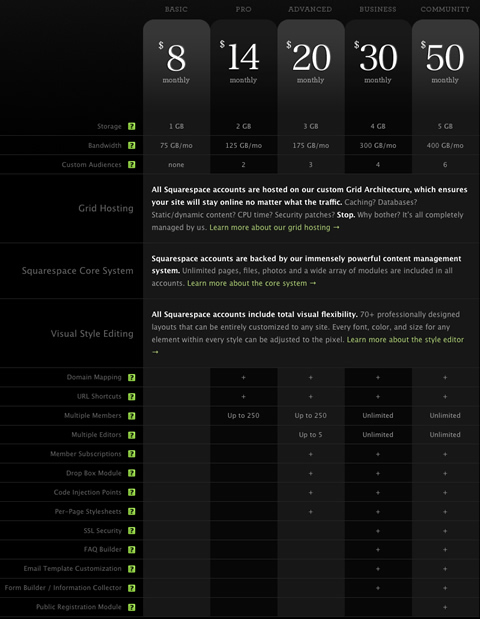
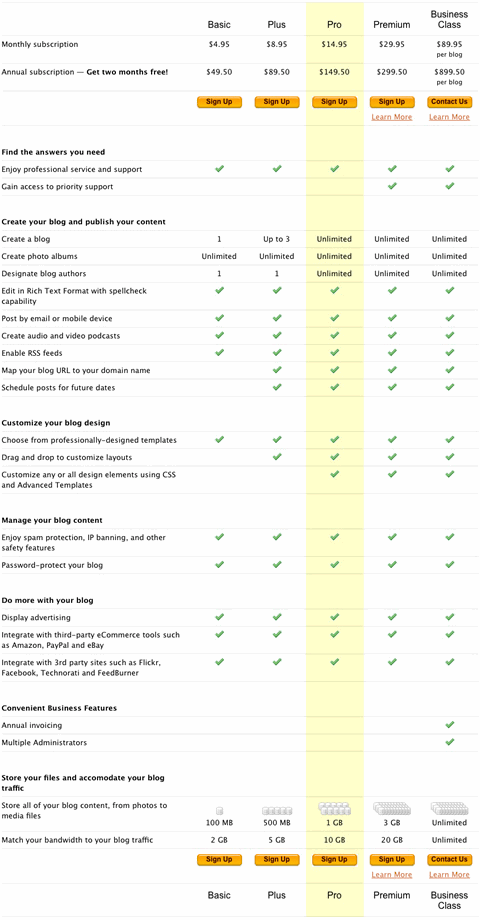
TypePad (screenshot below) uses a quite lengthy pricing table. Although it’s informative and goes into detail to explain the differences between various plans, it is really hard to scan: users need to remember which plan each column represents. Furthermore, although the plan titles are mentioned at the bottom of the table, the prices are not mentioned there. So a user who has landed below the middle of the table will have to scroll to the top to see how much each plan costs.
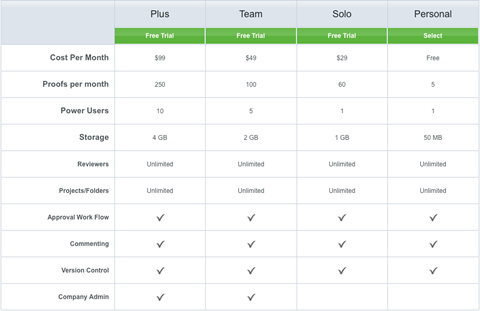
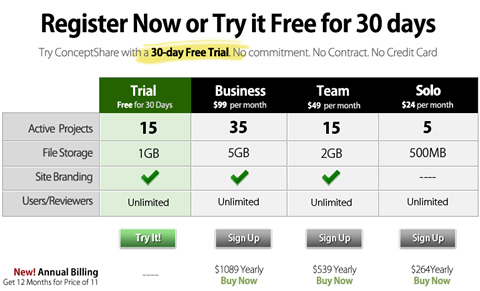
ConceptShare is an example of a short but concise and visually appealing form. Notice that the fourth row of the table combines two aspects (users and reviewers) in a single row and avoids a fifth unnecessary field. This is a beautiful and informative pricing table.
Still, it’s important that your visitors get a good understanding of the differences between different plans. Communicate not too much and not too little. If a potential customer walks into your store and wants to know the difference between two specific devices, you wouldn’t explain the similarities between the devices first, right? Communicate the information that your visitors are looking for; they will be grateful. This leads to our second point.
2. Communicate differences, not similarities
Instead of focusing on displaying similar features of available plans, communicate the differences between them. It is often a good idea to visually distinguish between similar features (available in all plans) and special features (available in only some plans). To achieve this, you could place the most distinctive features at the top of the table while leaving the common features at the bottom of the table.
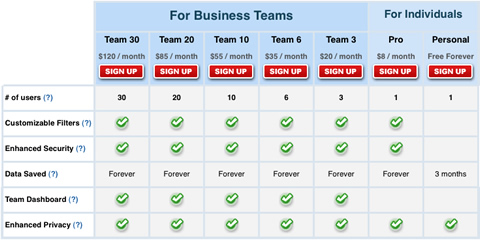
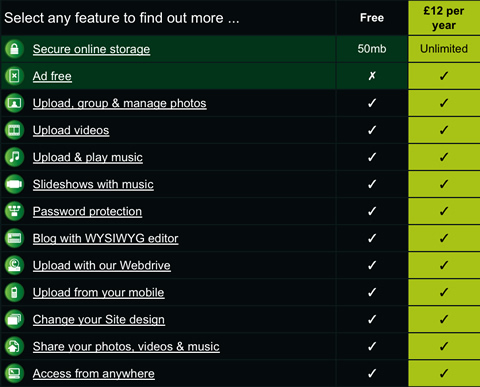
Take a look at eTribes.com’s pricing table (screenshot below). The design manages to communicate the differences effectively while conveying additional information. The choice of icons fits the overall design and supports, rather than distracts, the visitor. This is effective and user-friendly.
3. Make the price stand out
Price is the first thing users want to see when they visit a product or service website, and leaving it out is the number one design mistake on B2B and B2C websites. So, you had better make sure you show it to your visitors as quickly and as clearly as possible.
Font selection usually depends on the type of product or service offered, and it also must be consistent with the overall design. On many pricing tables, the font size of prices, titles and important headlines are larger and stronger to make them stand out. As a designer, you need to make sure that the price is given the appropriate weight, both visually and semantically.
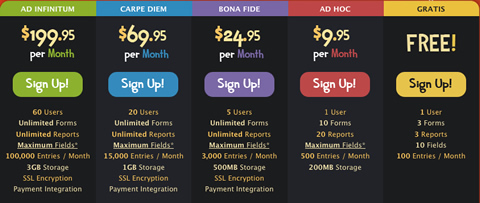
It is also a good idea to sort pricing plans by price, from highest to lowest or vice versa. Because users scan websites in an F-shape, some designers put the cheapest offer on the left side of the table, so that users see it first. It’s in designer’s best interest to make sure that users see the most attractive offer first.
4. Use visuals sparingly
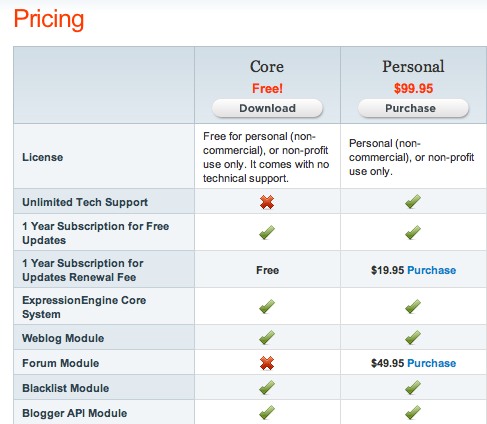
Unfortunately, many of the designs we are considering in this showcase have one major shortcoming: they use overly vibrant visuals too often and often for the wrong purpose. Designers try to make pricing plans look as attractive as possible, and, apparently, numerous green check marks and red crosses are supposed to help to achieve this effect.
And if these icons are spread widely across the table, then with each additional feature it becomes increasingly harder for visitors to read the table and identify differences between plans.
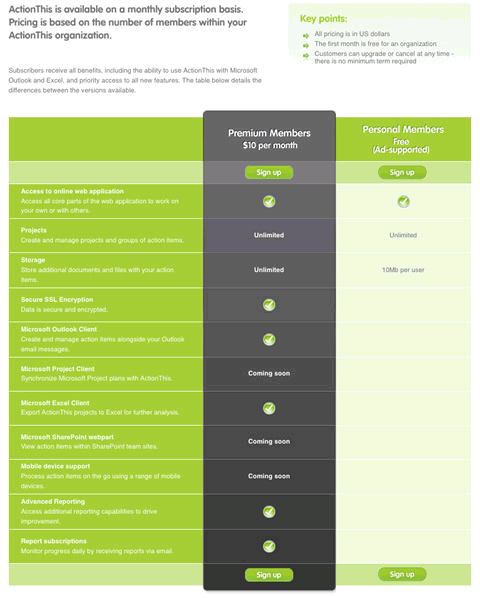
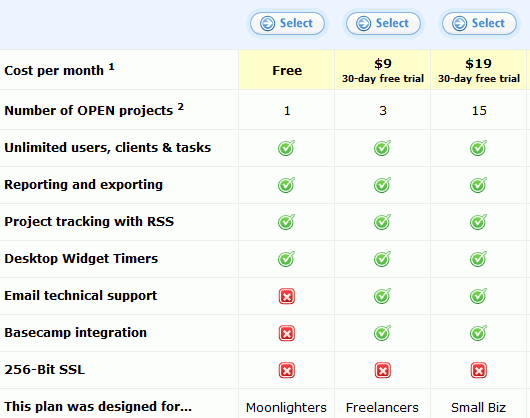
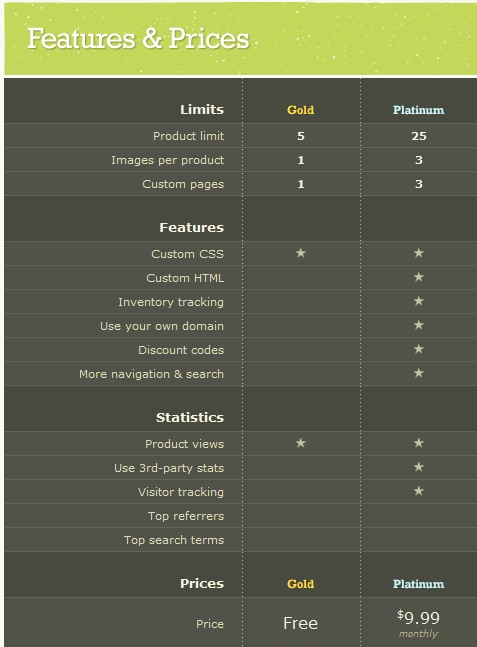
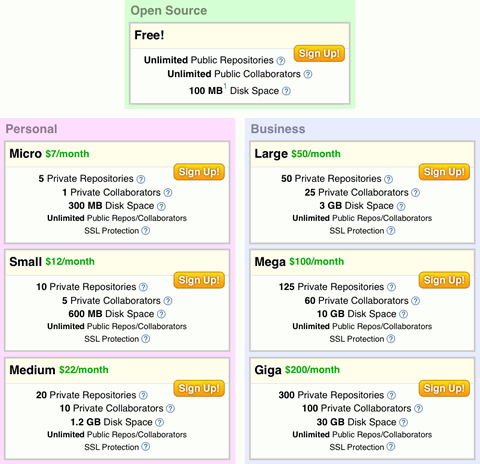
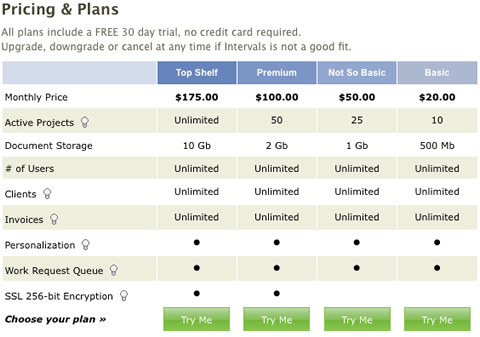
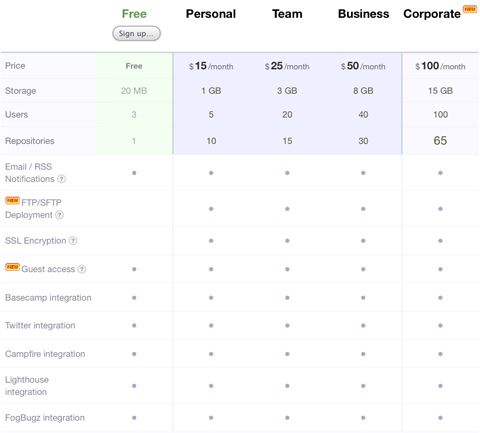
Beanstalk communicates its information effectively while avoiding the visual noise. The support of a feature is indicated by a neutral circle that doesn’t distract the eye but conveys the message. Plans that do not have a particular feature simply do not have a circle in the corresponding cell.
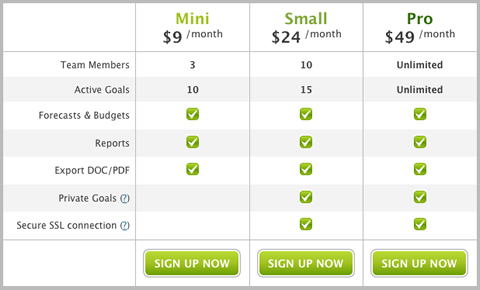
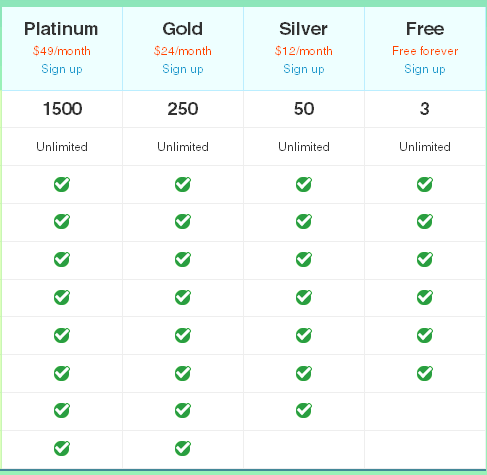
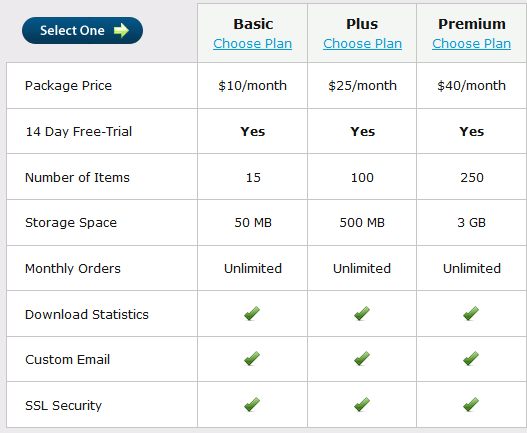
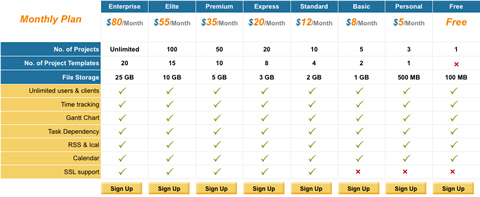
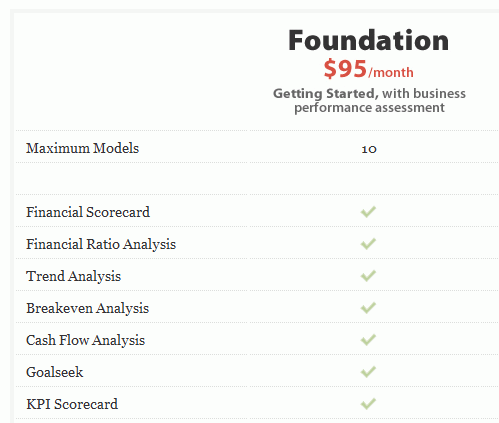
Planhq.com uses green check marks but not red crosses. In fact, why should crosses be used at all? If you can remove unnecessary elements from your design, you should remove them, right?
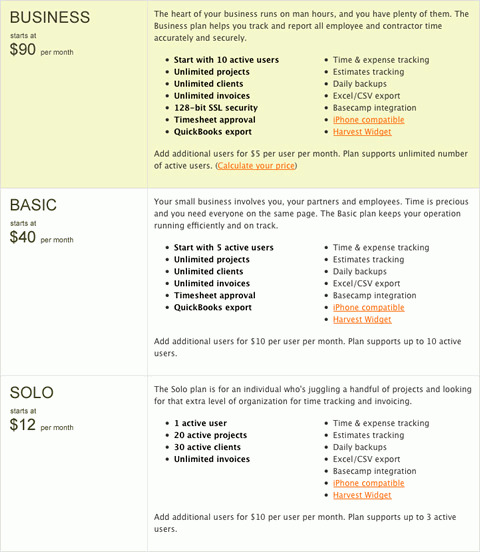
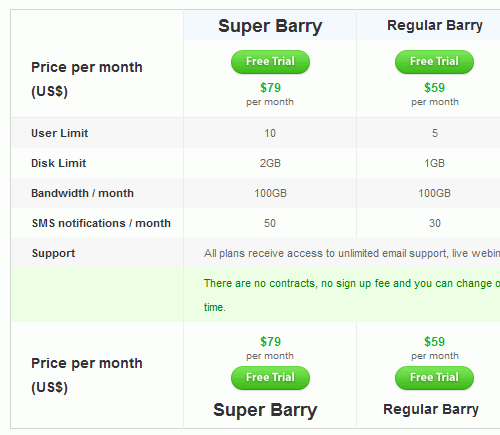
Goodbarry.com uses color to indicate the main details in the table. Notice how the font-size is used to make the different pricing plans more distinctive. Also notice how well green is used to animate the visitors into trying out the product.
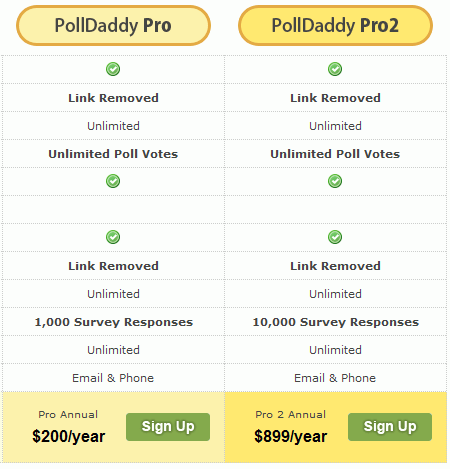
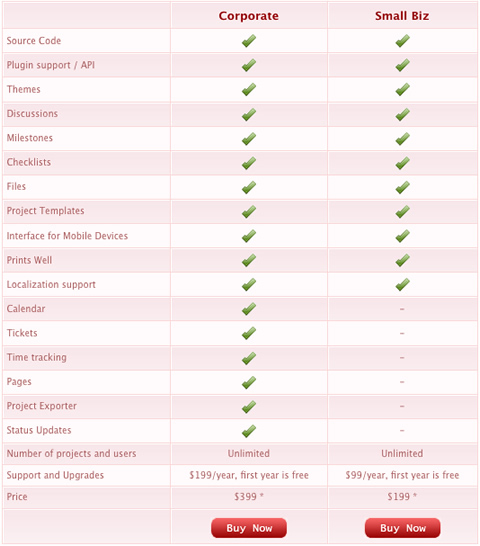
So, use visuals sparingly and avoid visual noise. Feel free to use icons if you are sure they are not too vibrant and if they help a user’s understanding of the table and, more importantly, convey some information. For instance, a green check mark next to the word “Unlimited” does not convey any information.
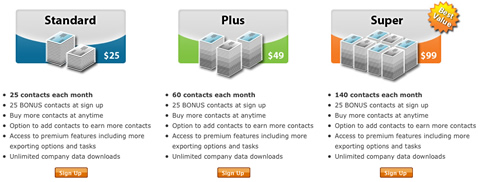
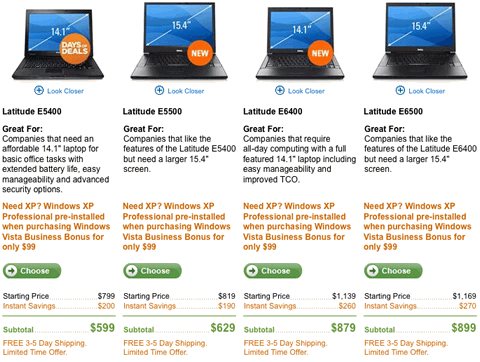
It’s important also that icons and thumbnails be extremely useful. For instance, if a table compares physical products, then thumbnail of those products should be present.
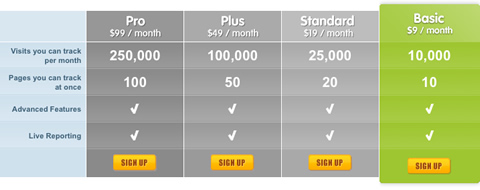
Almost all of the pricing tables we’ve examined use different background colors to differentiate pricing plans. Designers use color theory and vivid colors to keep the visitor’s focus on the specific plan that the company wants the most sales on.
5. Illustrate the difference vividly
Some designers use illlustrations and vivid images to clearly illustrate the difference between various plans in a memorable way. Metaphors (e.g. cartoons) are used very often. For instance, if a company is offering the poll service in several various plans, you may want to use a “lightweight” box with tools for a lite version and a bigger, larger toolbox for the corporate version. In fact, that’s what wany designers do.
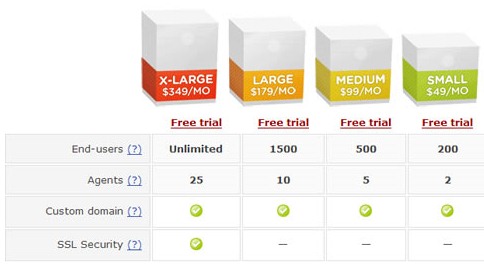
6. Be consistent in your design
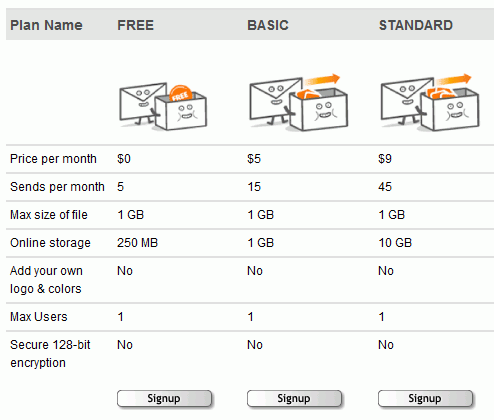
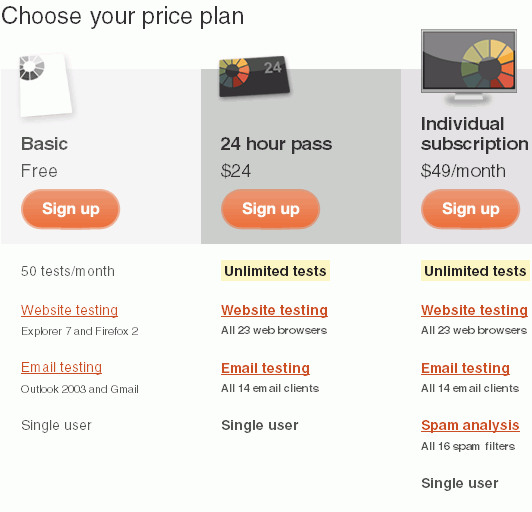
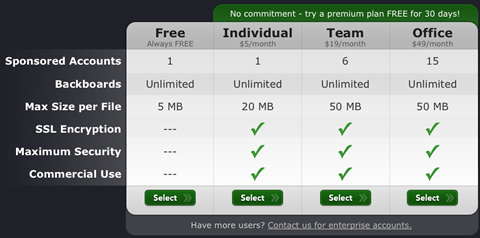
All website elements, not only pricing tables, should be consistent with the overall design. BigFilebox.com makes the mistake of breaking this rule:
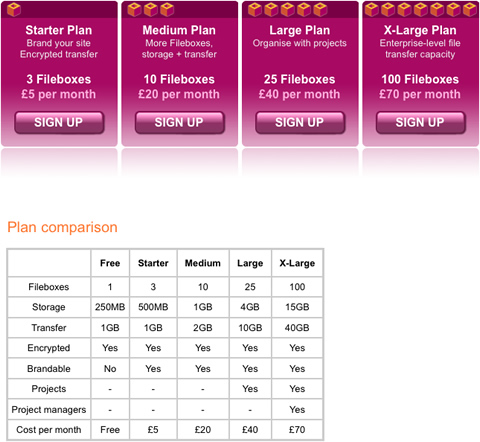
The second pricing table’s design is not consistent with the website’s whole design.
7. Don’t lose your customers
On a product or service website, pricing tables play an important role in making a successful sale. Pricing tables are the window to a product; therefore, it is important that they be usable and accessible to everyone.
Pricing tables should support not just modern Web browsers, but all forms of Web browsers, screen readers, etc. Companies can create pricing tables that are rich in features and effects, but they should make these features unobtrusive for users with browsers that do not have CSS or JavaScript enabled.
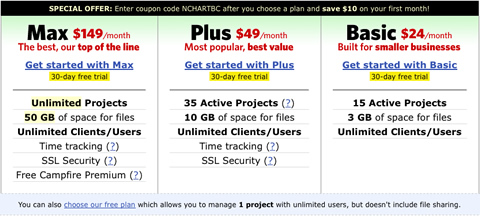
This is one example of how a pricing table should look when CSS and JavaScript is disabled:
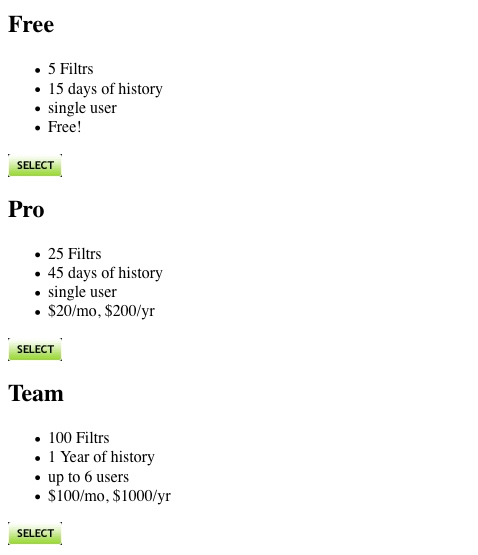
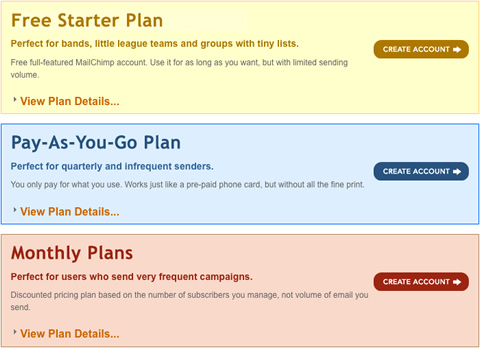
An example of a pricing table that uses JavaScript obtrusively is on mailchimp.com:
If you go to this pricing table and click on the “View plan details…” links, you will see a JavaScript accordion effect showing hidden elements. If we disable JavaScript in our browsers, the links don’t work anymore. One solution to this problem would be to show all hidden elements when JavaScript is disabled.
Pricing Table Showcase
Horizontal or vertical? Which should a designer choose? Either a horizontal or vertical layout is good as long as the plan’s features are clearly separated; although there is a strong trend towards column-based (vertical) layouts.
Movabletype (the pricing table is no longer available)
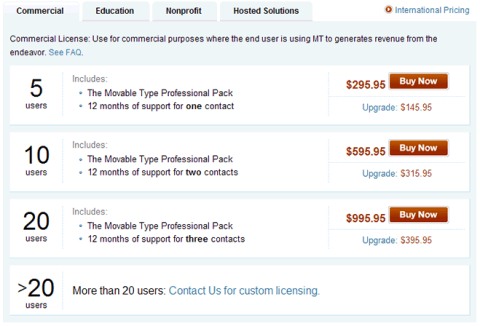
Zendesk (the pricing table is no longer available)
You can find more examples of pricing tables in Christian Watson’s showcase Pricing Tables.
Best Practices: Summary
- All elements, including pricing tables, should be consistent with the overall design of your website.
- Use background colors to visually separate different plans, but sparingly.
- Just as photographers draw attention to where they want in their images, so with price tables, make the sections that you want to draw attention to stand out.
- Use different font sizes and colors for titles and important headlines.
- Place important features at the top left of the table, according to the F-pattern of scanning Web pages.
- Use unobtrusive CSS and JavaScript techniques when designing a pricing table.
- Always show the prices of your plans.
- If your feature list is too long (i.e. doesn’t fit in the browser’s visible area), then make sure to present your plan names, prices and selection options at both the top and bottom of the pricing table.
- Mention the currency of your prices to avoid confusion, because a “$” sign could represent US, Canadian or Australian dollars.

Related articles
You may also want to take a look at the following related articles:
- Navigation Menus: Trends and Examples
- Web Form Design: Modern Solutions and Creative Ideas
- Block Quotes and Pull Quotes: Examples and Good Practices
- Footers: Creative Ideas and Examples
- Pagination Gallery: Examples and Good Practices
- Tag Clouds Gallery: Examples and Good Practices
- Shopping Carts Gallery: Examples and Good Practices


rebehayan
October 13th, 2008 2:25 pmso coooool~ :-)
Roshan
October 13th, 2008 2:32 pmReally cool. Just what I was looking for. I have been looking for some ideas for similar table styles for my next project and boom, smashing magazine made i easy for me.
Keep it up guys. You work very hard on these. Thank you.
Originalix
October 13th, 2008 2:35 pmGreat one!
CreamScoop.com
October 13th, 2008 2:46 pmNice post :)
Matthew
October 13th, 2008 3:17 pmGood post, better than the movie posters for sure.
arthack
October 13th, 2008 4:03 pmMaster of the collection is really good all-round, thank you
wilsonography
October 13th, 2008 4:29 pmVery nice article, I just happened to be working on a site where I can directly apply this, very inspirational!
Jake
October 13th, 2008 5:20 pmGreat post. We’ll be using some of these techniques very soon in mailings to show how we compare to our competitor pricing, etc.
Keep up the fantastic article ideas!
Pedro Abraham
October 13th, 2008 6:56 pmNice Post……
Benni
October 13th, 2008 7:38 pmGreat article. Inspired a lot for projects in the future.
Praveen Sewak
October 13th, 2008 7:44 pmEvery site has its own design, but keeping these in mind certainly takes them to the next level. Very inspiring SM. Thanks!
Ravi Vora
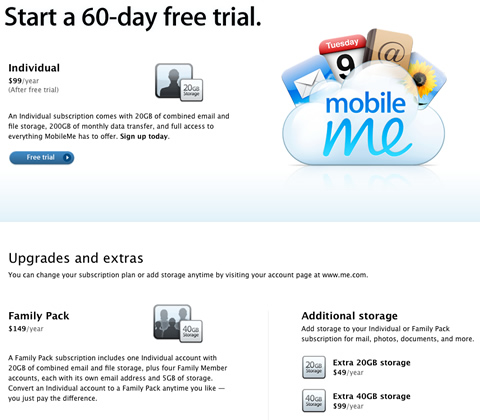
October 13th, 2008 9:21 pmGreat post idea. I love the way apple.com does it too.
Ivo Ivan
October 13th, 2008 10:20 pmgreat article. lot of inspiration for projects. thanks
wherearetheothers
October 13th, 2008 11:07 pmThis is an awful post, I read it with a real interest.
@ “Place important features at the top left of the table, according to the F-pattern of scanning Web pages.”
- Right, & I noticed that times the cheapest price is put to the left, and other times on right.
From your point of view, as the Westerner order of reading is: left – right, the cheapest price should not always it be put to the left, and the highest on right, to show an evolution?
Angulo
October 13th, 2008 11:50 pmGreat article. I love this one also: http://www.artifactsoftware.com/products/comparison.html
Benoit
October 14th, 2008 12:18 amHi !
If you want some examples of pricing tables, you can visit my website, where i publish One Pricing Table / Day Tarifiweb
Thanks for the article !
lpodolak
October 14th, 2008 12:19 amInvaluable source of information, thank you very much TSM !
Vitaly Friedman & Sven Lennartz
October 14th, 2008 12:25 am@wherearetheothers (#14): please read the article carefully. We have written: “Because users scan websites in an F-shape, some designers put the cheapest offer on the left side of the table, so that users see it first.” And please, don’t misinterpret the article.
ZeroDown
October 14th, 2008 1:13 amvery nice article and also great practices thanx a lot
Make Hay
October 14th, 2008 1:39 amThanks Smashing Magazine, as I’m about to redesign our web hosting site and this is exactly the sort of post I needed to get started.
srinivas
October 14th, 2008 2:25 amThanks… its a great article. all these days i was struggling hard, but this post…. awesome.
K
October 14th, 2008 3:00 amLove it! The posts you guys publish are absolutely awesome! Keep up the fantastic work!
Martin
October 14th, 2008 3:08 amLike the concept share sign up form it is really clean, simple and clear. Dream host has a pretty good well designed sign up form. Always impressed me, I thought I would see it here.
Linda
October 14th, 2008 3:27 amCool. I saw the name of the article and thought it would bore me. I looked at every single one with interest and ideas. Haha.
Runa
October 14th, 2008 3:28 amVery exhaustingly! Some designers did really good work.
Riccardo
October 14th, 2008 3:31 amA nicely written article with some great examples. Thanks!
david Martin
October 14th, 2008 4:02 amThanks, was looking for a similar article just last week
thomassl
October 14th, 2008 4:43 am“In fact, that’s what wany designers do.”
You are supposed to write “many”, right? Nice article anyways!
Andy Montoya
October 14th, 2008 4:47 amIn my projects I frequently use tables, is elemental to financial websites!! Nice post!
Cya
Andy Montoya
carlos
October 14th, 2008 5:25 amExcellent Article and Showcase, as a designer I hate designing tables and charts but “you gotta do what you gotta do” will be using this as a reference on future table torture jobs.
Tommy K
October 14th, 2008 6:40 amGreat article! Just needed this for a current project. Thanks a lot!
Siah
October 14th, 2008 6:47 amCool stuff man, i dig it!
Roy Vergara
October 14th, 2008 6:57 amawesome informative article. will change the way we do our pricing tables for sure!
Josh Bezdek
October 14th, 2008 7:16 amVery good examples of pricing. I have reworked our pricing page a bunch. Each time it gets more more simple. I work in an industry where it can be very difficult to represent pricing in an easy way. We tried very had to bring down the amount of content it took to describe our pricing. I wish I had seen this article before I did this last re-design but I didn’t so I was hoping I could get your opinion if you have a second. Please check it out and let me know
Christopher Ross (thisismyurl.com)
October 14th, 2008 7:17 amGreat article! I remember reading something similar in How magazine years ago, it became a staple for laying out tabular data. Chris
Helena
October 14th, 2008 8:06 amGood Job!!!
dev(Www.iHaCK.ASIA)
October 14th, 2008 8:29 amSome of the design really good, love it,and some of them not really good in color
Matt Rossi
October 14th, 2008 10:51 amNice post. I have always been a fan of Expression Engine’s table(s). Simple, yet very clean and effective.
wherearetheothers
October 14th, 2008 11:00 am@Vitaly Friedman & Sven Lennartz (# 18): I didn’t notice this sentence, so I apologize for the too quick comment.
“And please, don’t misinterpret the article.” : It was not with the intention of harming, I simply want to know more about it.
Nick
October 14th, 2008 11:22 amVery chuffed to appear on this list (etribes) which was very influenced by Basecamp
Jad Graphics
October 14th, 2008 12:22 pmWOW! Thank you so much for this great resource, inspiration, whatever you want to call this. I can definitely use this as a reference when creating tables for my webdesigns.
Jad Graphics
http://www.jadgraphics.net
Juan Ruiz
October 14th, 2008 2:36 pmnice collection of pricing tables, György. I’m currently working on an internal application for a client, with lots of information displayed on tables and grids. This article came at the right time! Thanks!
Billy
October 14th, 2008 7:10 pmnoice! we have just started looking into creating a product matrix these will come in handy for the artwork.
MikeP
October 14th, 2008 8:16 pmThanks guys, this is really informative and well researched. We’re using it as the basis for a pricing table we’re putting together ourselves at voeveo.
LENNE
October 15th, 2008 1:53 amExcellent article! Very useful for those who start their business and need to create good visibility on their offer and pricing.
Pricing tables are the best tools to present our differenciation points and so defend our prices.
And it’s a good way to know ourselves what we offer and which price we make.
Jason
October 15th, 2008 2:39 amGreat article. Loving the Crazy Egg pricing table.
Joe Ferrari
October 15th, 2008 8:51 amFantastic article! I really appreciate it. I’ve search something like this for days, for inspiration, than I design my own. See it here: http://whodo.es/plans
Shihan
October 15th, 2008 8:30 pmSimply Amazing..
h-a-r-v
October 16th, 2008 9:50 amGreat one. I just needed to make such a table and one of them appeared quite inspiring. Thanks.
zeba
October 16th, 2008 9:23 pmu guys rock man !!
kuddos n superb .. hey u must also someday show some damn good examples of login page.. sign up page..and thinngs whih r common on sites.. but for sure to read ur articles have become a habit now.. CHEERS!!
Mark Magyar
October 16th, 2008 11:57 pmNice collection! Many thx for this!
Remco Tolsma
October 17th, 2008 1:03 amVery nice collection of pricing tables, I will definitely use this in the future.
Fionnuala
October 17th, 2008 1:04 amThis article is suspiciously like an expanded version of this one, posted 3 days before this one on brainfuel: http://www.brainfuel.tv/web-app-pricing-tier-comparisons. Come one smashing! At least acknowledge sources!
Vitaly Friedman & Sven Lennartz
October 17th, 2008 1:52 am@Fionnuala (#53): we did not copy the article – you know that we would never do that. In fact, we have never seen this article before. For your information: we collect examples for our posts 30-60 days, so it must be a coincidence.
Jim
October 18th, 2008 3:29 amexcellent article – thorough and informative – just how we like it
Tzu Wei
October 19th, 2008 11:36 pmI love smashingmagazine and most of the articles are great, but for this I gotta say it is only dealing with presenting one form of data set – the package is on the column and the items include in the package are in the rows. This work wonderfully and perfectly when it comes to sales of various hosting services, emails, hardware, but doesn’t really deal with other industries e.g. theme parks where data has to be presented in a different format as the dynamics of sales is rather different.
shashikant
October 20th, 2008 1:38 amI never though there was anything like pricing table . i first found this in this website. Good work.
Torley
November 8th, 2008 9:31 amBrilliant article. One I’ve bookmarked for future usage — I was trying to search for this a few days ago under “pricing comparison” or “feature comparison” and am glad I found it! :D
Stuart Chaney
November 27th, 2008 4:46 pmGreat post,
Jan
January 6th, 2009 9:16 pmVery helpful post!
amongchina
March 30th, 2009 11:05 pmoh,great works,really helpfull things
Mark van Beek (mediablok.nl)
April 3rd, 2009 1:09 amWe are just in the process of creating price-tables for one of oure products. Youre timing couldn’t be better. Thanks for sharing this great piece of information.
Mark
Tahitian Noni Juice UK
April 24th, 2009 4:50 amA great post and very detailed. We’ll try it out on our website very soon for our new Tahitian Noni Juice subscription plans
Fiona Fell
October 11th, 2009 6:39 pmWOW.
I really never thought so intently about the design of my pricing tables. Thank you for prompting me to take another look at them all.
Off to re-woork my websites.
Laneth Sffarlenn
October 15th, 2009 4:35 pmAs I’m up to this stage in designing my site, I decided I’d come check out Smashing Mag to see if you guys had done an article on comparison / pricing tables.
You guys never disappoint me – this article is bookmarked and boy am I gonna have fun designing my table :)
OKIZOO
April 2nd, 2010 12:53 amGreat list for table design. I think this is an important because most will not read! It is so difficult to get web viewers to actually read content. If you make it easy to absorb the data, and laid out in an attractive way more users will read. NOW this doesn’t mean they will retain what they just learn :)
TJ
May 2nd, 2010 6:27 amCool and great stuff :)
Shalin Jain
August 18th, 2010 10:52 pmGreat list and very useful examples from a design perspective.
If you need rationale behind why some companies following a particular pricing model – you will find this article useful:
http://tenmiles.com/blog/2010/04/pricing-your-saas-application/
Dennis van der Heijden
December 10th, 2010 12:59 pmMy vision on 303 pricing pages. See screenshots and tips per pricing page.. Learn to make you killer page http://www.reedge.com/303-ideas-for-pricing-pages.html
mike ils
January 11th, 2011 9:41 amSo many of these were outdated that I decided to make an updated pricing table gallery: http://webdesignandsuch.com/pricing-table-design-showcase/
jangerz
January 31st, 2011 9:52 pmHi!
This day is a gift it we say present, yesterday is the past and tomorrow is the mystery.
Adam
February 15th, 2011 8:27 amWould love an updated version of this review.
FusionHost
March 26th, 2011 4:54 pmReally inspirational collection, thank you for putting them together.
mindxstudio
April 27th, 2011 6:46 pmThe best pricing table example I have found here, thanks for great effort.
Dennis van der Heijden
May 24th, 2011 10:44 amWrote a blogpost on our own pricing page design decisions http://blog.reedge.com/the-anatomy-of-our-pricing-page.html
Danny Hen
June 5th, 2011 9:57 amVery good article. From our experience in Personyze (a SaaS company dealing with site Personalization). A plan page needs to be as simple and intuitive as possible in order to work.
Squared
August 15th, 2011 6:13 pmThese are some amazing designs on how effectively to display prices and features. Here is more that I have found http://www.creativesen.se/category/pricing_tables
Will Egan
November 7th, 2011 2:47 pmThis is a good article,
I am surprised at how consistent the layout designs are. They are not very inspirational to be honest. Like an excel spreadsheet, 3, 4, 5 or 6 columns – different prices and options.
A smart designer could really turn this on it’s head. I advise people to look back to the way print media outlines plan options. If you go to your local car dealer and pick up a few brochures, look to the optional extras page – a lot easier to understand the trues benefits.
Overall quite good, thanks!
Deb
November 10th, 2011 8:06 amGreat article! Have you done any research as to how many pricing/product options are optimal and at what point too many becomes a detriment to conversion?
Granth
January 24th, 2013 12:45 pmGreat list. What do you think this “Go – Responsive Pricing” http://bit.ly/Y0qDm9?
Kev
April 20th, 2013 7:59 amSome nice and attractive tables but they should definitely be responsive these days. Check out this Responsive Pricing Table and Tabular Data Table.
Free Responsive HTML5 Pricing Table
http://templatz.co/responsive-multi-color-pricing-table.php
Free Responsive HTML5 Table For Tabular Data
http://templatz.co/responsive-table.php