Smashing Magazine - we smash you with the information that will make your life easier. really.

Strategic Design: 6 Steps For Building Successful Websites

Advertisement

Web design isn’t art. It involves a whole collection of different skills — from copywriting and typography to layout and art — all fused together to create an interface that not only features a pleasant aesthetic but that communicates function and facilitates easy access to its content.

But in order to combine all these elements of Web design together and achieve successful results you must have a clear direction, a direction that will guide each and every aspect of your design towards common goals. You must think strategically.

Chess in Strategic Design: 6 Steps For Building Successful Websites

What is strategic design?

Strategic design is the fusion of your organizational goals with every aspect of your design process. You aren’t simply designing a user interface that looks good and is usable and accessible. You’re designing an interface that will help you accomplish your organization’s objectives.

There are many websites out there that look fantastic and sport the latest trends in design yet often fail miserably in their intended function. Design trends are, of course, important because they give you fresh inspiration and new techniques, but the implementation of those techniques and styles needs to be intelligent and focused. For example, a blog isn’t a marketing brochure; you should focus on usability and readability rather than style. Similarly, a promotional website for a computer game should feature graphics and styles that portray a specific feel and style; the aesthetic is very important here.

When the designer simply implements a look and feel that is fashionable at the moment (think Web 2.0 trends) without any thought of how they fit the function of the website or the business behind it, the end result is unlikely to be very effective.

Web design is all about crafting an interface that communicates function, is usable and accessible and exudes the right emotion and feeling. Effective Web design needs all of these elements to be in tune with the goals of your website and in sync with the organizational objectives behind the website. Strategic design is all about identifying those goals and using them to guide your design.

Implementing Strategic Design

Let’s take a look at how we can use six steps to think strategically about a Web design project:

1. Establish your goals

One of the first things you need to do before starting work on a Web design project is to be clear about your client or organization’s goals. What are you trying to achieve with the new website or redesign? What is the website’s main purpose? Ask your client, your manager or yourself what those are. If they or you don’t know yet, then they should be discussed and agreed upon. A clear direction is essential if you want your design to have a purpose.

Remember that a website isn’t a piece of art; it’s an interface that serves a function. That function may be to sell products, to deliver informational content, to entertain, to inform or to provide access to a service. Whatever that function is, your design must focus on fulfilling it. Goals are also important, especially if you’re doing a redesign. Ask why you are doing the redesign: are you looking to grow the number of sign-ups, decrease the bounce rate or maybe increase user participation?
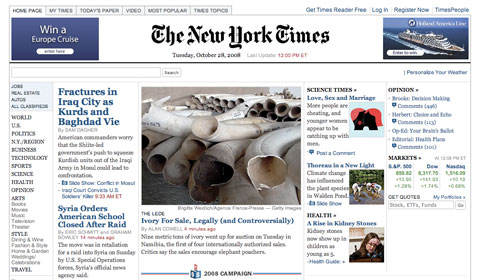
Nytimes in Strategic Design: 6 Steps For Building Successful Websites

Take a look at the design of the New York Times website above. Its function is to deliver informational content. The minimalist interface serves this function beautifully by fading into the background.
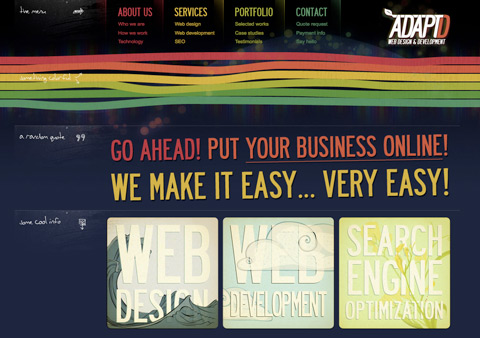
Adaptd in Strategic Design: 6 Steps For Building Successful Websites

In contrast to the New York Times, AdaptD is a Web design studio, so the goal is not to deliver a lot of content but to impress visitors with its design, showcase a gallery and advertise the company’s services. The visuals are very important here, and AdaptD delivers a browsing experience with beautiful imagery and strong colors.

2. Identify your audience

Who your audience is will play a big role in how your website should look and function. There are many demographics here that can influence your design, ones like age, gender, profession and technical competency. A computer game website for a younger audience needs a different style than that of a serious business journal. Usability should play a bigger role for older and less technically savvy audiences.

Who your audience is will not only influence the general aesthetic of the website but will also determine a lot of smaller details, like font sizes, so make sure you’re clear about who will be using your website.
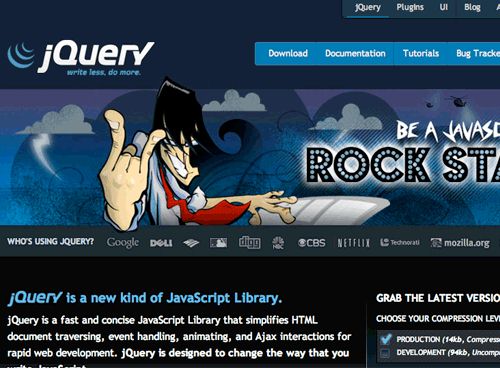
Jq in Strategic Design: 6 Steps For Building Successful Websites

This is the unsuccessful jQuery rock-star redesign. The designer went too far in trying to create excitement and so failed to cater to the more serious, techy audience. Since then, the rock-star graphic has been replaced with a more conservative look.
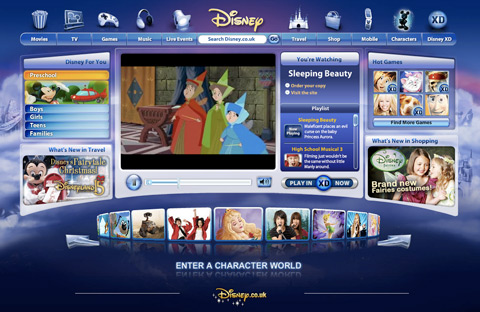
Disney in Strategic Design: 6 Steps For Building Successful Websites

Disney’s target audience is kids. The intent is to entertain and involve this young audience, and the design does it by wrapping the content in a fun, colorful interface with a lot of visual and interactive elements.

3. Determine your brand image

A lot of designers tend to get a little too inspired by the latest trends and then implement them without thinking first about what sort of image they really should be conveying. Glossy buttons, gradients and reflective floors may work for some websites, but they may not be right for your brand.

Think about color. Think about the feel you want to achieve and emotions you wish to elicit. Your design should embody the personality and character of your brand. Everything has a brand; even if you don’t sell a product or service — for example, if you run a blog — your website still has a certain feel that makes an impression on your visitors. Decide what that impression should be.
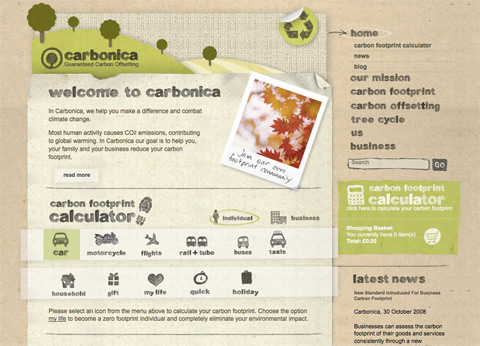
Carbonica in Strategic Design: 6 Steps For Building Successful Websites

Carbonica is a website aimed at helping people reduce their carbon emissions. The environmentally friendly image of the website is crafted using a lot of recycled paper images and textures, as well as earthy green and brown tones.
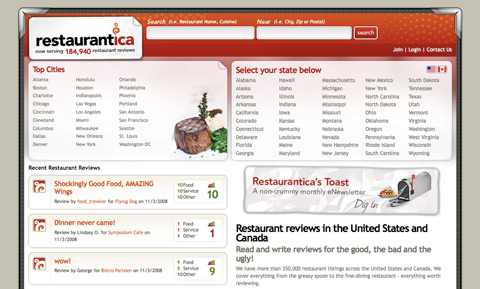
Restaurantica in Strategic Design: 6 Steps For Building Successful Websites

Restaurantica is a restaurant reviews website. Its design illustrates this by taking on the look and feel of an actual menu you would see in a restaurant.

4. Goal-driven design direction

You’ve established the purpose of your website, set some goals you want to achieve, identified your audience and determined your brand image. You can now proceed to implement it. So how do you make design decisions sync with your strategy? Let me illustrate this with a likely example.

Suppose your main objective is to increase the number of subscribers to your Web service. How can your design help accomplish this goal? I can see at least three things here that will make a difference:

  • Make the “About” snippet on your landing page as clear and concise as possible. Your visitors must not have any confusion about the function of your website.
  • Use color and contrast to make the registration button or link stand out. If people can’t find it, then you won’t get many sign-ups.
  • Streamline the registration process by removing unnecessary and optional elements; people can fill those out later. If the form looks long, people may be put off of filling it in.

These are just three ways you can lead your design towards accomplishing the goal of increasing the number of sign-ups to your service. Your goals may vary, but the strategy is the same: shape and focus all the design elements towards meeting those goals.

The same strategy applies to your brand and audience: design the aesthetic that best suits it. If your website’s focus is entertainment, then create an “experience.” You are free to use a lot of color and imagery to shape that experience. On the other hand, if you’re designing a website that is focused on information consumption, for example, a blog or a magazine, then focus on usability and readability. Create an interface that fades away and doesn’t distract the user from accessing the content.
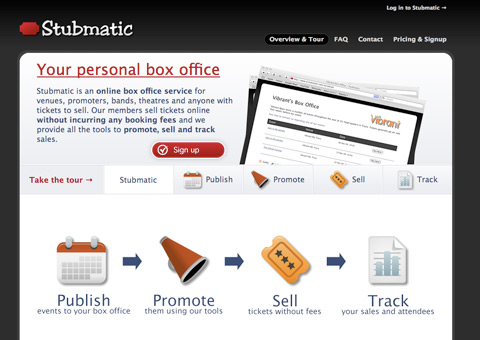
Stubmatic in Strategic Design: 6 Steps For Building Successful Websites

Stubmatic is an online box-office application. Their external website has two purposes: explain what the service does and get people to sign up. New visitors may only remain on your website for a few seconds, so if you don’t want to lose them you must be concise. You can do this by:

  • Using large imagery and diagrams to illustrate the function of your product or service.
  • Showing screenshots of your application. People will want to see what it looks like before they commit to a download or sign up.
  • Providing a tour, using descriptive examples of how your service can help them solve a problem. Show a video if you can; the less effort people need to make to understand how your app works the better.
  • Having the sign-up link accessible from all pages.

To succeed, the website must make the best use of the very limited amount of attention visitors will be giving it by not only informing but educating them about what your product does, and selling the benefits it provides. Stubmatic uses design elements effectively to pursue those goals.
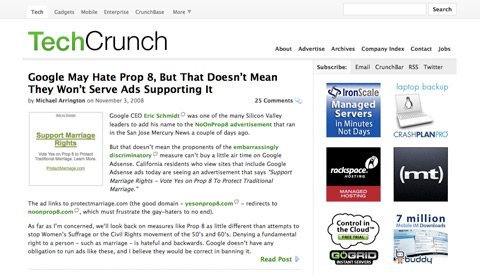
Techcrunch in Strategic Design: 6 Steps For Building Successful Websites

TechCrunch is one of the more popular tech blogs. Its new design removes every single unnecessary graphical element from the page. What’s left is just the content, advertising and navigation. Subtle lines and grey shades give the page structure, yet the interface is almost invisible and places content straight into the front row. For a blog that posts several new articles a day, this format is ideal because it facilitates fast and easy access to the content.

5. Measure results

Once you’ve designed and deployed your website, it’s time to measure your success. This is just as important as the first two steps because until you test how well your design performs, you won’t know whether or not it is effective in fulfilling your goals.

If your goal is to increase the number of sign-ups to your service, measure it and see if your changes are making a positive impact. If you want to increase the number of subscribers to your blog, check your RSS stats. If you want to increase user involvement, see if you get more comments or more forum posts or whatever else is relevant in your context.

You can, of course, also ask people for their feedback, and this is a very good way to check if you’re on the right track. Be careful though not to implement every suggestion people make. Everyone has different tastes and wants, so everyone is going to have a different opinion about what your website should look like. If you do collect feedback, look for patterns; see if there are common issues that crop up and deal with those.

Measuring various website metrics is a whole science unto itself and is beyond the scope of this article. But however in-depth your analytics are at this stage doesn’t really matter; the important thing is that at the very least you have some way of measuring your key objectives. You can use this information to see if you’re moving in the right direction with your design and with any future changes you or your client make.
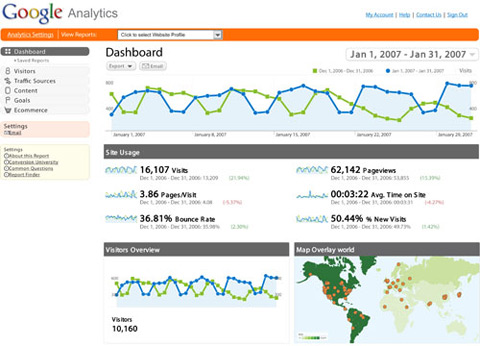
Analytics in Strategic Design: 6 Steps For Building Successful Websites
Even if you’re on a tight budget, you can use free tools like Google Analytics to get a lot of data on how your website is being used, including overlays of your pages to see what links people click on most as well as the ability to track conversion funnels.

6. Kaizen

There is a Japanese philosophy called “Kaizen,” which focuses on continuous improvement using small steps. When you work on your website, you should be thinking of Kaizen because the version you’ve just published is not the final version. There doesn’t even have to be a final version.

You can always make improvements, and the very nature of a website will allow you to introduce these at any time. This is because a website isn’t a magazine that you print and sell: once a magazine copy is out of your hands, you cannot make any changes or fix any spelling mistakes or errors. A website, however, sits on your server: if you find a mistake, you can fix it right away. In the same vein, you can introduce gradual improvements and updates to make your website more effective in serving its function.

Using the results of your measurements, you can identify problem areas. Perhaps your visitors cannot find the RSS feed link, or your bounce rate is too high or an important page on your website isn’t getting enough visits. Whatever the problem is, there will always be a way to improve things.

Conclusion

The main gist of strategic design is simply common sense: you’re making something for a specific purpose, so of course it should fulfill that purpose through its design. But it is actually very easy to lose track of your goals and end up with something that is beautiful but ultimately doesn’t work in its context. It’s very easy to fall into the trap of implementing the latest design trends just because they look attractive or shaping a section of your website to resemble another website that you really like without first thinking about why you are doing it or how it fits in with the purpose of your project.

Avoid falling into these traps by thinking through every design decision you make. Why is this button this color? Why are we using tabs? Why should we use icons here? Once you get into the habit of questioning your every design decision, the whole process will become much more focused. Think about the product or organization you’re representing. Think about the target audience and your brand. What will work in this context? What is expected? How can you use design to best fulfill the website’s purpose? Don’t just build a beautiful website: make a website that really works.

Related Articles

You may want to take a look at the following related articles:

(al)

Dmitry Fadeyev is the founder of the Usability Post blog, where you can read his thoughts on good design and usability.

Post Rating
1 Star2 Stars3 Stars4 Stars5 Stars (No votes yet)
Loading ... Loading ...

Tags: ,

Advertising
  1. 1
    Marc
    November 5th, 2008 2:48 pm

    Very nice article, I believe this will help me greatly in my quest of publishing my first successful website.

  2. 2
    crypta
    November 5th, 2008 2:51 pm

    always ok to know
    thx sm

  3. 3
    Okibi
    November 5th, 2008 3:16 pm

    Thanks for taking the time to compile these.

  4. 4
    Patrick
    November 5th, 2008 3:18 pm

    Great framework for beginners and experienced web developers alike.

  5. 5
    yo
    November 5th, 2008 3:27 pm

    Typo in AdaptD’s link! (used p instead of d)
    Great article btw

  6. 6
    Jin Y.
    November 5th, 2008 3:29 pm

    Good job Dmitry! It’s important for people who are new to web design to differentiate between design and decoration.

  7. 7
    Aldhis
    November 5th, 2008 3:55 pm

    Hi, what if I give the re-write the 6 steps here just to summarize:
    1. Establish your goals
    2. Identify your audience
    3. Determine your brand image
    4. Goal-driven design direction
    5. Measure results
    6. Kaizen
    Thank you for sharing this… I’ll put it in my notes so I could always remember. :)

  8. 8
    Ramiro Ruiz
    November 5th, 2008 4:23 pm

    really great post!

  9. 9
    Madichiban
    November 5th, 2008 5:08 pm

    wow…some things we forget about and always need a refresher course in. Great Post

  10. 10
    Joel Smith
    November 5th, 2008 5:26 pm

    This is definitely the recipe for a successful website for business/website owners today. When I work with my clients, objectives (business objectives and end-user objectives) are all we talk in the beginning, even before creative direction.

    Having those objectives creates boundaries, which creates direction, which allows for focused energy and idea generation.

    Great article! :)

  11. 11
    Ravi Vora
    November 5th, 2008 5:37 pm

    Great article, this was something I was discussing today at my company. It’s hard to nail down the exact measures we need to take as designers in order to give the best advice while providing the best solutions.

  12. 12
    nico
    November 5th, 2008 5:51 pm

    NICE!

  13. 13
    Matt
    November 5th, 2008 5:54 pm

    Great article. Web design is a totally different animal than straight art. We can use artist’s creations in web design (e.g. icons) and they are meant to compliment the design. Web design can be frustrating at times because there is so much thought that must ultimately go into a project. Thanks again for article.

  14. 14
    Han Deul
    November 5th, 2008 6:02 pm

    Good Post. this was not something what we discussed at my company.

  15. 15
    Anjar Priandoyo
    November 5th, 2008 6:04 pm

    Great article, i realize that i don’t have a good art sense, however by reading web development is not only about design but also typo, copywriting etc makes me motivated then

  16. 16
    Oktober Five
    November 5th, 2008 6:26 pm

    I’ve thought a lot about brand image lately–I think the title image and avatar I’ve created work, but they don’t communicate everything about what I offer. And they might be a little too un-exciting for the kind of content I produce. Or maybe my content is just really boring and nobody has told me yet. Either way, I think adding something a little more “fun” to the mix is a good idea, and this article has given me different ways to think about that change. Thanks.

  17. 17
    Tracy
    November 5th, 2008 7:18 pm

    I have already put this in my note

  18. 18
    cheesy
    November 5th, 2008 7:49 pm

    Thanks a lot for this article. Often times I forget/skip the steps/guidelines you mentioned. I bet this will help alot in my upcoming projects. Keep on smashing! ^__^

  19. 19
    Felix
    November 5th, 2008 7:53 pm

    Wow I like Kaizen!

  20. 20
    Rachel
    November 5th, 2008 8:22 pm

    Best article, hands down, for creating a beautiful AND successful website. Both of these ingredients should be considered when designing a site.

  21. 21
    jler
    November 5th, 2008 9:25 pm

    thanks for sharing.

  22. 22
    Derek McDonald
    November 5th, 2008 9:28 pm

    I’ll be keeping this in mind since I decided last weekend I’m going to design my own design for my site. Nice info there.

  23. 23
    Ben Jacob
    November 5th, 2008 9:31 pm

    Very informative post.. thanks for the guidance

  24. 24
    padmajarani k
    November 5th, 2008 10:23 pm

    Great Article…Covered all the aspects for web designers

  25. 25
    Irfan
    November 5th, 2008 10:25 pm

    Excellent advice – whether you’re a beginner or an old hand, this is an approach that covers all bases. This sort of advice is what separates good sites for the so-so… thanks.

  26. 26
    leonorv
    November 5th, 2008 11:13 pm

    yes,
    you should never forget who the audience of your page is.
    It is very important to remember the purspose of your page.

  27. 27
    Adam Almendras
    November 5th, 2008 11:18 pm

    Nice article! very useful. Thanks!

  28. 28
    Barttos
    November 5th, 2008 11:27 pm

    Huh, very good tutorial! Big thx for writing it!
    Added to favorites :-)

  29. 29
    third world apricot
    November 6th, 2008 12:20 am

    You say web design isn’t an art, then you go on to state that:

    Web design is all about crafting an interface that communicates function, is usable and accessible and exudes the right emotion and feeling.

    You could say someone has created art when they introduce grace, ease and style to a performance or action so that an audience receives sensual stimulation. Michael Jordon playing basketball, a sealion swimming, or the culmination of several skills into a final and beautiful website that works, for example.
    I guess your definition of art is restricted to the aesthetics.

  30. 30
    Thorvald
    November 6th, 2008 12:36 am

    Nice summary. I wish my current boss and my (print) art director would have read it before they said, we need a redesign of our website… I am currently trying to clean up this mess… :-(

  31. 31
    Snowflake
    November 6th, 2008 1:19 am

    wow…what i liked about this topic is the fact that you as a designer indirectly think about those points while you are designing your website…but you could never put your thoughts to these specific points…so thank you so much for these tips.

  32. 32
    Sam
    November 6th, 2008 1:28 am

    Really perfect! Thanx a lot for those tips. :D

  33. 33
    Mark
    November 6th, 2008 1:35 am

    Great article, very beneficial to the guys and gals who are starting out too! good tips!

  34. 34
    Mark
    November 6th, 2008 1:59 am

    Thanks for the article, its great as ever. Does anyone know what the ‘Rock Star’ font is on the jquery example?

  35. 35
    g0ma
    November 6th, 2008 1:59 am

    this gives me inspiration to focus on what suits best for a website to make.. this one truly helps rather than looking on a lot of website showcases and gets me confuse.

  36. 36
    karan
    November 6th, 2008 2:14 am

    Excellent article. I can take something from this article

  37. 37
    Janko
    November 6th, 2008 2:19 am

    Excellent article, Dmitry!

  38. 38
    Gilles "Forge"
    November 6th, 2008 2:28 am

    Good post !
    To be continued … ?

  39. 39
    Peter Lazaridis
    November 6th, 2008 2:42 am

    Awesome stuff as always SM! Keep it up, we’re followin :)

  40. 40
    Marcus Vinícius
    November 6th, 2008 3:27 am

    This is the kind of stuff that make’s me visit SM every day. Twice!

    hugs from Brazil.

  41. 41
    Gomi
    November 6th, 2008 4:43 am

    Nice read… BUT I would disagree completely with the first sentence.

    ‘Web Design isn’t an art.”

    IT IS… any bloke can code… real designers make the experience emotional.

  42. 42
    Riccardo
    November 6th, 2008 5:00 am

    An interesting read. Thanks, SM!

  43. 43
    Al Stevens
    November 6th, 2008 5:12 am

    Very good article – however I believe that establishing the business goals could be a red herring. I believe this should be replaced with “Establish User Goals”.

    Afterall, it doesn’t matter how many chocolate teapots your business wants to sell if all users to your website are looking for pop art.

  44. 44
    Lars Bouwens
    November 6th, 2008 6:01 am

    A nice reference to the Kaizen method. One introduced by Masaaki Imai, a great respected ‘guru’ in process improvement. I would like to add a comment on your story about the method; Kaizen can only work when all people involved understand the method! You cannot use Kaizen in your own way, it has to be an all intergrated way of working!

  45. 45
    adrian tache
    November 6th, 2008 6:15 am

    kaizen is quality management strategy of continuous improvement and does not only refer to small steps, it is an entire process which improves quality at the workplace and it starts with removing all that is not necessary.

    it’s brilliant stuff, but it’s a lot more than just small steps, read here: http://www.valuebasedmanagement.net/methods_kaizen.html and then search google because there’s a lot more

  46. 46
    Dmitry
    November 6th, 2008 6:41 am

    Thanks everyone for the positive comments. I’m really glad you liked the article.

    About art vs web design: I see art more as self expression, and design as communication. I think web design can be self expression and can be art — but for the large majority of sites out there the communication aspect is more important as they need to deliver an interface more than experience.

  47. 47
    Joseph
    November 6th, 2008 7:32 am

    I think this is a particular stance on functional site design. Goal oriented site design. But I disagree that website design isn’t art on the commercial advertising sense. If your creating a new product or a new movie, its equally a showcase of art and creative as it is about communication. Because in that sense it’s about inspiring others to do things based upon an environmental look and feel. But in regards to most sites this article is spot on and the 6 steps is worthy of noting down.

  48. 48
    Brian
    November 6th, 2008 7:43 am

    Web design is still art. Yes it is a collective of skills, typography, design, and programing, etc.. But it is can still be used for creative expression. To say web design isn’t art is just as bad as saying print design isn’t art. The only real difference is that a website is interactive art. You touch and feel it in ways that you do not with print. Still…. its an art form nonetheless.

  49. 49
    Brian
    November 6th, 2008 7:44 am

    Art is communication…

  50. 50
    Nathan Davies
    November 6th, 2008 7:46 am

    A good article. One point on the idea of sign-up forms is that many sites don’t need them. If you are processing sales then yes certain forms are required, however, if you are running a forum, taking comments on an article or similar then a sign-up form however short is a stumbling block. Simply have the form to take the information the user wants to submit and say an email address and that’s that. As long as your terms of service are clear this is enough for you to create an account and invite them back. the bonus is that they are already part of the community and now they even fell like it are being told a bit more about it and invited to try it again.

    I’ve used this kind of process and seen an increase in participants based on traditional sign-up methods.

  51. 51
    heather van de mark
    November 6th, 2008 7:49 am

    i might just be missing it, but if i want to print this is there a -print page- button anywhere?

  52. 52
    szalmo
    November 6th, 2008 8:16 am

    i tell you in italian, or better, in florentine patois: massai una sega te!
    That means, less or more, “i don’t think you have enough experience and empowerment to talk about this. not in this manner, though”.

    thx, anyway.

  53. 53
    Lawrence Anderson
    November 6th, 2008 8:43 am

    Really great post guys.

  54. 54
    Ahmet Burak Bal
    November 6th, 2008 8:52 am

    I want to print this is there a button anywhere?

  55. 55
    Siah
    November 6th, 2008 9:52 am

    Knowledge is Power, thanks!
    Here’s to Kaizen!!

  56. 56
    Deb Kolaras
    November 6th, 2008 10:44 am

    Succinct and on the money as usual. I will save this and share with clients!

  57. 57
    Jonathan
    November 6th, 2008 11:48 am

    Thanks for this very interesting.

  58. 58
    Cosmi
    November 6th, 2008 12:03 pm

    Thank’s for sharing. Usefull!

  59. 59
    dirk worring
    November 6th, 2008 12:17 pm

    All in all i have to say, this is a really strange issue. Sure, congrats to the author, a good written, down to earth article. As i recently search through some websites of major advertising agencies, i was more than stunned, more horrified about the concept and technical realization. You might think, that especially communication experts would know their shit, and in return would have perfect onliine presentations. But the reality is very different. Every Agency i contacted, I asked them if they wanted some feedback, about errors and horrible mistakes. And yes, we would very much appreciate this, they replied. So i wrote several emails, reporting tons of shitty programming, the problems of searchengines + complete flash sites, the general problems with flash (test it until you throw up and then three times more), the really bad concept (how do i find what you do? your references, who do i talk to?). Normally, you would expect, that a hotel has comfortable beds, and if they advertise that, it smells funny right away. But when big names in the “integrated communcation” field present themselves so badly, with information you have to search for, you know why articles like these are more than necessary. Keep it up. The world needs us, people who know online design and concept and know how this medium works. For the user. For success!

  60. 60
    Harlley
    November 6th, 2008 12:22 pm

    The article title should be “Web design isn’t art”. Excellent post!

  61. 61
    Steve Jamesson
    November 6th, 2008 3:00 pm

    I couldn’t count how many designers I’ve worked with that ignore these critical concepts!

  62. 62
    Steve Killen
    November 6th, 2008 3:53 pm

    To the above commenters: Art is not communication, design is communication. Art is in essence, useless, it is a thing unto itself which servers no other purpose. Smashing is right here.

    And it is definitely not a sea lion going for a paddle or any pretentious crap like that!

  63. 63
    Tanya
    November 6th, 2008 6:17 pm

    If this is so insightful about strategic design, why does this page suck so much with its two separte active columns? Your crammin’ me! Quit Jammin’ me! Give me room to enjoy this article. Im tired of scrolling! I gotta go rest my mouse finger. Great info though. Thanks.

  64. 64
    yu
    November 6th, 2008 7:54 pm

    Hi! I have always reading your intresting ariticle from Japan.
    It seems this article is very intresting for webdesigners.
    I sometimes think the relation markting to webdesign (layout, color, architecture, usabilty, etc…).
    It is very difficult. We will have been disignning ( cordinating) the various related elements.
    I am looking forward to reading these kinds of articles.

  65. 65
    Couchart
    November 6th, 2008 8:37 pm

    I think you’re totally wrong about web design not being art. It involves everything you mentioned, plus a lot of artistic talent. Great article though, successful websites do require these elements.

  66. 66
    Dibakar Jana
    November 6th, 2008 10:24 pm

    Nice article. I am a new web designer. So this points really help me to build a successful website.

    Thank you very much.

  67. 67
    Matt Hill
    November 7th, 2008 3:53 am

    @heather van de mark and @Ahmet Burak Bal: Use your browser print button, like any other application (File -> Print).

    “Web design isn’t art” is misleading. It’s a sweeping statement that is trying to be controversial for the sake of it. Some websites are purely art.

    But certainly for goal-driven websites (most commercial sites for example), art is secondary to the functional design, and this article is good for looking at the required thinking behind making those kinds of sites successful.

  68. 68
    OZZY
    November 7th, 2008 5:54 am

    going to help a lot . Great post thanks

  69. 69
    Craig Hooper
    November 7th, 2008 6:05 am

    Man, this has been discussed to death. Yes, the points listed in this article are a solid path to follow, but it’s been done—the discussion. It’s common sense. If you don’t follow this (sadly many don’t), you fail.

    I just don’t think someone needed to write this lengthly article and post it here. It’s been done.

  70. 70
    Matt Hill
    November 7th, 2008 9:44 am

    @Craig: What’s old to some is new to others. No need to knock it just because you’ve heard the message before.

  71. 71
    frank
    November 7th, 2008 10:50 am

    Great post. I’ve already read it twice. :)

  72. 72
    Matt
    November 7th, 2008 1:48 pm

    Thanks for the great article

  73. 73
    Adam Landrum
    November 7th, 2008 5:20 pm

    Great stuff and I concur 100%. Our company, mergeweb, has been preaching “Digital Strategy” for about seven years now. I think you nailed it. If the web site doesn’t [help] accomplish an organization’s objectives, then what’s the use?

    Some additional items we hit on include a Site Traffic strategy (it doesn’t matter if you have a branded, strategic web site if the right people can’t find you) and of course the custom functionality portion.

    Enjoyed the read and affirmed our approach. Thanks.

  74. 74
    Arkayne
    November 8th, 2008 2:31 am

    I stopped reading after the first sentence because that’s a load of crap.. I feel any sort of work, whether it be web design, print design, painting, graffiti or even architecture is still art, whether its originally intended to be or not.

    Anyway, went back and read the rest. A few good pointers. Thank you.

  75. 75
    Murtaza
    November 8th, 2008 10:23 am

    Just what I needed at the moment. I am trying to design a website for a university and I was too carried away with all those fancy designs and forgot the actual function of my website and ended up creating a template that was replica of Barack Obama’s[Now Proudly Mr. President] website :)

  76. 76
    John Hoff - eVentureBiz
    November 8th, 2008 12:36 pm

    Been reading your blog for awhile but I don’t think I’ve commented before. This was a well written article and I just wanted to say hello and thanks.

    One thing I might add to the conversation is although you need to keep up on your stats and tweaking your site here and there, don’t dwell on them too much. Remember, you have a business or blog to run also. Marketing should take up a big chunk of your time.

  77. 77
    onlyyourspiyu
    November 8th, 2008 1:30 pm

    HI..

    Thanks a lot for this articla. It surely has some very valid points. I will keep these in mind while working on my current project…

    You guys are smashing as ever…

  78. 78
    infernodeep
    November 9th, 2008 11:19 pm

    Very useful post.These may help me alot to build a good website.
    Thanks alot.

  79. 79
    kris
    November 11th, 2008 4:02 am

    truly helpful. thanks!

  80. 80
    wizely
    November 11th, 2008 7:07 pm

    A great article covering a subject which many designers forget to focus on – that a good design is one that achieves its purpose and not one that looks good.
    I would add to the 6 points – ‘Understand the business and the market”. Factors such as the business’ culture and style, it’s competitors and market conditions will influence the design.
    I’d also change “Brand image” to “Branding” as a brand is much more than just the look – the copy (what you say) and the user experience (which you point out) are important in a brand.
    There’s also not much mention of the actual content. It is the content that will do most of the work on a website to achieve the strategic goals and will have the greatest influence on a design.
    There are some articles on using content as a strategic design tool here.
    Thanks again for a great article for getting designers to think about more.

  81. 81
    Peter
    November 12th, 2008 5:38 pm

    Thanks alot.

  82. 82
    Nasip
    November 13th, 2008 4:38 am

    Impressive! Thanks Smashing.

  83. 83
    keith
    November 14th, 2008 2:06 pm

    I love the rockstar dude of jquery though, great article!

  84. 84
    Cibertrix
    November 29th, 2008 3:41 am

    This website – “smashingmagazine” is a classic example of a dreadful website, yet the owner of this website contines to “lecture” us about good website design….

    What is wrong here?…

    All the content (copied of course) is to the left but it is swamped by all that ad crap to the right ) no one will ever click there so why use it?)

    This landing page is so long that it is outside the reach of modem users, and for DSL users such as myself it is an entire waste of internet space…

    There is just one skinny column of content but a huge amount of empty space (does the webmaster here not understand pagination such as “Page 1, Page 2, etc???”) Why? It makes for faster loading web pages and less scrolloing down, and down, and down…. do you get it ?

    I give this website 0 out of 10 on all counts of design, accessability, original content, etc.

    Are the comments here real ? Are people so ignorant that they have not yet figured out that good website design is important to getting ahead…. are the readers here so dumb that they need to comment on the blindingly obvious…?

    Sure seems that way….

  85. 85
    NotSoSure
    December 14th, 2008 9:56 pm

    Dont agree with you Cibertrix. While this website is a big ugly with too much crap on the right I never look at, the article are usually quote good. Pagination sucks when reading an article, I just want to read it all by scrolling and not worrying about clicking next each time. The users of this site will most likely be on the cutting edge of technology too, so dial up modems are ruled out.

  86. 86
    Bruce Elkin
    December 22nd, 2008 12:08 pm

    Great article. Great illustrations. I’m going to use it to do a wordpress mini-site. And I linked it to an article I wrote on Hub Pages about Strategic Design in Business. I hope more people will read it, and learn about the uncommon sense of St. Design.

  87. 87
    Sam
    September 16th, 2009 3:31 pm

    Great article. Good information.

  1. 00

    There are no trackbacks at this time. If you are interested in leaving a trackback, please use this URL.

Leave a Comment

Make sure you enter the * required information where indicated. Please also rate the article as it will help us decide future content and posts. Comments are moderated – and rel="nofollow" is in use. Please no link dropping, no keywords or domains as names; do not spam, and do not advertise!


Advertisement Advertise with us!
Join in Smashing Forum
  • Re: Correct way to learn PHP

    Start off by reading all the 15 parts of PHP 101 on Devzone.

  • Re: Using Tutorials?

    I say you're okay. I wouldn't straight up jack someone else's design and present it as my own, even if it was a tutorial, but it's certainly acceptable to learn some…

  • Correct way to learn PHP

    So, I'm a designer but I wanna expand my abilities and learn PHP, to be more exact I wanna learn CI - Codeigniter!

  • I wanna make comics!

    Hello,I'm designer but I've never involved in vector painting so I need your help

  • Re: Twitter

    @gatorwebdesignShould tweet something really...

Post your job