Smashing Magazine - we smash you with the information that will make your life easier. really.
12 Principles For Keeping Your Code Clean
Beautiful HTML is the foundation of a beautiful website. When I teach people about CSS, I always begin by telling them that good CSS can only exist with equally good HTML markup. A house is only as strong as its foundation, right? The advantages of clean, semantic HTML are many, yet so many websites suffer from poorly written markup.
Let’s take a look at some poorly written HTML, discuss its problems, and then whip it into shape! Bear in mind, we are not passing any judgment on the content or design of this page, only the markup that builds it. If you are interested, take a peek at the bad code and the good code before we start so you can see the big picture. Now let’s start right at the top.
1. Strict DOCTYPE
If we are going to do this, let’s just do it right. No need for a discussion about whether to use HTML 4.01 or XHTML 1.0: both of them offer a strict version that will keep us nice and honest as we write our code.
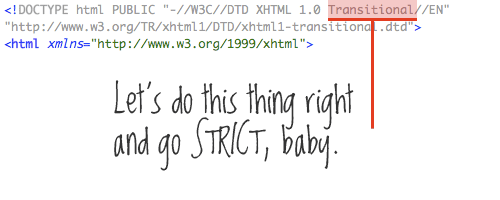
Our code doesn’t use any tables for layout anyway (nice!), so there really is no need for a transitional DOCTYPE.
Resources:
- W3C: Recommended DTDs to use in your Web document
- Fix Your Site With the Right DOCTYPE!
- No more Transitional DOCTYPEs, please
2. Character set & encoding characters
In our <head> section, the very first thing should be the declaration of our character set. We’re using UTF-8 here, which is swell, but it’s listed after our <title>. Let’s go ahead and move it up so that the browser knows what character set it’s dealing with before it starts reading any content at all.
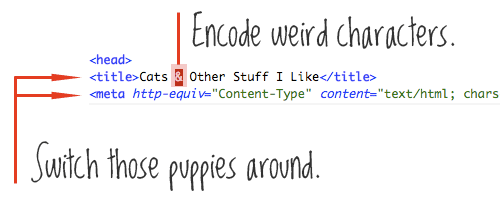
While we’re talking about characters, let’s go ahead and make sure any funny characters we are using are properly encoded. We have an ampersand in our title. To avoid any possible misinterpretation of that, we’ll convert it to & instead.
Resources:
3. Proper indentation
All right, we are about three lines in and I’m already annoyed by the lack of indentation. Indentation has no bearing on how the page is rendered, but it has a huge effect on the readability of the code. Standard procedure is to indent one tab (or a few spaces) when you are starting a new element that is a child element of the tag above it. Then move back in a tab when you are closing that element.
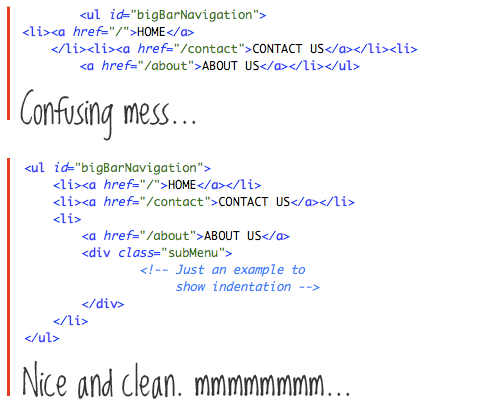
Indentation rules are far from set in stone; feel free to invent your own system. But I recommend being consistent with whatever you choose. Nicely indented markup goes a long way in beautifying your code and making it easy to read and jump around in.
Resources:
4. Keep your CSS and JavaScript external
We have some CSS that has snuck into our <head> section. This is a grievous foul because not only does it muddy our markup but it can only apply to this single HTML page. Keeping your CSS files separate means that future pages can link to them and use the same code, so changing the design on multiple pages becomes easy.
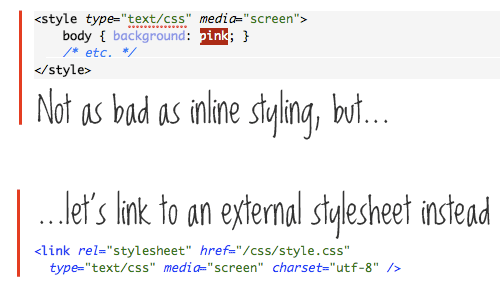
This may have happened as a “quick fix” at some point, which is understandable and happens to all of us, but let’s get that moved to a more appropriate place in an external file. There is no JavaScript in our head section, but the same goes for that.
5. Nest your tags properly
The title of our site, “My Cat Site,” is properly inside <h1> tags, which makes perfect sense. And as per the norm, the title is a link to the home page. However, the anchor link, <a>, wraps the header tags. Easy mistake. Most browsers will handle it fine, but technically it’s a no-no. An anchor link is an “inline” element, and header tags are “block” elements. Blocks shouldn’t go inside inline elements. It’s like crossing the streams in Ghostbusters. It’s just not a good idea.

6. Eliminate unnecessary divs
I don’t know who first coined it, but I love the term “divitis,” which refers to the overuse of divs in HTML markup. Sometime during the learning stages of Web design, people learn how to wrap elements in a div so that they can target them with CSS and apply styling. This leads to a proliferation of the div element and to their being used far too liberally in unnecessary places.
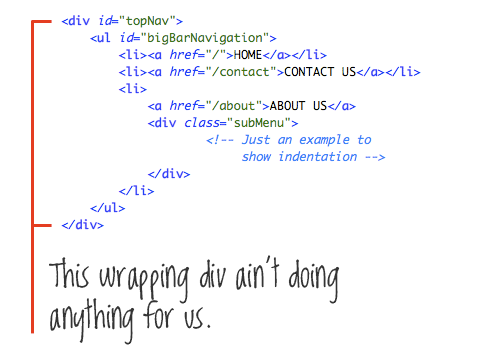
In our example, we have a div (”topNav”) that wraps an unordered list (”bigBarNavigation”). Both divs and unordered lists are block-level elements. There really is no need whatsoever for the <ul> to be wrapped in a div; anything you can do with that div you can do with the <ul>.
Resources:
7. Use better naming conventions
This is a good time to bring up naming conventions, as we have just talked about that unordered list with an id of “bigBarNavigation.” The “Navigation” part makes sense, because it’s describing the content that the list contains, but “big” and “Bar” describe the design not the content. It might make sense right now because the menu is a big bar, but if you change the design of the website (and, say, change the website navigation to a vertical style), that id name will be confusing and irrelevant.
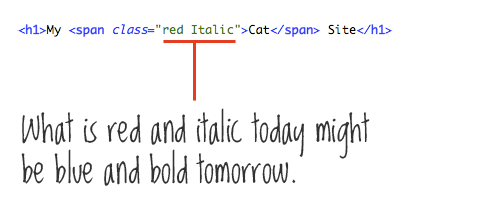
Good class and id names are things like “mainNav,” “subNav,” “sidebar,” “footer,” “metaData,” things that describe the content they contain. Bad class and id names are things that describe the design, like “bigBoldHeader,” “leftSidebar,” and “roundedBox.”
8. Leave typography to the CSS
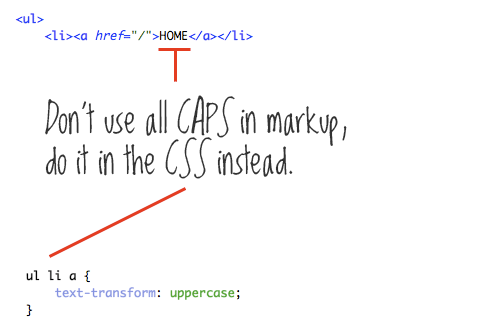
The design of our menu calls for all-caps text. We just dig how that looks, and more power to us. We have achieved this by putting the text in all-caps, which of course works; but for better, future extensibility, we should abstract typographic choices like this one to the CSS. We can easily target this text and turn it to all-caps with {text-transform: uppercase}. This means that down the road, if that all-caps look loses its charm, we can make one little change in the CSS to change it to regular lowercase text.
9. Class/id the <body>
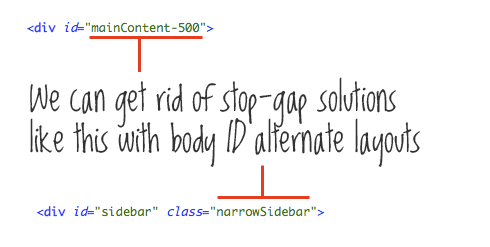
By “class the body,” I literally mean apply a class to the body, like <body class=”blogLayout”>. Why? I can see two things going on in this code that lead me to believe that this page has a layout that is different than other pages on the website. One, the main content div is id’d “mainContent-500.” Seems like someone had a “mainContent” div at one point and then needed to alter its size later on and, to do so, created a brand new id. I’m guessing it was to make it larger, because further in the code we see <class=”narrowSidebar”> applied to the sidebar, and we can infer that that was added to slim down the sidebar from its normal size.
This isn’t a very good long-term solution for alternate layouts. Instead, we should apply a class name to the body as suggested above. That will allow us to target both the “mainContent” and “sidebar” divs uniquely without the need for fancy new names or class additions.
Having unique class and id names for the body is very powerful and has many more uses than just for alternate layouts. Because every bit of page content lies in the “body” tag, you can uniquely target anything on any page with that hook; particularly useful for things like navigation and indicating current navigation, since you’ll know exactly what page you are on with that unique body class.
Resources:
10. Validate
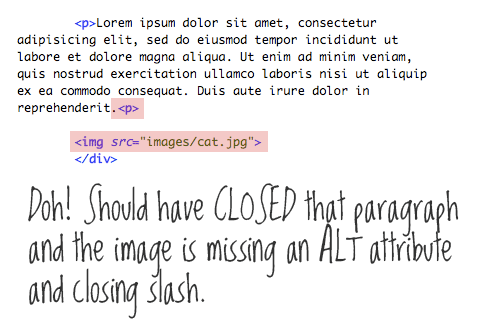
Kind of goes without saying, but you should run your code through the ol’ validator machine to pick up small mistakes. Sometimes the mistakes will have no bearing on how the page renders, but some mistakes certainly will. Validated code is certain to outlive non-validated code.
If for no other reason, seeing that green text on the W3C validator tool just makes you feel good inside.
Resources:
- The W3C Markup Validation Service
- XHTML-CSS Validator
- Free Site Validator (checks entire site, not just one page)
11. Logical ordering
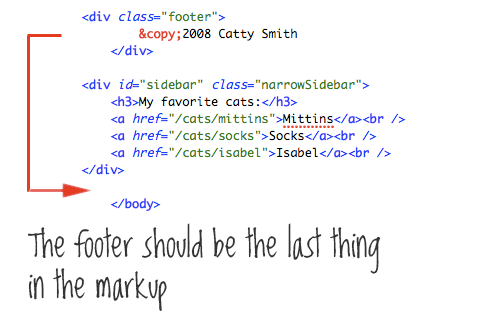
If it is at all possible, keeping the sections of your website in a logical order is best. Notice how the footer section lies above the sidebar in our code. This may be because it works best for the design of the website to keep that information just after the main content and out of the sidebar. Understandable, but if there is any way to get that footer markup down to be the last thing on the page and then use some kind of layout or positioning technique to visually put it where you need it, that is better.
12. Just do what you can
We’ve covered a lot here, and this is a great start to writing cleaner HTML, but there is so much more. When starting from scratch, all of this seems much easier. When trying to fix existing code, it feels a lot more difficult. You can get bogged down in a CMS that is forcing bad markup on you. Or, there could be just so many pages on your website that it’s hard to think of even where to begin. That’s OK! The important thing is that you learn how to write good HTML and that you stick with it.
The next time you write HTML, be it a small chunk in a huge website, or the beginning of a fresh new project, just do what you can to make it right.

(al)

I create websites and help others create better websites through writing and speaking. I consider myself a lucky man for getting to work in such a fun and rewarding field.
- 223 Comments
- 1
- 2November 12th, 2008 3:17 pm
Great post!
What font did you use for the comments :-)
- 3November 12th, 2008 3:18 pm
Just curious, what font are you using for the comments in your images?
- 4November 12th, 2008 3:18 pm
For some reason I dont really trust html tidy used it for the first time this weekend though. The whole automated thing sorta freaks me out.
And #2 that’s new to me thanks a lot.
Awesome article
- 5November 12th, 2008 3:18 pm
“Our code doesn’t use any tables for layout anyway (nice!)”
Nice…but…tables do allow us to center blocks on the screen very easily. - 6November 12th, 2008 3:21 pm
So does
div{margin:0 auto;} - 7November 12th, 2008 3:26 pm
Cool… easy and well explained.
- 8November 12th, 2008 3:26 pm
Regarding the font, you’ll love this, it’s a freebie!
http://www.dafont.com/loved-by-the-king.font
Thanks for having me, Smashing Magazine =)
- 9November 12th, 2008 3:26 pm
really nice and usefull tips. thank you interweb! :)
- 10November 12th, 2008 3:27 pm
I’ve given up on the Strict DOCTYPE. I used to be its biggest advocate, but it has become less and less viable to me. The reason: user-generated content. We’re well into Web 2.0 now, whatever that means. It’s the era of interaction. I can control my code and validate it and make it semantically perfect… but the minute a user types an ampersand into a comment box, the whole thing explodes. Not to mention mismatched, unclosed, or deprecated HTML tags.
I suppose if I got paid more I could bother to parse everything and convert characters to entities and figure out what to do with user-supplied HTML. That’s too big of a job to be feasible for me — I can’t anticipate every possible thing a user might type. With the Strict DOCTYPE, all it takes is one syntax error and the entire page fails most ungracefully. I can’t afford to let that happen on a modern dynamic site. Better to go with a Transitional DOCTYPE and let quirks mode deal with irregularities. Practicality wins out.
- 11November 12th, 2008 3:29 pm
great for beginners
- 12November 12th, 2008 3:34 pm
Great tips, Chris.
- 13November 12th, 2008 3:39 pm
Something really worth reading and extremely useful..as always Smashing Mag!
I love you guys.
- 14November 12th, 2008 3:41 pm
Good post!
oh, and the link “W3 MARKUP” in the footer is ugly dead.. - 15November 12th, 2008 3:48 pm
Close, but no cigar.
It is a right step in the right direction, but… (there is always a but)…
1) Since there should be only one<h1>in a page it does not need an id and if you need to style the<h1>in a different way in different pages you can use the body id to identify the<h1>withbody#blogLayout h1{color:#f00}.
2) in most designs the<div id="topNav">is needless and the<ul>under it can be the hook for the CSS, on the other hand, if you do need the<div id="topNav">then you probably do not need the id in<ul id="bigBarNavigation">
3) the name “topNav”, “bigBarNavigation”, “sidebar” and “footer” are problematic. The id of an element should describe its content not its position (top, side, foot) or style (big). Navigation is a good name, you can add mainNavigation, secondaryNavigation and copy as ids, now if you will change (with CSS) the position and/or style of the element the id will still describe its content. - 16November 12th, 2008 3:51 pm
Good Things! :D haha :)
- 17November 12th, 2008 3:52 pm
Much thanks to Chris Coyier, the handwritten font is Loved by the King (a great $5 font by Kimberly Geswein).
- 18November 12th, 2008 3:59 pm
Chris, great post. Really like the way you lay out the info, and explain in an easy to understand manner. Great stuff, nice work.
- 19November 12th, 2008 4:03 pm
Good article for Strict basic template building. Thanx
- 20November 12th, 2008 4:12 pm
With the Strict DOCTYPE, all it takes is one syntax error and the entire page fails most ungracefully.
Only if you’re using an XHTML strict doctype and serving your page up as proper XHTML (mime type = application/xml+xhtml) with its more draconian error handling. And if you’re doing that then you’d need to be using content negotiation for IE anyway. XHTML served as text/html won’t fail badly and neither will HTML 4.0 pages. The pages might not validate, but they won’t fall apart. Sounds like you’re making things more difficult for yourself than they need to be.
Since there should be only one <h1> in a page it does not need an id
Not necessarily. You might use a h1 for the title of your site on the site’s home page but on internal pages use the h1 as the page title with the site’s title then being wrapped in a different tag. Rather than have two style rules for each different element, if you give the site title an ID, you only need to write the rule once. It also means that on internal pages that if you use a <p> or <div> for the site title that it won’t get confused with other similar elements in the header.
- 21November 12th, 2008 4:17 pm
So you guys do not draw tabular datas into tables?
Gosh… - 22November 12th, 2008 4:58 pm
Great post Chris, thanks.
- 23November 12th, 2008 5:01 pm
I love clean code and whenever I develop anything I always make sure the code is readable and well commented. I find that it helps to have clean code to easily fix problems that may occur when the code is rendered.
Great list of helpful tips there but don’t forget people that both javascript and css also need to be nice and clean too.
- 24November 12th, 2008 5:24 pm
Great article. Thanks.
- 25November 12th, 2008 6:05 pm
Great list, but I also disagree (somewhat) in regards to the naming conventions. “Sidebar” and “footer” have become so popular that we tend to forget that they are actually describing the style, or at least the layout more than they describe the content.
Consider what content is going to go into those sections and name them accordingly. Try “secondary-content” or “supporting-information” or “calls-to-action” for “sidebar”, and “company-information” or “legal” for the footer.
I’d also go so far as to say that “container”, another very popular class/id name, is also layout specific and should probably be replaced with the name of your website – div id=”www.mysite.com”.
- 26November 12th, 2008 6:06 pm
@Parker
You should be sanitizing user input anyway so if a wayward & slips by you that is your fault. An ampersand is mos’ def’ a quite common replacement for and.
- 27November 12th, 2008 6:10 pm
Nice article Chris! I once was guilty of all these! But i’m improving thanks to you and other bloggers around the web!
@parker
If you use php you can simply use the htmlspecialchars() function, which cleans all the special chars LOL - 28November 12th, 2008 6:33 pm
Chris excellent article. You covered all the major points.
- 29November 12th, 2008 6:50 pm
Excellent. Thank you. I make many of these mistakes – (past tense}.
- 30November 12th, 2008 7:16 pm
Very weak. Strict still validates when using tables for layout. The difference is that in Strict you cannot declare css values as attributes
example:
I'm a div tag
- 31November 12th, 2008 7:17 pm
This was an excellent post. Well written, and very informative.
- 32November 12th, 2008 7:18 pm
Wow, nice blog – it doesn’t even encode my (x)html – let’s try this again:
example:
<div align="center">I'm a div tag</div>
- 33November 12th, 2008 7:37 pm
I actually disagree with a lot of the content. You know why people use tables to layout content? Because it’s intuitive, simple and self contained. While there’s a lot of merit in code isolation (particularly for re-use and robustness), there is little reason for many people to use CSS to layout their page.
Another reason for code going directly into files is Dreamweaver and you know what – it works and people don’t care, in fact, why should they?
I agree with points 3 and 11 on formatting code, but as another newsflash – people were doing this before blogs were around to tell them about it. In fact in my first year studying Computer Science at uni, I got marks for code style – formatting, indenting, comments. I’m also a fan of verbose variable names – take a look at Apple’s extensive design guidelines for more examples of that.
- 34November 12th, 2008 7:45 pm
The
{text-transform: uppercase;}property works great for English text, but fails to transform foreign characters (such as ö -> Ö, å -> Å) for other languages. - 35November 12th, 2008 8:00 pm
POO!
- 36November 12th, 2008 8:09 pm
I disagree with #7, there is nothing wrong with the class “Red” if it is defined as { color: red; }. In that instance, it is the most descriptive it can be, and if you change your design, you wouldn’t change it to be defined differently, you would apply “Blue” as a class instead.
As an ID name, I agree with you that Navigation or footer should be specific to what they are, but a class name is something that can be applied to many elements, and should define the class. What is the common denominator of every element of the class? Well, in that instance, every instance of the “Red” class will be red, so why is that a worse name than describing the content?
- 37November 12th, 2008 8:12 pm
@Lee… What is so intuitive about tons of spacer.gif graphics (you normally see ton of those when site is designed with tables)? Learn how to layout pages with CSS, and leave tables for tabular data. Just MHO.
- 38November 12th, 2008 8:23 pm
I was advocating “STRICT” XHTML until I hit the biggest snag – file upload in AJAX enabled websites – still requires an IFRAME which isn’t allowed in XHTML strict…. unfortunately the workaround – OBJECT – doesn’t offer the same functionality as IFRAME… in this one instance.!
- 39November 12th, 2008 8:52 pm
Nice article, good refresher for somebody who is coming back from a mini-vacation ;)
I’ve seen more and more of these bad practices put into place. Especially ones like #6 & #7. Although, to add onto #7 I would prefer to name it based off the type of color it is – primary, highlight, shadows, etc in addition to what it is (subNav)
Validating your markup is a bit, well, overrated. When some browsers *cough* IE *cough* still don’t display the page correctly, even when everything is valid – what’s the point of going the extra mile? Now, I do think that web pages need to be properly coded – like properly closing tags & attributes.
P.S. – Did you ever look at SM’s css? “#leftcolumn”, “#footer .foologo” foo? Seriously?
- 40November 12th, 2008 9:00 pm
I’ve been doing these ever since i began, and i get all of my friends who are starting to codelike this aswell, it just looks soo much better.
And i agree, that little green text does give a nice warm feeling :)
- 41November 12th, 2008 9:19 pm
Nice post! This will guide me even further in making web designs in the future!
Thanks!
- 42November 12th, 2008 9:22 pm
Completely disagree with 4, I’m getting very tired of sites loading without styles or JavaScript whenever there’s a glitch with the connection! The correct approach would be to keep the important code in the header (from a server side include) and use an external file for all the extras.
- 43November 12th, 2008 10:07 pm
Well explained.. cleared concepts of writing new html code… 10 out of 10 marks…
- 44November 12th, 2008 10:09 pm
Nice post! Thanks.
- 45November 12th, 2008 10:19 pm
It’s nice…….but very difficult to apply STRICT markup……when we are working on CMS’s…………end user doesn’t think about this..
Well it’s nice post!
Thanks!
- 46November 12th, 2008 10:38 pm
I agree upon Strict but Transitional may be needed when e.g. using iframes (like Google map). It shall fade into the past when object finally renders properly in most browsers, but not today.. not today.
And I believe 10. consists 5. (any validation points badly nested tags, right? – of course the rules should be applied while coding – it measures our skill and saves time – but if validation is mentioned I guess it serves a higher purpose than just pointing badly ended tags).
- 47November 12th, 2008 10:57 pm
HEALTH ADVISORY: “Non-acute Divitis can also be an advantage in the long term”
Allow me to present a relatively weak but sound argument for the benefits of issue 6: Indeed, “Divitis” can result in a proliferation of div tags, and a lengthier HTML code. However, one long term benefit of the disease is the fact that the wrapping div can act as a great facilitator when using javascript frameworks (mootools, jquery, prototype).
Having named divs wrapping interface elements (even if the div does not server any CSS purpose) can sometimes be a good thing. It will allow the developer to easily implement future JS framework goodness (slides, arbitrary selections, animation etc) without the need to re-edit the code or worry whether the ul element has defined dimensions, is absolutely or relatively positioned, IE’s hasLayout is applied etc, etc.
Indeed, in the example presented, there’s no need to keep div id=”topNav” since if we need to refer to the li or a tags of the nested ul we can simply use $(’bigBarNavigation’). However, if in the future we wanted to play around with the idea of a sliding or revealing menu, and if we assumed that topNav is a styled menu with display:inline or float:left li elements, it would be easier to apply the animation to the topNav div instead of the bigBarNavigation ul (despite the fact that it’s a block level element).
Just my 2 cents…
- 48November 12th, 2008 11:15 pm
Great article! Back to basics.
- 49November 12th, 2008 11:33 pm
Basic but nice post.
Thanks! - 50November 12th, 2008 11:37 pm
Thanks man, great article. Saved in my bookmarks…
- 51November 13th, 2008 12:12 am
Jeah, pretty cool!
All newbies will love this ;)
I will show this article some of my trainies! - 52November 13th, 2008 12:26 am
About ‘11. Logical ordering’
what you mean by ‘logical order’, visual one? I meam:
1- Header
2- Content
3- Columm
4- Footer
this is the order while displaying the web but for SEO purposes (place the main content up as possible in markup) the logical order can be:
1- Content
2- Columm
3- Footer
4- Header
Yes, it can confuse a bit while working it but remember that uploading a web to server and make it alive is not the last step, is just the begining of the adventure and search engines are going to crawl your site so better serve it the best way or your work will be for nothing in most of the cases. - 53November 13th, 2008 12:33 am
@Parker control the user output so that it validates to a STRICT doctype. Don’t just fall back to a TRANSITIONAL doctype. That’s just plain lazy.
@Mukesh What CMS? If you’re using one that won’t produce valid code or a STRICT doctype get rid immediately. Again that’s just being lazy.
@David
I disagree with #7, there is nothing wrong with the class “Red” if it is defined as { color: red; }. In that instance, it is the most descriptive it can be, and if you change your design, you wouldn’t change it to be defined differently, you would apply “Blue” as a class instead.
That’s just daft – now you’ve got to go back through your 2 million page website and remove class=”red”. If you gave it a more descriptive name , then you’d only have to change the colour in the CSS. Or don’t give it a class at all!
The whole point of using CSS and X/HTML is to reduce the markup in your X/HTML – so utilise as many of the built in features as possible. See example:
div
ul
li one
li two
li a three
Would you give the anchor a class of red? Why? Wouldn’t this be better? You could style it like this?
div ul a {
color: red;
}
You’ve then only got to change the CSS, utilising the power of CSS and X/HTML.
- 54November 13th, 2008 12:37 am
Good vibes here
- 55November 13th, 2008 12:41 am
A very usefull article, thanks!
- 56November 13th, 2008 12:55 am
Awesome post, really nice to read with some interesting points in it…
- 57November 13th, 2008 12:57 am
@Lee #30: Let go the 90’s – It’s 2008 now!
Nice article though!
- 58November 13th, 2008 1:05 am
Great post, it totally aproves that I work the right way :)
- 59November 13th, 2008 1:17 am
As a 5 year CSS bod myself I have to say that this must be the best Smashing article on CSS for beginners I have read to date.
Good job old chap!
- 60November 13th, 2008 1:17 am
Stating the obvious?!
It’s funny to watch the same stuff over and over again.
Seriously most of these practices have vanished the last years.
There’re always going to be some guys using tables, coz they are convinced that’s the way to go. You’re not going to convince those ppl by labeling tables as “bad practices” without proper reasoning. And there are indeed as many positive as negative points for both sides.
The only reason why people should adjust to CSS is because while tables have reached their potential, CSS is still getting improved.@David – Can you imagine having a large-scale website and editing every single class attribute when there’s about a thousand of them…well you might, but you gotta agree it’d be easier to just edit some properties in the CSS file. And there’s no proper reasoning why you wouldn’t use a classname with meaning. If everything important for example is red…use important as a class name…why wouldn’ t you?
Hopefully CSS3 or something else is coming out soon, otherwise we’ll keep reading these “good practices”-fillers as long as there is nothing new to write about on the Web.
- 61November 13th, 2008 1:30 am
Hahaha
“It’s like crossing the streams in Ghostbusters. It’s just not a good idea.”
Quality analogy.
Most of the points are just common sense but #8 is a new concept to me, I’ve never thought of using the CSS to change the case of text before, thanks for the informative post. - 62November 13th, 2008 1:52 am
div in li? you gotta be kidding.
- 63November 13th, 2008 2:05 am
Awesome post! #5 was an eye opener!
- 64November 13th, 2008 2:10 am
Moderate divitis is not to be feared – it is entirely compatible with the whole point of CSS, separating content and presentation, and should be welcomed. If you’re changing layout somewhere down the line, you may well need another containing div in order to add additional layout behaviour, not to mention avoiding buggy browser behaviour. If you have to go back and add these extra divs to your XHTML, that’s a failure in the very principle you’re advocating the use of CSS for. You need look no further than the Zen Garden to see this demonstrated perfectly – they even make a note to that effect in their guidelines for contributors.
- 65November 13th, 2008 2:15 am
Excellent article.
- 66November 13th, 2008 2:18 am
Lets not forget that properly formatted, streamlined code is also more compact in file size and nicer to the world!
Excellent article. Well written and presented. It’s about time we had articles of this quality on smashing magazine. Don’t get me wrong, posts about “The 50 most beautiful this and that” are all well and good for inspiration but articles on good practise are also a great tool to have. Keep up the good work and I hope it helps make the HTML world a cleaner, more logcal place to work in.
- 67November 13th, 2008 2:20 am
Nice post for beginners. Another good principle is to use lists (both ordered and unordered) when possible instead of divs. E.g.: a menu can be done with an ul element as it is a list of links, same goes for a category list, a post list, etc. The list of cats (#12) should have been done in that way too.
- Francesco
- 68
- 69November 13th, 2008 3:15 am
Great post! I can check 9 out of 10 most of the time, but it did remind my of one small point I’ve been forgetting and that’s to use text-transform: uppercase;
- 70November 13th, 2008 3:20 am
What font are you using for the handwritten comments?
Nice post! - 71November 13th, 2008 3:40 am
A useful and well written article. Thanks!
You also included some great resource links and made me laugh a few times, too! (”It’s like crossing the streams in Ghostbusters. It’s just not a good idea.” Heh!)
- 72November 13th, 2008 3:58 am
Fantastic post
- 73November 13th, 2008 4:07 am
it is a great list…!
let’s do it strict baby ;) - 74November 13th, 2008 4:41 am
simple stuffs but very useful!
- 75November 13th, 2008 4:48 am
awww, so cute. Im one of those Geeks who went from XHTML and CSS to DHTML to Pythong (Django) and its always such a pleasure to get to know people who dig standards as I always tried to. Feel umarmed and together our creative geeky but powerful network will rise.
sorry Im feeling kind of emotional,
Bruno
- 76November 13th, 2008 5:03 am
The #8 rule must be applied to the #3 example (uppercase text). ;-)
Great article. Thanks - 77November 13th, 2008 5:13 am
very informative article.
- 78November 13th, 2008 5:48 am
I don’t really agree with the body id thing. Or maybe I am thinking of this the wrong way. Can’t you just write
body #div1 {
}body #div2 {
}
???
Other than that I completely agree with the other topics. Good work!
- 79November 13th, 2008 5:55 am
Very nice article, Chris!
I’m really glad about your first rule because I see more and more Transitional Doctypes but I don’t know why it’s used, no reason for doing that. Transitional is a Doctype for the transition between old and new Markup, it’s been developed to be mostly compatible but it’s not for new websites.
On my own website I’ve written an article about the same issue and now I’m very pleased to see it on a very huge blog. May it help to make the Web better! ;-)
Thanks! - 80November 13th, 2008 5:59 am
nice article
i wish you make another one on DOCTYPEs - 81November 13th, 2008 6:01 am
I agree that if something looks clean and slick, most of the time it is slick.
However, I’ve heard enough of people trying to tell me that something is just “bad practice” only because it’s engraved in the holy grail of web design. That sounds quite religious..If something works for the majority of users , it’s good practice.
- 82November 13th, 2008 6:08 am
Nice article …
I would suggest to optimize your images (smush.it) – for people who don’t it’s the best tool for optimizing your images
And also measure your site with YSlow, see how fast it is, what you did wrong and what you did good and how to improve itAll these … thanks to yahoo and Stoyan S.
- 83November 13th, 2008 6:19 am
Great Article Chris! I will start using strict from now on in my client’s websites…
- 84November 13th, 2008 6:43 am
I just wrote an article on standards yesterday, because of a discussion on how tables are easier for layout than css on Reddit.
To those of you who are still using table based layouts… you’re one of the following:
1. Lazy
2. Unprofessional
3. A backend programmer who is set in their old ways.
4. A designer who doesn’t care to learn.
5. An amateur front-end coder.Any front-end guy worth their salt hasn’t touched a table based layout in years.
- 85November 13th, 2008 6:45 am
Thanks Smashi! :-)
- 86November 13th, 2008 6:56 am
On point 11, it might be interesting to put the menu at the bottom of the code and the put it on the top of the page with CSS. This will be good for your referencing. But maybe not for people who use text-readers browsers… Have fun !
- 87November 13th, 2008 7:05 am
What I really liked about this article was the comments. It’s nice to hear other peoples opinions. Sometimes there really is two ways of doing the same thing. Thanks!
- 88November 13th, 2008 7:10 am
I haven’t finished reading this article yet, but props for the handwritten script. It really makes this more interesting to read/look at visually. Thank you for not making this boring, otherwise I would have skipped right over it!
- 89November 13th, 2008 7:15 am
Nice post, grats!
- 90November 13th, 2008 7:20 am
@20
Not necessarily. You might use a h1 for the title of your site on the site’s home page but on internal pages use the h1 as the page title with the site’s title then being wrapped in a different tag. Rather than have two style rules for each different element, if you give the site title an ID, you only need to write the rule once. It also means that on internal pages that if you use a p or div for the site title that it won’t get confused with other similar elements in the header.
One of the authors key points was to define a class for body, so you can distinguish the content styling for h1 ones using the body class. This way you still only have one h1 per page.
body.main h1
body.home h1 - 91November 13th, 2008 7:20 am
Real Quick on the DOCTYPE thingy – Transitional is not always a bad choice – you have to consider sites that might need to embed code (i.e. YouTube videos, etc.) from a third-party site that may not be Strict compliant and will break validation tests in Strict. Another example might be a site that depends on an underlying CMS.
Also, many of the popular Javascript libraries (i.e. MooTools, JQuery, et al) are intended to work with XHTML – so there is a good reason at times to pick that over just plain old HTML.
- 92November 13th, 2008 7:32 am
Ironically enough, there are 14 errors when you validate this page….violation of number 10.
- 93November 13th, 2008 7:32 am
Great post. I practice most of these regularly, but every once in a while I find my code getting sloppy. It’s always good to go back and reinforce good habits.
Beginning HTML/CSS coders take heed!
- 94November 13th, 2008 7:41 am
Thanks for yet another great article.
- 95November 13th, 2008 7:45 am
How come Smashing Magazine doesn’t practice what they preach? On this very page where you promote clean code, you are breaking many of the rules you outline above.
1. Doc Type is XHTML 1.0 Transitional
2. Outputs 16 Validation Errors
3. Majority of Code not Indented
4. Lots of inline JavaScript - 96November 13th, 2008 7:47 am
nice post! unlike before where we just manually type everything, right now with the influx of tools that automatically generates html/css, i see this to be a challenge. it would be good practice to follow this esp when you’re in a consulting company and you’ll eventually transition your codes to another person, following a standard, and having a clean code (plus proper docos) is always a good practice!
- 97November 13th, 2008 7:50 am
Michael: CSS currently does not allow for vertical alignment for block level elements except for TD’s. So if you want something centered vertically on your page your only option is to use a table – or if you are centering a single-line inline element, you can fake it by setting line-height.
- 98November 13th, 2008 7:53 am
Good post !!
- 99November 13th, 2008 7:59 am
Ironic how this article’s own page is transitional and not strict!
- 100November 13th, 2008 8:02 am
I can really see how most of your tips are useful. I agree with most of them. However I don’t think it’s good to say that you can not, of should not use unlinked JavaScript / CSS. There is a reason when you should use CSS / JavaScript internal:
View source of yahoo.com, all CSS and JavaScript (well, most) is included in the index file. I have heard Nate Koechley speak on why yahoo did such a thing, it all had to do with loading time of the page. Every CSS/JavaScript file is an other server request. And if you are having a lot of traffic on your site (which yahoo, of course, does) than it pais not to link to it but render it into the HTML file.
So, there you have it, someone elses point ;-) For me it’s not a good idea to have internal CSS/JavaScript, just because I don’t have a high traffic site. But, if you do, it’s worth a shot!
- 101November 13th, 2008 8:16 am
Very nice article…
- Josso
- 102November 13th, 2008 8:32 am
*YAWN* Can we please stop calling CSS and HTML “code”. HTML = HyperText Markup Language – It’s a MARK UP LANGUAGE!!!!!!!!! There’s is no logic to CSS and HTML layouts, Puuuleeeezzzeeee – C is code, Perl is code, PHP is code, XCode is code, Java is code, Javascript is code — hey u guys really want to build a web page using Code – use Javascript – all this self patting in the back for what any 6th grader taking a computer science class can do using DreamWeaver is ridiculous. Those who create their pages using VI, VIM, PICO, Notepad or any text editor are a step up above you clowns but still by no means are they “coders”. WHen you guys start buiding insane web applications that combine CSS, HTML, Javascript, PHP, back end chron scripts, integrating C code into your PHP build, MySQL, FLEX, Actionscript cohesively – then, then maybe you can start discussin the merits of “clean code” as it it applies to web development not just simply laying out a pretty web page in photoshop, slicing the images, and then using CSS and HTML to lay them out—- thats not coding— not code — code it is not.
- 103November 13th, 2008 8:35 am
The {text-transform: uppercase;} property works great for English text, but fails to transform foreign characters (such as ö -> Ö, å -> Å) for other languages.
@Matt.
I use {text-transform: uppercase;} often, and most webbrowsers do this pretty good: In Firefox it’s not only transforming the umlauts but even ß to SS.
@ E to hte G
I think it’s cron not chron, isn’t it? - 104November 13th, 2008 8:42 am
Unless you’re working on a small website, validation is not compulsory, otherwise you’re gonna end crazy trying to correct all errors.
I’d say, if you keep only one rule from the twelves, it is #5
Remember that you want your website to work well in IE, Firefox and Safari. So I’d advice to test your page on multiple browser long before taking care of details like encoding characters
And having well nesting tags (rule #5) helps a lot when it comes to make your page multi-browser compliant. - 105November 13th, 2008 8:48 am
mainContent-500 is not a semantic class name – it’s as bad as “red italic”, used as an example by you earlier.
- 106November 13th, 2008 8:50 am
@E to the G
Actually I wouldn’t call Javascript “code” either. It’s a scripting language. Script, not code. But a lot of the same “good practices” applies to both script and code. And even mark-up.
And if you think there’s no logic to HTML then you’re doing somethng wrong… HTML should be semantic
- 107November 13th, 2008 8:51 am
Jeremy: tables aren’t the only option for vertically centering elements – a combination of nesting absolute and relative positioned elements, and a top: 50%; works, although admittedly it is harder to explain how to pull it off than valign=”center”.
- 108November 13th, 2008 8:52 am
@John Faulds
Using one
H1tag is a generally accepted SEO practice. It optimizes your search results and clarifies what the actual page title is. - 109November 13th, 2008 9:07 am
Linda OMG are you seriously saying semantic HTML is somehow tied into logic – Logic for me means trying to figure out the precise, correct method for handling use case scenaraios as they pertain to an application. It’s about writing re-usable code that passes unit testing. It’s figuring out the flow of the processes and figuring out all the multiple instances in which that processes might break and fixing that – logic does not meant using “cite” in place of “i” for emphasizing the title of a book in HTML. That’s just good sense, that’s just following W3C standards. Oh and calling Javascript a “scripting” language is correct, but what I meant to say is that you can PROGRAM in javascript which makes it code. Can you program in HTML?
- 110November 13th, 2008 9:08 am
I find that the most common reason for a ‘divitus’ wrapper on unordered / ordered lists is because each browser has it’s own formatting (margins, padding, etc) on lists. I wouldn’t trust the <ul> tag on it’s own in my layout. What’s more, the ‘div’ tag should be used to divide a section from the rest of the layout / content, and if you’re making a navigation section, that’s usually put in a ‘div’ as it’s more likely than not containing more elements than just an unordered list.
- 111November 13th, 2008 9:11 am
great post. I agree with all the point that you made. I would also like to insert a new point on avoiding CSS hacks for specific browsers/versions. If you need hacks, odds are your doing something un-needed.
- 112November 13th, 2008 9:32 am
Hi Chris,
Thank you so much for sharing these points. I’m a beginner in web development/design. Pretty useful.
Thanks again.
- 113November 13th, 2008 9:50 am
retard stuff for beginners. thanks for wasting my time
- 114November 13th, 2008 10:02 am
excellent post. thanks a lot for sharing!
- 115November 13th, 2008 10:13 am
…about #2
I read somewhere that using the title tag first gives a small bump with search engines and since reloading a few lines is not that big a deal, you should go with title first.
Anyone know if this is true?
- 116November 13th, 2008 10:15 am
“great for beginners”
Why are there so many douchebags who feel the need to make it clear that they are *so* much more advanced than this mundane post. Grow up, children!
- 117November 13th, 2008 10:18 am
Validating your markup is a bit, well, overrated. When some browsers *cough* IE *cough* still don’t display the page correctly, even when everything is valid – what’s the point of going the extra mile? Now, I do think that web pages need to be properly coded – like properly closing tags & attributes.
It’s not overrated if you just take it is. Validating your code isn’t there to help you achieve cross browser compatibility, it’s there to help you clean up your code. It’s entirely possible to create a new .html page with 100% valid code an have it display horribly (and differently) in different browsers.
- 118November 13th, 2008 10:19 am
Let’s examine the site this is stated on:
1. Doc type: XHTML 1.0 Transitional
3. Uh, check the indention of this site…
4. Lots and lots of inline styling
5. Didn’t want to check for badly properly tags
9. Hrmp… the id of the body element is ‘css’… good choice of name and what is this that is just after ?
10. 16 Errors, not too bad, but still. One should practice what one preaches?
- 119November 13th, 2008 10:24 am
Good stuff, I think #1 is a bit misleading though… probably at least 95% of sites that use XHTML strict actually aren’t serving it up to specification… so in an attempt to adapt the latest standards and follow everything to the letter, it turns out to be fairly counterproductive… HTML strict could work though, but I opt for XHTML transitional (even though I write strict code), for the simple reason that some browsers (namely IE) won’t even render the page if the XHTML specifications are strictly followed.
- 120November 13th, 2008 10:26 am
Fantastic article. Very helpful. Cheers.
- 121November 13th, 2008 10:33 am
This is a fantastic post and really helps a lot.
Unfortunately it serves equally to inflate the massive ego of those who are no longer beginners and therefore do not need the information which they once did, like others do now. They really should grow up. Regardless of their skills, they are just proving themselves to be a total waste of space.
- 122November 13th, 2008 10:37 am
What a beautiful and easy way to present your point! I totally loved reading through this and had to say it even though usually I am a full on lurker.
- 123November 13th, 2008 10:44 am
Nice article, I found it very usefull for some friends that are in charge of doing the markup in a project of ours.
Anyway, I don’t agree with giving the body an id/class, when you have a site that uses the same (or almost) header and footer, it’s a really good practice to keep those files separate in a folder, like includes, so you can include them in the pages that uses them, so the body tag and sometimes even the navigation (and maybe some other stuff) is left in the header file.
Despite that, I think is a good article for beginners.
- 124November 13th, 2008 11:03 am
Nice article, although I have a few points regarding tables:
Tables are allowed in Strict XHTML, they’re not disallowed in any instance to do with code validation. They are however frowned upon when used for layout, as they can present an accessibility issue. Non-tabular content displayed in tables for a screen reader means it could get read out in a very different order than it appears on the page. Having multiple table columns with large amounts of content in each could mean it doesn’t display correctly on Mobile Devices, or can’t fit on an A4 piece of paper when printed. There’s many reasons why table tags should not abuse, even though it can make construction of HTML templates much easier.
- 125November 13th, 2008 11:45 am
find ./ -name *.html -exec sed -i 's/class=\"red\"/color=\"blue\"/g' {} \;Will replace all occurences of
class="red"withclass="blue"Learn how to use the fundamental tools and your life will be a lot easier. I do agree that
class="red"is a bad idea BTW. - 126November 13th, 2008 12:05 pm
These are great hints to writing code well.
They will keep my code clean for sure. - 127November 13th, 2008 12:20 pm
Hi. Nice post, but I have to disagree on some points.
Rule 1 seems unrealistic to me. When you work for a client, you have to accept some constraints. What will you do if he wants some links to open in a new window ? Beat him with your laptop because it’s a bad pratice ? Use JavaScript to open a new window (eeeeek) ?
Sometimes, transitional doctype is just the right choice. And there’s nothing wrong about that. Keep your HTML clean, use CSS styles and document everything correctly. Who cares if your doctype isn’t strict, really ?
Rules 2 & 5 aren’t needed if you apply #10 ;)
- 128November 13th, 2008 12:42 pm
This article was just what I was looking for! Very Helpful! :]
- 129November 13th, 2008 12:51 pm
Your advertisement columns are ridiculous. On a normal width browser window they take up half of the screen! It blocks out your nice article on how to design webpages…
- 130November 13th, 2008 1:18 pm
You seem to have confused markup language with code.
html != code
- 131November 13th, 2008 1:35 pm
Seems like someone is really eager to get their article listed on digg. This article has all the symptoms…
- 132November 13th, 2008 1:41 pm
Thank you for taking the time to create this article. While some of the experienced persons replying think this was a waste of their time…others of us find it encouraging that there are references out there to help the infants of the group find their legs, and learn to walk properly without dragging a limb behind them. It also helps us all to review the basics on occasion, to ensure we aren’t straying from the path.
While I don’t agree with all of your points, as someone who has been working with web markup/scripting/coding/et al. since BLINK was a pup, the theme that one should always follow a set of standards cannot be drummed upon enough. Far too often, I find myself cringing when I open the pages created by my predecessor, because it is inconsistent, poorly formatted, has no thought process applied to layout and for a myriad of other reasons. If you are unable to apply basic rules to your coding style in the most basic pages, then once server side languages such as PHP are interjected, your code will degrade even faster.
- 133November 13th, 2008 2:20 pm
You forgot the golden rule:
If you are smart, use tables instead of CSS for layouts…then you can get back to making shit instead of dealing with shotty implementations. - 134November 13th, 2008 2:29 pm
I’ll have to disagree with “11. Logical ordering”.
See, when Search Engines scan your page for content, they look at your code from top to bottom. This is why you want the parts of your code containing your most keywords to be at the top.
True, it seems more logical to have your #footer at the bottom, but sometimes for SEO purpose it is better to have it right after your and then using CSS, place it at the bottom of your page.
Then again, like the last point says, do what you can!
- 135November 13th, 2008 2:35 pm
1) No “format for print” option = epic fail.
2) Fully half your blog content area devoted to something other than actual content = weak.
Good article though. - 136November 13th, 2008 3:08 pm
Yes this article is basic for most Computer Programmers who deal with C, Perl, JavaScript, PHP, ASP, and other back end total scripting and coding languages. For those who do not use those languages, who do not have the need for databases or hard core programming languages, these are meant to be useful for general mark up.
No it does not apply to the hard core coders and programmers. It is not meant to be. If you know all that stuff more power to you. No, actually, not more power, just good for you for being able to knowing those languages.
But going to a post that is supposed to help people, then completely bashing it because it is not a hardcore programming article is not called for. These may be basic principles, but that is all they are meant to be. Some people may agree or disagree with some of this stuff. So be it. If you take something good away from it than it served its purpose. If not then go on doing what you do. Don’t go on here, bash people and fight over it. That is just stupid and childish. - 137November 13th, 2008 3:10 pm
RE: “Moderate divitis is not to be feared”
You need look no further than the Zen Garden to see this demonstrated perfectly – they even make a note to that effect in their guidelines for contributors.
Even Dave Shea says that they would do things differently now. When they created the Zen Garden, the CSS landscape looked different, and they didn’t have the tools/techniques that we take for granted now.
RE: Styles/Javascript in the header
An additional reason to keep the javascript/css external is that it can then be cached, saving additional load times for internal pages.And if everyone hot linked to Google for their jQuery, everyone would have the same item in their cache, speeding up the intarwebs for everyone.
- 138November 13th, 2008 4:04 pm
oh great another newbie tutorial on what not to do. How about some actual useful items?
- 139November 13th, 2008 4:20 pm
@ DavidWell, in that instance, every instance of the “Red” class will be red, so why is that a worse name than describing the content?
Your HTML should be semantic, meaning you want to describe your classes in a way that explains why it’s red. Is it red because it’s an alert?
class='alert'. Or is it red because it’s an extra important link?class='important'.My question relates to the order of your content. Semantically should you put the navigation before or after the content. The content is what the reader is on the page for and for those browsing on mobile devices it makes it much easier.
- 140November 13th, 2008 4:46 pm
A lot sites on the net use rendered output which may be messy, but who cares, your there to use the site not inspect the code behind.
Setting DOCTYPE to strict is silly.
The best rule to follow is, if it displays and works properly in all major browsers then your done. Following a strict standard does nothing for you.
- 141November 13th, 2008 5:16 pm
lol Jonny Haynes, you said everything I wanted to say.
It’s amazing how most people’s excuses are “It’s too hard”
It’s even more amazing how people are actually arguing that using tables to design a layout is the smarter way to go. Lol Mainly because they are lazy.
Amazing, simply amazing. Read a book people.
- 142November 13th, 2008 5:22 pm
People follow people.
A few people say don’t use tables, then some more people follow eventually opinions change. You silly sheep!
- 143November 13th, 2008 5:59 pm
标题很好很强大,内容很黄很暴力
- 144November 13th, 2008 7:08 pm
Enough with validation
Validation is bullshit in a finished site.
While I strongly advocate validation when building the site (that missing closing brace just might be wiping out your css), I believe that a site that’s gone live should always have perfect validation. Validations are guidelines, not laws.
I’m sick of people who must validate. It constrains people and limits freedom. Say you want to use CSS3 attributes for an added effect or just to get a browser to behave. Why throw it away for something as silly as validation?
Strict adherence to rules -> no change
With no change there’s no innovationLook at the empirics. Almost no successful site validates, especially if you validate them based on Strict validation.
And I laugh at people who tell others not to use tables. Think of the new web designers. You tell them tables are a sin and they will never use tables again. When they want to make a calendar they will make it a mess full of divs. When they want to show tabular data the html will be barely comprehensible. I design using CSS layouts by choice because tables are too rigid. CSS is flexible. I can throw elements all over the browser window using CSS. But you know what’s a bitch? Equal height columns. Table layouts made many things easy. CSS just brings more benefits.
- 145November 13th, 2008 7:41 pm
sdsdsdsdsd
- 146November 13th, 2008 7:58 pm
this entire post is common sense.
the title of this article should have been, “how to code front-end markup for n00bz 101″.
i applaud the effort, but this list of 12 could’ve been a lot shorter. - 147November 13th, 2008 9:48 pm
I’m confused on point 6. Eliminate unnecessary divs.
Isn’t the top div a hold for the Navigation bar?
I checked Chris website, he is doing the same as what he’s written here in the sample.
Did I miss out anything?
Can anyone remind me on this?
Thanks - 148November 13th, 2008 11:29 pm
Nice pointers! But why is this website still using a transitional doc type?
- 149November 14th, 2008 4:02 am
Excellent article! Thank you
- 150November 14th, 2008 4:06 am
can u tell me “!important” in css
how it will use
- 151November 14th, 2008 4:08 am
@E to the G: why shall we stop calling HTML code? Well, it’s not a programming language but it’s still code. Code is just a rule for converting information into another kind of information and it has nothing to do with logic. So HTML, XML, CSS, JSON, LaTEX, RTF and ODF are code. ASCII, UTF-8, ISO-8859-1 etc.are code as well. Everything is code. ;-)
- 152November 14th, 2008 6:38 am
Using tables for layout is like drinking tea from a bedpan – you won’t spill any but yer fellow designer will think your taking the p*ss. Think of what screen readers will make of it all!
- 153November 14th, 2008 7:48 am
Nice set of tips here, I strongly agree about the importance of getting the basics right.
- 154November 14th, 2008 7:52 am
useful sharing thanks for it
- 155November 14th, 2008 10:11 am
Working in an enterprise that deals with many websites and millions of pages I can attest to the value of these best practices.
Semantic id’s and classes are good because they help new developers understand the use of particular elements better than “bold_left_red” imparts that knowledge. It also allows for flexibility as designs change over time and different audiences shape the look and feel of a site.
Tables are bad because you have to take extra steps to ensure accessibility devices understand the structure. It’s more difficult to use tables to layout a search engine friendly site (content first, navigation second). It takes extra markup in the form of table nesting, spacer images, and non-breaking spaces to get everything to appear correctly. Tables set you into a rigid path which may exclude your side being usable to mobile devices.
If you are using a template language and breaking up your layout into component templates those templates may end up being invalid depending on where you are trying to slice and dice your design. I see this most often with JSP where one JSP starts a table and another JSP ends it.
Using tables for a quick gain up front will cost you more later down the line when you need to redesign a site, cobrand, or internationalize.
I’ve never seen tables as an intuitive way to layout a page and I fail to see the logic of that mindset unless you are using a WYSIWYG tool as your primary way of developing pages. If that is the case then it’s unlikely that you would care about any of the above tips because you aren’t a person who cares about the markup.
Regexp and automated find and replace methods are hit or miss and can’t cover the complexity of a modern enterprise website. Changing “red” class to “blue” might work as a very simple case but there’s also a possibility that you break something because the tool isn’t specific enough or someone is using “red” on a different bit of content than you expect them to. Plus the time it takes to get the code right, test it, and run the conversion you might as well have just spent that time on doing things the right way.
A problem with the idea of automating thousands of changes across a site is risk. With each code change you introduce the risk of defect. By separating concerns and keeping layout in one set of files and structure in another you limit the number of files that need to change and reduce risk. At the same time you reduce QA hours, reduce auditing requirements, reduce version control file space consumed, reduce the number of files synchronized to the server, reduce bandwidth consumed, etc.,.
Having styles and behavior in separate files is good, specifically in the case that something goes wrong. If you’ve done your job right and the look and feel doesn’t make it to the user because of a failure or because of a choice made by the user, then all of your content should still be there easy to read and ready to use, using the default markup styles provided by HTML. The problem is that most people don’t ensure that their content is solid before adding style and behavior.
- 156November 14th, 2008 11:40 am
Most of the things are the ones I do normally except I narrowColumn to squeeze the width in and keep the main id for the logical stuff is very neat allows for some sweet jQuery transformations to your page.
Thanks for the article.
- 157
- 158November 14th, 2008 5:14 pm
Great Article, Chris!
As a side point, I believe I personally coined the term “attributitis” or “attribute-itis” on my own blog. Read Cleaner Code by Avoiding Attributitis.
- 159November 14th, 2008 8:28 pm
Very Very Interesting!!!!!!!!!!!
- 160November 14th, 2008 9:11 pm
Really Nice.
- 161November 14th, 2008 9:40 pm
very useful
- 162November 14th, 2008 11:32 pm
very nice..
i do them all..
that means my HTML is perfect..
but i dont class/id the body.. - 163November 15th, 2008 1:02 am
Very useful Chris! Basic concepts which a web developer should know about.
Also,
16.The ‘charset=iso-8859-1‘ parameter is used so that the special characters in text are not transformed.
Characters like “less than sign, single/double quotes, etc.” these get printed as ‘?‘.
To avoid this change the parameter in meta tag – charset=utf-8 to charset=iso-8859-1.Cris correct me if i’m wrong :)
- 164November 15th, 2008 1:11 am
8. Leave typography to the CSS
This is for English or uppercase supported languages. Turkish and many other languages are not supported by uppercase.
- 165November 15th, 2008 3:48 am
Great post!…… really nice and useful tips……… thank you…..
- 166November 15th, 2008 5:27 am
the doctype of this page is transitional!
- 167November 15th, 2008 6:30 am
Great post… it’s cool. Thank you.
- 168November 15th, 2008 6:44 am
It’s beautiful that I will realize the principles when coding.
Merci Beaucoup. - 169November 15th, 2008 9:35 am
Really Nice.
- 170November 16th, 2008 5:31 am
Very good post dear
- 171November 16th, 2008 7:15 am
Great Post. Thanks!
- 172November 16th, 2008 1:07 pm
thanks, a really good post here!
- 173November 16th, 2008 9:03 pm
Nice tips.. #8 is seems to be the thing i always forgot.. heheh thanks
- 174November 16th, 2008 11:04 pm
OK, all this is good, and I practice what you preach actually. But can someone tell me how to validate in STRICT doctype when using
Jump out of this sitexHTML Strict doesn’t allow the “target” element. - 175November 16th, 2008 11:06 pm
< a href="www.mysite.com" target="_blank">link</a<is what i wanted to type. - 176November 17th, 2008 1:38 am
excellent article
- 177November 17th, 2008 6:40 am
Ever tried doing target=”_blank” (etc.) in a strict document type?
- 178November 17th, 2008 10:41 am
Why should I commet my html when I have Firebug. Even correct indentation is somehow absolete. Firebug does that for you so I just need to make sure the html is not to messy.
- 179November 17th, 2008 11:48 am
nice article, but geared towards beginners…
- 180November 17th, 2008 10:11 pm
Wouldn’t it actually be better to use all caps in the markup versus text-transform CSS property? Sounds like unnecessary processing to me.
- 181November 18th, 2008 3:49 am
The “target” element is not allowed for simple reasons.
Some explorers like ie6 don’t use tabs. A “_blank” link open a new window and it’s really messy.
It’s really messy too for the people who navigate with speech synthesis. The linear navigation is really important for this users.
To open a link in a new window you might use java script like that :link
Java script may be disable for users who don’t use it.
In this way you keep a valid document in xhtml 1.0 strict.cheers from france
- 182November 18th, 2008 3:52 am
<a href="page.htm" onclick="window.open(this.href); return false;">is what I wanted to type for the simple javascript alternative…Great exemples in french here : http://www.openweb.eu.org/articles/popup/
- 183November 19th, 2008 1:35 am
@E to the G
Xcode isn’t a language.
- 184November 19th, 2008 4:12 am
What a rubbish article, it didnt tell me anything about dinosaurs, thanks for wasting my time.
- 185November 19th, 2008 11:27 am
#7 Made me realize a few things. I’ve always wondered what good naming conventions are, what to focus on when creating classnames, and it just made sense when I read your points.
Thanks for making my day.
- 186November 19th, 2008 12:08 pm
Very good instructions.
We used and programming web3box.com using this instructions as well.Now web3box.com look good on firefox, ie and chrome.
Thanks man!
- 187November 21st, 2008 4:40 am
I had a lump in my throat when I started reading this, but I realized afterwards that my HTML coding methods aren’t as shabby as I thought. Thank you Smashing Magazine for making me feel better.
- 188November 23rd, 2008 5:36 am
Good tips.
Nice post!
Cheers! - 189November 25th, 2008 11:17 pm
Great post. I love smashingmagzine and thinkflick both have great and original posts
- 190November 26th, 2008 4:23 am
It’s beautiful that I will realize the principles when coding.
Kudaravalli’s from HYD (INDIA)
- 191December 1st, 2008 1:42 am
HI.
wonderful article. May I translate it into Chinese version? - 192December 2nd, 2008 4:57 am
You don’t really need to indent your code anymore, except for your own use. If you want anyone to read your code, let them use Firebug anyway.
In my case, for example, PHP produces my HTML, so I indent the HTML according to what’ll make the PHP look pretty, even if the HTML’s indentation comes out ugly. Nobody looks at it anyway.
- 193December 2nd, 2008 5:03 am
and what body id gives you is the ability to write css for a specific page without making a whole new CSS file for it.
for example, if you need a wider events page:
#wrapper { width: 70%; }
#events #wrapper { width: 80%; }where the code for each page is
<!– dtd, , .. –>
<body id=”">this is more readable than separating the CSS file.
In multilingual sites I also give the body a class with the language. e.g.:
.hebrew #navigation { margin-right: 2em; }
.english #navigation { margin-left: 2em; }
for code <body id=”" class=”">. - 194December 2nd, 2008 5:04 am
oh shoot the code came out wrong. but you understand what i meant, i hope..
if not, write me at xnahbdnd at ailag dot net for further discussion. - 195December 2nd, 2008 7:09 pm
awesome post!
- 196December 4th, 2008 7:51 am
wow! I think ‘E to the G’ need to to take a chill pill or something, he is getting so worked up!
Relax and get a life dude!
keep up the good blogs Chris, dont listen to these coding nazis like ‘E to the G’, I think he has a little to much free time on his hands. He strikes me as somebody who likes the sound of their own voice a little too much.
- 197December 5th, 2008 11:10 am
very informative article.
- 198December 5th, 2008 2:25 pm
Great article, thank you! :)
- 199December 17th, 2008 11:08 pm
Excellent one….. everybody should read this
- 200December 19th, 2008 8:46 am
Great read Chris,
Thanks for another useful article
Aaron I - 201December 20th, 2008 12:50 pm
Great tips..!
Thank you
- 202December 23rd, 2008 6:29 am
great post, thanks :)
- 203December 25th, 2008 3:47 am
Great post!
Thanx…
- 204December 27th, 2008 2:26 pm
The XML prolog in the ‘good’ HTML triggers browsers (even modern ones) into quirks mode. Not what you want. Since the defaults are used (utf-8, stand alone) it can be omitted without problems.
- 205December 30th, 2008 1:39 am
A nice post
- 206January 4th, 2009 11:10 pm
good things haha
- 207January 7th, 2009 1:12 pm
Decent enough article to state guidelines for common practice. Nothing too intense here, just a “hey, make sure you cross your t’s and dot your i’s”
- 208January 12th, 2009 7:45 pm
Nice list, except I must disagree with point #8. if you use css to change the capitalization, then you go to select/cut/paste the text in the web page, the pasted text will be exactly as it is in the HTML, not as instructed by the css rule(s). This is a deception.
- 209January 14th, 2009 9:19 pm
It’s interesting to see the persnickety assumption from many of the posters here that someone who primarily programs automatically grasps the ins and outs of semantic xhtml and css. I’ve worked with dozens of so-called “hardcore” programmers…many who have been coding website back-end functionality for years…not a one knew/knows all of the basic rules outlined in this article. They couldn’t care less about the front-end, as long as it works. Try to teach a .net developer to ditch the design view and see how far you get.
Also – I’ve been trying to hire two new people for months. I’ve conducted dozens of interviews, and each person claims to have at least a decade of experience in web development. The first four questions I ask everyone:
–
1. Which xhtml tags would you use to wrap these elements, which will be children of the body tag? (on a whiteboard I write ‘About Our Company’, and then on a subsequent line ‘Paragraph text’)
2. What is the purpose of the DOCTYPE definition?
3. You are handed an approved creative comp from one of our designers. When you open the PSD, you notice that they decided to include meaningful header text for each page as part of a stylized banner image. How will you construct this element without changing the design?
4. What is n-tier (or three-tier) architecture?
–
Not a single person has answered any of these questions correctly.
- 210January 16th, 2009 3:28 am
Hi Chris Coyier,
Very good post, pretty helpful… - 211January 18th, 2009 8:48 pm
Those seem like pretty reasonable principles that I don’t break to often. Thanks for the list.
- 212February 6th, 2009 2:16 am
If anything…this has confirmed that clean coding is essential, and not difficult!
Thanks! - 213March 3rd, 2009 8:22 pm
So Good!
- 214March 24th, 2009 4:17 am
it’s really helpful to us……
- 215
- 216March 30th, 2009 11:47 pm
hehe,I just viewed an article named “7pinciples”,both are good,need to study them.
- 217
- 218April 24th, 2009 4:46 am
yes its really helpfull for coding
- 219April 27th, 2009 7:25 am
Really helpful principles, any more?
- 220June 21st, 2009 10:00 am
Hi there, If you don’t like topics with many links, just delete this topic.
Thankyou. - 221July 2nd, 2009 3:23 am
Nice tips
- 222July 22nd, 2009 11:18 pm
i will do all what i can do !
i love web design ! - 223November 16th, 2009 6:10 pm
I’m no expert at this hense why i’m here but the first thing I noticed when viewing the source code on this page is it’s using Transitional as opposed to Strict???
- 00
There are no trackbacks at this time. If you are interested in leaving a trackback, please use this URL.
Leave a Comment
Make sure you enter the * required information where indicated. Please also rate the article as it will help us decide future content and posts. Comments are moderated – and rel="nofollow" is in use. Please no link dropping, no keywords or domains as names; do not spam, and do not advertise!
Interact
Popular
- 100 Wordpress Themes
- Photoshop Tutorials
- Fantastic Wallpapers
- 40+ Excellent Freefonts
- Dual-Screen Wallpapers
- Wordpress Themes for 2009
- Illustrator Tutorials
- Incredible Free Icon Sets
- High-Quality Free Fonts
- 30 Scripts For Galleries
- Photoshop Text Effects
- Useful Icon Sets
- Web Design Trends
- iPhone Wallpapers
- Before Launching a Website
- CSS Layouts And Templates
- Photoshop Actions
- Stunning Pictures and Photos
- Fantastic HDR Pictures
- Logo Design Tutorials
- Free Design Templates
- 10 Mistakes In Logo Design
- Photoshop Custom Shapes
- 40 Creative Design Layouts
- 8 Layout Solutions
- 53 CSS Techniques
- Photography Techniques
- Black & White Photography
- Styling Design Elements
- CSS-Based Forms
- 50 jQuery Techniques
- 50 Portfolio Websites
- 50 CSS Techniques
- Creative Logo Designs
- Desktop Wallpapers
- 25 Open Source Mac Apps
- 50 Free Icon Sets
- Apple ad bombing Windows 7 on Google - http://bit.ly/28ctPq
- Atatonic - a fresh CSS framework - http://bit.ly/4oOV2w (via @umutm)
- @HrvojeKC yes, that's an interesting idea. Maybe when the waiting is over, we'll write a detailed post about it.
- @benbeltran thanks, Ben, your support means a lot to us.
- @dandenney thanks for the nice words, Dan - really appreciate it.
- @TheKheiron well, it's not entirely our fault. But we will certainly learn a lot from this horrible experience.


13. Apply the concept of DRY to your websites — use includes for repeating code like navigation, footer, headers, etc.
14. Comment your closing div tags for when you come back to it in the future
**Most times when people don’t use logical ordering it is because they want the most important information at the top of the page for SEO reasons.