Smashing Magazine ~ we smash you with the information that will make your life easier. really.
Smashing Magazine we smash you with the information that will make your life easier. really.

Swirls Vector Illustrations Set

By Smashing Editorial, November 12th, 2008 in Freebies | 71 Comments | Forum

Advertisement

Today we are glad to release Swirls Illustrations Set, a sets of 10 high-quality vector illustrations, created with Adobe Illustrator and available as .eps source files. These illustrations were created by Designious.com and released exclusively for Smashing Magazine and its readers.

Download the set for free!

You can use the set for all of your projects for free and without any restrictions. You can freely use it for both your private and commercial projects, including software, online services, templates and themes. The set may not be resold, sublicensed, rented, transferred or otherwise made available for use. Please link to this article if you would like to spread the word.
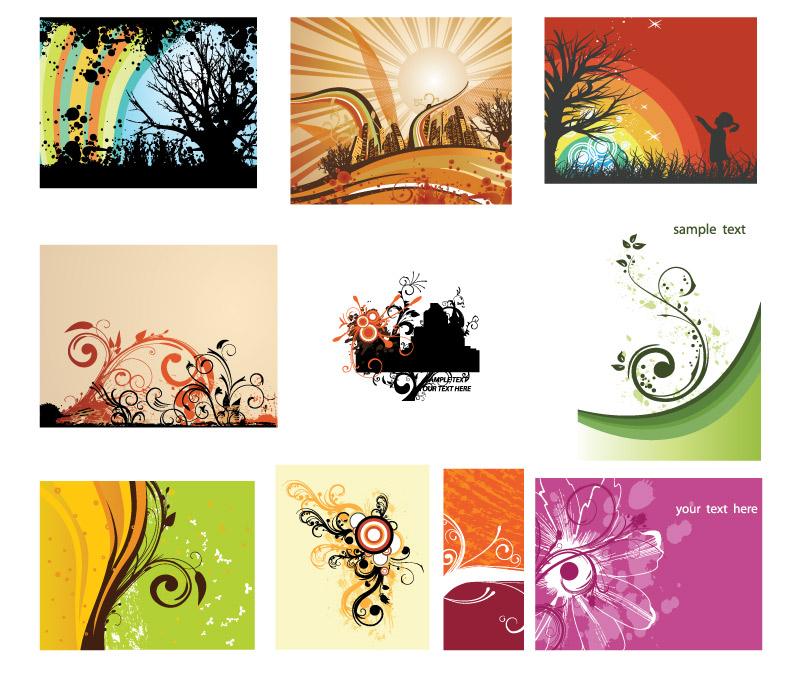
Swirls Adobe Illustrator Set

Swirls Adobe Illustrator Set

Last But Not Least

We are constantly looking for creative designers and artists. You may not know it yet, but we may feature you in one of our upcoming posts.

If you would like to release a free high-quality font, a Wordpress theme, Photoshop brushes, a Drupal theme, some wallpapers or an icon set, please contact us. We would like to support you (both financially and with the broad readership of Smashing Magazine).

Delicious button Stumbleupon Spread the word on Twitter!

Advertisement
  1. 1.

    hristo (November 12th, 2008, 4:35 am)

    The download link is not working :(

  2. 2.

    Ken (November 12th, 2008, 4:39 am)

    Same. link not working

  3. 3.

    Shuuun (November 12th, 2008, 4:39 am)

    is this the girl from Bioshock? =D

  4. 4.

    Vitaly Friedman & Sven Lennartz (November 12th, 2008, 4:48 am)

    Sorry for inconvenience, the link should be working now.

  5. 5.

    Paul (November 12th, 2008, 4:48 am)

    HQ stuff… Just what I need right now :-)

  6. 6.

    Kichigai-san (November 12th, 2008, 4:51 am)

    It’s working now, but i have 403 Forbidden error…

  7. 7.

    Vitaly Friedman & Sven Lennartz (November 12th, 2008, 4:52 am)

    @Kichigai-san (#6): please try to download the file directly, without download-managers.

  8. 8.

    Paul (November 12th, 2008, 4:59 am)

    It works for me now

  9. 9.

    rajaraman (November 12th, 2008, 5:14 am)

    its fine, good work

  10. 10.

    Dottie (November 12th, 2008, 5:19 am)

    looks great, tnx!

  11. 11.

    Taowie (November 12th, 2008, 5:36 am)

    Oh man, this is something I have been looking for a while. I will be sure to put these to good use! Thanks.

  12. 12.

    ptamaro (November 12th, 2008, 5:37 am)

    Cool, thanks as always. Designious is awesome for spreading the vector love…

  13. 13.

    Andris (November 12th, 2008, 5:48 am)

    Nice one. Thanx a lot for sharing.

  14. 14.

    Laura (November 12th, 2008, 6:20 am)

    They are lovely - it’s a shame they’re only compatible with CS3 :(

  15. 15.

    angeloff (November 12th, 2008, 6:23 am)

    amazing. tnx for sharing this cool vector set.

  16. 16.

    Tom (November 12th, 2008, 6:25 am)

    how is it possible to use and work with these files without having adobe tools?
    not all are in the luck of having such great tools…

  17. 17.

    Dietmar (November 12th, 2008, 6:59 am)

    Thanks for that helpful freebie!

  18. 18.

    CT (November 12th, 2008, 7:24 am)

    Thanks, I’m new to CS3-where would one usually unzip these files to in Illustrator?

  19. 19.

    Ihsanrama (November 12th, 2008, 9:47 am)

    The Link work for me, dude …
    Thanks Very Nice.

  20. 20.

    Jeffster93 (November 12th, 2008, 9:52 am)

    These are beautiful! Thanks!

    CT: I used to put them all in the c:/Program Files/AdobeAdobe Illustrator CS3/Presets/Brushes folder, but then that got jammed full of things that aren’t always really brushes. Just this past week I took the time to look carefully at all the great stuff I have downloaded from this and other sites. It turns out that some really are brushes, some are vector artwork to cut and paste, some are symbol packs, and some are JPG or PNG. Adobe Bridge is really helpful for viewing all the different types of files, especially those that the operating system doesn’t display as a thumbnail.

    Once I had the files all sorted out, I put the ones that really are brush packs into the Brushes folder, and the symbol packs into the Symbols folder. The cut-and-paste vector artworks I moved to a higher-level folder, side-by-side with my projects folder, instead of keeping them buried six layers deep below the Program Files directory. That saves a lot of time.

    I haven’t quite figured out what to do with the PNG and JPG files. Some of them are just thumbnails or sample usages of the brushes, but others (usually full backgrounds) are the finished product, which I have to convert somehow to a vector format.

    I have a PC, so if you have a Mac, I don’t know where stuff is supposed to reside, but I hope you find my comments helpful.

  21. 21.

    Roxanne (November 12th, 2008, 11:05 am)

    Thanks these are great!

    @ Tom: I would download a free version of Adobe Photoshop or Illustrator until you can actually acquire the full program. That way you can use them and possibly save them as something other then the Adobe file format and then you’ll be able to use them anytime!

  22. 22.

    sporadic visitor (November 12th, 2008, 11:13 am)

    Smashing is going down to the alphabet city.
    Rubbish content lately no matter what anyone says.

  23. 23.

    Sylvia (November 12th, 2008, 11:49 am)

    these are what I have been waiting for….now I need some inspiration hwo to use them, but they are quite amazing :)

  24. 24.

    Alec (November 12th, 2008, 12:56 pm)

    Thanks for taking my input a couple of months ago! I hope to see more like these! Thank you very much!

  25. 25.

    Tom Ross - PSDFAN (November 12th, 2008, 1:25 pm)

    Bookmarked :)

  26. 26.

    Angie Bowen (November 12th, 2008, 2:27 pm)

    Amazing set, thank you so much!

  27. 27.

    xepik (November 12th, 2008, 4:56 pm)

    gorgeous brushes 8D
    thanks

  28. 28.

    JasonCC (November 12th, 2008, 5:45 pm)

    Great set, Thanks so much.
    I can use it to creat my rainforests-plant illustrations.

  29. 29.

    hadie saputra (November 12th, 2008, 6:31 pm)

    thx alot

  30. 30.

    Andrea (November 12th, 2008, 7:17 pm)

    they cancelled my post because i said that the link “W3 MARKUP” was not working.
    It’s fixed now, i thought they thank me, instead thay cancelled it.

  31. 31.

    Andrea (November 12th, 2008, 7:23 pm)

    disregard previous post (little cousin messed it up)

  32. 32.

    lise (November 12th, 2008, 8:44 pm)

    It looks great but ..is it possible to load those in CS2 or are they only CS3-compatible?
    Thanks -

  33. 33.

    srinivas (November 12th, 2008, 10:19 pm)

    awesome means i think this is .. thanks

  34. 34.

    Komil (November 12th, 2008, 10:31 pm)

    What software is best to draw ornament? I tryed in photoshop but I could not beacause to draw perfect symmetric shapes in photoshop is impossible IMHO. Thanks in advance

  35. 35.

    Pedro (November 12th, 2008, 10:46 pm)

    Me encanta esta página y todas las cosas que aporta.

  36. 36.

    Juavenita (November 12th, 2008, 11:44 pm)

    Awesome stuff just what i needed

  37. 37.

    Stef (November 13th, 2008, 12:43 am)

    Thanks, but have you think about CS2 or CS users ? the file is only for CS3 users !

  38. 38.

    Adel (November 13th, 2008, 3:40 am)

    Thanks for sharing, great and helpfull!

  39. 39.

    Morgan Grimshaw (November 13th, 2008, 8:23 am)

    Nice vectors! Thanks so much.

  40. 40.

    fatma demir (November 13th, 2008, 1:57 pm)

    teşekkürlerrrrrr…….

  41. 41.

    Jumping Dog Design (November 13th, 2008, 4:32 pm)

    Thanks for the contribution.

  42. 42.

    Vitaly Friedman & Sven Lennartz (November 15th, 2008, 7:34 am)

    The release package was updated. All illustrations are now saved in the EPS 8 forma,t so everyone can open them.

  43. 43.

    Alex (November 17th, 2008, 3:45 pm)

    Thanks for the artwork, it’s great!!!!!!!!!!!

  44. 44.

    Rajesh Dcruz (November 17th, 2008, 9:15 pm)

    These are really nice… thanks for these stuffs…..

  45. 45.

    Daniel Campos (November 25th, 2008, 9:25 am)

    Simply awesome!

  46. 46.

    web design company (November 26th, 2008, 9:21 am)

    Awesome Vector set..free for download.

  47. 47.

    Christopher Ross (thisismyurl.com) (November 28th, 2008, 6:14 am)

    As usual, you guys have blown me away. Thanks for offering this for free.

    In return, I’ve incorporated it into a basic WordPress theme for people to download for free. Link [www.thisismyurl.com].

  48. 48.

    Dx (November 29th, 2008, 12:33 am)

    I’ve tried using Gimp and Adobe Photoshop to open the .eps files but I can’t get the layers. I’d download a trial version of Illustrator, only it’s a huge download for my slow connection.

    Is there a way for GIMP and Photoshop to import the layers properly?

  49. 49.

    inggars (January 18th, 2009, 10:24 pm)

    THANKS….GOD BLESS U….SEMOGA ALLAH SWT TURUNKAH HIDAYAHNYA KEPADA SMASHING MAGAZINE CREW

  50. 50.

    Gregor (January 30th, 2009, 7:22 am)

    Hello, I tried to download using IE7 and Firefox but It only downloads about 300kb than stops. On opening swirls-vector-illustrations archive with winrar/winzip it tells me file the is corrupted :( :(

  51. 51.

    Teboho (February 5th, 2009, 11:54 pm)

    wow
    u guys just made my day this swirls are beautiful!
    just what i was looking for….
    thanx a mil

  52. 52.

    hahahahahah (March 16th, 2009, 12:11 pm)

    hehehehheehheshehjhjkjhjhk

  53. 53.

    KD (March 24th, 2009, 3:03 am)

    Nice Job…

  54. 54.

    Binod Jayadevan (March 29th, 2009, 9:37 pm)

    It’s wonderful and quite useful. Thanks.

  55. 55.

    Milky (April 3rd, 2009, 10:07 pm)

    Really good

  56. 56.

    feli (June 9th, 2009, 2:51 pm)

    not working for me! :(

  57. 57.

    feli (June 9th, 2009, 2:52 pm)

    wait nevermind! yay!

  58. 58.

    Jongheum (July 1st, 2009, 11:38 pm)

    wow,…. Thanks a lot

Leave a Reply

Allowed Tags: <a href="" title=""> <abbr title=""> <acronym title=""> <b> <blockquote cite=""> <cite> <code> <del datetime=""> <em> <i> <q cite=""> <strike> <strong>
Advertisement
 

All Posts

Follow us on Twitter!
Subscribe to our RSS-feed!

Advertisement

Fresh Bookmarks

25 Beautiful Logos with Sequential Concept
Sequential logos maybe is a new trend among logo designers.

Designing a blog with HTML5
Much of HTML 5’s feature set involves JavaScript APIs that make it easier to develop interactive web pages.

20+ CSS Data Visualization Techniques
Get inspired.

CSS3 – a big storm is coming
With CSS3 media queries and multi-column layouts it will be a whole new ballgame.

Woodgrain: A Free Social Media Icon Set
With 18 social networks represented alongside astandard RSS icon in PNG format,

Webdesign: Five Minute Upgrade
Making Your Design Pop.

45 Stylish Typographical Desktop Wallpapers
These beautifully designed wallpapers are not solely about typography.

The Light CMS Trend
A new trend in CMSs I’m calling “light” CMSs.

10 Impressive JavaScript Animation Frameworks
Create stunning and eye-grabbing animation and transition effects.

Linux System Monitoring Tools Every SysAdmin Should Know
Need to monitor Linux server performance?

  • 9Rules Logo
  • Quicksprout Logo

