Smashing Magazine - we smash you with the information that will make your life easier. really.

iPhone PSD Vector Kit

Advertisement

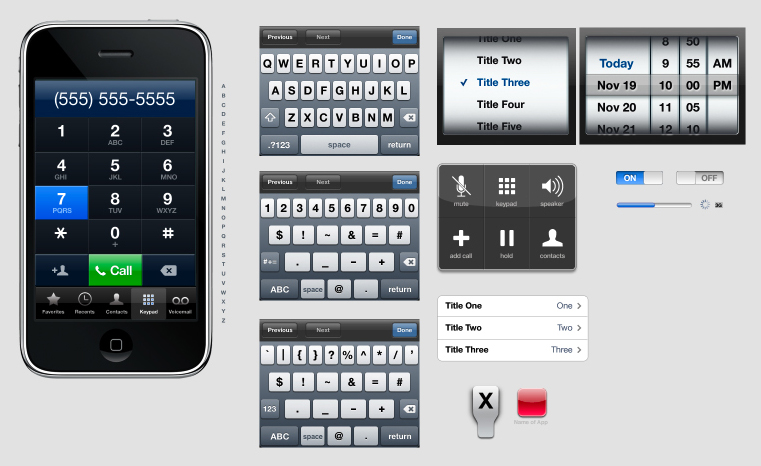
Today, we are glad to release the iPhone Starter Kit, a set that comes with several button elements as well as six different iPhone interface options. This pack may be useful for mobile developers and front-end designers who need a professional way to show mock-ups to clients or to work out ideas. This set was designed by Renee Rist especially for Smashing Magazine and its readers.
Release in iPhone PSD Vector Kit

Download the icon set for free!

You can use the set for all of your projects for free and without any restrictions. You can freely use it for both your private and commercial projects, including software, online services, templates and themes. The set may not be resold, sub-licensed, rented, transferred or otherwise made available for use. Please link to this article if you would like to spread the word.

Iphone in iPhone PSD Vector Kit

Behind the design

As always, here are some insights from the designer herself:

“This iPhone Vector Pack was created entirely in Photoshop. The elements in this set are a combination of vector and real screenshots. Last month, I was asked to create a mobile website mock-up using the iPhone as a medium. I needed to show several parts of the interface, none of which I had graphics for. I set out to create an iPhone “starter kit” for myself.

This iPhone Vector Pack comes with several button elements, as well as six different iPhone interface options (which you can turn on and off in Photoshop). I hope this freebie pack will be useful for mobile developers and front-end designers who need a professional way to show mock-ups to clients or to work out ideas.”

Thank you very much, Renee! We appreciate your efforts.

Last But Not Least

We are constantly looking for creative designers and artists. You may not know it yet, but we may feature you in one of our upcoming posts.

If you would like to release a free high-quality font, a WordPress theme, Photoshop brushes, a Drupal theme, some wallpapers or an icon set, please contact us. We would like to support you (both financially and with the broad readership of Smashing Magazine). (al)

The team here at Smashing Magazine. Mostly Sven & Vitaly.

Post Rating
1 Star2 Stars3 Stars4 Stars5 Stars (8 votes, average: 3.75 out of 5)
Loading ... Loading ...

Tags: , , ,

Advertising
  1. 1
    Steve
    November 26th, 2008 5:30 am

    Nice! Long live the iPhone

  2. 2
    Modisana
    November 26th, 2008 5:37 am

    very very nice

  3. 3
    Shuuun
    November 26th, 2008 5:43 am

    ty for nothing…
    nothing to learn anside the psd..

  4. 4
    fisker
    November 26th, 2008 6:18 am

    teehan+lax made a better imho
    :)

    http://www.teehanlax.com/blog/?p=447

    • 5
      twe4ked
      November 6th, 2009 12:58 am

      Albiet, more restricted.

  5. 6
    Rich
    November 26th, 2008 6:19 am

    This is really useful for native application mockups.

    I’d love to see one more geared towards WebApp development…

    Sadly my ‘Photoshop skills’ are more like ‘Photostop kills’!

  6. 7
    Geoff Teehan
    November 26th, 2008 6:44 am

    Nice job. We built one a few months back too and have been adding to it ever since. It’s all shape based (vector) as well.

  7. 8
    sixsix
    November 26th, 2008 6:59 am

    Great!

  8. 9
    Derek
    November 26th, 2008 7:17 am

    Very nice! However for something more robust (and updated based on feedback) see here: http://www.teehanlax.com/blog/?p=764

  9. 10
    Renee
    November 26th, 2008 7:30 am

    Thanks everyone!

  10. 11
    BitBot - Megowatt
    November 26th, 2008 7:36 am

    This is awesome! It looks absolutely gorgeous. Perfect to do professional mockups and designs. :)

  11. 12
    Neil
    November 26th, 2008 8:01 am

    Awesome.

    “Not for Blackberry RIM Use” should be part of the license agreement – http://www.engadget.com/2008/10/08/vodafones-blackberry-storm-art-department-all-soon-to-be-fired/

  12. 13
    The Dude
    November 26th, 2008 8:50 am

    Nice!

  13. 14
    Altair Pereira
    November 26th, 2008 9:42 am

    Nice.

    But this is better
    http://www.teehanlax.com/blog/?p=447

  14. 15
    Eric Aragon
    November 26th, 2008 1:09 pm

    http://www.teehanlax.com is the better one, i used it on a speech how ipods are antisocial. haha

  15. 16
    r0b3rt0
    November 26th, 2008 2:47 pm

    Thanks it can prove to be usefull! when I learn photoshop ;-)

  16. 17
    Max Weir
    November 26th, 2008 4:26 pm

    Thanks for this, this is one of the best resource downloads in a very long time! Great work people.

  17. 18
    Ben Rowe
    November 26th, 2008 4:54 pm

    Great resources (both the set in the article and in the comments)

    Best link all week. Thanks Guys!

  18. 19
    softcps.com
    November 26th, 2008 8:01 pm

    thank you~~~~

  19. 20
    Wazdesign
    November 26th, 2008 8:57 pm

    Thanks a Lot

  20. 21
    Dimitris Bor
    November 27th, 2008 12:21 am

    nice design

  21. 22
    Daemon
    November 27th, 2008 1:02 am

    Hm, but most of the elements inside are just flattened. The entire keyboard is flattened layer, there are no layer styles to define buttons and all that.

    Actually, only very little portion of UI is recreated by you using layer styles, most of it is just screengrabbed from iPhone and pasted in Photoshop.

    Very misleading.

  22. 23
    Chaminose
    November 27th, 2008 5:09 am

    é o baguio é bom memo!

  23. 24
    Renee
    November 27th, 2008 9:39 am

    @Daemon – Why would you need to alter the keyboard? All the items you’d need to alter for a presentation/mock-up are editable (buttons, pressed keyboard button, application, text, pop-up area, etc). If someone wanted to alter the keyboard, that is not iPhone standard, and it would be misleading to the client (or end-user).

    I flattened standard layers to save on file size. No one should need to alter iPhone standards anyhow, and if they do — that’s out of the scope of what this was designed for. :)

    I’m sorry you didn’t enjoy it.

  24. 25
    Etienne
    November 27th, 2008 10:21 am

    Thank you SOOOO much for sharing!!!! It was super useful for my projet!

  25. 26
    Daemon
    November 28th, 2008 12:58 am

    @Renee, nah man, it was a great start to push me into searching full PSD of iPhone UI. Why would i need full PSD UI? Well, for creating iPhone ready websites and applications. Simple.

  26. 27
    Cosmi
    November 28th, 2008 5:16 am

    Very nice! Thank you Renee Rist & SM

  27. 28
    Babypixel
    November 28th, 2008 7:13 am

    Gorgeus!

  28. 29
    Doodie
    November 28th, 2008 7:36 am

    This is a GREAT template to have in the arsenal. This might just appear in OTS graphics for news… if it does I’ll post a screenie.

  29. 30
    gobineitor
    December 27th, 2008 5:37 am

    gracias.!

  30. 31
    هادی
    January 6th, 2009 3:05 pm

    سلام سایت بسیار جالبی دارید واقعا خوب کار کردید
    http://www.wbx7.blogfa.cim
    متشکرم
    {هادی از ایران استان بوشهر }

  31. 32
    61re
    January 14th, 2009 7:37 pm

    Хорошо сделано!

  32. 33
    Michael
    January 15th, 2009 3:09 am

    That´s shit!! Cause….there are no VEKTOR-elements in that file!!! :-((((

  33. 34
    Jang
    January 31st, 2009 10:37 pm

    OMG!!! Thanks!!!

  34. 35
    http://www.creativefolks.net
    March 21st, 2009 2:14 pm

    thank you looks nice :) :) :) :) :) :) :) :) :) :) :) :)

  35. 36
    creativefolks.net
    March 21st, 2009 2:15 pm

    thank you looks nice :) :) :) :) :) :) :) :) :) :) :) :)

  36. 37
    Brett Eddy
    April 18th, 2009 8:40 am

    Many in the UX community like to spend quite a bit of time in “wireframing mode”, where simply black line sketches show a developer how the designer is thinking. This helps to communicate ideas, without having to do long trips through a design done in photoshop. At the end of the day, the photoshop glossies are required, but to get to something that is close to final, wireframes are an awesome tool.

    I created this Visio wireframing toolkit, available for free to help the UX community out. It can be a great compliment to this and other iPhone mockup PSDs out there (especially the awesome set at teehanlax.com). Hope it is of benefit.

    URL to the wireframe toolkit at: http://www.bretteddy.com/iphone/

    Do great things. Cheers. Brett

  37. 38
    brand
    June 15th, 2009 2:45 am

    just for testing – great stuff

  38. 39
    michael
    July 31st, 2009 11:24 pm

    Any chance of a higher-resolution mockup/template? Would love something like this but at higher resolution for poster-size prints! Thanks! I know that the UI elements are vector, but a high-resolution iphone render would be awesome. mikee60369 AT “aol” dot com.

  39. 40
    Çelik Konstrüksiyon
    August 9th, 2009 12:14 am

    Share This/Blog ItDownloadSend to MobileAlsomanicho’s profilemanicho’s gallerymanicho’s prints … çelik konstrüksiyon iPhone PSD for snapshots, icons, etc.

  40. 41
    BC Design
    October 15th, 2009 5:47 am

    Great Job! This was perfect for an ad I had to do!

  41. 42
    Tom Davenport
    November 5th, 2009 7:22 pm

    What a great resource, thank you.

  42. 43
    Srinivas Tamada
    November 5th, 2009 8:46 pm

    Wow! Great Work

  43. 44
    Hasib
    November 22nd, 2009 9:09 pm


    Short Love Story

  44. 45
    Typegeek
    December 18th, 2009 8:16 am

    Well I think it was a great job Renee. I may be using it to teach students about computers, and after seeing it I might put together a poster for our computer lab at work where students will be taking a new course in iPhone software development starting in January.

  45. 46
    avn.rocky
    January 13th, 2010 9:52 pm

    Thanks for sharing Renee! – avn

  46. 47
    dudergi
    January 20th, 2010 6:17 pm

    very nice~

  47. 48
    Diseño web
    February 8th, 2010 5:10 pm

    Wow, excelente… justo lo que andaba buscando ñ_ñ

  1. 00

    There are no trackbacks at this time. If you are interested in leaving a trackback, please use this URL.

Leave a Comment

Make sure you enter the * required information where indicated. Please also rate the article as it will help us decide future content and posts. Comments are moderated – and rel="nofollow" is in use. Please no link dropping, no keywords or domains as names; do not spam, and do not advertise!


Advertisement Advertise with us!
Join in Smashing Forum
Post your job