Smashing Magazine we smash you with the information that will make your life easier. really.
10 Useful RSS-Tricks and Hacks For WordPress

By Jean-Baptiste Jung, December 2nd, 2008 in Developer's Toolbox | 213 Comments | Forum
By Jean-Baptiste Jung
RSS is one of those technologies that are extremely simple yet extremely powerful. Currently, RSS is the de facto standard for blog syndication, and it is used widely in both personal and corporate settings; for example, in blogs. And because a large percentage of these blogs run on WordPress, we’ll cover in this post some (hopefully) relatively unknown but useful RSS-related tricks and hacks that will help you use RSS in a more effective way — and without unnecessary and chunky WordPress plug-ins.
Let’s take a look at 10 useful, yet rather unknown RSS-tricks for WordPress. Each section of the article presents a problem, suggests a solution and provides you with an explanation of the solution, so that you can not just solve some of your RSS-related problems but also understand what you are actually doing. Thus, you can make sure your WordPress theme remains under your control and is not bloated with some obscure source code.
1. Control When Your Posts are Available via RSS

The problem. Have you ever published an article and then immediately noticed an error? Sure, you can edit it, but there’s another problem: the article has already been published in your RSS feed. To avoid this kind of problem, use this recipe to create a delay between the publication of a post and its availability in your RSS feed.
The solution. To apply this hack, simply paste the following code into your theme’s function.php file. If your theme doesn’t have this file, just create it.
function publish_later_on_feed($where) {
global $wpdb;
if ( is_feed() ) {
// timestamp in WP-format
$now = gmdate('Y-m-d H:i:s');
// value for wait; + device
$wait = '5'; // integer
// http://dev.mysql.com/doc/refman/5.0/en/date-and-time-functions.html#function_timestampdiff
$device = 'MINUTE'; //MINUTE, HOUR, DAY, WEEK, MONTH, YEAR
// add SQL-sytax to default $where
$where .= " AND TIMESTAMPDIFF($device, $wpdb->posts.post_date_gmt, '$now') > $wait ";
}
return $where;
}
add_filter('posts_where', 'publish_later_on_feed');
Code explanation. The above code will add a 5-minute delay to the time between when your post is published on your blog and when it appears in your RSS feed. To change the length of the delay, change the value of the $wait variable on line 9.
Sources
2. Redirecting WordPress Feeds to FeedBurner Feeds
The problem. Beginner bloggers usually start to use FeedBurner only after they have seen it used on many other blogs and realize how useful and cool this tool is. They sign up and start to use it, but their early readers are already subscribed to their default WordPress feed.
Another problem: do you often change your theme? If so, you must be bored having to edit each call to bloginfo(’rss2_url’) and replace it with your FeedBurner feed’s URL.
The solution. The solution to both problems described above is simple: use server redirections.
- Create a backup of your .htaccess file, located in the root of your Web server.
- Edit the .htaccess file and add the following code. Don’t forget to modify the feed’s URL with your own feed’s URL.
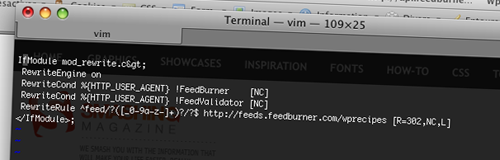
# temp redirect wordpress content feeds to feedburner <IfModule mod_rewrite.c> RewriteEngine on RewriteCond %{HTTP_USER_AGENT} !FeedBurner [NC] RewriteCond %{HTTP_USER_AGENT} !FeedValidator [NC] RewriteRule ^feed/?([_0-9a-z-]+)?/?$ http://feeds.feedburner.com/wprecipes [R=302,NC,L] </IfModule> - Save the file. You’re done!
Code explanation. Each time someone clicks on a link to http://www.yourblog.com/feed, he or she will be redirected to http://feeds.feedburner.com/yourblog. This way, you will have never lost an RSS subscriber, and even if you change your theme twice a day, you’ll never have to manually edit your RSS feed links again.
Sources
- Redirect WordPress feeds to FeedBurner via htaccess (Redux)
- How to: redirect WordPress RSS feeds to FeedBurner with .htaccess
3. Insert Ads (or Anything Else) in Your RSS Feed
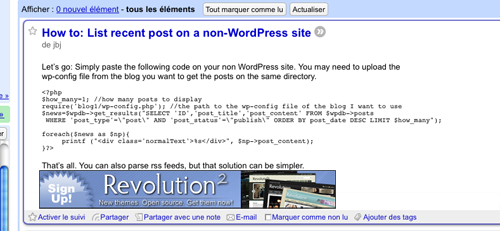
The problem. Monetizing RSS feeds is currently becoming a common practice, and many blog owners do it to maximize their income. FeedBurner can insert AdSense ads into your feed items, but you need at least 500 subscribers to qualify, and you can’t use any ads other than the AdSense ads provided by FeedBurner.
The solution. It is possible, though, to insert other kinds of ads into your RSS feed. You can, for example, use a link to a free WordPress theme only for your RSS subscribers.
Follow these simple steps to perform this hack:
- Edit the functions.php file of your theme. If your theme doesn’t have a functions.php file, simply create one.
- Paste the following code into your functions.php file:
<?php function insertAds($content) { $content = $content.'<hr /><a href="http://www.wprecipes.com">Have you visited WpRecipes today?</a><hr />'; return $content; } add_filter('the_excerpt_rss', 'insertAds'); add_filter('the_content_rss', 'insertAds'); ?> - Save the file. You’re now displaying your ads in your RSS feed!
Code explanation. I have seen many similar hacks on the Web, but all of them require you to edit WordPress core files to achieve the same result. Of course, editing WordPress core files is a very bad idea because then you would have to re-edit the files each time you upgrade your blog. Instead, this hack uses the add_filter() WordPress function to insert content into your RSS feed without editing any core files.
Sources
4. Format Your Images for Feed Readers
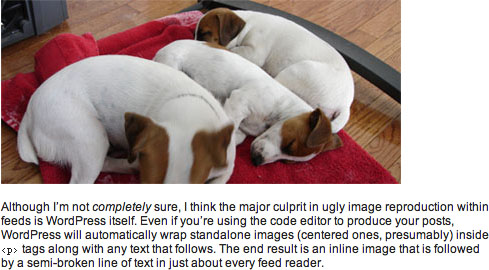
The problem. You took a lot of time to write and format your post and add beautiful screenshots. It looks so good on your blog. Sadly, when the post is displayed in Google Reader or any other RSS reader, it doesn’t look so great.
The solution. This is due to the fact that most feed readers display images inline with text:
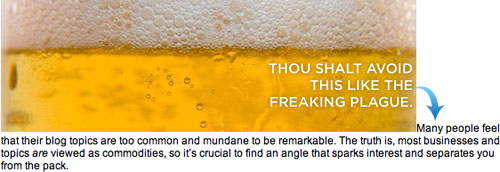
To avoid this problem, add a CSS class to display the image as a block. WordPress provides the built-in class “center“:
<img src="http://media2.smashingmagazine.com/images/wordpress-rss-hacks/myimage.jpg" alt="This is my image" class="center"/>
Sources
5. Provide Your Readers with a Feed for Each Post
The problem. When a post has lots and lots of comments, it can be hard for readers to follow the conversation. Most WordPress users don’t know this, but our favorite blogging engine has a built-in function for providing an RSS feed for the comments in each post.
The solution. Well, this recipe isn’t really a hack or anything: to provide an RSS feed for the comments in a particular post, just call the comment_rss_link() function:
<?php comments_rss_link('» Comments RSS Feed'); ?>
Sources
6. Exclude Categories from Your RSS Feed
The problem. Do you use one of your blog categories to let readers know about your website’s news, or does your blog feature a category that has nothing to do with the rest of your content? If so, it is generally not a good idea to include it in your RSS feed.
The solution. Here’s how to get rid of one of the categories in your RSS feed:
- First, get the numeric ID of the category you want to exclude. If you don’t know how to get the ID of a particular category, you can learn how here.
- Once you have the ID of the category you want to exclude from your RSS feed, edit the functions.php file in your theme. Create the file if it doesn’t exist.
- Paste the following code in it:
function myFilter($query) { if ($query->is_feed) { $query->set('cat','-5'); //Don't forget to change the category ID =^o^= } return $query; } add_filter('pre_get_posts','myFilter'); - Save the file, and you’re done!
Code explanation. This hack works exactly the same way as the previous one: create a custom function to exclude the category that you don’t want to appear in your RSS feed, and then use the super-useful add_filter() function to apply it to the pre_get_posts() WordPress core function.
Sources
7. Display Any RSS Feed on Your WordPress Blog
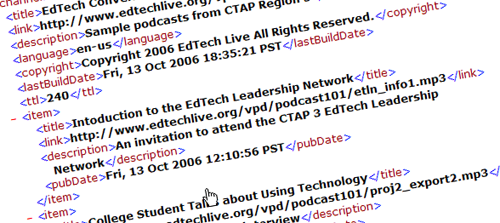
The problem. Do you have more than one blog, or do you manage a forum? If so, you may want to be able to display any RSS feed on your WordPress blog.
The solution. Many plug-ins can do the job, but they’re not necessary at all. WordPress has a built-in RSS reader that is used, for example, to display news on your dashboard. All you have to do is use it in your theme.
- Paste the following code anywhere in your theme (personally, I’d put it in the sidebar, the footer or, even better, the page template):
<?php include_once(ABSPATH.WPINC.'/rss.php'); wp_rss('http://feeds.feedburner.com/wprecipes', 3); ?> - Save it and you’re done. It’s as easy as that!
Code explanation. The first thing we have done is include the rss.php file from WordPress core. This file allows us to use the wp_rss() function, which takes two parameters: the first is the RSS feed’s URL, and the second is the number of RSS entries to be displayed.
Sources
8. Use Category-Specific RSS Feeds
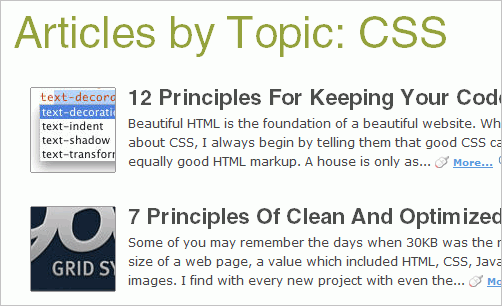
The problem. Many blogs talk about a lot of different topics: design, programming, blogging tips, etc. Have you ever come across a blog in which you have enjoyed only one category of posts? If so, you should definitely consider offering one feed per category to your own readers.
The solution. Let’s say you’d like to be able to subscribe only to TheGridSystem’s tools section. The category URL is:
http://www.thegridsystem.org/categories/tools/
To get an RSS feed for this category, you simply have to add /feed to the end of the URL:
http://www.thegridsystem.org/categories/tools/feed
Pretty easy, isn’t it? But pretty useful, too, in my opinion.
9. List RSS Feeds by Category
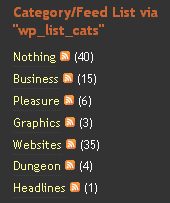
The problem. If you like the previous hack, you will probably also want to be able to display the names of all your category feeds in a list to your readers.
The solution.
- Edit any of your theme files, where you want to list your categories and their accompanying feeds.
- Paste the following code:
<?php wp_list_categories('feed_image=http://www.myblog.com/image.gif&feed=XML Feed&optioncount=1&children=0'); ?> - Save the file. You categories will now be displayed, along with their RSS feeds!
Code explanation. This hack uses only the good old wp_list_categories() function, with two parameters. The first is feed_image, which allows us to specify the URL to be displayed as a feed image. The second parameter is feed, which is used to specify the feed format.
10. Get Rid of RSS Feeds the Clean Way
The problem. Let’s say you’re using WordPress as a CMS to manage your online portfolio or your company’s website. In such cases, the RSS feed isn’t that useful, and some people would probably want to remove it.
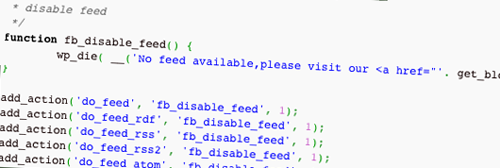
The solution. I have seen many “hacks” on the Web where people say you just have to remove the include on the wp-settings.php core file. I don’t think you should ever edit a core file. Instead, the following hack will do the job. Simply paste this code in the functions.php file of your theme:
function fb_disable_feed() {
wp_die( __('No feed available,please visit our <a href="'. get_bloginfo('url') .'">homepage</a>!') );
}
add_action('do_feed', 'fb_disable_feed', 1);
add_action('do_feed_rdf', 'fb_disable_feed', 1);
add_action('do_feed_rss', 'fb_disable_feed', 1);
add_action('do_feed_rss2', 'fb_disable_feed', 1);
add_action('do_feed_atom', 'fb_disable_feed', 1);
Sources
About the author
This guest post was written by Jean-Baptiste Jung, a 26-year-old blogger from Belgium, who blogs about WordPress at WpRecipes and about everything related to blogging and programming at Cats Who Code. You can stay in touch with Jean by following him on Twitter. (al)
Leave a Reply
Sponsors
- Advertise with us!
Smashing Links
Stay in touch
Popular Posts
- 100 Wordpress Themes
- 83 Wordpress Themes
- 80 AJAX Solutions
- 75 JavaScript Techniques
- 70 Best Photoshop Tutorials
- 70 Best Illustrator Tutorials
- 53 CSS Techniques
- 50 Blog Designs
- 50 Graffiti Artworks
- 50 Brilliant Photos
- 50 Movie Posters
- 40 Free Fonts
- 40 Creative Layouts
- 35 Beautiful Icon Sets
- Beautiful Desktop Wallpapers
- Beautiful Macro Photos
- Beautiful Underwater Photos
- Free Design Templates
- Free CSS Layouts
All Posts
- 35 Designers × 5 Questions
- 50 Designers × 6 Questions
- 404 Error Pages
- AJAX Libraries
- AJAX Solutions
- AJAX Tutorials
- Badges and Pins
- Batch Image Processing
- Black & White Photography
- Block Quotes
- Blog Designs 1, 2, 3, 4, 5
- Blog Headers
- Book Covers
- Brochures and Booklets
- Browsers Round-Up
- Browser Test Suites
- Buzz-Monitoring
- Calendar Designs
- Charts and Diagrams: Tools
- Cheat Sheets
- Code Beautifier
- Copyright Explained
- CSS Coding Techniques
- CSS Designs 1, 2, 3, 4, 5
- CSS Clean Code
- CSS Editors
- CSS Expert Ideas
- CSS Float Theory
- CSS Frameworks
- CSS Free Templates
- CSS Footers
- CSS Forms 1, 2
- CSS Frameworks
- CSS Galleries
- CSS Ideas
- CSS Layouts
- CSS Menus
- CSS Print-Layouts
- CSS Specificity
- CSS Styleguides
- CSS Tables
- CSS Tutorials
- CSS-Techniques
- CSS Tools
- Data Grids and Tables
- Data Visualization 1, 2
- Date Stamps
- Design Books 1, 2
- Design Magazines
- Designer's Checkpoints
- Divine Proportion
- Domain Tools
- Dreamweaver Tutorials
- Drupal
- E-Mail Delivery
- Favicons 1, 2, 3, 4, 5, 6
- Firefox Themes
- Fireworks Tutorials
- Flash Designs
- Flash Slideshows
- Flash Tutorials
- Fonts 1, 2, 3, 4, 5, 6
- Font Management
- Form Design Patterns
- Forums
- Fractals
- Gadgets 1, 2, 3
- Google AdSense
- Google PageRank
- Graffiti
- Graphics Design
- Grid-Based Design 1, 2
- Grunge Design 1, 2
- Hand-Drawing Style 1, 2
- Handwriting and Lettering
- Hotkeys
- HDR Pictures
- HTML Template Systems
- Icon Sets 1, 2, 3, 4, 5
- Icons, Templates 1, 2, 3
- Illustrator Tutorials 1, 2
- JavaScript Techniques
- jQuery
- Laptop Sleeves
- Laptop Designs
- Link Building
- Links in New Windows?
- Macro Photography
- Mascots
- Moleskine Art
- Motion Graphics
- Motion Blur Photos
- Movie Posters
- Music Videos
- Navigation Menus
- Newspaper Designs
- Online Converters
- Online Generators
- Packaging Design
- Pagination
- PDF Magazines
- Photoshop Actions
- Photoshop Tutorials 1, 2
- Pixel Art
- Podcasts
- PNG Transparency
- Portfolios
- Pricing Tables
- Product Designs
- Rain Photography
- RSS Best Design Practices
- RSS Feed Icons
- Screencasting
- Screensavers
- SEO Tools
- Shopping Carts
- Short Movies
- Slideshows & Lightboxes
- Smoke Photography
- Source Code Editors
- Splash Pages
- Start Pages
- Stock Icons
- Space, Nebula wallpapers
- Tab-Based Interfaces
- Tag Clouds
- Textures
- Textures & Backgrounds
- Texture Design
- Tooltips Scripts
- Tutorials
- Typefaces 1, 2
- Type Setting Principles
- Typographic Posters
- Typography In Motion
- Typography Showcase 1 2, 3
- Underwater Photography
- Usability Books
- Usability Glossary
- Usability Nightmares
- Usability Principles
- User Interfaces
- Version Control Systems
- Vintage & Retro Posters
- Vintage & Retro Designs
- Vintage & Retro Tutorials
- Wallpapers 1, 2, 3, 4
- Web 2.0 Tutorials
- Weblog Engines
- Whitespace & Simplicity
- Wordpress Plugins
- Wordpress Themes 1, 2, 3, 4
- Wordpress Toolbox
- WYSIWYG Editors
Fresh Bookmarks
25 Beautiful Logos with Sequential Concept
Sequential logos maybe is a new trend among logo designers.
Designing a blog with HTML5
Much of HTML 5’s feature set involves JavaScript APIs that make it easier to develop interactive web pages.
20+ CSS Data Visualization Techniques
Get inspired.
CSS3 – a big storm is coming
With CSS3 media queries and multi-column layouts it will be a whole new ballgame.
Woodgrain: A Free Social Media Icon Set
With 18 social networks represented alongside astandard RSS icon in PNG format,
Webdesign: Five Minute Upgrade
Making Your Design Pop.
45 Stylish Typographical Desktop Wallpapers
These beautifully designed wallpapers are not solely about typography.
The Light CMS Trend
A new trend in CMSs I’m calling “light” CMSs.
10 Impressive JavaScript Animation Frameworks
Create stunning and eye-grabbing animation and transition effects.
Linux System Monitoring Tools Every SysAdmin Should Know
Need to monitor Linux server performance?
Blogroll
- Bittbox
- CatsWhoCode
- Colorburned
- Design Disease
- Designm.ag
- Deziner Folio
- Dr. Web Magazin (.de)
- Dr. Web Shop (.de)
- Freshome Blog
- FudgeGraphics
- I Love Typography
- MakeUseOf.com
- Naldzgraphics
- Noupe.com
- Pro Blog Design
- Search-This
- Six Revisions
- SmileyCat
- Spoon Graphics
- Typesites
- Usability Post
- Walyou
- Webdesigner Depot
- Weburbanist
- Wellmedicated


Devon (December 2nd, 2008, 10:54 am)
wow…really helpful, thanks!
Soh (December 2nd, 2008, 11:03 am)
Great resources, thank you~
Manohar (December 2nd, 2008, 11:05 am)
thanks for “sm”
Kane (December 2nd, 2008, 11:09 am)
Fantastic post! Thanks very much for this.
Laura Stafford (December 2nd, 2008, 11:15 am)
This site always seems to have an excess of amazing resources. I’m a big fan. Thanks for the useful tips - great post :)
Roshan Bhattarai (December 2nd, 2008, 11:17 am)
great tutorial………really helpful for people like me who uses wordpress for blogging…
Ben (December 2nd, 2008, 11:25 am)
Very informative post,
btw can you say is it possible for us to fuse two different WordPress RSS into one with Feedburner ?
I mean, let there be two WordPress feeds, like 1) example.com/feed and 2) example.com/second/feed or second.example.com/feed is it possible to fuse 1 and 2 to a single RSS url easily ?
Simply I want to update readers with just one RSS url, with contents from two WordPress installations side-by-side
François (December 2nd, 2008, 11:30 am)
Very useful article, thanks!
Gelay (December 2nd, 2008, 11:41 am)
Thank you, thank you.
Clifton Griffin (December 2nd, 2008, 11:46 am)
@Ben,
Try yahoo pipes. Link [pipes.yahoo.com]
I had to switch to this after feedblendr went under. It’s pretty straightforward once you start playing with it. Shouldn’t take you long.
Clif
Dan (December 2nd, 2008, 11:48 am)
Hi, for Hack #1, line 20, is that a typo in your code? (assuming pulish should be publish?)
add_filter('posts_where', 'pulish_later_on_feed');Great article regardless, thanks!
Jean-Baptiste Jung (December 2nd, 2008, 11:54 am)
@Dan: You’re right, sorry for that.
@All: Thanks for your comments!
Srecko Bradic (December 2nd, 2008, 12:02 pm)
Direct hit!!! This is excactly what many of us have to learn :) Thank you for this very informative post or better say lesson.
Cheers
LGR (December 2nd, 2008, 12:05 pm)
Some great hacks and used some of them myself. The problem with hacks though is they can break easily when WordPress is upgraded. If you can find plugins that will do these kinds of things then you will be less likely to break your blog when you upgrade.
Paul (December 2nd, 2008, 12:38 pm)
Great post!
Thank you very much.
Curt Simon Harlinghausen /// Wunderknabe (December 2nd, 2008, 12:57 pm)
Very helpfull.
Rich (December 2nd, 2008, 12:58 pm)
Be careful with the first one. If you have scheduled posts, they’ll all be revealed!! Not good when I have six months of scheduled posts.
Tyler (December 2nd, 2008, 12:59 pm)
Thanks! This is really useful stuff. I love this site. :D
Atomised: the web design co-operative (December 2nd, 2008, 1:22 pm)
Great post. I love RSS and all kinds of feeds. Our company often use a CMS called Symphony (www.symphony21.com) which is natively XML-based and (especially in version 2) can grab and use any XML/RSS based feed SO easily and of course all the data is stored in XML so can create feeds for anything. It is useful to read what is possible with Wordpress a CMS I haven’t used for a year or two but am keen to get into again.
Bill Mulholland :CINQ (December 2nd, 2008, 1:38 pm)
Priceless, saved me hours of work !
Keep up the excellent work !
Permana Jayanta (December 2nd, 2008, 2:11 pm)
Exactly what I’m looking for. What about displaying a text that only appear in feed , not blog post?
Edward de Leau (December 2nd, 2008, 3:08 pm)
Nice collection. It made me remember again a thing I would want: to have feedburner feeds for my main feed (1), 9000 postings (9001), and all tag pages (11001). So in fact have feedburner come up with 11001 different feeds instead of only linking 1 primary feed to feedburner. Would be handy.
Juno (December 2nd, 2008, 3:16 pm)
I’ve tried #6, but it doesn’t work. :-(
Moreover, no hack and no plugin I’ve tried allow me to keep comments for a post from a specific category from showing up in RSS. It’s so annoying.
I have several categories set aside only for logged-in readers. But if the information of those posts and the comments to those posts show up in the feeds, that defeats the whole purpose.
The only solution I’ve discovered so far is to disable the comments RSS completely. :-/
Winnie (December 2nd, 2008, 3:30 pm)
#4 is wrong, rss readers doesn’t support classes from a stylesheet. The solution in the original source you referred is not about adding an additional class but it is about putting your images in a standalone paragraph apart from your text.
Camilo Oliveira (December 2nd, 2008, 5:50 pm)
Very useful information.
Thanks for this post.
Joe G. (December 2nd, 2008, 7:10 pm)
freakin sweet…this is why I love this website…wish you guys went to a physical magazine too.
www.Klikr.net (December 2nd, 2008, 9:35 pm)
Great reference for tweaking RSS!
As for #7, could I just enter this code:
into “widgets” and display it on the sidebar. I tried but it shows nothing.
Ryan (December 2nd, 2008, 10:11 pm)
This is a great post, thanks so much.
kristarella (December 2nd, 2008, 10:21 pm)
Good stuff.
I agree with Winnie about #4 though. All you need to do is hit enter a second time after the image; it will have its own paragraph and look better in WordPress and the feed reader.
Lenin Nair (December 2nd, 2008, 10:49 pm)
Have any idea about how to postpone RSS syndication for Blogger platform? The hack shown works only for the self hosted ones.
Yogi George (December 2nd, 2008, 11:28 pm)
great thanks a lot man, keep rocking ;)
Kenny | funky house podcast (December 2nd, 2008, 11:48 pm)
This stuff is gold.
I host a podcast, and wanted to add images but was worried about formatting in the many rss feeders. Thanks for this!!
Chris (December 2nd, 2008, 11:51 pm)
The missing piece in the Wordpress puzzle! I’ve been looking for this for months! Thank you Smashing Magazine. I feel I’ve got a good clear picture of Wordpress now.
Ari Herzog (December 3rd, 2008, 1:22 am)
Echoing LGR (#14 above), I currently do much of the above with plugins.
If a plugin is not available, hack away. But if you need to upgrade, or if something goes haywire and you forgot to backup, there goes your work while plugins keep things at bay.
Spence (December 3rd, 2008, 1:38 am)
Number 7 is bloody inspired!
Frank (December 3rd, 2008, 2:52 am)
Thanks for link my ideas on WPEngineer.com
gonkyhead (December 3rd, 2008, 3:24 am)
Point 9 about having multiple categories as feeds is great - unless you’re using feedburner for the main website feed.
How can you have feedburner keep track of multiple feeds, but conglomerate all the feed stats by main web url? So that for each feed subscriber (from different categories) are counted as a subscriber to a feed from my website?
erichansa (December 3rd, 2008, 3:42 am)
Some cool tips. Thanks.
jackman (December 3rd, 2008, 3:49 am)
Goooood 4 our info…@##$%^$
Thomas Scholz (December 3rd, 2008, 4:44 am)
Helpful article, thanks! Just one note: Never use » or « as arrows. These characters are quotation marks.
Julien Coquet (December 3rd, 2008, 5:30 am)
I’m surprised no one mentioned tagging the links from the feed to the post itself, using tracking parameters.The example below goes for Google Analytics but it can obviously be adapted to other web analytics mechanisms.Look in your wp-includes/feed-rss.php and replace code for the <link> tag:
<link><?php the_permalink_rss() ?>?utm_source=blog&utm_medium=rss&utm_content=<?php rawurlencode(the_title_rss()) ?></link>
Hope that helped!Julien Coquet
Analytics Country Manager - OX2/LBi
Visit our blog at Link [webanalytics.ox2.eu]Link [webanalytics.ox2.eu]
D-pan (December 3rd, 2008, 5:47 am)
gOOD ….
Stormy Seas Photography (December 3rd, 2008, 8:48 am)
This is an excellent post
Stormy Seas Photography (December 3rd, 2008, 8:49 am)
This is an excellent post
Link [www.stormyseasphotography.com]
clifgriffin (December 3rd, 2008, 10:03 am)
I posted this yesterday, but I think I did something wrong. I turned the 10th tip into a wordpress plugin. (no reason not to) Link [clifgriffin.com]
I may turn some of these other tips into plugins as well…the ones that most simply translate.
Laura (December 3rd, 2008, 12:07 pm)
That’s amazing, it’s like you read my mind this morning as I was ferventing googling ‘RSS exclude categories WordPress.’ Smashing Magazine is getting back on top form!
Jhay (December 3rd, 2008, 12:22 pm)
Great article! Thanks for sharing
Jonathon (December 3rd, 2008, 12:59 pm)
Great Article, very informative! I guess I would be considered a newbie blogger and don’t understand most of what you wrote, but it sounds cool if I could understand it like that! Here is the address to my blog (which I hate with a passion!)
blog.jonathonhewitt.com
Just looking for a pointer or two or a place to start learning this stuff. Thanks so much! You can email me at Link []
Marcio Rocon (December 3rd, 2008, 4:22 pm)
Maravilha!
Precisava de uma informação como esta para dar aquela melhorada em meus feeds.
Blog for Beginners (December 3rd, 2008, 7:18 pm)
Hey Jean
As usual no brings to the table the best WordPress codes better than you - at least you are high in my list whom to turn to for any WordPress related tips and tricks. You rocks, buddy!
Yan
redwall_hp (December 3rd, 2008, 9:01 pm)
Excellent post. The first code snippet is really cool.
kReEsTaL (December 4th, 2008, 9:14 am)
Excellent article, thank you! :)
Jean-Baptiste Jung (December 4th, 2008, 9:55 pm)
Thanks for your comments and support! Glad you to see this article was useful to you =^o^=
Dainis Graveris (December 5th, 2008, 5:18 pm)
very useful tips - didn’t even thought about these for example, how to control RSS posts.
Greg (December 6th, 2008, 5:04 am)
The hack to add adds to rss feeds seem to work when viewing the feed using firefox but when viewing the feed using IE the adds do not show.
justin (December 6th, 2008, 2:12 pm)
Fantastic post, one of the better ones I’ve seen here. Bookmarking this for sure. Thank you!
web (December 7th, 2008, 10:01 am)
I’m just here for moral support.
Chelsea (December 9th, 2008, 11:04 am)
The RSS feed reader in WP tip was a godsend. You rock.
UncleZeiv (December 9th, 2008, 1:51 pm)
Very interesting article. I have a related question that maybe can be addressed here: the widget displaying the comments to my blog show all the comments, even those posted to attachments. And that’s exactly the behaviour I would like to have from my “comments feed”, which unfortunately ignores my attachments comments completely.
Any hints on how to solve this?
Heidi (December 9th, 2008, 3:04 pm)
Thanks for the knowledge!
deuts (December 9th, 2008, 6:09 pm)
what about if I want to include a feed from another blog within the feed of my primary blog?
Tshering (December 9th, 2008, 7:22 pm)
Nice tips! thanks!
Maxim (December 9th, 2008, 8:58 pm)
It would help if you also provided links to plugins that do these hacks - a cleaner way to make these chages work. Rather then messing around with PHP code, one could disable or enable the corresponding plugin.
Pierre Far (December 10th, 2008, 9:09 am)
This is a sneaky line of code:
$content = $content.'Link [www.wprecipes.com]‘;If everyone follows the code as is, wprecipies.com will get a free advert from every single RSS feed that gets modified.
A note to suggest changing this code is in order…
Pierre
Paris Vega (December 10th, 2008, 9:17 am)
really helpful
Bruno (December 10th, 2008, 12:59 pm)
Thanks!
LeeGang (December 10th, 2008, 5:14 pm)
Rss will be perfect.
johno (December 12th, 2008, 3:36 am)
Some incredibly useful tips. some of which I’m off to implement. Thanks, SM.
johno (December 12th, 2008, 7:34 am)
Re the “List RSS Feeds by Category”: is it possible to have RSS feeds for tags too?
p@r@noid (December 24th, 2008, 12:40 am)
Very useful information.
Thanks for this post.
Wonkie cartoons (January 2nd, 2009, 4:24 am)
Excellent tips.. thanks! A question on feeds by categories (your tip 8) - is it possible to migrate feed subscribers currently subscibing to all categories (through feedburner) to receive updates on only 1 category from this point on? (I will be adding new categories that are very region specific so don’t want to bore my existing subscribers with the content of the new categories I’ll be creating).. thanks
Josh (January 11th, 2009, 6:19 am)
First of all congratulation for such a great site. I learned a lot reading here today. I will make sure i visit this site more often so I can learn more.
subi (January 18th, 2009, 9:26 am)
How to control the rss feed content. I do not want to show any content on rss. I just want to show the title and the link back to the post. how to do that ?
pixeltunes (January 22nd, 2009, 6:46 am)
Great Articles, huu :-)
But what kind of Code generator (this who shows the code-screenshots) is this? I’m looking for a tool like this?
What is the name of it??
Thanks a lot
fotozine (February 1st, 2009, 6:20 am)
Helpfull tips, very thanks.
For second tip, I’m using FeedBurner FeedSmith plugin which looks to me more easy and safe.
Link [www.fotozine.com.br]
saurabh shah (February 4th, 2009, 3:26 am)
Great Articles and very helpul too…. thnks for sharing…
pravin (February 22nd, 2009, 8:54 pm)
marvelous article
Hikari (February 24th, 2009, 9:18 pm)
GREAT tips!
I was searching for a way to offer RSS feed for specific categories :D
Hikari (February 24th, 2009, 9:18 pm)
GREAT tips!
I was searching for a way to offer RSS feeds for specific categories :D
Dennis Miedema (March 7th, 2009, 7:30 am)
Although the info seems on-point, I’m a total noob when it comes to Wordpress (I do know how to edit lots of HTML and code though).
So I have a question I would like to invite you (or others reading this) to answer: how can I submit my Wordpress blog to several RSS Feed Sites? So sites that contain collections of feeds?
Because none of them work with my Wordpress blog and I do not know in WHICH file I can edit the code to get a category-specific RSS feed going. So in short: which file will I need to edit with /feed attached to the code, and how can I edit Wordpress code (is that possible with Dreamweaver for example?)
Any help is much appreciated.
Kindest regards,
Dennis
tony Mac (March 30th, 2009, 8:32 pm)
My Wordpress doesn’t separate its categories out into folders , so the #8 tip of using the “/feed” to get a feed doesn’t work. Is there any workaround for this, or a setting I’ve missed? I’m going to use it as a news feed and random bits section on my site.
thejodi (April 6th, 2009, 7:21 pm)
thanks - exactly what I needed. a life and time saver
VERY HAPPY (April 18th, 2009, 7:48 pm)
this is amazing.my head is exploding. i need a break….
thanks
Lisa (April 22nd, 2009, 11:53 am)
Great! Thanks - I’ve been looking at ways of including other feeds on blogs and plugins that let you do it - didn’t know there was a core function that does it for you! Excellent!
lx
NIKKS ROCKSTAR (April 22nd, 2009, 8:38 pm)
thanks for providing us this site i m enjyoing with this site
Yasin (May 5th, 2009, 12:13 am)
Shweeeeeeeeeeeeeeeet … nice one guys, thanks :)
Peter Williams (May 11th, 2009, 2:51 pm)
wow
DemoGeek (June 3rd, 2009, 7:09 am)
Just yesterday, I revamped my home page layout to shed some more light on the “News” section which might get updated more frequently. Last night I was looking for a way to avoid those frequent news updates to get to RSS and bullet# 6 “Exclude categories from your RSS feed” sums it up clearly.
Thank you.
David Peat (June 14th, 2009, 6:17 am)
Thank you for the great post really helpful.
jagbo (June 17th, 2009, 6:04 pm)
Looking for RSS feed that sends blog updates to email address
IMN (June 29th, 2009, 12:13 pm)
Great tips…
Do you know how to show the content of inbound RSS Feeds on a page?
Thanks,
V.C (July 1st, 2009, 2:25 am)
I don’t know why my feed automatically redirects to feedburner with no reason :(