hidden

Smashing Magazine

50 Extremely Useful PHP Tools

Advertisement

By Jacob Gube

PHP is one of the most widely used open-source server-side scripting languages that exist today. With over 20 million indexed domains using PHP, including major websites like Facebook, Digg and WordPress, there are good reasons why many Web developers prefer it to other server-side scripting languages, such as Python and Ruby.

PHP is faster (updated), and it is the most used scripting language in practice; it has detailed documentation, a huge community, numerous ready-to-use scripts and well-supported frameworks; and most importantly, it’s much easier to get started with PHP than with other scripting languages (Python, for example). That’s why it makes perfect sense to provide the huge community of PHP developers with an overview of useful tools and resources that can make their development process easier and more effective.

This post presents 50 useful PHP tools that can significantly improve your programming workflow. Among other things, you’ll find a plethora of libraries and classes that aid in debugging, testing, profiling and code-authoring in PHP.

You may also want to take a look at the following related posts:

[Offtopic: by the way, did you know that there is a Smashing eBook Series? Book #2 is Successful Freelancing for Web Designers, 260 pages for just $9,90.]

Debugging Tools

  • Webgrind
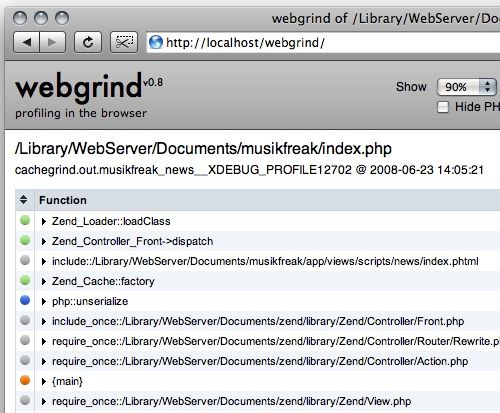
    Webgrind is an Xdebug profiling Web front end in PHP 5. It implements a subset of the features of kcachegrind, installs in seconds and works on all platforms. For quick ‘n’ dirty optimizations, it does the job.

    Webgrind in 50 Extremely Useful PHP Tools

  • Xdebug
    Xdebug is one of the most popular debugging PHP extensions. It provides a ton of useful data to help you quickly find bugs in your source code. Xdebug plugs right into many of the most popular PHP applications, such as PHPEclipse and phpDesigner.
  • Gubed PHP Debugger
    As the name implies, Gubed PHP Debugger is a PHP debugging tool for hunting down logic errors.
  • DBG
    DBG is a robust and popular PHP debugger for use in local and remote PHP debugging. It plugs into numerous PHP IDE’s and can easily be used with the command line.
  • PHP_Debug
    PHP_Debug is an open-source project that gives you useful information about your PHP code that can be used for debugging. It can output processing times of your PHP and SQL, check the performance of particular code blocks and get variable dumps in graphical form, which is great if you need a more visual output than the one given to you by print_r() or var_dump().
  • PHP_Dyn
    PHP_Dyn is another excellent PHP debugging tool that’s open-source. You can trace execution and get an output of the argument and return values of your functions.
  • MacGDBp
    MacGDBp is a live PHP debugger application for the Mac OS. It has all the features you’d expect from a fully featured debugger, such as the ability to step through your code and set breakpoints.

Testing and Optimization Tools

  • PHPUnit
    PHPUnit is a complete port of the popular JUnit unit testing suite to PHP 5. It’s a tool that helps you test your Web application’s stability and scalability. Writing test cases within the PHPUnit framework is easy; here’s how to do it.
  • SimpleTest
    SimpleTest is a straightforward unit-testing platform for PHP applications. To get up and running with SimpleTest quickly, read through this pragmatic tutorial that shows you how to create a new test case.
    Simpletest in 50 Extremely Useful PHP Tools

  • Selenium
    Selenium Remote Control (RC) is a test tool that allows you to write automated Web application UI tests in any programming language against any HTTP website using any mainstream JavaScript-enabled browser. It can be used in conjunction with PHPUnit to create and run automated tests within a Web browser.
  • PHP_CodeSniffer
    PHP_CodeSniffer is a PHP 5 script for detecting conformance to a predefined PHP coding standard. It’s a helpful tool for maintaining uniform coding styles for large projects and teams.
  • dBug
    dBug is ColdFusion’s cfDump for PHP. It’s a simple tool for outputting data tables that contain information about arrays, classes and objects, database resources and XML resources, making it very useful for debugging purposes.
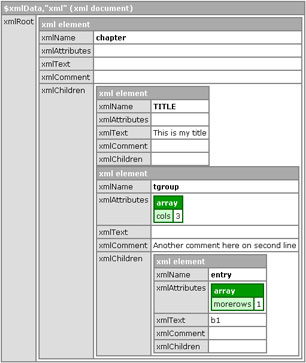
    11 Dbug in 50 Extremely Useful PHP Tools

  • PHP Profile Class
    PHP Profile Class is an excellent PHP profiling tool for your Web applications. Using this class will help you quickly and easily gain insight into which parts of your app could use some refactoring and optimization.

Documentation Tools

  • phpDocumentor
    phpDocumentor (also known as phpdoc and phpdocu) is a documentation tool for your PHP source code. It has an innumerable amount of features, including the ability to output in HTML, PDF, CHM and XML DocBook formats, and has both a Web-based and command-line interface as well as source-code highlighting. To learn more about phpDocumentor, check out the online manual.
  • PHP DOX
    An AJAX-powered PHP documentation search engine that enables you to search titles from all PHP documentation pages.

Security Tools

  • Securimage
    Securimage is a free, open-source PHP CAPTCHA script for generating complex images and CAPTCHA codes to protect forms from spam and abuse.
  • Scavenger
    Scavenger is an open-source, real-time vulnerability management tool. It helps system administrators respond to vulnerability findings, track vulnerability findings and review accepted and false-positive answered vulnerabilities, without “nagging” them with old vulnerabilities.
  • PHP-IDS
    PHP-IDS (PHP-Intrusion Detection System) is a simple-to-use, well-structured, fast and state-of-the-art security layer for your PHP-based Web application.
  • Pixy: PHP Security Scanner
    Pixy is a Java program that performs automatic scans of PHP 4 source code, aimed to detect XSS and SQL injection vulnerabilities. Pixy takes a PHP program as input and creates a report that lists possible vulnerable points in the program, along with additional information for understanding the vulnerability.

Image Manipulation and Graphs

  • PHP/SWF Charts
    PHP/SWF Charts is a powerful PHP tool that enables you to create attractive Web charts and graphs from dynamic data. You can use PHP scripts to generate and gather data from databases, then pass it to this tool to generate Flash (SWF) charts and graphs.
  • pChart – a chart-drawing PHP library
    pChart is a PHP class-oriented framework designed to create aliased charts. Most of today’s chart libraries have a cost; this one is free. Data can be retrieved from SQL queries or CSV files or can be manually provided.
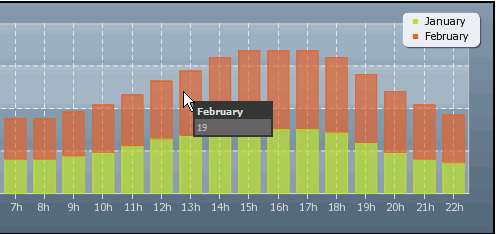
    Chart in 50 Extremely Useful PHP Tools

  • WideImage
    WideImage is a PHP library for dynamic image manipulation and processing for PHP 5. To be able to use the library, you should have the GD PHP extension installed on your Web server.
  • MagickWand For PHP
    MagickWand For PHP is a PHP module suite for working with the ImageMagick API, which lets you create, compose and edit bitmap images. It’s a useful tool for quickly incorporating image-editing features in your PHP applications.

PHP Code Beautifier

  • PHP_Beautifier
    PHP Beautifier is a PEAR package for automatically formatting and “beautifying” PHP 4 and PHP 5 source code.
  • PHPCodeBeautifier
    PHPCodeBeautifier is a tool that saves you from hours of reformatting code to suit your own way of presenting it. A GUI version allows you to process files visually; a command-line version can be batched or integrated with other tools (like CVS, SubVersion, IDE, etc.); and there is also an integrated tool of PHPEdit.
  • GeSHi – Generic Syntax Highlighter
    GeSHi is designed to be a simple but powerful highlighting class, with the goal of supporting a wide range of popular languages. Developers can easily add new languages for highlighting and define easily customizable output formats.

Version-Control Systems

  • Phing
    Phing is a popular project version-control system for PHP. It is a useful tool for organizing and maintaining different builds of your project.
  • xinc
    xinc is a continuous integration server version-control system written in PHP 5 (i.e. continuous builds instead of nightly builds). It works great with other systems such as Subversion and Phing.

Useful Extensions, Utilities and Classes

  • SimplePie
    SimplePie is a PHP class that helps you work with RSS feeds. Check out the online RSS and Atom feed reader, which demonstrates a simple Web application that uses SimplePie.
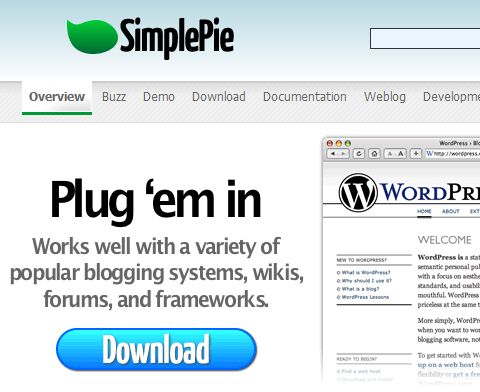
    Spie in 50 Extremely Useful PHP Tools

  • HTML Purifier
    HTML Purifier is a standards-compliant HTML filter library written in PHP. HTML Purifier not only removes all malicious code (better known as XSS) with a thoroughly audited, secure yet permissive white list, it also makes sure your documents are standards-compliant. Open source and highly customizable.
  • TCPDF
    TCPDF is an open-source PHP class for generating PDF documents.
  • htmlSQL
    htmlSQL is a unique tool. It is a PHP class for querying HTML values in an SQL-like syntax. Check out the live demonstration of how htmlSQL works.
  • The Greatest PHP Snippet File Ever (Using Quicktext for Notepad++)
    “A little something for all coders: a snippets file that I use for PHP coding. This is designed to be used with Quicktext for Notepad++, but feel free to adapt it to whatever text editor you prefer.”
  • Creole
    Creole is a database abstraction layer for PHP5. It abstracts PHP’s native database-specific API to create more portable code while also providing developers with a clean, fully object-oriented interface based loosely on the API for Java’s JDBC.
  • PHPLinq
    LINQ is a component that adds native data querying capabilities to PHP using a syntax reminiscent of SQL. It defines a set of query operators that can be used to query, project and filter data in arrays, enumerable classes, XML, relational databases and third-party data sources. [via]
  • PHPMathPublisher
    With PhpMathPublisher, you can publish mathematical documents on the Web using only a PHP script (no LaTeX programs on the server and no MathML).
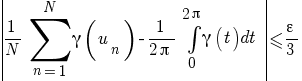
    Math in 50 Extremely Useful PHP Tools

  • phpMyAdmin
    If you’re working with PHP, there’s a big chance you’re set up in a LAMP configuration. phpMyAdmin is Web-based tool for managing, building, importing, exporting and exploring MySQL databases.
  • PHPExcel
    PHPExcel is a set of useful PHP classes for working with Microsoft Excel files. PHPExcel allows you to read Excel files and write to them. This is useful for dynamically generating Excel spreadsheets for downloading.
  • Phormer
    Phormer is a PHP-based photo gallery management application that helps you to store, categorize and trim your photos online.
  • xajax PHP Class Library
    xajax is a PHP class for easily working with PHP AJAX applications. It gives you an easy-to-use API for quickly managing AJAX-related tasks. Check out the xajax Multiplier demo and the Graffiti Wall demo to see the xajax PHP class in action.
  • PHP User Class
    PHP User Class is an excellent script that helps you create a system for user authentication (i.e. registration, log in, account profile, etc.). It’s a useful utility to have around if you require user registration for your Web applications.
  • PHP-GTK
    PHP-GTK is a PHP extension for the GTK+ toolkit (a robust toolkit for developing GUIs). It is a suite of useful OOP functions and classes to help you rapidly build cross-platform, client-side GUI’s for your application.

PHP Online Tools and Resources

  • Minify!
    Minify is a PHP 5 app that can combine multiple CSS or JavaScript files, compress their content (i.e. remove unnecessary white space and comments) and serve the results with HTTP encoding (via Gzip/deflate) and headers that allow optimal client-side caching. This will help you follow several of Yahoo!’s Rules for High Performance Websites.
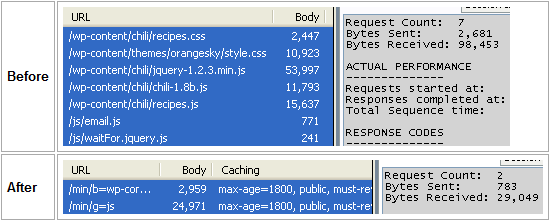
    Minify in 50 Extremely Useful PHP Tools

  • HTTP_StaticMerger: Automatic “merging” of CSS and JavaScript files
    This library automatically merges sets of static files (CSS or JavaScript) and speeds up page loading (by lowering the number of HTTP queries). It is recommended to use this together with caching reverse-proxy to minimize the response time.
  • PHP Object Generator
    PHP Object Generator is an open-source Web-based tool that helps you quickly construct PHP objects and leverage object-oriented programming (OOP) principles in your code.
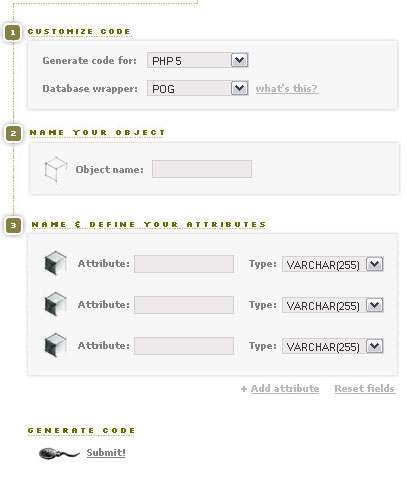
    03 Object Generator in 50 Extremely Useful PHP Tools

  • gotAPI/PHP
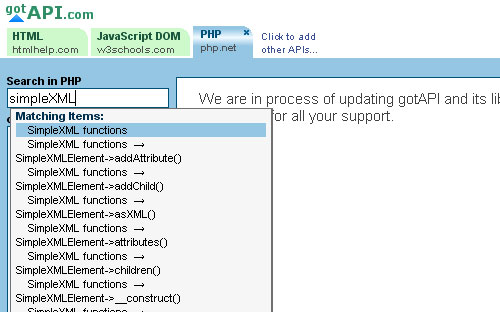
    gotAPI is a useful online tool for quickly looking up PHP functions and classes. Also check out the Quick PHP look-up widget example in case you’d like to include this awesome look-up feature on your website.
    04 Gotapi in 50 Extremely Useful PHP Tools

  • koders
    koders is a search engine for open-source and downloadable code. It currently has over a billion lines of code indexed and isn’t limited to just PHP.
  • PECL
    PECL is a directory of all known PHP extensions and a hosting facility for downloading and developing PHP extensions.

In-Browser Tools (Firefox Add-Ons)

  • FirePHP
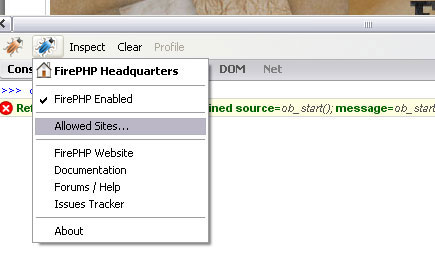
    FirePHP is a Firefox extension that allows you to log data in Firebug. It has a variety of useful logging features, such as the ability to change your error and exception handling on the fly and to log errors directly to the Firebug console. To learn more about what FirePHP can do, check out the FirePHP guide on how to use FirePHP. For developers using the Zend PHP framework, you might find this guide on using FirePHP with Zend useful.
    01 Firephp in 50 Extremely Useful PHP Tools

  • phpLangEditor
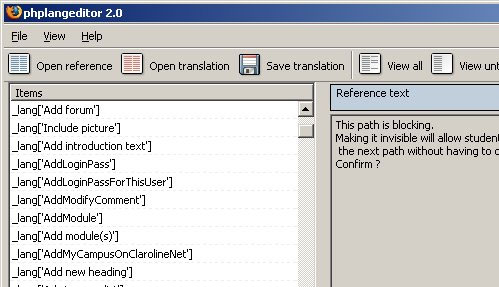
    phpLangEditor is a very handy Firefox add-on for translating language files and variables in your script.
    02 Phplangeditor in 50 Extremely Useful PHP Tools

  • PHP Lookup
    PHP Lookup is a built-in search bar to help you quickly look up references to PHP syntax.
  • PHP Manual Search
    PHP Manual Search is a handy search bar that searches official PHP documentation from within your Web browser.

Frameworks for PHP

  • Dwoo
    Dwoo is a PHP 5 template engine positioned as an alternative to Smarty. It is (nearly) fully compatible with its templates and plug-ins, but it is being written from scratch and is aimed to go one step further with a cleaner code base.
  • CodeIgniter
    CodeIgniter is a powerful, high-performance, open-source PHP framework that helps you author PHP applications rapidly. CodeIgniter is known for having a light footprint, thereby reducing your server’s work. You can get up and running with CodeIgniter in a jiffy: it has an awesome online manual, a couple of helpful video tutorials and an active user forum.

    Codeigniter in 50 Extremely Useful PHP Tools

  • YII Framework
    Here is a high-performance component-based PHP framework that is supposed to be more efficient than CodeIgniter, CakePHP, ZF and Symfony. An optimal solution for developing large-scale Web applications. Yii supports MVC, DAO/ActiveRecord, I18N/L10N, caching, jQuery-based AJAX support, authentication and role-based access control, scaffolding, input validation, widgets, events, theming and Web services.
  • NetBeans
    A dedicated PHP coding environment and complete integration with web standards. The NetBeans PHP editor is dynamically integrated with NetBeans HTML, JavaScript and CSS editing features such as syntax highlighting and the JavaScript debugger. NetBeans IDE 6.5 fully supports iterative development, so testing PHP projects follows the classic patterns familiar to web developers.
  • Solar
    Solar is a PHP 5 development framework for Web applications derived from the Savant templating engine. Solar uses the MVC architectural pattern and has a host of classes and functions for securing your Web app against SQL injection, cross-website scripting (XSS) and other common exploits.

    Solar in 50 Extremely Useful PHP Tools

  • symfony
    symfony is an open-source PHP 5 Web application framework that is well known for its modularity and useful library of classes. To get up and running as fast as possible, you should check out the pragmatic symfony online tutorial called “The symfony 1.2 advent calendar tutorial,” which takes you through a step-by-step example of building your own symfony-based Web application.
  • PEAR – PHP Extension and Application Repository
    PEAR is a popular framework and distribution system for reusable PHP components. The purpose of the framework is to provide a structured library of open-source code for PHP users, a system for code distribution and package maintenance and a standard style for PHP code.
  • Propel
    Propel is an Object-Relational Mapping (ORM) framework for PHP 5. It allows you to access your database using a set of objects, providing a simple API for storing and retrieving data.
  • {{macro}} template engine
    {{macro}} compiles initial templates into executable PHP scripts with very clean syntax (much cleaner than WACT and Smarty) and executes them very fast. The engine doesn’t use an XML-like syntax; there are only two data scopes, global and local, and no more data sources (all data is displayed with regular PHP variables); and the system supports all WACT features such as templates wrapping and including.Macro in 50 Extremely Useful PHP Tools
  • Zend Framework
    The Zend Framework by Zend Technologies (the creators of PHP’s scripting engine) is a popular PHP Web application framework that embraces the principles of PHP OOP; it’s very extensible and has built-in utilities for working with free Web service APIs, such as those of Google, Flickr and Amazon.
  • Qcodo
    Qcodo is an excellent open-source PHP Web application framework. It’s subdivided into two parts: (1) Code Generator, and (2) Qforms. Code Generator handles the creation of object code and PHP and HTML front-end code from your data model. Qforms is an intuitive system for handling and creating complex PHP-driven HTML Web forms. Check out demos of applications that use Qcodo and presentational material that covers Qcodo.
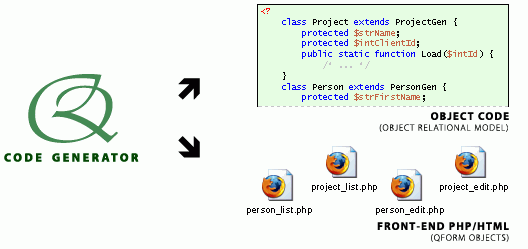
    Qc in 50 Extremely Useful PHP Tools

  • SAJAX
    SAJAX is a JavaScript and AJAX application framework that works well with PHP (as well as several other server-side scripting languages). See SAJAX at work by going to Wall live demonstration.
  • Smarty
    Smarty is a popular PHP templating system to help you separate PHP logic and front-end code (HTML, CSS, JavaScript). It will keep your projects modular and easier to maintain.
  • CakePHP
    CakePHP is one of the leading PHP frameworks for creating robust, fully-featured Web applications. CakePHP has an extensive and well-organized online manual. If you want to learn via video tutorials, check out the CakePHP screencasts.
    Cake in 50 Extremely Useful PHP Tools

  • Savant2
    Savant2 is another popular object-oriented PHP templating system. Instead of a special syntax unique to Savant2, you use PHP syntax to develop your project’s template.
  • PHPSpec
    PHPSpec is a simple and intuitive PHP framework. It follows the Behavior-Driven Development principle and therefore allows you to write behavior-oriented code, oftentimes in plain English.

PHP IDEs and Editors

  • PHPEclipse
    PHPEclipse is a popular PHP source-code editor that is open source and runs on all the major operating systems, such as Windows, Linux and Mac OS. It has all the features you’d expect from a PHP source-code editor, such as code-folding, syntax highlighting, hover-over tool tips and support for XDebug and DBG.
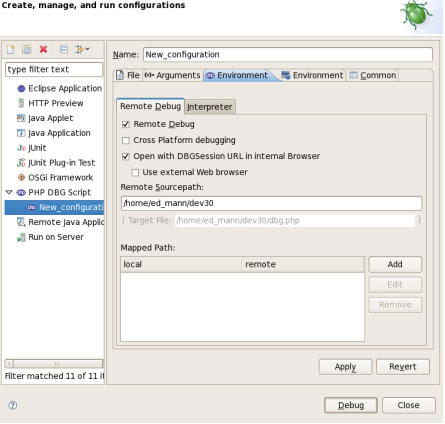
    07 Php Eclipse in 50 Extremely Useful PHP Tools

  • PhpED
    PhpED is an excellent IDE for Windows users. It is one of the most robust and feature-packed IDEs currently out on the market and has useful features such as a built-in source-code profiler to find bottlenecks in your PHP source code and excellent integration with third-party apps and services just as front-end code validation.
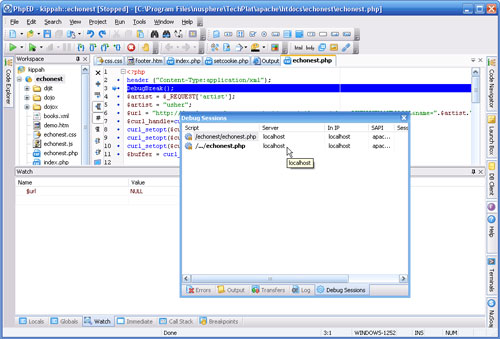
    08 Phped in 50 Extremely Useful PHP Tools

  • phpDesigner
    phpDesigner is a lightweight PHP editor/IDE that also handles front-end code and markup remarkably well. Check out the phpDesigner online tutorials, as well as screencasts on phpDesigner to help you learn more about the IDE.
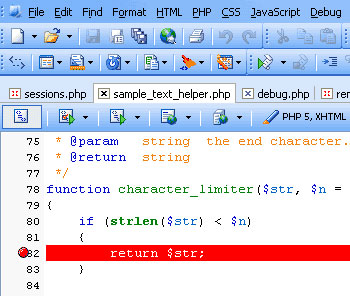
    09 Phpdesigner in 50 Extremely Useful PHP Tools

  • Zend Studio
    Zend Studio is an excellent PHP IDE for Eclipse. It’ll help you develop, deploy and manage Rich Internet Applications (RIAs) in an intuitive interface.
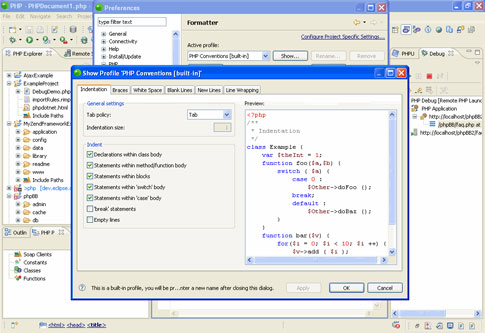
    10 Zend Studio in 50 Extremely Useful PHP Tools

  • Aptana PHP
    Aptana PHP is an open-source IDE extension/plug-in to be used in conjunction with Aptana Studio. To learn more, be sure to check out the online documentation about Aptana PHP.
  • PDT
    PDT is a PHP Development Tools framework that’s part of the Eclipse project. PDT includes all the necessary tools for you to create PHP-based Web applications.
  • VS.Php
    VS.Php is a PHP IDE for MS Visual Studio, making it a great IDE for recently converted ASP developers who have used MS VS to develop Web applications. To get you up and running ASAP with VS.Php, check out Jcx.Software’s online tutorials as well as its online documentation.
  • PHPEdit
    PHPEdit is an excellent PHP editor/IDE with a ton of useful features and a very intuitive user interface. To learn more about why PHPEdit is a good IDE, read the 10 reasons to use PHPEdit and view the introductory screencast about PHPEdit.

Sources and Resources

Related articles

You might also want to take a look at the following related posts:

(al)

Jacob Gube is the Founder and Chief Editor of Six Revisions, a web publication for web developers and designers, and the Deputy Editor of Design Instruct, a web magazine for designers and digital artists. He has over seven years of experience as professional web developer and web designer and has written a book on JavaScript. Connect with him via Twitter.

11

Tags: ,

Advertising
  1. 1
    Brian Gottier
    January 20th, 2009 8:09 pm

    This is a great article. I love PHP. Thank you very much!

  2. 2
    Dhane
    January 20th, 2009 8:10 pm

    Now this is what I’ve been looking for. Thanks!

  3. 3
    Kane
    January 20th, 2009 8:21 pm

    Psst.. under “Image Manipulation” you’ve got “WideImage” listed twice.

    Fix it quickly and it can be our little secret. ;)

  4. 4
    Saravanan07
    January 20th, 2009 8:42 pm

    Perfect Tools Collection..Thank you very much..:D

  5. 5
    Noam
    January 20th, 2009 8:43 pm

    Great!
    Q:Does anyone know about a built in FTP browser in Eclipse?
    Not finding it yet is the only reason I’m still using Zend studio…

  6. 6
    Benni
    January 20th, 2009 8:47 pm

    Creole is a really powerful package for accessing databases. The only problem with it at the moment is that its dead. But unfortunately I don´t know any alternatives, except for Dibi.

  7. 7
    Atiq at Metrodesk.com.bd
    January 20th, 2009 9:30 pm

    Great collection! I like its Keep Rocking!!!

  8. 8
    simeon
    January 20th, 2009 10:14 pm

    Your version control section should disappear – version control means managing changes to text files (tla tools like cvs, svn, bzr, git, etc). Phing is a build system (like makefiles but more sophisticated) and xinc is a continuous integration tool. This arguably fits under version control since your version control system is what prompts a continuous integration tool (never used it, but as I understand the idea is that for all all commits or checkins, builds are created and tested automatically…). Still xinc would probably be better under the “testing” section…

  9. 9
    skey
    January 20th, 2009 10:20 pm

    very good!

  10. 10
    Webmasterish
    January 20th, 2009 10:28 pm

    Excellent collection.

  11. 11
    marcO
    January 20th, 2009 10:41 pm

    As allways a really got post but i’m missing php caching applications like php eaccelerator for example. This is a great help to get much more speed out of php overall!

  12. 12
    kenji
    January 20th, 2009 10:56 pm

    You missed Netbeans IDE, which supports PHP in its latest version too! And also KohanaPHP framework.

  13. 13
    localjoost
    January 20th, 2009 10:56 pm

    Excellent post! Thanks, a lot of new, useful information.

  14. 14
    Tomek
    January 20th, 2009 11:03 pm

    Huh… PHP… it is beautiful to be graphic / web designer only :) Especially now, when you can find a lot of java/php/etc scripts over the internet :]

  15. 15
    Joe
    January 20th, 2009 11:03 pm

    Also have a look at phpdevshell.org, nifty gui framework. It works great where smaller teams are involved in the development.

  16. 16
    zarathustra
    January 20th, 2009 11:10 pm

    ha! Back from the brink! You see this post “makes my life easier” like the tagline says. HDR photos don’t, this does. Consider an advertiser clicked.

  17. 17
    cnara
    January 20th, 2009 11:17 pm

    What a great survey. Thanks, smashing!

  18. 18
    Andris
    January 20th, 2009 11:26 pm

    As always a great collection of ressources again. Smashing magazine, you make my world go rocking round!

  19. 19
    tkuntario
    January 20th, 2009 11:37 pm

    I sugggest KohanaPHP framework. It’s a super-charged version of CodeIgniter, and will significantly reduce your development time. It has ORM, templating, and very clear namespace, and much more. Try take a peek on their website.

  20. 20
    David
    January 20th, 2009 11:49 pm

    Doxygen does a better job than phpDocumentor. Its not written in PHP but it works with PHP.

  21. 21
    EvilFaeron
    January 20th, 2009 11:50 pm

    In PHP IDE missed NetBeans PHP – now more usable then Eclipse.

  22. 22
    Hendrik
    January 20th, 2009 11:53 pm

    Thanks for the great list. Very usefull. Yet, I happen to be using Komodo as an IDE (actually the free Komodo Edit) and miss it in your listing of PHP IDEs. A closer look at the software might be interesting as it is much more robust than, say, the Eclipse Plugins. These tend to shut down unexpectately quite often on my Mac. Nevertheless: You rock!

  23. 23
    Natrium
    January 20th, 2009 11:54 pm

    finally some resources for the programmer.
    LINQ for PHP: I’m certainly going to try that one out!!

    Great article!

  24. 24
    Mohammad
    January 20th, 2009 11:54 pm

    Good Job, Thank You.

  25. 25
    kodekrash
    January 20th, 2009 11:54 pm

    Reply to Noam’s “Q:Does anyone know about a built in FTP browser in Eclipse?”

    Eclipse has a team provider plugins available for FTP and SFTP as well:

    FTP: http://www.eclipse.org/eclipse/platform-team/target.php
    SFTP: http://www.jcraft.com/eclipse-sftp/

  26. 26
    Junni
    January 20th, 2009 11:58 pm

    Very nice listing. I’m currently using creole, propel and symfony and Eclipse as editor.

  27. 27
    Pop
    January 21st, 2009 12:02 am

    Thank you!! I love you, SM

  28. 28
    Stii
    January 21st, 2009 12:14 am

    You have Code Igniter as a framework and not Kohana?! Kohana is based on Code Igniter, but is far better… I’d much rather replace Code Igniter with Kohana if I were you!

    Fantastic post, btw!

  29. 29
    Mario Lurig
    January 21st, 2009 12:18 am

    The version 5 of XML/SWF is easier to work with than the version 4 PHP/SWF, definitely worth going with instead (I’ve used both).
    I also keep my book handy, either in printed form or in PDF form (free, creative commons). I’m not always near the internet, and we all know you never memorize all the date function extras or sprintf details, so I find that invaluable. PHP book if anyone else wants it.

  30. 30
    Vordreller
    January 21st, 2009 12:19 am

    Why wasn’t Netbeans listed among the PHP IDE’s? Netbeans has had PHP support since Netbeans 6.5

  31. 31
    Valentin Jacquemin
    January 21st, 2009 12:28 am

    Nice list, thanks!

    Netbeans would have deserve a mention in tools section. It’s a really enjoyable and fast PHP IDE. I can only encourage to take a look!

  32. 32
    Two Socks
    January 21st, 2009 12:29 am

    Great post thankyou!

  33. 33
    Ivan
    January 21st, 2009 12:30 am

    Great list thanks!

    This might me a helpful addition though http://www.PHPanywhere.net is an Online PHP Editor and FTP server.

    THis is a service I created so I hope you enjoy!

  34. 34
    bash3r
    January 21st, 2009 12:48 am

    One more editor … TextMate :) It’s probably the best one for MacOS X :)

  35. 35
    andy
    January 21st, 2009 12:49 am

    everytime I see lists of “usefull php-editors” I’m misssing edit plus. it’s so great I won’t miss it anymore. the best are the build-in ftp functionality (save online) and the possibility to build up user defined syntax-highlight-files and keystrokes. give it a try!!

  36. 36
    Anes Sabitovic
    January 21st, 2009 12:52 am

    Wow! This is a great article. I love Smashingmagazine. Thank you very much!

  37. 37
    Simon
    January 21st, 2009 12:54 am

    Unbelievably usefull !
    Thanks a lot guys, this really rocks !

  38. 38
    krishna@Search Corner
    January 21st, 2009 1:00 am

    Very Nice compilation of list. Thanks for sharing it :). Its worth tweeting

  39. 39
    acidre
    January 21st, 2009 1:06 am

    Great article!

  40. 40
    Angel Psiakis
    January 21st, 2009 1:09 am

    Excellent article but where’s NetBeans?
    I’ve dumped Zend Studio in its favour and I’m a happier programmer now! :o)

  41. 41
    zarathustra
    January 21st, 2009 1:10 am

    Further to my earlier comment, my discovery of “minify” just saved my clients 1.9 seconds per page. haha. Time saved all round! Good job.

  42. 42
    Skaag Argonius
    January 21st, 2009 1:19 am

    For some reason I don’t see the “Prado” PHP Framework in this list, and in my opinion, it blasts most of them out of the water.

  43. 43
    Andrea Spadaccini
    January 21st, 2009 1:20 am

    Great list, I’d add to it phpMinAdmin, a lightweight clone of PHPMyAdmin. http://phpminadmin.sourceforge.net/

  44. 44
    Michael
    January 21st, 2009 1:29 am

    Thanks! Just browsed the list and found many interesting links and will investigate more in the future. Bookmarked it.

  45. 45
    sobstel
    January 21st, 2009 1:30 am

    PHP isn’t quick? Just read comments to article you’ve pointed to.

  46. 46
    xman
    January 21st, 2009 1:52 am

    Don;t forget Komodo from activestate – by far and away the best PHP IDE around

  47. 47
    Linus
    January 21st, 2009 1:52 am

    “Sure, PHP isn’t quick, ”

    Utter rubbish – if you read the comments at the end of the article you realise how flawed the benchmarking approach in that article is. He has come to a conclusion then gone out to get the results.

    1) The PHP code he wrote was poor and inefficient
    2) The benchmark test does not give a good understanding of general performance, each language has its own optimizations and therefore strengths and weaknesses.
    2.1) Therefore the only thing he proved was that his (poorly written) merge sort function was faster in Ruby. If he’d used the inbuilt sort() function or a good merge sort algorithm the results would be different.

    Sorry Ruby fans

  48. 48
    Jorge Oliveira
    January 21st, 2009 1:53 am

    Another good editor is EditPlus.

  49. 49
    LC
    January 21st, 2009 1:55 am

    I got into Zend Framework recently. It was kinda hard at start but with the latest Quickstart it should be easier for newcomers now.

    I’m not really using an IDE right now but would love to know which one does the best (or the less worst …) autocompletion with ZF ?

  50. 50
    Loïc d'Anterroches
    January 21st, 2009 2:00 am

    In the PHP framework, take a look at Pluf, following the Django principles and 2 times faster than CodeIgniter.

  51. 51
    Roland
    January 21st, 2009 2:29 am

    Nice post! Thanks for the effort!

  52. 52
    Matt
    January 21st, 2009 2:30 am

    Extremely useful post. Well done!

  53. 53
    Paul Wiegers
    January 21st, 2009 2:44 am

    A very usefull class: phpswivel
    Create online pivottables…!

  54. 54
    LC
    January 21st, 2009 3:06 am

    RoR fans looks like Linux fans, you see them everywhere on the web saying how good their software is and so it looks like everyone is using it, but when you look at the market share there’s only this tiny % :-) Doesn’t say anything about inner qualities though.

  55. 55
    Funbug
    January 21st, 2009 3:24 am

    Don’t forget the glorious Debuglib. I could not live without it.

  56. 56
    Vitaly Friedman & Sven Lennartz
    January 21st, 2009 3:35 am

    The article was updated. Thanks for heads up – indeed, PHP is quicker than Ruby.

  57. 57
    Pau
    January 21st, 2009 3:49 am

    What about Akelos? We use that framework in all our projects and it works great.

  58. 58
    diroddi
    January 21st, 2009 3:55 am

    How about eAccelerator….

  59. 59
    monopoint
    January 21st, 2009 4:07 am

    A lot of people note that netbeans is not on the list of IDEs.

    Netbeans has built in support for PHP since v6.5, that was just recently released, and probably explains why it didn’t make the list. It will surely be on the next ;)
    Netbeans has grown up to become a fast and feature rich IDE, and is now my choice IDE for php.

    It comes as a PHP only build as well, so no need for bloatware.
    Roumor has it future versions will hav CkaePHP integration as well.

    Get a glimpse of it from the netbeans php editor screencast video:
    http://www.netbeans.org/kb/docs/php/php-editor-screencast.html

  60. 60
    Alpesh
    January 21st, 2009 4:27 am

    This article rocks.

    Thanks for sharing info

  61. 61
    Doky
    January 21st, 2009 5:16 am

    You have ArtiShow Lib to make Graph & Chart in PHP (but it’s in french) => http://www.artichow.org/

  62. 62
    Sebastiaan Stok
    January 21st, 2009 5:16 am

    Wow tank you so much!!!!

    That pChart is great, and that Excell Class!
    Oh god is this is realy good, i have searched the whole web for that Excell class.
    And pChart much better then Jgrahp (and is most of all free!).

  63. 63
    vladocar
    January 21st, 2009 5:23 am

    Finally something useful on Smashing Magazine

  64. 64
    Don
    January 21st, 2009 5:24 am

    PDF – DOMPDF – http://www.digitaljunkies.ca/dompdf/

    I wish someone would redesign the PHP Classes site. It’s been same same cluster f**k for years and years…

  65. 65
    Jafeth
    January 21st, 2009 5:31 am

    NeatBeans isnt PHP framework but IDE…

  66. 66
    bram
    January 21st, 2009 5:41 am

    i have been using Eclipse + Zend framework

    Simply the best with built in subversion and svn http://www.smashingmagazine.com/wp-content/plugins/wp-ajax-edit-comments/php/comment-editor.php?action=editcomment&p=3346&c=307585&KeepThis=true&#

  67. 67
    Dilip Joshi
    January 21st, 2009 5:42 am

    Good post, please keep it up
    I want this type information because i also maintain a blog
    but this is a hindi blog & not copy ur post but i got ideas through ur posts.

    Thanks

  68. 68
    Fabian Tollenaar
    January 21st, 2009 5:45 am

    Nice post.. But it misses one very important IDE…
    Coda! It’s probably the most inuitative and most featured IDE out there, and it’s for Mac.
    Really, it is the best.

  69. 69
    Anton Shevchuk
    January 21st, 2009 5:47 am

    Library jQuery-PHP – alternative of Xajax

    Please Separate frameworks and template engines.
    Move NetBeans from Framework to IDE

  70. 70
    Okizoo
    January 21st, 2009 5:56 am

    I wish this list was available sooner! I found a bunch of useful tools! Thanks

  71. 71
    benny
    January 21st, 2009 5:58 am

    great post thanks!!! like some of the other ppl commented id also add Kohana to the list as its a fantastic PHP framework.

    • 72
      EllisGL
      February 9th, 2010 8:04 pm

      I too would nominate the Kohana PHP framework to this list.

  72. 73
    Timothy
    January 21st, 2009 6:05 am

    Awesome list. I’ll be sure to check some of these out later

  73. 74
    cebu web design
    January 21st, 2009 6:21 am

    wow…thanks a lot for this.. I love PHP too :)

  74. 75
    ricky
    January 21st, 2009 6:23 am

    yeah where is netbeans ? its great

  75. 76
    BangYa
    January 21st, 2009 6:25 am

    Sorry but I think you might have left out one of the most important parts, and that is security. Here is a free link http://www.owasp.org/index.php/Main_Page

  76. 77
    mikemike
    January 21st, 2009 6:45 am

    I learned PHP as my first programming language, and good lord do I hate it. “Hmmm, which argument goes in which parameter slot” or “What does this script do?”. Oh, and they’re adding name spaces to PHP6? That’s completely away from how PHP is used. Think about CodeIgniter; the best framework out there, and it’d have to be completely rewritten if ported to PHP6. And… Why add name spaces and real programming things to PHP when it’s not used for real programming. It couldn’t be anyhow, since most enterprise applications can’t afford a complete rewrite every time they need to add something to their app. The only reason PHP still exists is because so many beginners stick with it because their brains hurt when they try to learn a real language, and because of this, things like WordPress (which is written like spaghetti) come out.

    • 78
      ryantxr
      March 4th, 2010 2:25 pm

      Are you kidding? PHP not for serious programming? More than 90% of all CMS systems are written in PHP. By far PHP is THE programming language for the web.
      And CodeIgniter is good, but not clearly the best. Cake and Zend are at least as good, if not better.
      WordPress is an excellent product. I don’t know what your problem is with it.

  77. 79
    VS.NET4EVER
    January 21st, 2009 6:56 am

    Hum, all of those are already integral part of VS.NET…

  78. 80
    Banhawi
    January 21st, 2009 6:59 am

    Great article , thanks smashing .

  79. 81
    Kyle Gallant
    January 21st, 2009 7:20 am

    Excellent post, very useful stuff;

  80. 82
    Kris Jordan
    January 21st, 2009 7:55 am

    One framework you might want to check out which is up-and-coming is my Recess Framework. It is a full-stack, REST PHP Framework that has a number of innovative techniques which differentiate itself from the mass of PHP frameworks.

  81. 83
    martin
    January 21st, 2009 8:13 am

    great article but i think the “flow3 framework which will come up next time should be added it combines many great paradigm of modern programming like DomainDrivenDesign,
    Aspect Orientated Programming, Model-View-Controller Concept and many more.
    although i think that the eclipse pdt package combined with the aptana studio is a great IDE for php…

  82. 84
    Tom
    January 21st, 2009 8:33 am

    huge overview of tools .. just wow!

    anyway – altough I’m not really a programmer, I wouldn’t say that php is easier to learn than e.g python. php is just much more populated, so most of the stuff in the web naturally is written in php. but python as language itself is definitely more intuitive and elaborate than php.

    and aditionally – as mikmike claimed above – php is not the language you can naturally grow with, if you wanna take advantage of new functions in new versions

  83. 85
    Tom
    January 21st, 2009 8:46 am

    something more to this benchmark-thing:

    I’ve gone through the most used languages on the list of the used benchmark test.
    AND: php is faster than ruby but slower than python and perl or java …

  84. 86
    Aravind
    January 21st, 2009 8:56 am

    Never knew there were these many tools for PHP out there..

    thanks a lot!

  85. 87
    hmart
    January 21st, 2009 9:22 am

    Hello,
    You can add Doctrine a PHP Object Relational Mapping and Komodo Edit / Komodo IDE, the best editor if you use several dynamic languages.

  86. 88
    Hristo Manolov
    January 21st, 2009 9:26 am

    In the same leage as dBug, have you seen Krumo ? It’s quite handy ;)

    http://krumo.sourceforge.net/

  87. 89
    leveetated
    January 21st, 2009 9:36 am

    phpMyEdit is a *fantastic* little tool that generates an add/edit/delete PHP application straight from your MySQL tables. It’s flexible and couldn’t be simpler to use. I’ve used it for years and it’s saved me so many hours in coding simple content management systems for PHP/MySQL.

  88. 90
    Aleksey Korzun
    January 21st, 2009 10:18 am

    Shameless plug, clean and format your PHP code:
    http://www.beautifyphp.com/

  89. 91
    Dominic
    January 21st, 2009 11:03 am

    I think phpUnderControl is missing. It’s good tool for testing your application automaticly.
    eZ Components is a framelike with a very good code quality and maintainers.

  90. 92
    Jusitn Carmony
    January 21st, 2009 11:15 am

    Great list!

  91. 93
    DKumar M.
    January 21st, 2009 11:22 am

    Nice List of tools Jacob.

    I think you should separate frameworks and template engines !!

    But I’m still confused that how you missed some of the great tools like netbeans , Doxygen etc..

    I also believe that PHP is much powerful then ruby…I do admit that Ruby appears to have some features that would appeal to Smalltalk fans, but that remains a small minority. :)

    DKumar M.

  92. 94
    John
    January 21st, 2009 12:03 pm

    Wow, that’s an impressive article.
    Please write more about PHP, I really enjoy reading these articles!

  93. 95
    Saeed Jabbar
    January 21st, 2009 12:03 pm

    Great list, for you mac users out there try coda for an IDE ,it rocks.

  94. 96
    Albedo
    January 21st, 2009 12:05 pm

    I’ve also found Server2Go to be one of the most useful tools – it’s a php/apache/mysql combo that runs literally w/o any config – unzip and go. I’ve got it installed on a portable drive …

  95. 97
    Matthew Lechleider
    January 21st, 2009 12:51 pm

    Great collection of tools. It is obvious you spent a great deal of time putting this together.

    Thank you!

  96. 98
    Jonathon Hibbard
    January 21st, 2009 1:10 pm

    Great list! Too bad you listed Zend IDE though. Zend 5.x and below were great, but the new 6.x crashes constantly and just flat out sucks…

    @mikemike
    Seems to be like you might be a simple minded V9 boy (Aka Microsoft Slut). Go troll somewhere else.

    The fact is, PHP devs aren’t just beginners. I will agree there are a lot of beginners coming to PHP, but the majority of PHP devs are ones who came from Microsoft -based languages frustrated, and found PHP to be similar to the old school C++ methods of writing. And I’m more than happy to see beginners come to PHP! Web-based scripting languages are what fuel America’s online economy. It makes sense to choose the right language for the job. If you want to do gaming and stuff, by all means, choose C/C++ (TRUE PROGRAMMING LANGUAGES) for that.

    Namespaces are absolutely necessary to bring the language up to true OOP specs. Dunno what you’re talking about there, but it seems you, mikemike, may be the one unable to understand how to code ;)

    It becomes even more evident mikemike has a learning curve problem when he can’t use a simple manual to figure out where params go for a function. Not to mention almost all PHP-based IDE’s now have autocomplete for you, which gives pretty good explanations of all params for a function.

    nice try though ;)

  97. 99
    iDesignMotion
    January 21st, 2009 1:18 pm

    Good Stuff SM, Good Stuff.

  98. 100
    Julio Fagundes
    January 21st, 2009 3:04 pm

    Nice post! very usefull

  99. 101
    Ben May
    January 21st, 2009 3:47 pm

    Great List! Looking at a new editor at the moment. Cheers

  100. 102
    ben
    January 21st, 2009 5:39 pm

    cfDump for PHP … pure GOLD!

  101. 103
    Richard
    January 21st, 2009 6:31 pm

    Awesome list! Thanks!

  102. 104
    Son Nguyen
    January 21st, 2009 6:48 pm

    I highly recommend TextMate as an excellent PHP editor for Macs

  103. 105
    lasc
    January 21st, 2009 7:38 pm

    netbeans IDE in wrong section(suppost to be in IDE not framework)

  104. 106
    Ryan
    January 22nd, 2009 12:24 am

    You should add ActiveState’s Komodo IDE to your recommended IDE list. It has a great debugger and all of the features you would expect from a good IDE (code completion, jump-to-definition, etc). I’ve demoed every IDE on your list, and although I love Eclipse (as a former Java programmer), I think Komodo blows everything else away for PHP. It does a great job with Javascript and HTML, too.

  105. 107
    Martin Has.
    January 22nd, 2009 12:36 am

    You should add eZ Components to the framework list, it’s really good.
    But as the name implies the individual building blocks are dependency free so you don’t need to use the whole package if you just like one of them. It has Mvc, WebDav, Mail, Template, Database, PersistentObject, Search (Using Solr), Workflow and many more components included and it’s actively developed.

  106. 108
    冰古
    January 22nd, 2009 1:23 am

    oh! excellent list.
    THX

  107. 109
    shiplu
    January 22nd, 2009 5:03 am

    Great List!!
    Thanks a ton.

  108. 110
    Janckos
    January 22nd, 2009 5:51 am

    gracias!

  109. 111
    Ron
    January 22nd, 2009 6:49 am

    I’ll take Sequel Pro or SQL Grinder over PHP Admin any day of the week! Native Cocoa Apps Rock!

  110. 112
    Ron
    January 22nd, 2009 6:50 am

    Don’t forget Coda and GitX!

  111. 113
    srikanth
    January 22nd, 2009 10:26 am

    So you don’t let me Google for php tools. I’ll glued to this post for any tools related to PHP.
    Nice Guide
    Cheers!

  112. 114
    Jonathon Hibbard
    January 22nd, 2009 11:58 am

    For everyone here who keeps saying Netbeans is suposed to be an IDE instead of a Framwork, I agree. i think it was mistakenly assumed to be Java Beans (a framework for java).

  113. 115
    gishaust
    January 22nd, 2009 1:57 pm

    I loved the article keep it up =)
    This article has given me more practical tools.

    thanks

  114. 116
    Glen
    January 22nd, 2009 4:08 pm

    smashingmagazine.com is the best site ever period. Soo much to take in. Made my life as a freelance web/graphic designer Very Very Simple.

  115. 117
    Nicolai Willems
    January 22nd, 2009 4:12 pm

    I must add to Jonathon Hibbard

    I think PHP has its eligibility but from my point of view, it has been used to many times in the wrong places where ASP.Net should have been used, or python or a third alternative. Not saying that you should start your software project with analyzing languages, maybee more your team members, but in the long run you should consider carefully.

    And for a note, I just started using LINQ. And its a microsoft tehcnology, so whatch out for spanking thoose MS fanboys.

  116. 118
    Jérôme Charron
    January 23rd, 2009 3:10 am

    Netbeans is not a framework but an IDE.
    Very good post. Thanks.

  117. 119
    Vinícius Krolow
    January 23rd, 2009 4:46 am

    very useful your list of links and resource ;D

  118. 120
    jukea
    January 23rd, 2009 8:01 am

    don’t forget Doctrine as an ORM , which is better than propel in my opinion (and other’s too :) )

  119. 121
    Angelo Panares
    January 23rd, 2009 8:05 am

    This is a good one. Kudos ! Another quality article from SM.

  120. 122
    Pit
    January 23rd, 2009 8:31 am

    ATK is THE framework for bussines applications:

    http://www.atk-framework.com/

  121. 123
    Amit Sidhpura
    January 23rd, 2009 12:41 pm

    Hey!! keep it up, as always its a great collection for php lovers….

  122. 124
    Multifarious
    January 23rd, 2009 2:48 pm

    Best.List.Ever

    no really, not that the other lists are bad or anything but I have never EVER seen such a thourough, well segmented and well documented list. It’s nearly a microsite in itself.

    well done!!

    Oh, and MUCH thanks :)

  123. 125
    Jonathon Hibbard
    January 23rd, 2009 11:58 pm

    @Nicolai Willems

    I can see where you’re coming from, but this is true for all languages. However, I don’t misuse PHP (that I know of), so I think that might be misconception #1.

    Misconception #2 is that you “need” other languages than PHP (as if you need ASP.NET, Ruby, or Python). This is a TOTAL fabrication. The only time you need another language is if you don’t understand your language enough to get the job done.

    Now, the #2 is part of web-based application development. I don’t need other languages (aside from Javascript. Flash, HTML) to do my job. To say that one misuses PHP, I think, is his/her own ignorance of the language. I challenge you to show me where mixing and matching will benefit. If you feel the need, I can suggest we hold that sort of dicussion on a forum (devnetwork would be a great place to do this….http://forums.devnetwork.net. My nick is infolock there)

    if you’re talking about console apps, well now, you’ve just went and opened a whole brand new discussion. In that case, I would only use PHP minimally and call server commands that could process my requests faster, and let PHP act as a display.

  124. 126
    Saurabh Sharma
    January 24th, 2009 2:04 am

    Great!
    This is what I am looking for!!!
    Please post articles on Zend Framework and some advance PHP stuff.

    Thanks
    Love you guys..

  125. 127
    Eduardo
    January 24th, 2009 6:23 am

    very helpfull!

  126. 128
    timo
    January 24th, 2009 9:40 am

    Ridiculous statements about php in the introduction…

  127. 129
    3arabstarz
    January 25th, 2009 4:55 pm

    this is wonderful tutorial .. i read it 3 times and get a fantastic results and sure i put a
    copy of this lesson on my site here

    http://www.3arabstarz.com

  128. 130
    Matheus Bona
    January 25th, 2009 5:08 pm

    Don’t forget of NetBeans 6.5 in PHP Frameworks!

    Congratulations!

  129. 131
    pjach
    January 25th, 2009 10:32 pm

    and Delphi for PHP ?

  130. 132
    7mdy
    January 25th, 2009 11:18 pm

    this is wonderful tutorial .. i read it 3 times and get a fantastic results and sure i put a
    copy of this lesson on my site here

    http://www.t3mri.com

  131. 133
    Jesse
    January 26th, 2009 3:54 am

    Good list of PHP tools. This is class is not listed but I found it very useful asido image manipulation class.

  132. 134
    yaph
    January 26th, 2009 7:26 am

    According to the linked PHP benchmarks PHP is faster than Ruby, but it is slower than Python for example. Simply stating PHP is faster is misleading. Thumbs down!

  133. 135
    James
    January 26th, 2009 2:51 pm

    I’d recommend PHPTAL as a template system. It’s much cleaner than Smarty.

  134. 136
    Paolo
    January 27th, 2009 6:49 am

    Still php lacks a good reporting tool like Crystal Reports

  135. 137
    John
    January 28th, 2009 10:36 pm

    great stuf, thanks, much appreciated.
    I feel that there is a missing category – PHP encoders. You need them to protect your php code, very useful in some cases if you want to protect your application. I’m using less known encoding solution nucoder from nusphere – they are listed in IDE section (PhpED – excellent product BTW) and their debugger is listed as dbg, but their encoder is great and much less expensive then competitors. So you may want to check their site http://www.nusphere.com/products/nucoder.htm, phpexpress is the loader of encoded scripts.

  136. 138
    PHP Maker
    January 30th, 2009 3:59 am

    That’s really useful!
    Here another useful ascii-Tool: Link

    Thank you for this great lists!!

  137. 139
    mafsol
    January 30th, 2009 5:04 am

    good

  138. 140
    COil
    January 31st, 2009 1:04 pm

    Glad to see PHP_Debug in your list. :) Interesting post, indeed PHP has a lot of advantages. Also good to see that i am already a lot of the tools described here. hehe :)

  139. 141
    James
    February 1st, 2009 12:08 am

    The is a great resource. Thanks for putting it together, SM. As a newbie to php, I find I work best with cheat sheets. Sine I always have my iPhone with me, I keep them there. The best one I’ve found so far is from these guys:

    http://itunes.apple.com/WebObjects/MZStore.woa/wa/viewSoftware?id=302760278&mt=8

    They also have a great cheat sheets for CSS and Javascript. Hope this is helpful!

  140. 142
    Laura
    February 2nd, 2009 7:40 am

    Not all of these tools are that useful. Maybe I’m missing something, but what is so so much better than a good old-fashioned “Find and Replace”?

    If I downloaded everything mentioned, I would lose a significant amount of memory on my computer.

  141. 143
    monk.e.boy
    February 5th, 2009 6:11 am

    open flash chart has PHP libraries. Make nice flash charts. All code is LGPL so you can embed it in your app and sell it (so long as you comply with the LGPL)

  142. 144
    singularity
    February 10th, 2009 4:18 am

    The dreamweaver name does not exist anywhere in this page. So awkward it is!!!!!!!!1

  143. 145
    betek
    February 11th, 2009 7:43 am

    this is wonderful tutorial .. i read it 3 times and get a fantastic results and sure i put a
    copy of this lesson on my site here
    http://www.betek.info/vb

  144. 146
    Golchi
    February 11th, 2009 10:17 pm

    Good compilation, this article will surely save time :-)

  145. 147
    raylı dolap
    February 24th, 2009 6:22 am

    Thanks

  146. 148
    büro mobilyaları
    February 26th, 2009 3:46 am

    thanks you..

  147. 149
    google reklam
    February 26th, 2009 9:36 am

    Thanks

  148. 150
    büro mobilyaları
    February 27th, 2009 9:02 am

    thanks For Sharring

  149. 151
    belek golf
    March 1st, 2009 9:27 am

    Thank You..

  150. 152
    asansör
    March 1st, 2009 11:39 am

    Thanks you

  151. 153
    butzi
    March 2nd, 2009 10:32 pm

    Tanks for the great article. Very nice list of tools.

    I missed out on page in the section PHP Online Tools and Resources: functions-online.com

  152. 154
    Jacob Zak
    March 4th, 2009 12:50 am

    I’ve been using phpDocumentor as a documentation builder, but I missed a tool that allows to create a end-user manual, but not DocBook. I’ve found TypeFriendly – i think it is worth pointing out.

    Anyway, why the template engines are mixed with frameworks? I thought they do completely different things.

  153. 155
    Org Palazzio Bunselmann Jew
    March 6th, 2009 4:04 am

    what drives me nuts is that there are now popping up 2 millioln new “great frameworks” – but here is stil NOT ONE really good solution for PDF generation and no good Open Document support. instead of reinventing your own framework again and again please start woring on this big issues. I have to use java for pdf and openoffice – and i hate java. but here is nothing close to the libs that you get there.

  154. 156
    halı yıkama
    March 6th, 2009 7:53 am

    Thanks

    halı yıkama

  155. 157
    burçlar
    March 11th, 2009 9:19 am

    THanks

    burçlar

  156. 158
    güneş enerji sistemleri
    March 27th, 2009 11:19 am

    Thank You..
    güneş enerji sistemleri

  157. 159
    dış cephe temizliği
    March 29th, 2009 5:57 am

    THanks

    dış cephe temizliği

  158. 160
    Munim
    April 7th, 2009 10:12 am

    So many frameworks! :-(
    I am just familiar with Symfony.. and that too an old version which I used 8 months ago.
    Now I don’t know what to pick up.. it takes a long time to adopt and learn frameworks.

  159. 161
    dinleme cihazı
    April 10th, 2009 5:07 am

    Thanks You…
    dinleme cihazı

  160. 162
    LP
    April 16th, 2009 12:14 pm

    excelente post!, muchas herramienrtas utiles, muy bueno!

  161. 163
    Tom Tomasi
    June 2nd, 2009 2:14 pm

    You forgot htmLawed — a 45 kb single file PHP script to filter and purify HTML for restricting tags/elements, attributes and URL protocols as per one’s specification, balancing HTML tags and ensuring valid tag nesting/well-formedness, removing XSS, reducing spam measures, beautifying HTML… excellent!

  162. 164
    booby joe
    June 8th, 2009 6:53 am

    good work, really useful

  163. 165
    Emile
    June 20th, 2009 3:24 am

    For debugging (displaying variables on screen very nicely) I use this one:
    http://sourceforge.net/projects/datadumper/

  164. 166
    emceha
    June 29th, 2009 12:33 pm

    Please move NetBeans to IDE from frameworks.

  165. 167
    Wizard
    August 3rd, 2009 1:11 am

    Great list thanks,

    Now, I know there’s a lot of frameworks listed already, but I think this one helps building applications really fast, check Tequila:

    http://sites.google.com/site/phptequila/

    There’s also a super quick tutorial to get an idea before loosing days trying:
    http://sites.google.com/site/phptequila/Home/in-a-nutshell

  166. 168
    ronnie
    August 4th, 2009 9:56 pm

    THANK YOU!!!

  167. 169
    tudorel
    August 9th, 2009 6:00 am

    romania thanks you :D

  168. 170
    Hussain
    August 26th, 2009 9:36 pm

    Thank you so much for such a great artical..

  169. 171
    mag
    September 1st, 2009 3:34 am

    superb compilation. this is the one i am really looking for

  170. 172
    Nestor
    September 15th, 2009 2:03 pm

    Great list! Probably the best one I’ve read in 2009.

    One comment… Shouldn’t Netbeans technically go under the IDE/Editors section?

    For several years I have used Eclipse for all of my PHP and Java development. I recently moved to Netbeans for PHP and, IMHO, I cannot believe how much better it is than Eclipse. Don’t get me wrong, Eclipse is a powerful tool, but I may end up migrating to Netbeans across for both PHP and Java.

  171. 173
    ricky
    October 6th, 2009 6:59 pm

    yeah why prado not include . in my experience prado is the best

    • 174
      mazen abufasha
      March 17th, 2010 4:21 am

      that is because PRADO founder (Qiang Xue ) renamed it to Yii , so PRADO is called Yii , the (most) change step was to change the initial letter in class name form ‘T’ to ‘C’ so the class TApplication is renamed to CApplication , I do not know why ???

  172. 175
    Chris
    November 9th, 2009 6:39 am

    Hello,

    there is a paragraph called “Netbeans” in the section “Frameworks”. I think, this would more fit in the sections “Integrated Development Environments”.

    ;-)

    Greetings

  173. 176
    Fabio Rehm
    November 21st, 2009 7:13 am

    Great list!
    For those that are “test-addicted” like me I’d suggest checking out AutotestForPHP:
    http://github.com/fgrehm/autotestforphp

    Cheers

  174. 177
    Anurag
    December 2nd, 2009 1:53 am

    Hi…
    I think I’ve got something really helpful over here
    for my project.
    Thanks for such good article.

  175. 178
    Leslie
    December 8th, 2009 4:43 am

    nice, very useful :)

  176. 179
    Akhilani
    December 8th, 2009 7:45 am

    Gracias. Muy útil para cualquier desarrollador de PHP.

  177. 180
    Wesam Alalem
    December 23rd, 2009 6:19 am

    Thanks a lot for the tools list,
    I found many new things to check,
    Waiting for more ;)

  178. 181
    Matt
    December 26th, 2009 7:38 am

    Great. thanks
    #matt

  179. 182
    Vipul Tanna
    December 30th, 2009 3:21 am

    Superb!! Thanks.
    Great thing!

  180. 183
    Vijay
    January 8th, 2010 2:42 am

    Awesome collection. Really a treasure of knowledge for all things PHP.
    Thanks for this great collection.

  181. 184
    Vikas
    January 22nd, 2010 5:57 am

    I would add NetBeans IDE.

  182. 185
    pons
    January 25th, 2010 2:45 am

    BIg list. Thank you!
    I suggest to add this my little code: Mini Bots Class: barattalo.it/examples/minibots.php

  183. 186
    rahul shedge
    February 10th, 2010 12:39 am

    You must include dTools this tool provides add edit delete and list code generation for php. Also generates client side validation. You can generate file upload code , database script …
    visit
    http://www.hotscripts.com/listing/eazy-code-generator-for-php-add-edit-delete-with-validation
    or
    http://www.eazysoftsolutions.com/dTools

  184. 187
    Sweepstakes
    February 10th, 2010 1:34 am

    I am not much into reading, but somehow I got to read nice information on your site. Simple to understand and helpful. We will look forward for your future updates.

    Thanks

  185. 188
    Sweepstakes
    February 10th, 2010 1:36 am

    I admire what you have done here.

    Thanks.

  186. 189
    Stas
    February 16th, 2010 5:31 am

    I recommend everybody to try Codelobster PHP Edition.
    It’s free PHP IDE, that has its own powerful debugger, very advanced PHP autocomplete, even SQL autocomplete, and very handy navigation with “Ctrl”-key holding.
    Tooltips with parameters are shown for functions, there is ability to call in for help from site php.net. The same works for html, css and javascript.
    And you have an ability to use special plug-ins for Drupal, Joomla, WordPress, Smarty, CodeIgniter and JQuery.

  187. 190
    Jeffrey
    March 5th, 2010 4:34 am

    Thanks for this post. It’s a GOLDMINE!

  188. 191
    sowmya
    March 10th, 2010 1:53 am

    very useful

  189. 192
    MrCraft
    March 30th, 2010 8:24 am

    Thanks for information in one place.

    I did not find here: http://quanta.kdewebdev.org

  190. 193
    john
    June 25th, 2010 1:50 am

    50 tools is way too much. make a selection with the best.
    i can google too.

  191. 194
    Bharanikumar
    June 28th, 2010 10:12 pm

    All Tools are really great one, pdf, testing, etc ,
    If some one add the caching related simple open source,

    that would be really great ,also Drupal chating module ,etc #

  192. 195
    Thomas Freewill
    July 1st, 2010 1:31 pm

    For all PHP developers who works with ORM frameworks (Doctrine, Doctrine2, Propel, CakePhp) there is tool ORM Designer for visual designing of their ORM model (with import/export functionality). Although this tool is relatively new, is already very useful.

  193. 196
    iphone_addict
    July 1st, 2010 11:49 pm

    I need to learn PHP to develop custom modules for our website atc-distribution.com and these tools are very useful. Thanks so much!

Leave a Comment

Make sure you enter the * required information where indicated. Please also rate the article as it will help us decide future content and posts. Comments are moderated – and rel="nofollow" is in use. Please no link dropping, no keywords or domains as names; do not spam, and do not advertise!


Advertisement Advertise with us!
Visit job board Post your job
Add this widget to your site!
Advertisement