Smashing Magazine - we smash you with the information that will make your life easier. really.
MySQL Admin and Development Tools Round Up
The most popular and best open source database is MySQL. Simple as that. It is consistently fast , reliabile and very, very easy to use. One of MySQLs main features is its cross-platform support, it will run on almost all operating systems, including Windows, OSX, Linux and many more. So, MySQL is the best database, and we all use it. The question now is which is the best MySQL Admin and Development Tool?
In the overview below we present some of the most useful and most popular MySQL Admin and Development Tools for Mac, Windows and Linux, for beginners and for professionals. Among other tools we feature phpMyAdmin, MySQL Workbench, HeidiSQL and SequelPro. Please let us know if some useful MySQL-tool is missing in the list by commenting upon this article.
You may be interested in the following related posts:
MySQL Workbench (Win, Linux, Mac)
MySQL Workbench
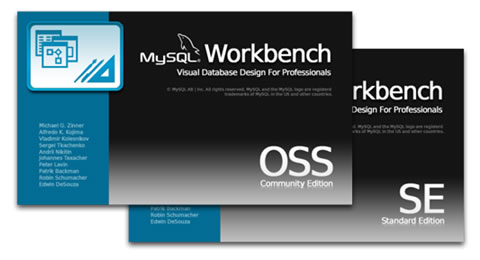
This application is a fully featured visual database design package that includes database design, modeling, creation and maintenance bundled into a single environment for the MySQL database system. The free version is the Community Edition, which is loaded with features that will meet almost all your requirements. If you feel adventurous you could always go for the commercial version (Standard Edition).
- Help and Support
MySQL Workbench Help - Download
Select your download version
HeidiSQL – MySQL made easy (Win, Linux)
Heidi SQL
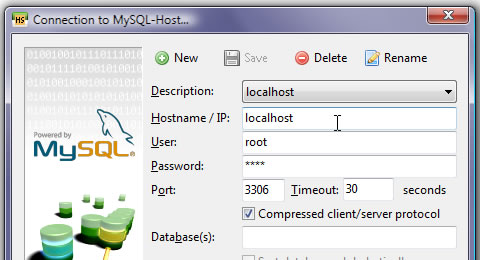
Heidi SQL is lightweight and fast with a flexible interface, it allows you to browse and edit your databases databases, manage tables, view and edit records, manage user-privileges, import data from text files, run SQL queries, synchronize tables between two databases and export selected tables to other databases or SQL scripts, and all this from an intuitive Windows interface.
- Help and Support
Heidi SQL Forums - Download
jHeidi Alpha 4 download
You can also download a small app for the iPhone called jHeidi Mobi, whicht is the only application to offer Oracle and MySQL access in a mobile application. jHeidi Mobi Download Page
Aqua Data Studio (Win, Linux, OS X, Solaris)
Aqua Data Studio
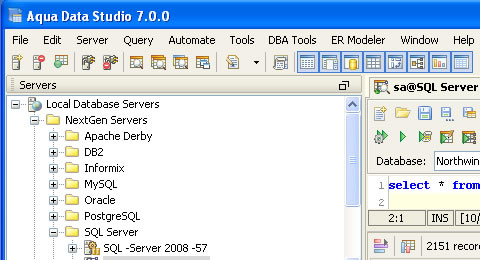
This complete IDE, has four major areas of functionality: Database query and administration tools; a suite of compare tools for databases, source control and file systems; integrated source control client for Subversion (SVN) and CVS; and a powerful database modeler. The Studio has a single consistent interface to all major relational databases, this allows the developer to simultaneously tackle several tasks from within a single application.
- Help and Support
Aqua Data Studio Support - Download
Aqua Data Studio Downloads Page
phpMyAdmin
phpMyAdmin
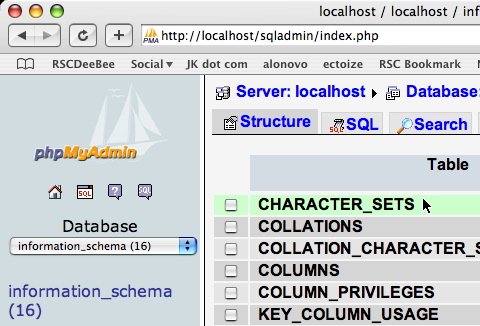
This very popular, feature rich and easy to use free tool, written in PHP (obviusly), has been built to handle the full administration of MySQL. It can create and drop databases, create/drop/alter tables, delete/edit/add fields, execute any SQL statement, manage users and permissions, and manage keys on fields. A nice feature from this legendary tool is that you can download and change the theme (not exactly a monumental feature, but a unique feature), download themes here: phpMyAdmin Themes (remember themes are version specific).
- Help and Support
phpMyAdmin Support - Docs
phpMyAdmin Docs - Download
phpMyAdmin Downloads Page
SQLyog MySQL GUI (Win)
SQLyog
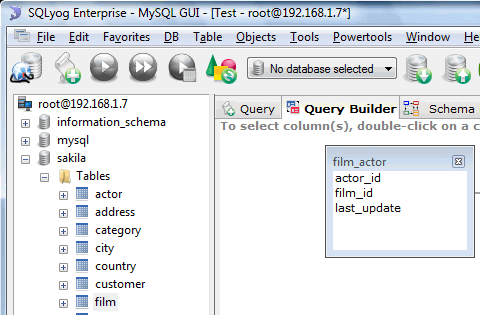
SQLyog is another popular SQL management tool that has a couple of useful features such as visual schema designer, visual query builder, intelligent code completion and a data / structure synchronization. It support HTTP / HTTPs / SSH tunneling and SSL connections. You can also specify a job manager, define a scheduled database backup and use a notification service to be reminded when some jobs are finished. There is a free Community version and a commercial Enterprise edition. You may also use MONyog, a MySQL Monitor and Advisor.
- Help and Support
SQLyog Forum - FAQ
SQLyog FAQ - Download
SQLyog Downloads Page
MySQL-Front (Win)
MYSQL Front
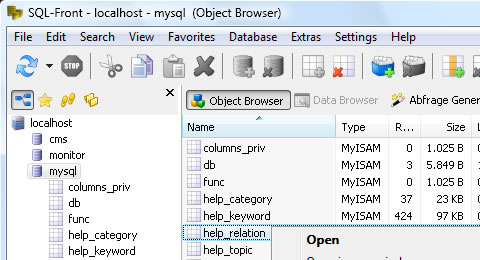
This graphical GUI for the MySQL database, is a “real” application, it can offer a more refined user-interface than is possible with systems built on PHP and HTML. Response is immediate, as there is no delay of reloading HTML-pages. If your provider allows it, MySQL-Front can make direct contact with the database. Otherwise, only one small script needs to be installed on the publishing website. Login information are stored on your hard disk, so you no longer have to log on to different web interfaces.
- Help and Support
MYSQL Front Forum - Download
MYSQL Front Downloads Page
Sequel Pro (Mac OS X)
Sequel Pro
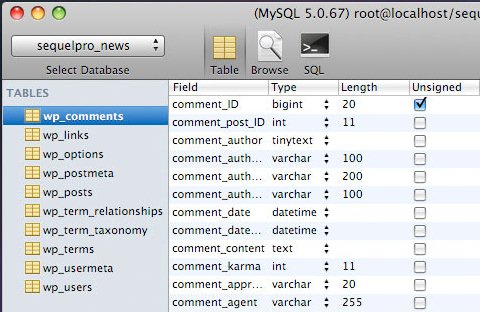
This MAC OSX database management app gives you direct access to your MySQL databases on local and remote servers with support for importing and exporting data from popular files including SQL, CSV and XML. Sequel Pro started as a fork of the open source CocoaMySQL project. It is the self proclaimed “Best Looking MySQL Database Management App for the Mac OS X“, going by the screenshot below they wouldn’t be wrong, it is sleek and cool.
- Help and Support
Sequel Pro Support - Download
Sequel Pro Downloads Page
SQL Buddy (Web-App)
SQL Buddy
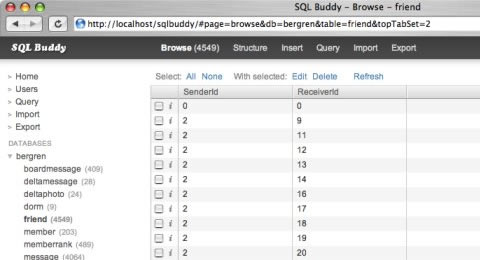
This cool lightweight ajax powered database management tool is amazing. It is very, very easy to install, unzip the folder to your server and thats it. As for upgrading, delete the older version and replace with the new version, simple. Being powered by Ajax, it is browser friendly so you can use normal browsing actions like “bookmark”, “back” and “refresh”. There is also a useful range of keyboard shortcuts, which you can view here: SQL Buddy Keyboard Shortcuts.
- Help and Support
SQL Buddy Support - Download
SQL Buddy Downloads Page
EMS SQL Manager (Win)
EMS SQL Manager
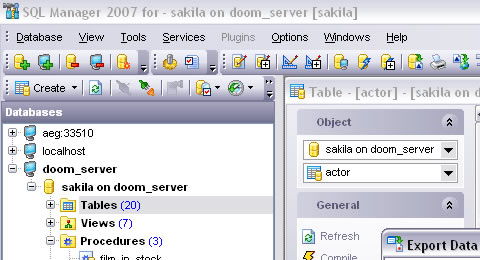
EMS SQL Manager is a fairly high performance tool for database administration and development. Features include MySQL triggers, views, stored procedures and functions, InnoDB foreign keys, it allows you to create/edit all MySQL database objects, design databases visually, run SQL scripts, import and export database data, manage users and their privileges and has many other useful features. There is a commercial version, but download the free version, its fairly powerful and offers plenty of features.
- Help and Support
EMS SQL Manager Support - Download
EMS SQL Manager Downloads Page
Navicat Lite MySQL Admin Tool (Win, OS X, Linux)
Navicat Lite MySQL Admin Tool
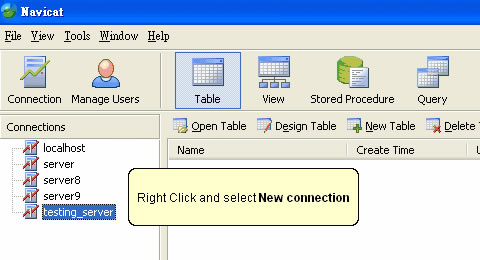
Navicat is a fast, reliable and popular (millions of downloads) Database Administration tool purpose-built for simplifying database management and reducing administrative costs. Designed to meet the needs of database administrators, developers, and small and medium businesses, Navicat is built with an intuitive GUI which lets you create, organize, access and share information in a secure and easy way. Navicat Lite is available as a free download only for non-commercial customers.
- Help and Support
Navicat Support - Download
Navicat Downloads Page
DreamCoder for MySQL (Win)
DreamCoder for MySQL
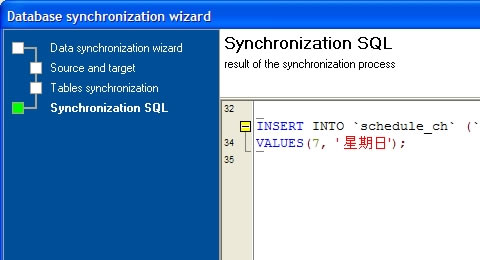
DreamCoder works with all MySQL versions from 3.23 to 6.0 and it supports all MySQL features including tables, views, procedures, functions, triggers, InnoDB Tables, foreign keys , UDFS, BLOB Types, etc. It also includes the most advanced options for data manipulation, build queries visually, execute queries, script execution, reports generation, database monitoring and export and import data to/from most popular file formats. DreamCoder for MySQL is easy to use for the novice MySQL user and is powerful enough for any expert user.
- Help and Support
DreamCoder Support - Download
DreamCoder Downloads Page
Toad MySQL (Win)
Toad MySQL
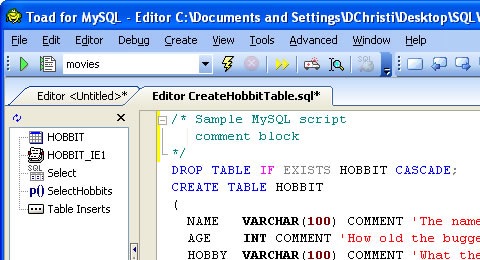
Toad for MySQL is a database development and administration tool that provides productivity features for rapidly creating and executing queries and managing complex database systems. It provides utilities to compare, extract and search for objects, manage projects, import/export data and administer the database. Changes to the interface recently has been the the introduction of the “Tabbed Document Interface”, this means you can view a fully maximized window without the need for you to constantly resize, arrange, or tile the windows.
- Help and Support
Toad MySQL Support - Download
Toad MySQL Downloads Page
DB Tools Manager Professional (Win)
DB Tools Manager Professional
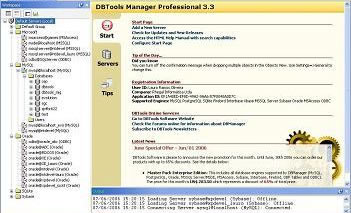
DBManager is a fairly powerful application data management data management. With builtin support for MySQL, PostgreSQL, Interbase/Firebird, SQLite, DBF tables, MSAccess, MSSQL Server, Sybase, Oracle and ODBC database engines, making it one of the most advanced database application. The free edition (Standard Edition) has a minimun set of features that makes it ideal for new database users to perform basic database management, you can use this for non commercial use.
- Help and Support
DB Tools Manager Forum - Download
DB Tools Manager Downloads Page
MyCon – MySQL GUI (Win)
MyCon – MySQL GUI
MyCon is an extremely powerful windows based graphical user interface, MySQL GUI, for administering and working with MySQL server databases. This easy to use MySQL GUI front-end client includes all the functionality and tools you will need to be productive in MySQL as a DBA, developer, manager, report writer or a general end-user.
- Help and Support
MyCon – MySQL GUI Forum - Download
Free MyCon Downloads Page
MyDB Studio (Win)
MyDB Studio
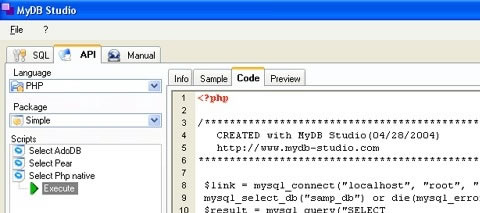
MyDB Studio is a complete collection of powerful tools for MySQL Server administration. MyDB Studio (freeware) is designed for MySQL developers and administrators to rapidly manage, create and execute queries and develop SQL and Php code more efficiently. Keep an eye out for the upcoming Adobe Air version of MyDB Studio, that will be cool.
- Help and Support
MyDB Studio FAQ - Download
MyDB Studio Downloads Page
MySQL Sidu (Win)
MySQL Sidu
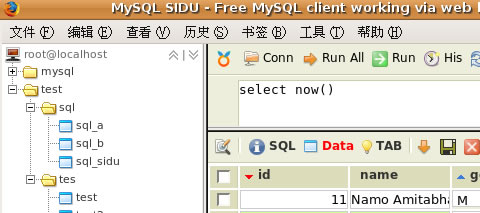
MySQL Sidu is a FREE MySQL client that works via your web browser, it is simple, intuitive and an easy database tool to use. Sidu is not as powerful as other similiar tools but packs enough punch to merit its place in this list, its features may be limited but it does do exactly what the name says (Sidu stands for Select Insert Delete Update).
You can also use a Firefox Extension in conjunction with Sidu that enables you to insert data from text fields & textareas in a webpage. View the details here: Firefox addon for MySQL Sidu.
- Help and Support
MySQL Sidu Support - Download
MySQL Sidu Downloads Page
apache friends – xampp (Win, Mac, Linux, Solaris)
apache friends – xampp
It’s not easy to install an Apache web server and it gets harder if you want to add MySQL, PHP and Perl. XAMPP is an easy to install Apache distribution containing MySQL, PHP and Perl. It is really very easy to install and to use – just download, extract and start.
- Help and Support
xampp Support - Download
xampp Downloads Page
Further MySQL Links
Finally, here are some further general references to MySQL and MySQL-related resources.
What MySQL Admin and Development Tool Do You Use?
Related posts
You may be interested in the following related posts:

Paul Andrew is a freelance Web designer. He is chief admin for Speckyboy - Design Magazine, a Web design, Web development and graphic design resource blog.
- 112 Comments
- 1
- 2March 25th, 2009 4:41 am
YourSQL (Mac) is a handy little freeware program that does some nice things. Easy to use, Mac-oriented interface. http://yoursql.ludit.it/
- 3March 25th, 2009 4:45 am
Mysql Workbench is worthless unless you buy it. Can’t even create a database schema to export.
- 4March 25th, 2009 4:45 am
You’ve got SQL Buddy listed as (WIN) … its a web app…
- 5March 25th, 2009 4:46 am
Awesome. I use phpMyAdmin, which is good and all, but wanted a standalone app. Something similar to MS-SQL Server 2005 Management Studio. And this was just it.
- 7March 25th, 2009 4:51 am
The DB plugin in Aptana Studio is also working surprisingly well for existing DBs/tables.
- 8March 25th, 2009 4:54 am
When MySQL-Front went silent a couple of years ago, the developer pulled it for personal reasons, I came across a MySQL GUI client tool called SQLyog:
“SQLyog MySQL GUI is the most powerful MySQL manager and admin tool, combining the features of MySQL Query Browser, Administrator, phpMyAdmin and various other MySQL Front Ends and MySQL clients in a single intuitive interface. “
A strange name, still don’t know what it means, but the tool has been great for the past 4 years. They also have a MySQL Monitor and Advisor tool called MONyog:
“MONyog MySQL Monitor and Advisor is a “MySQL DBA in a box” that helps MySQL DBAs manage more MySQL servers, tune their current MySQL servers and fix problems with their MySQL database applications before they can become serious problems.”
- 9March 25th, 2009 4:55 am
Some very good resources, thanks for the article.
Another good one for Mac OSX users is MAMP for setting up a local server environment for testing MySQL and PHP apps.
- 10March 25th, 2009 4:59 am
Mysql Query Browser? Kit download with MySQL Tools
- 11March 25th, 2009 5:02 am
Great help. Thanks. I’m looking for some good mysql client and this is such a good article for that.
- 12March 25th, 2009 5:04 am
@Timothy
The MySQL Administration Tool kit from Mysql works great. - 13March 25th, 2009 5:06 am
Mysql sidu works on any apache + php + mysql
Then works on linux, mac, freebsd, win. - 14March 25th, 2009 5:12 am
Yes, definitely a killer article ! Quite a few apps I didn’t know !
One rather unpleasant detail is that MySQL Workbench is available only for Mac OSX Leopard, while I have Tiger and I am stuck with MySQL Query Browser which is not really polished and not to mention crashes rather often …
- 15March 25th, 2009 5:14 am
Two things.
You left off the default tools found on the MySQL website (which is probably for the best because they’re worthless).
I greatly appreciate articles like this, but if you’re just telling us about them it doesn’t help a ton. How about some sort of rating system? At least a thumbs up thumbs down sort of thing? Also, some sort of indicator that an app is free, shareware, paid in full would be helpful. You did indicate that some of the apps are free. Can I assume that by your omission, the others are paid?
Thanks again.
- 16March 25th, 2009 5:14 am
I am surprised that MySQL Control Center was not discussed. For whatever reason, I can’t get phpMyAdmin up and configured on my system, and when someone suggested MySQLCC, I was able to get it up and running in no time.
It’s really worth a look.
- 17March 25th, 2009 5:15 am
I’m using Navicat Mysql. Not lite.
- 18March 25th, 2009 5:19 am
Good article SM people!
I think SQLyog (free & commercial versions) are excellent alternatives not mentioned in this article.
You can get it here: . - 19March 25th, 2009 5:27 am
MySQL Workbench seems great so far but haven’t had time to play with it much to have a worthwhile opinion on it. Part of the reason is that it did not want to install on 64bit Ubuntu so I had to install it onto the windows VM. Also, my db-fu isn’t great so not sure how valuable my input would be. I didn’t know Xampp has a tool, going to have to check that out. Thanks for a list of alternatives.
- 21March 25th, 2009 5:41 am
HeidiSQL has a wrong download link, it points to the jHeidi (Java) version. Correct link would be: http://www.heidisql.com/download.php . Thanks for fixing that.
- 22March 25th, 2009 5:45 am
Good list, but I think maybe you’ve got too many things on it. Why not try out all the tools and pick and handful of your favourite and explain why they’re good, it would be a lot more informative.
For example, MySQL Query Browser is available on Win/Mac/Linux but has different bugs in each version. The windows version has issues showing the table info for tables with title-case names, the linux version doesn’t let you delete multiple rows through the UI and the mac version is just unpolished and fiddly to use.
- 23March 25th, 2009 5:47 am
I’ve been using an older version of dbForge Studio for MySQL by Devart (was Corelabs). It’s very good indeed. I prefered it over some of the products mentioned above.
http://www.devart.com/dbforge/mysql/studio/
I also use Mysql Workbench to generate my schema via the export function.
- 24March 25th, 2009 6:01 am
I find Querious (http://www.araelium.com/querious/) for the Mac pretty good, don’t know if its that much betetr than Sequel Pro though, and its $25.
- 25March 25th, 2009 6:23 am
If you develop on OS X then this is the best tool I’ve found SQLEditor Database Design for Mac OS X. It’s a nice OS X Cocoa interface if you’re tired of the page refresh madness that is phpMyAdmin and other web based tools.
- 26March 25th, 2009 6:29 am
The stock applications are nice but are very limited in functionality.
I have since purchased Navicat Standard and have not looked back. Primary reason for this move is dealing with legacy databases and migration/enhancements. - 27March 25th, 2009 6:40 am
great article thanks :) just installed HeidiSQL and *loving* it. Have used phpmyadmin for years but I just may switch to a thicker, faster client that is HeidiSQL :)
- 28March 25th, 2009 7:11 am
Great article!
- 29March 25th, 2009 7:38 am
Is phpMyAdmin the most installed MySQL Admin Tool? I guess it is. Most of the hosts I know have phpMyAdmin installed on their servers.
- 30March 25th, 2009 7:46 am
Hi, nice article.
I would like to know what is the best (and simplest if possible) tool to [[ graphically ]] show database schemas in an existing mysql database, links and cardinalities between tables, primary keys, etc…
Any idea in the above list or another tools?Ex:
| Table 1 | 0,1 ————> 1,n | Table 2 |
- 31March 25th, 2009 7:54 am
My personal and favourite mysql query browser
- 32March 25th, 2009 8:00 am
PhpMyAdmin & Xampp FTW!
- 33March 25th, 2009 8:13 am
I build something similar to PhpMyAdmin it is called MySql Lite Administrator MySql Lite Administrator
- 34March 25th, 2009 8:18 am
It seems you’re forgeting MicroOLAP. It’s not free (and not cheap at all), but I think it worth the money! …and it’s Windows only, but I’m ok with that! >:D
- 35
- 36March 25th, 2009 8:56 am
I was a long-time MySQL-Front user, but when I found SQLyog, I simply could not go back. Highly recommended, and worth buying a license!
- 37March 25th, 2009 8:57 am
Yes, I know this site is targeted as “designers”, but calling MySQL the best DBMS is just plain bullshit. There are many attributes that could be used to compare DBMS and *try* to chose the “best” one, although this usually works for a certain target environment, and that’s nothing bad. Also, some people with actual expertise in that area abstain from calling MySQL a RDBMS at all — it’s more or less a SQL wrapper for the file system with some features patched on that other systems had production-ready years before.
- 38March 25th, 2009 9:14 am
Good list but useless without some kind of conclusion about which is the best of the bunch. I could have gotten this list from google.
- 39March 25th, 2009 9:26 am
Wow! That’s a pretty exhaustive list. My hosting server provides me with MyPHPAdmin whereas I’m using SQLite.
- 40March 25th, 2009 9:32 am
I would say Querious from Araelium is worth looking at. The UI is “the best” (much better than even Sequel Pro), and includes a really useful csv/tab file viewer/editor. It’s still in beta (but it’s very stable), and every release adds more refinement and useful features. It’s not yet the “do everything” tool that Navicat et al are, but for creating/editing tables, working with raw data, and managing reusable queries it’s a very fluid tool.
- 41March 25th, 2009 9:34 am
True. MyPHPadmin is quite user friendly. But the others seem to be very good as well. Thanks for this useful post. FIJ
- 42March 25th, 2009 10:05 am
Ahem, mysql isn’t necessarily the best open source db platform. Lay off the hyperbole.
- 43March 25th, 2009 10:08 am
I use AppServ about five years, and I never had any problems.
AppServ install apache and PhpMyAdmin in 2 minutes btw. - 44March 25th, 2009 10:12 am
I agree with the other comments that you should do a ranking system. I think you could rank them on the following:
- Ease of use (Graphically)
- License type (Open Source = 5, highest $ = 1)
- Moving data between databases on same server / and different servers
- Finding data when you don’t know what you are looking for (like navicat you just double click the table it opens with the data and you can sort from there, no query needed)
- Updating information ease of use
- Multiple instances running (Yes = 5, No = 1)
- Connection types allowed (SSH, SSL, ect)Also I would break up this article to be Web Only, and Application only. Since phpMyAdmin a lot of people use because it’s on the server. Where what if you want to use something not on the server?
- 45March 25th, 2009 10:26 am
Navicat is by far the best of the lot. I run it on Mac and in Parallels on Windows. Only advantage for windows is it allows for quick no hassle import of Access to MySql. It costs $$ but the ability to import Access and Excel is worth the price of admission, to me anyway.
- 46March 25th, 2009 10:39 am
For Mac OSX, Querious +1, better than Sequel Pro, still in beta, but developers very active. Product has great potential, and it very, very usable in the beta form.
- 47March 25th, 2009 10:45 am
google dbdesigner4
it is the code mysql workbench is based on and in the old version which you can still download there are more features than in the mysqlworkbench oss. Keep in mind that it is old though so some newer mysql stuff may not work, but I still prefer it for quick ERD
- 48March 25th, 2009 11:08 am
Querious!!!!!
- 49March 25th, 2009 11:15 am
This is so funny, you guys seem to always know what I’m doing and working on right now and what I have to learn about yet!
- 50March 25th, 2009 12:01 pm
If you liked Toad for MySQL then you should also check out Spotlight on MySQL from Quest. It is a freeware product to make problem diagnosis much easier. You can get the information and download link here:
http://www.quest.com/spotlight-on-mysql/
Some of Quest’s other products for MySQL are also available in freeware form. You can find a list of products here:
- 51March 25th, 2009 12:02 pm
Nice article
i love this poll, very nice:) - 52March 25th, 2009 12:35 pm
Useless.
No Conclusive remark!
At the end, we stay where we are!
- 53March 25th, 2009 1:00 pm
I use the MySQL Gui Tools, Workbench SE and Query Analyzer to manage our databases. MySQL is Great!
- 54March 25th, 2009 1:04 pm
Great list! I started using navicat for mysql (not the lite version) about 3 months ago and it has changed my life. I still have phpMyAdmin installed in case I need to work on the databases while not at my normal mac, but for everyday use navicat does it for me!
- 55March 25th, 2009 1:30 pm
You totally forgot about MySQLAdmin!
- 56March 25th, 2009 1:31 pm
I’m surprised MySQL Maestro wasn’t on this list. Pretty nice tool.
- 57March 25th, 2009 4:34 pm
Very nice ressource. As silly as it seems, I actually never had a look to other solutions than phpMyAdmin, since all my hosts have it installed by default. I tried out a few apps listed here and I’ll definitely keep HeidiSQL installed. I’m very excited about it, and can’t wait to show it to my colleagues. It looks very nice, stable, and takes the pain away from connecting to my (many) MySQL accounts. I have the feeling that this one is above the others, and best of all absolutely FREE (well its not cause you pay your internet connexion, at least in France we do).
MySQL Front seemed very promising, but it is way too buggy on my XP, and made me feel nervous about my systems’ health. Bad!
Thanks a lot for this article. Indeed, it could list some more stuff, you could have tested all those apps, and even sent a Starbucks cupper to the 50 first commentors… As you’ve guessed, I’ve been walking through the comments, and I think some readers expect too much sometimes. Personnally I’m just happy with that list :)
The only thing I regret about Smashing Magazine is that I can’t receive articles via mail, which I understand in terms of monetization, but you guys write so much, it makes me want to check your website too many times a day!
- 58March 25th, 2009 5:04 pm
Great article but ..
I am nit-picking at this “The most popular and best open source database is MySQL”.Most popular – yes, but not best.
I prefer PostgreSQL (power, speed, etc) - 59March 25th, 2009 5:25 pm
You guys missed official Mysql Query Browser and powerful Administration toolkit from Mysql
- 60March 25th, 2009 5:32 pm
Great article, I love Sequel Pro! I use MAMP for local development on my Mac, and thusly use phpMyAdmin on occasion.
- 61March 25th, 2009 10:32 pm
SQLyog is by far the best if you are running Windows
- 62March 25th, 2009 10:43 pm
Nice Article!
I used Navicat, but not the Lite Version, they have a commercial version which contains more features like data/structure sync, import/export, report building, scheduler, etc.
But if you are just looking for normal data editing features, the Lite version will do, and it’s free. - 63March 26th, 2009 12:20 am
Well some do and some dont.
jHeidi (aka j/HeidiSQL) is OSX, Lin and Win and also connects you to ORACLE databases in the same app even on the iphone.
No other app on this list does that.
- 64March 26th, 2009 1:07 am
I’ve always use phpMyAdmin. I may give some of the others mentioned in this article a go. I particularly like the look of MySQL-Front.
- 65March 26th, 2009 1:47 am
I am very pleased with Navicat!
I was using free lite before to replace my phpmyadmin and sqlyog. Finally, I bought its Win & Mac versions. I love its excellent performance when handling large data import export or transfer. My project was using Oracle but have to convert to Mysql. I tried all the GUI with our DBA. Navicat is really impressive and worth. Sqlyog is nice and very cheap too but I rather paid little more for the best. - 66March 26th, 2009 1:49 am
I am highly recommend Navicat , fast and stable.
and he provides fully support, especially online live support! its really helpful. - 67March 26th, 2009 1:55 am
I use phpMyAdmin for years like everybody else but it’s a mess when you need to export/import large data even on a local test server. So I wanted to try other tools, great article then :)
But it’s true that a descriptive list like that is a bit overwhelming … I read that human can’t decide with more than 7 choices, especially with no pros/cons.
I’m gonna try SQLyog et HeidiSql. Thanks SM.
- 68March 26th, 2009 2:54 am
+1 of SQLYog. I also use phpMyAdmin when appropriate.
Navicat comes to a distant 2nd. The advantage with Navicat is that it is platform independent.
The problem with Navicat is that it is very buggy and crashes very often. I dumped it when it crashed with unsaved queries! - 69March 26th, 2009 4:05 am
Interesting, but would be much more useful if it had a feature comparison table. Realistically I’m not going to go scouring round all these apps examining their documentation to see which does what.
- 70March 26th, 2009 6:18 am
A couple people have mentioned the official MySQL GUI tools. I find they work great, and not only are they are already in the Ubuntu repo’s for an easy installation, but they work on Win and OS X as well. Oh…yeah…. they are free.
MySQL Administrator
MySQL Query Browser - 71
- 72March 26th, 2009 7:16 am
Many Thanks.
My all time favorite is Navicat. - 73March 26th, 2009 7:58 am
Definitely Navicat! It rocks! If you’re serious about MySQL and you have money to spend, this is one product worth the cost. It allows me to design, edit, and update all aspects of a MySQL DBs for website. Don’t even need documents to know how it works, just using the buttons and menus. This really user friendly and support is great. Thanks.
- 74March 26th, 2009 8:23 am
I just tired Navicat for MySQL and purchased it. It does cost some money but you can try it for free to see if you like it (it also supports PostgreSQL and Oracle). I personally think it is the cat’s pajamas.
I used to use free MySQL admin tool such as phpmyadmin and sqlyog but both are very buggy especially when handling large amount of data.
- 75March 26th, 2009 12:01 pm
Here’s my vote for the paid version of Navicat – as others, both on the Mac native and in either Parallels or VMware’s fusion–just the best, particularly for whittling your queries down to the barest bones to make it as fast as possible, the editing, the uploading from other files…hands down the winner.
- 76March 26th, 2009 12:49 pm
Good article.
Have to add my voice of approval for SQLyog, absolutely brilliant piece of software.
Not much of a fan of phpMyAdmin anymore though, far too limiting.
- 77March 26th, 2009 3:19 pm
Well fellas, lots of gossip going on..first of all i appreciate the article..
My vote goes for SQLyog as it is the best tool i have found and the only issue with it is it wont help if i am on mac os. But some body suggested me the parallels..though it is a bit cumbersome, works fine for me. For windows no other can beat SQLyog also for Linux, Wine Windows emulator will help to work.Just have a check on latest release SQLyog 8.04 and many of you will start following me.
- 78March 26th, 2009 6:35 pm
Using heidy sql, after trying alot of free software i found this the more complete (not web-based) solution for mysql database creation.
- 79March 26th, 2009 7:54 pm
well incase of web based tool I simply impressed with phpMyAdmin.
Your articels help me to get exposure from desktop based tools.
Thanks!
- 80
- 81March 27th, 2009 8:46 am
I concur with the comments on Navicat. It looks very promising initially but crashes very often. I would go for Heidisql or others.
- 82March 27th, 2009 9:31 am
Dbvis ( dbvis ) should be added to your list.
Works great with MySQL (and anything else that provides a JDBC driver). Versions available for Mac/Windows/Linux.
Being able to work on Oracle, MySQL and sqlite tables, concurrently, all within one application instance is a huge time-saver for me.
- 83
- 84March 28th, 2009 5:24 pm
I got navicat, because I was building a database to manage wide range of data for a research project. I had about 10 different excel spreadsheets that I was tracking various bits of data, which was confusing enough, but I need to get the information out to more people. So I decided to convert to MySQL database, and Navicat really helped easily get my excel data into mysql, and Navicat makes it easy to maintain using a GUI, rather than the line commands, or tedium of phpMyAdmin for multiple edits.
No offense, I think Navicat is much better than Heidisql or Sqlyog. They are nice and very cheap. However, Sqlyog or Heidisql are very unstable especially I tried them to handle large data transfer and they crashed. We did different tests and Navicat’s speed is really fast!!
My favourite features of Navicat are Backup, import/export, basic database functionality, including browsing tables, connections management, toolbar, subdivision of functions, user management, queries, performance. I’d like to see being able to search backwards in the text of query results.
Didn’t really need the documentation. Navicat was so well designed and user-friendly that it’s self-explained. Thanks.
- 85March 29th, 2009 5:15 am
All of the tools you need for MySQL in one easy, intuitive front end. Navicat is a *comprehensive suite* of tools for MySQL- not a piece meal, patchwork collections of utilities. It is well thought out and allows the developer or user to concentrate on the data rater than the database.
If you work with MySQL on anything more than a casual basis, you will quickly find that Navicat is worth the money in saved aggravation alone!
- 86March 29th, 2009 5:57 am
Wow, these Navicat guys have started spamming again. Take their comments with a pinch of salt. These guys are so lazy that they won’t even change their names while spamming!
Check this:
http://www.orafaq.com/forum/index.php?t=rview&th=123464
http://forums.tutorialized.com/oracle-112/is-navicat-oracle-database-admin-tool-a-oracle-product-82825.htmlThe last comment as “Klin” is from Ken Lin – the product manager of Navicat. He is a big spammer himself. Find out yourself: http://www.google.com/search?q=ken+lin+navicat
In a nutshell, don’t believe these comments. Download the trial of each software in the list and judge yourself. Just my 2 cents.
- 87March 29th, 2009 6:53 am
Also Oracle PL/SQL Developer Oracle PL/SQL Developer can be turned to MySQL RDBMS. It offers a great variety of options and tools to speed up maintainance and to help developers during the the development of their DB.
Instead, if you’re looking for a useful tool for designing or re-desiging DBs, you should look for DB Designer, in its fork version from SourceForge.net.
Very nice article. :)
- 88March 30th, 2009 8:21 am
SQLyog is an easy to use GUI tool that has helped our team to work smarter and deliver the project faster. Its features and functions can be learned quickly. My teammates highly recommended this tool. I tried many software. All other MySQL GUIs are not stable and will crash sometimes. Sqlyog will not crash. I would persuade my boss to get a copy.
- 89March 30th, 2009 8:26 am
I am very happy that I can find Sqlyog. It saved my time and my life is easier. It’s very cheap product. I saved lots of money.
I also tried 2 more tools, EMS and HeidiSQL. I think EMS and HeidiSQL are nice too but they are quite unstable.
- 90March 30th, 2009 8:14 pm
SQLYog is the way to go. It’s the best MySQL GUI out there. It can even run well on a Mac if you have Crossover or Wine.
- 91March 30th, 2009 11:25 pm
im using “Navicat Lite MySQL Admin Tool” and its perfect tool for mysql.
- 92March 31st, 2009 6:59 am
Yes, SQLyog is very cheap and I was attracted by the very cheap price of SQLyog. However, it crashed few times when transferred large database between my development DB and my production DB. I lost some important data of daily sales. Anyway, I will keep using its free version. Also, it’s terrible suggestion for using SQLyog on Mac platform. I will never do that on my Mac!! Sorry.
- 93April 1st, 2009 5:22 am
No mention of power*architect? Granted, I have only used it a few times, but it seemed quite exciting (perhaps a bit heavy). Plus, it’s free and open-source. Always a bonus in my view. More at http://www.sqlpower.ca/page/architect
Akiva Levy
- 94April 1st, 2009 6:34 am
The cool thing about Navicat is that it also supports other databases like Oracle and PostgreSQL
- 95April 1st, 2009 8:47 am
SQLyog is the best of the best. It’s much better than EMS, Navicat, jHeidi or Toad or any other MySQL GUI. I downloaded this and entered my database information, it connected so quickly that I actually thought it had silently failed, but it hadn’t – it just worked perfectly straight away. It’s best of the best. Thanks
- 96April 1st, 2009 11:27 am
Nice article! I would like to see more of this ;)
I’m using ModelRight for designing, deploying resp. reverse engineering MySQL databases. I was wandering not seeing it in this article. They even have a free community edition. Great tool! Don’t want to miss it. - 97April 14th, 2009 12:01 pm
i have a big wiki website in the arabic internet
all my work in xampp
it’s coolmy website: w3arab
- 98April 20th, 2009 11:33 am
I would like to recommend 1 more tool :
MySQL DB compare tool – http://nobhillsoft.com/NHDBCompare.aspx
(The tools here are good for SQL or MySQL) - 99April 24th, 2009 5:03 am
This tool is out in this list.
TOra (like TOAD) but with support in Linux (without wine)
http://tora.sourceforge.net/ - 100April 24th, 2009 9:45 pm
Jing Dan Yo!
Amazing - 101April 28th, 2009 2:50 am
@John-Garrison there’s no deny that navicat-the-spammer has 8% market share as revealed in the poll result…. LOL
what can we really believe these days?
- 102May 2nd, 2009 9:18 am
I was searching for a list of all MySql Tools available and this article is great!!!
I might also suggest a free, open source web based MySql Manager.
It’s called AeroSQL.There is a demo, video and screenshots.
AeroSQL is a free web based tool for managing MySql servers written in PHP. The key feature of the product is an intuitive management of the database content. The result of SELECTs is displayed in a grid as in traditional desktop applications.
Regards.
- 103May 7th, 2009 1:40 am
You can also try SiSense Prism for dashboards and reports on MySQL
- 104May 18th, 2009 1:59 pm
Anybody else use Oracle’s SQL Developer for accessing MySql (and plenty of other DBMS’, including Oracle, of course)?
- 105June 26th, 2009 6:19 am
I agree that MySQL is popular, but not necessarily the best. A majority of the tools you list offer Windows versions. If you’re running on a Windows box anyway, why not just use SQL Server? There’s a free 2008 version with plenty of admin tools included. I don’t have to hunt around to figure out what works when it’s already integrated (SSMS, Visual Studio, etc.)
- 106July 26th, 2009 9:08 am
I’ve used Navicat (not lite) on Windows for a while and have been pleased. After going through the comments and seeing the obvious self promotion, I’ve decided I need to investigate these other tools and see what is best.
I’m trying to move to using my MacBook Pro more and came across this article to find out what tools are out there.
I’m hoping that Sequel Pro will meet my needs. I did not see many other OS X apps that do the same. If there are others that are similar to Navicat and Sequel Pro, let me know. I’d love to try them out.
- 107July 30th, 2009 10:34 pm
Hello,
Its a nice article. Is there any online query builder tool available for mysql where I can directly generate dynamic queries? Thanks. - 108August 5th, 2009 10:21 pm
Navicat and phpmyadmin are very fine.
Thanking you,
B.V.Krishna Kumar. - 109August 6th, 2009 8:09 pm
About MySQL Workbench:
- Team lead by Mike Zinner (who previoulsy created DBDesigner)
- Developed in C++
- Native for Mac OS, Linux, WindowsWB 5.1:
- Focused on Data Modeling
- Replaced DBDesignerWB 5.2:
- Focused on Query (replace MySQL Query Browser)
- Focused on Admin (replace MySQL Administrator)Discussions:
http://forums.mysql.com/index.php?151QuickTour of WB 5.2:
http://dev.mysql.com/workbench/?page_id=236- MySQL Workbench
- 110September 5th, 2009 5:07 pm
I used to use MySQL GUI tools for windows but since shifting to development on my mac I found the tools to be somewhat poor crashing ever 5 minutes numerous bug requests over the past year have all ended with Mac is not supported so I have now switched to Sequel Pro Awesome and pretty, I even donated!!!
- 111September 10th, 2009 11:50 am
All about HeidiSQL
http://www.gplpedia.com/Softwares/about/HeidiSQL.html
Visit http://www.gplpedia.com for all open source related work
- 112October 27th, 2009 1:55 am
Don’t forget “Database Workbench”, a Pro edition is available and a FREE Lite Edition for MySQL as well.
- 00
There are no trackbacks at this time. If you are interested in leaving a trackback, please use this URL.
Leave a Comment
Make sure you enter the * required information where indicated. Please also rate the article as it will help us decide future content and posts. Comments are moderated – and rel="nofollow" is in use. Please no link dropping, no keywords or domains as names; do not spam, and do not advertise!
Interact
Popular
- 100 Wordpress Themes
- Photoshop Tutorials
- Fantastic Wallpapers
- 40+ Excellent Freefonts
- Dual-Screen Wallpapers
- Wordpress Themes for 2009
- Illustrator Tutorials
- Incredible Free Icon Sets
- High-Quality Free Fonts
- 30 Scripts For Galleries
- Photoshop Text Effects
- Useful Icon Sets
- Web Design Trends
- iPhone Wallpapers
- Before Launching a Website
- CSS Layouts And Templates
- Photoshop Actions
- Stunning Pictures and Photos
- Fantastic HDR Pictures
- Logo Design Tutorials
- Free Design Templates
- 10 Mistakes In Logo Design
- Photoshop Custom Shapes
- 40 Creative Design Layouts
- 8 Layout Solutions
- 53 CSS Techniques
- Photography Techniques
- Black & White Photography
- Styling Design Elements
- CSS-Based Forms
- 50 jQuery Techniques
- 50 Portfolio Websites
- 50 CSS Techniques
- Creative Logo Designs
- Desktop Wallpapers
- 25 Open Source Mac Apps
- 50 Free Icon Sets
- The Big Showcase Of Online T-Shirt Stores - http://bit.ly/5Tq8uA
- @ilmv oh ok then ;)
- @ilmv no, the SM Book will not be out of date :) We made sure it contains universal design, usability and marketing principles.
- Apple ad bombing Windows 7 on Google - http://bit.ly/28ctPq
- Atatonic - a fresh CSS framework - http://bit.ly/4oOV2w (via @umutm)
- @HrvojeKC yes, that's an interesting idea. Maybe when the waiting is over, we'll write a detailed post about it.


Another great article by SM. Good round up. I would love to know what other people use for MySQL tool. A poll for this would have been nice :-)