Typography Keyboard Layout: Download Now!

Advertisement

In January we commissioned Ilya Birman, a Russian designer with passion for typography, to adapt his typography keyboard layout (which has become a common typographer’s tool in Russia) to create a version for English-speaking designers, artists and, of course, typographers across the globe.

The main idea was to provide the web design community with a handy tool that would let designers enter characters that are usually unavailable on a keyboard easier and quicker. If you already tried to enter such words like naïve or résumé or used special symbols (trademark symbol ™) or pay attention to punctuation (en-dash, em-dash, hyphen etc.) and diacritics (accents, cedillas, etc.), you probably know what we mean.

We asked our Twitter followers to participate in our beta-testing. And after we received a lot of positive feedback, we implemented some of your suggestions in the final version.
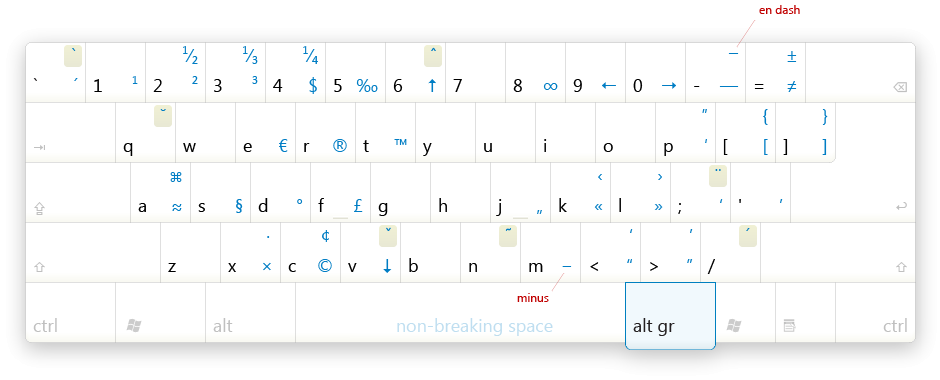
In this post we release the Typography Keyboard Layout – a simple, yet useful tool that lets you enter characters that are usually unavailable on a keyboard with ease. Hopefully it will help you to achieve better typography in your designs.

Typography Keyboard Layout (Win / Mac)

Good designers, undoubtedly, know that quotation marks look like “this” and not like "this." The latter are typewriter legacy and today are to be used solely in programming. Good designers also know, that dash is not the same as hyphen.

The most common use for hyphens in English is (surprisingly enough) hyphenation; dashes are used in ranges (2006–2009) or — and this is an example — as an alternative to parentheses. Good designers never use letter ‘x’ instead of multiplication sign in 1920×1440, and they never put (c) instead of © under their work. Oh, and they also do good designs.

So, now life is going to be a little bit easier. No more will you need to open Character Palette or try to recover that Alt+0163 combination from your memory.

Meet Typography Layout for Mac and Windows

This thing is a regular keyboard layout, except that with Alt key on Mac or Alt Gr key on Windows it lets you type all these nice characters seamlessly.

Just type Alt+T, and you get a ™. Everyday things are apostrophe (Alt + '), quotes (Alt + < >), em-dash (Alt + -) and en-dash (Alt + Shift + -). Other stuff is intended to be not so hard to remember if you use it. For example, Alt+v is for ↓ , since the letter ‘v’ looks somewhat like arrow pointing down. Alt+A is ≈ for approximately, Alt+S is § for section. Guess why Alt+8 is ∞ and Alt+R is ®. So, you get the idea.

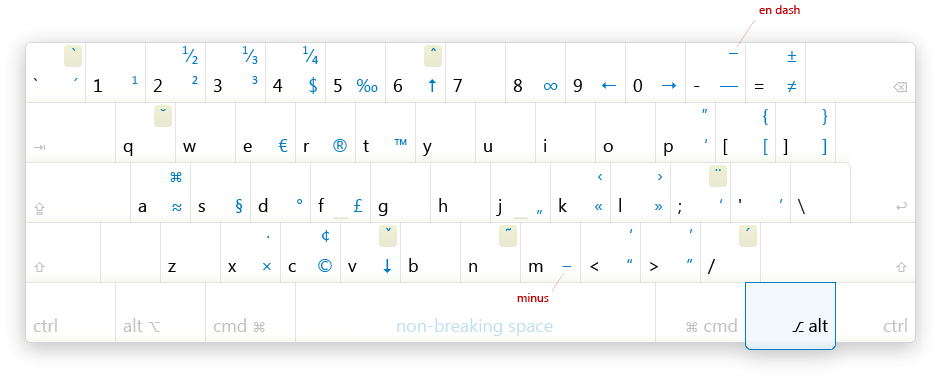
The layout also supports many kinds of diacritics, so you can type words like naïve or café and have fun. On the picture above (see full image for Mac or full image for Windows) the diacritical keys are printed on a beige background, e.g. acute is on / and diaeresis is on : .

To type character é, you first press Alt + Shift + / (this kind of means “enter acute mode”), then press e. To type ï, press Alt + Shift + : , then press i. Not every character has a version with every possible accent. For example, there is no letter v with circumflex. In case you want to use such a character, you need to use combining diacritics. Press v and then Alt + Shift + ^ twice. You can hold Alt + Shift and double press ^ .

The best way to understand how it works is to play with it. But please note that many applications do not support combining diacritics, so whether you can use them or not is more or less question of your luck :-)

Get it for free!

Download and see install instructions.

Bugs, ideas or suggestions?

Please report bugs and fixes directly to Ilya Birman and please leave your comments, ideas and suggestions for further improvements in the comments to this post.

We love high-quality content and we care about little details. We believe that good content and design are crafts worth sharpening. Located in the lovely city of Freiburg, Germany. Mostly Vitaly (vf), Iris (il) and Sven (sl).

  1. 101

    akram_rock90

    April 10th, 2009 5:10 am

    thank you very much ……………it’s great effort

    0
  2. 102

    lenny

    April 11th, 2009 8:48 pm
    0
  3. 103

    Ilya Birman

    April 13th, 2009 1:05 pm

    Aleksandar, it must be available on Alt+/. I don’t specify it on a picture, since I don’t recommend using it.

    0
  4. 104

    Blude

    April 15th, 2009 4:49 am

    Indoubtly a great tool for designers et al! I’m looking forward for the source to make a Brazilian version of it.

    0
  5. 105

    Kyle Curtis

    April 16th, 2009 10:34 am

    would it be possible to get a copy of the Illustrator file in a legacy CS or CS2 format?

    0
  6. 106

    Elliot

    April 19th, 2009 5:59 am

    Accents are not available at Alt+Shift+/ followed by the character, at least to me. Anybody got them working?

    0
  7. 107

    Drew Gallagher

    May 9th, 2009 3:58 pm

    I would love to see this for Linux.

    0
  8. 108

    nooxie

    May 17th, 2009 7:22 pm

    I can’t seem to get it working on my laptop. I’m using macbook unibody, I tried to write something on TextWrangler, but the tool still not override mac default shortcut. I know some of you said that mac already provide us with simple shortcuts, but I’m just curious to try this tool. Anyone can help..? thanks in advance..!

    0
  9. 109

    Daryn

    June 5th, 2009 11:07 am

    Awesome and extremely useful. Thanks for all the amazing free stuff!!

    0
  10. 110

    Filip

    June 14th, 2009 10:34 am

    I am using a 2007 MacBook Pro with OS X 10.5.7 and the keyboard layout does not work.
    I also tried changing the active layout to your layout but then no keys at all work.

    0
  11. 111

    w.n.

    August 1st, 2009 8:34 pm

    Well…on a Mac, holding down the alt/option key and hitting nearly any key on the keyboard supplies you with a few of these characters already.

    Now… the diacritics on the other hand could be quite useful.

    0
  12. 112

    Vlad

    October 31st, 2009 1:16 am

    Works fine on Windows 7 Pro and Windows 7 Ultimate release from 22nd October. Both English and Russian keyboard layout.
    Huge Thank You for your work! Also keyboard is very intuitive and easy to use, and get used to, but something like “Widget” with a little graphic keyboard layout with buttons would make it perfect.

    0
  13. 113

    IntoniEnquiny

    November 19th, 2009 8:30 pm

    What’s up all, I’m redone to the forum and just wanted to translate hey.

    0
  14. 114

    Montana Flynn

    November 25th, 2009 5:27 pm

    This tool looks amazing, thanks Smashing Mag!

    0
  15. 115

    Amy

    November 25th, 2009 10:11 pm

    To clarify this passage: “The most common use for hyphens in English is (surprisingly enough) hyphenation; dashes are used in ranges (2006–2009) or — and this is an example — as an alternative to parentheses.”

    Hyphens are used only for hyphenation. For ranges, the en dash is used, not a hyphen: 2006–2009.

    And an em dash is used for an alternative to parentheses — this is an example.

    On the Mac, an en dash is option-dash, and an em dash is option-shift-dash.

    Designers often track out some space to either side of the en and em dash for visual appeal, depending on the font.

    0
  16. 116

    insiniadymn

    November 29th, 2009 3:56 am

    Hey pepole I would like to pan off up hello i like assemble latest pepole, and allocate bits with them

    0
  17. 117

    Taylor Satula

    December 31st, 2009 6:56 am

    Really cool, I wish this was in html though.

    0
  18. 118

    Jim

    May 11th, 2010 4:25 am

    Please stop describing this as a “standard English layout” when it is actually a standard US layout. I don’t know about the antipodes, since they probably don’t care too much about the Euro symbol, but since the English (and Scots, Welsh) are European, your layout does not match what we consider normal.

    0
    • 119

      Savvo

      May 12th, 2010 3:27 am

      Seconded. And this still doesn’t work terribly well on a UK keyboard (grave accents, but how do you get any others?). Or is it a Win7 problem? Who knows?

      Close, but as long as I have to switch to US layout to use it, no thanks.

      0
  19. 120

    NightWatchman

    June 22nd, 2010 10:41 am

    Addendum:

    Those who have been asking for the layout in other languages should download as well (see my previous post) as I’ve included instructions on how to make your own modifications.

    0
  20. 121

    NightWatchman

    June 22nd, 2010 11:22 am

    New download link for Typography UK Keyboard Layout:

    http://rapidshare.com/files/401758812/Typography_UK_Keyboard_Layout.zip

    MD5: D3ACDF957C05A48690B9B9C2CE9AD597

    -1
  21. 122

    Mark Gason

    January 26th, 2011 5:56 pm

    install problem?
    the instructions say..
    Setup
    Copy both files found in archive to /Library/Keyboard Layouts.
    Go to System Preferences, open International, then Input Menu.
    Enable the layout:
    English — Ilya Birman Typography.

    When I open System preferences I do not have an option international. Is it inside some other option? Could someone please clarify how to do step 2. I am using Mac OS X 10.6.6 (10J567)

    0
  22. 123

    frank burns

    May 19th, 2011 5:53 am

    To state that “Good designers also know, that dash is not the same as hyphen” is certainly an understatement. Mediocre designers and even bad ones have to know this, or else how could they be called designers? If they don’t know something so basic they are called “charlatans.”

    0
  23. 124

    Jeff Carlsen

    August 4th, 2011 12:55 pm

    I love and use this layout regularly, so thank you for your efforts on this.

    If I may make a suggestion, I would like to see the option for entering a Thin Space, probably as Alt Gr + Shift + Space. These are generally used around an Em-Dash to slightly separate it from the surrounding words.

    0
  24. 125

    Paul Bunyar

    January 12th, 2012 9:31 pm

    This PC keyboard map is correct. But the Mac one is the same as the PC and so it is incorrect. For example, on the Mac, you need to type Option-2 to get the TM for trademark. Thanks.

    0

Leave a Comment

Yay! You've decided to leave a comment. That's fantastic! Please keep in mind that comments are moderated and rel="nofollow" is in use. So, please do not use a spammy keyword or a domain as your name, or it will be deleted. Let's have a personal and meaningful conversation instead. Thanks for dropping by!

↑ Back to top