Smashing Magazine - we smash you with the information that will make your life easier. really.

8 Simple Ways to Improve Typography In Your Designs

Advertisement

Many people, designers included, think that typography consists of only selecting a typeface, choosing a font size and whether it should be regular or bold. For most people it ends there. But there is much more to achieving good typography and it’s in the details that designers often neglect.

These details give the designer total control, allowing them to create beautiful and consistent typography in their designs. While these details can be applied across different types of media, in this articles we’re going to focus on how to apply them to web design using CSS. Here are 8 simple ways you can use CSS to improve your typography and hence the overall usability of your designs.

1. Measure

The measure is the length of a line of type. To a reader’s eye, long or short lines can be tiring and distracting. A long measure disrupts the rhythm because the reader has a hard time locating the next line of type. The only time a narrow measure is acceptable is with a small amount of text. For optimum readability you want the measure to be between 40-80 characters, including spaces. For a single-column design 65 characters is considered ideal.
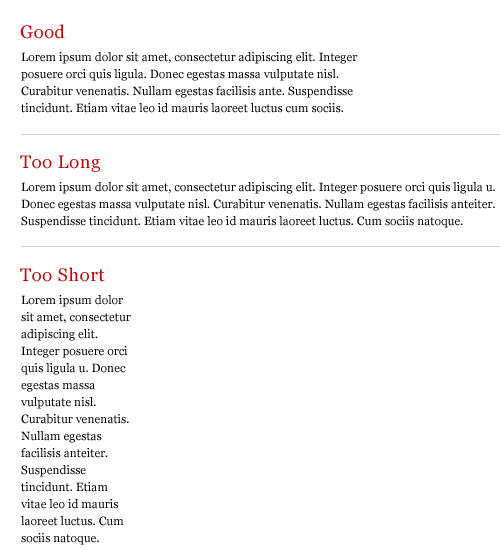
Image1 in 8 Simple Ways to Improve Typography In Your Designs

A simple way to calculate the measure is to use Robert Bringhurst’s method which multiples the type size by 30. So if the type size is 10px, multiplying it by 30 gives you a measure of 300px or around 65 characters per line. The code would look something like this:

p {
	font-size: 10px;
	max-width: 300px;
}

I’m using px because it makes the math easier but this also works with em’s.

2. Leading

Leading is the space between the lines of type in a body of copy that plays a big role in readability. Correctly spaced lines make it easier for a reader to follow the type and improves the overall appearance of the text. Leading also alters typographic color, which is the density or tone of a composition.

Many factors affect leading: typeface, type size, weight, case, measure, wordspacing, etc. The longer the measure, the more leading is needed. Also, the larger the type size, the less leading is required. A good rule is to set the leading 2-5pt larger than the type size, depending on the typeface. So if you set the type at 12pt, a 15pt or 16pt leading should work well on the web.
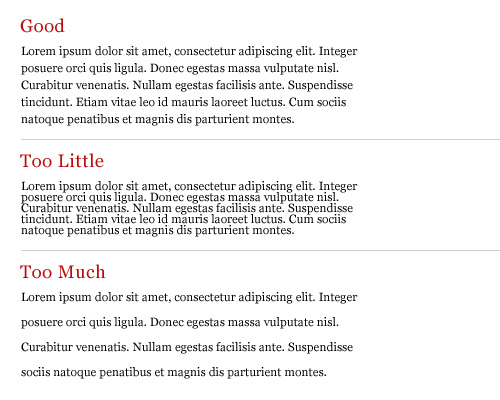
Image2 in 8 Simple Ways to Improve Typography In Your Designs

This takes some finessing to get the right spacing but here is an example of what the code would look like:

body {
	font-family: Helvetica, sans-serif;
	font-size: 12px;
	line-height: 16px;
}

3. Hanging Quotes

Hang quotes in the margin of the body of text. By not doing so a quotation mark that is flush with the text will interrupt the left margin and disrupt the rhythm of the reader. Hanging quotes keeps the left alignment intact and balanced therefore increasing readability.
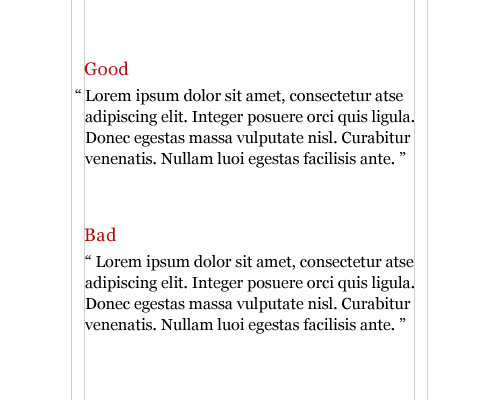
Image3 in 8 Simple Ways to Improve Typography In Your Designs

This is achieved very easily with CSS using the blockquote element:

blockquote {
	text-indent: -0.8em;
	font-size: 12px;
}

The negative indent will vary depending on the typeface, type size and margins.

4. Vertical Rhythm

A baseline grid is the foundation for consistent typographic rhythm on a page. It allows the readers to easily following the flow of the text, which in turn increases readability. A continuous rhythm in the vertical space keeps all the text on a consistent grid so that proportion and balance are retained throughout the page, no matter the type size, leading or measure.
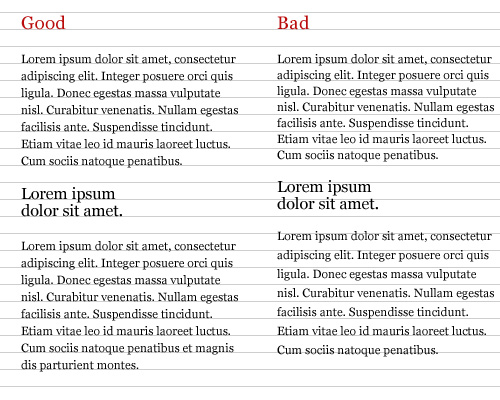
Image4 in 8 Simple Ways to Improve Typography In Your Designs

To keep a vertical rhythm in CSS, you want the spacing between elements and the line-spacing (leading) to equal the size of the baseline grid. For example, lets say you’re using a 15px baseline grid, meaning that there are 15px between each baseline. The line-spacing would be 15px and the space between each paragraph would also be 15px. Here is an example:

body {
	font-family: Helvetica, sans-serif;
	font-size: 12px;
	line-height: 15px;
}

p {
	margin-bottom: 15px;
}

This allows each paragraph element to align with the grid, keeping the vertical rhythm of the text.

5. Widows and Orphans

A widow is a short line or single word at the end of a paragraph. An orphan is a word or short line at the beginning or end of a column that is separated from the rest of the paragraph. Widows and Orphans create awkward rags, interrupt the reader’s eye and affect readability. They can be avoided by adjusting the type size, leading, measure, wordspacing, letterspacing or by entering manual line breaks.
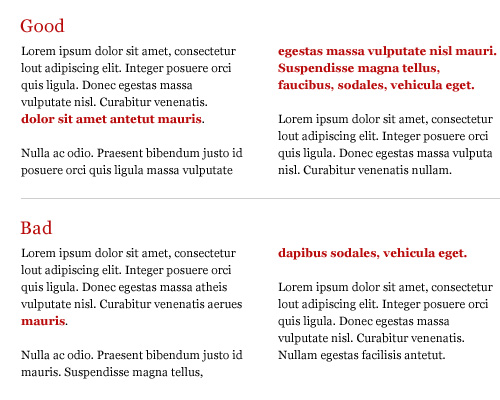
Image5 in 8 Simple Ways to Improve Typography In Your Designs

Unfortunately, there is no easy way to prevent typographic widows and orphans with CSS. One way to remove them has been mentioned above, but there is also a jQuery plug-in called jQWidon’t that places a non-breaking space between the last two words of an element.

6. Emphasis

Giving emphasis to a word without interrupting the reader is important. Italic is widely considered to be the ideal form of emphasis. Some other common forms of emphasis are: bold, caps, small caps, type size, color, underline or a different typeface. No matter which you choose, try to limit yourself to using only one. Combinations such as caps-bold-italic are disruptive and look clumsy.
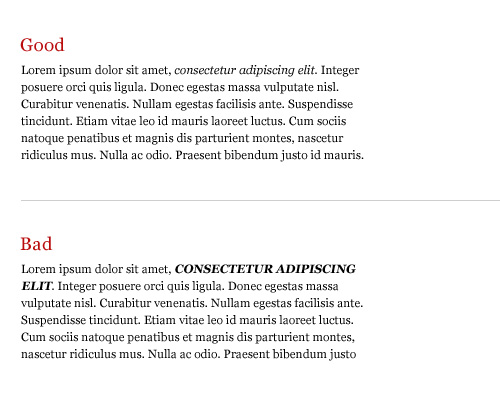
Image6 in 8 Simple Ways to Improve Typography In Your Designs

Here are some difference ways of creating emphasis with CSS:

span {
	font-style: italic;
}

h1 {
	font-weight: bold;
}

h2 {
	text-transform: uppercase;
}

b {
	font-variant: small-caps;
}

Keep in mind that the font-variant style only works if the font supports the small-caps variant.

7. Scale

Always compose with a scale, whether it’s the traditional scale developed in the sixteenth century that we’re all familiar with, or one you create on your own. A scale is important because it establishes a typographic hierarchy that improves readability and creates harmony and cohesiveness within the text.
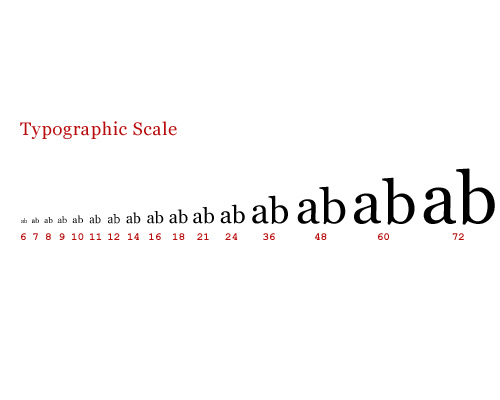
Image7 in 8 Simple Ways to Improve Typography In Your Designs

An example of a typographic scale defined in CSS:

h1 {
	font-size: 48px;
}

h2 {
	font-size: 36px;
}

h3 {
	font-size: 24px;
}

h4 {
	font-size: 21px;
}

h5 {
	font-size: 18px;
}

h6 {
	font-size: 16px;
}

p {
	font-size: 14px;
}

8. Clean Rags

When setting a block of text unjustified with a left or right alignment, be sure to keep the rag (the uneven side) balanced without any sudden “holes” or awkward shapes. A bad rag can be unsettling to the eye and distract the reader. A good rag has a “soft” unevenness, without any lines that are too long or too short. There is no way of controlling this in CSS, so to achieve a good rag you must make manual adjustments to the block of text.
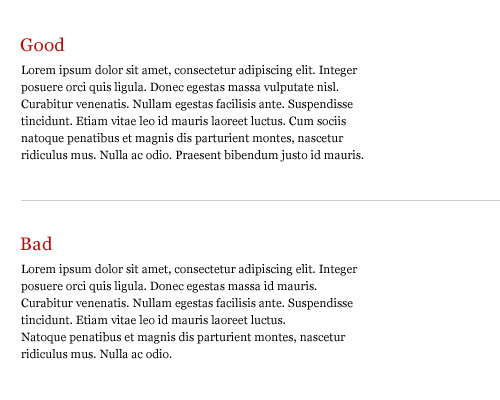
Image8 in 8 Simple Ways to Improve Typography In Your Designs

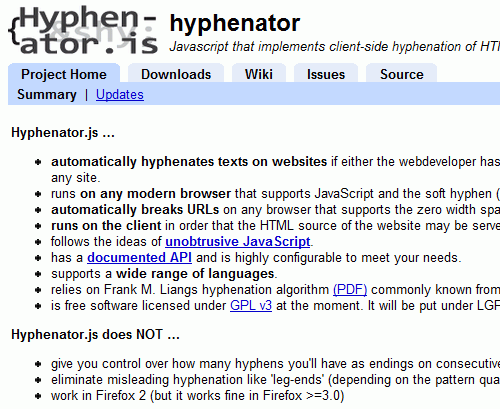
Hyphenation can also help with producing clean rags, but unfortunately CSS can’t handle this at the moment. Maybe in the near future we’ll see some control in CSS 3. Not all is lost though. There are some server and client side solutions for auto hyphenation like phpHyphenator and Hyphenator as well as online generators.
Hp in 8 Simple Ways to Improve Typography In Your Designs
Hyphenator.js is a Javascript-library that implements an automatic client-side hyphenation of Web-pages.

Further Resources

Here’s a list of related articles and books to further help you with the details.

Antonio Carusone is a New York based graphic designer and author of AisleOne, a blog focused on graphic design and typography, and The Grid System, an ever-growing resource on grid systems and part of the Thinking for a Living Network.

    Post Rating
    1 Star2 Stars3 Stars4 Stars5 Stars (1 votes, average: 5.00 out of 5)
    Loading ... Loading ...

    Tags: ,

    Advertising
    1. 1
      Marcin
      April 3rd, 2009 10:54 am

      gooood :)

    2. 2
      Don
      April 3rd, 2009 11:04 am

      Excellent – thanks for this … i’m learning and this is great learnin’ material !

    3. 3
      Radeksonic
      April 3rd, 2009 11:05 am

      Nice article! Good tips.

    4. 4
      sara
      April 3rd, 2009 11:06 am

      An article on fonts to use for web would be great too, and which fonts pair nicely.

    5. 5
      Rachmat Kukuh R.
      April 3rd, 2009 11:07 am

      Gagal Pertamax!

      Nice tutorial!

    6. 6
      MC
      April 3rd, 2009 11:08 am

      Why are there posts only on weekdays? Never realised people dont visiting on weekends.

    7. 7
      Pairofdime Design
      April 3rd, 2009 11:13 am

      Nice article. Don’t forget kerning (the space in between letters)!

    8. 8
      Mike Rundle
      April 3rd, 2009 11:15 am

      I disagree with setting line-height in pixels, it hampers accessibility especially in Internet Explorer versions that don’t support full-page zoom. I suggest using EM units instead but that’s a whole other bag of worms.

    9. 9
      Marco
      April 3rd, 2009 11:31 am

      Excellent article! I need more of these, cuz “power of Css is nothing without control”… ;-)

    10. 10
      Kirill
      April 3rd, 2009 11:33 am

      Great article, thanks!

    11. 11
      Bart
      April 3rd, 2009 11:35 am

      Thanks, great article!

    12. 12
      Fred Yates
      April 3rd, 2009 11:38 am

      fantastic post

    13. 13
      Paul Randall
      April 3rd, 2009 11:51 am

      A must for anyone new to typography for the web, and a good refresher for those who forget the rules occasionally!.

    14. 14
      natasha
      April 3rd, 2009 12:09 pm

      Very helpful!

    15. 15
      Z
      April 3rd, 2009 12:13 pm

      Essential article, thanks!

    16. 16
      Creamy CSS
      April 3rd, 2009 12:23 pm

      It’s a big pleasure to read such helpful post about typography at Smashing Magazine,.. Thanks a lot for great post! ;)

    17. 17
      Mike
      April 3rd, 2009 12:23 pm

      Setting anything as px is baaaad…

    18. 18
      Neko
      April 3rd, 2009 12:41 pm

      great article!

    19. 19
      Ser
      April 3rd, 2009 12:42 pm

      Awesome! SM is my fav web destination!

    20. 20
      Creative Drive
      April 3rd, 2009 12:53 pm

      Wow, very nice article.

    21. 21
      Eric
      April 3rd, 2009 12:54 pm

      Very nice! Thanks a lot!

    22. 22
      Ignus
      April 3rd, 2009 12:56 pm

      Nice article, font pairs that work well would be nice. I always have trouble matching San Serif & Serif fonts on a page.

      Keep up the sterling work Smashing

    23. 23
      Melissa
      April 3rd, 2009 1:06 pm

      Excellent article – I actually learned quite a bit from it!

    24. 24
      Alan Oliver
      April 3rd, 2009 1:17 pm

      Thanks for the info. I’ll apply it.

    25. 25
      Jonathan Hedrén
      April 3rd, 2009 1:21 pm

      I agree with Mike Rundle and Mike: avoid setting font sizes and line heights in px, use em or percent as unit instead.

    26. 26
      Rob
      April 3rd, 2009 1:22 pm

      I always have trouble deciding when to use pt, px, or em when it comes to font size. I would like to see some standards for when to use those. The article refers to all three, but doesn’t really specify in what situations each should be used.

    27. 27
      Nicole Hernandez
      April 3rd, 2009 1:22 pm

      Excellent article to bookmark. I tend to be absentminded and having quick reference lists that break down all the typography elements I need to make sure and cover on a design is useful. Let’s me run down a checklist to make sure I haven’t forgotten to do something – particularly useful when you work on multiple projects and often have days between the next time you work on one.. and forget what you have left to do.

    28. 28
      Joe T
      April 3rd, 2009 1:23 pm

      Some good points but for number 8 it isn’t always safe to craft line breaks as you would do for print. Fonts displays slightly differently in different browsers and on different OS’s so a break may work in one browser but not another.

    29. 29
      Randall
      April 3rd, 2009 1:23 pm

      if you learned something from this article, i hope you don’t plan on being a designer.

    30. 30
      Ted Bragg
      April 3rd, 2009 1:28 pm

      WOW! I’ve been searching for these very tips!

    31. 31
      Sean
      April 3rd, 2009 1:36 pm

      @Randall

      Right, because ‘true’ designers are born with this knowledge. Pfff.

      Seriously, what’s with some of these elitist comments… Great article!

    32. 32
      John Bokma
      April 3rd, 2009 1:57 pm

      Why, oh, why abuse span for emphasis when there is a em element…

    33. 33
      john.q
      April 3rd, 2009 2:15 pm

      this is a day one lesson in basic typography class.

      the standard size unit someone should use for type is pt. don’t use em. an em IS the point size. also to add to the articles advice, a good rag shouldn’t create a defined shape.

      any one interested in web design should do their readers a favor invest and in a typography textbook.

    34. 34
      Chris B
      April 3rd, 2009 2:16 pm

      I have just written an article on consistent line height using em. Text and elements will resize proportionally in all browsers, even without a zoom function.

      http://wbdsgn.com/blog/xhtml/the-easy-way-to-set-a-consistent-line-height/

      And an example:

      http://wbdsgn.com/library/2009/03/consistent-line-height/

    35. 35
      Patrick
      April 3rd, 2009 2:27 pm

      An interesting article, but it should have been called ‘6 simple ways to improve typography’, because two of the methods are neither simple nor practical, as the article admits. (Numbers 5 and 8).
      As for those saying don’t set type size in pixels, this advice is growing very quickly out of date. As IE6 and earlier fall away, there’s really no reason not to start using pixels and getting some more reliable designs.

    36. 36
      Jewen Soyterkijn
      April 3rd, 2009 2:35 pm

      @patrick I call 17% IE6 users enough of a reason. It is simply usability – taking care of all your users. Imo relative positioning also will retain your typographical settings in much nicer way than set pixels will. It’s not simple, neither Zen, but you can satisfy your own hunger for allround perfection.

      @john q
      pt really? I only use that for print css.

    37. 37
      ~M
      April 3rd, 2009 3:24 pm

      Helpful article in this day and age when everyone sets type to some degree. As a designer I was happy that all the “bad’s” stuck out at me as something I would never leave be… with the exception of the “unhung” quotes which I guess comes up so rarely I’d have to think about it.

      #8 struck me as pretty funny though. Hell, if I could change the copy to clean up rags… ~M

    38. 38
      acarback
      April 3rd, 2009 3:39 pm

      Very good article. Thank you.

    39. 39
      Pablo
      April 3rd, 2009 3:50 pm

      A really great article!

    40. 40
      Dmitry
      April 3rd, 2009 3:53 pm

      Nice article. Didn’t know about the hanging quotes method, very interesting :)

      Rob: You might find these articles useful: http://www.clagnut.com/blog/348/ and http://www.alistapart.com/articles/howtosizetextincss/ – they’re about the best method of setting font sizes.

    41. 41
      Liz Carver
      April 3rd, 2009 4:22 pm

      Great stuff. BUT, I notice you didn’t mention the fact that serif (with feet) and sans serif (without) have a huge impact on reading comprehension.

      Traditionally, at least in the last 50 years, a serif font is predominantly used for long passages, because it increases comprehension and visual flow, both of which are critical for mentally parsing large blocks of text.

      The “feet” literally propel the eyes from letter to letter, word to word, relieving physical strain. Ergo, this reduces the mental energy needed to understand what’s being said, or the language itself.

      A sans serif (footless) font is best used for very brief statements, as in headlines and captions, where clean, bold type aids design and does not impede comprehension.

      I love all the other points in your post, and am so glad there are those who still pay attention to the design elements critical to helping readers gain the most out of the text that writers have sweat and bled to create.

    42. 42
      Ryan Kirk
      April 3rd, 2009 4:36 pm

      A continuous rhythm in the vertical space keeps all the text on a consistent grid so that proportion and balance are retained throughout the page, no matter the type size, leading or measure.

      From a typographical standpoint, this is flat-out false. The illustration is worse. Type does not need to be, and should not be, on a horizontal grid. You are advocating the space after a paragraph to be equal to exactly one line height, and that the line-height of two rows of a headline should equal the line-height in the text. The former is equivalent to adding ’s, or just new lines Microsoft Word style, while the latter proposes inconsistency in ratios for large typefaces at a minimum, and large type overlapping each other at worst.

      Space after a paragraph should be designed based on visual appeal. It may be more or less than the exact line height, but using the exact line height looks like a and certainly looks amateurish. And I can’t imagine why you’d want to squish rows together in a headline.

      Smashing Mag, you’re great with some stuff. But will you please quit with the typography posts until you get a real expert in typography that knows what he’s talking about? Some reading on the http://www.ilovetypography.com blog would be a good start.

    43. 43
      Jason
      April 3rd, 2009 4:41 pm

      The serif vs. sans serif for body and headlines is debatable. It’s pretty accepted in print for sans serif to be for headlines and short bursts, and using serif fonts for bodies of copy. However, from my experience, and it appears the experience of others around the web as well, that sans-serif is the most legible and easiest on the eyes to read on a screen for larger bodies of text. Essentially the opposite of print. Of course there are always exceptions.

      I’m also a proponent of using percentages for line-height, but that’s strictly preference. Usually setting line height to somewhere between 130% and 150% yields nice results.

      This is one of the better articles to come from Smashing Mag lately, I may consider subscribing to the RSS feed again if you guys keep it up. Please though, no more link bait lists, very little good information in those.

    44. 44
      dragoshell
      April 3rd, 2009 5:40 pm

      Nce article, but the 5th example, Widows and Orphans is a bit confusing, since the author doesn’t make use of the same text in both of the examples.

    45. 45
      Bill
      April 3rd, 2009 5:41 pm

      Anybody that doesn’t know this stuff has no business calling themselves a “designer.” This is the first day of class at any decent design school.

      Web programmer or developer, maybe… designer?

      Absolutely not.

    46. 46
      Sean
      April 3rd, 2009 6:51 pm

      Honestly, I stopped reading after tip #1. Take the font size, multiply it by 30, and that gets you your ideal max width.

      The problem with that is that such math results in incredibly small widths! Even at 14px – which could easily be defined as much too large for the body – you are looking at a max width of 420px.

      Smashing blows past this rule. As does I Love Typography, Usability Post, A List Apart, and pretty much every other blog I have ever seen. All of which look great from a typography standpoint.

      So if I cannot trust the first rule, why should I trust any of the others?

    47. 47
      Nick Staroba
      April 3rd, 2009 6:53 pm

      Very good article. I always knew there was something up with my type. Thanks!

    48. 48
      Leo Baghdassarian
      April 3rd, 2009 7:44 pm

      in fact, the line-height property doesn’t even need units. avoid using them all together.

    49. 49
      Patricia Davidson
      April 3rd, 2009 8:08 pm

      Good article – thanks!

    50. 50
      teppser
      April 3rd, 2009 8:41 pm

      good and very informative

    51. 51
      xatax
      April 3rd, 2009 9:00 pm

      thanks lovely thing to read , refreshes typography

    52. 52
      Dariusz Siedlecki
      April 3rd, 2009 9:09 pm

      A good article, but you have to remember of the many font rendering options in web browsers. IE6 still doesn’t anti-alias any text, Mac OS X users get a very hard sub-pixel rendering, hence the fonts take up more space. It’s terribly hard in web typography to follow #5 and #8. As long as we have a lot of different browsers, on a lot of different machines, running on a lot of different resolutions – it’ll be close to impossible to conform to every one of them.

    53. 53
      Nathan
      April 3rd, 2009 9:14 pm

      This was great, best post ever. I see the of sites where layout of the content destroys the site just because there was no structure to the paragraphs. It seems simple but it really isn’t. I thought i was getting close to getting it right when all of a sudden this article comes up and shows me a few more techniques. nice.

    54. 54
      iphone-designer
      April 3rd, 2009 9:18 pm

      Great Article ……. I learnt so much .. now about TypoGraphy

    55. 55
      Kevin-K
      April 3rd, 2009 11:14 pm

      Very useful!

    56. 56
      Iliya Iliev
      April 3rd, 2009 11:34 pm

      Great article!

    57. 57
      Chuck Norris
      April 3rd, 2009 11:36 pm

      This article sucks

    58. 58
      rusmir
      April 3rd, 2009 11:40 pm

      very nice tips. thank you

    59. 59
      Snookerman
      April 3rd, 2009 11:52 pm

      6. Emphasis – The example there is as unsemantic as you can get. You should use <em> and <strong>, not <span> and <b>. There are other things as well but I won’t spend my time pointing them out. Doesn’t anyone proofread these articles before they are published?

    60. 60
      Ahmed El.Hussaini
      April 4th, 2009 12:05 am

      Fantastic article.

    61. 61
      Alisia Vans
      April 4th, 2009 12:09 am

      Great article – Funny however that this website doesn’t follow all these rules…but no doubt the rules are sound and great for improving everyone’s typography.

    62. 62
      touchofclass
      April 4th, 2009 12:15 am

      Number 3. Hanging Quotes is an old rancid rule that never had any sense.

    63. 63
      mary
      April 4th, 2009 12:20 am

      This article is very informative. =)
      However, I disagree with the entries: “widow and orphan” and “clean rags” — or I am confused by it. Some of us ‘design’ a layout or site and ‘delegate’ or leave it to the client to add their content. The two entries I have pointed out cannot be controlled by us designers outside of the ‘planning stage’ unless you are talking about our own blog-maintenance.
      Furthermore, shouldn’t adding line breaks to create “clean rags” create ‘unintelligible’ line breaks in case a window is resized (for fluid width layouts)? If so, adding clean rags decreases the ‘portability’ of your content. (In case you did a redesign, there’s a huge chance that your old content would have ’seemingly random’ line breaks in it.)

    64. 64
      Bas Vredeling
      April 4th, 2009 12:53 am

      Tips 4,5 and 8 and perhaps even 3, get messed up if users are viewing the page with an adjusted browser text-size. Some of the problems can be solved using mainly em units. I always like to test the effects of browser font scaling on a design. If you’re using px like the examples you can forget about getting widows, orphans and rags right, period. And I’m quite curious why the examples in this article are shown as images instead of text+css. After all, it IS a typographic item. So the Smashing folks should be putting all these great tips in effect themselves. Informative article but apply with caution.

    65. 65
      ostry-deXter
      April 4th, 2009 1:38 am

      wow!
      very good :)

    66. 66
      rodovsky
      April 4th, 2009 1:54 am

      that’s great ^) tanks!

    67. 67
      Sadiq Hussain
      April 4th, 2009 2:42 am

      Excellent Post!

    68. 68
      luuk
      April 4th, 2009 3:38 am

      An eye-opener. Thanks!

    69. 69
      Allahverdi
      April 4th, 2009 3:43 am

      good article… but often we are entering textes sent by customers… that’s why we can’t do it so well as it is shown on this article

    70. 70
      Elena
      April 4th, 2009 4:07 am

      thank u!

    71. 71
      Josh
      April 4th, 2009 4:15 am

      this article looks very familiar

    72. 72
      Christina
      April 4th, 2009 4:49 am

      Excellent article. I am just in the process of revamping my personal blank WordPress theme aka the bones for everything custom, and this will definitely improve it.

    73. 73
      myDevWares
      April 4th, 2009 4:58 am

      We need more typography stuff…excellent article.

    74. 74
      Ashley McFarland
      April 4th, 2009 6:25 am

      Learned something new here today. Thank you for this article!

    75. 75
      gaurav
      April 4th, 2009 8:04 am

      nice and light weight article on weekend.. m feeling lazy

    76. 76
      Kien Nguyen
      April 4th, 2009 8:19 am

      Thanks for the tips. They’re really good for me. I’ll do it in my site for sure.
      Here is my site, hope you’ll leave some good comments on it: Hàn Quốc

    77. 77
      Niels
      April 4th, 2009 12:12 pm

      Great(!) post. This is really helpful. Give us more on typography!

    78. 78
      pbhj
      April 4th, 2009 4:44 pm

      Bah, print designers!

      Span is not for emphasis, but feel free to use it to italicise. “b” is not for emphasis, use “strong”.

      Seriously you’re going to screw around with the rag? What about when I’m reading on a smartphone or other device that needs to reflow the text. Altering the textual content to favour [trivial features of] design over content is silly IMO, web pages are not a fixed form media.

      I agree with the other commenter 300px is way too narrow. Yes columnated text is easier to follow but where are you going to pull your images in? Moreover, long pages are less readable on most screens where the ratio of the medium is switched compared to most print pages (ie landscape vs portrait) and less easy to navigate as more text is pushed beyond the fold.

      pbhj

    79. 79
      marty
      April 4th, 2009 10:11 pm

      this is great, thanks. just learning this stuff and i will bookmark this article for sure.

    80. 80
      Thomas
      April 5th, 2009 1:05 am

      Great article. lots of useful info!

    81. 81
      Silver Firefly
      April 5th, 2009 5:36 am

      Thanks for the article. I found it informative, but I did find point 4 to be lacking and misleading (at least it could be misleading for those who aren’t familiar with setting type on the web). I’m glad links to other articles about the vertical rhythm were included in Further Resources because I feel these provide a more accurate explanation.

      What I would love to see next would be a review of the best web typography articles and books available to web designers.

    82. 82
      Wendy Kenney
      April 5th, 2009 6:34 am

      Thanks for the great info! Wish my designers would have been up on this!

    83. 83
      phan văn lân
      April 5th, 2009 4:17 pm

      Thanks. This is really helpful.

    84. 84
      kotakitam
      April 5th, 2009 6:26 pm

      This is awesome! Really fantastic article!

    85. 85
      Harington
      April 5th, 2009 8:37 pm

      @ touchofclass (April 4th, 2009, 12:15 am)

      “Number 3. Hanging Quotes is an old rancid rule that never had any sense.”

      Depends on the usage. In body copy there is no need for it but for headlines it’s a must.

    86. 86
      spritzstuhl
      April 5th, 2009 11:48 pm

      Thanks for that! Very helpful for an amateur like me.

    87. 87
      Adam Clark
      April 6th, 2009 12:08 am

      Good stuff. Would it be worth using the golden ratio for line heights? line-height: 1.62;

      I’m wondering what would be the perfect line height for legibility and flow.

    88. 88
      peter
      April 6th, 2009 12:22 am

      nice article but do you think some rules don’t apply to smashing magazine where you suggest the holy grail of line character length is 65 and smashing magazine averages 100?

    89. 89
      Rudolf Bos
      April 6th, 2009 1:06 am

      I think the white-space is also a good CSS-propertie for typography. You can make sure that anchors don’t break over two line. You can achief this by doing this in the CSS:

      a { white-space: no-wrap; }

      If your link is at the end of a line, it won’t break over the following line but it will show itselfe in one piece in the folowing line.

    90. 90
      christine
      April 6th, 2009 1:10 am

      love it. short & clear.

    91. 91
      Francesco Aloisio
      April 6th, 2009 1:33 am

      Such a good Post…

    92. 92
      Michal Zigo
      April 6th, 2009 2:11 am

      Nice article. But on the other side should be more voluminous.

      @peter:
      Smashing Magazine has a fluid layout. You can control it ;)

    93. 93
      venkat
      April 6th, 2009 2:59 am

      Nice, it will be help for designers.
      Thanks

    94. 94
      azizbaba
      April 6th, 2009 4:42 am

      it is really useful ! thanks too much

    95. 95
      Mark Taylor
      April 6th, 2009 6:23 am

      Good post, hopefully all designers will apply these principles.

    96. 96
      Louis
      April 6th, 2009 7:07 am

      Number one on this list is a little hypocritical, no? It claims that a “measure” more than 80 characters is too long, yet this entire article is written with “measures” that are around 100 characters, as are pretty much all the articles on SM.

    97. 97
      HowItGoes
      April 6th, 2009 1:18 pm

      THIS is what I expect from this site, not that lame ass Horror picture art post. Keep stuff like this coming please!!

    98. 98
      Carl
      April 6th, 2009 1:24 pm

      To Louis (96):
      tottally agree with you, don´t get me wrong, it´s a good post, but this are not rules but thinks to take into account, otherwise, all design would look the same!

    99. 99
      Heidi
      April 6th, 2009 6:24 pm

      This is such a great overview of quick tips for typography on the web.
      What a simple yet powerful list!

      Thank you for sharing this article.
      And while I’m at it, I have to say I totally love Smashing!

      XOXO,
      Heidi

    100. 100
      maryam
      April 6th, 2009 7:49 pm

      greaaaaaaaaaaaaaaaaat thankx alot

    101. 101
      DaGenius
      April 7th, 2009 2:41 am

      very great, thanks a lot…

    102. 102
      Mark (fetdigitaal.nl)
      April 7th, 2009 3:36 am

      Thanks for that!

    103. 103
      Andre
      April 7th, 2009 6:03 am

      Good stuff!

    104. 104
      Sidney Blank
      April 7th, 2009 8:07 am

      One quible. The example on Rule Number 8 sneaks it’s way out of cleaning up the rag. The copy has been edited rather than broken differently or hyphenated. I know it’s just lorem ipsum but what’s really challenging is producing a nicely ragged text with copy you may have little editing control over.

    105. 105
      Watchman
      April 7th, 2009 8:15 am

      JAJAJA, you´re so right Sidney…
      SM SUCKSSSS!!

    106. 106
      Todd
      April 7th, 2009 12:43 pm

      This a bad post and you should feel bad. Smashing, why are you publishing articles by people who are clearly only trained in print typography when you are about web design? The use of px, b, and span are all so wrong they make me want to cry. No wonder there is so much shitty web design, if these are the things people are being taught.

    107. 107
      JimbaDesign
      April 7th, 2009 8:57 pm

      Nice, hope it will help me…

    108. 108
      Ron G.
      April 8th, 2009 10:14 am

      @Todd – ditto. This article is a great read for PRINT designers. The problem we have is when print designers insist on the same rules for online. Sure – with CSS we CAN do it, but SHOULD we? We need to weigh the true cost of cross-platform, cross-browser, cross-device support against this idea of pixel perfect layout. I understand there is value to an overall site aesthetic, but this can be taken to extremes and minutia that waste everyone’s time (including the users.)

    109. 109
      Mike
      April 9th, 2009 11:01 am

      I agree with Todd – this article applies well to print, but not to the web. The very first example sets a line-length that is about half of the optimal size, and personally I think line-length should be left to the user to choose.
      Line-height should always be set in relative units, so that if the font size is changed by either the user OR the designer, the proportions remain.
      Beyond that, I give up… it is all close, but almost none of it is correct.

    110. 110
      Antonio
      April 9th, 2009 11:18 am

      Thanks to everyone for the kind words. I’m glad most of you enjoyed the article and found it helpful.

      @Todd – I’m not a print designer, I’m trained as a web designer but that is beside the point. The point of this article isn’t to teach people on the specifics of perfect CSS and HTML markup, its focus is the 8 typography principles and how to easily apply them with CSS. I gave example code to demonstrate how to apply the principles, never stating that these were the ONLY ways of doing it. Using “span” and “b” aren’t necessarily wrong but I do agree with you that there are better tags to apply these with, specifically “em” and “strong”. Maybe I should have used them instead but at the same time this small changes doesn’t overshadows or undermine the 8 typography principles, which is the point of the article.

      As for using “px” I strongly disagree with you and so do others. For one, the designer/developer must make this decision based on what type of site is being built and who will view it. If the target audience mainly uses IE6, then using “px” isn’t a good idea. If accessibility isn’t a top concern and IE6 usage is low, “px” are perfectly fine to use. At the same time, IE6 is on its way out and even Google isn’t supporting it. I work at a large ad agency and we’re even starting to phase out IE6 support. It’s an old browser and it’s time we move away from it. All modern browsers can resize “px” and soon we won’t even need to have this discussion. Nothing wrong with using “px”.

      I also used “px” in this article to keep it all simple. Relative sizes can get messy and I didn’t want to complicate things. I even mention in the article that this can all be done with “em”.

    111. 111
      Snookerman
      April 10th, 2009 2:47 am

      1. Measure – Why is the math easier in pixels? I’ll tell you why Antonio Carusone, because you don’t have a clue how ems work. If you knew what ems are, you would know that the math is much easier with ems since there is no math, all you need to do is set the max-width to 30 ems, regardless of the font size, since the ems do the math for you. Now, whether or not 65 characters per line is optimal can be discussed, but that’s another issue. I hope you will take this as constructive criticism and edit your article.

    112. 112
      Antonio
      April 11th, 2009 7:24 pm

      Actually, I know exactly how em’s work. What you’re forgetting is that the default font size in browsers is 16px so 1em will equal 16px. You have to first reduce the default size of the document by 62.5% to get it down to 10px to make things work much easier. Em’s are relative so when dealing with child elements it gets even more confusing. In my opinion using px keeps it all simple and uncomplicated. If you can’t see that then I’m not sure what to tell you buddy. But again, if you prefer em’s then more power to you. Nothing wrong with that but there’s also nothing wrong with using px.

    113. 113
      timhecker
      April 17th, 2009 2:22 am

      Very useful post!!..

    114. 114
      Сашка
      April 17th, 2009 2:53 am

      Спасибо. Отличный материал.

    115. 115
      DesignBuddy
      April 17th, 2009 11:06 am

      FART

    116. 116
      Sergio
      April 21st, 2009 4:02 pm

      This is something some self-taught webdesigners would learn from. Im a “print-designer” as im attending at a design for print and media school, but i like webdesigning more and im also one of the few of my school who enjoy learning more and more for accesability and good practices for the web.

      My point is, this is really good for webdesigners without a preparation in typography to start with, and also its good for us graphic designers to learn how to apply this for the web. But i have to agree with portability on the induced line breaks for the rags… those could cause problems on mobiles. Besides from that everything is really enlightening, even for me because I didnt know how to apply it with the CSS coding. Thanks :D

      And hanging quotes and vertical rythm is a must, even if you dont want to apply it, you have to, it reads and looks better, as it looks like you paid attention to text layout.

    117. 117
      Francie
      April 22nd, 2009 3:06 pm

      even working on a professional logo design, these are nice tips to keep on mind and this is how we get clients completely satisfied
      Logo-Corner

    118. 118
      Monsieur M
      May 4th, 2009 4:02 am

      thanks for this great article !

      Monsieur M from Belgium (http://blog.monsieurm.be)

    119. 119
      lily
      May 7th, 2009 8:13 pm

      @everyone grumbling:
      a lot of designers are self-taught. It’s nice to have resources to help without spending time in a classroom or library, or $15 on a book, or anyone who didn’t take notes/was absent on that day in typography. Hop off your high horse.

      PS: It’s how *CSS* can be used to improve your typography, or did you miss the last few lines of the introduction (which is usually there for a reason).

    120. 120
      New York Website Design
      May 19th, 2009 11:50 am

      New York Website Design Company uses the 8 Simple Ways to Improve Typography their Designs successfully.

      This premiere full-service New York website design company delivers web design and internet marketing SEO services. Contact New York Website Design Company for all custom website design and development needs in NYC and NY state.

    121. 121
      Berong
      May 22nd, 2009 9:33 am

      great post!
      these are the reasons why designers are addicted on this site.
      smashed!

    122. 122
      Arie Putranto
      May 26th, 2009 1:32 am

      Great stuff! I knew that I can learn something in this site .. thx

    123. 123
      mrvé
      May 31st, 2009 11:46 am

      That’s really useful. Thanks..

    124. 124
      Enk.
      June 25th, 2009 1:59 am

      Great great.. very useful for me.. I lack in typography :D

    125. 125
      Nick Cooke
      June 28th, 2009 10:13 am

      What you’ve said is exactly how I write my letters and reports. It is good to know that what I have learnt by trial and error over a number of years and what looks good to me and most other people I ask is confirmed by your excellent article. I run a small engineering and building consultancy in Billericay in England but its got to be the same for everyone hasn’t it? Kind regards Nick.

    126. 126
      nimz
      July 3rd, 2009 11:28 am

      Great article. Thank you for your time and effort.

    127. 127
      Heather Feimster
      July 6th, 2009 6:13 am

      @Antonio – You’ve obviously put in a lot of work and this is a good article for a specific audience just getting their “CSS-legs” in the sea of web design coding. It will undoubtedly give newer designers some more CSS ammo to add to their arsenal.

      However, to be a good blogger/writer, understand that many more people will read your work than your target audience and probably half won’t like it. Please take cues from other great online writers who accept criticism humbly in their comments and use it to further the conversation – not get defensive and shut down.

      That being said, I’d really love to see a “Part II” to this that goes a bit further for more experienced designers. Look at each rule from an em or relative POV (yes, you may not agree, but obviously your readers want it) and talk about some other more intensive typography tricks. Solicit your readers to send in their own CSS rules and breakthroughs – it could be a great way to turn this around and satisfy another group of readers with more typography experience and begin the discussion many of us want.

    128. 128
      Mylapra70
      July 7th, 2009 6:01 am

      Good stuff! If only I had paid systematic attention to typography when I started…

    129. 129
      etoainshrdlu
      July 12th, 2009 9:44 am

      Many Thanks! It’s a big help!

    130. 130
      Ellyn
      September 17th, 2009 12:07 pm

      Wow. You have managed to smoosh about a semester or less of my Typography I class into an article which probably took you less than a week.

    131. 131
      eilonvi
      November 13th, 2009 11:47 am

      the best practical article i’ve read on typography so far. thanks!

    1. 00

      There are no trackbacks at this time. If you are interested in leaving a trackback, please use this URL.

    Leave a Comment

    Make sure you enter the * required information where indicated. Please also rate the article as it will help us decide future content and posts. Comments are moderated – and rel="nofollow" is in use. Please no link dropping, no keywords or domains as names; do not spam, and do not advertise!


    Advertisement Advertise with us!
    Join in Smashing Forum
    Post your job