Smashing Magazine - we smash you with the information that will make your life easier. really.

Table Layouts vs. Div Layouts: From Hell to… Hell?

Advertisement

Over the last several years, developers have moved from table-based website structures to div-based structures. Hey, that’s great. But wait! Do developers know the reasons for moving to div-based structures, and do they know how to? Often it seems that people are moving away from table hell only to wind up in div hell.

This article covers common problems with layout structure in web design. The first part goes through what table and div hells are, including lots of examples. The next section shows how to write cleaner and more readable code. The final part looks at what features await in future. Please join us on this journey from hell to heaven.

Signheavenhell in Table Layouts vs. Div Layouts: From Hell to... Hell?
Image by lpinc.1988.

Table Hell

You’re in table hell when your website uses tables for design purposes. Tables generally increase the complexity of documents and make them more difficult to maintain. Also, they reduce a website’s flexibility in accommodating different media and design elements, and they limit a website’s functionality.

MAMA (Metadata Analysis and Mining Application) is a structural Web page search engine from Opera Software that crawls Web pages and returns results detailing page structures. If we look into MAMA’s key findings, we see that the average website has a table structure nested three levels deep. On the list of 10 most popular tags, table, td and tr are all there. The table element is found on over 80% of the pages whose URLs were crawled by MAMA.

Semantically speaking, the table tag is meant for listing tabular data. It is not optimized to build structure.

Ease of use

Using tables to build structure is quite intuitive. We see tabular data every day, and the concept is well known.

And the existence of table attributes makes for a rather flat learning curve because the developer doesn’t have to use a separate style sheet. With divs, the developer must use the style attribute or an external style sheet, because the div tag doesn’t have any attributes attached to it.

Also, tables don’t break when the content is too wide. Columns are not squeezed under other columns as they are in a div-based structure. This adds to the feeling that using tables is safe.

Maintainability

Table contains different tags: the table tag being the wrapper, tr for each row and td for each cell. The thead and tbody tags are not used for structural purposes because they add semantic meaning to the content. For readability, each tag is normally given its own line of code, with indention. With all of these tags for the table, several extra lines of code are added to content. The colspan and rowspan attributes make the code even more complex, and any developer maintaining that page in future has to go through a lot of code to understand its structure.

<table cellpadding="0" cellspacing="0" border="0">
	<tr>
		<td colspan="3" height="120px">....</td>
	</tr>
	<tr>
		<td class="menu" valign="top">...</td>
		<td class="content" valign="top">...</td>
		<td class="aSide" valign="top">...</td>
	</tr>
	<tr>
		<td colspan="3">...</td>
	</tr>
</table>
<div id="header">...</div>
<div id="menu">...</div>
<div id="content">...</div>
<div id="aSide">...</div>
<div id="footer">...</div>

As we see from the example, the table-based layout contains more code than the div-based version. Imagine now if this difference in size stays consistent as the code base grows (by a ratio as much as 2:1). In a div-based structure, it is also possible to skip the menu div and use an unordered list (ul) as a container instead.

Nested tables are code smell that a website is stuck in table hell. The number of lines of code is endless, and the complexity is overwhelming. Tables are far from clean code and don’t bring anything semantic to the content unless you’re dealing with actual tabular data. And if you’ve happened to inherit the maintenance of a website that has poor readability, it’s a nightmare. Nested tables are a poor substitution for semantically meaningful, block-level elements.

Another drawback to tables is that they make it harder to separate content from design. The border, width, cellpadding and cellspacing tags are used in about 90% of all websites that use tables, according to MAMA. This adds code to the HTML that should instead go in the style sheet.

Excess code slows down development and raises maintenance costs. There’s a limit to how many lines of code a programmer can produce per hour, and excess code is more complicated for others to understand. Developers may not even understand their own code after a while.

More lines of code mean larger file sizes, which mean longer download times. Developers should keep in mind new media, such as mobile devices, which usually have low bandwidth. Websites will have to support media other than traditional monitors in future, and bad code limits the possibilities. A large code base has more bugs than a small one. Developers tend to produce a certain number of bugs per line of code. Because tables increase the code base, such structures likely contain more bugs than layouts with less code lines.

Craigslist Org in Table Layouts vs. Div Layouts: From Hell to... Hell?
Websites with tags that properly describe content are easily identifiable. Disabling the style sheet on craigslist shows us a table-based layout. Headlines are marked only with the bold tag, and all links could easily be put in individual lists.

Flexibility with media

In an ideal world, the same markup would be used for printers, mobile devices, screens and other media. Using tables for structure provides less flexibility in moving columns around and hiding entire columns. Your user may want to put the side column at the bottom or view a printer-friendly version. With tables, this would require a separate page for each media, which means extra costs during development and higher maintenance costs compared to a div-based website that separates content and design.

Further reading:

Websites currently in table hell:

Div Hell

Websites in div hell have more div tags than are necessary. This is also known as “divitis.”

The div tag is a block-level element that defines a section within a document. Divs are thus suitable for building the structure of Web pages. The div tag is also used to describe content that cannot be properly described by other more semantic tags. When developers do not understand the semantic meaning of other block-level elements, they often add more div tags than are needed.

Heaveninhell in Table Layouts vs. Div Layouts: From Hell to... Hell?
Some programmers mistakenly believe that using a lot of divs is just fine. Maybe this photo by my_ladyhawk makes a good point. Is overuse of divs the best of the worst?

Ease of use

Div-based structures have a much steeper learning curve than table-based structures. The developer must know CSS and understand the difference between block-level elements and inline elements, when to use floats and when to use absolute positioning and how to solve browser bugs.

The div element isn’t visual like the table element. Everyone knows what a table looks like, but divs are not as obvious. The good thing about a div, though, is that it’s only one element. It’s not wrapped in a parent element the way td tags are in tables. The container, then, is more flexible and doesn’t have the limitations of its parent tag.

Using a div for structure can make a page more fragile when content is pushing the div to its limit. It can also force columns to fall under each other. But this is usually only true for older browsers (particularly IE6); newer browsers make content flow to the next column.

Dealing with browser bugs can be a little tricky at first, but with experience developers can identify and fix them. Browser support for W3C standards is getting better and better. With the growing popularity of Firefox and Safari and the introduction of Google Chrome, we are seeing a big fight over market share, which inevitably makes for better browsers.

Maintainability

The biggest problem with div tags is that they are used too often. Divs should only be used to build structure and as placeholders for design elements when no other block-level elements can describe the content. The div tag is for logical groupings of elements.

Nesting div tags deeply is a sure path to maintenance hell, and the code will make developers think twice before touching it, simply because it’s so unreadable. True, using descriptive class and structure names makes the code more understandable, but using them for nested div tags is not always easy.

Too many div tags is code smell that content isn’t being described as it should. It means divs are being used when semantic block-level tags would better describe the content; for instance, headings should be wrapped in h1 to h5 tags. Writing semantic code usually reduces the code base; and less divs with floats helps keep browser bugs away.
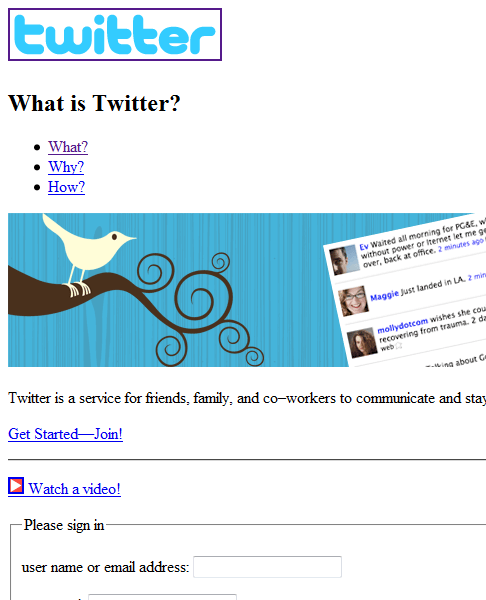
Twitter Com in Table Layouts vs. Div Layouts: From Hell to... Hell?
Disabling the style sheet for Twitter shows us some nice semantic code. Twitter uses lists, headings, hr and fieldset and shows good understanding of how to mark up content.

Of course, ids and classes can carry semantic values that no other tags have. The problem is that these values are not standardized. For example, div id="banner" could have a semantic value for software containing advanced algorithms, telling it that this is a banner. Classes and ids that have semantic values added to them will never be a substitute for tags that have semantic values built in.

Giving semantic values to classes and ids will dramatically increase the readability of code and help avoid bad class names like bigRedText. Also, search engines such as Google use complex algorithms that use the semantic information in classes and ids.

One interesting technology is microformats, which are built on the idea of semantic classes. With the help of special standardized formats, content can be automatically processed by microformat-aware software.

<div class="vcard">
 <span class="tel">
  <span class="type">home</span>:
  <span class="value">+1.415.555.1212</span>
 </span>
</div>

An example of an hCard microformat. The hCard is a format for representing people, companies, organizations and places.

The presence of the style attribute is code smell that a website is languishing in div hell, because it doesn’t have any particular rendering behavior. 53.54% of all websites indexed by MAMA contain a style attribute, and 35.40% of all websites have divs that use a style attribute. Classes and ids would help separate design and content and clean up this widespread use of the style attribute.

Classes and ids would also facilitate access to elements in the document object model (DOM) through scripts.

Semantic code helps machines understand content. While humans are capable of finding the Norwegian word for “monkey” using the Web, computers cannot do this without human direction. That’s why it’s very important to use tags that describe content properly.

Here are a couple more reasons why machines need to be able to understand website content:

  • Spiders crawl websites, indexing pages for search engines. Adding semantic meaning to content probably makes websites rank higher.
  • Screen readers are used by people with visual impairments. They read content out loud to the user or send it to a braille display that the user reads with his or her fingers. Also, visually impaired people use the keyboard to navigate and use a wide range of keyboard commands. They can also get lists of all headings and links on a page, and each of those lists has meta information on how many elements it contains. Setting the language attribute is also important so that screen readers read content in the correct language. The importance of semantic markup is illustrated by comparing the strong and b tags. The strong tag adds semantic meaning to the content; and b tag adds only visual meaning. As a result, people using screen readers won’t get the same information from that content as people seeing it visually. Many countries have laws that prescribe accessibility support for government websites. Others will follow.

Braille Display in Table Layouts vs. Div Layouts: From Hell to... Hell?
A braille display. Photo by cobalt123.

Every extra div the developer adds makes the code harder to read. More lines of code lead to longer download times, and so on. This all rings of the code smell we get from table-based layouts. Overusing div tags is as bad as having a table-based layout, except that it is more flexible with media.

To illustrate the circles of div hell, let’s look at examples:

Menu
<div id="menu">
	<div class="selected">
		<div class="graphicLeft">
			<div class="graphicRight">
				<a href="#">Home</a>
			</div>
		</div>
	</div>
	<div>
		<div class="graphicLeft">
			<div class="graphicRight">
				<a href="#">About</a>
			</div>
		</div>
	</div>
	...
</div>

Here is a typical example of a menu with too many div tags. Using a list and setting the anchor tag to display: block in the style sheet would have made all of these divs unnecessary.

Headings
<div class="headingOne">My heading</div>
<div class="headingTwo">My heading</div>
<div class="headingThree">My heading</div>


Headings created like this add only visual effect to the content. Their semantic value is lost, and screen readers and web spiders can’t tell they’re headings. (This is the same as what we see when b is used instead of strong.)

News list
<div class="news">
	<img />
	<h2 />
	<p />
	<a />
</div>
<div class="news">
	<img />
	<h2 />
	<p />
	<a />
</div>


Developers who don’t see the potential of list elements often use divs instead. Lists save some class definitions and help screen readers know how many items there are.

Different widths for containers

Page 1

<div id="contentNormal"></div>
<div id="aSideNormal"></div>

Page 2

<div id="contentWide"></div>
<div id="aSideSmall"></div>


When every column on a website is given its own container, many unnecessary div ids are created. This can easily be rectified by adding a class to the body tag. Let each container simply inherit the class of the body tag and then give each page its own layout in the style sheet. This makes it easy to read the content and page. The improved readability of both the HTML and style sheet simplifies maintenance.

Flexibility with media

Even a website in div hell can be flexible with different media as long as the design is separated from the content and put in the style sheet. Read the excellent article “Going to Print” on A List Apart for guidelines on building a printer-friendly version of your website. This is beyond the scope of this article, but it’s important to point out that a div-based structure is more flexible in supporting different media than a table-based structure. Not having to maintain separate pages for each media saves maintenance and development costs. A div-based structure allows you to move columns around and even hide columns using display: none in the style sheet.

When a website is in div hell and has a lot of floats, finding out which floats to disable to avoid printing bugs on Gecko-based browsers like Netscape 6.x and Mozilla’s is very hard. These browsers do not print long floating elements well. If a floating element runs past the bottom of a printed page, the rest of the float effectively disappears and is not printed on the next page.

Further reading:

Websites currently in div hell:

From Hell To Heaven

Heaven in Table Layouts vs. Div Layouts: From Hell to... Hell?
Photo taken by supernova9.

Using divs correctly

Before creating a div, the developer should consider, “Do I really need this, or can I do this with a block-level element?” Liberal use of h1 to h5 for headings and ul and dl for lists helps a lot, and don’t forget the paragraph tag. Another element that doesn’t need div wrapping is form. For more flexibility with forms, try combining the fieldset element with a list: that way, the content has semantic value, and the developer has block-level elements to design with.

Because a div element marks up only one block at a time, the code base is much smaller than that of a table-based structure. Less code is code that is more readable, easier to maintain, faster to develop, less buggy, smaller in size, you get the point. You want as little code as possible to do the job right.

When a structure is tagged correctly, more divs are needed only for graphics. When we can’t put background-color, border, background-image, etc. on a block-level element, introducing a div is okay. Clean code shouldn’t stand in the way of a good graphic design.
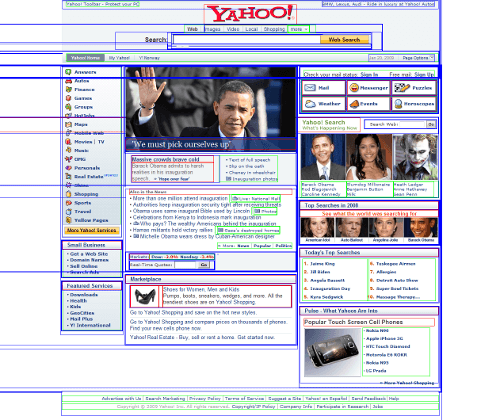
Yahoo Com in Table Layouts vs. Div Layouts: From Hell to... Hell?

See how many block-level elements Yahoo has on its home page. This screenshot, with tables and block-level elements outlined, was taken with the Web Developer plug-in for Firefox. Could Yahoo have used fewer containers?

Tips and tricks

Let’s go through some basic examples. The examples below should inspire developers to dig deeper into the subject of clean code and ways to avoid divitis. Notice how the semantics in the code help keep the code readable.

Menu
<ul id="menu">
	<li><a href="#">Home</a></li>
	<li><a href="#">Products</a></li>
	<li><a href="#">About</a></li>
</ul>


A menu as a list is easier to use than as a div and saves many lines of codes. The li tag is a block-level element that can have background properties attached to it, as it is the anchor tag if its display attribute is set to block in the style sheet. Two block-level elements exist to contain the beginning and end of each menu item’s layout. Using a list also makes the page more accessible for people with disabilities and allows you to nest lists for sub-menus.

Headings
<h1>Main heading</h1>
<h2>Normal heading</h2>

Use headings where possible. They add semantic value to content and boost website rankings in search engines. They also help people who use screen readers access and understand content.

News list
<ul class="newsList">
	<li>
		<img />
		<h2 />
		<p />
		<a />
	</li>
	<li>
		<img />
		<h2 />
		<p />
		<a />
	</li>
</ul>


Group similar pieces of content together and put them in lists. It’s amazing how much of the web is in lists. Lists are perfect containers. They save many lines of code and make code much more understandable than it would be with tables or a mess of divs. And lists let people with screen readers know how many elements they contain. So many main pages of websites already contain lists of news.

Different widths for containers

HTML

<body class="newsShow">
	<div id="content"></div>
	<div id="aSide"></div>
</body>

CSS

/* Containers */
#content { float: left; }
#aSide { float: right; }

/* Page structures */
.newsShow #content { width: 80%; }
.newsShow #aSide { width: 20%; }

.home #content { width: 70%; }
.home #aSide { width: 30%; }

.oneColumn #content { width: 100%; }


With a class for body, there is no need for contentSmall, contentNormal, contentWider and so on. Simply refer to the container through the body parent class and then control the width in the style sheet. The style sheet will be more readable, and the developer won’t need to refer to so many bad classes. The page type (body class) will tell you which one to refer to.

List post data
<dl>
	<dt>Your name is:</dt>
	<dd>Susan Hanson</dd>
	<dt>Your address is:</dt>
	<dd>Street name 1</dd>
	<dt>You live in:</dt>
	<dd>Oslo</dd>
</dl>


Use the dl tag when listing key value pairs. Many people would probably use a table for this purpose. But using the dl tag saves code and makes it possible to float the dt and dd tags and set their widths for a nice layout. The dl tag semantically links the dd to the dt tag. Both dt and dd are block-level elements.

Simple form
<form>
<ul>
  <li>
	<fieldset>
	  <legend>Person info</legend>
	  <ul>
		<li>
		  <label for="name">Name:</label>
		  <input type="text" name="name" id="name" />
		</li>
		<li>
		  <label for="age">Age:</label>
		  <input type="text" name="age" id="age" />
		</li>
		...
	  </ul>
	</fieldset>
  </li>
  <li>
	<fieldset>
	  <legend>Address info</legend>
	  <ul>
		<li>
		  <label for="address">Address:</label>
		  <input type="text" name="address" id="address" />
		</li>
		<li>
		  <label for="zip">Zip:</label>
		  <input type="text" name="zip" id="zip" />
		</li>
		...
	  </ul>
	</fieldset>
  </li>
  ...
</ul>
</form>

This example is of a form that is semantic and has containers for the layout. Getting a nice layout with forms can often be quite messy. Nested tables are often used for this purpose. But using lists instead tells screen readers how many elements a form contains. The fieldset is a block-level element that groups related data and can be nicely designed using CSS.

Using divs to manage structure (header, menu, footer and so on) and using other block elements, like p, ul, dl and form, where appropriate would make the world a much easier place to live. Lists are already widely used and perfect as containers. And don’t forget to include a class with your body tag. When developers start coding cleanly and semantically, they never look back.

Further reading:

Tips on Moving From a Table- to Div-Based Structure

  • Work your way from the outer table to the inner table. Remove tables one by one and replace them with proper markup that describes their content. Perhaps table aren’t even needed. Starting with the outer table will make the rest of the code more readable. If the outer tables are part of a framework, removing them may affect multiple pages. It’s also a good idea to work on the most important or popular pages first.
  • Don’t introduce new tables unless they are used for tabular data.
  • Separate design and content. Put layout-specific code in the style sheet, and let the markup tell the browser what kind of content it is.
  • Every time someone works on a page, she or he should check if the code can improved a bit, whether by making it more semantic, more readable or cleaner.
  • It would probably cost more to replace the whole system than fix it bit by bit, especially if it’s a large website.
  • Don’t continue writing bad code if the website already contains bad code. Write good semantic code and remind yourself that the bad code will eventually be replaced. Writing good code saves time in the end. Make a difference now, right away by writing only clean, semantic code.

The Future

Two upcoming technologies look very interesting in how they deal with structure. HTML 5 will come with tags that have structural semantic meaning and a table-based layout for CSS. CSS 3 will come with a nice feature called multi-column layout.

HTML 5

With HTML 5, we’ll actually see semantic markup for the structure of Web pages, which mean the structure will have meaning.
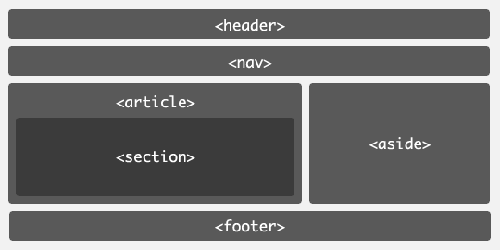
Html5 in Table Layouts vs. Div Layouts: From Hell to... Hell?

This will add many possibilities for the way machines read websites:

  • Search engines will have more ways to rank content, based on the structure.
  • Screen readers will have more semantic markup with which to help visually impaired people.
  • Markup for small-screen devices will become standardized.

Along with new structural elements, HTML 5 also introduces many new tags. Some of the most interesting elements:

  • The video and audio tag will bring new, semantically meaningful markup to content and allow video and audio to be streamed directly in the browser.
  • Forms will get new and improved semantics for text input and form validation.
  • The new canvas tag will have a 2-D drawing API.

HTML 5 also contains many new APIs, such as:

  • Immediate-mode 2D drawing
  • Timed media playback
  • Offline storage
  • Editing
  • Drag and drop
  • Messaging/networking
  • “Back” button management
  • MIME and protocol handler registration

Work on HTML 5 started in late 2003 and has the following timeline:

  • First W3C Working Draft in October 2007
  • Last Call Working Draft in October 2009
  • Call for contributions for the test suite in 2011
  • Candidate Recommendation in 2012
  • First draft of test suite in 2012
  • Second draft of test suite in 2015
  • Final version of test suite in 2019
  • Reissued Last Call Working Draft in 2020
  • Proposed Recommendation in 2022

This may look ridiculous (2003 to 2022 is 19 years!), but consider the case of HTML 4, DOM2 HTML and XHTML1, the three specifications that HTML 5 is supposed to replace. The HTML 5 team wants to have a test suite with which at least two browsers completely pass before calling it a day. This doesn’t mean that developers can’t start using HTML 5 before 2022, only that the specification may change during this period. HTML 5 will probably be usable by 2012, depending on how fast browser makers implement the features and distribute their browsers to users. Some APIs and tags have even been implemented in today’s browsers.

The semantic structure of HTML 5 will save developers from having to add many divs, but marking up the rest of the content correctly will still be important for having a semantic website. Last but not least, understanding the difference between block-level elements and inline elements and what every tag is for will still be very important.

Table-based layout with CSS

Another new feature will display block-level elements as tables with the help of CSS. The display attribute for the wrapper would be set to table, and the display attribute for block-level elements that are columns would be set to table-cell. Table-based layout with CSS will be more robust than the float model, in which the layout often breaks when the font size is extreme. Another positive effect is that columns will automatically be equal in height.

With the release of IE8, all three major browsers now support the styling of block-level elements as tables. It will probably be a while, though, before the majority of users actually use a browser that renders the feature as intended.

HTML
<body>
 <ul id="menu">
	<li><a href="#">Home</a></li>
	<li><a href="#">Products</a></li>
	<li><a href="#">About</a></li>
 </ul>
 <div id="content">
	<p>Fusce quis velit...</p>
 </div>
 <div id="aSide">
	<p>Praesent iaculis commodo elit...</p>
 </div>
</body>
CSS
body { display: table; table-layout: fixed;}
#menu, #content, #aSide { display: table-cell; }
#menu { width: 20%; border: 2px solid red;}
#content { width: 50%; border: 2px solid blue; }
#aSide { width: 29%; border: 2px solid green;}

The wrapper (in this example, body) is set to display as a table, and the relevant columns are set to table-cell. This even works for list elements, as the example shows (and it saves a div). This is a trimmed example; a normal structure would contain a header and footer. This would have required an extra div to contain the row with menu, content and aSide. The container that holds each row would need its display set to table-row. The container for each row is needed to get a break line after the columns.
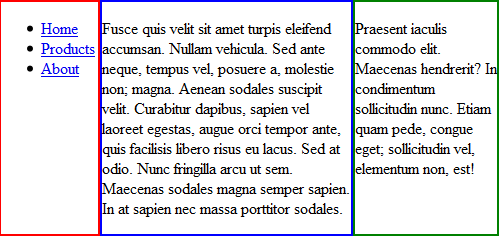
Tablebasedlayoutwithcss in Table Layouts vs. Div Layouts: From Hell to... Hell?

This example shows the above code running in Firefox.

Multi-column layout with CSS

Some CSS 3 magic will help developers arrange text in columns within an element. This will be possible in two ways: by defining either a column width or a column count.

Multi-column layout is currently supported in Mozilla and Webkit-based browsers, which prefix these properties with -moz- and -webkit-, respectively.

Column width

The number of columns displayed depends on how wide the column is set (spacing between columns is controlled by the column-gap property) and how wide the container is.

-webkit-column-width: 8em;
-webkit-column-gap: 1em;
-moz-column-width: 8em;
-moz-column-gap: 1em;

Columnwidth in Table Layouts vs. Div Layouts: From Hell to... Hell?

This example was created with column-width on the paragraph tag and a body width set to 495px. The code is rendered in Google Chrome.

Column count

The column-count property defines how many columns text is divided into. The width of the columns depends on how wide the container, column gaps and column borders are.

-webkit-column-count: 2;
-webkit-column-gap: 1em;
-webkit-column-rule: 1px solid black;
-moz-column-count: 2;
-moz-column-gap: 1em;
-moz-column-rule: 1px solid black;

Columncount in Table Layouts vs. Div Layouts: From Hell to... Hell?
This example was created with column-count on the paragraph tag and a body width set to 490px.The code is rendered in Google Chrome. (It looks the same in Firefox, aside from the column divider not showing.)

Further reading:

Knowing the difference between block-level and inline elements

A block-level element is an HTML tag (such as p, table, h1 or div) that generates a break line. A block-level element has five spacing properties: height, width, margin, border and padding. An inline element, such as a span or anchor, doesn’t generate a break line and isn’t as flexible a container as a block-level element. A block-level element is not allowed inside an inline element. Read more about this by checking out the links in the “Further Reading” sections throughout this article, because this is key for Web developers to know.

(al)

Geir Wavik works as a senior consultant at Miles located in Oslo, Norway. His main focus is web technology with an expertise in programming user-friendly and accessible designs.

    Post Rating
    1 Star2 Stars3 Stars4 Stars5 Stars (No votes yet)
    Loading ... Loading ...

    Tags: , , ,

    Advertising
    1. 1
      DKumar M.
      April 8th, 2009 3:48 pm

      Nice Overview Geir…. Some of them are really useful… Thanks for sharing !!

      DKumar M.

    2. 2
      M165437
      April 8th, 2009 4:14 pm

      Thank you!

    3. 3
      Kartik
      April 8th, 2009 4:15 pm

      Nice tutorial, Thanks a lot for sharing

    4. 4
      Soheil Alavi
      April 8th, 2009 4:23 pm

      awwweeesome tutorial.

    5. 5
      dini
      April 8th, 2009 4:27 pm

      I think there is not much complexity in using Divs.
      You can go for 960 grid systems and Css tables in the future.
      The problems lies in ones experience with them

    6. 6
      Fake Name
      April 8th, 2009 4:29 pm

      But how do I center something :-)

    7. 7
      Larson
      April 8th, 2009 4:38 pm

      Excellent information, very informative
      thx
      Larson

    8. 8
      Kyle Gallant
      April 8th, 2009 4:40 pm

      This is an excellent post, great information, and good visual aids.

      Thank you.

    9. 9
      Damien
      April 8th, 2009 4:46 pm

      Great article, very thorough and balanced. @Fake Name, Assuming you mean how do you center a div – set a width and then ‘margin:0 auto;’ in your stylesheet, easy.

    10. 10
      Herdy
      April 8th, 2009 4:49 pm

      Good article… I confess I’m close to DIV hell ATM! Complex layout need complex DIV nesting. But it’s still way better than table layouts, that’s for sure!

      One question that I have, does anyone really use the CSS @media to target different medium these days? Seeing that many sites generate different markup for different medium (iPhone site, mobile site, etc.) rather than use CSS.

      @Fake Name
      To center something in DIV, use “margin-left: auto; margin-right: auto;” or the shorthand “margin: 0 auto 0 auto;” or even “margin: 0 auto;”. Need to make sure the parent element has 100% width though…

    11. 11
      Agnes
      April 8th, 2009 4:56 pm

      That helps a lot since I am not a code developer, just a graphics designer. Sometimes hacking blog themes has been hard not knowing much about the code. I learned by trial and error, so this post is quite informative for me. Thanks guys!

      As an aside (off topic), if you are looking for ideas for new posts, what would be helpful to many including myself, is to give advise to beginner and intermediate job seekers in the field of web design. Where to look for a designer job, which sites are best to list your design services, create a rating of sites like eLance for example. And plenty of advise for after college designers with little to no experience, how to build a portfolio to get that dream job.
      It would be nice to explore the possibilities of getting a job via internet.
      Thanks!

    12. 12
      dragoshell
      April 8th, 2009 5:02 pm

      Great post, thanks!

    13. 13
      Daniel
      April 8th, 2009 5:28 pm

      This is not a tutorial.. it’s almost a book! :-) :-) :-)

      Great text. Congratulations.

    14. 14
      Flo
      April 8th, 2009 5:30 pm

      Great article!
      I couldn’t stop reading although it’s already 3:30 am here in Germany!
      Thanks!

    15. 15
      Lukasz
      April 8th, 2009 5:33 pm

      Great article Thank you.

    16. 16
      joe
      April 8th, 2009 5:40 pm

      this is why i love smashing magazine.

    17. 17
      Russell Heimlich
      April 8th, 2009 5:42 pm

      Finally something I can send to my friends who still use tables. CSS Tabes are no better than tables for layout. Instead of table code you have a bunch of different divs to represent rows and cells. Bleh!

      If anyone needs help figuring out which tag to use for which content (semantics) check out this HTML Elements Best Practice sheet -> http://keryx.se/resources/html-elements.xhtml

      Follow kingkool68 on Twitter!

    18. 18
      Mike
      April 8th, 2009 6:08 pm

      Fantastic overview! Thanks!

    19. 19
      SRB
      April 8th, 2009 6:22 pm

      Geir:

      Appreciate this overview.

      For developers who need to conform to *very* strict WCAG guidelines (such as sequencing of the Hx head tags), DIVs are an alluring way to outline information in ways that allude conformance tests, as is the use of tags such as P for what should be Hx heads.

      Your article helps remind us to be aware of these hellish shortcuts.

    20. 20
      KurtMAc
      April 8th, 2009 6:32 pm

      Problem being that many of the top websites on the internet are horrendously coded, table and div-itis, do not validate to standards and aren’t accessible. Just looking at all the Wordpress blogs and the dizzying code that makes them up makes me want to puke when it comes to the thought of having to code one myself. More posts like this one from SmashingMag, getting rid of WYSIWYG editors that cause a lot of these poor coding issues and better educating the next generation of web developers and designers is the only cure.

    21. 21
      James Dykstra
      April 8th, 2009 6:37 pm

      Great article, been in div/table hells for years. Nice to get a lucid explanation of the problems/solutions.

    22. 22
      Christina
      April 8th, 2009 6:40 pm

      I had to work on a site that so overused divs it wasn’t even funny. I literally wanted to break the fingers of the person(s) who coded it. They used divs for spacing above and below content and between content that was placed next to one another, and also used them instead of lists (ol or ul).

      They so did not understand the concept of KISS.

    23. 23
      choochew
      April 8th, 2009 6:43 pm

      i really appreciate this article… thanks so much!

    24. 24
      scott
      April 8th, 2009 6:56 pm

      Thank you smashing!

      Some of the stuff I knew, but I certainly fall victim to divitis and poor class names. This not only gave me good ideas for future sites, but walked me through examples and explained why to do certain things. You guys are amazing!

    25. 25
      Prabhu
      April 8th, 2009 7:09 pm

      Good Post!
      Thanks

    26. 26
      Sarah
      April 8th, 2009 7:11 pm

      Great article! I’ve always been on the CSS bandwagon. I can’t wait for CSS3! I’ve never understood why anyone would code in the way of “div hell”, let alone how they can understand it.

      Also, I think I’ll have to add “code smell” to my vocabulary now :)

    27. 27
      Merxhan
      April 8th, 2009 7:21 pm

      Nice, It explains almost everything. I didn’t know many of this things. I should read about semantics more.

      I use div tags more often than needed to, because it is easier to align and control.

    28. 28
      Chris Wallace
      April 8th, 2009 7:32 pm

      “Overusing div tags is as bad as having a table-based layout.” I think that may be a bit of a stretch. Last time I checked nested divs had nothing on “<TABLE CELLPADDING=0 CELLSPACING=0 WIDTH=250 HEIGHT=450 BACKGROUND=”deepsea.gif”>” While they are not always a great idea, they’re never as bad as tables for layout. Yuck.

    29. 29
      Ron
      April 8th, 2009 7:46 pm

      Excellent article, and very informative. I know when I first moved from tables to DIVs I was a bit intimidated and it definitely takes some time and experience to become truly proficient, but it’s well worth it. I think the only real issue with using DIVs is browser compatability – I don’t know how many times I’ve built sites and ended having to go back in and tweak things to get them to work in a certain browser (almost always IE of course).

    30. 30
      Wayne
      April 8th, 2009 7:53 pm

      Absolutely brilliant work! I’ve found nirvana with divs and only use tables for, yes, tabular data. I’m bookmarking this for reference, top notch, read it twice stuff.

    31. 31
      burnz
      April 8th, 2009 8:17 pm

      Good article… currently learning on using div rather that table…

    32. 32
      Biju louis
      April 8th, 2009 8:24 pm

      Really good news …..valuable

    33. 33
      Johnny
      April 8th, 2009 8:33 pm

      now times it’s hard to find pretty good info, i enjoyed so much reading this article, thank you so much for posting such interesting topic.

    34. 34
      Julian Santacruz
      April 8th, 2009 8:47 pm

      Excelente artículo y este comentario quize escribirlo en castellano, porque aprecio mucho el trabajo de estas personas y para que sepan que no hay barreras ni de lenguaje, ni de nacionalidad para el conocimiento y empeño que SM dá para darnos artículos como estos que sirven mucho para algunas personas con malas prácticas y perjudiciales para las personas con pocas oportunidades de buen acceso a la internet por discapacidades… Gracias, buen trabajo…

    35. 35
      Ambalika
      April 8th, 2009 8:50 pm

      nice article… hope next time u come up with again a nice one. weating 4 that…

    36. 36
      Mr M
      April 8th, 2009 8:57 pm

      For complex layout divs can be a nightmare. semantic or not tables should not be demonized in use.

    37. 37
      Kerrick
      April 8th, 2009 9:16 pm

      Wonderful article, thank you! It’s helped me grasp the concept of using block-level elements a bit more.

    38. 38
      Anna
      April 8th, 2009 9:33 pm

      Thanks, really great info!

    39. 39
      Rajnikant
      April 8th, 2009 9:41 pm

      Very Good Article… ! Help me a lot about deference between Table V/S Div. Thanks Smashing :)

    40. 40
      Amit Nazare
      April 8th, 2009 10:08 pm

      Thanks for sharing such a Great article.

    41. 41
      Anoop D
      April 8th, 2009 10:09 pm

      Nice article .. Wondered to find still tables are alive at some part of the world !!! (Even Google still uses it)!! Carry Onnn…………….

    42. 42
      vinay
      April 8th, 2009 10:13 pm

      Great article….:)

    43. 43
      Malcolm
      April 8th, 2009 10:21 pm

      Great article.. very informative..

    44. 44
      Dré
      April 8th, 2009 10:22 pm

      This is what I like to read :D thnx!

    45. 45
      BigBong
      April 8th, 2009 10:25 pm

      This article is misleading. The way browsers are built to interpret tables and divs are key issues here. Tables were never design for structure hence browser interpret tables in tabular form and if you do nested tables, it is as good as rendering at N square. Whereas divs are design for structure and renders at N level because they are interpreted as single structure even if its nested.

      From table hell to Divs hell only true to mean that the designer or developer took shortcuts or just being plain lazy. If you take pride in your work, your source will be very elegant and easy to maintain. Its a human problem. Its like maths, if you do not understand the root of the problem, you will not understand the solution.

      Understand the problem and apply the solution, don’t use the solution blindly.

    46. 46
      Brian Temecula
      April 8th, 2009 10:30 pm

      Definitely worth reading … but man is this long. I’ll have to go back a couple times to take it all in.

    47. 47
      Matthew
      April 8th, 2009 10:42 pm

      Awesome man!

    48. 48
      Bertje
      April 8th, 2009 11:04 pm

      What about the blink tag? Is that still alowed?

    49. 49
      chris nara
      April 8th, 2009 11:09 pm

      What a fine article. I’ve learned a lot.

    50. 50
      Pristine
      April 8th, 2009 11:22 pm

      I’ve been wondering about the use of H1 tags in blogs for a long time. A lot of blogs I check out seem to place the Blog title in H1. Is this the correct use? I used to think that it is the title of the page, not the blog, that got the H1 tag.

    51. 51
      Thibaut Allender
      April 8th, 2009 11:24 pm

      “This is a hell of an article!” ;-)

      I’ve been teaching semantics and CSS styling to professional web developers and when I read “When every column on a website is given its own container, many unnecessary div ids are created. This can easily be rectified by adding a class to the body tag.”, I know I can send this link to everybody and say “read this, it’s full of sense”.

      Thanks!

    52. 52
      Jhecht
      April 8th, 2009 11:26 pm

      Your article says to give a body a class attribute and have the main nodes inherit the properties from that and so on.

      Weird thing is:
      If you read the .dtd for XHTML transitional (even strict, i believe), the body tag doesn’t accept a class attribute. So, by logic, doing what the article mentions shouldn’t work, since the body itself shouldn’t accept the fact that the attribute does anything.

      Just one of many weird browser bugs.

    53. 53
      Oliver
      April 8th, 2009 11:32 pm

      great …. :)

      But i cant believe that people growin their own hell ..

      for exmpl. using plenty of div containeres instead of list elements ..
      I m living in heaven and i love it :D

      - german capability ;) -

    54. 54
      Kraven
      April 8th, 2009 11:47 pm

      Suggesting that multiple div tags (and therefore reusable styles) are “bad” is just plain wrong. Code reuse and CSS just don’t work well because CSS is inherently inflexible (there’s not many ways to do the same thing). Reuse in styling is important for portability, which means you don’t want to aggregate if you can help it, in the design phase. This article tends to blindly criticize with a wild perspective.

      See the end of Maintainability.

      “Every extra div the developer adds makes the code harder to read. ” – Huh? If you don’t know CSS or are using a dumb text editor or aren’t an actual programmer, that might be true of any language. Each div has a specific purpose instead of relying on increasingly complex name mangling to describe combinations. I know which one requires less memorization and flexibility to work with. I’ll just have to break it down later when changing it around.

      Next time, you might want to write about how you get to this style nirvana instead of showing pictures of the peak.

    55. 55
      MarcoBarbosa
      April 9th, 2009 12:02 am

      Nice!
      I just don’t agree of using lists for forms. I think tables should be used instead (easier, better).

    56. 56
      Kim
      April 9th, 2009 12:06 am

      Tables generally increase the complexity of documents and make them more difficult to maintain

      I must admit that I don’t understand this argument. My websites use includes for the main layout, so the pages “within” the main cell doesn’t know that it is in a table at all. How can that make it more difficult to maintain? I have just one place to modify the main layout, and it is quite easy. I could change to a CSS based layout at any time, just by modifying the includes (one for header and one for footer)

      It may be that some sites have an extremely complex structure, but I doubt that it is a generic problem. Unless your site consists of multiple handcoded HTML pages, I just don’t see the “tables are hard to maintain” argument.

    57. 57
      Decbrad
      April 9th, 2009 12:13 am

      Great article! Wish I had stumbled onto it a couple of weeks ago!

    58. 58
      Zanthrax
      April 9th, 2009 12:27 am

      IMO this article is a bit biased.
      I generally try to do stuff in CSS and I am quite crafty with it but I need this site pretty often:
      http://giveupandusetables.com/
      Tables mighty be difficult to maintain, but the same is even more true for CSS.
      My main reason for not using tables is that IE is slow at rendering them.

    59. 59
      cssah
      April 9th, 2009 12:41 am

      thanks so much

    60. 60
      maddo
      April 9th, 2009 12:41 am

      The getting-things-done law in webdesign:

      O(div markup)+O(div css) >> O(table markup) + O(table css).

      “In the sum divs are more complex than tables and harder to maintain x-browser.”

      Am I the only one out there that does not believe in divs? In the past I tried hard, very hard to cover my needs using div layouts that render on all important browsers … and I desperately failed. While table markup might be more complex than divs (given you are not suffering divitis), complexity is shifted from markup to css. Your css will be full of hacks to address bugs in all of the browsers out there just to get a simple thing done like align two columns of content.

      The things that I really like about tables is that they stretch while the content inside grows, whereas divs take full width. It’s a kind of “pressure” that tables impose on the content inside, a thing not there in divs, and extremely usefull.

      Furthermore, columns can be aligned next to each other having the same hight depending on which column has got more content. I haven’t found a way to do that using two divs without javascript. Again this is a natural behavior for tables.

      Well, I can’t wait for html 5 to be wide spread enuf. Legacy browsers will still be around for a very long time. Tables on the other hand are just there since forever. And they work. Browser developers seem to have understood the concept of a table better than absolute positioning, floats and clearing floats. Maybe that’s because they are longer around.

      I know that as a webdesigner you should joint the semantic markup model and keep quiet when you still admire tables.

    61. 61
      Andris
      April 9th, 2009 12:41 am

      That’s been a good read. Thanx for the nice article.

    62. 62
      spritzstuhl
      April 9th, 2009 12:41 am

      As always, there is no good and no bad, it depends on what you want to achieve with the time and resources you have. Just a temporary thing for a special event? I would go for tables. Personally I like the YAML framework (http://www.yaml.de). With the YAML builder you can create basic layouts and adjust it to your needs. (Don’t shoot at me, I’m not a web designer!). If you really want to use tables there is no rule saying you are not allowed to combine it with DIV elements :-)

    63. 63
      Johny
      April 9th, 2009 12:51 am

      Using divs for more complex layouts is nightmare. You end with at least 6-7 nested divs and 50-60 classes/id. And when you see the final code you are saying “man, I should use tables”. The reality is that mixed solution with tables and divs is the best way in many complex situations

    64. 64
      Anraiki
      April 9th, 2009 1:39 am

      div hell? table hell? There is no difference. There is no hell. Is the ability to read and comprehend messing coding which makes programmer, great programmers.

      I hate this Div vs Table War. This divides a difference and also introduces a “hell”. There is no hell, that just coding.

    65. 65
      Dylan Parry
      April 9th, 2009 1:42 am

      Was good to see a section about HTML5 at the end of the article. The image in that section was particularly helpful in understanding how the new elements will be used.

      As the author said, it does seem like it’s a long way off, but from what I’ve read it’s possible to start using HTML5 right away although browsers won’t understand the semantics of the elements—they can style them just fine though!

    66. 66
      DivDisciple
      April 9th, 2009 1:43 am

      “Using divs for more complex layouts is nightmare. You end with at least 6-7 nested divs and 50-60 classes/id”

      I’d never hire you.

    67. 67
      pive
      April 9th, 2009 1:47 am

      @maddo:
      I couldn’t agree more. Thanks!
      While I find lots of good remarks and advice in this article, I still use tables for some specific issues and will not change.

    68. 68
      Ashish Tiwari
      April 9th, 2009 1:50 am

      Well, after all these years we are still at the topic of tables vs divs…..according to natural selection theory, by now we should have had some kind of a best practice, or even a trend favoring the either, but as new developers(fresh out of college) join the same debate flares up again.
      This is a telling effect of browser inconsistency, and the medium(techniques, technology, tools) not being upto the mark to deliver the goods to the masses.

      (yeah, given that there is ’some’ favorism to the DIV method by the elite-gizmod-designers and demigods, still young’uns and beginners seems to be grappling with tables/divsconfusion)

    69. 69
      Craig
      April 9th, 2009 1:52 am

      It’s all very well being purist about the usage of DIV’s, but there are simply some situations where there is no avoiding the necessity for adding extra DIV elements. A prime example is setting widths to containers that need padding. If you want to avoid hours of needless frustration in getting them working cross-browser, separating a single DIV into two is a necessity, the first holding the width (e.g. .container { width: 300px }) and the nested DIV holding the necessary padding and margin elements (e.g. .container .pad { padding: 5px; }).

      As for the comment from #60, that law is patently false over time, IMO; it is only true for the initial learning curve. I initially used to struggle getting DIVs working after having spent most of my designing career using TABLE tags. However, since I invested the time and effort, I can safely say that I can develop incredibly complex designs faster than I used to do using tables, and they’re also (long term) easier to maintain than TABLEs. Also, I remember having to come up with all sorts of hacks using plain HTML and TABLEs. (I would also point out that, IMO, using TABLEs for design is actually a hack, so you’re immediately using a hack yourself). It’s a fact of life that hacks are necessary in most web-design because of the ways different browsers behave.

      As for the expanding height and shifting width, I can’t say I’ve ever encountered a situation where I needed that, so can’t comment.

    70. 70
      Szabi
      April 9th, 2009 2:11 am

      Thanks for this interesting read.

    71. 71
      Anna
      April 9th, 2009 2:16 am

      Great article, enjoyed reading it. Thanx!

    72. 72
      TORN
      April 9th, 2009 2:45 am

      @maddo, @pive

      Equal heights seems to be the only reason to use tables instead of divs for you, right?
      But there are scriptless methods to let divs “behave” like tables. (just meaning the height issue).
      Faux columns or a method like described here: http://www.ejeliot.com/blog/61

      Tables are so f*** unmaintainable. How could a designer sell it’s customers a table based website? I mean just a litte change an you have to search for that one table cell to give it a colspan… (i.e.)
      But that’s a discussion, that I had to often to start it again.

      I mean, I really understand your position.
      I really can’t wait for “display: table” to come.

      But let me say one last thing: stop using tables, lean css, start with basic (!) layouts that are x-browser compatible and you’ll understand the browserbugs for upcoming projects.

      regards

    73. 73
      Rachel
      April 9th, 2009 2:49 am

      This is a great article – thank you for sharing it and spreading the word about divitis. There are way too many websites, especially Wordpress blogs, with a crazy number of divs – but people still think it’s fine because it’s CSS based… :-(

    74. 74
      JHW
      April 9th, 2009 4:23 am

      Note: When using a block-level element like P make sure that you don’t allow other block-elements like UL or P inside it.
      So when a customer/user can submit their own news with e.g. a wysiwyg-editor you still have to wrap it in a DIV.

    75. 75
      Tom Bradshaw
      April 9th, 2009 4:30 am

      Interesting overview. I used to use tables before working professionally, it took a few months for me to be completely confident using divs and css. Now I would never go back to tables, divs work across multiple platforms and cause alot less stress. CSS 3’s new features like multi-column layout look very interesting as well.

    76. 76
      Thibaut Allender
      April 9th, 2009 4:44 am

      @Jhecht you shoud learn to read a DTD, “class” is a valid body attribute… Try to validate a page containing such an attribute on the body element, it is perfectly valid!

    77. 77
      F. Aquino
      April 9th, 2009 5:24 am

      The future:

      - header or nav tag etc
      – div tag
      – div tag
      – div tag
      – maybe a span tag, the “always use it before content” rule
      – #Title or #Text

      There will still be terribad “professionals”. If nobody takes the reigns to break the bad semantic for once and ever (never will happen), 80% will still use it wrong, 15% will use it to populate their CVs without having the slightest clue on the meaning of all this (trendy) and the rest will live the dream hating every single backwards adaptation and wishing they were dumb enough to not care or just do it wrong like the majority. Wait, its like society, i get the whole ’social’ thing now.

      Those are fake numbers btw, as any statistics on the internet.

      Source: Intuition.

    78. 78
      SuperChef
      April 9th, 2009 5:27 am

      nice article. Thanks. This is helpfull

    79. 79
      John Turner
      April 9th, 2009 5:32 am

      Great Post! It’s funny because you mention Twitter as an example website. They actually use tables for layout on their profile and home pages when you log in. I know this because I created a Wordpress theme called Twordder that looks like Twitter and it was a pain to create a css 2 col layout with equal heights! I had to use js to measure the longest column and them resize the other col. I’d like to see a post on that.

    80. 80
      DesignDiva
      April 9th, 2009 5:39 am

      @maddo, @johny, @anybody who still thinks that using tables is okay,

      I don’t buy the “I tried divs but it was too haaaaaaard!” argument. I code in 100% standards-compliant CSS, as do many other designers, and I cant’ remember the last time I used a hack to get things to display properly. With today’s modern set of browsers, the days of CSS hacks are farther and farther behind us.

      If you’re stuck in the 90s and can’t handle working with MODERN technologies for website design, then maybe you should find another profession or hobby. Your clients deserve better.

    81. 81
      bycolor
      April 9th, 2009 5:40 am

      Good article. It’s not something new, but its a reminder of what NOT to do and why.

      P.S.:
      Cool site there, Zanthrax (giveupandusetables.com). Besides the fact it is ugly and useless, it has one error & 5 warnings in only 56 lines of HTML code. Way to go… :(

    82. 82
      roné/di/kristu
      April 9th, 2009 6:02 am

      Excellent recapitulation of web-developers’ everyday challenge.

      Thanks alot!

    83. 83
      MRivera
      April 9th, 2009 6:03 am

      To be honest, I suffer of divitis, but I’m working on it. This will help, for sure. Thanks.

    84. 84
      mikemike
      April 9th, 2009 6:19 am

      You’re not very intelligent author. The reason why people switched to based layouts is not because they’re hip, or easy. It’s because that’s how (x)html is supposed to be used. Tables are made for use with tables. Does that go over your head. A table tag is used to display a table of tabular data. It matters not how much code space is spared. It only matters that tags are made for structure.

    85. 85
      Tami
      April 9th, 2009 6:34 am

      After reading Andy Clarke’s “Transcending CSS” about two years ago, I realized how bad my own div-itis had gotten. I now make a point to think logically about what the tag is supposed to signify. If you think of a div as a Page Division, the crazy nested divs stop. What you really need to do to make good markup is think about the tags without any of the design elements to it. Once you’ve got that laid out, only then you add the presentation (css). Makes for much better code. Of course, some times thing have to be worked around, but for the most part this will lead to clean, easy maintain code.

    86. 86
      Jason
      April 9th, 2009 6:45 am

      It’s 2009. Do we really need to touch on tables and divs like this still? If you are a professional, you know what to do.

    87. 87
      Xavier C.
      April 9th, 2009 6:48 am

      Awesome article! I’d like to think that my code is as clean as it gets. I always make sure that all websites I develop have code that is easy to read, XHTML valid and cross-browser compliant but this article makes me realize that I have sometimes fallen into the trap of overusing divs when there are other block-level options. Thanks for the great tips!

    88. 88
      Ron
      April 9th, 2009 7:00 am

      For CSS to have a setting that allows, and I quote:the styling of block-level elements as tables

      proves that CSS in its current incarnation has to accomodate the FACT that design layouts are basically different types of grids/tables. People who use tables for design are only taking advantage of the obvious: Most layouts are some form of a grid/table & therefore using a TABLE to build a design-table isn’t so farfetched.

      If CSS has to have a setting that allows its elements to act like tables… you don’t see any automobiles that have ‘Rikshaw Mode’. You don’t see any telephones that have ‘work like smoke signals’ mode.

      If CSS is so awesome, why does it have to have a setting to allow it to behave STYLISTICALLY like those awful disgusting tables?

      Only with CSS and the CSS Cool-Aid Cult do you see so much complete abandonment of a lot of logical thought.Tables shouldn’t be used for design! Tabular data belongs in tables! they cry. But then again those same people will use the Unordered List and the list-item to try and create darn-near everything. The Unordered list was meant for bullet points! It wasn’t meant to be a navbar! Or better yet, “Oh, a paragraph is just a list of words so lets use the unordered list instead of the P tag.”

      Its also so much fun to watch the CSS alchemists try to vertically align something or get their css to work in old browsers… -> you see them going 4+ divs deep, multiple style sheets, esoteric selectors and bull$h!+ hacks. And the whole time they’re saying, “Look Ma, No tables!”

    89. 89
      Davin
      April 9th, 2009 7:11 am

      We should burn IE6 so we can move towards a better tomorrow with HTML5

    90. 90
      Greg
      April 9th, 2009 7:26 am

      How to make the internet for website plz

      thx

    91. 91
      vu
      April 9th, 2009 7:39 am

      I can’t wait for Html5 come out. Make my life much easier with new structure element and new tags.

    92. 92
      Rahszhul
      April 9th, 2009 7:42 am

      So, I took a look at the artsforeveryone.com website above. It’s not just table hell, it’s flat out hell. Truthfully, there aren’t 745 nested tables, as there is so much improper HTML markup.

      There are 919 instances of <table border=”0″ cellpadding=”0″ cellspacing=”0″ class=”bodyText10W” width=”124″ align=”center”> not including other table tags.

      …and only 17 close table tags in the entire document.

      The inclusion of the <spacer /> tag, which was introduced by Navigator 3.0, and apparently only usable by Navigator.

      One other glaring oddity is valign-”middle” plastered multiple time early on the markup.

      Just general hell.

    93. 93
      M@
      April 9th, 2009 7:57 am

      I think the article was great, but what I was expecting was more of how to switch over from tables to divs, but the article was still enjoyable.

    94. 94
      linhland
      April 9th, 2009 8:00 am

      Yo, 2022 we will have html5 stable :)

    95. 95
      rodrigo
      April 9th, 2009 8:00 am

      absolutly awesome, thanks for sharing!

    96. 96
      Thibaut Allender
      April 9th, 2009 8:11 am

      @Ron one word to reply to all your trolly questions: “semantics”… unordered lists = bullets, LOL.! About vertical-align, it’s possible without 4 divs in every decent browser.
      Btw, vertical alignment of variable content is not a common pratice.

    97. 97
      h-a-r-v
      April 9th, 2009 8:22 am

      I use CSS Tables (degradable to HTML Tables via conditional comments for soon-to-be-forgotten IE6 & 7).

    98. 98
      Sean McArthur
      April 9th, 2009 8:49 am

      If you’re of the “css is too hard, I use tables.” crowd…

      Then web-sites isn’t the industry you should be in. You can’t honestly be a web professional creating tables that Photoshop or Fireworks can create with the Slice button.

      No.

    99. 99
      keithics
      April 9th, 2009 9:02 am

      I dont believe this.. nice article anyway.

    100. 100
      doctornono
      April 9th, 2009 9:30 am

      I don’t understand the interest of specific browser CSS rules like:
      # -webkit-column-width: 8em;
      # -webkit-column-gap: 1em;
      # -moz-column-width: 8em;
      # -moz-column-gap: 1em;

      I remembered the problems with specific browser javascript. Why import these problems in CSS ? Some guys are nostalgic ?

    101. 101
      Katie
      April 9th, 2009 9:35 am

      This article is well-intentioned but fails on many levels, because it doesn’t take into account all of the non-ACID compliant browsers the average developer or shop has to code for.

    102. 102
      Kevin S.
      April 9th, 2009 9:40 am

      Hilarious: w3schools.com is a tag with a ton of nested tabels. Divitis is just as bad.

    103. 103
      Kevin S.
      April 9th, 2009 9:41 am

      Hilarious: w3schools.com is a ‘center’ tag with a ton of nested tables. Div-itis is just as bad.

    104. 104
      Eric
      April 9th, 2009 9:41 am

      How do you get a div to fill the remaining screen space vertically using CSS? argh!!!

    105. 105
      bao
      April 9th, 2009 9:52 am

      Thank you for this wonderful article!

    106. 106
      Brian Johnston
      April 9th, 2009 10:29 am

      Great article. It’s well written, detailed and has a plethora of resources for further reading. Thank you.

    107. 107
      Thomas
      April 9th, 2009 10:32 am

      I’ll be one of the few contrarians here, and have similar comments as Ron and maddo…

      Seems to me, that the majority of people who think CSS can do everything, are those who (a.) have too much free time, or (b.) virtually unlimited budgets, that would allow them to sit around all day (week or months) tweaking endless workarounds, creating alternate css versions (or non css versions for other devices), and using dozens of lines of code (rather than a single line variable) just to align text or provide site users greater flexibility (with fluid webpage layouts, for example).

      I’ve done as much as is reasonable with CSS, and am more than happy to use it to add stylistic aesthetic treatments to fonts, navigational and page elements. But like most structured code standards (used primarily for design and layout, by the way), the people managing the standards are almost always too technical for the good of the standard, and tend to disregard as silly any designer who wants to actually use the standard.

      I hear people boo-hoo about the lack of compliance with CSS standards. Well, I’m sorry, but I care exponentially less about Internet Explorer’s CSS compliance, than the fact that the CSS standard itself is too limited and is simply not evolving quickly enough, nor in a way that addresses the needs of its actual audience (webmasters, developers, and even mom-and-pop do-it-yourself site owners that all you guys seem to hate so much).

      I’d like a one-line CSS variable that adds radiused corners around a box, without the need for any images or 6 divs. And right now, all the standards people and technical CSS gurus reading this have absolutely no idea why I’d want something stupid like that (or they’ll reference some non-CSS tag I can use, which will only work in Netscape… which, by the way, is a true story). That’s my point. If the code or standard doesn’t meet my needs, that’s a problem with the standard – not compliance.

      Unfortunately, I don’t have the time, budget, nor interest in becoming an absolutist CSS purist. When revamping a business site recently, I used good old HTML tables to give myself a fluid page layout I want, the ability to use 3 or 2 columns without using (or having to maintain) a completely different set of CSS files, avoid several issues with different browser or mobile devices, or even printers (yes, people still like printing long pages, and printers by default mostly still don’t know how to adjust a fixed width page that is wider than 780-ish pixels)… and more.

      So, if you want CSS to become THE standard, adopted and used for EVERYTHING related to the presentation of information online – then update the standard every few months rather than years (or decades), implement and include features and options based on the requests and needs of the ENTIRE potential audience and users – which includes designers and “mom and pop” webmasters too. Sorry to break it to you.

      Jeez… This dialogue has been going on for years… So, I’ll even share a potentially profitable idea for whoever wants to take it. However, if you make millions, I’d sure love at least a little help with my mortgage. You’re on the honor system.

      Here’s the idea: Develop a browser plugin that could become as ubiquitous as Flash, which allows for community (managed), and local (webmaster) design elements to be created and rendered in the browser. Any webmaster with some basic understanding of the code (API) could then sidestep the CSS standards body altogether, and we (the world) would finally have an easy one-line tag that puts radius corners on boxes, or whatever else we want. The code would load into the viewers’ browser plugin when they land on my site, and they could see the design and layout I want them to see – unlimited by a half-decade+ old, outdated CSS standard, or a standards body that doesn’t even understand how people are trying and desperately want to use their standard. Security risk? Possibly… But open it up, and I’m sure someone will figure out how to display design elements on top of a webpage without giving the plugin access to the local (users’) system.

      So, go forth and profit (or do the Open thing if you must). I’m tired of CSS whores telling me *I’m* the idiot or some stupid programmer, just because I don’t use CSS for everything. Well, sorry kids – I don’t have unlimited time or resources to make nice with all the browsers or printers. I have to use what works for me, with the resources I have available. And right now, the best solution is a mix of reliable old HTML and the few interoperable and most useful variables available through CSS.

      Cheers,
      Thomas

    108. 108
      BlabberStar.com
      April 9th, 2009 10:35 am

      I hate the fact, that it takes so long for css3 and html5 to come out…

      it should be the matter of max 2 years!!!!

    109. 109
      gh0st
      April 9th, 2009 10:35 am

      Very good article. Well written and informative with some really good stuff that is explained very well. I would be remiss, however, if I did not take yet another oppertunity to point out the false economy of “fewer lines == better code”. Yes, I am old fashioned, perhaps old school, but this is not as simple as this author and so many others assume.

      The author is correct in pointing out that most of software cost comes from maintenance. But then he falls into the same trap that so many others do with the false assumption “therefore, if you have fewer lines of code, there will be less to maintain and therefore maintenance cost will be less.”

      I could go on and on and on as to how this is erroneous, but the ternary operator does for me in…you guessed it, a single line ;)

      Compare the following

      costTotal = sumProduct > minPurchase ? sumProduct + feeShipping : sumProduct

      Now, a C guy would rip right through that. My point is NOT that this is beyond comprehension. However compared to:

      if (sumProduct > minPurchase)
      costTotal = sumProduct + feeShipping
      else
      costTotal = sumProduct

      I have still to meet the computer scientist who can provide a compelling argument how the first is more obvious, simpler to read, or anything else.

      I know I have taken a “pretty pages” layout discussion off course a bit, but someone I have become to feel that it is my duty to combat this. Just because there are fewer lines of code does not automatically mean that the code is more easily maintainable. From my experience from working on hundreds of thousands of lines of code in various languages, the inverse is most often true. The more lines of code there is, more often than not, it is easier to figure out what is going on (caveat: all other things equivalent, a good coder in fewer lines is still better than a scriptkiddie being verbose).

      There are also aother assumptions in this article I take great exception to. “More lines means more bugs”. This, I simply do not get. I could write some wicked nasty evil bugs in five lines that could take a VERY long time to figure out. If that same piece of logic was more verbose, the bad assignment or reference pointer or whatever would be very, very obvious.

      Everything else the author states about file size and code complexity, I agree with. And I believe it is very important to take these into consideration. But when you are simply gobbly-gooking your code to get it down to X-n lines, than you are not the best coder in my book.

      To sum up, it comes down to this. Higher level languages were developed for us, not the machines. The first thing a computer does with your sources code? Gets rid of it and turns it into something meanginful for it. If we truly wanted the most efficient code possible, we would be writting in 1s and 0s. ****The primary function of source code is to express program logic to other humans.**** To forget this is to fail as a proficient programmer.

    110. 110
      Eric
      April 9th, 2009 10:40 am

      Great article!

    111. 111
      emceha
      April 9th, 2009 10:46 am

      Very good, very useful, especialy “Div heaven” about good html. Thank you.

    112. 112
      James
      April 9th, 2009 10:59 am

      Awesome twitter embedding without tables LINK

    113. 113
      Nina
      April 9th, 2009 11:05 am

      I agree with Thomas 100%. I use what works for me – HTML with a mix of basic CSS variables. I prefer HTML tables for fluid layouts over divs.

      Yes, there are benefits to using purely CSS for a site, but the benefits are mostly for aesthetic purposes. I don’t build pretty, swirly, informative blogs. I build functional e-commerce sites with thousands of pages. It’s impractical and unrealistic for a “real” web developer on a deadline to spend so much time tweaking CSS to be perfect. With HTML, my possibilities are infinite. With CSS, I’m limited to what a few CSS gurus have come up with.

      Are my sites fast loading? Yes. Are they buggy? No. So what’s the problem? Using HTML with CSS variables sprinkied in works for me and makes me money with no coding maintenance issues to worry about. I love HTML and can’t wait for HTML 5 to show CSS who’s boss.

    114. 114
      Mike Kivikoski
      April 9th, 2009 11:34 am

      This is one of the better articles I’ve read in a long time. Thank you for all the information & content. Please keep posts like this one coming!

    115. 115
      Chris
      April 9th, 2009 11:55 am

      One other thing against nested tables. They slow down the rendering of your page because the way they display has to be calculated from the inside out to get the sizing right (unless you used fixed table layouts, which most people don’t).

      Thanks for summarizing all of this so well!

    116. 116
      Michael Christopherson
      April 9th, 2009 12:44 pm

      Markup minimalism and semantic purity are admirable goals. Unfortunately, in today’s web, they do not always equate to heaven. Consider a widget containing a set of links. Sure, you could code it without a div, but what do you sacrifice in modularity and extensibility? Is it really more semantic? Eventually, the widget may need to accommodate more than just links. Rather than adhering blindly to a given philosophy, thoughtful designers will consider markup choices in the context of the interface’s purpose, it’s potential for change, and the structure of the data and content.

    117. 117
      Tami
      April 9th, 2009 1:02 pm

      I am surprised at the number of people arguing that css is too hard or that it requires more time than table layout. Well structured semantic html and css is a breeze – IF you know what you’re doing. It does take slightly more time than a table layout or a div heavy layout, but the benefits are many. For example, proper structure means your site can last forever. A redesign doesn’t mean starting from scratch. I recently redesigned a site without touching the html. If you honestly think that its impractical and unrealistic to use proper, semantic html with good, solid css for appearance, then you need to evaluate your own skillset in this area.

      And lets not forget that most people that use table (and those with div-itis) also fail to optimize their code for search engines. With as much money as people spend on SEO, I am surprised they let their developers get away with the sloppy, non-semantic code people do. Failure to use proper markup has more of a cascade effect than most people realize.

      With HTML 5, those that don’t know how to use proper semantic markup with css are in even more trouble, as it will lean even more towards the creation of the semantic web. Sure, it is years and years off, but if you’re still struggling with using the correct markup now in 2009, do you really expect to be able to catch up then?

    118. 118
      r_jake
      April 9th, 2009 1:07 pm

      Hey Vitaly, Sven, any chance of a post on JS degradation/enhancement best practices? Seems like a hot potato…

    119. 119
      Vincent Beneche
      April 9th, 2009 2:13 pm

      Very nice article !
      it really shows the best practices BUT IN THE REAL WORLD…
      Browsers are our real enemies…
      The HTML 5 overview is nice too but if the interpretation of the code is as versatile in 2032 as it is now, these new functionnalities will be even harder to implement… :)

    120. 120
      Chris B
      April 9th, 2009 2:34 pm

      Is this still really a problem? I thought everyone stopped using tables for layouts around three years ago.

    121. 121
      Leland Clemmons
      April 9th, 2009 3:15 pm

      A well written article and a nice summation of both table and div problems. A lot of the focus is on using tables improperly, so it’s nice to see an article published about DIV woes.
      Some of those pictures seem a bit random however. Nevertheless, it is nice to see an article on web design at Smashing again.

    122. 122
      Michael W.
      April 9th, 2009 3:18 pm

      You showed an h2 inside a li, but I believe putting block-level elements such as this inside a li does not validate.

      I remember when switching to divs was hard, but now I occasionally have to do table layouts for e-mail, and find them very cumbersome. After awhile, divs are easy as pie. I float most everything and never run into issues, as long as I avoid box model variances with a bit of nesting (just a slight divitis ;).

      Thomas (looong post): you certainly have quite a rant going. I’d just like to point out that there are rounded corners for (border-radius) in mozilla and webkit. If there was an IE version, we wouldn’t have wait for rounded corners in css specs, it would be a done deal.

    123. 123
      KC
      April 9th, 2009 4:10 pm

      Very detailed post. Thank you!

    124. 124
      jelumalai
      April 9th, 2009 8:36 pm

      Nice and important article.

      Lots of time i think about this, I just waiting about this article, I know you will post this.

      anyway thanks for this article.

    125. 125
      tim
      April 9th, 2009 10:17 pm

      Good article, one thing I’d like to point out in the ‘News list’ example is that whenever I nest h2’s inside list items like you have in the example I get validation warnings.

      @Thomas and Nina: fair points you’re making if CSS is not working for you but reading through your posts (or in the case of Thomas – skimming through) you might be misunderstanding the intended use of CSS. Its not meant to do EVERYTHING, its a complimentary styling language to a markup language. I like my whiskey with ginger ale, and my vodka with tonic… I could have them by themselves but im not a glutton for punishment. : P

      I’m sorry to hear that your experience with it so far has been so oppressive, it may not be able to do rounded corners yet but it really is the better way.

    126. 126
      zosimos
      April 9th, 2009 10:20 pm

      Great Article!! Thanks!

      May I translate this article into our language? Many people in Taiwan really need to read this article.

    127. 127
      Cyro
      April 9th, 2009 10:37 pm

      Great article! *_*

    128. 128
      VirusoID
      April 9th, 2009 10:55 pm

      Thanks! I like CSS!))

    129. 129
      df-fo
      April 10th, 2009 12:22 am

      Great article!

    130. 130
      photofolio
      April 10th, 2009 1:56 am

      Great article. CSS saved webdesign. My personal problem is not really div-itis but rather style-itis; my stylesheets tend to grow to enormous proportions …

    131. 131
      Blue Eye world
      April 10th, 2009 2:41 am

      almere, Holland, europe

      Tables are for table data only …

      table for design is not the right anwser..

      semanthic html and css is the best effort on design.
      and got al lot of benefits.

      greetz Blue.

    132. 132
      hira kumar maharjan
      April 10th, 2009 3:33 am

      This article is really great. This is what , I want to inform other web design that your code should meet symantic code

    133. 133
      Thibaut Allender
      April 10th, 2009 5:16 am

      Most people ranting about “CSS is harder or longer” should take the time to LEARN semantics, CSS and how to avoid or resolve browser bugs instead of loosing it here with *stupid* comments and being stuck for ages with “table layout with some CSS inside” which is like deguising a Trabant into a Ferrari.

      They should also learn no to rant about what they don’t know.

      When I started to make websites 12 years ago, I’ve been doing tables for 6 years but now I’m sort of an expert in the semantics/css field (6 years of pure css layout, no divitis so far and I’ve been teaching CSS to other professionals). And I can say: yeah, it was hard at the beginning, but when you get it, it’s so fast and easy. Even fixing IE bugs has become easy (takes some time but there’s always a solution).

    134. 134
      PureDezigner
      April 10th, 2009 5:46 am

      This is a very detailed easy to read article. When I went to college for multimedia / web design about 6 years ago they were testing us table based layouts. I can tell you from personal experience that tables to me where harder and even though CSS had a learning curve the more I used what learned the easier it was to build a more professional set of web skills.

      When interviewing for jobs the thing that really made me stand out from other designs is that I can produce semantic web markup that is SEO friendly and uses web standards. This has landed me few jobs and puts me in the ‘cut above the rest’ category.

      For those still using table based layouts, come on people, that is so 90’s ;)

    135. 135
      Tami
      April 10th, 2009 6:19 am

      Michael W.:

      You showed an h2 inside a li, but I believe putting block-level elements such as this inside a li does not validate.

      tim:

      whenever I nest h2’s inside list items like you have in the example I get validation warnings.

      Hrm, have you really had the heading tags not validate in list item tags? I’ve not run into this. Li tags are block. What doc type are you using? I prefer xhtml transitional . . . On the other hand, DL’s can’t handle heading tags, they won’t validate. Which is a shame, because many lists are really definition lists, and having the definition lists contain a heading would be optimal.

    136. 136
      Joe Hickman
      April 10th, 2009 6:46 am

      Great post!

    137. 137
      J.Kerdsri
      April 10th, 2009 7:37 am

      Such a great article, it’s really help me seeing something.

    138. 138
      max
      April 10th, 2009 8:46 am

      Look at the Miles’s site (where author works). It is an example of div hell ))))))

    139. 139
      Navdeep
      April 10th, 2009 9:34 am

      Lots of information is this post. Thx

    140. 140
      Nick Tulett
      April 10th, 2009 12:48 pm

      Without any trace of exaggeration, possibly the most important blog post in the history of the universe.

      Last week I was sent a web app for review. The login page had a name field, a password field and a submit button and was rendered using nested tables 6 levels deep. Sometimes you just want to cry.

    141. 141
      Chris S
      April 10th, 2009 2:20 pm

      Great article!

    142. 142
      joey
      April 10th, 2009 4:07 pm

      SM, about HTML5 > “Search engines will have more ways to rank content, based on the structure.”
      Well, software search engines that you can install on your own server will, but Google or Yahoo will never trust these tags. They already can determine what is the header, the main nav, the second nav and so on, for a very long while, and their algorithms are rock solid. So why would they open the door to abusive SEO technics ?

      I personally use divs but also tables. Sometimes, it simply is way too complex to do even quite simple thing with divs, thanks to IE.
      I’m really, really bored with CSS2, i NEED CSS3 but the problem is… when you give it a real try, with complex things, there are many obvious or subtle differences between Firefox, Safari and Opera.
      From my experience, Safari (/Chrome) are the most advanced, and that’s cool… but IE8 is there and even if it’s a bit better… it’s still a shitty browser.
      I HATE Microsoft so much, i can’t imagine how many hours have been lost because of this company’s incompetence. I can’t count the hours I lost because of IE (not to mention some other MS softwares), but it’s hundreds and hundreds… or even thousands.
      I don’t want a better IE, i just want no IE at all.

    143. 143
      Nicole
      April 10th, 2009 6:23 pm

      Excellent article. It was a concern for years that it would become div/span’itis for people who never really ‘learned’ but who simply replaced tables with divs and spans. CSS frameworks usually increase the amount of divs and spans a design needs, unfortunately, the speed gained in using those frameworks also created a lot of developers who choose speed over quality. Apparently we taught people CSS, we just didn’t teach them patience ;)

    144. 144
      d3signr
      April 10th, 2009 11:07 pm

      There is nothing remotely difficult about CSS (whichever flavour). However, it does take thoughtful preparation in order to know which elements can be reused and which cannot.

      Here’s a few tips that may help others.

      Separating your CSS into . (dot) CLASSES and # (hash) IDs helps a lot. Also, always always KNOW your dimensions, without which you will never conquer CSS use properly. You’ll always be kludging figures together in a trial and error way rather than a mathematical way. Yes, this means learning the Box Model, knowing your margins, knowing your padding and you will find CSS appears much more friendly in everyday use.

      These are the main things I always apply when designing and have served me very well in almost all situations. With respect, I understand that not all projects will necessarily follow these simple rules but on the whole one can achieve solid, valid markup by applying these techniques.

      Use a CSS Reset (eric myer has a good example of this) to set default parameters for (most) browsers. Then apply your layout, then your styling (page level, menu level, custom elements etc), then typography. I now have a small library of reusable CSS code that works in ANY given situation regardless of the site i’m working on, albeit mainly positional and typographical code, but nonetheless reduces the amount of work i have to perform.

      As with anything in life. Methodology is as important as the code you generate.

    145. 145
      Zoran
      April 11th, 2009 12:32 am

      Nice post!

      Anyone how has ever maintain huge table-based site surely knows what kind of hell is that! Tables are not logic and natural!

      On the other side, only one NAY for divs are when you try to fix them for s***y IE6 … that’s kind of hell, also.

      Coclusion: when someone says that tables are better than divs, it means that he(she) doesn’t know nothing about essence of HTML, nor CSS, and that he (she) is lazy to learn new things.

    146. 146
      Make Hay
      April 11th, 2009 3:13 am

      *Shakes head* – is this 2009 or 1999?

      It seems there really are ‘coders’ out there using tables for anything other than tabular data. I’m a bit stunned tbh – with CSS Frameworks and GUI’s supporting them there really isn’t much of an excuse for this imho. Maybe the CSS Kool-Aid needs to be a bit stronger…

      I wouldn’t hire anyone with that ’skillset’ – but that’s a good thing for decent developers, just a bad thing for the web overall.

    147. 147
      Dan Howard
      April 11th, 2009 9:40 am

      Good article but your first example is misleading. There isn’t less code in you DIV example. That example shows none of the layout code which is inherent in table tag. Try getting a nice flexible layout to work with IE6 or 7 and you WILL end up with much more hackey code.

    148. 148
      beatphys
      April 11th, 2009 12:55 pm

      I have used both, and they both are extremely picky to use properly. Add CSS and it makes for an explosive concoction of confusion and frustration. Table are just that: to be used as tables! Tables show data in an organized and relevant way. Nothing more. Things get real weird when trying to use them to write-up a web page. The alternative: div tags can be as hard to use as tables. But, div tags preserve more of the “essence” of HTML.

      (my opinion) What really is needed is to dump the whole thing and start over–making HTML a “self-taught language” again. It has gotten far too complex for mere mortals.

    149. 149
      Poornima
      April 12th, 2009 7:20 am

      This is an excellent and informative article! A must read for all web designers out there!

    150. 150
      thomasg
      April 12th, 2009 11:32 am

      very good article

    151. 151
      Atreidex
      April 12th, 2009 1:27 pm

      Great article, keep up the good work!

    152. 152
      nasip
      April 12th, 2009 11:55 pm

      One of the greatest articles ever!

    153. 153
      fesh
      April 13th, 2009 12:25 am

      It should be read by every beginner in web design.

    154. 154
      Heidi Cool
      April 13th, 2009 1:34 pm

      I think this is the most comprehensive article I’ve seen on this topic to date. The stats you mention at the beginning were surprising. I knew table layouts were still common, but not the extent to which they still dominate the Web landscape, esp. given the number of years that CSS has been available to us.

      I’m also surprised when I see pro-table naysayers. I’ll admit that CSS isn’t perfect, I’m sure we would all like a system that would easily implement all that we might envision. But it works pretty darn well. Aside from issues of vertical alignment, and having to adjust for cross-browser compatibility (also an issue wih tables) I find that my CSS layouts are both easier and faster to code, not to mention the fact that they’ll be easier for others to interpret if I turn a site over to an in-house maintainer or other developer.

      Using CSS for layout also makes me more conscious of maintaining W3C Web standards. The time I spent making sure my code is clean and uses hierarchically semantic mark-up, helps me reduce errors that could affect browser compatibility and lays a structural foundation for my search engine optimization (SEO) strategy.

      Yes, I’ll admit that it took me awhile to get the hang of CSS. When I first started playing with it there were some hair pulling moments. But once I got over the learning curve it made life much easier. And it’s not as though I must build each new site from scratch, I can reuse base elements from old HTML files in new sites and still give them a fresh look. Each site I build offers components I can re-use in the future.

      For those who are hesitant to take the leap, I’d say work through the frustration. The time you spend learning CSS now, will save you far more time in the future.

    155. 155
      Valadas
      April 13th, 2009 1:50 pm

      Thank you for the great reading.

      I was having some trouble understanding divs vs tables and with the help of your article and some googling I’m on my way to great design.

      Again, thanks.

    156. 156
      KYMDUSTING
      April 13th, 2009 3:19 pm

      Not too sure about the use of a List around form elements, what is the semantic value there? Surely the labels and form elements are enough without the list?

      If someone can explain to me how this is semantically correct I would love to hear it but I think this falls into the category of “listitis”.

    157. 157
      Tore Skobba
      April 14th, 2009 1:36 am

      Good and informative article, but I do not agree with the extensive use of lists (ul li). For instance in the simple form example I would rather use paragrap (p) instead of ul li as I find it more correct. The argument of counting elements can be used everywhere, and could eventual lead to using ul li instead of p so that you can count the number of paragrap in an document! I also note that the more complex problems with ul li is not touched. Such as having an lists over several vertical columns sorted

      I specifically liked the analyzing of current state of the web, and I totally agree with the general argument of div hell etc.:)

      Thanks for sharing

    158. 158
      Hastimal Shah
      April 14th, 2009 2:37 am

      Hi this information is too helpful for me..
      thank you very much.

    159. 159
      Tom Jackson
      April 14th, 2009 10:44 am

      It’s good to see a tables-vs-divs article that doesn’t amount to “all the cool kids are using CSS, so don’t be a table dork.”

      However, this article still resembles most of the others in that it implies that table layout must necessarily be done in the 1997 manner, with all the usual table markup. A more useful comparison would be between tables styled with CSS and divs styled with CSS.

    160. 160
      Bransin Anderson
      April 14th, 2009 5:11 pm

      Thank you for writing this. I have had to fix one too many websites with div galore. At times I have even gone to the extremes of redoing an entire section of a website and eliminated 50% of previous div use.
      I enjoy using Andy Clarke’s method, writing meaningful content first, and then start by adding divs when necessary to group information. I truly believe if you operate this way, you’ll have fewer errors in IE 6,7,8.

    161. 161
      BigBong
      April 14th, 2009 8:33 pm

      I am glad that many have disagree with comment 60…and feels that this article is misleading. And yes, again I have to agree with comment 66…I will never hire comment 63.

      I have to agree with comment 69 and comment 80 as well. You really need to put in effort to understand div and why was it use for structure. To those who doesn’t really understand markup, please do not mislead others.

      By misleading others, you are giving them the wrong foundation to begin with.

    162. 162
      sama creation
      April 15th, 2009 3:52 am

      Hi this information is too helpful for me..
      thank you very much.

    163. 163
      Lebowski
      April 16th, 2009 2:59 am

      For a good example of a table-less complex layout look at Eternum Online’s portal page

    164. 164
      Riccardo
      April 17th, 2009 3:48 am

      Great article. Thanks!

    165. 165
      Shelley
      April 17th, 2009 6:10 am

      “Also, search engines such as Google use complex algorithms that use the semantic information in classes and ids.”

      Where is this documented at Google?

    166. 166
      Shelley
      April 17th, 2009 6:13 am

      And HTML5 provides meaning only if you’re writing a weblog. Where is the semantically named constructs for, oh, something like an item at a store? Do we see something like an element named storeitem?

    167. 167
      Matt Butcher
      April 17th, 2009 6:38 am

      Seems like a mention (or better yet, a discussion) of RDFa would be in order, here.

      RDFa, sometimes explained as “Microformats on Steroids”, provides additional semantic markup inside of standard HTML/XHTML. W3.org has a surprisingly readable primer on RDFa here: W3’s RDFa Primer.

      In the context of this article, RDFa makes the content more “understandable” to machine agents, and can also serve as cues to developers.

    168. 168
      Hans A
      April 17th, 2009 10:34 am

      Absolutely impressive and necessary. From a tables-trying-to-be-good-div-guy, Thank You!

    169. 169
      No one
      April 20th, 2009 2:00 pm

      Reading articles like this always make me wonder.

      It makes sense that web developers be more concerned with the code and how “things” like search engines and devices for the disabled read and interpret the code than they are about the presentation, but it seems to me that it always gets to a point where you have to sacrifice one or the other if you want a website that doesn’t look like everyone else’s.

      For websites that are meant to be informational (like blogs, main search engine pages, news sites, even social networking sites) it’s perfectly fine for them to all look the same (and they do, 90% of the websites I see all look like boring “table based” layouts regardless of whether or not they’re done with CSS divs or tables, what color schemes they use, or what graphics they include).

      But when you’re someone like me who is an artist working in creative visual fields, the way your content looks can matter more than the code behind it because your content IS what’s being presented visually. So you appreciate something a bit more interesting than just “columns and lists” and everything being very linear.

      Once you get into trying to create designs like that, the code in the background becomes complex no matter WHAT you’re using because you’re trying to do something more than just line up content in blocks.

      For this reason I think most people in my field opt for flash websites to have complete control over a more fluid design that’s about placing structures wherever you like and having it always look the same rather than trying to do it solely with HTML and CSS and then having to worry about so browser specific issues.

      At the end of the day, I care more about the way that my visitors are seeing my work. If I can view my website in the top five web browsers and top five mobile browers which make up 100% of what my visitors are using and it looks the same in every one of them and highlights exactly the areas that I want highlighted, I honestly don’t care if the code is “messy” – but that’s because I’m not a developer.

      I also don’t care about other developers needing to understand my code because I’m the only one who works on my site.

      While I do see tons of sites moving toward CSS div layouts because it’s supposedly “better”, I can’t say that I’ve come across many if any that don’t look different in ways I find completely unacceptable when going from one browser to the next.

      At least tables have been around long enough for most if not all IMPORTANT browsers to interpret them the same way. It’s annoying going from one browser to the next for a CSS div based site seeing extreme changes and shifts from the colors to font sizes to the location of images and content.

      It gets to the point where I end up shutting stylesheets off much of the time and if that’s what your content inspires – shutting stylesheets off just to see some consistency – what’s the point of using stylesheets in the first place? All you’re doing in essence is stripping the page back down to its basic HTML, which is what developers are trying to move away from – which makes little sense to me.

      Are CSS divs more flexible than tables? Yes, but if your website is going to end up looking like a table based site anyway, I’m still not convinced that it matters to anyone other than developers which one you use nor am I convinced that CSS divs would be an easier/faster way of getting things to line up properly and consistently in a table format than just using tables and being done with it, and if your site is going to be more visually complex than having everything just line up in columns and rows, CSS divs can still only do so much before they begin to show discrepancies from one browser to the next.

      I use CSS more for styling, not layout. I used SSI includes and HTML tables for my site in the beginning and had not one problem with it. It was visible by everyone in the same way who were using methods of viewing my site that actually matter and at the top of the search engines.

      Then, after reading everywhere that CSS divs are better, I decided to redesign my site without tables using only CSS to determine layout and it’s become such a chore to get it to look the same as it did using only divs that I’m bored with it now and have been trying to come up with a new design to accommodate CSS divs, when it SHOULD be the other way around. They should be accommodating me.

      The time it takes to learn all of the different work arounds for each browser and each element to get things to look the way I want using only CSS pretty much negates any of the supposed benefits.

      And I can’t accept that “using divs or floats or positioning may cause content to shift down in this browser or be pushed out of view in that browser or xyz”. If it’s not displaying all of my content exactly how I wish it to be displayed at all times according to the browsers most commonly used in my visitor statistics, it’s not worth it to me.

      Sometimes, things aren’t better simply because they’re newer and more flexible. If older methods are still more universal, they’re not obsolete. Until CSS advances to a point where it can be used to EASILY produce common layout styles using simple tags that everyone can learn within a few minutes and that render the same in the major browsers without issue, I’m not going to hand anything over to it entirely.

    170. 170
      Erik R
      April 27th, 2009 7:06 pm

      Nobody cares about what you do on your site. This is all about having to work on any junk we do for anybody else that you worked for ever.

      This isn’t that complicated people.

      When your behavior (js), your content structure (x/html), and your CSS (presentation are completely separated and properly organized, you gain the following benefits:

      * You know exactly where to look when there is a cross-browser problem of some sort.
      * Your site is easier to modify/maintain with less skill level than it takes to use any of these absurdly complicated CMSes people are trying to use nowadays.
      * It’s a Hell of a lot easier to work with the HTML on the back end and the front end with JavaScript. You don’t know Hell until you’ve tried to find your way out of a 3-table deep table layout that was never validated by walking the node tree.

      HTML 5 completely misses the point. The last thing we need is more specific tag types with their own unique presentational behavior for the browsers to screw up. We need CSS support from everybody not a reinvention of the only wheel that works particularly well at this point which is our framework for marking out the content structure.

      And finally, I know both. I admired tables as layout for being a creative solution to an interesting problem. Now I think tables are an unnecessary pain in the ass because I bothered to learn enough CSS to do any and I mean ANY 2-dimensional layout.

      If your ambitions run any higher than listing your portfolio of horror in the “computer services” section of Craigslist, you need to learn new stuff as it comes along or suck it up and focus on your art, if you’re really just a designer, or !@#$ing deal and stop wasting your time in an industry that changes every five minutes if you don’t like learning new stuff.

    171. 171
      Mike
      April 30th, 2009 1:52 pm

      Very nice! One of the better articles I’ve seen. Summed everything up in a nutshell

    172. 172
      Tom
      May 5th, 2009 3:32 pm

      Hmm.

      One commenter: “One of the greatest articles ever!”

      Really?

      It surprises me that people are…
      a) still using tables for layout
      …and…
      b) discovering that nesting more and more things inside each other starts to become awkward to read.

    173. 173
      Kevin-K
      May 9th, 2009 4:27 am

      Nice article. Worth reading :-)

    174. 174
      vijayan
      May 14th, 2009 10:22 pm

      this is vijay from salem…….. vjn

      Very nice tutorial…….

      thank you so much……….

    175. 175
      disha
      May 18th, 2009 12:41 am

      very nice tutorial……i learnd soooo much thngs 4m it….thanx for share…….[:)]

    176. 176
      Stomme poes
      May 24th, 2009 8:31 am

      The article states: “But using lists instead tells screen readers how many elements a form contains.”
      No, the screen reader itself will say this, if the user asks. Why complicate a perfectly good form with useful form controls with a list? A sequence of questions isn’t the same as a list anyway.
      If you need a wrapper around label input pairs a div does the job without saying anything. A form is a form and a list is a list.

    177. 177
      Synergy Informatics
      May 26th, 2009 4:36 am

      Hey, nice tutorials with nice explanation… I think it would be wise if I learn from reading this blog, instead from some one else locally…..

      Regards,
      Synergy Informatics
      Synergy Informatics Web Solutions

    178. 178
      Brian
      May 27th, 2009 1:52 pm

      thank you

    179. 179
      Atholl
      June 2nd, 2009 1:43 pm

      Some good tips, and I’d love to only use divs, but 30% of my visitors are still using IE6 where the floating divs just fall apart and and then IE8, Chrome, and Mozilla display padding differently from IE7 and move my columns around and then the body background dosn’t go to the bottom of the page in Chrome ( I do love chrome I just don’t understand it) and if you use too many floating divs your bakckground just disappears and it just make me want to cry! The one good thing I’ve seen on this subject recently is the IE8 compatibility view so that I can show my customers that it’s a real issue and not just some techno-geek stuff that I’m trying to confuse them with.

    180. 180
      EarL
      June 3rd, 2009 1:04 pm

      Excellent outline, thanx for sharing, geeeeeee, I don’t know how I did without this site before, a friend of mine told me about it and I can’t stop reading everything you publish

    181. 181
      Richard king
      June 4th, 2009 1:31 am

      Div is always the best but needs more attention of course. There are tricks that needs to be mastered such as including a footer page. having a left-side-nav, right-side-nav, center-content which flows on auto attribute or downwards. Placing a footer comes a hell….. please share more light on that. For ages i have been writing few if’s (){} to fix them. Is there any way at all beside that.?

    182. 182
      Amy
      June 8th, 2009 6:28 pm

      Could someone please help me with how to print the instructions without having to do 63 pages? It tries to print everything on this page

    183. 183
      Amit
      June 11th, 2009 2:50 am

      Nice Article! Really Helpful

    184. 184
      Jojo
      June 17th, 2009 12:36 am

      Tables are still the way to go. How many developers that use TABLE tags do NOT use css? They all do. Encapsulating styles into classes is great, but you still have all the code in the classes!

      DIVs are great but become very cumbersome for very complex sites very quickly. When you need to dynamically add/delete columns, nest components on a page that you don’t know what they will be paired with, it’s just a lot easier to use TABLEs.

      Browser support is another HUGE drawback to pure DIVs; if and when all browsers support DIVs better than TABLEs, developers will switch to DIVs. But that is not the case now, there is much more universal browser support for TABLEs. You can’t just ignore Safari or IE 6 because you don’t like it.

      You people are complaining about IE6, that doesn’t really help much does it? People will still use IE6 at least for the next few years: you can choose to support those browsers or not and lose customers.

      I don’t really care about using DIVs or TABLEs, I just use whatever is easiest and most maintainable, and right now that is TABLEs for layout. In the future if DIVs get better I’ll use DIVs. It doesn’t matter to me, it’s one tag vs. another.

      DIVs are really useful for a number of layout issues, but TABLEs are essential for most page designs. They have a lower learning curve for getting the exact same display on screen; why use something that is more difficult? Because it’s “correct”? Guess what, I don’t care.

      DIV tags with floats are much more particular; the entire site will appear incorrect if you miss a float tag vs. a lower chance of that with TABLEs.

      And if you don’t believe me, there is a REASON why giveupandusetables.com exists.

      Here’s a pro-tip: skip the 47 minutes and just use TABLEs.

      Read these posts, the DIV fanatics even ADMIT that using DIVs takes more time and are full of hacks, yet they still want to use them exclusively anyway.

      I hereby give you permission to use TABLEs, guilt-free.

      Designers hate TABLEs; in the real world developers will continue to use TABLE tags for the forseeable future. Reality.

    185. 185
      jeffh
      June 21st, 2009 3:20 pm

      i am a newbie trying both tables and DIV. I was thinking I could start code the ‘right’ way and use div’s etc. but after reading your thoughtful and well researched article there is no doubt in my mind that tables are the way to go. Why all the talk about using them for tabular data ‘only’ is absurd. They are far more simpler to design and maintain – you are using the same tags over and over so the learning curve is not that steep and they seem to work well in most browsers with far less tweaking. There is no comparision between nested divs and nested tables – the latter are far much simpler to use. Thanks for helping me make the right decision!

    186. 186
      Brett
      June 22nd, 2009 7:08 am

      An important point: modern screen readers are well-equipped to handle the table layout problem. The argument that screen readers need div’s is nonsense. In fact, liberal use of floating div’s is perhaps more disorienting to a screen reader.

      Further, I don’t find anything more semantically clear by using the ul tag as a replacement for table. They’re both flawed.

      Regardless of your choice; however, careful use of <label> tags within forms is obligatory for screen readers.

      Bottom line: when browsers start handling css uniformly, I’ll switch to div’s. Until then, I’ll not waste my time.

    187. 187
      Leandro Tami
      June 26th, 2009 5:59 am

      Nice article, however you forgot to mention how mind shattering can it be to make a DIV based layout work in every browser, or how poor the support for floats is.
      BTW, neither this page nor its stylesheets validate against W3C standards. Check it using the official W3C validators, I don’t want to violate the ‘no link dropping’ rule.

    188. 188
      senthil kumar J
      June 30th, 2009 5:05 am

      great….great…..

    189. 189
      Nikhil malhotra
      July 28th, 2009 8:57 pm

      This one is a very deep and well written article.Its very informative.Thanks for the information.It helped a lot.

    190. 190
      William
      August 14th, 2009 2:28 am

      Ok, tables are only for tabular data are they? Well, tell that to w3.org. In their design considerations for tables (http://www.w3.org/TR/html401/appendix/notes.html#notes-tables) they say that when working out what tables should do, they looked at “…a wide range of tabular layout techniques in magazines, books and other paper-based documents.” So they explicitly considered the use of tables for layout, not just for tabular data.

    191. 191
      Tert
      September 2nd, 2009 6:26 am

      this is the most concise and informative address to this particular issue, thank you.

    192. 192
      openspace
      September 8th, 2009 5:39 am

      good read. thank you very much

    193. 193
      baljit
      September 10th, 2009 8:03 am

      really good content. beneficiary for every body

      baljit

    194. 194
      suryakant patil
      September 18th, 2009 9:35 pm

      its easy to understand

    195. 195
      kkk_
      October 16th, 2009 4:28 am

      well, still today the reality is that you cannot use div’s to build a website…

      just try this, the simplest thing:
      <body style=”margin:0;padding:0;”>
      <div style=”width:100%;border: 1px solid #ff0000;”>i want this div to be always as wide as body</div>
      <div style=”margin:auto;width:960px;”>fixed width and centered div</div>
      </body>

      Now resize the browser window, make it narrower than 960 pixels…
      It cannot be done.

    196. 196
      Dumb text editor
      October 20th, 2009 11:39 am

      @Kraven

      The sign of a good programmer is one that uses dumb text editors…

    197. 197
      jeevanathg
      October 28th, 2009 5:15 am

      Great Article, Thanks for sharing…

    198. 198
      rgluga
      November 2nd, 2009 3:34 pm

      DIV purists are like religious fanatics. There is no maintenance or readability difference between table-itis and div-itis. There is no logical reason why you shouldn’t use tables for layout. Tables can be styled too via css rules. Tables are easy to conceptually understand and very flexible (it’s easy to picture the grid model in your head).

      DIVs on the other hand are too conceptual and full of browser quirk bugs. Learning the intricacies of DIV css rules and all associated hacks is a nightmare in itself. Sure it’s easy enough to start out and get a layout going thinking it’s all fine, but then you start to hit all sorts of niggling little issues about something not aligning the right way, not stretching the right way, overlapping with something else, having different widths and heights in different browsers, etc. You spend a whole day trying to make it work by implementing all sorts of quirky meaningless css browser specific hacks, you add unnecessarily complex nested structures, etc, etc. Then you finally go back to a table layout and you solve the problem in 10 minutes flat, across all browsers.

    199. 199
      A REAL Professional
      November 6th, 2009 1:42 pm

      The fact that this debate still exists conveys two things:
      1. Browsers are horribly inconsistent, even in 2009.
      2. Coders are horribly inconsistent, even in 2009.

      The MOST important advice in building a website should be to DO WHAT WORKS! It is a VERY DANGEROUS thing to refuse to employ an obvious and highly scalable method simply because some false authority told you that it is “antiquated.” There are still large companies (and very profitable) that use COBOL and VB6!

      You don’t get paid to worry about knowing every tag and CSS rule known to man. You get paid getting the website DONE. A REAL professional puts the customer first and gets the job done, not engage in a pissing contest about which approach is superior.

    200. 200
      deirdre
      November 7th, 2009 9:03 am

      I 100% second comments #198 and #199. Not only that, I’ll add this: This whole tables vs. divs debate was never anything more than a cynical attempt at creating an “elite” in the world of web design when there wasn’t before. Once upon a time, the mark of a good web designer was being able to produce an aesthetically pleasing web site that worked across all browsers and loaded quickly.

      Unfortunately for elitists, this meant that any layman with a natural knack for web design could become a *pro*. Well, the elitists couldn’t have that, so they literally *manufactured* a new convoluted system of coding websites as a way to distinguish their work from others, since they couldn’t complete with so-called *amateurs* through other means.

      Makes sense if you think about it. The average person judges the professionality of a web site based on aesthetics, speed, and functionality. He or she couldn’t care less how those aims are achieved. All he cares about is: 1) Does it look good? 2) Does it load quickly? 3) Do the links, forms, etc… work? 4) Can my friends who use Opera, Chrome, or other browsers at various monitor rezzes see this site as flawlessly as I do on IE or FF with my rez?

      But if you can then “teach” the customer to care about how a site is coded, you give yourself that extra “edge.” By all appearances, your sites may look, act, and function the exact same way as sites laid out in tables, but the fact that you use divs marks you out as special and moe desirable to hire. Also, the fact that to the average client, the science of divs are on the whole far more “esoteric” than tables gives you an added mystique.

      The “fetishization” of div-based layouts works out to the elitist’s advantage in another way. By encouraging everyone to use divs, it’s made it harder for the average person to build a simple personal home page without hiring someone to do it. Back in the day, if ppl wanted to build a plain ol’ fan site to Britney Spears or a shrine to his cat, it was no snap at all to do, whether hard-coding it himself or using a simple WYSIWYG that relied on tables. His layout would come out more or less as he wanted and there would be no nasty surprises.

      Today, fuhgeddaboutit. When the same ppl today try to build their shrines and fan site using divs (because this is what the experts are telling them to do), they come across stumbling block after stumbling block. Their friends using an alternative browser asks them why the layout looks weird or why something is all the way to the bottom of the page instead of the right. They themselves may struggle with issues of padding or other niggling issues that cause hours of hairpulling.

      The average person isn’t going to go through the hassle of learning tableles layouts just to set up a celebrity fan site or some other personal web page, so guess what he or she most likely does now? Either creates a page on one of the social networks (like MySpace– ugh) or… *drumroll*… hires someone to do it.

      See how this all works?

      Keep in mind that I’m not against tableless layouts. If ppl want to knock themselves out silly using divs, they’re free to. What I’m against are the often dogmatic assertions regarding tableless layouts, as if there was a perfectly rational, reasonable explanation for why everyone *must* use them . There isn’t. Cynical motivation causes so many ppl to so angrily and dogmatically state that going tableless is the *only* way– no more, no less. JMO.

    201. 201
      mubarak
      November 11th, 2009 1:21 am

      Its a very good article for me, because i am in verge of changing my tables to divs for my site, and learned more.Thanks for the information

    1. 00

      There are no trackbacks at this time. If you are interested in leaving a trackback, please use this URL.

    Leave a Comment

    Make sure you enter the * required information where indicated. Please also rate the article as it will help us decide future content and posts. Comments are moderated – and rel="nofollow" is in use. Please no link dropping, no keywords or domains as names; do not spam, and do not advertise!


    Advertisement Advertise with us!
    Join in Smashing Forum
    Post your job


