Smashing Magazine - we smash you with the information that will make your life easier. really.
Ultimate Collection Of Useful Photoshop Plug-Ins
Can Photoshop do everything? Of course, it can. But one should have extreme skills, plenty of experience and a great deal of time before retouching images or creating graphics pixel by pixel. Photoshop is an amazing graphics application that has forever changed graphic, Web design and digital photo editing.
One should know how to use Photoshop to its full potential to get the most stunning results. This is where Photoshop plug-ins come in handy. (Plug-ins aside, though, if you have time to acquire extreme skills, we encourage you to do so because there is nothing better than learning something new.)
Featured below is the ultimate collection of useful Adobe Photoshop plug-ins that will make your work easier, faster and better and reduce the number of steps needed to accomplish tasks. They will also allow you to do things you just cannot do with the features built into Photoshop. Some of the plug-ins are collections of filters, whereas others are programs or utilities that you may find useful.
Please also take a look at the following collection of (free and commercial) Photoshop plug-ins from our friends from the web design community:
- Free Photoshop Plugins Collection
This post present over 150 high-quality free Photoshop plugins. - Huge List Of Highly Extensible Photoshop Plugins
Dainis Graveris’ huge collection of free and commercial Photoshop plugins. - 25 of the Best FREE Photoshop Plugins and Filters Resource Sites
An extensive collection by Smashing Magazine’s author Paul Andrew.
Photo Retouching
Fluid Mask
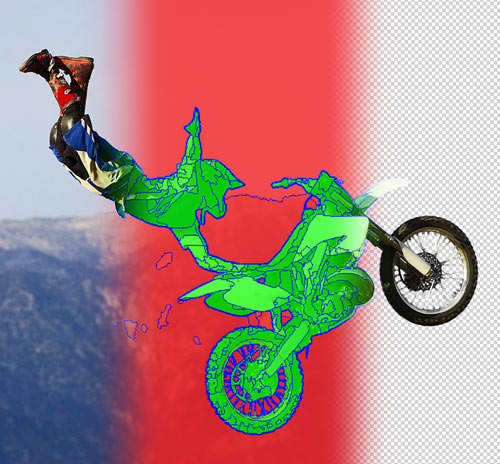
Cutting out is one of those painful tasks in Adobe Photoshop that people always approach with gritted teeth. It is very easy to cut out a section when the image has clearly defined lines. But on many occasions, you will come across images that prove to be just too challenging.
The fluid mask plug-in is helpful in such cases. It can isolate subjects in a quick and logical way and works similar to Photoshop’s own mask options, except that it has its own interface and offers much more control; for example, all brushes have their own settings. There are a lot of ways to use this plug-in, depending on the type of image you are working with.
| Compatible host program | Adobe Photoshop CS2 Adobe Photoshop CS3 (Fluid Mask installed as plug-in) |
| Operating system | Windows XP with Service Pack 2 and above Mac OS X v.10.3.9, v.10.4.9 and above |
| License | Commercial with 14-day trial |
Similar Photoshop Plug-Ins:
Virtual Photographer
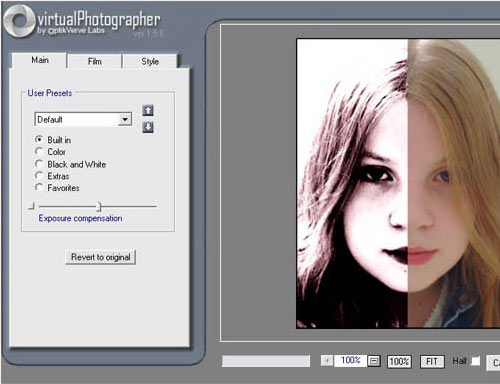
Virtual Photographer is a free plug-in that you can use to create a variety of photographic styles quickly and easily. This plug-in features multiple presets for creating numerous effects, so you don’t have to waste hours working out the perfect settings.
Virtual photographer has a filter to suit every purpose. You can fine-tune the available settings even further to manipulate the image to your specific requirements. It is also possible to save your favorite settings as .vph files so that you can apply the styles to future images.
| License | Freeware |
| Operating system | Windows |
Similar Photoshop Plug-Ins:
Portraiture
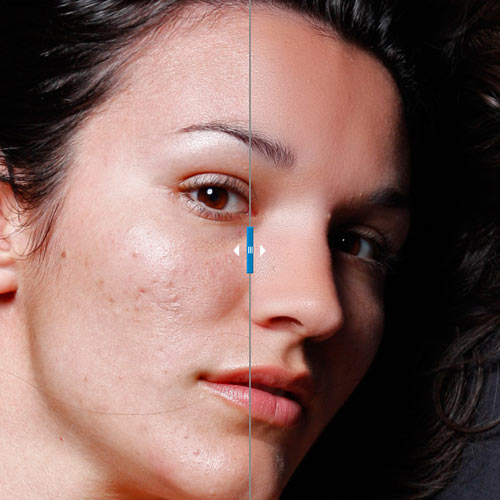
Portraiture is a useful portrait retouching plug-in. It intelligently smoothens and removes imperfections, while preserving important portrait details such as skin texture, hair, eyebrows, eyelashes, etc. A unique feature is that it allows selective smoothening for only the skin tone areas of the image. It also lets you add effects quickly with presets.
| Batch processing | via Photoshop Actions |
| Compatible host program | Adobe Photoshop CS2, CS3, CS4 Adobe Photoshop Elements 4, 5, 6, 7 Adobe Lightroom 1.5, 2.0 Apple Aperture 2.1 |
| Color support | 8 bits/channel 16 bits/channel |
| Operating system | Windows XP, Vista Mac OS X 10.4.x, 10.5.x |
| Price | $199.95 |
AKVIS Chameleon
AKVIS Chameleon automatically adjusts pasted objects to the target image’s color range and smoothens the object’s borders. This plug-in frees you from the meticulous process of precisely selecting objects. With the press of a button, the object adjusts to the new background, adapting to the new color range and blending with the environment.
| Compatible host program | Adobe Photoshop Photoshop Elements Corel (Jasc) Paint Shop Pro Many more (view compatibility list) |
| Operating system | Mac OS X and Windows |
| License | Free to try |
| Price | Home: $75 Business: $230 (Additional fee of $19.95 for a DVD) |
Noise Ninja

Noise Ninja is a useful plug-in for removing noise and grain from digital photographs. Noise reduction is useful for anyone shooting in low-light or fast-action situations like news, sports, weddings and events.
Noise Ninja often yields a two-fold improvement in image quality, while preserving important image detail. In addition, it can produce cleaner, smoother enlargements from low-ISO images. It includes automatic and manual noise analysis, camera-specific profiles, an innovative “Noise Brush” and batch processing to allow you to quickly and easily retouch and rescue your images.
| Compatible host program | Adobe Photoshop Adobe Photoshop Elements Aperture |
| Operating system | Mac OS X, Windows and Linux (stand-alone only) |
| Price | Pro Bundle (plug-in) license: $79.95 Pro stand-alone license: $69.95 Home Bundle (plug-in) license: $44.95 Home stand-alone license: $34.95 |
Similar Photoshop Plug-Ins:
Depth of Field Generator Pro
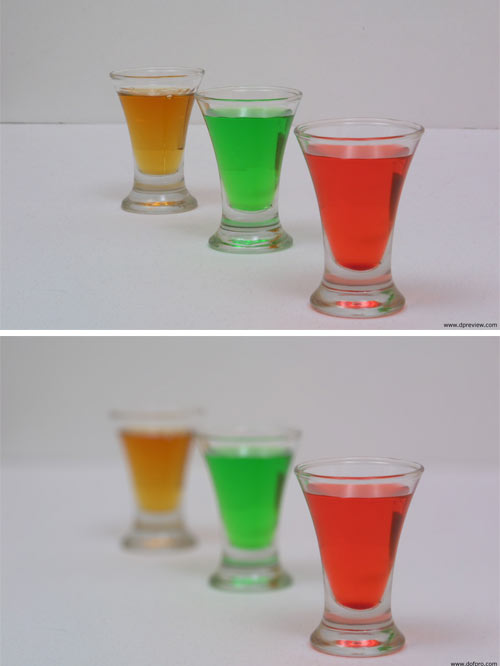
An image often looks dull if all areas or objects are of the same focus. Giving areas varying levels of focus is an ideal way to add interest and create a more sophisticated look. Depth of filed is a difficult effect to get right, but this plug-in allows you to achieve it easily.
Depth of Field Generator Pro provides an automatic solution for depth of field problems and uses a range of algorithms to aid you in the process. The plug-in can be applied to single or multiple images at once.
| Compatible host program | Adobe Photoshop v4.0 and above Adobe Photoshop Elements Adobe Illustrator 7 and above Many more (view compatibility list) |
| Operating system | Windows |
| Price | $99.99 |
Light
Although natural lighting effects can greatly improve a photograph and add interest to it, there is no way to guarantee light when taking a photo. That’s where the Light plug-in comes in handy. It comes with a selection of shapes that you can use to cast light and shadow. Don’t worry, the image won’t look unnatural because this plug-in comes bundled with displacement options that emulate the effect of light wrapping around objects.
| Compatible host program | Adobe Photoshop 7.0 and above Adobe Photoshop Elements 3.0 and above Apple Aperture 2.1 and above Adobe Photoshop-compatible applications that support the Photoshop 6 API |
| Operating system | Windows XP, Vista Mac OS X 10.4 and above |
| Price | $50.00 |
Similar Photoshop Plug-Ins:
Altostorm Rectilinear Panorama
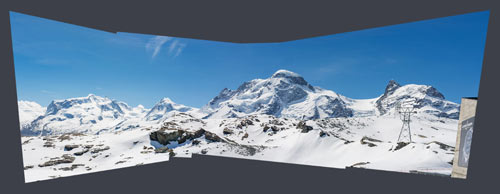
Altostorm Rectilinear Panorama is an unique tool that corrects distortions in panoramic images, including geometric image distortions; lens, perspective and panorama distortions; and asymmetrical and irregular distortions.
| Compatible host applications | Adobe Photoshop 4.0 to CS4 (32-bit and 64-bit) Adobe Photoshop Elements 2.0 to 7.0 Microsoft Digital Image 10.0 Adobe Fireworks CS3, CS4 Corel Photo-Paint 9.0 to X4 and many more |
| Operating system | Windows 2000, XP, Vista |
| Price | Professional: $179 Home Edition: $69 |
Dreamy Photo

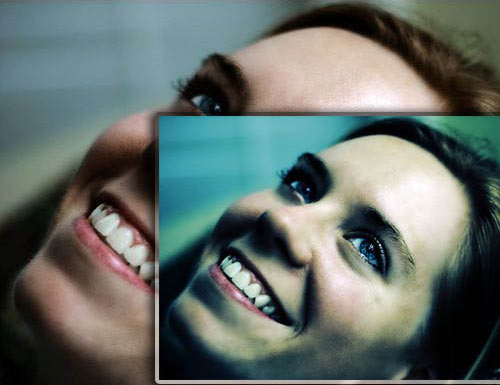
Dreamy Photo gives your photos a soft-focus look, giving them a dream-like feel.
| Compatible host program | Adobe Photoshop |
| Operating system | Windows and Mac |
| License | Freeware |
AutoEye

AutoEye is a useful tool for image editing if you have no clue about color correction or processes such as adjustment, curves, levels, cast removals, contrast and histograms. It can automatically improve digital images by rebuilding color detail, sharpness and image vibrancy using a totally different set of adjustment methods than Photoshop’s. It can instantly correct and enhance images.
| Compatible host applications | Adobe Photoshop 7, CS, CS2, CS3, CS4 |
| Operating system | Windows 2000, XP, Vista Mac OSX |
| Price | $129 |
Image Doctor
Image Doctor can save you hours trying to fix a photo in Photoshop. It is a powerful tool for retouching and repairing images. It seamlessly removes blemishes and objects. It enables photo editors to unclutter poorly composed photographs with just a few clicks of the mouse. Web designers and photographers can restore and repurpose poorly compressed JPEGs, including cell phone photos. Portraits can be retouched instantly with one click, removing pimples, moles, scars and tattoos. It can restore old photos by removing dust and scratches.
| Compatible host applications | Adobe Photoshop CS2 9.0.2 and above Adobe Photoshop Elements 4.0.1 and above (Macintosh) Adobe Photoshop Elements 5 and above (Windows) Corel Paint Shop Pro Photo X2 and above Adobe Fireworks CS3* |
| Operating system | Mac OS X 10.4.0 and above Windows XP and above |
| Price | $199.00 USD |
Similar Photoshop Plug-Ins:
Bleach Bypass PRO
Bleach Bypass Professional is an advanced Photoshop-compatible plug-in designed to digitally simulate the traditional “bleach bypass” film technique. The “bleach bypass” technique involves partially or completely skipping the bleaching stage when processing color film. This prevents the silver from being removed from the negative, and the result is a contrast image with muted colors.
| Operating system | Windows |
| License | Freeware and Pro |
| Price | $29.95 |
Process FX
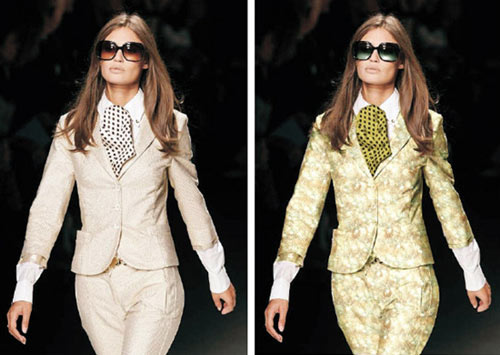
Process FX is another tool that digitally simulates traditional film cross-processing (i.e. C-41 print film processed in the chemicals used for the processing of E-6 slide film, and vice versa). This technique creates skewed color effects that range from subtle to extreme. This plug-in allows you to reproduce that cross-processed look in software, with full control over the effect. It comes with several presets, which you can save for later use.
| Operating system | Windows |
| Price | $29.95 |
PearlyWhites
PearlyWhites automatically whitens and brightens teeth. PearlyWhites can also whiten the sclera of the eye because it looks for white elements surrounded by flesh tones. It supports batch image processing for editing many images at once.
| Compatible host program | Adobe Photoshop 7.0 and above Photoshop Elements 2 and above PaintShop Pro 7 and above |
| Operating System | Windows Vista, XP, NT, 2000 Mac OS X and above |
| License | Free to try |
| Price | $49.95 |
Photomatix
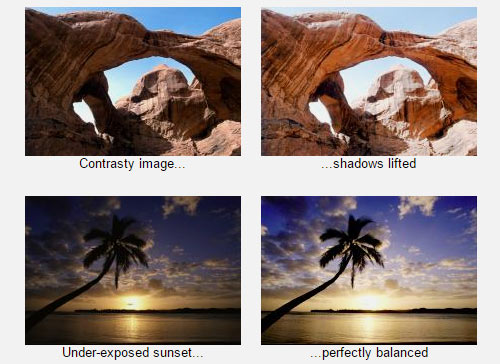
Photomatix is a tool for creating high dynamic range (HDR) photographs. Although Photoshop CS2 and later versions allow photographers to create HDR images, the tools for mapping the resulting files into something that can be displayed in print or online are primitive.
Using Photomatix, photographers can merge photographs of various exposures into one image with increased dynamic range. They can also reveal highlight and shadow details in an HDR image created from multiple exposures.
| Compatible host program | Photoshop CS2, CS3, CS4 |
| Operating System | Windows 98, ME, 2000, XP, Vista Mac OS X |
| License | Unlimited trial period (with a watermark) |
| Price | $119 USD |
ReDynaMix HDR
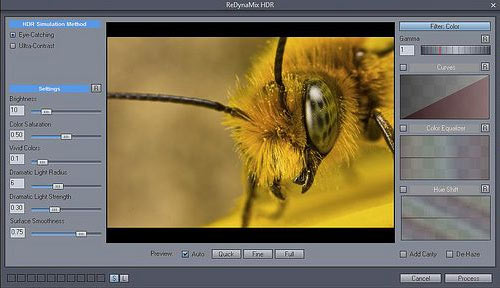
MediaChance’s ReDynaMix HDR is another Photoshop plug-in that gives HDR-like effect to your images. The difference between Photomatix (covered above) and ReDynaMix is that the latter adds HDR-like effects to single images: no need for multiple exposed photographs. It has an easy-to-understand interface, with immediate previews for settings.
| Compatible host program | Adobe Photoshop 5, 6, 7, CS, CS2, CS3 Adobe Photoshop Elements 1 and above PaintShop Pro 8 Photo-Brush 4.3 |
| Operating system | Windows |
| Price | $16 |
Xpose
Xpose is an exposure adjustment plug-in. It allows you to quickly adjust highlights and shadows with rapid preview feedback and a simple, intuitive interface. With just a few sliders, you can better expose your digital photos.
| Operating system | Windows |
| License | Freeware |
Color MegaMix
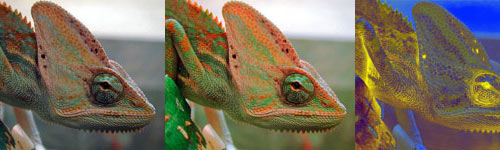
Color MegaMix is a free Photoshop plug-in that can modify the colors in any image. Using two rows of colors, eight source colors and eight target colors, this plug-in reconstructs the color space.
| Operating system | Windows |
| License | Freeware |
Wire Worm
The Wire Worm plug-in can remove wires and other unwanted objects from your images. Wire Worm comes with a set of features that distinguishes it from other tools:
- Specific tool designed for easy selection of long thin objects,
- Advanced color matching for seamless patches without color bleeding,
- Ability to fine-tune patches after placement,
- Unlimited undo and redo.
| Compatible host program | Adobe Photoshop |
| Operating system | Windows |
| License | Freeware |
Color! Color!
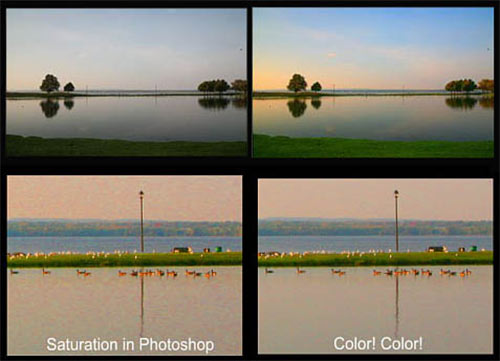
The Color! Color! plug-in gives you bold colors for your images with far less color distortion.
| Compatible host program | Adobe Photoshop 5, 6, 7, CS, CS2, CS3 Adobe Photoshop Elements 1 and above PaintShop Pro 8 |
| Operating system | Windows |
| License | Free Trial |
| Price | $10 |
Face Control
The Face Control plug-in allows you to change the facial expression of people in digital photos.
| Operating system | Windows |
| License | Freeware |
Backdrop designer
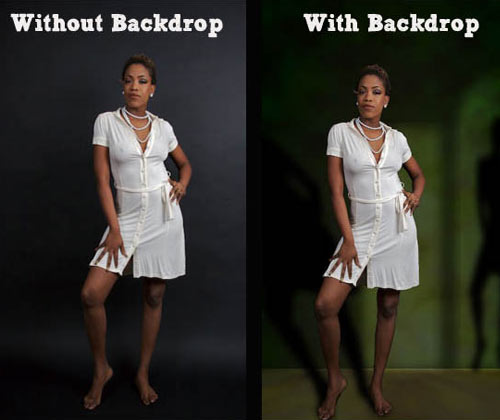
With the Backdrop designer plug-in, you can transport people and objects into scenes from professional photo shoots from the comfort of your desktop. Produce backgrounds that are resolution-independent and have textures and shadows, which increase depth and makes your scene more realistic.
| Compatible host program | Photoshop 7.0 – CS3 Photoshop CS4 32-bit (not CS4 64-bit) Elements 4.0–6.0 |
| Operating system | Mac 10.4, 10.5 Win 2000, XP Home, XP Pro Vista 32-bit, 64-bit |
| License | Free to try |
| Price | $199.00 |
Intellihance Pro
No more going through various steps to enhance your photos. Without any advanced Photoshop skills, using Intellihance Pro, you can easily correct your photos based on dynamic before-and-after previews. Using the improved Quick Enhance adjustment engine, you can visually compare up to 25 color-corrected variations of your photo, allowing you to easily correct digital images from any source.
| Compatible host program | Photoshop CS2 v9.0.2, CS3 Photoshop Elements 4 |
| Operating system | Mac OS X 10.4.8 and above Windows XP SP2, Vista (32-bit only) |
| License | Free to try |
| Price | $159.95 |
NightScope
The NightScope plug-in is a free filter for converting your day photos to night ones. NightScope works by removing color from the image and applying a slight blur that mimics the action of a camera trying to focus. You can choose the amount of grain to be applied to the image, as well as the color, by mixing the red, green and blue channels.
| Compatible host program | Adobe Photoshop |
| Operating system | MacOS 8 and above Windows 95, 98, ME, 2000, XP, Vista |
| License | Free |
Photoframe Pro
The Photoframe Pro plug-in gives your images an artistic and professional look through numerous frame designs and border effects. Photoframe Pro comes bundled with decorative and realistic effects, such as ones that make your image resemble negative film. Using the effects palette, you can adjust the settings of your frame’s background, border, glow, shadow, bevel, texture and edge. Frames and settings can be saved as presets and applied to other images.
| Compatible host program | Photoshop CS2 v9.0.2, CS3, CS4 Photoshop Elements 4 Lightroom Apple Aperture 2.1 and above |
| Operating system | Mac OS X 10.4.10 and above Windows XP SP2, Vista |
| Price | Professional Edition Price: $259.95 Standard Edition Price: $159.95 |
Similar Photoshop Plug-Ins:
Photo Manipulation And Graphic And Web Design
Aurora
The Aurora plug-in is great for creating environments for 2-D images. Using Aurora, you can create natural-looking environments with ease. It allows you to “magic up” sun, clouds, stars, water and moon, along with lightning effects and other options. It is used not just for creating natural-looking environments but also for improving areas in outdoor images. For example, you can replace a dull-looking sky with something pleasant.
| Compatible host program | Adobe Photoshop 6.0 and above |
| Operating system | Windows 98 and above Mac OS 9.2, Mac OS X |
| Price | $199 |
Fractalius
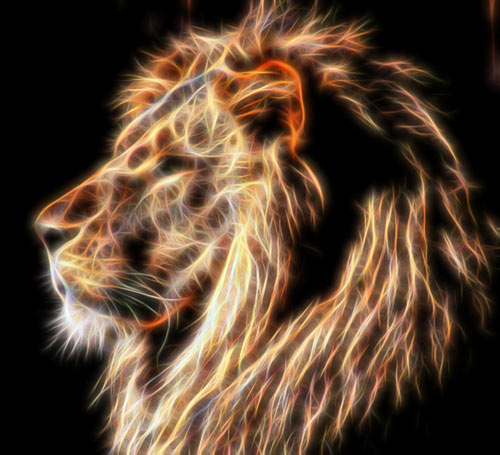
Fractalius creates beautiful fractal textures from images. You can also simulate various types of exotic lighting and highly realistic pencil sketches.
| Operating System | Windows |
| Price | $39.90 USD |
SymmetryShop
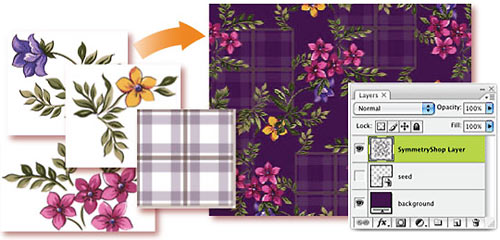
SymmetryShop is a powerful tool for designing patterns.
| Compatible host program | Adobe Photoshop |
| Operating system | Windows and Mac |
| Price | CD-ROM with printed User Guide: $321.00 Download: $295.00 |
Sketch Master
Sketch Master is a manipulation tool for creating realistic hand drawings derived from photos. It consists of various tools, such as lead pencil, ink pencil, crayon, charcoal, airbrush, etc. Three layers with separate settings allow one to emulate effects of stylized fine art on all sorts of surfaces, including water paper, squared paper, laid paper, canvas, leather, crepe and rag paper.
| Operating system | Windows |
| Price | $39.90 USD |
Similar Photoshop Plug-Ins:
SiteGrinder
Often, a big gap separates visual Web design and development. Creative professionals feel comfortable using Photoshop for Web design. The resulting design is then coded into an actual Web page by scripting professionals.
SiteGrinder bridges the gap between Web design and development by generating Web pages directly from Photoshop. Photoshop Type layers are converted to CSS layouts, while image layers are converted to Web graphics, and HTML code is automatically generated to display images on the website exactly where you positioned them in Photoshop. It is also bundled with the Layer Comps palette tool, which allows you to create a multi-page website from a single Photoshop document.
| Compatible host program | Adobe Photoshop 7 and above Photoshop Elements |
| Operating system | Mac OS X and Windows |
| Price | SiteGrinder 2 Professional: $349 SiteGrinder 2 Basic: $129 |
Similar Photoshop Plug-Ins:
Eye Candy Bundle
Eye Candy Bundle contains three Adobe Photoshop plug-ins:
Nature
A collection of 10 Photoshop filters, which can create fire, smoke, rust, snow, ice and more. Nature includes over 500 presets for frequently used effects.
Impact
A collection of 10 Photoshop filters, which can create chrome, brushed metal, glass, bevels, shadows, reflections and more. Impact offers beautifully rendered effects for designers.
Textures
A collection of 10 seamless texture generators. Textures produces a wide variety of effects, including snake and lizard skin, fur, brick, stone and wood. Graphic designers, Web developers and 3-D artists can quickly create backgrounds, skins, seamless tiles and more.
| Compatible host program | Macintosh:
Windows:
|
| Operating System | Windows 2000, XP, Vista Mac OS X 10.4.0 and above |
| Price | $199 |
AKVIS Decorator
Decorator allows you to change the surface of objects in a realistic way. You can create things unimaginable even to Mother Nature.
| Compatible host program | Adobe Photoshop Adobe Photoshop Elements Corel Photo-Paint Many more (check compatibility) |
| Operating system | Windows 2000, XP, NT, 2003, Vista Mac OS X 10.3.9 to 10.5 |
| Price | Home license: $54.00 Business license: $82.00 |
LucisArt
LucisArt is image-processing software that can be used to quickly and easily give beautiful artistic effects to your images. LucisArt 3 comes in two versions:
- LucisArt 3 ED (Enhance Detail)
Provides greatly increased ability to fine-tune how you enhance detail. - LucisArt 3 ED/SE (LucisArt 3 ED bundled with LucisArt 3 SE (Special Effects))
Adds special effects like Winslow, Sculpture and Plaid.
Sometimes combining the two gives unique and stunning results.
| Compatible host program | Macintosh:
Windows:
|
| Operating System | Windows XP, Vista (32-bit and 64-bit) Mac OS X 10.5 and above (Intel Mac computer only) |
| License | Free 30-day trial |
| Price | Check online store |
Utilities
Blow Up
Preparing photos for print can be tedious, often involving DPI, aspect ratio and cropping. Blow Up is a Photoshop plug-in that produces dramatically sharp enlargements. Blow Up uses an innovative algorithm that temporarily converts pixels to a vector representation that results in perfectly smooth, crisp edges. Simulated texture and film grain keep photos looking natural even in extreme enlargements. Over 100 presets for common output sizes are available with this plug-in and make cropping and resizing easy to do in one step. Blow Up also has a built-in batch processing tool for resizing many photos at once.
| Compatible host program | Adobe Photoshop CS2 9.0.2 and above Adobe Photoshop Elements 4.0.1 and above (Macintosh) Adobe Photoshop Elements 5 and above (Windows) |
| Operating System | Windows XP and above Mac OS X 10.4.11 and above |
| Price | $249 |
Similar Photoshop Plug-Ins:
Icon Plug-in
Icon is a free plug-in that graphic designers can use to create compelling icons directly in Adobe Photoshop without needing to use intermediate files or buy additional icon editors. It can export and import Windows icons (.ico). It supports multi-format icons, transparency, semi-transparency and other non-standard icons of different sizes and color resolutions, including monochrome, 16 colors, 256 colors, 24-bit True Color and 32-bit True Color with semi-transparency.
| Compatible host program | Adobe Photoshop 5.0, 6.0, 7.0, CS Paint Shop Pro 9 Photoshop Elements 3.0 |
| Operating system | Windows 95, 98, ME, 2000, NT, XP, 2003 |
| License | Freeware |
FlickrShop
FlickrShop is a plug-in for uploading photos to Flickr directly from Photoshop. You can automatically resize photos, choose image formats and adjust image quality. Also add titles, descriptions and tags, and set visibility settings for public, family and friends.
| Compatible host program | Adobe Photoshop |
| Operating system | Windows and Mac |
| License | Freeware (3 uploads per day) |
| Price | $19.95 |
PhotoPurify
PhotoPurify lets you match your print’s colors to your screen’s colors without additional hardware. It takes 27 measurements, using a color picker to synchronize print color and screen color.
| Compatible host program | Photoshop and Photoshop Elements |
| Operating System | Windows and Mac |
| License | 10-day trial |
| Price | $9.95 |
SuperPNG
SuperPNG is fast and can reduce the size of PNGs considerably. It includes some advanced options for saving PNGs: 16-bit color support, variable compression, gamma correction and meta-data saving.
| Color support | 16-bit |
| Compatible host program | Adobe Photoshop and Adobe After Effects |
| Operating System | Windows and Mac |
| License | Freeware |
Timeline
Timeline is a version control system designed specifically for Adobe Photoshop files. Whenever you feel you have done something worth saving, just click a magic button on the Timeline palette in Photoshop, and your file is saved as a version on the PixelNovel server.
| Compatible host program | Adobe Photoshop CS2, CS3, CS4 |
| Operating systems | Window and Mac |
| License | Beta |
Other Good Photoshop Plug-Ins
Many other good plug-ins are not reviewed in the list above:
- Flexify
- Snap Art
- Brightness Editor
- Golden Section
- Flaming pear
- Primatte Chromakey
- Path Styler Pro
- Camouflage
Further Resources
You may be interested in the following articles and related resources:
- The 111 Most-Used Photoshop Plug-Ins
- Mehdi Plug-ins
Many free plug-ins for Adobe Photoshop. - Running Photoshop plug-ins in GIMP, even on Linux
(al)
Vailancio Rodrigues, born and currently living in scenic beauty of Goa, spent most of his childhood in art and creativity. At present a College student who likes to try and do different things at every moment. Also an webmaster and web designer – Tiny Goa and Pixel Art.
- 69 Comments
- 1
- 2April 23rd, 2009 11:54 pm
Nice plugins!
Some really useful stuff
- 3April 23rd, 2009 11:59 pm
Really useful list of plugins.
It will be great if you can find out and add some information about photoshop plugin development too.
- 4April 23rd, 2009 11:59 pm
Very nice list of plugins – finally a resource to come back to a lot when you know you’ve seen it on the web somewhere. Organized and with examples; just the way we like it.
Keep up the good work.
- 5April 24th, 2009 12:01 am
Great article. It was about time for you to come out with a good collection of some sort :)
- 6April 24th, 2009 12:08 am
I find a few plugins actually useful – almost nothing I can’t already do manual or perhaps creating actions.
- 7April 24th, 2009 12:14 am
mmm, plugins you can do most of the stuff above with just plain photoshop!!
- 8April 24th, 2009 12:21 am
How could you miss the only plug you ever need? Nik Color EFX pro?
http://jeanfrancoisokane.com/2008/09/02/my-stuff-my-softwares-nik-color-efex-pro-3/ - 9April 24th, 2009 12:37 am
^ Pascal, Surely you can do all of the stuff with plain old Photoshop- plugins just make it faster. Time is money as they say.
- 10April 24th, 2009 12:38 am
I think most of them are just needless, because you can configure a PS-Action with plain PS and get the same result. And people who can´t configure an Action like this … also couldn´t install a plugin :-)
- 11April 24th, 2009 12:45 am
Should make a list like this only for freeware plug-ins!
- 12April 24th, 2009 12:49 am
wow, some of things I’ve been doing manually, they have been automated with these plugins. they’ll speed up my work.
- 13April 24th, 2009 12:50 am
Nice list, but you should definitely also add this one: Viveza from Nik Software (www.niksoftware.com). Very intuitive color correction tool. Can save you a lot of time when doing color corrections, especially selective color corrections.
- 14April 24th, 2009 12:59 am
Oh, if only I had thousands and thousands of dollars to dump into plugins.
I actually kinda liked the Sketch Master one.
- 15
- 16April 24th, 2009 1:06 am
I guess I old school, but I rather make it my self in Photoshop! It just feels better
- 17April 24th, 2009 1:11 am
Yeah, some of them are very useful…thanks
- 18April 24th, 2009 1:11 am
Superb list – well done smashing mag !
- 19April 24th, 2009 1:38 am
Yay, SuperPNG just saved a small Button with 60KB. With “Save for web” it’s 4KB.
- 20April 24th, 2009 1:38 am
Hmm, some very interesting plug-ins – can’t wait to give them a try!
- 21April 24th, 2009 1:40 am
Thanks very much for the mention to “free photoshop plug-ins collection” post in WebResourcesDepot.
Very nice post btw. Congrats.
- 22April 24th, 2009 1:44 am
Great post! I like them so much.
- 23April 24th, 2009 2:28 am
Hmkay. I will save time by not browsing through all the available plugins and save money by not buying any…
- 24April 24th, 2009 2:51 am
has anyone actually used that sitegrinder tool? does it work or is it just a waste of time.. created for amateurs that don’t know css, html, etc…?
- 25April 24th, 2009 2:51 am
good collection,
I really like the “Altostorm Rectilinear Panorama”, the results are very impressive - 26April 24th, 2009 3:03 am
Very nice and informative…!!
thanks for mentioning freeware….. - 27April 24th, 2009 3:22 am
crazyyyy
- 28April 24th, 2009 3:28 am
Great list as usual. Just retweeted and dugg it. I created list myself of freeware plugins here:
http://www.photoshoproadmap.com/Photoshop-blog/2008/12/04/15-fantastic-and-absolutely-free-photoshop-plugins/ - 29April 24th, 2009 3:41 am
meh.
- 30April 24th, 2009 3:54 am
Great post!
\m/\m/ - 31April 24th, 2009 4:39 am
Anyone knows if there is a plugin/action/whatever that makes Photoshop Files readable to Photoshop Elements? Cause Elements cannot expand folders. So…i want some kind of script that deletes all folders and places all layers in the “root”. Been looking for it a long time!
- 32April 24th, 2009 5:27 am
Really? I am surprised at the number of positive responses to this post. I must be getting old; I use curves, levels, channel mixer, patch tool, clone tool and so on for my photo work.
Super PNG and Timeline look interesting though.
Anyway, thanks SM…cheers!
- 33April 24th, 2009 5:32 am
Dammit, I had intended to spend the weekend cleaning and ironing… now I’ll just have to fire up Photoshop and try some of the plugins ;-)
Many thanks for a great collection!
- 34April 24th, 2009 5:53 am
wow ! great rocking resources.
- 35April 24th, 2009 5:59 am
hello there,
most of the plugins are useless….come on. One or two are good - 36April 24th, 2009 6:01 am
Oooohhhh I just love these posts. Thank you :-)
- 37April 24th, 2009 6:03 am
Great collection of plug-ins guys! Thanks for putting this together! Sketch Master is pretty cool and so is Altostorm Rectilinear Panorama. I have never heard of those before!
- 38April 24th, 2009 6:13 am
Hello? No Nik plugins?!?! Have you never used them or something?
Stunning that you could create an “Ultimate Collection” piece and not mention a single Nik program…
- 39April 24th, 2009 6:59 am
Meh.
All I see is one big advertisement. For things that I hand do in photoshop, with better success.
Plus, plug-ins slow photoshop down, and no one likes a slow photoshop.
- 40April 24th, 2009 7:20 am
Thanks for your time in putting this post together, quite comprehensive.
I do find though that people become too reliant on plug ins. And the majority of plug ins can be replicated, usually better, with a few simple steps, manually, in PS. Admittedly, a few are handy, like enlargement plug ins or noise reduction plug ins. The rest though just make people lazy and stop them playing around, thus learning new techniques.T.
- 41April 24th, 2009 7:27 am
Nice collection but you missed out “Bokeh” from Alienskin Software :-)
Cheers!
- 42April 24th, 2009 8:17 am
Just amazing
- 43April 24th, 2009 8:36 am
Great article! Congrats!
- 44April 24th, 2009 10:29 am
Thank you for that list.
While I agree a lot of these things can be done manually in photoshop, it does take time to figure out all the steps to get it all done. And yes, while an action can be created… as we all know, actions or droplets don’t always produce the same results with every single image we’re working with.
The advantage I see to these plugins is that they’re like an action, only you can go in and make custom adjustments right in the middle of the action… if that makes any sense whatsoever.
Not sure I want to spend the money some of these manufacturer’s are asking (thus, I’d likely stick to doing it all manually with photoshop). But it’s nice knowing those things are available.
I am also curious about the Site Grinder plugin. I’d love to hear if it’s amazing or a piece of junk.
- 45April 24th, 2009 10:55 am
Thats really cool, I would definitely use the Process FX one :D
- 46April 24th, 2009 11:07 am
Imagenomic’s Noiseware Professional is the best noise reduction software I’ve ever used. I’ve tried out quite a few, too. It needs to be included on this list. And I agree with others about the Nik tools – great stuff. And yes, any plugin is replicating something that can be done by hand, that’s true. Plugins may slow down the workflow for some, but for many of us, they are going to be the key to faster, better production.
- 47April 24th, 2009 11:48 am
I use only plugins from Nik Software .. they are great..
- 48April 24th, 2009 12:43 pm
what about kodak Plug-ins the best for portrait retouching.
- 49April 24th, 2009 3:23 pm
Nik is top of the line, if you can afford the pro complete version. Viveza is great, and sounds like Cerveza, a perfect combination!
- 50April 24th, 2009 4:10 pm
Hi Smashing, your Bleach Bypass Pro link is down!
- 51April 24th, 2009 6:42 pm
Fantastic! I love it
- 52April 24th, 2009 9:13 pm
Fractalius is amazing
- 53April 25th, 2009 2:52 am
Rally excellent plug-ins..
Thanks for the post.
Like them all - 54
- 55April 25th, 2009 4:14 am
Great resources
- 56April 25th, 2009 6:02 am
I like VirtualPhotographer… It’s free
- 57April 25th, 2009 7:18 am
Alien Skin’s Eye Candy Bundle should have been first on the list, but I do like the wire removing plugin. I’m not sure I would buy it, but it is cool.
- 58April 25th, 2009 11:08 am
another great post. 10x a lot for this. really uselfull. u keep up with this smashing stuff :)
- 59April 25th, 2009 3:03 pm
I agree with one of the commenters that Bokeh by Alienskin should have been on the list.
Top notch list otherwise. Great work.
- 60April 25th, 2009 8:43 pm
FilterForge is very good too.
- 61April 25th, 2009 11:52 pm
Definately Niks Range of Products are one of the Best around
- 62April 26th, 2009 8:00 am
Awesome tools! Another awesome post!
Many thanks.
grsk - 63April 26th, 2009 8:03 pm
Just curious about the “FlickrShop” post. What’s the difference between this and the free Flickr Uploadr tool? Why pay $20?
- 64April 27th, 2009 12:24 am
Very cool plugins.
I have added some of them on my birthdays-wishlist!Thanks Smashing for keeping me up to date!
- 65April 27th, 2009 3:13 am
Hey, the Bleach Bypass PRO and Process FX website is down! I know it have been down from months…
- 66April 27th, 2009 10:43 am
Thanks very much for taking the effort to put up such a list.Many of these I didn’t knew although I keep searching for Unique items for my work.People do criticise u but they forget that one could have kept knowledge to oneself & they would not have even known its existence instead of giving atleast a word of appreciation to those who take efforts without giving a thought to their own benefit.Thanks again
- 67April 27th, 2009 11:37 am
amazing work, amazing post
great stuff, nice and clear explained, what’s more ha?excellent one more time !!!
thankss - 68April 28th, 2009 9:39 pm
thanks for sharing, but they’re pretty expensive..
- 69
- 00
There are no trackbacks at this time. If you are interested in leaving a trackback, please use this URL.
Leave a Comment
Make sure you enter the * required information where indicated. Please also rate the article as it will help us decide future content and posts. Comments are moderated – and rel="nofollow" is in use. Please no link dropping, no keywords or domains as names; do not spam, and do not advertise!
Interact
Popular
- 100 Wordpress Themes
- Photoshop Tutorials
- Fantastic Wallpapers
- 40+ Excellent Freefonts
- Dual-Screen Wallpapers
- Wordpress Themes for 2009
- Illustrator Tutorials
- Incredible Free Icon Sets
- High-Quality Free Fonts
- 30 Scripts For Galleries
- Photoshop Text Effects
- Useful Icon Sets
- Web Design Trends
- iPhone Wallpapers
- Before Launching a Website
- CSS Layouts And Templates
- Photoshop Actions
- Stunning Pictures and Photos
- Fantastic HDR Pictures
- Logo Design Tutorials
- Free Design Templates
- 10 Mistakes In Logo Design
- Photoshop Custom Shapes
- 40 Creative Design Layouts
- 8 Layout Solutions
- 53 CSS Techniques
- Photography Techniques
- Black & White Photography
- Styling Design Elements
- CSS-Based Forms
- 50 jQuery Techniques
- 50 Portfolio Websites
- 50 CSS Techniques
- Creative Logo Designs
- Desktop Wallpapers
- 25 Open Source Mac Apps
- 50 Free Icon Sets
- The Big Showcase Of Online T-Shirt Stores - http://bit.ly/5Tq8uA
- @ilmv oh ok then ;)
- @ilmv no, the SM Book will not be out of date :) We made sure it contains universal design, usability and marketing principles.
- Apple ad bombing Windows 7 on Google - http://bit.ly/28ctPq
- Atatonic - a fresh CSS framework - http://bit.ly/4oOV2w (via @umutm)
- @HrvojeKC yes, that's an interesting idea. Maybe when the waiting is over, we'll write a detailed post about it.


Cool Resources!
and first :D