Flash vs. Silverlight: What Suits Your Needs Best?

Advertisement

With the release of Silverlight 1.0 and its subsequent versions, a debate started among designers and developers regarding choosing between Flash and Silverlight. Silverlight faces difficulties in capturing the market because of the maturity of Flash. However, Silverlight has managed to keep up by including certain features that designers and developers have always wanted to see in Flash, such as search engine optimization. In this article, we will discuss some of the technical differences between Flash and Silverlight to help you choose the technology that best suits your needs.

Animation

Flash uses the frame-based animation model. In frame-by-frame animation, we create an object for each frame to produce an animation sequence. For example, if you want to move something across the screen in 3 seconds, calculate how many frames 3 seconds will take, then calculate the matrices required for each frame along the way. Keep in mind that the player won’t actually maintain a frame rate unless you embed a blank audio track; otherwise, 3 seconds might turn out to be 2 or 6 or 5.
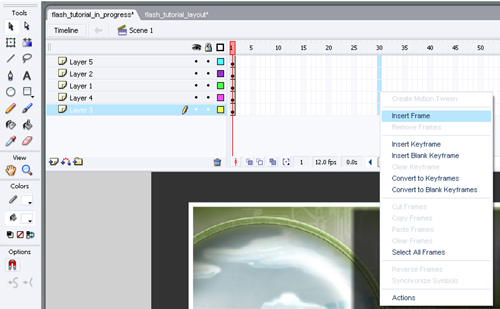
Adobe Flash Animation

Silverlight is based on the WPF animation model, which is time-based instead of frame-based, so you define the start and end conditions, and it figures out how to do it. No need to deal with matrices like with Flash. Also, no need to calculate the positions of objects in various frames.
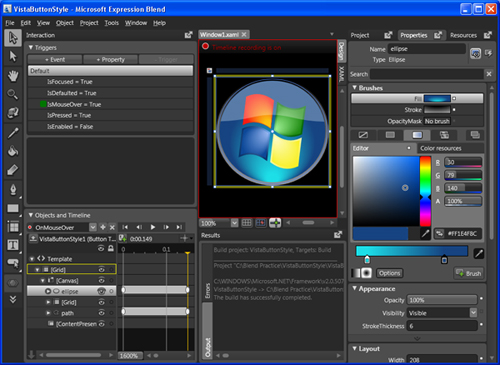
Microsoft Silverlight Animation

File Size

Flash uses a compressed format, and text and images are embedded in the movie, hence the file size of a Flash component is relatively small.
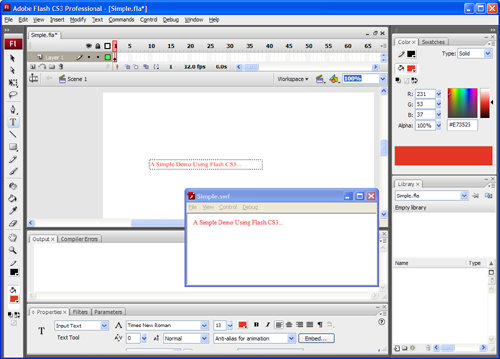
Text representation in Adobe Flash

Silverlight uses XAML for its description language, and it is non-compressed, so the size of a Silverlight component is usually larger.
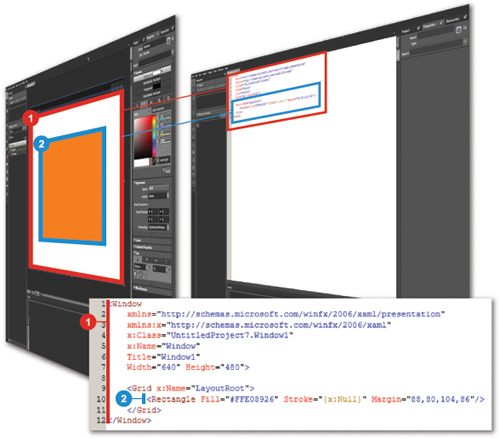
Text representation in Microsoft Silverlight

Scripting

ActionScript is used to program Flash objects. ActionScript is an object-oriented language with a full range of controls for designing user interfaces. And it can be integrated with back-end technologies that use other languages and frameworks, such as PHP, ASP and Ruby On Rails. It comes with a huge, powerful class library for developing online browser-hosted applications and stand-alone desktop applications.
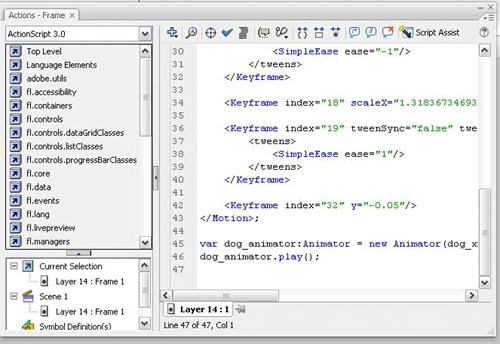
Action Script

For Silverlight scripting, you can choose from among a number of programming languages such as Visual C#.Net and Visual Basic.Net, including client-side scripting with JavaScript. C# and VB.NET can be used to write managed code that runs on and uses all of the enhancements and capabilities of Microsoft’s .NET framework.
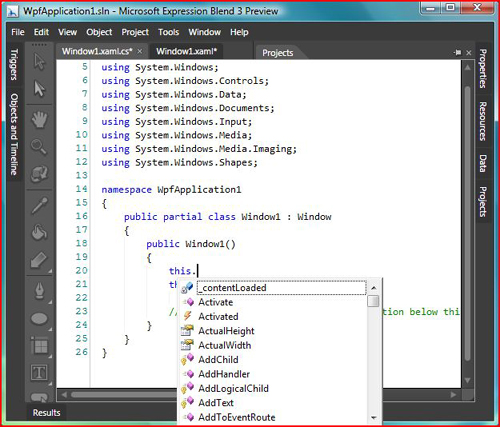
Visual Basic

Video And Audio

Flash supports multiple video formats. The latest codec is very high quality, and the bandwidth usage is nice. There is one problem, though: if you create a tool that outputs Flash content, the formats it supports aren’t really used by anyone else. The original video codec, Sorenson’s proprietary H.263 implementation, is a mutant version of H.263. The compression follows the spec fairly closely, but a bunch of features were left out, and you can’t exactly just go find complete specs on how to build your own encoder.

Video Codec

Silverlight implements the industry-standard VC-1 codec for video, and supports WMV and WMA. Just about everyone already has Windows Movie Maker, but if someone doesn’t, it’s not a big deal because Microsoft makes available a free SDK encoder for producing WMA and WMV. So, not only would you be using formats that people would more likely be able to encode themselves, but Microsoft provides your product with SDKs if you want to do the encoding yourself.

Sound Processing

ActionScript offers a set of sound classes that can be used to generate and control sound in a movie. You can add sounds from the library while the movie clip is playing and control those sounds. If you do not specify a target when you create a new sound object, there are methods to control sound for the whole movie.

Sound Processing

Silverlight doesn’t have the low-level audio APIs you would need to write an audio application in the browser. It doesn’t even support playback of WAV files because .NET has very little audio playback support.

Accessibility

Flash provides rich accessibility features for those who have hearing and vision problems or who rely on keyboard shortcuts. Providing captions for video solves accessibility challenges for people who are deaf and hard of hearing, but people who are blind or have low vision or other physical disabilities need the video playback controls to be keyboard-accessible and to function properly with assistive technologies such as screen readers and screen magnifiers. Users who rely on keyboard access can use a variety of familiar shortcuts to control video. Buttons such as “Play/Pause,” “Stop,” “Rewind,” “Mute” and “Closed Captions” can be tabbed to and activated with the spacebar. Slider controls such as for volume and playhead position controls can be accessed via the arrow keys, and the “Home” and “End” keys can be used to skip directly to the beginning or end of a range. The volume slider also accepts numeric keys to set playback audio levels in one quick step.

Accessibility

Accessibility

Accessibility

Silverlight 3 is the first browser plug-in to provide access to all system colors, allowing people with partial vision to use familiar operating system controls to make changes, such as switching to high-contrast color schemes for ease of readability. These features are far fewer than those provided by Flash.

Platform Compatibility

Flash supports Windows Vista/XP/2000, Windows Server 2003/2008, Mac OS 10.1/10.5 (PowerPC), Mac OS 10.1/10.5 (Intel), Linux 5, openSUSE 11, Ubuntu 7.10 or later and Solaris 10.

Silverlight supports only Windows Vista/XP/2000, Windows Server 2003/2008, Windows Mobile 6, Mac OS 10.1/10.5 (PowerPC) and Mac OS 10.1/10.5 (Intel). Because Linux and Solaris support is missing, users of those operating systems won’t be able to experience Silverlight on their machines.

Text Representation/SEO

Flash stores fonts using shape definitions and the player doesn’t understand TTF, hence we cannot separate the text layer from the movie. Typically the text written on a flash component was not SEO friendly however Adobe has made the modifications to Flash so that it will be indexable, and the search engines have begun to index Flash.

Currently Google is the only search engine that is noticeably reading Flash files. They have worked closely with Adobe to develop the right toolset for the Googlebot in order to read the files for indexing. Yahoo is working on it and MSN is working with their own format, Silverlight, so they probably won’t be developing the toolset necessary to read Flash files.

To read more about how to make Flash SEO friendly, please read the following articles:

In Silverlight applications, user interfaces are declared in XAML and programmed using a subset of the .NET Framework. XAML can be used for marking up the vector graphics and animations. Text is deployed on web server as separate entity and can be read and accessed separately. Textual content created with Silverlight is searchable and indexable by search engines as it is not compiled, but represented as text (XAML).

Supported Image Formats

Flash supports almost all image formats.

Silverlight supports only PNG and JPEG file formats. Some other file formats are supported by Silverlight but in a limited way. A full list can be found here.

Socket Programming

The XMLSocket object implements client sockets that allow computers running the Flash player to communicate with a server computer identified by an IP address or domain name.

To use the XMLSocket object, the server computer must run a daemon that understands the protocol used by the XMLSocket object. The protocol is as follows:

  • XML messages are sent over a full-duplex TCP/IP stream socket connection.
  • Each XML message is a complete XML document, terminated by a zero byte.
  • An unlimited number of XML messages can be sent and received over a single XMLSocket connection.
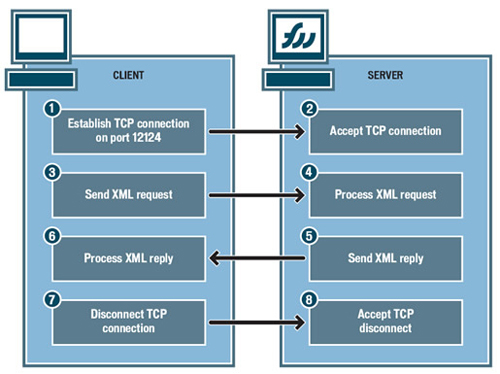
Socket Programming with Flash

Silverlight doesn’t support socket programming. Silverlight supports sockets programming through the System.Net.Sockets namespace. Silverlight supports asynchronously sending data back and forth across a socket over ports ranging from 4502 to 4534. Silverlight supports cross-domain socket communications between a Silverlight application and any server, provided that a special security policy file is in place on the server.

Webcam Support

Flash has webcam and microphone support for live video and audio transmission, and using them is really easy in Flash. It takes only a few lines of ActionScript code to invoke the camera object.

Camera.get Returns a default or specified camera object, or null if the camera is not available.
Camera.setMode Sets aspects of the camera capture mode, including height, width and frames per second.
Camera.setMotionLevel Specifies how much motion is required to invoke Camera.onActivity(true) and how much time should elapse without motion before Camera.onActivity(false) is invoked.

Silverlight doesn’t support webcam or microphone.

Deployment

The Flash deployment package contains only a single Shockwave (SWF) file, and all images, text and animations are incorporated in this file. Because of the compressed nature of a Flash component, its images and text are not indexed by search engines, and thus not searchable.

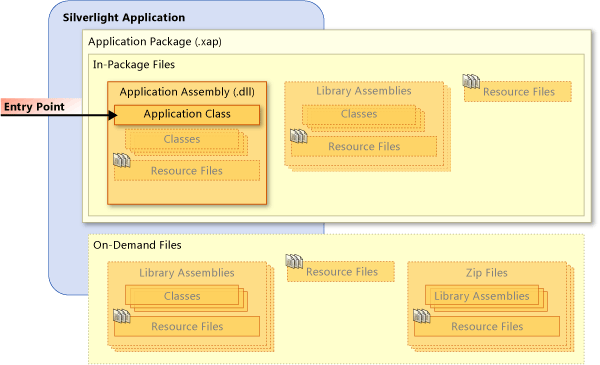
The deployment process of Silverlight is far more complex; all individual components need to be deployed separately. The following components typically get sent to the client for each Web request of Silverlight:

  • XML files,
  • DLL files (if necessary),
  • Silverlight.js file,
  • Any other JavaScript file,
  • Resources (images, audio, video).

Silverlight Deployment

Read the full documentation on Silverlight deployment.

Windows Application

A Flash movie can be compiled into a Windows application and run as a standalone EXE file. It can also be played on a desktop that has an appropriate Flash player.
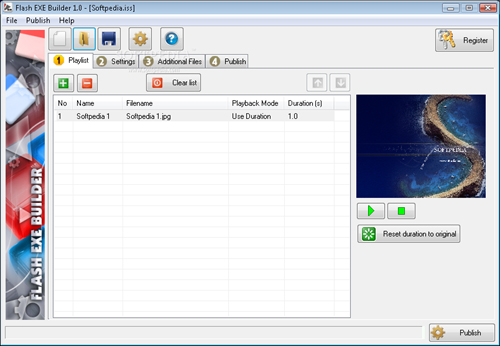
Flash EXE Builder

Silverlight doesn’t support playing the movie as a Windows application.

Media Streaming

Flash provides no such service to host the content and application with them. Thus, building a video website with Flash is not as cost-effective as building one with Silverlight.

Microsoft Silverlight Streaming by Windows Live is a companion service for Silverlight that makes it easy for developers and designers to deliver rich media as part of their Silverlight applications. The service allows Web designers and developers to host and stream cross-browser media and interactive applications that run on both Windows and Mac. This service can be combined with Microsoft Expression Studio and other third-party tools to create and develop interactive contents.

Silverlight Streaming by Windows Live is currently in beta testing and offers 10 GB of free hosting for rich-media applications.
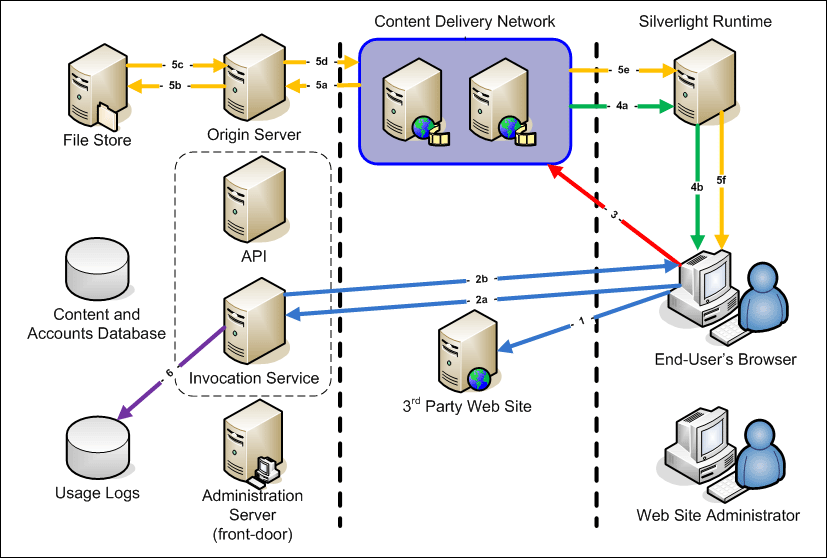
Microsoft Silverlight Streaming

Conclusion

Selecting the right technology for rich Internet applications is often critical, and choosing between Flash and Silverlight depends entirely on your requirements. If you expect that some of your users will be on Linux or Solaris, then you should go with Flash. If you want your website to be indexed by search engines, then Silverlight may be better.

Besides, as Doug S. is points out in the comments, it’s worth noticing that a minority of web users actually have a Silverlight plugin installed on their machine, while most users do have Flash-support. The Flash Player 9 and higher support streaming of the H.264 video codec which means anyone with a video program that can output an MP4 can stream to Flash. There are literally hundreds of free apps on Mac, PC and Linux that can do this. It’s also important to mention that the latest version of Flash Player supports 3D rendering while Silverlight does not and that SWF, FLA, FLV, and AS are all open-standard formats, while Silverlight is 100% proprietary.

The following table summarizes the features discussed above. Rather than including arrows to indicate whether each platform has a particular feature, we’ve simply marked “better” to show the areas in which each technology beats out the other.

Features Flash Silverlight
Animation better
File size better
Scripting better
Video/Audio better
Sound processing better
Accessibility better
Platform compatibility better
Text representation/SEO better
Supported image formats better
Socket programming better
Webcam support better
Deployment better
Windows application better
Media streaming better

Further Resources

The following articles are suggested for further reading:

(al)

  1. 301

    Try to do something like http://www.ladimolnar.com/Fractalia/ in Flash/Flex and then we’ll talk.

    0
  2. 302

    Liberty City Cops Rules!!!!!!!!!!!!!!!!!!!!!!!!

    0
  3. 303

    I think that the comment are too much more biased than the article itself. Actually the article is nice, and just traces a parallel between both tools. Obviously the writer has no one (or very small) experience with SilverLight. But – what the heck – I doubt that anyone here (or anywhere) can tell that has DEEP experience in SL!

    Anyway, I have seen people above speaking in defense of Flash and others doing the same regarding to SL – what in my opinion is very childish since as developers we would be always focused on find the better tools instead to fight each other in name of big companies. Come on, people – not MS neither Adobe will be sharing their revenues with you just because your passionate comments! LoL!

    Anyway, back to the point I think that both platforms has advantages and disadvantages. I am a Flash guy and a .NET developer for years now and my better wish would be to see Flash incarnated into the .NET platform (AKA SilverLight).

    However, as usual (and again!) Microsoft has released a product in a rush with an apparently unfinished tool instead to make their homework accordingly. It sounds at least as stupidity to release a web tool by ignoring Linux.

    I am about to develop a desktop application for the company I work for because they are MS freak and they want one of our old Flash tool converted into SL. It will be very fun for me! But obviously my situation is very comfortable as I will be paid to learn SL as by my bosses request, then even if SL becomes a big failure in the future I won’t have lost anything…

    However, for all the ones that work as freelance developers, I think that it is a dangerous bet. At least for a while. It may mean a big learning curve, and after then, ends as a faulty idea. In my almost 30 years of experience I have seen lots of great nice tools come and go. Anyway, I think that is better to be careful.

    I think that SL MAY be a great tool some day, but for now it just look like a nice golden pill. The fact is that I don’t think that it is fair enough to compare a mature tool with over a decade of attested success with a new born. It is not fair for both ones.

    Let’s try again in 3 years or so. And, of course only if it become Linux friendly. Otherwise, not even in century!

    PS: Just for the records – I am NOT a Linux user – I am only a realistic and conscientious developer!

    :)

    +11
    • 304

      Yan,

      You are exactly correct about neither company sharing profits for passionate comments. To me the important thing is which to is versatile and usable with many platforms and which has mad itself exclusive only to its developers other software tools,

      No different to the computer manufacturers that made their systems capable of using any RAM/video card/network card/etc… versus those that made their equipment proprietary. When you go the proprietary trying to force people to all you products, you force so many more away, that do not want to pay your Premium cost to use it.

      0
  4. 305

    This article and all of its comments agents Flash are written by serious Flash amateurs, so I would not consider it as any reference point. Just looking on Silver lite code makes me laugh loudly. You have to write 10X more than in flash to do the same thing, and when rush hour, that is the only thing that meters! My vote is for Flash in all aspects!

    +1
  5. 306

    I think that until now, flash and silverlight are two completely different products and any comparison is just to be. Any real-life deleloper will certainly manage both of the environments, ‘do’ the job and go to next one….but i also think that in the same world, noone will ever have (i hope) to choose and propably noone will ever do.
    Silverlight development is presented, supported and distributed as a business application platform and is build uppon a rather large portion of the not-so-young .NET framework that will always be a business platform. With Silverlight you would propably create an Eshop, a CRM, an Enterprise or Educational Software, a Navigation Application or any type of content access software and you could do it rather easily by using the various set of tools and technologies that .NET has to offer. And even more you can do all that Accelerated, Animated and with some Effects , just like Flash.
    You have to be already a .NET developer and value the development-style that it promotes and it doesn’t matter if SL has disadvantages over Flash, or not still running on some OS – That is product specifications.
    As for Flash, i would consider using it if i had to create a very-very-very impressive presentation over the web, a commercial or even a game that would not require any serious communication with a server or data-exchange.
    To simplify things consider Silverlight a platform for web-developers with design skills (and demands) and Flash the one for web-designers with code development skills.

    0
  6. 307

    i want car game script for flash

    0
  7. 308

    Can anyone help me i want to learn Silveright or flash witch is good i need a honest answer plz guys

    0
  8. 309

    Time proves it Silverlight is officially dead now

    Microsoft dropping it in favor of HTML5

    0
  9. 310

    Silverlight is not dead! HTML5 and Flash are a subset of features in Silverlight 4. High end buisness applications such as SAP are written in Silverlight. Windows Phone will always use it. As far as the Mental Miget Colony of “open sores” software goes, you will always be angry because you couldn’t cut it with MIcrosoft products for development. So enjoy your 4% market share.

    +3
  10. 311

    I am not an animator or website maker. I am just a normal browser of websites, and play games and all that. I have to give an F to Adobe Flash. It always crashes and freezes my browsers up. Ever since Adobe took it over from macromedia, they ruined it. Macromedia Flash was much more stabler than now. I decided to completely remove Adobe Flash and use an alternative on my Windows XP system. Silverlight for my window based browsers, or the Open Source Gnash which can be used for Mozilla based browsers, K-Meleon, Opera and Chrome. Gnash is based basically on the old Macromedia Flash Player without the bloatware of Adobes. The flash player was not a security problem that Adobe made it out to be. It was just an excuse by them to add extra stuff to it that did not need it. The security issue was with Microsoft. Now, to go back to Gnash. I had it installed on a Ubuntu linux like system before, and found that it was much more stable with no crashes, freezes or script stop running error messages. Plus, it does not eat up all the resources like Adobe Flash Player does. Gnash plays Adobe Flash 8 scripts, and some of 9s. I am trying to go away from all Adobe junk lately like using Foxit Reader and all that. There are only three flash player programs out there for Windows system and they are Adobe Flash, Gnash and Silverlight. Maybe all the animators who make games and all that might want to check out Gnash since they also have a programmer program with it on building flash. I know that Adobe flash does hurt people who have older computers. I would prefer using Gnash over the other two because it is easier to use, and not a headache for people who loves to play games and all that. I really do not want to see a message all the time to update my Adobe Flash player when I have the latest update from the other two when they are installed.

    0
  11. 312

    A lot of your points don’t seem credible enough, not enough evidence…

    One major flaw is the comparison of “what is a better animator” – a terrible approach!
    Flash was intended to be a fully fledged animation tool for frame by frame, tweening and more, your comparison is biased and does not represent fact!

    0
  12. 313

    For the last 7 years as hobbyist I have been coding during my spare time using varies programming software tools. I have used C,Basic,Assembler and C# to program PIC/ ATMEL controller. I have spend almost 3 years trying build site from scratch using AS2 and AS3 using flash (Happy with the result) and PHP CMS (Epic failure but awesome) just for fun. Although, I am not a professional developer I have to say that I have no regret learning Adobe AS2-AS3 and it’s programming environment. It’s simply exciting and fun and the learning curve is so smooth since there’s a vast amount of community help resource out there. This is in contrast Silverlight. Saw it on “Start Program Menu” so was curious to find out more. Spend 8-10 hours (1 whole day) reading and watching their tutorials and realized that it’s the worst programming language (XAML) ever, in comparison any other AS3,PHP,AJAX etc. It lacks of maturity in term of coding and user friendly environment just to mention a few. For e.g Adding Button to make it appear the way you want it you have to write so many line of codes. “This is like going back to Square one after gone so far ahead”, Once again another epic fails product from Microsoft one just like Window Vista .

    0
  13. 314

    Dear Len Heng. “epic fail product from microsoft”? I’m afraid that “epic fail” is only your comment, and really big one. Obviously you are a kid who doesn’t know anything about software engineering and hasn’t done even a high school…

    0
  14. 315

    Flash is just afraid of silverlight in terms of superb animation.

    0

  1. 1

    I think that the comment are too much more biased than the article itself. Actually the article is nice, and just traces a parallel between both tools. Obviously the writer has no one (or very small) experience with SilverLight. But – what the heck – I doubt that anyone here (or anywhere) can tell that has DEEP experience in SL!

    Anyway, I have seen people above speaking in defense of Flash and others doing the same regarding to SL – what in my opinion is very childish since as developers we would be always focused on find the better tools instead to fight each other in name of big companies. Come on, people – not MS neither Adobe will be sharing their revenues with you just because your passionate comments! LoL!

    Anyway, back to the point I think that both platforms has advantages and disadvantages. I am a Flash guy and a .NET developer for years now and my better wish would be to see Flash incarnated into the .NET platform (AKA SilverLight).

    However, as usual (and again!) Microsoft has released a product in a rush with an apparently unfinished tool instead to make their homework accordingly. It sounds at least as stupidity to release a web tool by ignoring Linux.

    I am about to develop a desktop application for the company I work for because they are MS freak and they want one of our old Flash tool converted into SL. It will be very fun for me! But obviously my situation is very comfortable as I will be paid to learn SL as by my bosses request, then even if SL becomes a big failure in the future I won’t have lost anything…

    However, for all the ones that work as freelance developers, I think that it is a dangerous bet. At least for a while. It may mean a big learning curve, and after then, ends as a faulty idea. In my almost 30 years of experience I have seen lots of great nice tools come and go. Anyway, I think that is better to be careful.

    I think that SL MAY be a great tool some day, but for now it just look like a nice golden pill. The fact is that I don’t think that it is fair enough to compare a mature tool with over a decade of attested success with a new born. It is not fair for both ones.

    Let’s try again in 3 years or so. And, of course only if it become Linux friendly. Otherwise, not even in century!

    PS: Just for the records – I am NOT a Linux user – I am only a realistic and conscientious developer!

    :)

    +11
  2. 2

    Obviously, this comment is also biased. For example, the “smooth streaming” as is worth noting, is nothing but a technique similar to the good’ol RealMedia streaming, sacrificing video quality for continuous playback.
    Silverlight is lacking in many respects, just like Flash is, but they each have their own specific drawbacks. Overall, neither of the two is suitable for streaming HD video, no matter what is claimed – this is from practical experience. Flash puts a heavier load on the CPU than Silverlight does, which makes Microsoft’s solution better for potentially embedded use, but at the same time, the actual quality of the result is seriously lacking.

    +5
  3. 3

    This is definitely a biased article. Many things about Silverlight have been overlooked based on lack of experience.
    File size is actually smaller for silverlight if you know how to use the tools Microsoft has provided in their toolkits. As well as all of the files are automatically zipped in to a .xap file by Visual Studio. So there is no need to worry about all of the files it generates. Some of the files listed like Silverlight.js aren’t needed on an ASP.NET server because they are already provided. The Silverlight.js just exists as a helper for sites that don’t necessarily have server-side functionality.
    The sound processing is somewhat lacking in Silverlight. Although Microsoft provided a way for your code to process incoming media streams before they arrive to the MediaElement. This is something that is done seemlessly without modifying the existing functionality. One example of this is Microsoft’s Smooth Streaming technology. This is something that this article failed to mention but is definitely worth noting. Expression Encoder will encode videos at multiple bitrates (generally about 8). And as your watching the video, the appropriate bitrate will be selected based on your computer’s processing power as well as download bandwidth. The transitions between bitrates are smooth. There is no jitter. The video just get clear or blurry. And videos always start immediately.
    The accessibility features of Silverlight are all the same as flash if not better. Silverlight supports close captions and hotkeys as well. And it seems the author just didn’t know about those features.
    Something this article completely left out was Moonlight. It is the Mono Project’s Linux implementation of Silverlight. Mono has some sort of contract with Microsoft to provide the implementation exclusively. And from what I’ve read, they have the Silverlight source code as a reference. So Silverlight is supported on Linux platforms as well. And Microsoft makes this known on their own site.
    I’ve found Silverlight handles images very well. As well as another format called “Deep Zoom”. With Deep Zoom your images are split up in to several files, much like the smooth streaming. As more and more information for the image is downloaded, the image becomes more crisp. Silverlight will only download the information necessary to display the image at the rendering size untill you try to zoom in on the image.
    Socket programming is very limited, but for security reasons. Still most scenarios can be supported with Silverlight. And time-saving tools exist to really speed up communication scenarios. Silverlight supports WCF (Windows Communication Foundation). This is the same framework that .NET has been using since version 3.0. In addition, Microsoft has provided a new product called RIA Services. Which allows you to do database operations and ui binding without writing any code. Aside from binding your xaml elements, it’s all drag and drop. RIA Services also has full customization for field validation. A really impressive toolkit, completely integrated in to Visual Studio.
    Silverlight 4 beta supports webcam and microphone. Sure they’re a little behind. But it’s version 4. What version is Flash at?
    I found deployment to be way simpler than the auther makes it out to be. Infact Microsoft provided a complete javascript framework to provide functions I used to spend hours searching the internet trying to find ways to do with flash.
    There is no mention of “Out-of-Browser” mode for Silverlight. It basically puts a link to the application directly on your desktop. It runs in it’s own window not contained in any browser window. As well as the entire Silverlight program is an ActiveX COM dll. So you can include it in any application. In addition, writing apps for Silverlight is the scaled down version of writing them for WPF and .NET 3.5. So if you wanted to make a stand-alone exe, you would just create it as that type of project. Code can be cross-referenced from both types of projects.
    I haven’t seen true 3D hardware accelerated graphics in either. Infact, what I have seen in flash looks like prerendered alpha video. Unless flash has a poor 3D engine and is rendering those “compressed video blocky” effects. I’m guessing if this is the case, 3D is prerendered in your flash designer. Silverlight does have support for true 3D transformations of 2D objects. Alot can be achieved with this, but still no 3D games. I’m sure some day we’ll see true 3D hardware acceleration from both. But until then, 3D alpha video is the best solution. As any 3D toolkits will be extremely slow.
    Microsoft also has a toolkit that allows you to export your 2D XNA games to Silverlight. This means the same framework you use to make games for PC and XBox 360 can now be used to create games for Silverlight as well. Simplified, yes? And with that hanging over their head, I’m sure 3D support is coming soon.
    Silverlight 4 beta also has full printing support and full mouse support. It also supports a wide range of new media services including downloadable digital copy DRM and full 1080p HD.

    +4
  4. 4

    This is article is sad.

    This shows how media is capable of showing facts upside down.

    I am disappointed with smashingmagazine to present such inaccurate information . It is unfortunate that this article gets a high rank on search engines. I think smashingmagazine should be more responsible and not just bring articles from any author. This author obviously is not qualified to write about Silverlight.

    I feel bad for people who make decision based on this article.

    Anybody with a basic understanding of Silverlight knows that 80% of information here are just wrong!!! Sahme.

    +4
  5. 5

    @Ramon

    FACT: Flash was not a technology of Adobe but of Macromedia.

    +4
  6. 6

    You’re misinformed about Actionscript. Doing your game and animations with frames is just an option, not a requirement. And it isn’t one that’s typically used by serious actionscript programmers. AS3 is also far more similar to C# and Java than it is to javascript.

    I would actually say that Flash is a better platform for games than Silverlight is. The display list heirarchy, event system and object model just really works well for this, as does the integration with their graphic tools. Silverlight is much closer to Flex in terms of how you author applications and what it’s great for creating.

    .NET developers interested in making games really should give Flash a chance. Learning AS3 after knowing C# is a breeze, particularly if you’re used to some of the newer features in C#. You’ll miss some things, such as LINQ, but you may find yourself surprised by the effectiveness of some of the solutions it has, such as E4X for dealing with XML. Creating event driven flow is quicker than in most languages (including C# – though I agree the delegate system there is really pretty nice), and in many ways I feel like the language lends itself nicely to encouraging good programming practice by not making it too painful to do. Adobe took a lot of ideas from Java and C# when they remade the language for AS3, and while it’s missing some features that make those languages mature, it IMHO makes up for it by having an API that’s second to none for what it’s meant to do.

    One tip for people coming from Visual Studio – I find the combination of the free FlashDevelop IDE and the flex sdk to be far more appealing to work with than FlashBuilder or Flash CS5. It’s nice to be able to create content visually in CS5, but for coding, I find FlashDevelop is far more enjoyable. Free is also good.

    +4
  7. 7

    Silverlight is not dead! HTML5 and Flash are a subset of features in Silverlight 4. High end buisness applications such as SAP are written in Silverlight. Windows Phone will always use it. As far as the Mental Miget Colony of “open sores” software goes, you will always be angry because you couldn’t cut it with MIcrosoft products for development. So enjoy your 4% market share.

    +3
  8. 8

    www.Batchass.fr

    June 13th, 2009 6:19 pm

    I used to love Visual Studio, then I discovered Flex Builder (Flash Builder now), based on Eclipse, which is a great development environment to build SWF files. I been using it for 2 years now, it rocks, and I won’t try to learn Silverlight.
    The funny thing is that I found a lot of support from flex developpers on the internet, whereas in ms world, it seems people don’t give information so easily…
    Also, the open source flex SDK is free to use, so no need to buy a flash license if you don’t want to.

    +3
  9. 9

    Hey Gay Joe,
    What’s with all the gay bashing? You know they say that what people hate about other people the most is what they see in themselves.

    And as far as straight people using Flash and gay people using Silverlight, my brother-in-law is gay and uses Flash. He won’t even give Silverlight a try. I myself am straight and use Silverlight. And I gotta say, it’s fun, it’s easy, and there is soooo much Silverlight work out there right now.

    Only an idiot/closet gay could be as ignorant as you.

    +3
  10. 10

    Did somebody care to mention that Flash has lead of few years over Silverlight. All MS haters at the end are writing S/W supported on MS environments to make living.
    Like it or not, a pure OO is much better than kludgy scripting environments. Its matter of time when both technologies will be comparable apples to apples.

    +2
  11. 11

    one of the previous posters said: “4. SWF, FLA, FLV, and AS are all open-standard formats. Silverlight is 100% proprietary.” How can this be true if you are required to have adobe installed to open/read FLA and FLV files? where as with silverlight all you need is notepad to open the XAML.

    +2
  12. 12

    I am a software developer (I don’t develop on flash or silverlight). I develop on Linux at work and my personal box at home is also Linux. I used to be the windows hater guy few years ago, but I’ve learned to judge things on merit rather than propaganda.

    So I watched last night’s football game on nbc.com, which uses silverlight for streaming and let me tell you I am impressed. I did a bad job with cooling my personal desktop at home and whenever I try to watch hulu videos on it, it gets my processor so hot that the computer shuts down automatically. Flash just sucks life out of processors. Silverlight in comparison is way way better. I can watch it without killing my computer. It adjusts the bitrate automatically and does not use much of my processor.

    I, as a user, think silverlight is better than flash.

    +2
  13. 13

    Ok, a whole part of the article is not trus at this time, with Silverlight 3 (and soon 4), but I still think this article is biased, not intentionaly, but rather by lack of information. The one that is mostly untrue is the fact that the IDE is not free, it is free with Visual Studiio Express.

    +2
  14. 14

    I have used Flash and all the other Adobe Programs and don’t really have much interest to learn SilverLight just for the fact that Microsoft doesn’t do creative creation programs (Microsoft Paint is useless). I have never personally used Silverlight’s creation program, it being a Microsoft product makes me feel dirty when my browser pops up that I need it. I know that what ever that it is needed for could have been done in Flash instead.

    What about the creative environment of the program? Does Silverlight’s creation program support Vector art? Can you create artwork and animated it to the point that it comes a live like a cartoon? Flash has been a strong place for Designers that want to be creative. Adobe has been the creative program company, Microsoft is the OS company, that alone makes me doubt Microsoft’s usefulness in this area.

    If you can’t create art in Silverlight, I think Microsoft should just walk away… I don’t want them wining a war that would take away creativity from us Designers. Flash is more then scripting!!

    +2
  15. 15

    @125: Wrong. You can host a Silverlight app on a Gameboy, if it’s a Gameboy that can serve HTTP. You don’t know what you’re talking about.

    +1
  16. 16

    Fact checker

    May 10th, 2009 9:16 am

    This article is a piece of sh*t with an obvious serious lack of research behind not to mention the comments are just a bunch of zealots on a closed minded agenda (with VERY few exceptions).
    It would be foolish to base any decisions on this article.

    +1
  17. 17

    @Jeff surely you realize Adobe is doing the same thing.

    @ryguy and the MLB experience this time around blew as well with just as many complaints if not more. Maybe they’ll try JavaFX next time and get three strikes? I don’t think the problem there is with Flash or Silverlight.

    As to the rest of the folks who pick Flash because it isn’t proprietary: what are you thinking? Surely you realize that Flash is just as proprietary as any other RIA solution unless you stick with pure W3C HTML and JavaScript.

    Agreed on SL3 comments for now. It would have been nice if the article at least compared Silverlight 2 then to the current version of Flash/Flex. The article didn’t even do that.

    +1
  18. 18

    Silverlight, making crappy .NET developers think they are creative since ’07.

    EDIT: For some background, I work with 3 .NET developers who don’t have a creative bone in their bodies. Yet they open up Silverlight and all of a sudden they think they have the qualifications to talk about front end.

    +1
  19. 19

    Seriously, it’s weird how many people will die saying “I hate microsoft” and have the phrase on their tombstone.

    I mean really…is microsoft really hitler?

    +1
  20. 20

    LOL @ the folks saying you can’t develop with Silverlight 3 yet – anyone with an MSDN account has been using it since March :v

    +1
  21. 21

    Errors
    Flash is frame based. Error Flash from CS3 can be programmed from the timer object.
    Deployment. Flash contains only one swf file. This is up to the object design.
    Summary
    ‘it’s worth noticing that a minority of web users actually have a Silverlight plugin installed on their machine’ Aint that the truth!
    Wish List
    Microsoft build CS3/4 support for the IDE/Microsoft ,’assist’ all of there users to include silverlight, it would only need an ‘update’.
    Microsoft need to give more backwards compatibilty, my IBM PC is not getting automatic updates when booting from basica. I have not had an update since 1986

    +1
  22. 22

    Daniel Greitens

    May 10th, 2009 10:23 pm

    One fact is not true: “Silverlight uses XAML for its description language, and it is non-compressed, so the size of a Silverlight component is usually larger.”
    Silverlight uses XAML, thats right. But it is compiled and packed in an zip. So THERE IS a very good compression.

    Someone mentioned flex. When comparing to something, then you must compare it to WPF (which is much more powerfull than flex).

    Daniel Greitens
    MVP Visual Developer Expression

    +1
  23. 23

    What cracks me up reading these comments is how people look at Silverlights current 25% market share as a deal breaker.. so I guess if a low market share is a reason to disregard a technology then I guess Silverlight not supporting Linux is just fine.. I mean that OS only has 1% of the workstation market.. so great, one less reason to dislike Silverlight…right? Flash was first released in 1996 over a DECADE ago… Silverlight version 1 was released in 2007.. and is now at version 3 and for the most part is on par with Flash. So all you people that want to harp on Silverlights market share better have at it while you can…. for better or worse it won’t last for long. I for one think it is for the better for both groups of developers as it gives Adobe a real reason to quickly improve their product and the same goes for MS. So far I have been pretty impressed with the speed to which MS has improved Silverlight. I think Adobe and the previous owners got a little lazy.. I mean over a Decade? By now Flash should just read your thoughts.. and BAM project done! I think that will probably ship in Silverlight 4.

    +1
  24. 24

    This article is not completely biased. The *ignorant* author does what he can to ensure that both technologies get what he thinks is a good representation.

    Here’s a flash dev’s quick POV:

    Animation: while time-based tweening isn’t completely there yet for flash, the article supposes that everyone’s doing timeline animation. hardly so. if you want my opinion, check out jack doyle’s Tween* classes. ’nuff said.

    File Size: totally irrelevant comparison. sorry. I agree with most posters: compare SL with Flex instead.

    Video: have you been on the internet in the last two years? flash is clearly on the ball with the latest video technologies. vc-1? industry standard? you’ve got to be kidding me. I read all of the responses here, laughing particularly hard at the ones mentioning that vc-1 was the codec of choice for dvds from major motion picture agencies. IRRELEVANT AGAIN.

    I’ll make this the last one:

    Accessibility: The author actually talked to someone worth their salt when they said that Google was working with Adobe to make flash accessible. I’m surprised no flash devs here brought up other efforts to make flash sites SEO compatible, namely Gaia (of which I’m a HUGE fan). SEO, not a problem. Dynamic text, yeah still a problem, but show me an ajax site that can have all its dynamic content indexed. Not happening because it’s not possible.

    +1
  25. 25

    @148 like I said … won’t last for long. You think Flash was born at its current penetration level? Some how clients went for it just fine.. so I hope that is not all you are pinning your future client base on. When Flash was born in 1996 Netscape had like 80% of the browser market and MS had around 15% and we all know how that turned out. In fact I think MS is pulling an IE all over again…does anyone doubt that Silverlight will be installed on the impending Windows 7? Anyone? I don’t think Flash will go the way of Netscape as it requires a larger investment (in time and training) for people to just switch willy nilly. Also, why are people are acting like having a user install the Silverlight player is some huge deal… ahh… it’s like a mouse click.. the same mouse click it takes to upgrade to the next version of the Flash player.

    +1
  26. 26

    Andrei Gonzales

    May 11th, 2009 2:17 am

    LOL. I learned more from the comments than from the article.

    Good one SM. Rubbish attempt at journalism once again.

    +1
  27. 27

    I want to add here, that the most flexble power of Flash is the code based animation. The Flash have various scripting libraries to make animations based on ActionScript. You have the native Tween, the Tweener (caurina), gTween, bTween, TweenLite, TweenMax, and much more. With Flash you have a community on the back giving you support arround the world, and powerfully tools, like Gaia Flash Framework.

    The Silverlight should work so much to become a tool better than Flash!
    (sorry for weak english)

    +1
  28. 28

    A Good Article but I think if You compare Adobe Flex Vs silverlight then it will be better because Adobe Flex and Silverlight are companions and i am sure Adobe Flex will get maximum marks, as a adobe lover i believe Its Always the best as for as graphic and media soft wares are concerned

    +1
  29. 29

    I own Adobe Create Suite 4 Production Premium, Expression Studio 1, and Visual Studio 2005/8. I really like everything about CS4 and Visual Studio. I don’t like Expression Suite because it’s not mature, has poor documentation, and Microsoft keeps nickeling and diming me for upgrades to get the tools that support Silverlight. I like ActionScript 3 and C#. I like Flash, AfterEffects and Premier Pro. I like Media Encoder from both products, but I favor the Adobe Media Encoder because I use it more, and I refuse to upgrade my Expression Studio.

    I agree with 18. Phillip above. If you are building a web application, use Flash. If you are building a LOB application or an Intranet application in a Windows environment, use Silverlight.

    I have tried to keep an open mind with both products because I really don’t care. It’s up to my clients what development environment I’m going to use. So I can use both, which makes me more productive. I love this stuff, and I don’t care who wins.

    +1
  30. 30

    ‘Microsoft will make sure Silverlight is only available to Windows systems.’
    FAIL

    http://www.mono-project.com/Moonlight

    +1

Leave a Comment

Yay! You've decided to leave a comment. That's fantastic! Please keep in mind that comments are moderated and rel="nofollow" is in use. So, please do not use a spammy keyword or a domain as your name, or it will be deleted. Let's have a personal and meaningful conversation instead. Thanks for dropping by!

↑ Back to top