Why Web Developers Don’t Need A Mac
As Web developers, we never stop hearing about the Mac. A lot of people love to talk about their Macs, but despite the “elite” status of the Apple computer, is there any need for a Web developer to splash money on one? A few weeks ago, Mark Nutter wrote here on Smashing Magazine in favor of swapping your PC for a Mac, and while some of his reasons are good, there are plenty of reasons to stick with (or switch back to!) Windows.
This article explores the best aspects of the Windows PC and, more importantly, the different apps that Web developers can use to become more efficient in their work. Every piece of software mentioned here is free to use.
Developer Tools
Notepad++ (code editor)
After looking at many text editors, Notepad++ is by far the best I’ve found. On top of the standard features you would expect from a great text editor, you can extend its functionality by installing any of the free plug-ins that suit you.
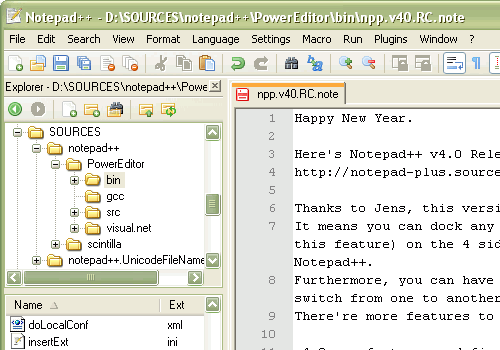
Some of the things that really make Notepad++ shine:
- FTP Synchronize
Allows you to connect to a server by FTP and edit files in Notepad++. Then when you save the file, it is automatically uploaded back to the server. No more saving files in an editor and then firing up a separate FTP client! Bonus: the FTP sync has “Keep Alive,” which pings the server at regular intervals to stop the connection from being closed. - Document Compare
Open two versions of the same document and the differences between them are automatically highlighted. Great for finding out where a coding change has gone wrong! - Code auto-completion
Auto-completion is a fairly standard feature, but with Notepad++ the code libraries can be downloaded from the website and updated manually. Keeping up to date with changes in the languages is easy then, and you can even write your own library file. - Panel Views
Allows you to see two files at once, side by side. Hugely useful if you have a large monitor and want to make better use of all the space. - Ctrl + D to duplicate a line
It may sound simple but is surprisingly useful. As an example, it took two seconds to write out all the <li></li> tags for this list!
Texter (text expander)
Texter is a free app from Lifehacker. It allows you to type a few characters, then hit Tab and have those characters replaced with a string of text. This is great for a lot of computer tasks (answering email most of all!), but the real advantage for developers is that Texter lets you specify key presses. For example, {HOME} is interpreted as pressing the Home button.
Take the following hot string:
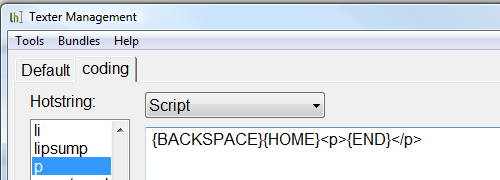
{BACKSPACE}{HOME}<p>{END}</p>
When coding, I type the text of my paragraph, then add a space, press “p” and hit tab. Texter automatically puts the <p> at the start of the line and </p> at the end.
That’s just one example. I have about 35 different strings saved for use in coding, so the number of possible uses is huge.
WampServer (Apache, PHP and MySQL)
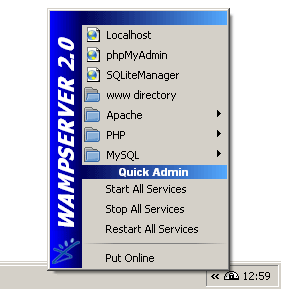
Installing a Web server on your local PC is great for development because you can test everything easily and instantly. No waiting on Web servers and dodgy Internet connections. WampServer packs an Apache, PHP and MySQl install all into one simple executable file, so your server will be up and running in five minutes tops.
Clipboard Manager
Clipboard Manager is a sidebar widget for Vista. It displays a snippet of the most recent items that you’ve copied. If you click one of the snippets, it is brought to the top of the clipboard, so when you hit Ctrl + V, you’ll paste that instead of what you copied last.
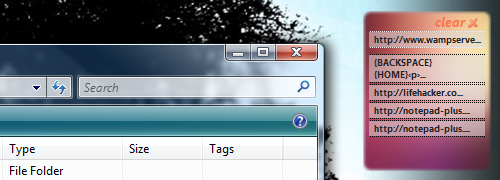
This is extremely useful when you are working on a document or script for re-arranging chunks of the page or copying properties from one object to another. Clipboard Manager cuts down drastically on the amount of time spent re-copying the same snippet again and again.
AutoHotkey (write your own shortcuts)
AutoHotkey allows you to create your own hot keys or remap existing ones. The scripts can be either extremely simple or quite complex. The Quickstart Guide walks you through everything you need to know.
One of the hot keys I use most is simple: pressing Caps Lock + W to close the current window. Anyone who is used to using Ctrl + W to close a tab in FireFox will find this very handy!
; Close Active Window Capslock & w:: WinClose, A return
Syncback (automatic back-ups)
Everyone’s hard drive fails eventually. Online tools like Mozy and Dropbox are ideal for backing up critical files that you’re currently working on, but backing up everything on your hard drive to one of these tools just isn’t feasible for most people.
Syncback is a free tool from 2BrightSparks that automatically backs up all your files to an external drive. (A paid version is available as well, but the freeware is more than enough.)
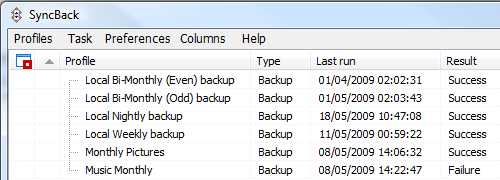
You select which folders to back up, set when you want back-ups to take place and let Syncback do the work. Back-ups can be done manually or automatically, and only files that have changed will be copied, so it is very efficient after the first run. It will even email you a report if any errors occur during the backup, such as certain files not being able to be copied.
Windows Live Writer (blog posting)
Not every developer needs this, but many of us have our own blogs now. Windows Live Writer is a free tool to help you write blog posts.
The main advantage of this is that it accesses your website and re-creates your design in the program. You can then write your post directly onto the website background, so you can see everything about your post’s presentation and fix it easily.
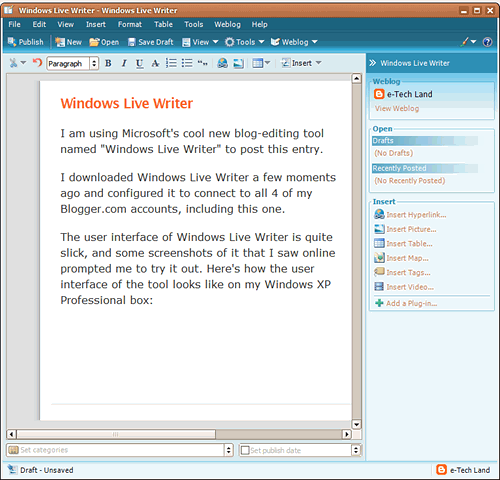
Is that image too big? Or that paragraph too long? Seeing it for yourself is the best way to catch these flaws.
The Best Parts Of The Mac
OS X does some things very nicely. Thankfully, the best bits can all be re-created in Windows free of charge.
The Dock → RocketDock
The Dock is probably the most distinctive Mac feature. The large icons and easy access to them appeal to a lot of people
RocketDock brings the Dock to Windows beautifully. Drag and drop to re-arrange, position on any side of the monitor, minimize windows to the dock and more. The demo video from its website below shows RocketDock in action:
Quicksilver → Launchy
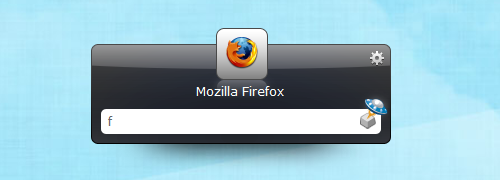
Launching applications from your keyboard is an extremely fast way to work. Mac users use Quicksilver for this, but Windows users can use Launchy. Launchy can be set to index only programs or include files as well. You also choose which directories it indexes. One of the best uses for it is to set up a directory of utility scripts that you can execute from a few quick keystrokes in Launchy.
For example, iTuny is a set of free scripts to control iTunes from Launchy. Now, if I want to skip to the next song, I hit Alt + Space to bring up Launchy and type “inext” to launch the iTunes Next script from iTuny. You can set up scripts for whatever you like, including shutting down and locking your machine.
Leopard Stacks → Stand-Alone Stack
Stacks are a great way to easily access your most commonly used files and programs.
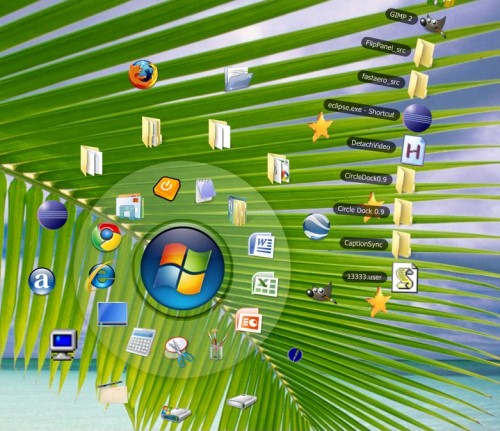
Standalone Stack allows you to create your own stacks in Windows, either in the taskbar or on your desktop. And you can display the files in either a list or a grid, just like in Leopard. For anyone using Rocketdock, you can install the Stacks Docklet from Matonga to get stacks into your dock.
More Control Of Your Machine
Custom Visual Styles
VistaGlazz allows you to control the appearance of your Vista installation. You can create your own custom styles or download them for free. One of the best sources of styles is DeviantArt (which has some OS X styles, though they’re not as polished as the Vista versions!).
Another popular application for theming is WindowBlinds from Stardock, but you need to pay for it. You’ll find plenty of themes for it on DeviantArt as well.
More Hardware Options
Macs come with very few variations in hardware. You have a small selection and just have to choose whichever one is closest to what you need. Because anyone can develop hardware for Windows, the selection is much greater. And because of this competition between manufacturers, companies are forced to offer good value for your money.
That doesn’t just mean better specs for about half the price. Check out this new multi-touch HP laptop, which comes in under the cost of any MacBook. Search around and you will find the perfect machine for your needs.

Huge Range of Devices
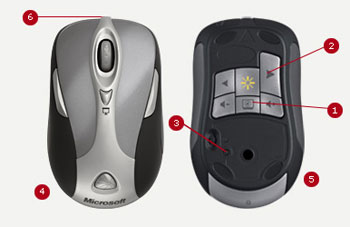
On top of the core hardware, you have thousands of peripherals to choose from. For graphics designers, that means a massive selection of tablets. But there are a lot of other devices as well, right down to your mouse. I have a five-button mouse and just hit the extra buttons on either side for small tasks like going backward and forward in a Web browser and Windows Explorer. For developers who have to give regular presentations to clients, this nifty wireless mouse/remote control is ideal.
Conclusion
There are a lot of good things about the Mac, and it’s hard not to get a little excited about them each time you watch one of Apple’s big developer conferences.
What you have to remember is that at the end of the day, the operating system is a means to an end, not the end itself. Whichever system you choose should make your daily work (and play!) easier and more efficient. Windows combined with the great free software and tips I’ve found online allows me to work exactly the way I want. I wouldn’t dream of going back to a default Vista installation with no extras: the customized installation is worth so much more to me than either Windows or OS X on its own.
We would love to hear what aspects of your operating system made you choose it (but not the flaws in the other one that made you not choose it!) and how you use it to work at your best.
(al)


Sharon
June 15th, 2009 9:58 amMy preference for a Mac has nothing to do with the apps and everything to do with the stability of the platform. The quality of the Mac OS and hardware is simply superior in quality to any PC I’ve ever owned.
Carlos Eduardo
June 15th, 2009 11:41 amI love to work with Mac, not only because it’s beautiful and “trendy”, but I think it’s far more stable than Windows and, about differences between the two OS for rendering sites, I just have to emulate Windows to test my sites on IE6, IE7 and Firefox.
So I don’t understand why I need to install so many apps to emule MacOS’ functionalities when I have a Mac, Coda (excellent code editor) and VMWare to emulate Windows to test my sites on IEs.
Shtrack
June 15th, 2009 1:43 pm@ Nik 147: Nik, by following this blog I assume you are aware that Macs are heavily used by designers and developers, people who work based on their ideas and inspiration. I did not want to insult those who use PC’s and their creativity. As for the blue screen of death – I had it the other day on my other computer, true that I haven’t seen it in a long time, but it was there, using Vista – apparently it is not an old argument. When I say perfection, I am talking about a benchmark. It is true that Macs are not perfect, but since there are no other company to compete with, one can admit that they are polishing their products very well, to a point where they become a standard. “Nice to see that the iphone is finally getting copy and paste though! :)” The iPhone also became a benchmark, even without the copy and paste. Too bad that people like you don’t see the product in the long run. All you do is bark about the minor stuff and satisfy your conscious with stupid reasons why not to buy the product. “it seems that many of these fervent fanboys are sadly incapable of making those arguments.” There is a difference between being a fanboy and be loyal to a culture of products. As for the arguments, I haven’t even started arguing, I just expressed an opinion. Perhaps you want to argue? I don’t mind at all.
kerotov
June 15th, 2009 1:46 pmI personally don’t like articles that compare things in such a one-sided way, be it about Mac or Windows. Both systems have a huge library of useful software that can make your workflow smoother – and in the era of Windows 7 and Snow Leopard, both have the guts it takes too. In the end, it all comes down to your own creative work, and the individual’s preference.
Yann
June 15th, 2009 7:27 pmWhat a ridiculous and amateurish article…
Jan
June 15th, 2009 11:01 pmGreat, just the niveau Mac-envying-PC-users use to defend why their PC is crashing more beautiful ;-)
Paddy
June 16th, 2009 4:22 amGreat Article. I am just about to switch back to PC because I became more and more unhappy with my MacBook for several reasons. One is the poor display quality that became even worse in the new models. Another one is the fact that I had it repaired about 6 times now and the Apple support is not good at all from my point of view.
I am planning to switch to a Dell Notebook now.
Biggs
June 16th, 2009 4:29 amMac developers are such a minority. That’s a fact. The title of this article suggests otherwise doesn’t it? It means well, but fails in its delivery and content.
parq
June 16th, 2009 5:25 amMost of those things comes up with any GNU/Linux such as Ubuntu. You don’t have to look for it and install.
Just use it.
Skip
June 16th, 2009 7:01 amif you never try a mac, you couldn’t speak about differences between pc & mac.. mac has a fantastic design, stable OS, easy to use.. switch back to pc from mac.. is impossible!
dennis
June 16th, 2009 10:51 amIs this a joke? I can’t imagine ever going back to developing on a PC unless I was going to waste my clients’ money making .NET apps.
Berkay UNAL
June 16th, 2009 11:29 amTotally disagree as a 10 years experienced developer (Macromedia – Adobe Certified Instructor & Expert). Switched to mac 1,5 years ago and didn’t want to mention the time before, thinking it as a bad morning experience after a long night ;)
Cooty
June 16th, 2009 11:29 amHi! I totally agree with the article’s title! From the featured apps I use Notepad++, the XAMPP suite, AutoHotKey and Rocketdoc on a daily basis! I must say that the Windows (XP) OS fully satisfies my professional and personal needs.
My biggest problem with Macs are (next to the price tag) that there’s not enough room to custumize your machine, you get a prepacked software+hardware solution (which maybe ideal for some people), but there are so much more options to expand/modify hardware/software on a PC.
George MAC
June 16th, 2009 11:39 amAnyone that does not use a MAC is not a designer. Come on people get on board MACS ROCK !
Tony Tone
June 16th, 2009 7:51 pmWhen interviewing possible employees I ask often what OS they run. When I hear “Windows” I chuckle and disregard them as a candidate. You get about 1% of Windows users who actually know what they’re doing on the web.
It’s so sad. Unless you’re developing for Windows servers, you don’t need to run Windows. I run Linux for development and so do all my employees.
Mac is better since it runs Photoshop natively. I got tired running virtualbox or wine to do design. Mac is just the best solution for design and development.
Abdulsalam Alasaadi
June 16th, 2009 8:38 pmcome on you guys!!
give the author a slack! He only wanted to emphasize on the fact that “There are always alternatives”. Web developers don’t really have to have Mac to be efficient!!!!!! do they?
LSB
June 16th, 2009 10:18 pmWhat about all the failures of the pc. I use a PC at work and a Mac at home. I spend roughly equal time and at work yesterday my machine chose to reboot 3 times. My Mac didn’t do that to me and even if it had it would take the 5-7 minutes that the pc takes.
Once you go Mac you don’t go back!
Shaun
June 17th, 2009 2:13 amThis is an awful article.
I have had a PC for all of my life but just under 3 years ago my partner got a mac. I was working on a website at the time and I moved over to the mac to develop it because the software was so much better, the fonts are nicer and it is just a pleasure to work with. Needless to say my next computer purchase was an iMac and I’ve never gone back.
There is a lot more to using a mac than some of the things suggested in this article, and you can download hundreds of crappy utilities to try and get your PC to be like a mac (I know, I tried this with my old laptop) but at the end of the day you cannot get any better than actually owning one.
Imitation is the best form of flattery after all.
Locke Murray
June 17th, 2009 7:22 amI am confused as to why this article only lists one web-development tool (WAMP.)
The rest are general purpose tools, all of which have Mac equivalents. WAMP functionality can also be duplicated with either the free or Pro version of MAMP.
Sugar
June 18th, 2009 7:43 am@Paddy – complain about the display of a laptop was not clever at all. u should ALWAYS use a bigger external display when u are working. but if u’r too lazy to do so, no one can help you.
for me… PC (u guys mean Windows, right?) is a must if i need to do MS .net projects, using VS to build web apps… but for other projects, i prefer Mac OS over Windows.
i just hate Windows (i actually have a media PC at home of TV and gaming). it gives me error and freezes too often… or maybe just to fix some tiny issues but take us hours to do so… just too much pain to deal with. *sigh*
i m actually happy working on my old white macbook (w/ 3gb ram) -> mail.app + PS + AI + open office + tons of firefox windows opened + parallels (winxp w/ VS + IE) running altogether at the same time -> my mac is not freezing nor gives me blue screen. :)
if my winxp vm crapped out, i can always trash it (but not format my hdd and reinstall the whole OS). b/c time machine already backed it up.
Mike McDonald
June 18th, 2009 8:25 pmThe mouse? Really? People are still clinging to the myth that the mouse you get with a Mac is the only one you can use? That argument was laughable a decade ago, and yet it still gets new life every so often among Mac haters like a bad hoax email.
paposo
June 19th, 2009 7:59 amWindows has tried hard to catch up to what macs already offer. If you have ever tried textmate for script/web development you’ll never go back.
Any good developer should use the best tools for the job. Tools make things easier. Hell you _could_ build a barn by hammering in the nails with your hands. But why??
It’s not so much about “evil” microsoft or “elite” apple products. You should use the best tools for the job. Frankly picking Vista with half-baked web dev tools so you can avoid “elitists” is silly.
Honestly the OP deserves the flamefest he’s getting here.
jack
June 20th, 2009 6:24 amI agree. I understand that as a web developer the joy is to develop software, but why take the time to develop software an apple already offers and excels at! Stop wasting time trying to make your PC function like an apple, get the best tool the market offers and use your time creating new programs that we will all benefit from.
And by the way, the picture of the doc used for this post is a mess!
Corey
June 20th, 2009 11:07 amI really wish Smashing Magazine would quit posting opinion pieces from people who have no clue.
Notepad++? Really? Coda, Espresso, and TextMate are all very comparable…and look better.
WAMP? How about MAMP which runs MySQL, Apache and PHP in an environment much more similar to Linux? You don’t test code in an environment that doesn’t even come close to matching your production environment.
The day I switch OSes for a widget clipboard manager, well, it’ll never come. There are plenty of options for these on either Windows or Mac…none of which offer anything to terribly useful for developers over the others.
AutoHotkey? Um, isn’t that just a ridiculous name for a shortcut? Oh, and Cmd+W works in most applications already on Mac…
Syncback….again…another piece of software that isn’t anything special and for which there are 25 replacements.
Windows Live Writer? This is absurd…you’re really stretching here…
Bottom line, just because the environment you use works for you doesn’t mean that it works for someone else.
Alain Duchesneau
June 22nd, 2009 11:52 amI use a Mac and I love it.
It’s a free World, use the PC of youre dream if you like.
Chris Markell (chriscoder)
June 22nd, 2009 12:34 pmAgreed, at home all Macs… At work all PCs… I’m reminded every day that indeed OS X is a whole generation ahead of Windows. Not that I don’t love the downtime from dealing with screwed up… well everything, software, hardware, updates, virus scans, viruses in general, regular bail out and reinstalls, flakey software and so on. I wouldn’t hate Windows so much if I wasn’t forced to use it.
To each his own but Windows people PLEASE refrain from asking Mac users to fix your pile of S PC. We use Macs to avoid the stress! Get something else or ask PC users to fix your junk, they feel empowered by a fixing something a few times daily. Makes them feel in control…
Harry Slaughter
June 23rd, 2009 1:18 pmMacs are prettier, PCs are more practical.
Macs can be just as flakey as PCs, regardless of what the fanboys claim. When they do crap out, however, they are definitely easier to rebuild for the average user and you don’t have to worry about driver hell like you do with something like a Dell PC.
But for getting work done, you just can’t compete with a PC. There are so many more apps available for PCs that there’s just no comparison. And while Windows is a fairly pathetic OS, there are top drawer apps that simply aren’t available for the Mac. Getting work done boils down to the applications you use, not usually the OS.
If all you need is a web browser and the ability to access photos and music, then a Mac is a good choice, but if you need to run CAD, database utilities, a variety of IDEs or other niche type software, you need to be using a PC.
Just one example… All the mac web developers I’ve seen typically use phpmyadmin for DB related tasks. I use an app called SQLYog. I save endless hours on DB tasks alone compared to guys clicking around in phpmyadmin all day.
Mariusz
June 23rd, 2009 11:41 pmWhat you forgot, was the fact that Windows has no serious console whatsoever which is basically required if you program in Python or Ruby or something else that’s not PHP. If you want Adobe Creative Suite (to cut your designs) and console in one, you *need* a Mac.
Kathleen
June 25th, 2009 6:12 amOk guys, come on…why would anyone ever switch back to a PC if they had a Mac? So they can deal with Windows crashing every ten minutes? I don’t think that is a very realistic situation! I LOVE MY MAC and WILL NEVER SWITCH BACK!!
Vam
June 25th, 2009 3:04 pmWindows doesn’t crash every ten minutes you idiot. You just don’t know how to use Windows I guess.
I must admit that windows is not the best OS, but say that it crash every 10 minutes it’s ridiculous, that it’s the most stupid argument that I ever heard in the last month.
Irfan Durmus
June 25th, 2009 5:11 pmI thought Michael Martin take salary from microsoft, or microsoft give salary to Michael Martin.
Best Question : Yes, web developers dont need a mac, how much need Microsoft ?
I have mac mini + mac book pro + Debian + Gentoo + CentOS.
Menda
June 27th, 2009 11:32 am+1 for a GNU/Linux article. I’m currently developing in Debian and Ubuntu and for me it’s perfect.
ukee
June 27th, 2009 9:50 pmlinux mint is the best, kudos to linux, haha~
Marcelloh
July 1st, 2009 9:56 pmI have to laugh at this kind of “discussion”. PC or Mac? All we do is use the hardware to run the software we like. So, if we look closely, the hardware shouldn’t matter. It’s the working of the software that we like. Some like software that is visually strong, and some like software that is intuitive, or fit for a certain purpose. It all depends on the user and of course the person(s) that make the software.
And before you start any discussion on Operating Systems; It’s about the same.
If I could use my favorite piece of software without hardware and O.S., I would probably be the first to try. If you use a piece of software that you like, and see a feature in another piece, tell you software-programmer, he/she will be glad to hear this kind of improvements.
Antony
July 2nd, 2009 2:55 amSounds like a slightly different take on ‘what’s better a PC or Mac’ to me which as we all know is a never ending arguement and one we shouldn’t go into too deeply.
Personally I work with both Macs and PC’s, but out of choice I use a Mac wherever possible. Yes it looks trendy and yes it cost a lot of money but it’s 2nd to none for performance and ease of use and that coupled with the abundance of applications I find it’s perfect for what I want to do.
I can’t see many people reverting back to a PC certainly not out of choice, in fact a developer friend of mine has recently converted to a Mac and is using Coda for most of his requirements and he can’t see how he lived without it.
If like for many people, using a Mac is out of your price range but you want a Mac experience turn your PC into a hackintosh and run OS X natively from your PC (you will require a fast machine) but don’t customise Vista to act like OS X when it’s nothing like it. Even if you managed to replicate the GUI it’s the optimised coding behind it that makes it in my opinion the fastest most reliable operating system currently available!
If you’ve never used a Mac try it you’ll almost definately like it. If you don’t like it then you can always run windows on it natively or a host of other OS.
Most importantly of all is it doesn’t really matter what I use or my friend or even your friend. Use what you feel best meets your needs, it’s a simple as that!
Patrick
July 2nd, 2009 7:06 amNot a compelling set of arguments to ever use a Windows PC.
Denis
July 8th, 2009 9:46 amI used a PC for web development for about 7years.
About a month ago I switched to a Mac and I never back to PC.
MAC BEST OF THE BEST!!!
Emma
July 16th, 2009 6:49 pmI don’t see how installing applications is “hacking the PC to be a mac”
None the less, it’s all a matter of personal preference, they both are generally capable of doing what a developer/designer needs to do and the rest is up to the individual preferences. Both great platforms and both with pro’s and con’s.
The immaturity of some of these comments is amazing!
I’d also love to see an article like this about Linux although it has a way to go to be in the same league and Win and Mac.
Rachel
December 22nd, 2011 8:57 pmI agree, a lot of these comment are very immature. It’s all about personal preference. I use a Win 7 Dell PC and do Web Development and have no problems. Sure Mac has some great options and I’ve set behind a Mac at a company and done some work, but to me it’s not much difference.
Yes Macs have software to help boost production, but I have been able to produce similar results to people using Macs on my PC in the same amount of time as them. As long as you have a system and know what’s best for you it doesn’t matter.
CSS Edit is nice on the Mac, but to me that’s the only real difference in software between the 2. I use Notepad++ on a daily basis and love it. I actually prefer it over Dreamweaver and some of the other Code Editors out there.
Radeksonic
July 17th, 2009 3:18 amRocketdock is illegal :p
But I like a Mac more, since I can run Adobe CS4 on it, and I develop applications and iPhone applications and Web Apps with Xcode, which is for a Mac.
Ben
July 18th, 2009 12:44 pmNever saw a usefull tool like CSSEdit on PCs :-)
It dont need a Mac for good Webdesign, thats right, but it can help you a lot to use a Mac …
Dont know how is your workflow, but mine is much more faster since i use Macs.
Vincent Gable
July 18th, 2009 2:49 pmThe Dock may be the most distinctive part of Mac OS X, but it’s a marketing gimmick with problems. It sells Macs, and it makes them recognizable, but it’s probably not the best way to switch between applications and documents. I think it’s a shame to see a Dock-mimic recommended over something more innovative.
Ben Dover
July 18th, 2009 9:39 pmPCs = development, games, business
MACs = aesthetics? gee great.
PCs rule, everyone knows it. That’s why Mac users always have to use VMWare or Bootcamp to use PC functionality whereas on a PC we don’t need anything from a Mac. ;)
lokers
July 20th, 2009 2:40 amI wanna see your Windows running constantly for a month, running a busy web server so clients can see your work but at the same time you working on the same machine 8-10 hours per day, listening to music (who doesn’t), doing some changes in Photoshop, downloading some cool stuff in a background, having your mail app open all the time and probably about 10 more apps too… Can you do it at the same time on your PC?! I bet it will crash with trendy blue screen, hahaha. I am not gonna mention security reasons here, I think talking only about performance will shout you all up anyway!
Lol at you all windows users! hahaha, big lol at you all!
Marty
July 21st, 2009 9:19 pmWell why not have the best of both worlds (or three) and just get a Mac? = )
Virtualization for the win.
edison
July 23rd, 2009 4:37 amwindows….ja jajajajajaj windows
andy.h
July 23rd, 2009 2:23 pmonce a wise man said to me:
“its not the tools you use,
its just the technique.”
slatka
July 27th, 2009 4:54 pmdevelopers don’t need a Mac…..EVERYONE needs a Mac
bluescreen? never heard of it until I was stuck working on PC’s
my mac just keeps on working, while the pc’s I am required to use for work cost me hours of down time and eventually are replaced by yet another hunk-o-pc-junk – we don’t need more landfill!
in a perfect world, everyone will convert and be happy !!
lonny
July 29th, 2009 11:02 amwhatever. sure developers don’t NEED a mac. you can write code on a vic 20 if you want. the fact is windows is garbage for just about every day to day task in comparison to osx. if you want to debate this, linux wins hands down for power users.
i guess writing like this depends solely on who shipped you your latest freebie to write about.
Nicolas
August 2nd, 2009 8:16 amWithout entering this useless little war about using a mac or pc. I just want to say that I’m impress to see that I use almost all the tools you mention for my everyday work. If I can just add my little contribution, Q-dir is a good file manager replacement with 4 views at the same time. I can’t live without it. thanks again for sharing your way to work.
factotum218
August 4th, 2009 8:06 pmI’ve been using a Mac on average 10 hours a day since 1996 for design work. I never really understood the loyalty to Apple that some people seem to live by. It’s a computer.
I have a windows laptop and a FreeBSD desktop. Bringing my work home with me got old about 10 years ago.
Hakim
August 14th, 2009 8:19 amThis is an awesome resource for us Mac folks adjusting to a PC environment. Thanks much!
john m howitt
September 9th, 2009 9:53 pmThe fact that you recommend FTP (totally insecure and hackable) and that you recommend editing files live on your server would indicate that you do not really have a clue. Get rid of FTP and put ssh in place. Then use version control, cvs, svn, git etc. put all you work in a vcs, then deploy, then test, then deploy to live.
Mac vs Windows vs Linux, who cares. Bad workmen always blame their tools and also buy flashier tools to compensate for their inadequacies.
Once you can hack it on the command line then you can use gui tools, not before.
robert
October 20th, 2009 10:25 pmTexter is epic.
Taylor Satula
December 31st, 2009 6:44 amI’m not going to get into the fanboy fight so ill stick to the facts.
If you can find a copy of windows that looks as good as espresso in snow leopard please contact me
online backup
January 13th, 2010 1:59 amThat’s really good and useful also.
Justin Parra
January 28th, 2010 12:28 pmI Don’t have a problem with PC’s. To me Windows is where the problem is. There are so many compatibility issues between different windows OS’s and the design and usability is a joke compared to OS X. The way Windows 7 improved itself was it became more like OS X. Why mess with the imitation when you can have the real thing?
rabblerouser
February 9th, 2010 7:11 pmI know this article is collecting a bit of dust but just for the heck of it I’m hoping that someone reads this and knows that the system you use is a red herring and has nothing to do with how well you design or develop anything. I use a Mac at work and have done so for over a decade. At home I use Windows and FreeBSD exclusively.
Why? I hate taking my work home with me.
Apple can create anything they want, but when it comes down to spending double-digit hours a day in front it I want to run away as fast as I can once I’m off the clock. Apple’s OS 10.x gives me nightmares.
Reemby
February 24th, 2010 6:28 amThat is all fine, I am a PC Developer and a Mac user, and I can tell you by my own experience that mac OS X is a superior OS, windows it just dry and tasteless. and the other thing why use Stardock and other features in Windows to emulate a Mac, If I want windows to look like a Mac I buy a Mac. Plus adding all this applications that you are mentioning above just make your PC slower and makes it crash many time, that is one of the reasons I when I ahead and purchase a Mac, because like I said before if I want my PC to look like a MAC I buy a Mac. Software Development, well Mac still have some things it can learn from Microsoft, but remembers this is only the begining, MAC is going to get better and I think is going to be a great competition for Windows.
One feature I like, about MAC is how simple it is to remove application without leaving a trace of DLL’s and files everywhere, in a mac when you delete a program is gone for ever not traces of it are left behind, the OS respons fater to application execution even when you have less memory that a PC, for example my Windows XP runs faster on my MAC Bookcamp with 2GB of Memory that on my PC with 4 GB Memory, how is this possible, well Apple makes the OS, the Hardware and the Drivers for the Hardware, since they make everything then they have control over the Quality of the drivers, not like on Windows. In windows when a new OS is released many time, the companies have not even finished programming all the new drivers to be compatible with the new OS, and it crashes left and right, ofcourse people blame it on Microsoft, at they are right, part of the problem is MS, but mustly third party device drivers manufacturers who sell half-finished drivers and hardware.
Anyway at the end, we will see who will win the OS war and for what I can see is going to be apple, I really do not care who does as long as I have a reliable OS where I can develop applications and make a living.
Note to apple: Please give MAC OS X (X-Code) developers a framework to connect to MySQL and MSSQL like the one Visual Studio has: System.data.sqlclient space name kind of library that is all we need to be able to make commercial software, other wise X-Code is just a single user stand alone application that cannot share information remotelly.
jd
March 6th, 2010 2:07 pmHrrm… unfortunately, you need both… if you are developing for a company, at least if you are higher up the ladder or running a small biz. Now if you want to just do your own site? sure. But if you are a developer like me, when you have to develop, manage sites, databases, graphic designers, other developers, mail servers, AND support clients who use your web applications it is best to have ALL bases covered.
I have win 7 on a netbook (so I can undock if necessary and take off site) and a mac mini all connected to switchable usbs, and kvm on running 3 24″ viewsonics (1 docked to laptop, 2 out from the mac mini). I also have 2 rackmount servers running centos (redhat linux), one in a colo and another mirroring it here offsite. I couldn’t get done what I need to get done without all 3 os.
To play devils advocate
Really I could do everything i need with an ssh terminal, vim, lamp stack and gimp, running on an old pentium 2 box somebody left in an alley but why would I want to?
by the way… unless you are developing in C#/.NET/ASP/sql server and hosting on IIS… windows would be the bottom of the barrel for a web developer, if that is what you are using then, it would be at the top, also it runs Adobe suite which linux won’t natively…
personally i use the LAMP stack for server side, AJAX for client side, occasionally RoR, and If we are lucky to get one sometimes inherit something written Java EE, none of these are tuned best for windows…
Lee F.
March 14th, 2010 6:58 pmAmigaDOS ftw
ccomp
March 23rd, 2010 5:03 amInteresting posts….
I am a seasoned software developer and have worked on everything from IBM36, AS400, Windows, Unix, Linux, Mac etc.
I currently develop for MS environment .Net/SQL Server at work.
From a user perspective, having limited inet access at home, Linux KDE and OSx mac work well for my kids. I let one of my younger kids get on the internet in Windows environment, once. You know what happened….netstat was scrolling into infinity. My beef with MS is totally around security issues built into the OS, and these never being resolved. Some people don’t have time to download and install hundred meg security updates every week or few days. Yes, linux and mac have their quirks, and need a somewhat knowledgable person to set them up, install hardware, etc. However, the time spent downloading and updating gets in the way of productivity, besides the cost of antivirus and anti spyware. If you are poor, learn linux, if you have money, get a mac, if you have alot of money run windows and pay some poor fool to maintain it for you. (less stress = longer life + more happiness)
From a pure server processing performance perspective anyone reading this knows what is on top there.
Cre8ive Commando
March 29th, 2010 3:50 pmI’m used to using a PC and it does everything I need and more. I’ve got nothing against Macs (besides their price) but I don’t think I’ll be changing over to a Mac anytime soon.
See what others are saying about the Mac VS PC debate and have your say here: http://www.macorpc.net
Aldo Cappucino
April 2nd, 2010 7:09 pmI started working as a PC programmer in 1985, and then LInux in 1995.
For 20 years I belived that all Mac users were effete elitists who had bought the Steve Job’s hard-sell hook, line, and sinker.
In 2005 I wandered into an Apple Store trying to kill and hour. I began demoing a PowerBook G4 and suddenly it was 3 hours later and I was thinking “this is what Linux would be like if it worked!” Five years and five Macs later and I still have a couple of PCs. To suggest that they are comparable is doofus.
theo
April 23rd, 2010 1:21 pmHah this post is useless…you never even bothered looking at Mac applications……
Notepad++ ? who cares I have textmate……….
Wamp ?? Who cares I have MAMP or XAMPP
plus i have so many more packages I can compile and run with ease using terminal….for full web development experience……
dickface
April 27th, 2010 9:21 ami started with a mac and left it behind since i am working in web and this is since 1999. mac is for beginners. I have a bigger peni… than mac users therefore i dont need a mac.
i think it is also embarrassing what apple does with his consumers. the ipad is the best example that the mac user is not aware of reality and the apple store is the new dictatorship of software selling.
i know so many poeple who dont understand anything about the web, design or just the basics of computer and guess what most of them are using. yes, a mac and they are so proud that they can send a email with it.
Fahad
June 5th, 2010 8:49 pmIm a web developer … Microsoft .NET developer that now uses a Mac. I made the switch about 6 months ago and so far, the only issue I have had has been software incompatibility. Thats not a major issue because it doesn’t affect me much. Other than that – I will never purchase a PC again. My Mac makes my everyday life so much easier, its extremely dependable ( I now feel my daily use of PC was just a tug-a-war between me and my computer). Mac stay out of your way, let you do what you need to do while PC, there is one issue after another.
I use .NET on my MacBook, well not really. I have VMWare installed on my Mac with a Windows 7 virtual machine. Any development I do is on my VM, and I use my Mac and the vm side by side (I know windows also has VM software, but its just not the same!)
I used to be one of those guys that hated Macs just because people loved it just for the hype – until I actually tried it for myself! Now, the only regret I had is why did i go these years destroying my brain cells trying to use horrible OS’s like Windows 98, Windows ME, and the clincher… Windows Vista.
Eric Marden
September 2nd, 2010 11:48 amIf you don’t have a real terminal, you don’t have a computer. This is why I only use OS X and Linux. Terminal + CSS Edit are my top two reasons to use a Mac for WebDev.
The rest of the stuff on this list are just hokey stand-ins for what are (mostly) built-in OS X features.
Cengiz
November 20th, 2010 4:44 amThis article sucks so bad.. All those years that I used a PC was just a bad dream which I can only forget when I touch my iMac. You totally have no idea how cool Mac is in every aspect. Those programs u mentioned r like cheap versions of the real deals we use on Mac. If u like ur PC stick with it but at least have some better grounds to support your PC better than Mac issue before attempting to write such a silly article..
CJ
December 22nd, 2010 5:58 pmOn Windows I just feel so cluttered trying to do work and it almost makes me not want to do it because of the freezes and such that we are all used to. Before I got a Mac… i didn’t realize how bad Windows really was. Macs just let you do your own thing and doesn’t bother you or inconvenient you… it actually feels like it inspires creativity in a way since in my idle time I don’t have to do PC maintenance.
Proud to be a Mac Snob
December 28th, 2010 3:39 amIt’s simple. There is no debate. For designers, OS X is better than Windows. Anyone who says otherwise has never owned a Mac. This article proves nothing to me and I will never “switch back” to a PC. I just want my PC to work. I could care less whether it emulates basic OS X functions. I know you anti-Mac users hate it when us Mac-snobs say “it just works” – but hey, its undeniable… “MACS JUST WORK!” It has nothing to do with how advanced you are. Who likes to stress everyday about Windows functionality anyway? I am an advanced Windows user, and I’ll be damned if I’m going to spend any more of my valuable time fixing or tweaking my PC when my Mac does it without bitching. I use my PC (occasionally) for certain tasks… but my sexy 27″ Quad-Core iMac is absolutely the best money I have ever spent — and my trusty 5yr old Powerbook G4 blows any 5yr old PC or Notebook out of the water.
Jason
January 2nd, 2012 3:32 pm:) agreed
James
January 20th, 2011 5:26 amBefore Windows 7, I would have recommended serious designers to use a MAC – not because of any snob factor, but purely for reliability. However, now that W7 is seemingly bulletproof, I’d recommend a MAC or PC. MACs are great, but they’re not the greatest for testing new web designs. I always use my MAC for DTP, and I simply can’t fault it for that purpose, but now when I’m developing for web content, it’s the W7 PC almost every time.
I had someone recently accuse me of not being a ‘professional’ web developer for using a PC. I’ve spent many years producing top quality work for various design companies, and also as a freelancer, asking for, and receiving top dollar for my work. It turns out, the person accusing me of being unprofessional was fresh out of college, had hardly any design or development experience, and just so happened to have opted to use own MAC. No doubt, he’d picked up on the snob factor of owning a MAC, and felt pressured into using a MAC for fear of not being taken seriously by other designers and developers.
I’m all for people loving their MACs, or their PCs, but please don’t try and force your preferences on others as the only way to go. Simply use what best suits YOU – not everyone else.
To sum up. I used to use MACs for their reliability, but I now use a W7 PC almost exclusively for design and dev.
maya
February 23rd, 2011 11:29 amwell, if you’re developing native apps for the iPhone and/or iPad in Objective-c you certainly need a mac…..;-)
you cannot do Objective-C development on windows machine…
jdizzle
February 24th, 2011 8:29 amIf you don’t have a real terminal, you don’t have a computer. This is why I only use OS X and Linux. Terminal + CSS Edit are my top two reasons to use a Mac for WebDev.
The rest of the stuff on this list are just hokey stand-ins for what are (mostly) built-in OS X features.
THIS ^
mac has native BASH
and is closer to my Redhat servers than windows.
I would gladly ONLY use redhat or centos, but linux doesn’t play with adobe design
if you are at a big windows corp…then well, you have no choice…
I def don’t think windows is the way to go though for freelancers.
for pure dev only then…linux would be the way to go
for a dev plus designer (I do devleopment for media groups, I also program in php/python…mac is definitely it. )
Jason
January 2nd, 2012 3:30 pmgo big daddy go ;)
Hugo Dias
June 15th, 2011 6:19 amJust because you have no money to buy a mac does not mean you have to tell people that they do not need one. Windows is horrible. Both developers and non developers
Ted J. Nielsen
June 20th, 2011 10:48 amI use Windows 7, have contemplated getting a Mac, but am severely put off by the condescending attitude of Mac fanboys. Seriously, it´s enough to accept the flaws of Windows just to not risk becoming a douchebag (even though I´m sure it´s just a small, but loud part of the Mac community).. If I read one more “You´re using Vista? LOL!”, or “stolen from MacOS “(like MacOS emerged from the blue without influence from nothing else but the supreme light that emanates from Steve Jobs), or “BSOD and viruses”(which have been strangely absent on Windows 7 for me)… get over yourselves already.. it´s the tools that make your system best for you, and if those tools happen to be powered by MacOS X or (gasp) Windows, so be it.
Matheus
July 23rd, 2011 2:43 pmI suppose that, doesn’t matter if you use Windows, Mac or even Linux, atlease, on web-design area.
Focusing on the Windows-Mac area, most “major” applications made for developers exist in both systems (Adobe CS, for example). Also, we can still program on Notepad or Textedit, or any other program that is able to edit PHP/HTML/CSS or whatever you program.
In general, doesn’t depends of what system you are using, but of the developer itself…
Currently I develop on Windows XP/7 using Notepad++ for text files and GIMP/Adobe for images and it’s fine…
I
don’t really see any difference from one system to another, just let’s put this way: You can’t compare a $200 bad computer to an Mac and say “Hey, our system is faster!”…
All you need to have an computer like an Mac is just quality hardware, put some cash into buying an good CPU, memory, GPU and 2 hard-drives (1 SSD) and you have an very good computer, maybe not spending as much you would with an Mac…
Again, it depends of the developer and not of the operating system you’re using.
gerald
August 20th, 2011 2:17 pmWhat is this garbage…
Is this about developers or designers… or people who can read html and mangled php and use photoshop? What is the market here.
I use a *real* IDE, not a text editor. It is called Eclipse…if you have never heard of it, you are probably not a professional developer and just toy around trying to sell websites to your family. Guess what, it is open source and cross platform. The underneath operating system isn’t much of a difference from a client perspective, perhaps in a production environment, certainly… But then why would you run mac or windows in a production environment, certainly not mac on the web.
I do my fair share of design work too from time to time, but I usually outsource it. Creative Suite runs on both Windows and MAC. The Wacom tablets run on both windows and mac. They both run the same hardware also.
Let’s see what else… If anything, Mac is behind, at least if you develop in Java or J2EE… Apple runs it’s own java builds, and they are horrendously outdated. In fact going forward, they do not plan to continue them. Everybody else gets their builds from java directly.
Umm, shell? Mac shell is a deprecated bash shell. There goes that argument. Mac is NOT debian. You could put install cygwin or you know use Windows Powershell with UNIX tools (in any non home version) and have just the same results.
I have a windows 7 laptop *surprise* that I do my development on, I also have a mac mini for testing purposes. I deploy everything to bsd/linux environment.
Hopefully that clears some things up, use what you are comfortable using, and test for clients needs, end of story.
Vertigo
August 21st, 2011 1:27 pmFor web development, ie. programming as opposed to design work, you should use whatever platform is closest to the production server. This is generally Linux. For that reason, I use Ubuntu (we use Debian servers), and it is perfect for my needs. Its functional, fast, and beautiful. Want more eye candy? apt-get compiz. Want a Mac style CLI visor? apt-get guake. The command line isnt scary, and if youre a developer, you should be familiar with it anyway. If youre not, use the Software Center app.
Using a Mac for development for a Linux system is better than using a Windows box, but there are enough differences that it would be better to stay in the family.
Yasen Vasilev
September 17th, 2011 4:10 amHow I didn’t know about autocomplition in NotePad ++ until now? I’ll check it out.
And yes, it was very funny for me when I had to help some classmates with Macs – the mouse for mac sucks, so hard to use it – so hard to scroll, to click the “right button”. The dock with application at the bottom was quite frustrating to make it appear, too.
Anyway, that might be just my first experience, but I’ve also used Ubuntu and I loved it – I just wish there were more programs and applications working in there.
Peace!
Jason
January 2nd, 2012 3:26 pmHe’s just starting a flame war.. wamp is not necessary on mac because its unix based and all the apps are already installed lol or easy to get and compile. Ever try moving a site running on windows apache to a linux box.. lol no fun.
Georg
January 30th, 2012 1:04 pmWhat is it all about Windows crashing ? … Seriously, Win7 hasn’t crashed once in a year! Thinking back to my MacBook it crashed once a week – mouse got stuck and the ball thingy was displayed – and I had to reboot. True Windows used to be unstable but in my opinion that’s past.
I don’t get the argument over Mac or PC in general. I find the design of Mac very appealing and sexy, however, I don’t like the OS. I bought a Mac but sold it after a year as I just didn’t like working on it. But then again – that’s my personal opinion. Some people prefer Mercedes over BMW – well, rest assured both products are well made.
The only thing that bugs me a bit is that some people think they are all of the sudden so creative because they owe a Mac ?! I don’t get it – so I can’t be creative on a PC? I guess it’s the hype that annoys me …. not necessarily the product – it’s gay seriously! – you ain’t creative nor develop better, nicer or sexier websites based on the OS you are using. Linux, Windows and MacOS are all awesome – doesn’t matter what you prefer – don’t care about efficiency (as the 5 min per day you might save or lose matter) – it’s what you do with it ! And no – the blue screen of death just doesn’t happen every now and then – if it does – configure your machine (and no one is using vista anymore – yes vista was crap!).
Rick Middleton
February 7th, 2012 11:21 pmI have been designing sites with a PC for 10 years.
I recently have been using a mac as part of a new web design as its standard for the company.
I have always used Notepad++, I have never used textmate although from what I know there is a comparasion
For creative suite the colours on a mac screen and fonts do render better however when doing web design you are designing for a majority of people using a PC…. so this is irrelevent!
I don’t understand what it is that is so great about a mac so far but really would like to hear what people have to say, pro mac people can only say “x is better” and there is no logical arguement at this point which I’d love to hear to see why I am mistaken
So far there is no simple # key so its an extra keystroke command and 3, the windows do not maximise which is frustrating, to get to my desktop I have to press function and 11 which doesnt minimise all of my programs properly. The drag and drop into programs is not near enough as easy as it is for PC so what am I missing out from??