Smashing Magazine - we smash you with the information that will make your life easier. really.
How To Develop Websites On Linux

In this article we will look at tools that can help those of you who want to develop websites on a Linux platform, from powerful text editors to desktop and system features. How do you edit files remotely without FTP plug-ins? What are package managers, and why they are cool? In which Web browsers can you test your applications?
I wish I could cover many more topics: using the command line, basics of Vim, Nautilus features in detail, Nautilus scripting, neat command line tools, basic server configuration and many others. But if I addressed all of the issues that arise from time to time on the Internet, this article would turn into a small book. This isn’t an article on “How to do X or Y on Linux” or “How to use [insert app name here].” And we cannot cover more comprehensive IDEs such as Eclipse and NetBeans, each of which requires separate articles.
You probably already have some idea of how to find and install applications for your favorite distros. However, we will point you to the right place anyway to download, for example, scripts and plug-ins.
So, let’s begin!
1. Our Tools
Below, for your quick reference, is a list of tools that we will mention or explain in this article.
Text Editors:
- Gedit
- Geany
Browsers:
- Opera
- Mozilla Firefox
- Epiphany (with the WebKit engine)
- Chromium (for some other WebKit examples)
General and command line tools:
- FUSE
- SSHFS
- Vim
- Parcellite
2. Gedit
Gedit is the default and simplest text editor for the GNOME environment. The default installation already comes with some good resources, although not all of them are activated by default. It is bundled with some plug-ins; however, you can add many more plug-ins to make it a nice simple IDE. If you go to Edit > Preferences > Plugins, you’ll see which plug-ins are installed by default. There, you can configure and activate them. On the same screen, you can configure other elements of the text editor, such as indentation, line numbering and current line highlighting.
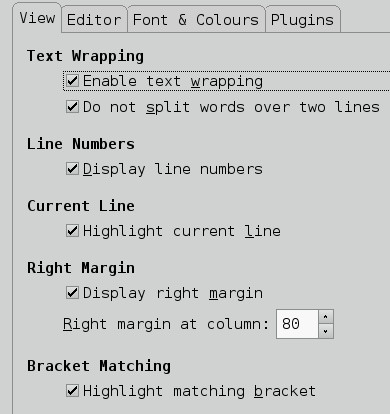
Your default installation probably won’t have many plug-ins by default other than those. Check if your distro has a package to automatically install a set of plug-ins. The package would be named gedit-plugins. I recommend installing it because it adds at least five helpful plug-ins: bracket completion, color picker (quite helpful with your CSS), session saver, smart spaces and terminal. These are all of the plug-ins installed with the package:
- Bracket completion
- Charmap select
- Code comment
- Color picker
- Join and split lines
- Session saver
- Smart spaces
- Show tabbar
- Terminal
See the plug-ins section for a fuller overview of them.
Let’s look at the most useful of these basic plug-ins for developers and see how we can configure them, in needed.
Snippets
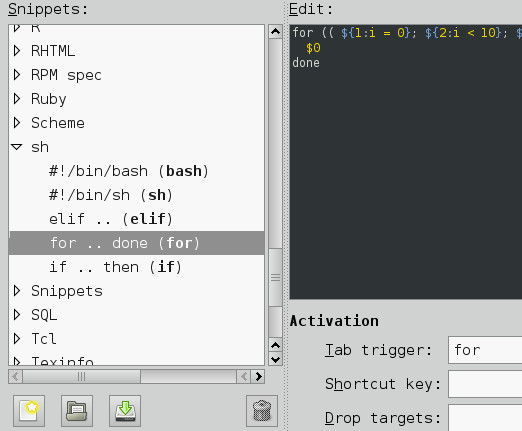
Snippets inserts frequently used pieces of text quickly. To configure it, check it on the plug-in tab and hit “Configure Plugin.” You can edit existing snippets, add new ones, import and export snippets and create global snippets. It is also possible to add tab triggers, shortcuts and drop targets. To activate a snippet, you must be editing a file with a corresponding snippet (e.g. if it is a Python snippet, you should be editing a Python file). If it is a blank pure-text file, just change its syntax on View > Highlight Mode. Many good snippets are on the Internet; some that I use are Django and RoR snippets.
External Tools
External tools executes external commands and shell scripts. As with snippets, you can configure those that ship with the plug-in or create your own. For more complex tasks, you will need some knowledge of shell-scripting and how to use some of the shell tools. We won’t go into how to master Gedit and its amazing plug-ins (we recommend reading Gedit manuals for that), but we will give you links to some scripts that you can play with.
Modelines
If you use Vim or Emacs in your daily work, you may know what modelines are. If you wish you could import them to other text editors, modelines lets you do exactly that.
For those who aren’t familiar with them, modelines are “definitions” of tabbing, spacing, line ending, tabbing level and so on.
The basic and gedit-plugins packages are the ones I use most often. Some other functionality can be added only through third-party plug-ins, which you can find all over the Web; GNOME Live’s Gedit section is a good start. Have a look at AutoComplete, Better Python Console (the Python Console that ships with Gedit is only useful for developing gedit plug-ins), ClassBrowserPlugin and Autosave editing sessions.
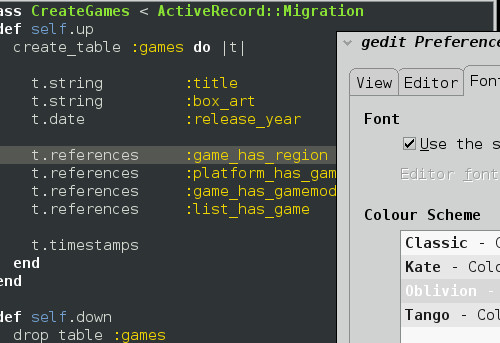
Finally, you can customize the look of Gedit with color themes. Gedit comes with a few, but you can find many more.
Further Reading
- Modelines:
Modelines page at GNOME library website. - Gedit Plug-ins
Gedit plug-ins repository at GNOME Live - External Tools Plug-in
External Tools plug-in page at Live GNOME. - Text-mate like Gedit in a few steps
A guide with resources for making Gedit look more like Text-mate.
- Using Gedit with Django:
A guide to using Gedit for Django programming - Django Snippets:
Snippets for Django. - RoR Development with Gedit
A guide to using Gedit for Ruby On Rails programming. - RoR Snippets
Snippets for Ruby On Rails. There are also more snippets here. - RHTML integration:
A guide to integrating RHTML in Gedit.
3. Geany
Unlike Gedit, Geany is more of a general purpose “minimalist” IDE than text editor. It already comes with such resources as an embed terminal, compiler tab, messages tab and note-taking tab (Scribble). You also have a side-pane listing of file symbols (i.e. classes and methods in Java files, sections and sub-sections in LaTeX files) and documents that can be extended to include a tab with file browsing. In addition, Geany comes with a simple completion tool, color picker, finder, simple project builder and tools for some languages. Its search tool is capable of searching the whole session or only the current file, with or without regex, and a “Find in files” option if the browser files plug-in is on.
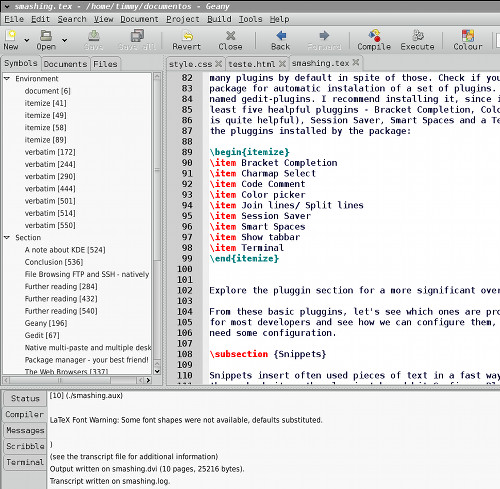
Yet one of the nicest features of Geany is its Compile and Execute buttons. Based on the file you are editing, Geany tries to find the corresponding compiler/interpreter. So, if you are editing a Java file, you can compile it with javac and run it right after the compilation ends. At the same time, you can compile a LaTeX file and preview it in a really simple DVI viewer without having to change any configuration parameters. For interpreted languages, you don’t even have to run the compiler: just hit “Execute.” Of course, if your executable has a different name (let’s say, ruby1.8 instead of ruby), it will fail and report that it couldn’t find ruby. But you simply need to configure that to make things work wonderfully again.
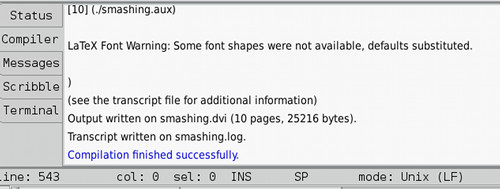
Another interesting aspect of Geany is its built-in tags information. You can create *.tags files for a language or framework that Geany does not support by default, as well as add support for auto-completion and call tips. Consult Geany’s documentation for more details
Finally, you can extend Geany with plug-ins (find the plug-ins manager in the Tools menu) and themes. Or simply configure everything the way you want: just go to “Preferences” and adjust things to your taste, from the browser to your shortcuts.
Further Reading
- Geany snippets
A collection of snippets to use with Geany. - Integrating with SVN/Git:
How to use Geany with SVN or Git version control systems. - Geany extras
Extra goodies to extend Geany.
4. What About Remote File Editing?
Nowadays, things are pretty easy, and you almost don’t need to install plug-ins to access FTP and SSH accounts or to edit files, because most modern distros comes with FUSE. And if you have GVFS installed, GNOME integrates it so that you can use it on Nautilus.
“But what is it?” you may be asking. In short, it allows you to mount a virtual file system on your system and work there just as you would in common directories.
You would just click on a file and start editing it. When you’re finished, just save and everything is done. A big advantage of this method over the FTP plug-in method is that you make things available to more than one application.
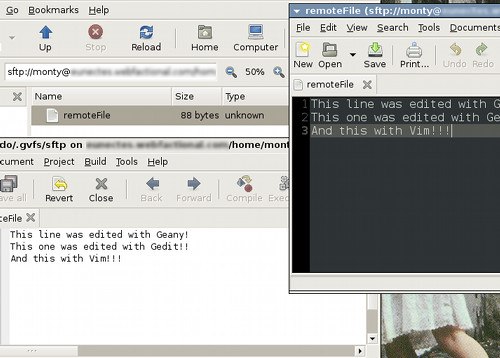
Note: since my server has only SFTP access, I’m not sure how stable this is with simple FTP, but it works flawlessly with SFTP. Nevertheless, when I need to edit a remote file, I prefer to connect via SSH using a terminal and use Vim to edit the file, only because the method reminds me that I’m not working locally and to be careful.
Further Reading
- Mounting FUSE file system
A quick guide to mounting a FUSE system and adding it to fstab. - Creating file systems with Ruby and FUSE
Using FUSE with Ruby
5. File Browsing FTP and SSH, Natively
In more recent versions of Nautilus, the GNOME file browser, you have native access to network protocols, such as WebDAV, FTP, SSH and Windows shares. You can add other protocols, like SVN, or extend it through its plug-ins and scripts. (Unfortunately, I cannot cover this topic here but only point you to an extensions and scripts website.)
You can browser different servers at the same time on different windows, which can be really helpful for transferring files from one server to another.
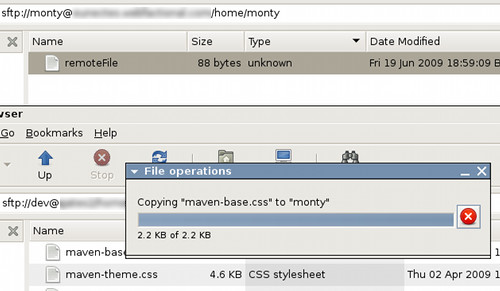
Of course, you don’t need to be stuck in the graphical portion of Linux. You can use the command line to perform most of these tasks.
Further Reading
- SVN on Nautilus:
Nautilus SVN integration project page. - Nautilus subversion integration tool. Execute SVN commands with Gnome scripts
A tutorial on how to integrate and use SVN on Nautilus. - Nautilus File Manager Scripts
A page with a good collection of Nautilus scripts. - Nautilus on GNOME Live
Nautilus page on GNOME Live. - Extending Nautilus
A guide on how to write scripts and extensions for the Nautilus File Browser.
Web Browsers
Linux has a lot of Web browsers to play with, from Mozilla’s family to console-based browsers. All of them have their pros and cons. But most of the time, we need only a few for testing, probably Firefox, Opera and one with the WebKit/KHTML engine.
Because I’m covering the GNOME environment, I chose Epiphany, with the WebKit engine (Epiphany’s project developers switched from Gecko to WebKit in the latest versions). Epiphany with WebKit is named epiphany-webkit on Debian and probably on some other distros
If you are on KDE, though, Chromium would probably suit you better because it does not depend on GNOME libraries or even use Konqueror (KHTML).
Note: I’m no specialist on rendering engines, so I can’t say for sure whether testing on more recent versions of Konqueror (which uses KHTML) would be sufficient for WebKit tests. I do all my testing on Epiphany.
If you really need to test your website in Internet Explorer, you can use the Wine library with Wine Tricks. Or use VirtualBox images, which is provided by Microsoft itself. For now, IE8 on Wine is still too buggy. But IE7 can run on Wine: check the “Further Reading” section below for more information. Running them on VirtualBox should work flawlessly.
Further Reading
- Chromium
Chromium project page. - Epiphany WebKit
Epiphany WebKit page at GNOME Live. - IE 7 on Wine
How to run IE7 on Wine. - HOWTO: run IE6, IE7, IE8 on Linux in VirtualBox
How to use VirtualBox to run Microsoft browsers. Another guide is here. - Wine Tricks
Wine tricks page at Wine HQ wiki.
Package Manager: Your Best Friend
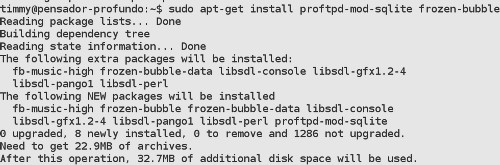
If there is one thing I really love on every Linux distro I have used, it is the package management. Okay, some are better than others, but generally speaking you need only the command line to take control of your system applications. Package managers help you find, install and keep track of security updates and new versions of your applications. And you can install more than one application at a time, even if they are not related.

Depending on the package manager, when you search for and install new applications, others that might work well with the ones you have found are suggested to you, such as GUIs for configuring and managing an FTP server.
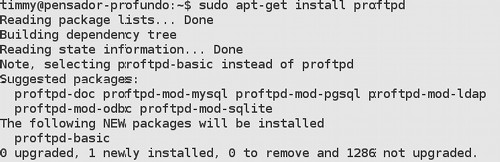
Some bundles for installing AMP include too many applications (even on Linux) or are strict in what they have packed. But when using a package manager on Linux, installing a server environment can be easier and flexible: you can tailor your installation more efficiently, choosing only what you need. Why would you install PHP if you are not a PHP developer? Why install MySQL if SQLite serves your needs? You probably don’t need an FTP server or an email service either. Nevertheless, you can install any of them easily if you need to in future. Also, you needn’t be restricted to Apache if you plan to use, say, lighttpd.
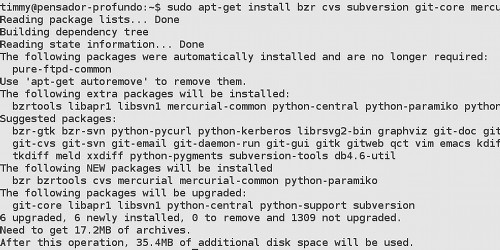
Open-source version control systems are available for Linux and, even better, in distro repositories. For Debian, you have Git (as git-core), Mercurial, CVS, Subversion and Bazaar all in the official repository (though Bazaar is over the backports and unstable). No need to go to a bunch of different websites.
Further Reading
- The Perfect Server: Debian Lenny
Tips and instructions on how to set up a complete server on Debian - Debian lighttpd
How to configure a lighttpd server on Debian - Gentoo Tutorials
A collection of tutorials at Getoo Wiki. Could be useful for others distro, too. - CrossFTP Server
An FTP server with an LDAP/database back end and GUI configuration/monitoring. - GAdmin ProFTPD
GAdmin module for administrating ProFTPD servers using a GUI. - PureAdmin
PureAdmin is a user and server administration for the pure-ftpd.
Native Multi-Paste And Multiple Desktops
I started using Linux seriously at the end of 2003, when I got sick of Windows 98 SE freezing after 20 minutes of use and having to be reinstalled after 2 weeks.
After installing Debian and exploring KDE features, I discovered how cool and useful the virtual multi-desktop concept was. Now when I use other operating systems, this is what I miss most. But really understanding how it can help you organize your windows and work takes some time.

![]()
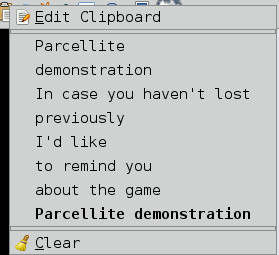
Another thing I find really helpful and miss in every other system I use is being able to buffer two things on the clipboard with any external tools. (Okay, I know when using Vim you have as many buffers as keys, but I’d need a whole book to talk about Vim!) All I need to do is highlight a piece of text and press the middle button to paste it. And if I have something in the buffer (loaded previously with Control + C), I won’t lose it.
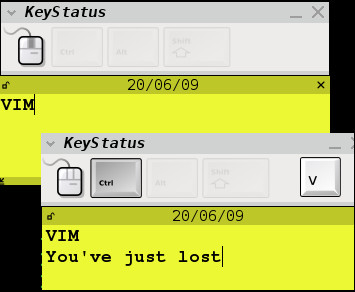
You have plenty of options for controlling multiple buffers in the clipboard. KDE already comes with Klipper, which is great. GNOME comes with no such tool, but you do have some good options (I use Parcellite).
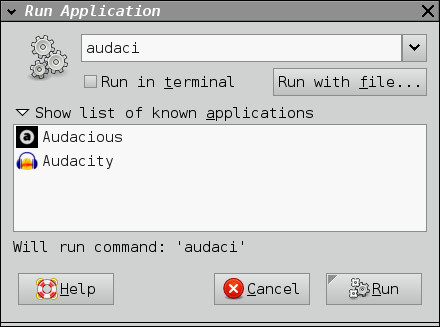
One little thing I miss is a native way to call programs without having to click on their icons or menu entries or call them through the terminal. GNOME and KDE both have a native application runner that you can call by pressing Alt + F2. Then, just start typing and it shows your options. Even though QuickSilver, and programs like it, does something similar and even better, you have to install it.
Further Reading
- X Window System Multiple Desktops
Wikipedia entry about multiple desktops on X Window System - Glipper
A GTK clipboard manager. - Parcellite
Another GTK clipboard manager. - GNOME Launch Box
A QuickSilver-like tool for the GNOME environment. - GNOME Do
Another tool inspired by QuickSilver. - Katapult
KDE’s tool inspired by QuickSilver. - GNOME Deskbar
Deskbar is an applet the comes bundled with GNOME with the goal of providing a common search interface.
A Note About KDE
Linux is a rich world and has many variables to experiment with. I have never used any of KDE’s specific tools. For programming, I use NetBeans. I have used KWriter for simple edits but never for programming (nor Kate). Though I haven’t used KDE4, I can say by experience that, for file browsing, Konqueror is a killer app: integrated preview for many file types, native access to SSH, (S)FTP and other network protocols, extensible, tabbed file browsing and many other great features.
Conclusion
We have seen a lot of simple tools to play with, a rich environment for building testing and development servers and a good range of tools to improve your workflow. Although Linux isn’t the most popular OS for desktops, it is not necessarily ill-suited to most kinds of development work — and it may even be better than more popular OS’s. It is up to you now to try it if you are not satisfied with your current environment.
Further Reading
- Vim
Vim official page - Vim doc
A Vim documentation project, with references, tips, FAQs and tutorials. A good resource for any Vim user. - Shlomi Fish’s Vim for begginers
A good place to start if you want to learn Vim. - VIM for Django
Tips, plug-ins and scripts to make Vim more suitable for Django. - Vim for Rails
A plug-in to enhance Vim for Ruby On Rails.
Related posts
You may be interested in the following related posts:
- CSS Editors Reviewed
This review includes JustStyle CSS Editor, CSSED and other CSS editors for Linux. - 35 Useful Source Code Editors Reviewed
This review includes Komodo Edit, Aptana Studio, Screem, Quanta Plus, Emacs and other editors for Linux.
(al)
Ricardo is a systems information student from Brazil. He works as an intern at a local company developing JSF applications that help people keep track of many Brazilian companies' stocks on BM&FBovespa. He is also starting a new website with some friends to talk about comics, video games, films, TV series and RPG in a way different from most Brazilian websites. You can contact him on Twitter or through vox. http://www.twitter.com/geeknerdnanico
- 110 Comments
- 1
- 2August 28th, 2009 7:06 am
Oh, I would have expected Komodo Edit to be mentioned here..
- 3August 28th, 2009 7:06 am
Nice work guys. We can’t all afford Macs!
- 4August 28th, 2009 7:07 am
Nice tut ;)
- 5August 28th, 2009 7:07 am
Neat article, thanks!
- 6August 28th, 2009 7:08 am
The big problem with developing for the web on linux is the state of linux fonts. While you can install other OS standard fonts, they are still rendered so differently that you really need to use a virtual machine / other box / browsercam to get anywhere near reasonable confidence that your design will look the way you expect on the 95% of other people’s boxes. Constantly toggling into a VM is a dealbreaker for me.
- 7August 28th, 2009 7:09 am
Cannot believe Komodo Edit was not mentioned! Also Filezilla is a great “FTP”.
- 8August 28th, 2009 7:10 am
Here is HOW to develop:
1. Buy Windows
2. Develop - 9August 28th, 2009 7:11 am
Thanks for the info. Personally, I am honestly shocked not to see Bluefish mentioned in this post. I use Bluefish almost exclusively for my coding. It works much better for me than any of the other text/code editors.
If you mount your Web server through SFTP as a network drive, Bluefish does a great job of editing the files directly on your Web server.
- 10August 28th, 2009 7:12 am
haha what about redcar editor ?
- 11August 28th, 2009 7:12 am
I personally love Konqueror for a browser. It’s crazy fast and has a nice split window feature that I use when doing front end development (src vs. display) . Also the newest versions of virtualbox combined with IE tester make it very easy to develop for all versions of IE. I also like Komodo Edit although it is quite the memory hog.
- 12August 28th, 2009 7:14 am
Use Aptana for web design!
Linux isn’t the realm of the geek any more!
- 13August 28th, 2009 7:18 am
There is some other insteresting software pieces on Linux, like these ones:
Text editor / IDE
- BluefishVetorial design tool
- InkscapeImage editor
- Gimp - 14August 28th, 2009 7:20 am
Aptana is another good IDE for those used to Dreamweaver. Does much of the same stuff.
- 15August 28th, 2009 7:21 am
I develope over years on Linux. It’s just the nicest plattform (for my reason). One big thing Linux not can give me as Webdesigner: Photoshop. Photoshop CS2 runs, but not smooth enough for me. So I have a Mac for graphic works but sure, you could use GIMP or other Software on Linux when you know how. I can’t handle GIMP as long time Photoshop user.
I use gEdit or Bluefish. But gEdit ist great. U dont need a FTP Client. You can make a connection to your server (this also works on Mac).
All in all: I prefer the gnome interface for developing.
- 16August 28th, 2009 7:21 am
It’s all ok until you have to test in IE. How do you guys do that?
Someone recommends a VM that works fine on obuntu?
- 17August 28th, 2009 7:21 am
Another great editor for linux is the Eclipse platformEclipse platform with loads of pluginsplugins for webdevelopment.
I can also recommend the PDT Eclipse edition for php scripting, and Aptana Eclipse for css,js and more. - 18August 28th, 2009 7:23 am
I love gnome-do, especially the docky theme. Aptana also works on linux and has built in ftp support. Bluefish is also cool for web dev. Lampp, the linux version of xampp, is available to test your php & mysql driven websites.
- 19August 28th, 2009 7:26 am
Interesting article. For Firefox there are useful addons like firebug, web devloper toolbar, greasemonkey, modify headers, screengrab.
I primary use IE virtualized with VMWare, where I installed Companion JS (firebug-like extension) and Xenocode for IE8 testing.
A nice tool for XML is Amaya (Linux) and codepad.org is a wonderful social coding website. - 20August 28th, 2009 7:30 am
Great article, it covers some tools that I never used for webdesign in Linux. I am going to try them out for sure!
My favorite tools (as I am a Linux based webdesigner) are Quanta Plus or Bluefish for coding. Also Kate is great for this purpose. Of course I use GIMP and Inkscape for my graphic design and Filezilla for uploading. And then there is ies4linux to get several IE’s working through Wine.
@Duncan
I don’t really have a lot of issues with fonts on Linux myself. It is true that fonts display a little bit different sometimes, but they also do in different browsers on the same OS. My designs do look 95% the same on different boxes. I am using the msttcorefonts package which includes all M$ fonts into Linux.
- 21August 28th, 2009 7:38 am
I will try to reply all the comments later. But I will reply to a few things:
1. Multi-Platform tools like FileZilla are already known by most people. So I tried to focus on things that aren’t so common on other platforms.
2. Aptana is bases on Eclipse and I said that these kinds of IDE need own articles because of how rich they are – and they are also multi-platform, meaning it would make more sense to have a generic article about it.
3. I never used Komodo IDE, though I already thought about trying it. So it wouldn’t make much sense to talk about a tool I never used.
4. At first I thought about talking about (that sounded weird….) Bluer Fish, however, this would make the article too big on my opinion. So I opt on removing it, since I don’t use it anymore.
cheers all, and thanks for all the feedback!
- 22August 28th, 2009 7:43 am
Tiago: for testing IE, you can have any Windows systems you want in your Ubuntu installing VirtualBox.
I’m a KDE user in my Debian.
For coding: Quanta+ (until I moved to KDE4…) and Kate.
Vectorial: Inkscape
Raster: GIMPThis article is fine, but left a lot in the basket… maybe a second or third part will be nice :)
- 23August 28th, 2009 7:46 am
I prefer to use NetBeans IDE for programming. It’s a powerful IDE and a PHP package is available for download.
- 24August 28th, 2009 7:47 am
I saw the pic and thought this would be about Rails :(
- 25August 28th, 2009 7:52 am
I develop under Linux, with vim as my text editor for everything. It took me a while to get used to, but it’s definitely worth it. I don’t need any FTP or anything either, I develop everything straight on the servers via SSH.
I mostly code, but the graphics I do I perform either in Gimp, Inkscape or Fireworks in a VirtualBox (works surprisingly well).
Before vim I used Kate, which is better than any GUI text editor I’ve ever used under any other OS.
I also have a VirtualBox running Windows XP which I connect to via RDP to check sites in IE, Safari and Chrome. That way I don’t have to clutter my workstation with a lot of browsers either.
- 26August 28th, 2009 8:00 am
I installed IE6 through Wine-doors on Linux Mint. Works fine.
- 27August 28th, 2009 8:07 am
I’ve been doing web development in Linux for years now.
I blog about it on my blog (click my name above).I use Linux because I can automate everything I do.
Every time I can save a precious key stroke really helps speed up total development time.
I find I can develop a site 10 times faster than a windows developer, which allows me to complete with large web development companies as a freelancer.Here are my responses to this article (which I’m not happy is being talked about, if others start doing this I’ll loose my competitive advantage).
1.) I use scite as a text editor.
2.) Browsers great list!
3.) I’d never connect to a webserver using FTP, SSH or SFTP all the way!
4.) I browser a web server in command line, but the GUI options here are interesting.
5.) Great note about package managers - 28August 28th, 2009 8:16 am
Interesting. Looks like linux has a ways to go before becoming a viable web dev environment for simple web app development.
- 29August 28th, 2009 8:25 am
*hmmm* .. GET A MAC … and get productive … man …
- 30August 28th, 2009 8:43 am
Where is Aptana Studio?
It works on Linux just like on windows. - 31August 28th, 2009 8:44 am
I run Quanta plus on Leopard, linunx+mac!!!
- 32August 28th, 2009 8:48 am
Strange article. It’s as if Linux has been something bizarre. Talk of “Do you want to program? Buy Windows” is simply nonsense.
I’ve been using Linux for 7 years. I code in Linux websites for 5 years and never have used Windows for this purpose. To tell the truth I can not imagine working on Windows.
Casual use:
- Eclipse + PDT,
- Gimp,
- Inkscape.Let me add that I am more a programmer than a developer.
- 33August 28th, 2009 8:50 am
Another nice thing about Linux desktop is that you can easily configure it with the same services that you deploy to (assuming you deploy to a LAMP type of server). So local development of web applications is very easy and you can often use the same configuration (file paths and etc) on devel as on production.
For graphic design work I use inkscape. It is like illustrator but scaled down a bit. GIMP has a “save for web” feature that is very similar to photoshop so you can optimize your images for the web. This works great for buttons, web backgrounds and layout elements.
- 34August 28th, 2009 9:07 am
~* LiNuX #1 oPeRaTiNg SyStEm *~
- 35August 28th, 2009 9:08 am
Netbeans is awesome and Gnome + Do surely can boost developers productivity.
- 36August 28th, 2009 9:21 am
good article… but linux… …
- 37August 28th, 2009 9:21 am
i miss quanta plus. try also bluefish. both are great IDE’s with their pro’s and con’s. theres also kcolorchooser, kruler, ksnapshot and kmag to be mentioned.
- 38August 28th, 2009 10:11 am
This article has shown me that I am so glad I run my sites on *nix, and that I code them on my OSX.
- 39August 28th, 2009 10:22 am
This is not a slam on Linux or Linux web developers, this is just an observation. This has the ffffffff-ugliest illustrations I’ve ever seen in a Smashing Magazine article.
As well it should, given the content. But man they stuck out like a sore thumb! I’m used to the purty pictures.
peace | dewde
- 40August 28th, 2009 10:33 am
Good article, I hope there’s going to be a follow up for kde.
- 41August 28th, 2009 10:36 am
This article is pretty much useless, really, as you can’t hope to cover all of the necessary information for one particular setup, or even come close, and everybody has their favorite programs.
*hmmm* .. GET A MAC … and get productive … man …
I’m afraid that you’ve never seen my workstation if you think that Linux makes me unproductive. Aside from not having a package manager and putting things in non-standard places, both of which make my life much more difficult, OS X has a very set window management system, which, unfortunately, restricts me to using a floating window manager. Perhaps someday you’ll learn of the wonder that is tiling wms, but to do that, you’ll have to use an OS that gives you choices…
- 42August 28th, 2009 10:48 am
Great article!
Linux is great and everyone should give it a try before they make comments like “buy windose, develop”. More linux articles Plase! - 43August 28th, 2009 10:57 am
I use vim, and mount remote folder directly from inside gnome.
- 44August 28th, 2009 11:01 am
Ehm… Vim is not a command line, eh.
- 45August 28th, 2009 11:03 am
OMG this is awesome!!! I’ve been waiting for a post like this for quite some time now. Linux rocks! Mac snoobs are just mad cause we get our software for free and share it!
- 46August 28th, 2009 11:22 am
I’ve always used Linux. One thing I like about all of the standard Linux platforms in the idea that you can have multiple linked workspaces, so even if you’re a nomadic developer you can have many windows open and keep them conceptually separate. I typically have three or four emacs windows open, each one full-screen, and the workspace manager keeps them all nicely organized.
For website development, I typically load the 960 PSD into GIMP 2.6 and go from there. Linux supports my Wacom pad beautifully, as well as a variety of other peripherals. I do the HTML, CSS and Javascript in Emacs, and Subversion is my content management system of choice. I also do Django and Rails in Emacs. I use Firefox as my principle browser, and Arora as my Webkit-based browser. I also make sure that any websites I design look and work with Dillo, a very old and primitive browser– but if does work with Dillo, it’s almost always Section 508 compliant.
For hard-core application server development, I use Umbrello for database design. Graphic design is done on paper, and Linux’s scanner software (XSane, XPhoto) all work wonderfully. On the rare occasions I do vector illustration, Inkscape is more than adequate for my needs (and the beta version has wonderful web-page development tools!), and on the even more rare occasion when I need some special typography, Scribus fits the bill.
Since I work in a distributed corporation, Skype and Pidgin provide all the corporate communication needs we need.
The thing I like most about Linux is its utilitarian nature. Because I have access to absolutely everything within it, I can pare it down to the bare essentials. Nothing gets between me and my development process. I have no worries about Microsoft and Apple’s slowly growing Digital Rights Denial platforms, and if something’s broken I have every right and capability to fix it.
- 47August 28th, 2009 11:26 am
This is not a slam on Linux or Linux web developers, this is just an observation. This has the ffffffff-ugliest illustrations I’ve ever seen in a Smashing Magazine article.
Agreed. The author have choosed the ugliest GTK theme available.
- 48August 28th, 2009 12:14 pm
Nice article from 1996 – not exactly going to encourage the blinkered or scared to try Linux, is it?
- 49August 28th, 2009 12:21 pm
For more complex tasks, you will need some knowledge of shell-scripting and how to use some of the shell tools.
First of all you can have your choice of shell and secondly you can do your shell scripting in any language that you have an interpreter for. Python, Ruby, Perl and even PHP so you can use your skills in a web scripting language on your work machine too.
- 50August 28th, 2009 12:33 pm
Wow.
The next article should be titled “Why To Develop Websites On Linux”
- 51August 28th, 2009 12:36 pm
@Duncan
On using linux fonts, I have to agree with Sebaastion:
I don’t really have a lot of issues with fonts on Linux myself. It is true that fonts display a little bit different sometimes, but they also do in different browsers on the same OS. My designs do look 95% the same on different boxes. I am using the msttcorefonts package which includes all M$ fonts into Linux.
I’m very happy developing with Linux–I wouldn’t consider using anything else.
- 52August 28th, 2009 1:08 pm
well in a linux sistem with Java RE, we can use Aptana or any eclipse based IDE for web development ( Eclipse PDT, Zend Studio, Aptana ), and for web graphics (GIMP, Inkscape, Krita and Karbon14).
And a lot of local webservers (XAMPP, Zend Server community editon, etc.), we can test our pages with IE4Lin, firefox, epiphany, konqueror, and a lot more.
I use to deploy a VM of virtualbox, with my webserver running XAMPP, another VM with windows XP and my host sistem with Eclipse PDT, Krita, Inkscape, everything in KDE4 archlinux.
- 53August 28th, 2009 1:56 pm
Great article guys! It’s always good to see some linux into the equation! :)
- 54August 28th, 2009 2:07 pm
To develope a website is different than to design a website, in my opinion.
I’d like to know more about version control on Linux
Great article. - 55August 28th, 2009 2:16 pm
I use eclipse+PDT for coding, it’s great. and a really good VM software is virtualbox, it’s free and open source http://www.virtualbox.org/
Nice article.
- 56August 28th, 2009 3:06 pm
As a Linux user, I’m mildly impressed with this article. It mentions several great resources, including a few that I plan to check out. But I also agree that the author used an ugly desktop theme (his choice, there are many beautiful themes available), and I’m not sure that the article conveys how well the Linux workflow, uh, works. Or flows. My suggestion would be to describe workflow from beginning to end, focusing on the Linux-specific tools and features. That said, I doubt that too many people here are going to switch operating systems based on this series of articles (Tips for developing in Mac, Windows, Linux) so I understand the goal of the article is to present additional resources for people already using those operating systems.
Personally, I think I’m able to work quite well with Linux, and I use it exclusively except for checking websites in IE. It turns out that I spend remarkably little time doing that – an afternoon here and there to squish bugs. Two huge advantages of Linux have already been mentioned – package management and a customizable, modular interface (with workspaces) that really helps me be productive.
One more tool to mention: Shutter, a nice screenshot tool for Gnome.
- 57August 28th, 2009 5:37 pm
Hi guys. I’ve tried a lot of linux flavors, windows editions and a little bit of OSX (hackintosh). I finally stick to Windows Vista. Why? Well, first of all, I can’t afford a real Mac and using hackintosh can get really complex if don’t know the “hacks” of the system. And I’ll be happy to switch to linux if it wasn’t for a big company named ADOBE. I know there’s GIMP and INKSCAPE, but, a lot of my jobs requires some Flash, and it’s irreplaceable in Linux.
- 58August 28th, 2009 6:29 pm
I prefer using Notepad++ through wine. Simple, easy to use & great code highlighting.
Sometimes I miss Photoshop though :) - 59August 28th, 2009 6:46 pm
developers != designers … I prefer to do something myself than just taking the (expensive shortcut) and paying someone else to do it for me.
- 60August 28th, 2009 11:31 pm
My package: Aptana Studio (code), GIMP (graphics), Inkscape (graphics), Scribus (Create PDF’s), Freemind (Planing) and a Local server with Apache, MySQL and PHP. Don’t forget Version Control (I use Bazaar and Subversion). All working very well in Linux.
- 61August 28th, 2009 11:34 pm
Sorry, but it’s piece of shit. Where you got so fucking DE? Terrible buttons, tabs… I’m scared.
Modern linux environment is beautiful, but you show it as old-school OS. - 62August 29th, 2009 12:13 am
Oh right, let’s waste an entire item on 1.7% of the computing world… It’s their (linux users) choice to be isolated and ’special’… why don’t you post an article in Tagalog while you’re at it? Linux psh.
- 63
- 64August 29th, 2009 2:31 am
Interesting article – even though my use of Linux is largely as a server VM on OS X, I find it useful to know ‘how the other half live’ – ‘Buy Windows, Develop’ isn’t a helpful answer, as much as patronising Windows users with ‘Buy A Mac’ – what’s important is knowing how to use your platform or language of choice to it’s best, rather than platform wars.
Although in response to the final comment – I don’t, personally, find Apple’s restrictions get in my way – at the end of the day, OS X is a Unix, and can be used as one – much of the same software is available as Linux, and the KDE port is coming along nicely. For me the choice is influenced by the availability of Omni Group’s software and Textmate, plus Keynote and Pages – while equivalent software is available, it doesn’t (yet) make it as easy to produce good looking results (this is as much down to template and theme design) – but the gap continues to close.
On Windows I’m using e-editor these days (which is a Windows and Linux port of Textmate) to keep a consistent environment. Before that it was vi (seeing as most of my development life has been on a variety of Unix’s, it pays to learn something available everywhere).
- 65August 29th, 2009 3:20 am
Thanks, Smash Mag, for your imparciality! Thank God Windows exists!!!
- 66August 29th, 2009 3:41 am
As Ricardo said he never used Komodo Edit but who works with it knows it is a great open source editor. Nice article.
- 67August 29th, 2009 3:53 am
very nice article!
recently I developed some Jquery snippets for the gedit Snippets plugin http://www.danielcamargo.com.br/stuffs/gedit-snippets-jquery/
i think that it is a great help in the development of sites using jquery. - 68August 29th, 2009 7:44 am
Aptana
regarding Konqueror: nothing (!!!!) comes even close to Opus Directory (which is only available for Windows) - 69August 29th, 2009 8:08 am
XAMPP for Linux (http://www.apachefriends.org/en/xampp-linux.html is missing in your list. I’m always installing this right after setting up my system with Linux. I don’t want to use outdated stuff out of the Debian or Ubuntu repositories – I prefer developing in up-to-date environments ;)
And you’re like me – I like my productive environment working and stable – compiling Epiphany with WebKit is a PITA. Thus, I’m using SRWare Iron (which basically is a Google Chrome build w/o all the privacy breaching stuff) inside a Windows 7 VM instead.
cu, w0lf.
- 70August 29th, 2009 9:51 am
I’ve developed professionally on all three major OS’s and I use almost exactly the same apps: Vim, Firefox, and a BASH terminal (a combo of WinSCP and Putty on Windows). So this seems redundant to me, but whatevs.
- 71August 29th, 2009 11:33 am
Thank you, that help us to choose programs to develop on linux…
- 72August 29th, 2009 12:32 pm
Thank you all for all the replies!
Cheers, all!
- 73August 29th, 2009 2:54 pm
Recently I switched from Windows to Ubuntu and I needed to find alternative tools and programs I used for creating web pages. Here is my current workspace:
Aptana Studio – web development
XAMPP for Linux (formerly LAMPP) – debugging and testing
Firefox & Chromium – browsers
gFTP – FTP client
VirtualBox – for running Photoshop (I know about Gimp but I’m more familiar with PS) - 74August 30th, 2009 3:12 am
Hello,
the author forgot to mention Emacs, it allows you to edit in any possible mode and you can edit files from within it over SSH/FTP without any extra tools.
- 75August 30th, 2009 11:13 am
I definitely recommend SCiTe as a text editor. I use it all the time for web developpement. As said before, the only reason I keep a dual boot with windows is Adobe products. I just can’t get used to (and can’t afford the time needed to learn) GIMP.
To CitizenX (comment 62) : if you put aside GNU/Linux users only because we are “only” 1.7% (even though I wonder where you got this estimation, mine is higher), why bother about MAC users, who are finally “only” 4 to 5% of computer users in the world ?
This said, I don’t use Linux because I want to be “special” in any way. I just use it because it’s the OS that fits my needs best…
- 76August 30th, 2009 2:04 pm
I had tried Linux a couple years back and was impressed, however it was daunting at times. However recently fed up with Vista and its antics, I went back to Linux and tried Ubuntu. I pretty much have fallen in love. However I found XUbuntu to be an even better match with its minimalist design and OS size. XUbuntu has become my development platform of choice because I can test on a platform that is very close to my production platform. I have also found Win to Lin to be a great tool for running adobe software like Flash CS4 and Illustrator CS4 on my Linux machine.
I have noticed that a lot of people posting do not understand the difference between developing and designing. Developing is usually considered to be the programing or coding of something. Design is more graphical. Linux may not yet be ideal for design, but with Ubuntu turning so many more users every day, I foresee a day not too far away in which Linux will be an excellent platform for Design, Development and much more! - 77August 30th, 2009 4:33 pm
Fantastic article, I especially like the consolidated section on extending gedit functionality. I’m anxiously awaiting the http://www.e-texteditor.com port to linux, I believe its in progress, I wish they’d hurry up!
- 78August 30th, 2009 8:54 pm
Great article. Like most Linux yousers will tell you, it’s all subject to opinion and preference. I’ve been at it on Linux for a couple years with my company funded mac getting used for graphics work (not much changed in the last 10 years I guess).
Over time it’s become second nature using Linux just like anything else. So far so good. I enjoy my work and our customers stay happy.
- 79August 31st, 2009 12:35 am
Congrats, you’ve made Linux a disservice showing this f**ing ugly desktop theme.
- 80August 31st, 2009 1:06 am
I believe that the best software for developing web is aptana studio for 3 reasons:
1 it’s free
2 it’s fast and easy to use
3 and it’s cross platform
If already u use eclipse u can add aptana plug-in
More info http://aptana.com/ - 81August 31st, 2009 4:44 am
I lost the game.
¬__¬
- 82August 31st, 2009 8:18 am
I have been working for a company as a webdeveloper and doing pages on the side. For both I have been using a Linux machine and I use vim for my editor….call me hardcore or whatever you want, but it is just very easy for me to use.
- 83August 31st, 2009 10:11 am
I agree it’s probably the ugliest GTK theme I ever saw, IMHO… But, hey, Linux is all about each user’s tastes ;)
- 84August 31st, 2009 11:45 am
There is few funny things, first of all, I can’t see a normal way to develop websites under windows? How people are able to do so, when windows is not compatible with internet? PHP, Apache, Python, bind, SSH and so on, where developed under *nix, so I’m asking you, why the hell any sirious website developer is not using linux or other *nix to create websites already? I know, propably because, they are sissy.
And remeber, I’m not telling about designing websites, but developing.
- 85August 31st, 2009 8:14 pm
I agree wholeheartedly with those who have mentioned Emacs (terribly geeky but unfathomably powerful), Aptana/Eclipse, Bluefish and Quanta Plus.
My Ubuntu box is set up as a development server with ColdFusion and CFEclipse. It was much simpler to configure than a similar setup I did on Windows XP.
Those who belittle *nix simply haven’t used any of its variants enough to know how stable and useful it is, or how many great programs are available to do all kinds of things you’ll need to do. Also easy to find, install and uninstall programs you might need only for occasional projects. And it’s still free. What’s not to like?
- 86September 1st, 2009 11:41 pm
Congratulations on putting up *crap* screenshots. Modern Linux desktops look *way* better than that.
For your viewing pleasure here’s what’s happening with KDE for example:
- 87September 2nd, 2009 12:13 am
“If you are on KDE, Chromium might suit you better”?
Chromium uses GTK+ for its widgets which is also used by GNOME. Chromium/Google Chrome is anything but native-KDE. However, you can still run it.
See these screenshots:
http://www.flickr.com/photos/11688121@N02/3880149427/
http://www.flickr.com/photos/11688121@N02/3880149421/
http://www.flickr.com/photos/11688121@N02/3880149419/
http://www.flickr.com/photos/11688121@N02/3880149413/
@SmashingMagazine. Please provide better (non-1996) screenshots of Linux desktops
in the future. - 88September 2nd, 2009 1:35 am
for IDE you can use more advance editor, that can run on linux too
like Netbeans, Eclipse, Aptana or Komodoto test in IE i always install Virtual Box, and install windows as a client
- 89September 2nd, 2009 2:32 am
It could have been interesting to read your experience in moving from Windows to Linux: were you working at the time? have you done the move gradually?
I use jEdit on Windows and I am trying to move gradually to ubuntu. jEdit is a great text editor with many plugins available and it works on linux as well as it based on Java.
Never heard of virtualbox before but it seems a great solution for IE testing - 90September 2nd, 2009 5:23 am
This was a disappointing article, compared to the wealth of information that I’ve seen and used on this site.
I use the following tools:
Inkscape
Awesome vector graphics tool, nice for prototyping your site.
Gimp
Raster graphics tool, awesome too, and you can import Inkscape (.svg) files.
NetBeans
An all round IDE with awesome code completion.The above are only a few of the tools that are readily available for you to use. Even though I feel this article did no justice to web development in Linux, it does mention quite a few useful things.
- 91September 2nd, 2009 9:45 am
1- If i don´t have a FTP tool that sends the files to where they belong without having to go back and forth through levels of folders, that´s waste of time, with Aptana or DW just save the file, hit the proper keys and the file goes to the server where it has to go.
2- I need graphic edition, not to design, but to write, maybe in english is not necessary but in spanish, lots of words have accents áéíóú or ñ and having to write the html code for that is just a waste of time too. Bad for aptana.
- 92September 3rd, 2009 6:04 am
Hey, you could do a better job when taking the screenshots. The text is pretty ugly and I can’t read comfortably. I’m using Gnome too, but mine looks much more reader-friendly.
Nice tut though.
- 93September 3rd, 2009 8:14 am
jedit is a better code editor than gedit or geany
- 94September 3rd, 2009 1:07 pm
> “If you are on KDE, Chromium might suit you better”?
>
> Chromium uses GTK+ for its widgets which is also used by
> GNOME. Chromium/Google Chrome is anything but native-KDE.
> However, you can still run it.GTK itself is not dependent on Gnome libs, as for Chromium. But Epiphany is. So, if you have KDE you’d be better with Chromium, since you need only GTK and Chromium libs. This is the same as telling to a Gnome user to use a QT app that is not dependent on KDE libs, though KDE uses QT.
Also:
I did not mean to say that using built-in ftp navigation is better than using an ftp client, such as FileZilla, gFTP, etc. I just wanted to show that you don’t need them if you don’t want to. I use FileZIlla sometimes.I’m convinced on trying jEdit.
As I said before: Emacs (I’m really sorry emacs users for not mentioning it!), Vim, Eclipse and its derivatives, Netbeans and other bigger IDEs would need single articles to cover at least their basic features. Plus, I had to sacrifice some tools or else this article would get too long.
@Ramm
When you mount a FUSE filesystem and you save a file on it you are already saving it on the server side – you can even set up your distro to auto-mount a FUSE filesystem every time you boot. But I know what you mean: having a window inside the IDE listing your files on the server and so on.And to make special characters there are scripts that changes every á é ê ã and etc to html-entities automatically.
To everyone complaining about the ugliness of my desktop:
I need to have something to find uglier than myself. So since I can’t set fire on people’s face, I choose ugly themes for my systems. But if I have another opportunity, like, a second part using KDE and some other tools that people missed (if someone else don’t want to do it), I promise that I will use KDE 4 and its nice set of themes. All right?But Im aware that in some images the reading isn’t so good. But most of these images were really over SM’s sizes, and cropping / resizing them caused a loss on quality. I will try better next time.
Cheers all!
- 95September 3rd, 2009 2:24 pm
@ricardo
I stand corrected, desktop look aside, there are some things worth checking out.
- 96September 4th, 2009 3:15 am
I prefer using Komodo
- 97September 4th, 2009 4:25 am
Jedit with xinsert, project manager, sidekick plugins and krusader for remote editing and synchronisation on kubuntu works for me
- 98September 4th, 2009 7:31 am
Informative as ever. I always like to visit you post. Every time in you article you post step by step guidance which really useful. Thanks!!
- 99September 5th, 2009 7:49 am
i like use pdt and vim.
- 100September 9th, 2009 2:05 pm
I’d love to see more Linux-based posts here on Smashing!
- 00
There are no trackbacks at this time. If you are interested in leaving a trackback, please use this URL.
Leave a Comment
Make sure you enter the * required information where indicated. Please also rate the article as it will help us decide future content and posts. Comments are moderated – and rel="nofollow" is in use. Please no link dropping, no keywords or domains as names; do not spam, and do not advertise!
Interact
Popular
- 100 Wordpress Themes
- Photoshop Tutorials
- Fantastic Wallpapers
- 40+ Excellent Freefonts
- Dual-Screen Wallpapers
- Wordpress Themes for 2009
- Illustrator Tutorials
- Incredible Free Icon Sets
- High-Quality Free Fonts
- 30 Scripts For Galleries
- Photoshop Text Effects
- Useful Icon Sets
- Web Design Trends
- iPhone Wallpapers
- Before Launching a Website
- CSS Layouts And Templates
- Photoshop Actions
- Stunning Pictures and Photos
- Fantastic HDR Pictures
- Logo Design Tutorials
- Free Design Templates
- 10 Mistakes In Logo Design
- Photoshop Custom Shapes
- 40 Creative Design Layouts
- 8 Layout Solutions
- 53 CSS Techniques
- Photography Techniques
- Black & White Photography
- Styling Design Elements
- CSS-Based Forms
- 50 jQuery Techniques
- 50 Portfolio Websites
- 50 CSS Techniques
- Creative Logo Designs
- Desktop Wallpapers
- 25 Open Source Mac Apps
- 50 Free Icon Sets
- The Big Showcase Of Online T-Shirt Stores - http://bit.ly/5Tq8uA
- @ilmv oh ok then ;)
- @ilmv no, the SM Book will not be out of date :) We made sure it contains universal design, usability and marketing principles.
- Apple ad bombing Windows 7 on Google - http://bit.ly/28ctPq
- Atatonic - a fresh CSS framework - http://bit.ly/4oOV2w (via @umutm)
- @HrvojeKC yes, that's an interesting idea. Maybe when the waiting is over, we'll write a detailed post about it.


interesting post! good read :-)