Smashing Magazine - we smash you with the information that will make your life easier. really.

How To Integrate Facebook With WordPress

Advertisement

Facebook is one of those Web phenomena that impress everyone with numbers. To cite some: about 250 million users are on Facebook, and together they spend more than 5 billion minutes on Facebook… every day. These numbers suggest that we should start thinking about how to use Facebook for blogging or vice versa.

We did some research to find out how the integration of Facebook with WordPress and vice versa works, or — in other words — how you can present your WordPress blog on Facebook or use the functionality of Facebook on your WordPress-powered blog. Both of these can be achieved with a set of WordPress plug-ins, a couple of which we’ll present here in detail.

1. Integrating A WordPress Blog Into Facebook

Integrating a WordPress blog into Facebook is actually quite simply achieved via the Facebook API. The Facebook API makes programming applications that can be spread via Facebook almost a piece of cake. A lot of interactive browser games are on Facebook, such as the currently popular “Mafia Wars.” This game allows users to start a mafia family with their friends, with the goal of becoming an important figure in the virtual underground crime scene. To start a clan, you invite other friends on the network to join. This is the growth strategy of any application on Facebook: the simple snowball effect.

The applications sustain themselves through earnings generated by displaying advertisements, which also makes Facebook an even more attractive platform to develop on. This symbiosis generates growth for both Facebook and its applications. Deutschsprachige Version des Artikels

Plug-In Installation and Configuration

John Eckman developed the WordPress plug-in Wordbook in early 2009. This plug-in allows WordPress blog owners to integrate their blog in Facebook. This gives a blog two lives: one as an application on Facebook (such as, for example, my private FreigeistBlog) and one at the original URL (http://freigeist.devmag.net).

To access a blog via Facebook, you need to first grant access to the application. To do this, go to the so-called “canvas” page, which is where the Facebook twin of the blog lives (my example). However, granting access to the blog’s application means that the administrator of the blog also has access to information about you as a user (this is what most applications aim for: information such as date of birth, gender and educational status allows them to display quite targeted ads).

The application we’re dealing with is a simple blog and, in this sense, quite innocent, but we should state outright that the Facebook API as it is now treats blogs and websites as applications, which may not be appropriate, given the issue mentioned above. Facebook users who authorize the blog application can now easly send comments and share posts from within Facebook. The data, however, is still stored in the original database on the server where the blog is installed.

This makes it look as though Facebook serves merely as a simple feed reader. Yet, we get some other benefits. The blog on Facebook can be used to create a community around it by taking advantage of Facebook’s snowball effect, because friends of the blog’s users will see in their activity stream that they have been participating on the blog. Furthermore, it means that Facebook users will see new posts from your blog whenever they sign in to Facebook and can easily follow comments, making your blog more accessible.

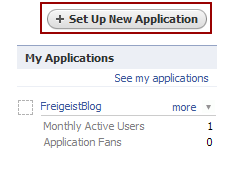
To create a Facebook twin of your blog, first you have to set up a new application. To do this, you need a Facebook account and have to register as a developer using the preceding link. All of this can be done in a few minutes.
Wp-facebook-application-create in How To Integrate Facebook With WordPress
Create a new Facebook application

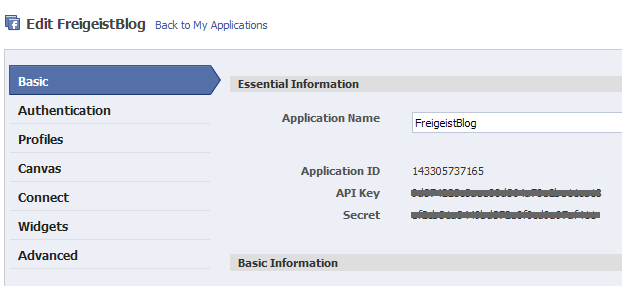
Once you have agreed to the terms of use, give your application a name. Then you will receive your API key and a secret, which you will need later.
Img1 in How To Integrate Facebook With WordPress
Settings for the Facebook application. Large view.

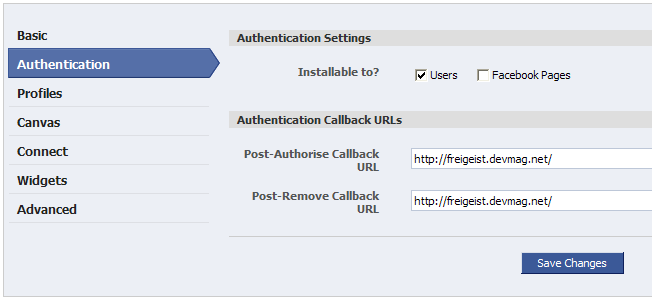
Then, you have to submit a so-called “post-authorize callback URL.” This is the address on your server to which Facebook will send a notice whenever a user authorizes access to the application. By the same logic, there is also the “post-remove callback URL,” which receives a notice when a user removes the application. Both of these events are handled by the Wordbook plug-in. You merely need to write the address of the blog’s root directory with a trailing slash.
Img2 in How To Integrate Facebook With WordPress
Facebook application settings: Define callback URLs. Large view.

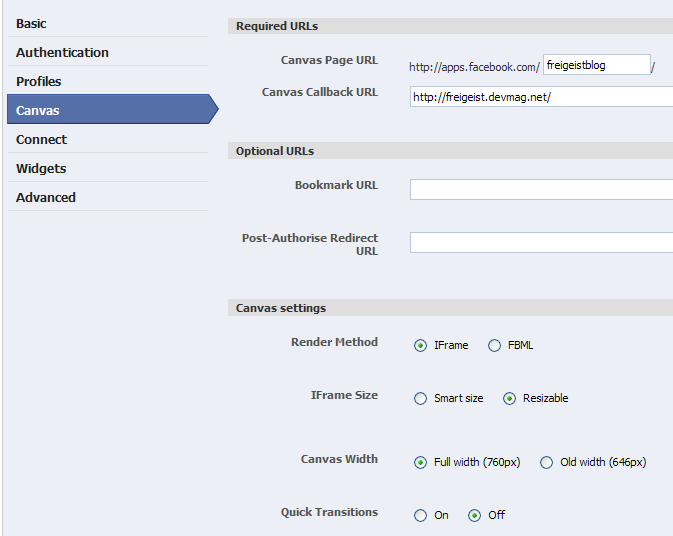
The third step is to claim your canvas page, which is the page through which a Facebook user accesses your blog, and a canvas callback URL, which is the page from which content is retrieved. Again, include a trailing slash, or else internal links on your blog won’t work with their Facebook twin.
Img3 in How To Integrate Facebook With WordPress
Facebook application settings: Define canvas page. Large view.

Now you have some choices to make, namely, how to set up your canvas page. You have a choice between iFrame and FBML. FBML is a Facebook XML scheme with which you can use specific Facebook tags (such as tags to display user profiles). You can also use it to access certain Facebook procedures. However, the Wordbook plug-in works with iFrames, which allow Javascript and other tags, and which FBML does not support.

To distinguish between them rather crudely, you can say that iFrames give the developer more flexibility but, unlike FBML, restrict access to Facebook procedures. Another advantage of iFrames is that code that Facebook retrieves from the canvas callback URL need not be parsed by the FBML parser, which could yield a performance gain. With iFrames, only internal links on the blog need to be adjusted. And the “resizeable” option allows Facebook’s JavaScript code to adjust the size of the iFrame to Facebook’s layout.

Now the hard work is done. All that’s left is to install the Wordbook plug-in using the standard WordPress method: install and activate. Then you can change the plug-in’s settings on the settings panel, and here you will need your application ID and the secret. You also have to tell the plug-in where the canvas page is located, so that internal links can be adjusted.
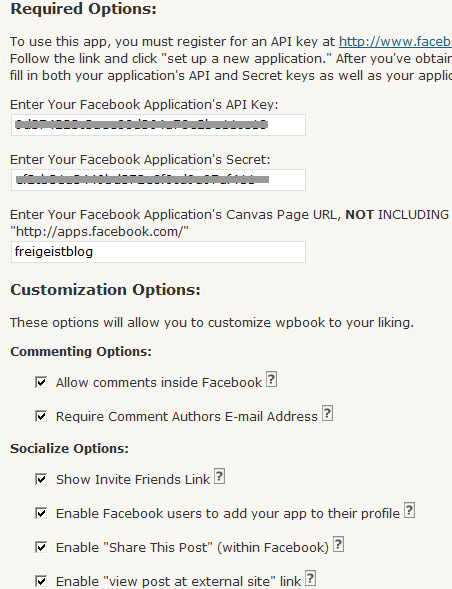
Wp-wordbook-settings1 in How To Integrate Facebook With WordPress
Adjusting the settings of the Wordbook plug-in

And that’s it! If you want, you could activate or deactivate some other options, such as the commenting function and whether users can add your application to their profile by displaying the latest posts from your blog in their profile.
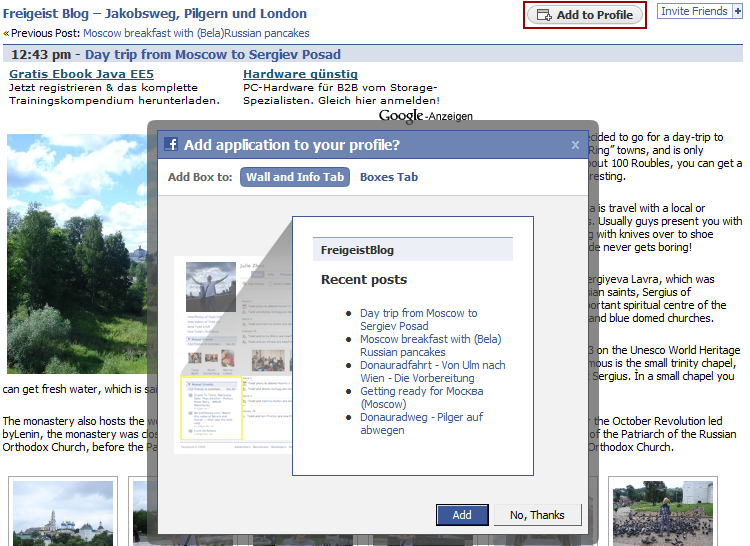
Img4 in How To Integrate Facebook With WordPress
Browsing through the blog via Facebook. Large view.

The plug-in allows you to play around a little bit. But as we said, you are somewhat limited in how fully you can integrate your blog into the Facebook canvas. But the next plug-in we’ll look at integrates a bit of Facebook into your blog.

2. Integrating Facebook In A WordPress Blog

To begin, a little history lesson is needed. Many users do not like having to register for each blog where they would like to post comments, especially if they already have accounts on so many other social networks, such as Facebook and MySpace. So a single online ID for several purposes would be ideal, wouldn’t it? That’s the idea behind the OpenID protocol, which started in 2005. It decentralizes the identification of users for various providers and services. In essence, you can create an account on Facebook and connect it to services such as MySpace or even a personal blog. If you want to change your profile for all of these services, that too is decentralized: you simply change the settings on your Facebook account. OpenID is a chance to make the Web and its services more easily accessible. There are reasonable risks and concerns involved, but also many opportunities.

Facebook announced in 2007 that it would implement OpenID, and others followed, which explains why we now find more and more buttons that say “Connect with Facebook” or “Google Friend Connect.” This leads us to our second plug-in, Facebook Connect WordPress plug-in, which almost seamlessly integrates Facebook into your blog.

The plug-in allows users to comment on a blog using their Facebook account; and if they are already signed in or on Facebook, they need not sign in again. Users do not have to register for a unique account on the blog because the plug-in retrieves the user’s information directly from the Facebook API. With access to the user profiles on Facebook, you can display your users’ profile pictures, which adds a personal touch to your blog.

The plug-in integrates a lot of Facebook functions: for example, users can send invitations and share stories and comments on Facebook, which gives your blog the benefit of word-of-mouth marketing. To do this, you need to activate the plug-in option that publishes a user’s activity in their respective activity feed. Last but not least, you can enable a gadget that displays the profile pictures of your blog’s most recent visitors, similar to “Google Friend Connect.”

Wp-facebook-sociable-example in How To Integrate Facebook With WordPress
Facebook Connect implemented on sociable.es (in Spanish)

This plug-in essentially does the opposite of Wordbook (which integrates Facebook functionality into your blog).

Plug-In Installation and Configuration

Again, as in the previous section, you will need to create a new Facebook application.
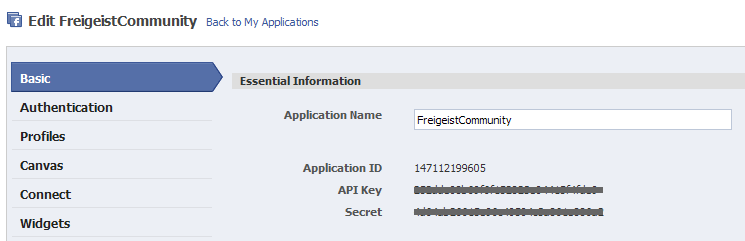
Wp-facebook-api-new-application in How To Integrate Facebook With WordPress
Creating a new Facebook application. Large view.

You will also have to define the callback URLs, which point to the root of your blog.
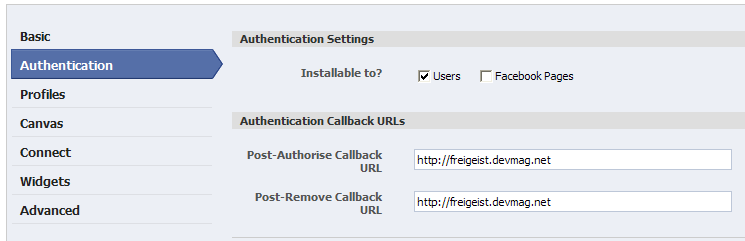
Wp-facebook-api-callback-url in How To Integrate Facebook With WordPress
Defining callback URLs for the new application. Large view.

Again, most of the work is now done, and you can soon start having fun and being creative. Just a few steps remain. First, download the plug-in from the website (see link above) and upload and enable it. A big part of the plug-in consists of the “Facebook Connect” library, which is provided by Facebook. You might stumble over the two xd_reciever files, one in HTML and one in PHP. They play a key role: enabling the so-called cross-domain communication (hence, the xd) between your blog and Facebook.

So why are these needed? Typically, HTTP requests are sent with the XMLHttpRequest object. However, the typical security settings on browsers allow XMLHttpRequest to send requests only to the domain where the original request was sent to. In our case, requests are send to and from Facebook. This cross-domain communication is achieved with iFrame cross-domain communication. With this, the application opens an iFrame on facebook.com with the relevant requests; for example, to retrieve information on whether a user is logged into Facebook.

These requests are sent to Facebook through the iFrame via the URL, with which the iFrame is opened. The request is checked, and now the Facebook script that was called via the iFrame opens an iFrame on the application page, where the outcome of the request is sent to, again with the query string of the URL. The result of any requests lands in the query string of the xd_receiver.htm file on your own server. This circumvents the problem of being unable to use XMLHttpRequest.

Now back to the plug-in. Once you have installed and activated the plug-in, you can add the plug-in as a widget to your blog’s sidebar. However, you first need to enter your API key and secret.
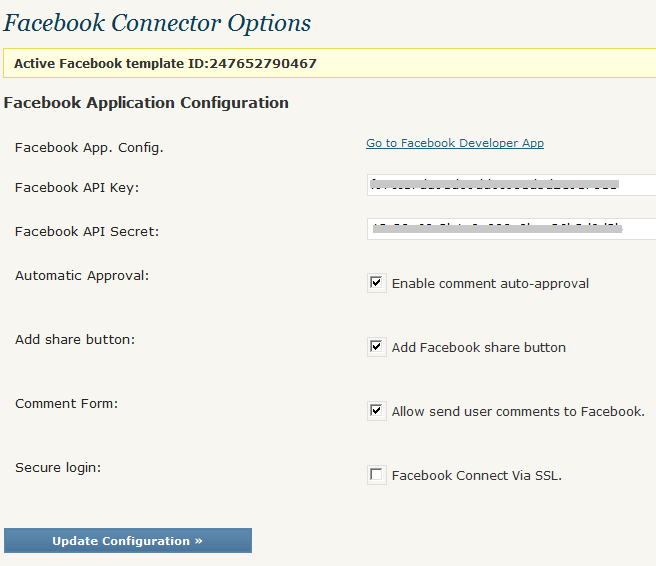
Wp-facebook-connect-settings-1 in How To Integrate Facebook With WordPress
Settings for Facebook Connect WordPress plug-in. Large view.

As you will see, a whole lot of options are enabled by default, such as automatically publishing comments if they are posted through a Facebook account (the rationale being that you don’t have to moderate them because they come from actual people using Facebook and not spambots).

If you activate the sharing function, the plug-in adds a “Share” button automatically below each post. You can also activate the option that publishes a user’s comments in their activity feed on Facebook, thus making their activity on your blog visible to their friends.

After you have adjusted the settings, you will be notified that you need to define templates for the presentation. These need to be “synchronized” with Facebook. Scroll down a bit to generate and activate these templates. You can change the language manually here as well.
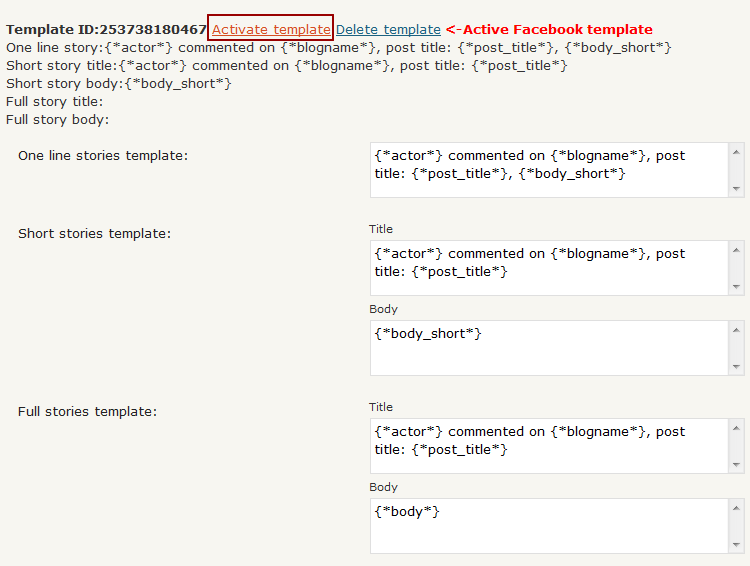
Wp-facebook-connect-settings-2 in How To Integrate Facebook With WordPress
Adjust Facebook Connect’s template settings. Large view.

The first template controls how a user’s activity is posted in their activity feed on Facebook. However, you can also include the activity feed of your users in your gadget, as done on sociable.es (see link above). The last step is to go to the widget set-up page and include the gadget as a widget in your sidebar.
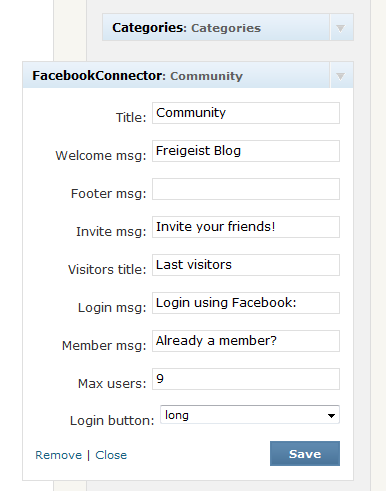
Wp-facebook-connect-settings-3 in How To Integrate Facebook With WordPress
Including the Facebook Connect widget in the sidebar

Here again, you have some choice over the configuration, especially with regard to changing the language, showing a big or small “Connect to Facebook” button, etc. After installing the plug-in, you may want to see what else you can do with it. The implementation on sociable.es is quite a nice one.

Further Resources

These two plug-ins are quite specific in what they do. However, a wide variety of Facebook plug-ins are available for platforms other WordPress. Here is a list, certainly not comprehensive:

  • Movable Type
    A plug-in by Six Apart for adding Facebook Connect to a Movable Type blog, allowing any Facebook user to sign in. It is still in beta.
  • WordPress-FacebookConnect
    This plug-in is quite similar to the one on sociable.es. It has the same features, such as single sign-on, publishing comments to news feeds and displaying profile pictures. However, it has not been updated since the beginning of the year. Still, there is a nice tutorial by the developer Adam Breckler.
  • WordPress Fotobook
    With this WordPress plug-in, you can import all of your photo albums from Facebook onto a WordPress page.
  • Drupal’s Facebook Connect module
    With this Drupal module, you can allow Facebook users to connect to your blog through their account. Similar to the plug-in by sociable.es.
  • Gigya WordPress plug-in
    This plug-in integrates not only Facebook but Twitter, MySpace and other OpenID providers into your blog for community building.
  • StatusPress
    This small plug-in displays your Facebook, Twitter or Last.fm status on your blog.
  • Quailpress
    Integrate Facebook-sharing functionality on your blog with this plug-in. However, it has not been actively developed for some time. And with the sociable.es plug-in, it is practically redundant.

(al)

Thiemo Fetzer is pursuing a PhD in Economics at the London School of Economics. He has been publishing articles on programming in PHP for more than 8 years in German print and online magazines such as Dr.Web, his own website Devmag.

Post Rating
1 Star2 Stars3 Stars4 Stars5 Stars (No votes yet)
Loading ... Loading ...

Tags: ,

Advertising
  1. 1
    Francesco
    September 14th, 2009 1:06 am

    nice and useful article ;-)

  2. 2
    Iva
    September 14th, 2009 1:17 am

    It’s all great, but I miss only one little thing: Cross-posting comments on Facebook notes to original post? I saw a plugin for that but it hasn’t been updated in ages, still looking for a solution. Some of my site’s viewers have an ugly habit of commenting the news only on Facebook.

  3. 3
    Chris Burton
    September 14th, 2009 1:25 am

    Nice… I am going to check this out in depth

  4. 4
    Cosmin
    September 14th, 2009 1:58 am

    Nice, but doesn’t this basically duplicate your content? How is SEO affected? Do search engines crawl these twin posts on Facebook?

    Cause if they do, then Facebook is regarded higher than your personal blog for sure – and this would be a problem…

    I would appreciate if someone can share thoughts on this :)

  5. 5
    robb luther
    September 14th, 2009 2:14 am

    As far as the duplicate content issue, the SEs should not crawl the FaceBook version because the content requires a user to be logged in to view the blog.

  6. 6
    ryan
    September 14th, 2009 2:26 am

    please tell me that if there’s an app called wordbook then there is also an app called facepress…

  7. 7
    Thiemo
    September 14th, 2009 2:46 am

    @ryan: good one!

    @Cosmin – i think robb is right, because the application needs to be added it is not visible to users who havent authorized access.

  8. 8
    Cosmin
    September 14th, 2009 2:51 am

    robb, Thiemo : thanks for the answers :)

  9. 9
    Quakeulf
    September 14th, 2009 3:13 am

    Why would I want to? Facebook is an attentionwhoring timesink like no other. >:[

  10. 10
    Chris
    September 14th, 2009 3:48 am

    I have being researching the option for Users to login using Facebook for a while, I came across Sociable.es, I had a few difficulities installing but I am going to give it ago again as you have given more info :)

    I think the option to have people signin into your blog via Facebook is one of the best options I have heard of (For spreading your site)

    I have a few sites where if people can log in via facebook, the site will be more accesible, people know how to use facebook, meaning they will know how to comment and use your website.

    Thanks for the great article :)

  11. 11
    Mas Dhani
    September 14th, 2009 3:55 am

    it is very useful

  12. 12
    steve
    September 14th, 2009 5:06 am

    great post, thanks for the info

  13. 13
    Amos Anon
    September 14th, 2009 5:13 am

    Have you investigated the details regarding the Zwinki advertisement? They install an annoying widget & I find it hard to believe that you endorse this site.

  14. 14
    Jason
    September 14th, 2009 5:19 am

    Hi Thiemo Fetzer very nice tutorial for a seo as i am really finding a way to integrate my word press blog with facebook . I hope your article will be sufficient for me to achieve my task . Thanks for sharing your knowledge.

  15. 15
    S
    September 14th, 2009 5:19 am

    I enjoy reading articles on this site, but pleeaassee stop posting about Wordpress again and again, it gets kinda annoying. I know there enough to say about Wordpress, but to me, it more and more looks like you’re just endorsing Wordpress..

    Just my 2 cents, but keep making those good articles about other subject ;-)

  16. 16
    David
    September 14th, 2009 5:22 am

    Is there a way to disallow WPbook/Facebook from cross-posting all comments so to have only articles fed into Facebook?

  17. 17
    Duy Dang
    September 14th, 2009 6:43 am

    Useful article. Thanks!

  18. 18
    Stijn
    September 14th, 2009 7:01 am

    I’ve been looking for a tutorial like this for quite some time. Thanks for the effort. I know a few clients who are going to be happy to see their blogs integrated.

  19. 19
    @stuartflatt on twitter
    September 14th, 2009 7:03 am

    You need to change your twitter networking button. Currently it just replies to @tweetmeme which means unless someone is following both you and them they will not see the post. I would add a RT or the reading first before the @.

    And that little tip my friends is free of charge ;)

  20. 20
    Brad
    September 14th, 2009 7:13 am

    Wow, great article. I’ve been manually dropping my blog posts into Facebook, this will be a huge help! Thanks for sharing.

  21. 21
    António Farinha
    September 14th, 2009 7:51 am

    Following these instructions I get this error on the Facebook application setting:

    Unable to update Installable to?

    Couldn’t find any documentation to decypher what causes this error or how to solve it…

  22. 22
    Thiemo
    September 14th, 2009 8:05 am

    @antonio: where exactly do you get this error? for the first plugin wordbook or the second plugin for the facebook connect?

  23. 23
    SEO by Just Say ON
    September 14th, 2009 8:25 am

    I’ll wait for the plugin. Too lazy.

  24. 24
    Deny Deyn
    September 14th, 2009 8:54 am

    nice info, but i don’t use WP
    i little bit confuse about this tut, hehe

  25. 25
    Ben Rama
    September 14th, 2009 8:55 am

    @Just Say ON lol i agree

  26. 26
    Kris
    September 14th, 2009 9:03 am

    Excellent article! Many thanks!

  27. 27
    Akhila
    September 14th, 2009 9:25 am

    great article!!

  28. 28
    Xavi Ivars
    September 14th, 2009 10:08 am

    Just a comment: you say Wordbook, but the plugin you really mean is called WPBook. With Wordbook you don’t need to create an application to publish into Facebook

  29. 29
    Dele
    September 14th, 2009 12:16 pm

    Awesome!! Simply Awesome.

  30. 30
    Yesenia Chappell
    September 14th, 2009 2:10 pm

    Great post!!! I was looking for this information for a long time.

    By any chance does anybody know how to integrate your Twitter profile with a Facebook page (not a personal profile)?

    I’m using now the Facebook application to update your Twitter profile everytime you update your Facebook page. However, I cannot find anything about the other way: update from a Twitter Profile to a Facebook Page.

    If anybody knows, please share. Thanks.

  31. 31
    NotAlame
    September 14th, 2009 2:34 pm

    Thanks ! Nice post.

  32. 32
    Netbook Reviews
    September 14th, 2009 4:08 pm

    Nice post. That’s exactly what i am looking for a while. Thanks. Although, i found entagrating Twitter(<a href="http://hubpages.com/hub/How-To-Add-Twiiter-Connect-To-Your-Blog"How To Connect Twitter To Wordpress) to wordpress, Facebook connection is also needed.

  33. 33
    yoxx
    September 14th, 2009 5:09 pm

    very nice tips eventhough facebook’ve been blocked in my office ;)

  34. 34
    Akmal Adnan
    September 14th, 2009 5:39 pm

    Thanks. Yummy one.

  35. 35
    Kuan
    September 14th, 2009 7:03 pm

    Yea, I simply need this one as a guide.

  36. 36
    Sardar Mohkim Khan
    September 14th, 2009 8:07 pm

    Great article ! Thanks for sharing!

  37. 37
    allen
    September 14th, 2009 8:46 pm

    i’m wondering if it works for both wordpress.com and wordpress.org

  38. 38
    Adam Hermsdorfer
    September 14th, 2009 8:59 pm

    Excellent tutorial! I’ve been using a fan a box on one of my sites but am looking to integrate more.

  39. 39
    Alpesh
    September 14th, 2009 9:39 pm

    Its time for facebook. I will def. try cheers

  40. 40
    Kaloyan
    September 14th, 2009 11:36 pm

    Hi, when i integrated facebook to my wordpress site, the plugin changed the “Submit” button style down im my comment form, and now it is different from all other buttons. Where can i find it and how can i change its style manually ?

  41. 41
    Javier Rincon
    September 15th, 2009 12:52 am

    Amazing article. I had done the second integration. Now its time to try the first step.

    Thank!

  42. 42
    Jesus Herman
    September 15th, 2009 3:12 am

    Thanks guys, this is exactly what I was looking for, a comprehensive set of resources. Thanks!

  43. 43
    Sinoun
    September 15th, 2009 6:54 am

    Yes, someone else mentioned it earlier, but there’s a huge error in the article: Wordbook is a plugin that is completely different from WPBook… in fact, Wordbook is what I currently use to publish my blog articles to my facebook newsfeeds, and it was developed by a different person altogether as far back as last year I believe. Please fix this mistake!

    Thanks

  44. 44
    Jared
    September 15th, 2009 1:31 pm

    I have an Error –

    Facebook is setting the article links like this – http://apps.facebook.com/144210336888/2009/09/01/disney-to-acquire-marvel-entertainment/ and they break.

    “The page you requested was not found”

    If I manually test a link in the browser like this: http://apps.facebook.com/freeden/2009/09/01/disney-to-acquire-marvel-entertainment/ it works.

    How do I set the app to use my name and not the ID??

  45. 45
    EJ
    September 15th, 2009 1:35 pm

    in order to ‘import’ my blog to facebook, I simly use the Facebook Notes app and point it to my blog’s RSS feed.Blog post then automatically appear into your lifestream too.

    seems much simpler to me and less fuzz with creating your applications, and the related annoying ‘allow this app…’ screens.

    hope this helps!

  46. 46
    Nashville web design guy
    September 15th, 2009 6:16 pm

    Great post. I just implemented this. I think it will be the next big thing on facebook!

  47. 47
    Innovationsraum Blog
    September 16th, 2009 12:45 am

    Great post! I had to implement it as fast as possible. But I still have some problemes. I installed everything but my posts from wordbook are not shown at my facebook app.
    How long can this take? Any ideas? Thanks for help.

  48. 48
    Ujjwol
    September 16th, 2009 3:23 am

    Everything works, but invite friend in facebook shows PHP error how to fix that???

  49. 49
    Thiemo Fetzer
    September 16th, 2009 7:11 am

    @InnovationsraumBlog
    It should appear there immediately. Are you sure you set the post-callback URL correctly? are you sure you choose iframe as method of rendering?
    @Ujjwool
    In which php file is the error reported to be in?

  50. 50
    Paul Olyslager
    September 16th, 2009 7:40 am

    Great article and nice to follow as well… has anyone have an idea about the advantages if you submit it through the Application Verification Program?

  51. 51
    sean
    September 16th, 2009 9:19 am

    Wonderful Article. I digged your story

  52. 52
    Matt
    September 16th, 2009 11:41 am

    once a new post is published, should it display a notification on the people who are subscribed to the facebook blog… if so, how long after it has been published…. if not, how can we make it so it does?

  53. 53
    malcom
    September 16th, 2009 1:31 pm

    brilliant article :)

  54. 54
    John Eckman
    September 16th, 2009 3:56 pm

    Thanks for the mention – I’m the developer of the WPBook plugin you describe in #1 above.

    To answer a few questions:

    1. Yes, comments from facebook will appear on your blog outside facebook and vice versa

    2. No, the plugin will not work for wordpress.com hosted blogs – only self-hosted wordpress.org ones

    Some other folks have contacted me directly through the contact form on my blog – you can also check the support forum at WordPress for the plugin.

  55. 55
    Chris
    September 17th, 2009 5:06 am

    Has anyone actually intergrated the Socalise.es plugin??

    Would love to see some examples :)

    Just read something about ‘Zwinki advertisement’ being embeded in with the plugin though?

    Is this true?

    Cheers
    Chris

  56. 56
    Cara
    September 17th, 2009 7:36 am

    Is there a way to add this to a Facebook Page not a profile. I am the admin for my company’s facebook page but I won’t let me add it to the our page and not my profile. I tried changing the settings of the application but that didn’t work.

    Any thoughts appreciated. Thanks

  57. 57
    Redstage Magento
    September 17th, 2009 1:10 pm

    Informative article. This will be very useful to me in the future. Thanks!

  58. 58
    Tore Rex
    September 17th, 2009 5:48 pm

    thanks for sharing, great stuff ! I’ve been looking for this.

    I do have one concern about making this app for any blog. As you post to Facebook you’ll give up the intellectual property rights!

    I’m a big fan of sharing stuff the Creative Commons way, but I guess you should be careful with giving away your personal work, ideas or thoughts for commercial use? Dosen’t this break with the way blogs should work, Creative Commons style? Any comments on this subject?

    A quick reminder from Facebook:

    1. For content that is covered by intellectual property rights, like photos and videos (”IP content”), you specifically give us the following permission, subject to your privacy and application settings: you grant us a non-exclusive, transferable, sub-licensable, royalty-free, worldwide license to use any IP content that you post on or in connection with Facebook (”IP License”). “

  59. 59
    DArryl
    September 17th, 2009 10:23 pm

    Perfect. Just what I needed.

  60. 60
    Sandra Vanhooser
    September 18th, 2009 9:26 am

    Great post! Very helpful information.

  61. 61
    Nick Schmidt
    September 18th, 2009 8:49 pm

    Why is it when someone comments the blog post within Facebook that the commenter is known as anonymous for on both Facebook & Wordpress?

    Facebook knows the person who is commenting because they are logged in. The comment management function of wordpress has the URL of the facebook profile and the name, but only displays “anonymous”?

    Facebook doesn’t ask for a name… It should ask or pick up from their profile..

    Is there a way to fix it?

  62. 62
    Mauro
    September 19th, 2009 11:53 pm

    Okay thanks for the info. Starting new entries ;D

  63. 63
    siMukti
    September 20th, 2009 8:31 pm

    wow… this article is great.. thanks for share…

  64. 64
    Ethan
    September 21st, 2009 3:41 pm

    Is there anyway to force a visitor to log in with Facebook before they can comment?

  65. 65
    hotxac
    September 21st, 2009 11:35 pm

    Hi great web

  66. 66
    billy
    September 22nd, 2009 12:18 am

    just what i neeed

  67. 67
    billy
    September 22nd, 2009 12:19 am

    diocan

  68. 68
    Tuviere
    September 23rd, 2009 3:42 pm

    I understand the concept of increasing views on post but am confused with the whole concept as am very new to facebook and the concept of apps.
    So here we go?

    1. I see from the thumbnail of the app that only the titles of the articles show, or is it customizable so it shows summaries too? And when a user clicks on the title does where does the post show? in facebook or back to my site?

    2. Is it possible to add adsense to the plugin to make money if not how does one make money with apps?

    3. is there any way to customize the app theme?

  69. 69
    Chris
    September 27th, 2009 2:43 am

    Has anyone tried the FacePress plugin instead? It appears to be able to post to Fan Pages, and it looks like it gives you a choice to post to FB on a post by post basis, when you publish a new post. Both are features that I need, and have kept me from using Wordbook, but there’s a lot less info about FacePress.

  70. 70
    K
    September 27th, 2009 6:42 am

    Thanks for the tips! I’ve almost completed integrating Facebook Connect in my WordPress blog. However, I’m stuck on one thing.

    “Once you have installed and activated the plug-in, you can add the plug-in as a widget to your blog’s sidebar.” How do I do that? My API key and secret number are entered and working. Since I don’t know how to add it as a widget, is that why I cannot locate the Facebook Connector Options? Thanks!

  71. 71
    Jordan
    September 30th, 2009 2:38 pm

    Great post. Thanks! One question: when creating the canvas page URL, I’m told I have a 20 character limit. Unfortunately my URL is 24 characters. Is there a way around this, or am I hosed?

  72. 72
    Tim M
    October 1st, 2009 6:41 pm

    This was handy, thanks.

    I went and wacked together a how-to guide (40 pages), which you can download (for free of course) from http://projectheresy.com/featured/beginners-guide-to-integrating-facebook-and-wordpress/

  73. 73
    KKP
    October 8th, 2009 7:45 pm

    Really useful & handy guide, thanks!

  74. 74
    James
    October 9th, 2009 7:44 pm

    This may sound like a stupid question, but I’m stumped. I’ve gone about setting up the application and installing wpbook on my wordpress blog. But how the heck do I actually install the app on my facebook page?

    thanks!

    - j

  75. 75
    Neo
    October 16th, 2009 4:14 pm

    Just what i needed.
    Best of this Web – Blog Spot

  76. 76
    Fahim Murshed
    October 17th, 2009 11:32 pm

    great post. Thanks Thiemo Fetzer and SMASH in MAGAZINE :)

  77. 77
    Tim M
    October 20th, 2009 1:53 pm

    @ James (October 9th, 2009, 7:44 pm)
    James, you need to use Networked Blogs App.
    Do yourself a favour and download the (free) pdf guide with step by step screenshots for Facebook Connect, WP Book and getting the blog into FB (as well as creating an app to grab the feed) at http://projectheresy.com/featured/beginners-guide-to-integrating-facebook-and-wordpress/

    Tim

  78. 78
    Tim M
    October 20th, 2009 1:55 pm

    @ Jordan (September 30th, 2009, 2:38 pm)
    You’re hosed, cut it down, but keep it meaningful (such that it would still draw organic search)

    Ex: I needed /cyclinginmelbourne, but had to cut it down to /cyclinginmelb

  79. 79
    Dan C
    October 24th, 2009 12:45 pm

    Hi there,

    I created the wpbook app (open-culture) and it is pulling content from my site (www.openculture.com). I also then linked the app with my facebook page (www.facebook.com/openculture), but the app is not bringing any new content to the page. Any thoughts on what might be the problem? Many thanks,

    Dan

  80. 80
    Tutorial Lounge
    November 3rd, 2009 3:22 am

    i must try to integrate myself with facebook, this is helping for get traffic as well.

  81. 81
    Hans
    November 8th, 2009 10:39 pm

    so nice, I want to try this in a short time. Maybe with this app, many friends in my blog to be friends in facebook too…
    beD_Boy

  82. 82
    myspace 2.0 layouts
    November 19th, 2009 9:59 pm

    Very fantastic information. I think im gonna stick around and read about 3 of your posts. Later alligator

  1. 00

    There are no trackbacks at this time. If you are interested in leaving a trackback, please use this URL.

Leave a Comment

Make sure you enter the * required information where indicated. Please also rate the article as it will help us decide future content and posts. Comments are moderated – and rel="nofollow" is in use. Please no link dropping, no keywords or domains as names; do not spam, and do not advertise!


Advertisement Advertise with us!
Join in Smashing Forum
Post your job