Smashing Magazine - we smash you with the information that will make your life easier. really.
Louis Lazaris is freelance web developer of Greek descent, based in Toronto, Canada. He runs Impressive Webs, and the newly-launched Interviews by Design that houses interviews with talented designers. You can follow Louis on Twitter or contact him through his website.
- 134 Comments
- 1
- 2
January 11th, 2010 1:51 amVery glad you had the exception to the rules at the end there ;)
Just to reiterate, left hand nav’s shouldn’t be avoided – when used correctly they can make for a great top nav!
People shouldn’t automatically assume top-level horizontal nav just because of trends or because it’s what they’re used to. Obviously needs to work with content on a per-site basis.
- 3
January 11th, 2010 1:54 amAwesome points made, exceptions to the rule always welcome for a objective post, well done! Nice to see From The Couch in the effective usage list, nice work guys!
- 4
January 11th, 2010 1:56 amI don’t do horizontal scrolling because my mouse wheel isn’t horizontal.
Tbh it’s a gimmick.
- 5
January 11th, 2010 2:02 amI think the effective use examples really highlight that the main problem is the number of links and the separation – often vertical menus feature more options than a horizontal one and these can become a monotonous set of links. There are too many vertical menus that stick a site map on every screen, where the space limitations of horizontal menus force you to consider where the user will want to go above all else and order that logically.
- 6
January 11th, 2010 2:08 amI think these vertical menus are great for sites that don’t have too many links. The reason why I don’t like them too much is because often, clients would want to fill those out with more pages, while on a horizontal navigation, you are limited on the amount of menu items you can put so you tend to think about it more carefully.
- 7
January 11th, 2010 2:08 am@ James
Have you read the article???? It has nothing to do with scrolling
Muppet
Why do people post comments like that when they clearly have no idea what they are talking about….
Interesting article, I might forward it to some of the hopeless print designers I have to work for who can’t escape from the A4 sheet of paper thinking patten and just cant grasp navigation and site structure relationship.
- 8
January 11th, 2010 2:17 amAs an engineer, the Thora website seems perfectly clear to me. It says right there in the text that they are a supplier, and one column displaying their product categories is about as useful to me as it could be. If there was a large number of categories, it would get confusing, but with a restricted product line it’s fine.
You’re doing yourself a disfavour by using it as an example of poor design, especially as it was one of your first jobs.
- 9
January 11th, 2010 5:10 amI agree with Louis here.
Someone coming to the site without knowing what they are looking for would be lost without having to read that paragraph. If your links can describe some of the services offered it does make it easier and less time consuming – you could effectively determine quickly whether you have arrived at the right ‘Thora’ website for example.
On more than one occasion I have found myself thinking i was at the right place until three pages later I realize it’s a completely different line of business.
- 10
January 13th, 2010 8:40 pmI’m going to agree with Paul. It is not necessarily good design practice to cater for the widest possible audience.
In this case, if you don’t understand what a ‘wet process system’ is, then burying the link under a products and services page is not going to help your understanding. The business is not targeting mass-market consumers and catering for them instead of the target market could equally be described as bad design.
For mine, the main design features of the primary navigation area are – it needs to be immediately visible and it should not have too many items (admittedly the Thora page borders on too many). Vertical or Horizontal for me is a matter of visual aesthetics.
- 10
- 9
- 11
January 11th, 2010 2:33 amI agree with this article however one point isn’t imho correct.
‘It doesn’t conform to real life reading’
True and urm…nah.
True in that we normally read left to right but that is for content only
False in that since books have been printed (some little time), indexes and tables of contents have been vertical.
- 12
January 11th, 2010 2:36 amThank you Louis for a very good article.
- 13
January 11th, 2010 2:37 amThe comments in the ‘It Doesn’t Conform to Real-Life Reading’ section were interesting however neglected to acknowledge Content pages in books and magazines. There is a clear parallel between vertical navigation and content pages as both are structured similarly and used as reference to find the piece of information required further on the book/website.
- 14
January 11th, 2010 11:40 amThat’s a really good point. It makes me wonder how many other arguments can be made for vertical menus.
- 14
- 15
January 11th, 2010 2:47 amEverything nice but…
unfortunatly I allmost allways use a vertical menu. I work in company where is no any process like “Careful Content Analysis” :/ in most cases there is no any content… it appears after designing process and all I get from client is a list of links (just like it was 10 years ago).
so I am forced to use vertical menu :/
oh. and sorry about complaining :)
- 16
January 11th, 2010 2:49 amalmost perfect:
what happens if you have got an horizontal navigation that need to be translated in 17 languages and you can’t predict the length of each menu item?
The temptation of going vertical is strong.Nice article though, especially the eye track resource and the example of left nav that works!.
Well done.- 17
January 11th, 2010 3:48 amGood point! Thanks, that’s actually a very good exception to the rule.
- 17
- 18
January 11th, 2010 3:18 amhow odd. you argue valid points against the use of vertical navigation and then show the ‘from the couch’ site which exemplifies and illustrate these exact points – but then included it in the ‘effective use’ category.
- 19
January 11th, 2010 3:19 amnice post
thanks - 20
January 11th, 2010 3:21 amI agree that the horizontal menu system in your top example looks dated, for sure – it might have looked dated if it sat at the top of the page also! But there is no reason why this particular menu layout can not be intergrated in to any site design. For sure, put the menu neatly at the top of the screen out of the way to save of space for visual content, but this doens’t always have to be the case. Site design should be more dynamic and free, especailly with today technology. Great debate, topic and nicely supported. Carl.
- 21
January 11th, 2010 3:57 aminteresting arguments! building vertical navigation is easier, but i prefer the rigidity of horizontal navigation because it’s an easy way to keep designers and editors in check! sometimes vertical navigation gets too long, but when planned right it can look good.
- 22
January 11th, 2010 3:59 amMy biggest worry for creating websites with top navigation only is the filling of content using a CMS. Most of our users want to edit their websites theirselves. In an ideal world, we could create either 1, 2 or 3 columns. But most CMS vendors only support one. This makes it hard to layout the dynamic text without it being 900+ px wide.
- 23
January 20th, 2010 1:39 pmthis job would be great if it wasn’t for the damn customers…
- 23
- 24
January 11th, 2010 4:26 amOther than the eye-tracking studies mentioned in the article, there’s limited evidence to back up your argument – it seems based more or less entirely on opinion. Why can’t left hand navigation be used based on sound IA? I think the answer to why horizontal nav is more prevalent these days is the bias towards fixed-width designs, ergo it’s a trend.
- 25
January 11th, 2010 4:50 amI think a vertical left hand navigation does conform to real-world reading. You can think of the navigation as a “table of contents” of the site; and in the real-world, ToC’s are typically arranged in a vertical fashion because it’s easier to show the parent-child hierarchy of pages/sub-pages.
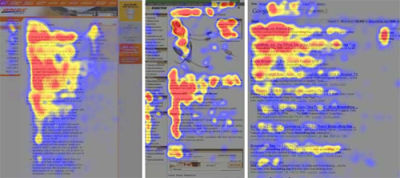
Also: to base a rule using a 4-year-old eye-tracking study that doesn’t cover navigation usability but rather, content reading, as supporting evidence is dangerous – even if it was done by the Jakob Neilsen. Why is that?
First, the study tasks the readers to read the page content; the study was not about site navigation – so the use of it in this article’s context is misrepresented. If the study asked readers to “Find the About page of this website”, the results for the first screen shot would be different because, as web users, you’re going to look for the area that most resembles the primary navigation (which typically looks like a list of links).
Second, usability studies are very subjective and dependent on the study design. They’re behavioral studies so it’s hard to set up a control versus test case scenario, like you’d do in a science lab or computer simulation. The results depend on the five people that just happened to volunteer for the study. Are those five people representative of the global 1.7 billion’ish internet users?
Third, it’s hard to come with conclusive evidence from usability studies; the best we can do is guess using our experiences; not unlike, in my opinion, what this article has done. The Myth of Usability Testing on ALA discusses this where several usability teams were tasked to work on the same issue and the results and suggestions were very different from each other: http://www.alistapart.com/articles/the-myth-of-usability-testing/
It’s a well-written and well-articulated article – but I feel it should’ve given more emphasis on the fact that this is an opinion-based article. I can make 20 arguments FOR vertical site navigation, and call that a “rule”. They’ll mostly be my opinion based on my experience. For example, I personally like the list of links on Smashing Magazine’s right sidebar to find content versus the top horizontal nav. That’s my preference, that’s my opinion. In the end, it depends on project requirements and what the most effective way of presenting content is (and I think that’s what Jeffrey Zeldman meant about that tweet).
- 26
January 11th, 2010 5:22 amJacob, great points here, thanks for your feedback. Couple of responses to what you said:
You’re right that tables of contents in print are vertical, but they’re customarily on their own page. Websites are not like that, so I don’t agree with your point on that. I think my argument in that regard is sound.
And regarding the “studies”, there were two studies that I mentioned. The first one specifically says that horizontal navigation performed better. And the reason I mentioned the Neilsen study was to emphasize the “F-pattern”, not necessarily to say that the study was about navigation. I think it’s fairly common knowledge now that such a pattern in users’ habits exists, and it’s definitely better to keep “common” site components out of the most important areas.
You also mention that we should “guess using our experiences” instead of relying on studies, but I think that is just wrong. I can’t agree with that. A 4-year old study is much more authoritative than what I can personally “guess” at.
And of course, as you mentioned, all of this is my opinion. I hope people start to understand that there’s nothing wrong with formulating an opinion on design that is not necessarily held by the blog that publishes the opinion. I’d love to hear yours or anyone else’s opinions in this regard. I suppose SM could post a notification on these types of articles, to show that it’s an opinion piece, but I don’t think that’s necessary. The comments to the article will certainly make that clear, as you’ve done here. :)
Thanks, Jacob!
- 27
January 11th, 2010 6:39 amLouis,
Your print design analogy is problematic. Obviously print design and web design are two different things – I think that’s lesson #1 in web design class.
In order to claim that your argument is sound regarding tables of contents, you would have to agree that a design that only allows you to page forward and backward through content with a link to a table of contents is an appropriate and effective navigation method based on reasonable web information architecture for all sites.
I generally assume that navigation (regardless of position and layout) is an inherent part of a website, which itself is a break from print design.
Additionally, your example of the LTR nature of print design happens to be a good vertical reading example – Cookbooks list ingredients vertically, and it would be weird if their lists were horizontal. In fact, lists tend to be vertical by nature. And what’s (as semantically illustrated by the markup) more of a list than site navigation?
You can’t have your cake and eat it too by mentioning the F-pattern of the eyetracking studies, then presenting images that show that the f pattern starts to the right of the left-hand vertical nav bar. Which is it? Is left-hand vertical navigation less viewed, or is it taking up screen real estate where users’ eyes naturally go? Maybe it’s just me, but that appears contradictory. Are you throwing the proverbial spaghetti at the wall?
- 28
January 11th, 2010 7:11 amJacob is right, this is entirely your opinion- and that’s ok. But several statements you made were positioned as fact, when instead, they’re your opinion. Smashing Mag needs to vet this sort of misrepresentation in the editorial process before publishing. If you have data to back up your claims (which you do a couple of times, so kudos for that), cite your sources. Otherwise, these need to be clearly presented as opinion.
‘In general, people are accustomed to reading content that spans the entire width of the reading area’
‘the vertical navigation bar is an unusual and unique element in web design that doesn’t conform to anything in the real world’.
- 29
January 11th, 2010 8:06 am@Brad:
The first study was demonstrating that there is at least one study showing higher success with horizontal navigation.
The second study (about the F-pattern) was showing the value of the left side of the screen. Thus, the point is: If horizontal is more successful and the left-side is more valuable, then the answer is clear: Use horizontal.
I know that point seemed contradictory. I spent a lot of time thinking about that to make sure I communicated my point clearly, but maybe it could have been clearer, I don’t know.
Anyways, thanks for your feedback.
- 30
January 11th, 2010 8:47 amre: Print analogy versus web design – You cited my main issue with that section right here – print != website. If I were to make an argument for or against vertical navs, I’d leave out the print analogy all together because it’s apples versus oranges in this context. BUT, if you insist on making the analogy, then I think the better analogy would be more similar to a Table of Contents. Remember – you brought up the analogy in the post, not me.
re: two studies – I know, and to clarify, what I meant was “as one of the supporting evidence” which would’ve disambiguated what I said. I did read the first study, and again, personally I believe the “The Myth of Usability Testing” on ALA applies there (especially when the site the study was on uses vertical navigation, at least, as a secondary nav).
re: F-shaped pattern – but the F-shaped pattern, if the study was designed specifically for evaluating site nav instead of site content (e.g. Task: “read the list of navigation links and find the About page link”), would also appear on the vertical nav if the list of links had headings (similar in structure to From the Couch).
As users scan the vertical list of links, you’d see an F-shaped pattern that’s more dominant on the left-hand navigation of that screen shot. So in that respect, the F-shaped pattern doesn’t exclude the vertical nav if the context was “evaluate the site navigation” instead of “read the content”. But the argument above seems to imply that because of the F-shaped pattern, a vertical navigation is ineffective, when in fact, it is also applicable to it and would actually support a hierarchical vertical navigation under the correct context.
re: 4-year study more authoritative: yes, if it was applied in the correct context, definitely. Otherwise, my guess based on experience and other studies on the subject would be as good, if not better. And I have not stated nor implied that guessing is better than usability study results; only that, in the end, you’ve got to evaluate your choice on a case-by-case project basis.
And I must say that despite what I’ve said, this is one of my favorite articles here and hope that Smashing Magazine continues to go towards more of these opinion-based articles that foster discussions like the one we’re having now.
This is one of the few times I’ve been compelled to comment here. This is one of the few times that I’ve come back to an article on the same day to see how the discussion in the comments is progressing (other than the articles I write on Smashing Magazine, of course, which I tend to check neurotically).
Whether I agree or not with the content is moot because it’s an opinion. You have an opinion. And I have an opinion. It’s better to have these types of posts because it gives you a reason to critically think, explore, and react to the topic more fully than articles that simply tell you what you already know or can find on Wikipedia.
On Six Revisions, I’ve been trying to get more of these types of opinion/experiential “blog” posts that facilitate constructive discussions among the readers instead of being only informational. This transition has been happening more recently, but I’m not satisfied with the ratio of informational versus opinion/experience posts on the site yet. This post, more than anything, has inspired me to progress further in this new direction.
I commend your resolution to your argument; it’s much easier to play it safe than to provoke thinking, discussions, and counter-arguments like this post has. Well done.
- 27
- 26
- 31
January 11th, 2010 5:00 amWhat I have found is that a horizontal over time can become just as bloated as vertical. I think we as professionals needs to start looking at navigation in a different way then the norm. I’m actually working on a similar article which looks at new navigational patterns outside our traditional “accepted” forms of navigation.
I’ve even seen entire sites where navigation and wayfinding were thrown to the curb in favor of a google search appliance…
Regardless this debate has been on going for years.
- 32
January 11th, 2010 5:11 am@Lee
If you have a long menu and make it horizontal, you have two options:
-make the page wider and force horizontal scrolling (what James refers to)
or
-let the menu wrap.Not every site can have some simplistic 5-item menu.
Not every site is only written in a single language. James totally has a point about horizontal scrolling because whenever you make a horizontal menu you must consider it, unless your menu is very very short.
- 33
January 11th, 2010 5:31 amI think it’s all about organisation. (I know this is hard to accomplish, sometimes almost impossible).
Everything has a parent hierarchy but the parent itself right? If you can work out a way to drill down through this information then why not have only 3 links?
Of course, the difficult part is presenting this extra information whilst keeping your page accessible. Now thats the hard part!
- 34
January 13th, 2010 4:32 amThats not what he means at all
He never mentions long menus, hes misread the title and not read the article
You seem to have not read his comment
- 33
- 35
January 11th, 2010 5:15 amGet real. This is ignorant, opinionated nonsense. You should know better.
- 36
January 11th, 2010 5:25 amWow, another constructive comment!
Great Article Louis, I think different opinions are great.
- 36
- 37
January 11th, 2010 5:47 amseems to me that if you have a decent design it really does not matter if navigation is horizontal or vertical. we read plenty of things vertically, we get it. it is not like you are asking the user to read backwards. i think that if a site is designed well either way can work.
- 38
January 11th, 2010 6:02 amAn insightful post. I’ve avoided using left-hand vertical navigation for a long time now, simply because I never thought it to be user-friendly at all. Glad to see I’m not alone in this viewpoint.
I’d also like to comment on something that it seems most people who think that, when it comes to navigation on a web site, that one should use print magazines, etc. as good examples for ‘why left hand navigation is OK’.
One point – yes, we read left to right … but! Most of us are right-handed and reading a web page is not the same as picking up a paper magazine or book.
When we read web pages we also use one of our hands, not just our eyes. For most of us, that is our right hand to navigate the page.
Placing navigation on the left-hand side of web pages forces the majority of users to travel their mouse over to the far-left of the page to navigate the site. Hey, this was OK when we did not have large screen resolutions (way back in the ‘olden days’).
Nowadays users are on resolutions larger than 800×600 and 1024×768 and left-hand vertical navigation, imho, is simply user-UNfriendly in such cases, i.e. making the user do an uncomfortable swing to the left to navigate through a site, with every link *sigh*.
Think about it, try it for yourself and see if you’re comfortable doing that, especially on a large site.
On another note, regarding the exceptions to the rules part of the post:
Recently I’ve had occasion to use a vertical navigation system for a client’s site, and the reason was for one of the exceptions you listed at the end of your article: The primary links have, by necessity, long titles, and try as I might, I could not shorten these suitably to fit on a horizontal navigation bar.
I fixed the problem by creating a right-hand navigation system that adequately accommodated the link titles. It does a good job of being user-friendly + the navigation doesn’t look like a big foot stuffed into a too-small shoe just for the sake of using horizontal navigation.
To solve problems one has to think outside the box, and be flexible, this is true for any situation, not just web design. The current ‘trends’ are not always the best solutions in every scenario, so I’m glad to see you mentioning the ‘exceptions to the rule’ – there are always exceptions.
- 39
January 11th, 2010 6:06 amThe problem is wide screen monitors are stupid. I flip mine sideways.
- 40
January 11th, 2010 6:12 ami’m looking forward seeing an article with principles of good undersites in navigation. beside that, great article!
- 41
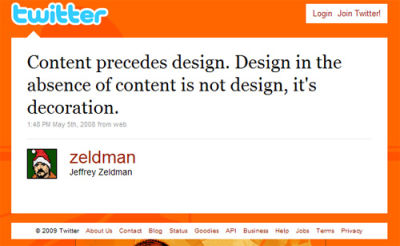
January 11th, 2010 6:23 amZeldman said it best: “Content Precedes Design”?
No he didn’t.
Louis Sullivan put it better: “Form follows function”.
But I’m just being contrarian. Nice article. - 42
January 11th, 2010 6:24 amHey Louis – You really picked a good topic for this post.
@MvA
In a scenario where the site design should have horizontal structure but the links are more then it can be accommodated, UX experts jump into the picture as a relief for designers. It’s important to analyze which are the important links that need to be placed on top while others can be pushed down at the footer. Now days we are seeing a lot of site with links like – ‘About’ and ‘Contact’ moving down at the footer while purposeful links are kept as primary nav at top. This avoids:
1) the trap of wrapping primary navigation into two lines
2) in case a link in primary navigation has a drop down, when it falls the second row of primary navigation would hide.Hope it helps:-)
- 43
January 11th, 2010 6:25 amGreat insight. Made me wonder why I never used a main vertical navigation anymore.
- 44
January 11th, 2010 6:36 amBit of an odd article. As Jacob states, to use the Nielsen study to back up a point about vertical nav is misrepresentative in the extreme. If you look at the pictures you’ll see that the top bar of the ‘F’ is formed by users scanning the first line of content and reaching for the search box.
The only navigational conclusion you might draw is that users ignore nav bars altogether…
I think horizontal nav can be useful in that it does deter designers from making their top level menu too long, and it makes you think of shorter, more scannable labels. It has also become the convention.
- 45
January 11th, 2010 6:37 amOh, I think I’ve found the secret recipe for those exceptional vertical navigation bar.
If you see among the examples, you’ll notice that most of them are placed on top menu area. Main content are placed under the vertical navigation menu.
It’s now become logical. As the vertical navigation menu no longer consume too much of our attention, it becomes acceptable!
- 46
January 11th, 2010 6:39 amI was pondering a while about this before finally finding I wanted to share in my comment. And I’ve to say Zeldman’s phrase said it all.
Based on the examples here, it’s not really about which is better; vertical or horizontal. It should be really about which best fits the presentation of the content to fulfill the user experience.
Monitors may be wider, but user’s attention span and focus would tire easily when eyes have to track too far a width. Therefore, we’ll soon reach a maximum width which we’d feel most comfortable and not make websites any wider.
And because we can’t go wider, content can only go downwards. Thus, it’s not about whether it’s horizontal or vertical but how should the content be best presented to the user. :)
- 47
January 11th, 2010 6:42 amVery interesting article.
I believe that vertical navigation does have it’s place within web design however it is up to the judgment of the designer as to if it fits in. Blogs and e-commerce stores almost always have vertical navigation. A question I have is, why do blogs most commonly have a vertical navigation on the right hand side of the screen and e-commerce stores most commonly have a vertical navigation on the left hand side of the screen? Maybe its a standard users have come to expect by now, but why?
Thanks for the good read Louis!
- 48
January 11th, 2010 6:46 amNice to see a Slovenian site on the front page of Smashing Magazine! :)
- 49
January 11th, 2010 6:48 amSo, you show an ugly webstie saying the reason why its bad is because of the type of navigation. Then you show more peer-friendly sites that use left navigation and say that its an exception.
Your exception list seemed to indicate that your thesis shouldn’t be to NOT use left navigation, rather HOW to use it and expand more on those rules based on the more successful sites.
I give this article an A, for almost ;)
- 50
January 11th, 2010 6:52 amNice article, and an interesting topic of debate. It would be even better, though, if you gave reasons as to how each of those examples at the end use vertical navigation in “a respectable way”. I’d also challenge the statement that “Readers Aren’t Used to a Left-Side Menu”. Not in the real-world, sure, but they certainly are on the web, since it’s an element used on a huge number (if not the majority) of websites.
- 51
January 11th, 2010 6:53 amThose eye-tracking studies are worthless in this context, as you’re not testing two versions of the same site against each other. As someone pointed out, the aim of that study was for the user to read the content, not find information on the site.
Get back to me when you do a real world A/B test.
- 52
January 11th, 2010 7:10 amso cool ! nice work !!
- 53
January 11th, 2010 7:12 amWith so many widescreen monitors and netbooks available on the market, an extra wide letter box shaped browser window seems very common nowadays (according to stats for sites I have access to).
In this scenario, a vertical navigation works well as it regains more visible vertical space for browser content, using some of that extra width that is otherwise difficult to fill with content.
I don’t think there is a definitive way to go with horizontal or vertical navigation. Think about the content and audience first. Then you can make an informed decision about wether a horizontal or vertical navigation is more suitable for a specific web site.
- 54
January 11th, 2010 7:23 amWhether to use vertical or horizontal navigation depends on the purpose of the site. Most “designer” sites like big bold graphics to grab the reader’s attention (”focus on content”) and it makes sense for the navigation to stay out of the way at the top of the screen. But, Louis, most applications (as in computer applications that are increasingly migrating to the Web) do better with a consistent vertical navigation. Just my 2 cents. Great article!
- 55
January 11th, 2010 7:24 amOne small example, feedback as a user and not some expert: when i am tired, using the mouse and keyboard continuously for the whole day, i really wish every horizontal navigation bar i come across could be stacked vertically – i don’t care it its on the left or the right hand side of the page. It’s way too easier to navigate down on a wide column that to navigate sideways on a narrow strip!
FWIW, it only matters when i am dead tired. As far as accessibility is concerned, i think the same markup can be stacked up vertically or arranged horizontally using pure css – so that’s not even an issue!
[quote]
“sites built in that manner will often lack depth and fail to make their purpose clear”
[/quote]This, with reference to vertical navigation, is going overboard with your claims – totally baseless.
The fuss made about “the fold” is a classic example of all the hype in the name of usability from stables that consider the user to be a complete mindless drone. Users adapt. Just give them what they want, available *where they expect it to be* – some sensible information.
- 56
January 11th, 2010 7:31 amThe little list of exceptions at the bottom is very important. On an information heavy site, top navigation can be painful, and just requires most clicks from users which UX experts agree is a bad thing.
For a real world example, my company’s site (a publisher) gets literally 5 times the revenue from links to sales on our sidebar than we do our horizontal navigation bar.
- 57
January 11th, 2010 7:33 amSo well illustrated discussion, thank you.
- 58
January 11th, 2010 8:32 amI respectfully disagree with you. Would
you recommend to not use a reciprocating saw as opposed to a circular saw? Obviously not. They are for different things. They server different purposes. Same here. There are plenty of reasons to use vertical navigation for contemporary design.Strucuture and usability design should always drive your navigation decisions. This article defeats it’s own purpose because you guys are a magazine about giving more tools to the designers.
Advicing against a particular technique suggests a limitation to creativity.
Alex_
- 59
January 11th, 2010 8:32 amI’m up in the air on this one.
Having worked on an intranet for a major bank in the US with thousands upon thousands of business line managed pages, it’s damn near impossible to have well thought out navigation beyond the top level pages – regardless of of the orientation of that navigation.
If anything, to try and have *some* consistency, we had both a horizontal navigation featuring top level corporate wide links, and then left hand vertical navigation for business line specific content. The top nav was always smartly organized, while the left nav could potentially be a mess because it was user controlled, not by information architects, but by secretaries, tellers, etc.
What I’m trying to say is this: the larger the site / less control you have, the navigation ends up not mattering too much as users turn it in to a rat’s nest.
- 60
January 11th, 2010 8:38 amThis is one reason why I stopped using iGoogle — the other reason is the removed the hide/show toggle. Still looking for a new startpage for the moment I am using bing which is actually much better than I though it would be and the images are great.
- 61
January 11th, 2010 8:44 amI wrote a short response to this article as I disagree with its content: In Defense of Vertical Navigation.
- 62
January 12th, 2010 5:28 amI’ve responded to Kyle’s article on my own site:
- 62
- 63
January 11th, 2010 8:45 amTo be perfectly honest, this is the dumbest article it has ever been my disappointment to read on Smashing Mag and almost anywhere!
The author starts of by making a number of ridiculous and unsubstantiated (and unsupported) claims re: Vertical navigation, instantly contradicts himself (herself?) by providing excellent examples of VN and constantly confuses the usability/acceptability problems of VN with issues that are obviously due to poor typography, grammar and content.The inane, facile arguments seem reminicisent of people debating “the factual reasons why black people cant be good at Economics” or why “women just cant do ‘x’”, simply, start with some misconceived, predefined notion, then babble away with some pseudo facts and ‘evidence’ to support it!
-Next up: Why Evolution is fake, and why Sarah Palin should be President of The United States!*
*I can see this stupid post from my house!
- 64
January 11th, 2010 8:49 amI love how smashing always finds a way to post an article about something I argued with my boss a week before. I think we’re being stalked!
Great article. I would love to see more on websites from a usability standpoint, as it’s a very expensive thing to test yourself. I especially love the eye charts.
- 65
January 11th, 2010 9:06 amYawn, fundamentals are key, good use of screen real-estate, matters, and personally, the stock “happy” faces / uber intelligent, serious images as banners taking up vertical and horizontal static space is boring, useless and stale.
Though from a “branding” standpoint, a necessary element I suppose.
Many times I visually mask the right 2 inches of screen space as it is usually “noise”
Poorly coded-executed, quirky fly-outs suck.
Drop down hierarchical and / or nested make sense.
Opinions are free.
Truly creativity is a virtue, yet should maintain focus. a “cool” design, still gets stale over time. As in web, to regular standards, code / display to your audience, so I guess that will still lead to “goth” like sites, navigation and usability issues.
- 66
January 11th, 2010 9:06 amAs average computer screen resolutions get bigger, horizontal Nav becomes easier.
Back on the good old days, it was a right royal pain getting it to fit on 640×480 and 800×600 resolutions if you didn’t want to write in miniscule font, pin your hopes on fuzzy text-based menu images, or get “a bit keen” and want to use long labels like “Contact Us” :)
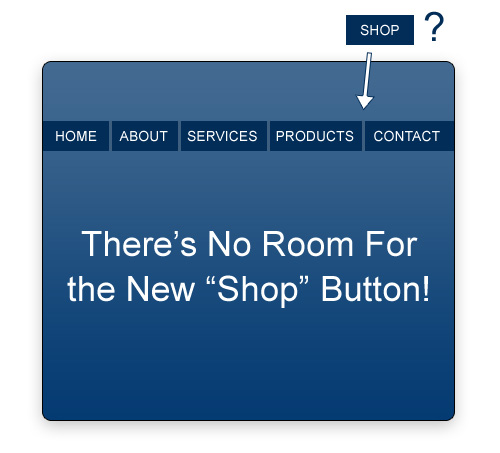
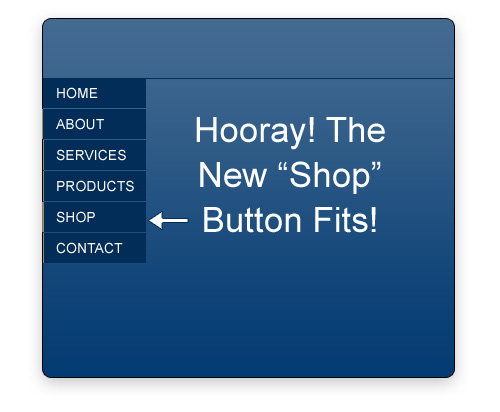
I guess that’s why there has been more vertical nav – it was the only quick and flexible solution to the “shop” problem above….and people have stuck with it as an accepted, established design pattern.
- 67
January 11th, 2010 9:08 amThis is the first article on SM that I have disagreed with.
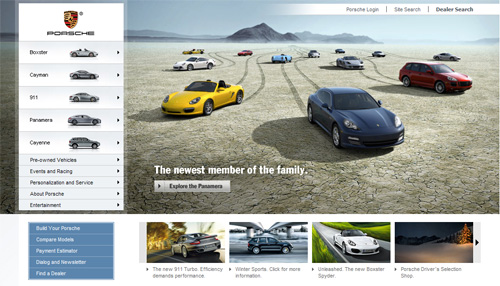
The “Exceptions to the Rule” gallery at the end is laughable. If everything stated is so true and so right, then these sites wouldn’t ever dare use vertical nav. Especially Porsche! For shame!
Anyway, I don’t think the article holds water, pointing to the only research freely available on the internet to support its theory. Every article talking about reading patterns point to that one study, because of this.
It’s a toolbox. You use the right tool for the job. Every situation is different.
- 68
January 11th, 2010 9:22 amWord!
- 69
January 11th, 2010 9:25 amI agree with Jason. Generally I do go for a top nav but there is no solid rule for web design, you do whatever is appropriate for the site and approach each situation uniquely, making this kind of generalisation is just silly.
Not sure why they included the examples at the end – they clearly contradict the rest of the article!
The problem with a post like this is many people will take it as law as it’s posted on smashing magazine, even if it is just an opinion of one person.
Not sure why smashing have dedicated an entire article just to defend a flippant remark in a previous post.
There are no rules to web design and don’t follow trends!!!
- 68
- 70
January 11th, 2010 9:19 amUnless in a store situation, with tons of information choice’s and sub-choices. Vertical Navigation should be obsolete.
Chris has crabs.
- 71
January 11th, 2010 9:21 amVertical nav and horizontal nav are equal oppurtunity offenders. The limitations to the effectiveness of a sites navigation depends on how well the designer can create a functional, harmonious, and congruous navigation that effectively compliments the design.
- 72
January 11th, 2010 9:30 amI was diggin’ the vertical nav on the porche site… but I have to say I’m definitely a fan of the horizontal navigation in most cases.
- 73
January 11th, 2010 10:09 amAnother fantastic read by smashing! I really haven’t found vertical navis to be that appealing, guess i need to refresh on that!!!
- 74
January 11th, 2010 10:32 amThere are two things that I noticed reading this article. First, you state that users shouldn’t be drawn to “pretty navigation bars” on every page and be distracted from the content. Then, later, you say that studies have shown horizontal navigation to be more successful because users look at them more often! That does not make sense at all.
I’ve always learned that navigation is doing its job if a user can find what they’re looking for within a fraction of a second. If anything, those studies show that, BECAUSE the user isn’t focused on the navigation long, it IS effective. But, to be honest, those screen shots don’t tell me anything about that either; did the user in question even navigate in that instance or did they not leave the homepage?
You can’t build “a solid case against using vertical navigation in modern webdesign” when you completely disregard important aspects of usability, the material that is “shown by studies” is incomplete and you discredit your own previous statement by following up with stating the complete opposite!- 75
January 11th, 2010 12:00 pmPauline,
You’re right, it does sound like a contradiction regarding drawing the eyes. A few commenters have pointed that out, so maybe the argument needed more refining. My point was that we want users to focus on content in the content area, and not waste prime screen space. I think a vertical navigation bar infringes on valuable content areas that could be used for more important things.
- 75
- 76
January 11th, 2010 10:38 amI can’t even finish this article. The author says, “A vertical navigation bar that sits to the left of a page’s content on every screen wastes valuable space that could be used for more important things.”
When he says that, he shows his complete ignorance of the value of a good navigation system. Navigation IS the internet. There IS nothing more important in a website than the navigation. (Notice that I did not say webPAGE, in which case an argument could be made.)
Placing the “value of the navigation” argument within the “vertical vs. horizontal” argument is a huge straw man argument that has no place within this discussion.
- 77
January 11th, 2010 10:58 amOne of the first times I’ve been compelled to comment on a Smashing article.
There are several contradictions that have already been pointed out, but are worth restating: if content precedes design, then sometimes content will dictate vertical navigation, so you can’t really extrapolate that vertical navigation is, as a rule, verboten; if there are plenty of great examples that show effective vertical navigation, again, how can we rule it out?
I understand that the author is trying to distill design into a set of easily remembered heuristics, but in this case, the advice is simply poor.
This article should have been one about content & context, and how, as a rule, we shouldn’t marry ourselves to a single paradigm when designing navigation – that our content, site metrics, usability considerations, site architecture, and targeted user behavior should be the warrant for our designs – not pure aesthetics or convention.
Questions we should be asking: how does navigation design differ when designing an information-rich portal versus a Flash-heavy marketing campaign? What about a task-focused web application? That same site, but for an iPhone? Would we consider Wordpress a failure because the navigation almost all of use is a left-aligned list? What if the domain for which we are designing naturally falls into two-dozen discreet chunks of equal priority? What does scannability say about lists? What does Fitt’s law say about our ability to hit targets that are 1000 pixels apart? Does our information architecture warrant split navigation, progressive reveals, a browse hierarchy, a wizard, or a rich site map footer?
We owe it ourselves to think through and design for each and every problem individually. If we don’t, we’re just monkeys, not designers.
- 78
January 11th, 2010 11:44 amKris, thanks for your thoughts. You bring up some good points, but I think you and a lot of others have missed some of the subtleties in my argument. Maybe I wasn’t clear enough.
Although I referred to my overall argument as a “rule”, since I had “exceptions” to the rule, then obviously it’s not really a rule. My article agrees with you: Content will sometimes dictate vertical navigation. So, I’m not sure why you view that as a counter-argument, when the article obviously agrees with that point.
Your other points are great, and many of them would be great topics for future articles, thanks.
- 79
January 11th, 2010 11:58 amFair enough.
Except that that many people will read this and say “well, that’s that, I’m not using vertical nav, Smashing Mag says not to.” The takeaway should not be “don’t do this, don’t do that.” The takeway should be, do what’s right – and to do what’s right, you need to consider the ups and downs of EVERY navigation paradigm.
You should do a follow up that demonstrates the perils of horizontal navigation – namely, width limitations, human-computer interaction issues, scannibility, etc.
- 80
January 11th, 2010 12:03 pmHey, why don’t you write it? You brought up some excellent points, and I’m sure SM would be happy to consider publishing it.
- 79
- 78
- 81
January 11th, 2010 11:31 amExcellent article. For several years I have argued to clients, colleagues and supervisors that left-hand navigation is outdated and unnecessary. With well organized content and architecture, you’ll find you simply don’t need it (and generally mucks up the layout). That its, unless it just works for specific content and design. Form=function I always say.
- 82
January 11th, 2010 11:38 amIt’s a shame, judging by a large number of responses, that the one vital take-home piece of information in this article – “content precedes design” – has been lost; a victim of a provocative title, perhaps.
Then again, “Vertical Navigation: here’s why it can be a bad choice, but why a combination of content, research and experience should dictate whether or not it should be employed” is less snappy and alluring. Headlines have to be designed too, after all. I guess someone wanted this one to pop more, and be more edgy…
I was surprised to discover that the article makes no mention of the efficacy [or otherwise] of vertical navigation in a mobile browsing environment, where a lower resolution means even greater care must be given to decisions of navigation placement.
In fact, the only thing more surprising was to find that no previous comment has mentioned it [edit: Kris is clearly a faster typer than I!]. It’s becoming less about the desktop with each passing year, folks.
Still, an interesting and thought-provoking read, Louis. Thanks. I’d be interested to read a follow-up piece regarding the implications for mobile browsing.
@Kyle Meyer: that’s a good counter-article, too.
- 83
January 11th, 2010 11:42 amGreat article. I enjoyed reading it, but the first few arguments seemed a little vague. I still don’t see how having a vertical menu discourages information architecture.
- 84
January 11th, 2010 12:05 pmBecause with a vertical nav, it’s easy to say “here are all the pages, lined up nicely on the left side” with no depth or thought given to any sort of hierarchy.
- 84
- 85
January 11th, 2010 12:34 pmtake this entire article with a grain of salt and expressly for your own information – period. what you all seem to neglect is this: its not what we want for the client, its just what the client wants. before you all start nerd raging me, remember, we cant write our own checks unless we have our own company. people can talk about studies all they want, and as valid as they may be, is the study paying your bills? are the people making the study paying your bills? unless you can answer both of those questions as “yes”, then this whole article means little to none to any designer. as good designers, we are called to be just that. it has been my experience that content comes first, and the client comes first when it comes to making containers that fully support the content i.e. a web page/design/site whatever. one could have an award winning design with a horizontal menu all shiny and good to go, but if the client doesn’t like it, what does it matter? this article is awesome in that, it makes us more aware of criteria that we may or may not be aware of and therefore should take solely for knowledge. i dont know about you guys, but i’m in it because i like it and i like the money it brings me.
- 86
January 11th, 2010 1:13 pmGood post, interesting idea. The only problem i see here, you write a lot about the negative side, but nothing but images about the positive side. Some text would be nice about the fact, that you choose some websites as an example with Effective Use of Vertical Navigation. Does light gray color in vertical navigation of mytheresa.com is a really good example?
- 87
January 26th, 2010 12:12 amVlad,
Part of the reason I chose those sites for the good examples of vertical navigation is that they do a good job of placing visual focus on the content area. So, they weren’t necessarily sites with good-looking navigation, but the made effective use without taking away from the user experience too much.
But in many of those examples, I personally would still prefer a horizontal nav.
- 87
- 88
January 11th, 2010 1:40 pmAll your hnav are belong to me. Based on the title of the article, I was hoping for some stronger points here. Seems a little contrived to me. I say bring on the 3D navigation. I’ll wear the funny glasses.
- 89
January 11th, 2010 1:51 pmGreat article! Well written, focused. I’m in the sketch-up of my first ‘real’ web design, and the allure of being ‘unique’ had me considering some left hand options. We’ll go ahead and cross those off the list… thanks…
- 90
January 11th, 2010 2:11 pmHi, have to agree with @jacob gure, the eye tracking study relates to content (ie, F-words, F-headings etc.) and not usability. Just to add that the BBC.co.uk website, one of the most frequented sites on the web that has won many awards for usability uses …. left hand horizontal nav. Cheers AL.
- 91
January 11th, 2010 3:17 pmClearly you feel strongly, and make some good points. But I do not agree that a particular approach should be set aside because *some* designers aren’t thinking through their design. Seems to me that setting aside one approach in favor of another across the board is just trading one set of blinkers for another.
I agree that content comes first – but audience needs come a very close second. Most of the companies I’ve supported still have a dominant 1024×768 audience. For many sites, writing goes left-to-right, and so horizontal space gets used quickly. Scrolling to the right is less intuitive than scrolling down for most of my audience, so when necessary, or when I need to allow room to grow, my menus go down rather than across for space reasons.
While some may have gone to horizontal nav, some fairly major sites have gone the opposite route. Amazon, former lord of the tabs, went the opposite route: to a vertical global nav.
I love both forms in different contexts, along with less traditional nav formats. I don’t think we can possibly write off one or the other – each case requires separate analysis.
- 92
January 11th, 2010 3:48 pmWouldn’t you loose user focus when going from primary horizontal navigation to secondary vertical – which was not there on the entrance page?
- 93
January 11th, 2010 4:45 pmYou start with some faulty assumptions — that your home page should look the same as your deeper-level pages, and that complex sites should show their full navigation up front. It often makes sense to hide deeper, less-utilized structures up front, then reveal them later when needed. This is referred to as the “80-20 rule,” where 80% of the use will happen with 20% of your links. Those should be the links emphasized.
Check out Whitehouse.gov or Mailchimp.com for good examples of no-sidenav home pages that have really useful left-hand menus after the home page.
- 93
- 94
January 11th, 2010 4:38 pmI’m an advocate that if you’re requiring a vertical menu it should be on the right. For one, as a right hand user it means less work to navigate because you’re concentrating on the right hand side of the page and also because generally the mouse will be in your right hand therefore the mouse will require less movement if on the right hand side.
The biggest benefit however of the navigation being on the right hand is that people read the content before they navigate as we tend to read left to right having the content on the left just makes sense.
- 95
January 11th, 2010 4:52 pmI want to genuinely thank you for taking the time to write this article, but I gotta say, with usability stuff like this, I really miss the rigor of fields like psychology and sociology. While we should try to draw rules from evidence, the amount of evidence you’ve cited is not enough for the broad claims your making, and in fact sometimes you present no evidence at all. I really think some citations are in order for the following claims:
1. “Fly-Outs Aren’t as Usable as Drop-Downs”
2. “Readers Aren’t Used to a Left-Side Menu”
3. “the right-pointing arrow indicating fly-out menus is not be as easily understood.”
4. “It’s Not as Successful, According to Studies.” What you have shown is “that is, it was seen by the highest percentage of test subjects and looked at for the longest duration.” Definitions of success are extremely important, and I’m not sure being looked at for the longest duration, as other have noted, should be considered a “success.”Not only does the author make several claims without providing any evidence, but also disturbingly assumes that *one* study of eye tracking (which others have pointed out was somewhat misrepresented) should be enough evidence and information from which to draw a fairly general principle. Any serious social scientist will tell you that it takes multiple well-designed tests, replicated and performed by multiple groups/individuals, before a line of evidence should be considered high-quality.
As a sociologist / web designer, I really feel we need to bring much more careful examination to our discussions of usability practices, which is essentially a discussion of social science — a field which most designers have very little experience. The social sciences are essentially fields packed with logical-fallacy landmines, in that it’s easy to draw the wrong conclusions from what seem to be straight-forward results. I don’t necessarily disagree with many of the postulations the author puts forward, but I disagree with the way in which he has drawn his conclusions — which is to draw broad principles from a small pool of evidence.
- 96
January 12th, 2010 3:13 amI agree with you Brian…
Consider these points that the author discusses:
1. It Discourages Information Architecture:
When the author discusses the “Thora” website, all he proves is that, in his opinion, he did not plan the site architecture properly. This certainly does not prove a case against vertical navigationLouis says “This would then allow for a more aesthetically-pleasing horizontal bar that would serve to facilitate a more organized structure that’s not just one level deep.”
So you could as well have those 3 links on the left hand side (vertical menu)
2. Design Should be Based on Careful Content Analysis
Everybody agrees with this statement…but how does this build up a case against vertical navigation?
3. It Wastes Prime Screen Real Estate
That a website should be designed with careful planning is a “given”. Taking this as a rule, if the website content is such that it covers the whole screen space, then certainly, do not use vertical navigation. But then, I think this would be obvious to most designers, and consequently, a vertical navigation would be avoided. In most blogs today, links extend vertically all the way down the page. I do not think they have any
problem managing content “laying out”, and this certainly will not be construed as “a Waste of Prime Screen Real Estate”4. Readers Aren’t Used to a Left-Side Menu
Who says so?5. Fly-Outs Aren’t as Usable as Drop-Downs
This is just a “without any basis” remarkLouis has given 6-7 reasons why, in his opinion, vertical navigation shouldn’t be used.
He also has given 6 reasons as to why a designer could go for a vertical navigation
How can he classify what is the rule and what is the exception?
All in all, I think the title of this article should have been ” When to use Horizontal Navigation & When to Use Vertical Navigation”
- 96
- 97
January 11th, 2010 9:10 pmLouis – well written article. i don’t have much feedback, other than the obvious: based on the vigor of the responses you’ve received, and the sheer amount of highly opinionated feedback, it’s pretty clear that this debate will continue to rage on for years to come!
thanks for the read! again, nicely written!
Bruce @transcendwebs
- 98
January 11th, 2010 9:56 pmmmmm… i dunno. you make a few fair points, but undercut them by saying, basically, that it’s ok to use vertnav in certain situations. how is that different from how we think about the design process now? you tailor your solution to fit the informational need, surely, and while i agree with you that we shouldn’t just slap in a vertical menu just because, every case has different needs and should be addressed individually.
The horizontal and vertical menu bars are tools in the designer’s toolbox – it doesn’t make sense to say that we should throw away the hammer coz most of the time we need to use a screwdriver…
Thanks for the post tho – thought provoking.
- 99
January 12th, 2010 12:15 amWhat do you guys tink from this vertical menu i made for a client?
automobielbedrijfkuipers.nl/I have used animated gifs as the rollover states. Doesnt work as i would in Chrome though.
- 100
January 12th, 2010 2:24 amDisagree with this article. Both strategies can work. Points missed:
1. Vertical navigation links can be perceived as a block, without moving your head too much. Hence they are easier to get oriented with. this is both good for 1st time visits, where you don’t want the visitor to miss out on anything that might draw them in, and for the long-term, where you want your regulars to feel at home and be able to get places fast and easy.
2. While they do take up valuable real estate, vertical nav bars CAN be incorporated wisely into the design, as in the examples given above. This makes deep pages more accessible, so the website is perceived as a whole – and moves you towards the ideal of making the interface transparent. Esp. important for multiple-category websites. I challenge you to find a gaming industry website, for example, that makes the links in the right third of its horizontal navigation bar seem welcoming.
3. Long category names for links give more perceived value for being long, period. That they are adapted in modern-day blog post names means long-copy headers withstand the test of time. In any case, the traditional header length in classic advertising is up to 17 words long.
4. Vertical design creates a better sense of hierarchy, and therefore makes traffic flow in a more controlled manner. This is important for example for presenting an idea (your classical start-up website), or for creating a structured sales process of high-cost products. You can also number the links and create a de-facto tunnel. It makes less sense to number horizontal links.
- 101
January 12th, 2010 2:26 amI actually prefer vertical navigation, since I’m used to it. You make a good case for other styles, but they’re far more related to style and graphic design, which is not so important if you’re after content. If you go to sites such as dubli.com, you’ll see that as an e-commerce site, it’s far more useful to have a vertical menu, since – as you note – it allows greater freedom for adding new content (categories, information and so on).
Other than that, an enjoyable read. Keep it up!
- 102
January 12th, 2010 2:43 amWhat’s the point of this article? At one hand, you try to make a strong case for horizontal navigation. Then you mention some benefits of using vertical navigation. And the conclusion is that “content precedes design”.
If your conclusion is that content really precedes design, then why think of design patterns without considering content at all? Aside from the quote from Zeldman you don’t mention anything yourself about designing for content.
Also, your arguments are inadequate and have been pointed out well by Kyle Meyer. I really don’t understand how using horizontal menus will magically create better information architecture. I enjoy simple websites with simple navigation, but that doesn’t mean it’s the best solution for every case.
If you like horizontal menus because they look good and it’s trendy, just point out a couple good looking horizontal menus. But don’t provide pseudo-research arguments because your audience is smarter than that.
- 103
January 12th, 2010 4:50 amI think this article could have been written a little bit better, there’s no concrete conclusion why vertical navigation shouldn’t be utilised. It depends on your design whether a vertical or horizontal navigation should be used for a site. I totally disagree with this article.
- 104
January 12th, 2010 5:08 amI personally prefer horizontal navigation, but I’m often creating designs with vertical navigation at work. A lot of the work we do uses content management systems where the client can add new pages themselves, and you never know how many pages they will adding in the future. Vertical navigation works best for these projects to accommodate the addition of more links.
I believe which navigation style you use really depends on the project. It is important to know the benefits and limitations for both, so you can choose which navigation is more suited for that specific website.
- 105
January 12th, 2010 6:15 amLeft side vertical is bad and annoyingly in your way, but right hand side vertical navigation is great : ) Especially if you do not need to fill the page with clutter. Some people find they have two much space, remember thinner columns a much easier to read, having readable information all the way accross a page is not good, that is why books and newspapers divide into columns it is easier to read, the eye can jump to the next line.
Remember there are people who do not want to fill their website with huge loudly colored ads not all businesses work in this manner, smashingmagazine yes, but standard business does not need to advertise others, only their own product
- 106
January 12th, 2010 7:31 amJohnQ said”
I think this article could have been written a little bit better, there’s no concrete conclusion why vertical navigation shouldn’t be utilised. It depends on your design whether a vertical or horizontal navigation should be used for a site. I totally disagree with this article.”Welcome to the club.. what we are seeing here, to me, is more than an idiotic and sophomoric “article” about navigation, we are basically seeing the death of writing. In this twitterish/Textspeak world, the ability to produce a cogent, verifiable and quantifiable article (vs another goddamn list of ‘icons’ or ‘wallpapers’ or some shit) is rapidly atrophying like the vestigial appendix.
This particular article, I’m convinced, is “POST BAIT”.. In other words, a totally bullshit article (and known to be such by the editors) but allowed because it will ‘generate a lot of posts and activity’ .. this whoring of the editorial process will only lead to deterioration in the long run. People can sense when they are being ‘gamed’ with inflammatory ‘articles’ known to have no value, but presented solely for the controversial (stupid) content and the useless heat (without warmth) that they generate.
- 107
January 12th, 2010 8:25 amI disagree.
- 108
January 12th, 2010 9:25 am@Stephan Wehner : Have you read the article properly? There’s a clear argument about vertical and horizontal navigation but there isn’t a solid conclusion why front-end developers shouldn’t use the vertical navigation method.
There are issues with horizontal navigation, as describe by this article, which is not scalable. This scalability applies on vertical navigation as well. Thus, the way front-end developers build their navigation depends on the design and how the content of the site should be presented to the user.
Take a look at this generic example, if your client tells you that there are 30 navigation links that need to be present on the site, how are you going to design and build this? Also the client wants these navigation links in 150×25 dimensions and must be an animated image. What are you going to do, a horizontal navigation? But wait, this article’s argument is not to use the vertical navigation.
- 109
January 12th, 2010 4:50 pmJohn, find me a client who will ask for what you’re saying and I’ll write an article denouncing my entire argument. Your example is completely unrealistic, and has no validity in this argument.
Of course, even if it was a realistic scenario, if any client asked me to do what you said, I would kindly tell him to take his business elsewhere.
- 108
- 107
- 110
January 12th, 2010 8:09 amLouis, thanks for pulling this information together in one place. Most of this is stuff I’ve logged through experience but it’s nice to see it organized so well…like a nice website with a horizontal navigation.
- 111
January 12th, 2010 9:26 amWhat a lot of noise about not very much.
Sometimes horizontal navigation works well; other times vertical navigation works well; sometimes some combination works well.
As a designer, you need to look at what the site’s users and owners want to achieve, and design navigation appropriately.
Why make such a song and dance about it?
I could very easily write an equivalent article about the shortcomings of horizontal navigation.
These things are what any half-way competent web designer should know already.
- 112
January 12th, 2010 12:00 pmDear Louis
I thought this was an article that needed to be written and needs to be read
BUT!
The 2 most rigorously user tested, and eyetracked homepages on the planet don’t use horizontal nav.
Yahoo.com
Amazon.comI would say they know something that is not accounted for in your article, and that worries me.
- 113
January 12th, 2010 4:44 pmMichael,
Thanks for your comment. You need to look at those sites again. What is the primary means of navigating both Yahoo and Amazon? The answer is “the search box”. That is their primary navigation bar, which is why on both those sites, the search box is huge and is at the top/middle of the page, horizontally.
So, yes you’re right, they know something: That horizontal navigation works, and that’s why they use it.
- 113
- 114
January 12th, 2010 1:37 pmThis whole topic is pointless. This very website uses vertical navigation in addition to its horizontal 6 links up top.
- 115
January 12th, 2010 1:43 pmI think I only ever use vertical navigation in minimal site designs, but I think the case against readability is not so strong.
Navigations are essentially a list of elements, and we are accustomed to read lists vertically. Be it the grocery list, table of contents, etc…
I think the eye tests are interesting. One thing vertical navigation really has going against it, is that if it is long, it gets farther and farther down the page which is more of a hindrance to eye scanning than farther and farther right. But I wonder in those examples if you wanted your visitors looking over your navigation that much, or focusing on your content… maybe the extra eye scans on the horizontal navigation meant the user was more distracted from the content? Just a thought.
- 116
January 12th, 2010 7:14 pmAgree.
I don’t want users to spend time on the navigation… I want them to read the content (and know where the nav is for when they need it). I don’t want them spending time gazing at the map. That’s how I’ve always interpretted the first heat map image.
- 116
- 117
January 12th, 2010 7:09 pmHorizontal nav is fine…
I like to offer users the chance to see what their options are within a current section… to always move ‘forward’… when they click. This frequently means starting with a horizontal nav, but then, after one choice is made, displaying that section’s other pages in a vertical nav.How do you show that to a user with a horizontal nav? The options are so often hidden behind a dropdown, especially if that’s the first page a user sees.
What are good examples of how to do that within a given section? even if you assume the section starts from a horizontal nav?
- 118
January 12th, 2010 9:47 pmgreat article!
thanks for posting, very interesting and thought provoking read.
- 119
January 13th, 2010 5:09 pmYou seem to have conflicting references in your article.
First, you link to an article and say that, “… you also don’t want navigation to unnecessarily crowd the left side of the page, which studies have shown will draw a user’s eyes more often.”
Then, you quote another article that says, “Navigation placed at the top of a homepage performed best — that is, it was seen by the highest percentage of test subjects and looked at for the longest duration.”
Aside from the fact that the studies seem to contradict each other, the fact that horizontal menus were “looked at for the longest duration” should logically encourage all of us design vertical menus since as you pointed out, “…we don’t want our users to be fixated on pretty navigation bars – unless they’re navigating.”
My personal belief is that the prevalence of horizontal menus is due more to popular design trends rather than outdated technology. The web is a constantly changing, ever-evolving entity where people are always looking for the next way to stand out. Once everyone is hooked on horizontal, vertical menus will most likely take off again as it will set people apart from their competition.
Great opinions though.
- 120
January 15th, 2010 12:41 pmWe want our users to see the navigation, but it shouldn’t take the most valuable part of the screen, which is the left side. That’s essentially what I was trying to express. I should have expressed it more clearly and not allowed that seeming contradiction.
The point of the second study was to show that even when there is vertical navigation, it’s not focused on, so there’s no point in having it there. Whereas, earlier in the article, I was talking about the value of the left side of the page.
- 120
- 121
January 13th, 2010 9:45 pmThis is the Web. There is nothing we “should not use”… We need all the tools we have to do things right regarding content and audience…
- 122
January 14th, 2010 5:44 amAnother wonderful exception to the rule is the new Vera Bradley web site:
It seems that photo-heavy sites can still succeed with vertical menus.
- 123
January 14th, 2010 8:36 amYou only seem to cover _left-hand_ vertical navigation. What about vertical navigation on the right?
- 124
January 14th, 2010 12:27 pmLouis,
I really appreciate your article. I get the subtle arguments. You’re not relating fast and hard rules, your giving food for thought for those who “set” themselves to certain ways of design and cannot see the benefit of adaptive design based on well structured content.Or for those who do see design as “decorative” and not integral to user navigation.
“Those” being, in my experience, IT professionals and uneducated clients whose personalities are strongly in the “red” spectrum of decision making.
People that I, unfortunately, have to deal with often.
Perhaps an article entitled “Which are you? Strong Foundation or Brick Wall?”
:)
- 125
January 14th, 2010 7:56 pmWhether a website which has a vertical on left/right or a horizontal on top is depending on the content. That is why information architects and web designers have to work hard.
We could see left side vertical navigations often a while ago (also vertically flipped “L” letter navigations); my first website design has left vertical navigations as main (in 1999). The vertical navigation system was flexible and expandable for future when the information has to be added as a high priority one. However, numbers of information didn’t bring users goals. Bad usability and experience.
Most of computers are made and we have become familiar with scrolling down instead of to the right so save the space of width. Again, the way of representing information on a website is depending on the content. “Trendy” style doesn’t achieve users’ goals. - 126
January 16th, 2010 1:39 pmHorizontal navigation is dangerous with multilingual sites : you never know if you will have enough space in German, for instance. It is also dangerous in case of font-only resizal. It is dangerous for further content growth (what if you site evolves and adds sections ?).
- 127
January 16th, 2010 9:16 pmHad a good read of this article, after the title caught me eye, and scared me silly.
Having read a dozen or so responses, I’m inclined to state, this argument is bolx. The examples of vertical prove this.
It’s really all about what the site does. Take SmashingMagazine – it doesn”t need vertical nav, because its more of a blog than a website. I come here, because I click an interesting tweet, or bookmark – I come to the page I intended to read, I do what I came here to do, and I leave.
Take a look at BBC – many brands within BBC websites. The main one… magazine layout (because, where do you start). News – verticle… cause of all that information, and it’s listed in order of importance. Radio One – horizontal nav… because it can – every visitor has their own vision of whats important to them – so vertical works.
I’m a printer – I use both horizontal, and vertical – the horz is for client area, while the ever growing and changing product list is vert. I’ve recently introduced a massive footer, to stick anything that was starting to clutter up the left nav.
I really don’t want to read that vert nav isn’t cool. It’s just not needed on top level web 2.0 sites – Twitter home page… hmm – not needed.
And then, there’s the SEO value.
It’s late, I’m clocking off. Thanks for the article, I feel better now – vert is here to stay.
- 128
January 17th, 2010 9:20 amThis whole article smells like comment bait. If you want to keep usability a science, not a free-for-all opinion fest, you should really back up those personal peeves. If you want to make a recognisable information-based website, go with a structure that is known and don’t change a winning (Higher Click Trough Rates + more Pageviews) team.
Header, VN left column. Main content center column. Aside content right column. Footer. Making money since 1999.
Dropdowns always need a fallback for users with shoddy browsers or javascript off. You would be the first placing those fallback dropdowns in a Horizontal Nav on the main Category.
There has been research showing that the Golden Ratio does not fair well in communicating information vs. the older standards. There has also been research showing that people view the Golden Ratio as automatically aesthetically pleasing. Webdesign is always a marriage of factors, but you talk like VN does not deserve some love at all.
A person forcing these views like rules and talking about “facts” where there are none, sounds like a stubborn boring person.
- 129
January 18th, 2010 2:02 pmHi Louis,
thanks for you thoughtful post. You make some interesting trend observations.
We did a study a while back comparing a left navigation with a *right navigation in an A/B test: https://journals.tdl.org/jodi/article/view/94/93. Not reported in that study are the results of a sub-test we did on focus of attention: where do people look?. It turned out that the left navigation actually proved to have a lower focus on the content of the page than the right navigation. (I mention these findings briefly in my book, but they are otherwise unpublished (http://www.amazon.com/Designing-Web-Navigation-Optimizing-Experience/dp/0596528108))
Perhaps, though, you’re making an argument that doesn’t really need to be made. It’s not really left versus top (or versus right). All are potentially viable arrangements. Indeed it depends on the content and the situation.
Actually sites with very large information architectures may *benefit* from a left navigation. (So I disagree with your first point). Take Amazon, which, BTW, moved from horizontal tabs to a vertical nav on the left. (The fly-out isn’t very good, though, is it?). In this case, it’s actually the large IA of the site, in part, that calls for a left navigation.
A left navigation also allows for longer labels, in general. And this in turn gives better information scent. (It also makes localization into other languages potentially less problematic).
Or, check out what the NY Times does: the navigation starts out on the left and then moves horizontally deeper in the site. (Probably to give more focus on the content).
So you don’t really need to pit the layouts against each other, IMHO, even if there is a “trend” in one direction or another.
Again, thanks for your insightful post. I enjoyed reading it and looking at the examples.
Cheers,
James Kalbach- 130
January 25th, 2010 9:59 amJames,
Thanks very much for your thoughts on this topic.
Regarding some of the benefits you mentioned related to vertical navigation (lanugage, long labels), yes, those are benefits, and a few commenters have pointed those out.
Regarding what you said about NY Times and Amazon, however: I don’t think their left hand navigation bars are relevant in this discussion, because, as I pointed out in a previous comment, Amazon uses the left bar as a secondary means of navigating the site. The primary navigation for Amazon is the horizontal bar at the top that has the search box right in the middle. That’s how users navigate Amazon, through search.
And, although it’s not as prominent or as important on NY Times, I would make the same argument in their case as well.
So in both those examples, they would fall under the “exceptions” that I mentioned, one of which was “a site that uses both vertical and horizontal navigation”. I also pointed out in the introduction that I was specifically referring to primary navigation in my argument.
Anyhow, I will definitely look at those links you provided, and thanks again for contributing and enjoying the article.
- 130
- 131
January 31st, 2010 9:05 amLouis:
No offense meant, but this is just another article offering no real solution to a real problem. Instead it presents an opinion, based upon a temporal observance, as a rule.
The only “rule” I have found true is that the relationship between design and technology is in a constant state of flux and will remain that way for as long as we live. As such, we adapt and use our design skills and function solutions as they fall within the ebe and flow limits of technology.
For example, when real estate was tight, we crowded everything together as best we could. Now that real estate is more spacious, we are have more room to present our ideas about design and function. Who knows what technology will present tomorrow?
Using studies like the F-Shaped Pattern to confirm a subjective argument can be very wrong. For example, one could conclude that all menus should appear within the red areas of the text. Would that solve the menu placement problem? Of course it would not, for that solution would create it’s own set of problems. Therefore, such claims demonstrate that such studies should not be taken out of context and extrapolated beyond their scope.
As for me, I am open to all menu designs and see no “rule” as to their application. The only “rule” is to provide service for my clients.
I have clients who insist that everything they can think of must be presented on the front page of their web site with no regard for usability or design. Additionally, the numbers of menu items and lengths of text within their menus do not fall neatly within a simple top menu solution. The clients simply have services they want to show and they want to show everything they have. In their thinking, they are the client, they want it, they are paying for it, so what’s wrong with that? Actually there’s nothing with that if you look at it from their perspective. Besides, who are any of us to tell our clients what will work for their business?
I also have other clients who simply want customers and will listen to my reasoning. As such, their web sites follow function –however, it’s function as *I* believe proper. But my understanding is as limited as any other and my answers often fall short in the long term.
Seldom in life do you have “rules” that stand the test of time. So, your followers may move everything from left to center, but in a short while there will be another lead lemming shouting another direction for people to take. That’s life, however, in realizing that sometimes makes taking the road less traveled a better choice.
Food for thought.
tedd
- 132
January 31st, 2010 3:12 pmThank you for your insights. While it is difficult to create a hard and fast rule for web design, I can appreciate your clear effort at describing your thoughts. I agree, but the sites I have built have always included a horizontal navigation. Until now, it didn’t occur to me that this was why. I have always designed websites to approach the user kindly, and having to scroll down to navigate seemed like more a of a nuisance than it was worth. I believe in being as concise as possible with content on the landing page, for fear of bogging down the user. Thank you for giving me an explanation for my choices, and giving me an argument for my methods the next time a client backs me into a corner.
- 133
February 11th, 2010 9:54 pmI have a real objection to the implications of the eye-tracking study. Some will argue that the eye should track to the navigation of the website or that there’s a problem with the eyes not naturally going in the direction of the navigation. I believe that it’s highly site and context-dependant. In other words, if the landing page (or whatever page the user comes to) happens to have high-quality content, then I want the user to be reading that first and I think navigation slows down and distracts from the content I’m trying to present to the user. If THEY decide that the content isn’t exactly what they are looking for, then they can immediately go to the navigation and proceed to more specific details or other parts of the site as appropriate.
There’s no denying, most of the sites I’ve built do use horizontal navigation (mostly due to small link names, no hassles with extra float layouts and most of those sites are centered anyway)…But for the one that put a high value on content, I’ve actually felt more confident putting navigation to the side.
I apologize if I missed somebody else saying this, I didn’t get to skim all of the comments…
- 134
February 13th, 2010 8:28 pmHi Louis,
Thank you for a wonderful article. I have a few questions for you, and I hope they have not already been covered.
1. Do you feel that horizontal navigation is also (as a rule) superior for software programs? It seems to me that the majority of software uses vertical navigation, though it is most definitely done both ways. Microsoft Outlook is a good example.
2. Have you seen the new Facebook design? It relies heavily on vertical navigation and I personally love it.
3. For what it is worth I have personally studied this issue endlessly and am convinced it can be done equally well either way. I personally prefer vertical navigation strongly for any program I spend a lot of time in, but I can easily adapt to either method.
- 00
There are no trackbacks at this time. If you are interested in leaving a trackback, please use this URL.
Leave a Comment
Make sure you enter the * required information where indicated. Please also rate the article as it will help us decide future content and posts. Comments are moderated – and rel="nofollow" is in use. Please no link dropping, no keywords or domains as names; do not spam, and do not advertise!
Interact
Popular
- 100 Wordpress Themes
- Photoshop Tutorials
- Fantastic Wallpapers
- 40+ Excellent Freefonts
- Dual-Screen Wallpapers
- Wordpress Themes for 2009
- Illustrator Tutorials
- Incredible Free Icon Sets
- High-Quality Free Fonts
- 30 Scripts For Galleries
- Photoshop Text Effects
- Useful Icon Sets
- Web Design Trends
- iPhone Wallpapers
- Before Launching a Website
- CSS Layouts And Templates
- Photoshop Actions
- Stunning Pictures and Photos
- Fantastic HDR Pictures
- Logo Design Tutorials
- Free Design Templates
- 10 Mistakes In Logo Design
- Photoshop Custom Shapes
- 40 Creative Design Layouts
- 8 Layout Solutions
- 53 CSS Techniques
- Photography Techniques
- Black & White Photography
- Styling Design Elements
- CSS-Based Forms
- 50 jQuery Techniques
- 50 Portfolio Websites
- 50 CSS Techniques
- Creative Logo Designs
- Desktop Wallpapers
- 25 Open Source Mac Apps
- 50 Free Icon Sets
- @aniiish you are welcome, too :-) We are just doing our job and we love what we do!
- @MikePerry yes, for sure. But that's always a compromise: as they say, content doesn't grow on trees :)
- CSS3 Online Generator - http://bit.ly/aH9Tg6 (via @designshack)
- @MikePerry we do need traffic, and SU delivers hugetraffic to our site. Sending SU-links helps a lot. Or are Su-links too much to require?
- @MikePerry I have read it now. Thank you for your feedback. I will certainly keep it in mind. But you need to understand our situation, too
- @MikePerry I am not sure what exactly you mean :) #justsayin
- @honoki you are welcome! We hope that it will help you improve your skills and wil help your business too!


Very useful post! Thanks!