Photoshop Keyboard Shortcuts Cheat Sheet (PDF)

Advertisement

Over the last months we released a variety of icon sets, tools and templates, but now we would like to release something a bit different for a change. In this post we are glad to release Photoshop Keyboard Shortcuts, a PDF-file with a handy overview of most useful keyboard shortcuts available in Adobe Photoshop. The cheat sheet was created by Kenneth Setzer and released especially for Smashing Magazine and its readers.
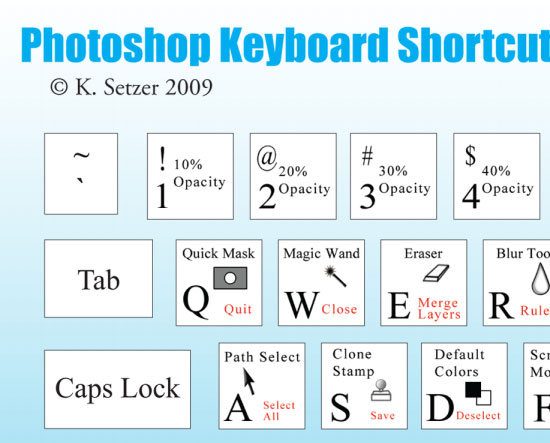
Photoshop Keyboard Shortcuts

The cheat sheet is a mousepad-sized image featuring a typical PC keyboard. Photoshop’s keyboard shortcuts are listed for each key, with the shortcut and its icon printed on the individual key. In red is the shortcut you will get by hitting the key in combination with the Ctrl key. For example, typing "t" in Photoshop will activate the Type tool, while typing Ctrl+t will allow you to use the Transformation tool. Additional shortcuts requiring more than two keys are listed as well.
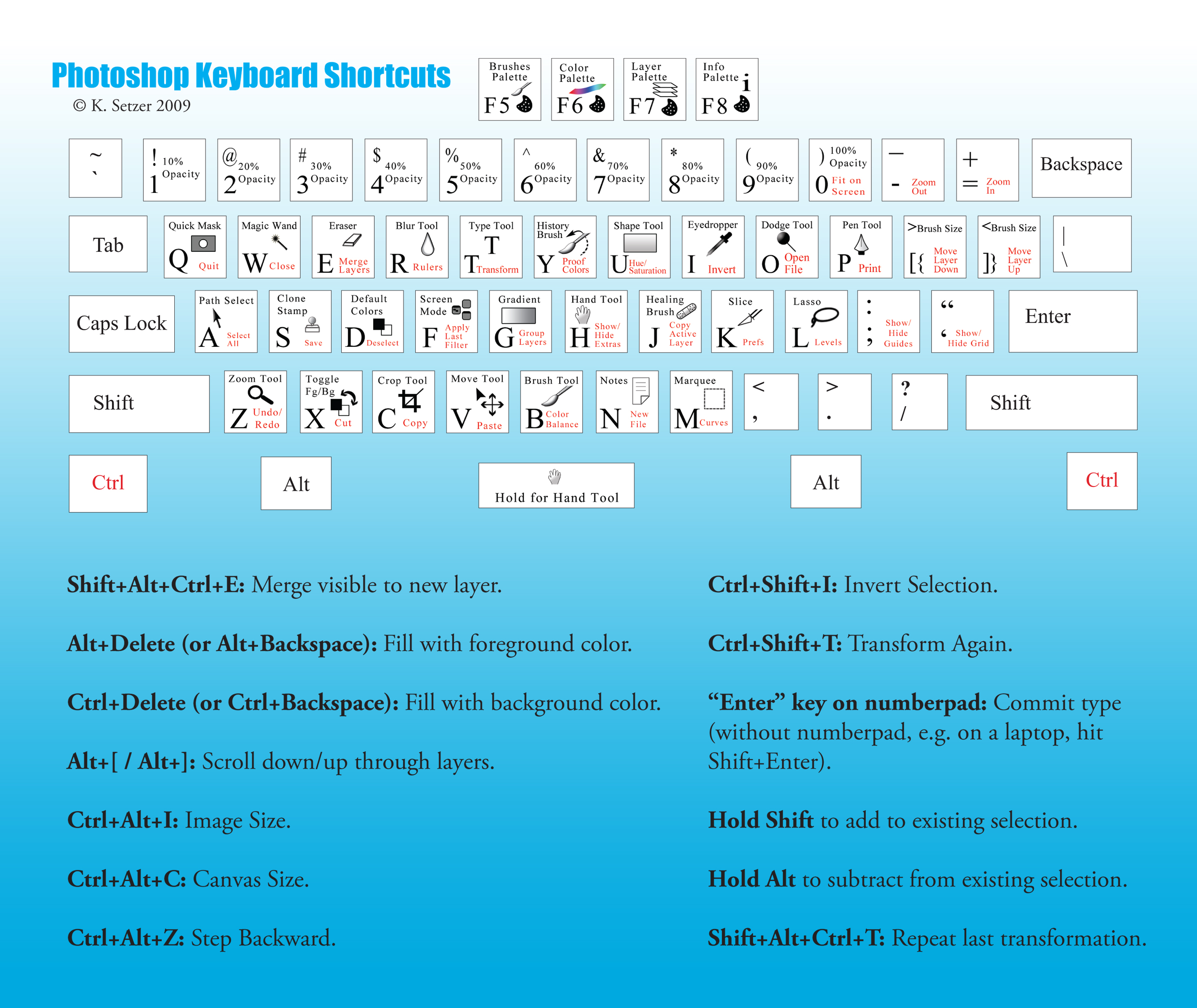
Photoshop Keyboard Shortcuts

Download the cheat sheet for free!

Of course, you can use the PDF for all of your projects for free and without any restrictions. The PDF may not be resold, sublicensed, rented, transferred or otherwise made available for use. Please link to this article if you want to spread the word.

Photoshop Keyboard Shortcuts

  • large preview (.jpg)
  • download the set (.pdf, 2.5 Mb)
  • Behind the design

    As always, here are some insights from the designer herself:

    Originally, I intended to buy a keyboard overlay with Photoshop shortcuts, but couldn’t find any for a PC, just for Macs. So I compiled a list of keyboard shortcuts, and thought they would fit nicely on a mousepad. I think printing it out and hanging it by the monitor works just as well. I hope those learning Photoshop will find it useful, as well as the more advanced users who may have forgotten some of the less-often-used shortcuts. They save a lot of time, and can impress your boss!

    Thank you very much, Kenneth! We appreciate your efforts.

The Smashing Editorial loves high-quality content and cares about little details. We also believe that content and design are crafts worth sharpening.

  1. 101

    Great….but would be a lot more useful without the blue gradient, it doesn’t come out well on a black and white printer.

    +4
  2. 102

    Great thank you !!! But I think they may have changed a bit in cs6

    Jillianxeniaphoto.blogspot.com

    +2
  3. 103

    Thank you very much, this is great!!

    +2
  4. 104

    Great contributions, thanks for those.

    +2
  5. 105

    Was about to print this out, but stumbled upon this. Very helpful :)

    +2
  6. 106

    reealllyy cool ..Great thank you !

    0
  7. 107

    Stacie Jensen

    April 10th, 2013 3:56 pm

    These are great keyboard tips for people just getting comfortable with PS. Great work!

    0
  8. 108

    Andre Anbarchian

    April 26th, 2013 8:32 pm

    Thank you for your efforts, I am a beginning coder, and learning to implement Photoshop with web design features to attach my CSS/html work and learning how to work these programs together. Much love to those who take the time to make life easier for those who are willing to take the time to find these optional tools and cheat sheets. If there are any other things someone whom can relate to what I am currently Expressing, please do feel free to contact me with those ideas.

    0

  1. 1

    Hey Cute, go advertise your business on a site for lonely gold diggers, this is a design site, you don’t belong here. Happy hunting! loser.

    +15
  2. 2

    The sad part is that she thinks us designers are millionaires. I can only say ‘I wish’. :)

    +8
  3. 3

    Hey Lala. You really should be more sympathetic. Poor “Cute” is a lonely woman, clearly in pain. Why else would she go to a nerdy page like this one for love. She’s obviously tried all other options. She’s tried the pool-boy, the cable-guy, her tennis instructor, her sons friends, her grandsons friends — tragically none of them can stand the smell of vaseline and olives for that long. It’s a shame there is no PC keyboard shortcut for the rich application of love.

    I will love you “Cute Anna Baly.” I will come and find you! … (command + z)

    +5
  4. 4

    Sorry to inform you DirtyD but only about more than half of designers in America uses MAC and the rest of the world uses PC which is still more powerful & reliable.
    For Mac users info change the Ctrl with Cmd & Alt with Opt.

    To Kenneth, thanks a lot for this helpful manual.

    +4
  5. 5

    Great….but would be a lot more useful without the blue gradient, it doesn’t come out well on a black and white printer.

    +4
  6. 6

    I completely agree…
    It’s quite a nice pdf, but this blue gradient hurts the eyes…

    +3
  7. 7

    The mac version would be the same, just opt the ctrl for the command key.

    +3
  8. 8

    Thanks for the effort and time dude. Really appreciated
    Anyways, do you have a short cut for Illustrator or Flash hehe ^_^.
    More power to you.

    +2
  9. 9

    very usefull…the blue gradient is horrible ;)

    +2
  10. 10

    Nice! I wonder what the boss will say if I print this out at work (where I don’t have photoshop)

    +2
  11. 11

    Bombchell - in Atlanta

    February 11th, 2010 12:04 am

    lol y’all are so twisted.

    +2
  12. 12

    “Real designers don’t use PC.”
    Another cocky mac user. The computer is just a tool used by artists.

    +2
  13. 13

    Was about to print this out, but stumbled upon this. Very helpful :)

    +2
  14. 14

    Great contributions, thanks for those.

    +2
  15. 15

    Thank you very much, this is great!!

    +2
  16. 16

    Great thank you !!! But I think they may have changed a bit in cs6

    Jillianxeniaphoto.blogspot.com

    +2
  17. 17

    These would be great to print on a sticker sheet and stick to the actual keyboard, thanks!

    +1
  18. 18

    Hi Everyone,
    Very useful resource for Photoshop designers.

    Regrads
    Rahul Chauhan

    +1
  19. 19

    Do you have MAC version? Thank you.

    +1
  20. 20

    For AZERTY’s keyboard users, I’ve adapated the pdf.

    http://www.gs-design.be/public/stuff/shortcut_ps_plat.pdf

    +1
  21. 21

    Hmm, thanks for this useful post quiet handy for photoshop users

    +1
  22. 22

    Peter Hilgersom

    February 10th, 2010 2:05 am

    Thanks for the article. Great overview :)

    +1
  23. 23

    Tidy Web Design

    February 10th, 2010 1:58 am

    VERY TIDY!!! Shortcuts make it soooo much easier!!! Thanks

    +1
  24. 24

    Thanks a lot for this sheet, it’s just great. :-)

    +1
  25. 25

    Yeah, I thought the background was a little odd. Something I would never send to a printer.

    Another way to get the shortcuts to a printer or leave them onscreen if you gotta enough space:
    If you google “Adobe Shortcut App” (http://goo.gl/ExEH) you will find and Adobe Air App that has all the shortcuts for the entire suite (Win+Mac) from which you can print-out Cheat Sheets for the shortcuts.

    +1
  26. 26

    Pretty cool and handy, but it’s god awful ugly. I’d expect Smashing to post something that’s pleasing on the eyes. This makes me just want to rip them out.

    +1
  27. 27

    I use both Macs and PC’s, so I’m not biased toward either. They each have their pros and cons. That said… Hey Mac users, please stop getting bent out of shape because this was posted in reference to a PC.

    If you read the entire article, including the “Behind the Design” section you will see a comment from the designer of the PDF that clearly states why it’s for a PC…

    “Originally, I intended to buy a keyboard overlay with Photoshop shortcuts, but couldn’t find any for a PC, just for Macs.”

    As a matter of fact, the last article I saw listing keyboard shortcuts was for a Mac and PC users were asked to do the conversion.

    As for the poster who asked about switching between open applications in Windows… It’s actually [Alt] + [Tab]. [Ctrl] + [Tab] switches between files open within the same application.

    +1
  28. 28

    I am sure your boss has seen far worse things printed off at work.
    At least it is something educational.

    +1

Leave a Comment

Yay! You've decided to leave a comment. That's fantastic! Please keep in mind that comments are moderated and rel="nofollow" is in use. So, please do not use a spammy keyword or a domain as your name, or it will be deleted. Let's have a personal and meaningful conversation instead. Thanks for dropping by!

↑ Back to top

