VI Editor / Linux Terminal Cheat Sheet (PDF)
We’ve been releasing many icon sets and WordPress themes on Smashing Magazine, yet today we are glad to announce the release of a bit different freebie. This post features a VI Help Sheet, a cheat sheet for the VI Editor, for all web-developers out there who are working on Linux. The help sheet was designed by GoSquared and released for Smashing Magazine and its readers.
The cheat sheet contains terminal commands for modes and controls, inserting text, cursor navigation, deleting text, searching and replacing. Download it. Print it. Stick it on the wall and get commanding.
Download the cheat sheet for free!
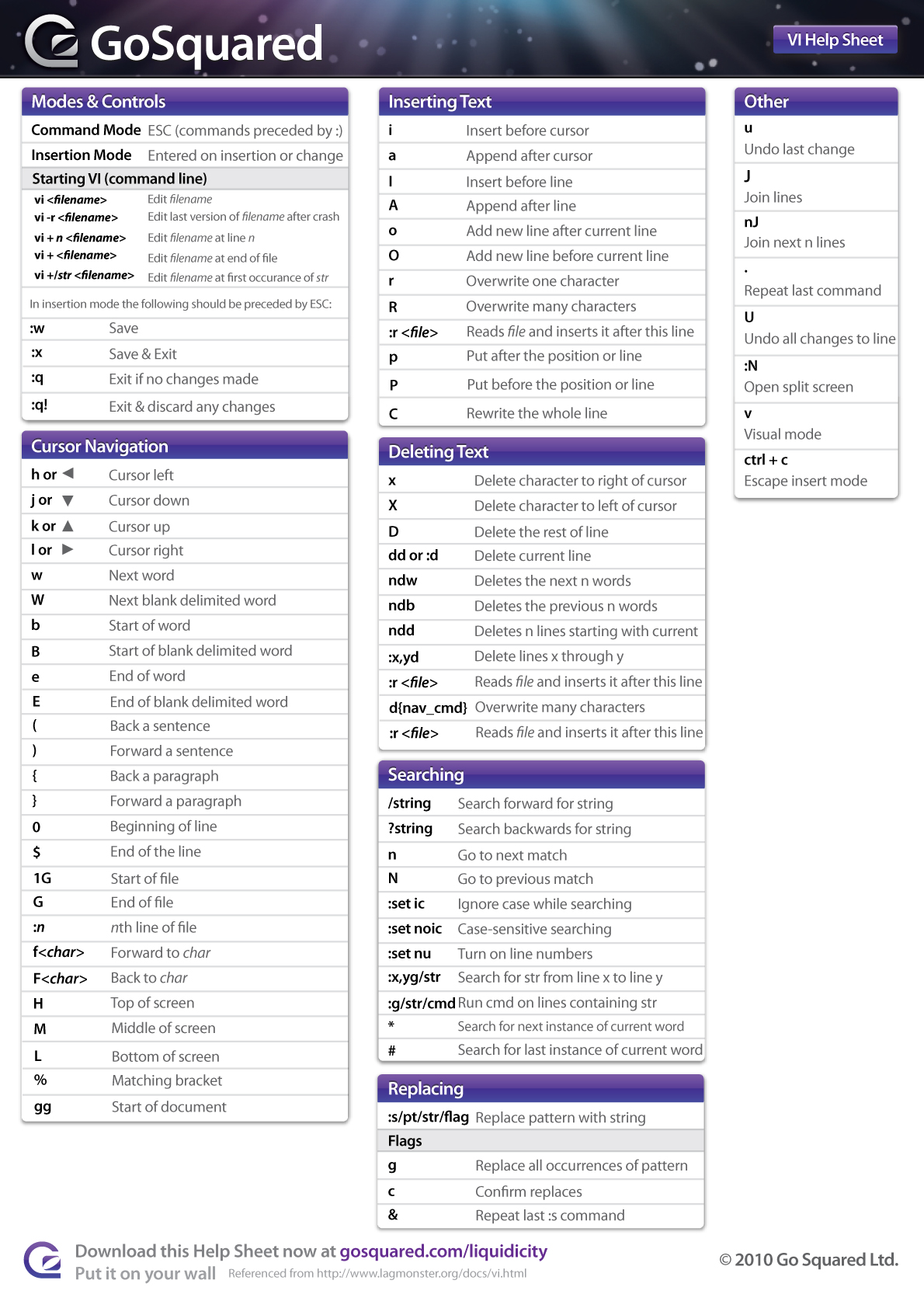
- large preview
- download the PDF-file (updated, 0.5 Mb)
- release post on the designers’ page
Behind the design
As always, here are some insights from the designers:
We created the VI Editor cheat sheet because of the amount of time members of our team spend working in the Linux Terminal. Working on our web app is a full time occupation and for the developers, using the command line 24/7 can be exhausting. Forgetting a command here or there can really break up their workflow. So we put together the VI cheat sheet that can be used for quick reference as and when you need!
Thank you, guys. We really appreciate your work and your good intentions.


Val
May 3rd, 2010 12:05 pmI don’t quite get how they can spend 24/7 on the shell and still need such a small cheat sheet. Thanks anyway, it will be of great help for anyone trying to learn vi.
dirim
May 6th, 2010 1:53 amThis is VI cheatsheet, not VIM, so since VI is less powerfull than VIM, the number of important things to remember might be smaller.
James Gill
May 3rd, 2010 12:11 pmMany thanks to Smashing Mag for posting this. We wanted to get the basics down on one sheet, but we’re looking into creating a more advanced version for anyone with extra über skills.
Hope you like it!
bmsatierf
May 3rd, 2010 12:14 pmThank you SM, it is time to learn VI.
Diego
May 3rd, 2010 12:36 pmThe most underrated editor ever.Get VIM, get the power. :)
Thanks SM!
Lucho
May 3rd, 2010 12:52 pmThat’s awesome, I simply love VIm! Great work!
Adrian
May 3rd, 2010 12:53 pmIt took me a week of on and off use (editing config files in Arch Linux) to learn the commands. Don’t tell me those programmers need a cheat sheet after working that long!
(Btw, vim rocks)
AEXT.NET MAGAZINE
May 3rd, 2010 12:54 pmToo many cheat-sheets on my wall, lol. It would be included one more. Thanks, it’s really useful!
Joe
May 3rd, 2010 1:19 pmAwesome sheet. I love using VIM.
However, I think I found a problem under the “Searching” section
It says:
“:x,ys/str Search for str from line x to line y”
It should say:
“:x,yg/str Search for str from line x to line y”
Since it uses ‘s’ as the command it’s actually substituting instead of searching (‘g’). In fact, this essentially erases str from the lines, which is not a good thing if your searching for something.
Lenin
May 3rd, 2010 1:21 pmWhat I’m really looking for is the innovations used in vi by great developers who use it like the great GUI IDEs out there. I mean I seek to learn the real wizardry of vi :)
Hope commenters will post such links including the patches, tips, snippets to customize vi.
Thanks in advance
Cyrillus
May 3rd, 2010 1:48 pmNot only for Linuxians, I personally use OSX exclusively, and my one and only editor remains Vim (well, MacVim, but I almost never use its GUI functionnalities apart from the tabs).
James Taylor
May 3rd, 2010 1:50 pm@Joe – good spot there, we’ll update the file on Liquidicity soon and make sure SM has the latest version too.
And if anyone else spots any other little errors, just post them here or over on Liquidicity and we’ll make sure we pick them up :)
Smashing Editorial
May 4th, 2010 1:35 amThanks, James – just received your files. The files are updated now.
Marin Todorov
May 3rd, 2010 1:56 pmThat’s a really great resource for designers, I bet all Photoshop masters are going to use it on daily basis. Thanks Smashing editorial
Matt Combs
May 4th, 2010 3:50 amWhy does everything on smashing have to be directed towards designers who sit in photoshop? Being a developer myself its nice to see these types of posts. I love design and try to progress as a designer (fail miserably ha). You don’t see all the developers who come here complain about all the design posts do you? If you were on the old forums there were quite a few developers who read smashing and all they do is develop. So the article might not be directed at you, but some one like me who develops and spends a good bit of time in ssh to my servers a cheat sheet like this can come in handy.
Robert Kenny
May 3rd, 2010 1:58 pmI am just seeing morse code in the PDF. It can’t extract the font MyriadPro.
Peter
May 3rd, 2010 2:57 pmUse vim not vi.
James Gill
May 3rd, 2010 3:28 pmHi guys, we’ve updated the Help Sheet with a few more commands, and made a correction to one of the search commands as pointed out by Joe in the comments above.
I’ve sent the files to Vitaly, but for now if you would like to download the updated version, it’s on our blog:
http://www.gosquared.com/liquidicity/archives/1333
Thanks for your support!
Martin Chaov
May 3rd, 2010 5:08 pmWhy not the extended version of VI – VIM ?
orsome
May 4th, 2010 2:49 amEverything in the cheatsheet works in vim also.
Martin Chaov
May 4th, 2010 4:18 amYes, I know but there are some nasty features absent from VI.
Anyway. It is one of the best editors and one of the first I’ve ever touched. Like it very much.
Scott
May 3rd, 2010 5:41 pmEvery day, something helpful. Thanks.
JamesScottSomers
May 3rd, 2010 10:09 pmman VI love VI. Nice work.
Frank Matuse
May 3rd, 2010 10:13 pmYay! This saved my day. The usage of VIM was always confusing for me. But now it’s more clear and looks like fun. Great post. Thank you!
Adam C
May 4th, 2010 12:14 amI really needed this last week. I’ve been throw in the deep end with vi, and now I have a reference. It’s like SM knew what I wanted and made it. Superb.
Chris F.A. Johnson
May 4th, 2010 1:49 amThe fact that this is needed is a mark against vi!
danilo
May 4th, 2010 1:52 amThanks for this, VIM is my favorite editor!
Paul Gregory
May 4th, 2010 2:28 amVery handy. Thank you kindly!
Seeker
May 4th, 2010 3:25 amOh yeah, VI is great. Quite possibly the only editor that made me want to shoot myself last time I was forced to use it. So I guess the cheat sheet might come in handy if there is a next time.
Martin Chaov
May 4th, 2010 4:24 amIt is not the most user friendly editor out there at first site and it is very hard to work with at first. But there are very useful features.
My best are – like browsing the same file at two different places. Also deleting single word or a sentence with a key combinations are very useful. Also it has tabbed interface…
Penuel
May 4th, 2010 5:08 amGreat quick reference resource for beginners and seldom users of VI like me :)
Thanks
chetan
May 4th, 2010 8:04 amYou guys know what I want.^_^
Marco
May 4th, 2010 8:40 amI love you just a little more, now :)
Ramana S.
May 5th, 2010 8:30 amThank you so much for a very-nice cheat-sheet. Really Handy.
Bit_Banger
May 5th, 2010 9:22 amI’ve been using vi since before 1984. vi has many more commands than are documented in the cheat-sheet. Of course, many are redundant ways to accomplish the same task. For example ZZ is equivalent to :wq. I would have to say that the cheat-sheet will allow you to do basic editing, but it ignores the wonderful things that you can do with things like “named buffers”, “filters”, and “ex commands”. “ex commands” are hinted at with commands like :% and :g. Unfortunately, a truly exhaustive cheat sheet would have to be printed on a 17 x 22 sheet of paper.
Andy
May 5th, 2010 11:17 amThanks for making this!
Use that white space on the bottom right and add the commands for cut/copy and paste. Those are the ones I always have to look up.
Y or yy copy line (Yank)
2Y 10Y copy 2 lines. copy 10 lines
yG copy from cursor to the end of the file
P paste before cursor
p paste after cursor
Geoff Wagstaff
May 10th, 2010 7:11 am@Andy – thanks for the suggestion, we do have some stuff planned for the whitespace in a future version and copy/paste commands will almost certainly be part of it
Rich
May 5th, 2010 1:37 pmGreat to feature this amazing bit of software. It’s a bit of a dark art, but it’s so flexible once you get used to it. Syntax highlighting (the php one is amazing, manages php, html and javascript all at once), auto-formatting, loads of plugins, split screen edits, live diffs, keyword (and whole-line-) completion and loads of ways to do useful stuff with blocks of text like feed it through external commands (sort, uniq, perl…)
I used all sorts of IDEs before finding vim, and now I won’t go back. Users should note that there’s vim versions that make it easy for those used to Windows, and that there’s graphical (hey you can use your mouse!) versions as well as the terminal versions.
Thanks, smashing.
tigerace
May 5th, 2010 5:44 pmThank you. You have reminded me VI.
Karlo Espiritu
May 7th, 2010 9:52 amNice work for making this. This is very useful. I can highly recommend this cheat sheet to sysad beginners. There’s still a lot of old unix systems running out there.
frank
May 7th, 2010 1:05 pmvi rocks!
Antje
May 8th, 2010 6:46 amSome genius drew this up. It is the famous “type quit to stop” gag coming to life.
Why do people make lines as :w Save where w stands for WRITE. Or H for Top of screen. H means HOME i.e. top left of the screen.
To learn Vi just take a few hours and understand the mechanism. The letters are first characters of a meaningful word! Memorize the words.
It all comes together after that and you will soon type all commands and movements without thinking. I have done so for more years then most are of age. All after a jumpstart in one afternoon.
James Gill
June 2nd, 2010 4:33 pmFor anyone who was having trouble reading the VI Help Sheet due to font issues, we’ve published a new version on the GoSquared site with all text outlined:
http://www.gosquared.com/liquidicity/archives/1333
I hope this helps, and thank you to everyone for the kind comments!
Asad
June 20th, 2010 9:45 amWhy is vi always associated with Linux? First off, vi pre-dates Linux by a couple of decades, second, I use vi on Mac OSX mainly, third, People on Linux don’t automatically use vi, either, there are others like emacs, Bluefish to name a couple.
Heh, this isn’t necessarily a rant, just thought I’d point it out.
Ipads bag
June 21st, 2010 9:48 pmThis post features a VI Help Sheet, a cheat sheet for the VI Editor, for all web-developers out there who are working on Linux. The help sheet was designed by GoSquared and released for Smashing Magazine and its readers.
ipad bag
Badita Florin
November 1st, 2010 8:31 amVery nice stuff :) Make a cheat sheet for Smarty ?;;)
Isuru Ranawaka
November 25th, 2010 9:48 pmThanks, this is very helpful.
Steve
January 16th, 2011 4:14 pmThose are useful. But nothing beats this one: http://www.zalas.eu/the-best-vim-cheat-sheet-ever
majid
February 1st, 2011 2:35 amtnx alot
great post
Mrityunjay
August 29th, 2011 10:45 pmVery nice….thanks


