CSS 2.1 and CSS 3 Help Cheat Sheets (PDF)
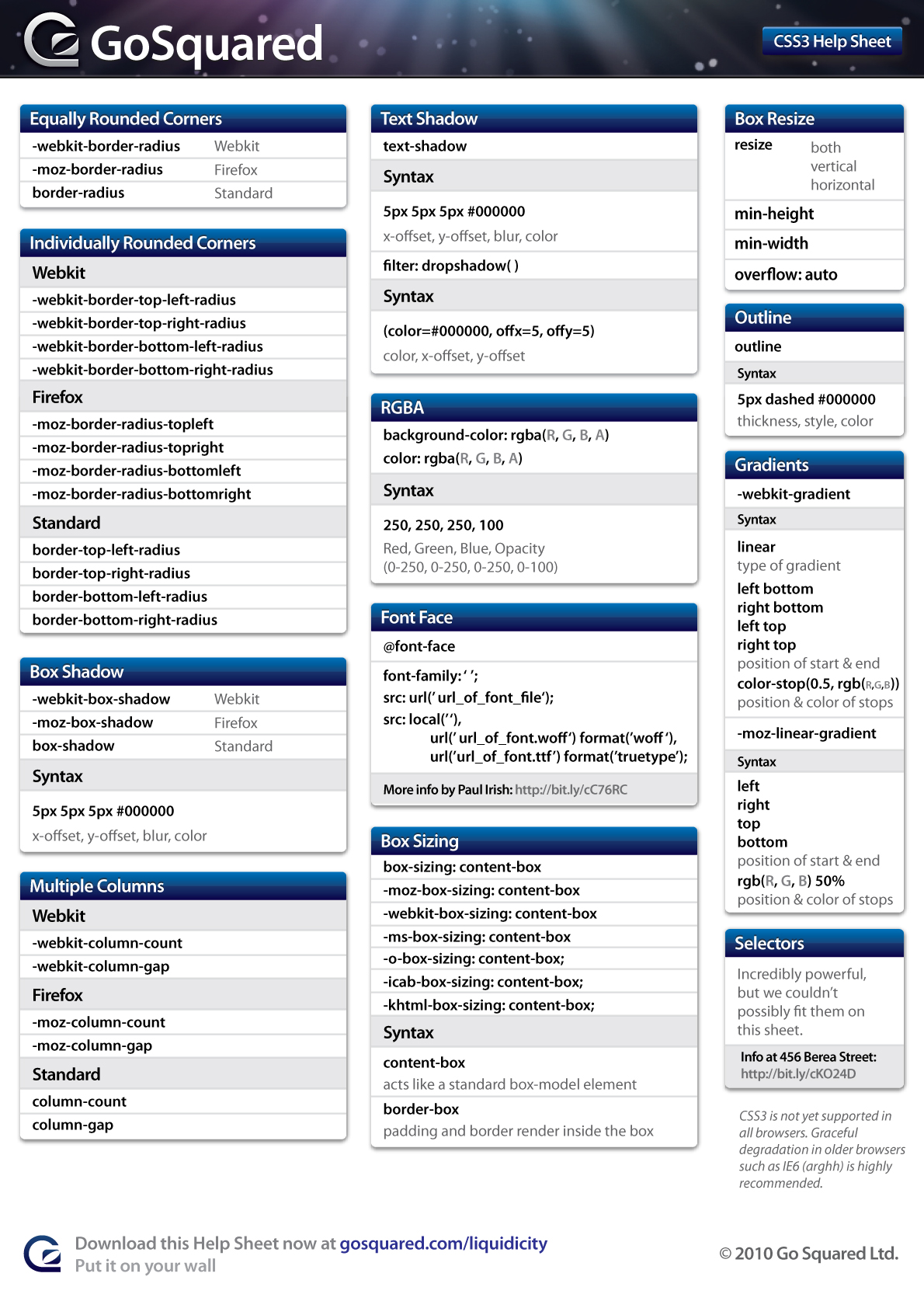
Today we are glad to release two useful cheat sheets that will help you quickly look up the right CSS 2.1-property or an obscure CSS 3 property. The style sheets contain most important properties, explanations and keywords for each property. The help sheets were created by GoSquared and released for Smashing Magazine and its readers.
Download the cheat sheets for free!
The CSS 2.1 Help Sheet covers Syntax, Font, Text, Margins, Padding, Border, Position, Background, List, Media Types and Keywords. The CSS 3 Help Sheet contains code snippets for Rounded Corners, Box Shadow, Multiple Columns, Text Shadow, RGBa, Font Face (actually, not the CSS3 property, but still include for the sake of usefulness), Box Sizing, Box Resize, Outline and Gradients.
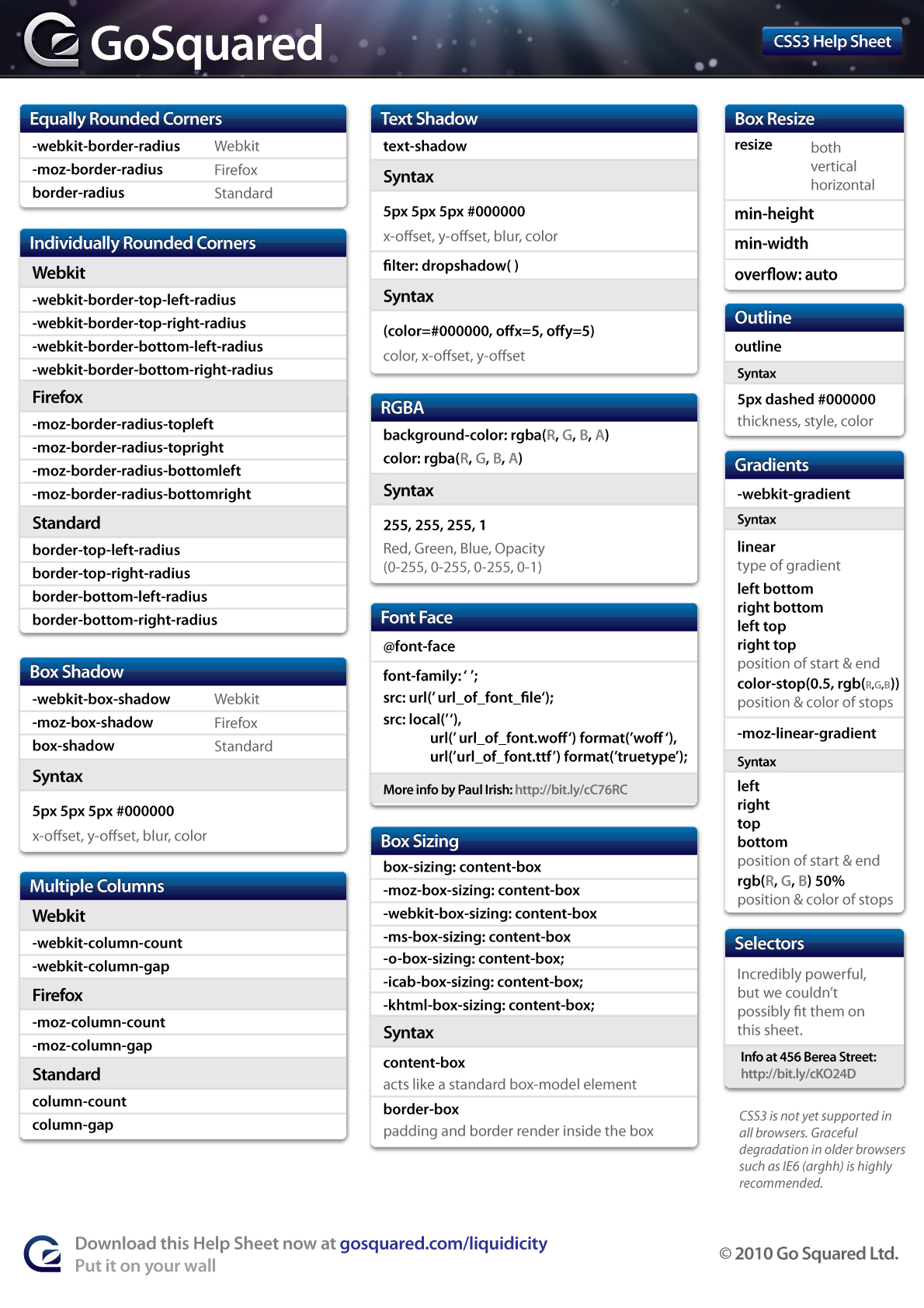
- CSS 2.1 Sheet (large preview)
- CSS 3 Sheet (large preview)
- download the CSS 2.1 Sheet (PDF) (0.2 Mb)
- download the CSS 3 Sheet (PDF) (updated, 0.2 Mb)
- release post on the designers’ page
Behind the design
As always, here are some insights from the designers:
“We created the original CSS Help Sheet because we spent ages staring at ugly cheat sheets while designing beautiful sites. So we thought we’d make a Help Sheet that didn’t hurt the eyes of anyone who tried to use it. The past year, we’ve found ourselves using more and more CSS3 methods, and there was never much in the way of help out there until we decided to create a Help Sheet specifically for CSS3.
We’ve kept CSS2 and CSS3 on separate Help Sheets for now as not everything in CSS3 is finalised, or works in all browsers (cough, IE).
We hope you enjoy using them, and that they help you create even more memorable, usable, and stylish websites.
Thank you, guys. We really appreciate your work and your good intentions.
Related Posts
You may be interested in the following related posts:




DaveKingsnorth
May 13th, 2010 11:14 amThe CSS3 cheat sheet is pretty useful. Might print this one
Joshua Briley
May 13th, 2010 11:14 amThanks for posting this… I never remember the CS3 Webkit info.
Felix Chi
May 13th, 2010 11:27 amSo, 12 lines of code to get a rounded corner… is this the bright future we’ve been waiting for?
bill
May 13th, 2010 12:41 pmSomeone can’t count. It’s one line if you want all four corners to be the same, and three lines if you want all four corners to be the same in all browsers that support CSS rounded corners. Someday border-radius along will be sufficient.
thekumar
May 14th, 2010 5:36 amyou could go upto 12 lines if you make an ugly looking rounded corner box.
Robin Fisher
May 13th, 2010 11:28 amReally useful. Only comment is that RGBA values are between 0-255 for RGB and 0-1 for A.
Svein
May 17th, 2010 11:44 amReally? Sounds strange… This means it would only be fully transparent or fully opaque. A normal a channel should have 0-255 so you could use it to set something to be semi-transparent. Or does it mean you can set A to be 0.5?
acepek
May 13th, 2010 11:46 amThank you for the helpful resource! It’s a whole new world of round-corner boxes.
g0dkar
May 13th, 2010 12:14 pmIt needs some bug correction :P
Smashing Editorial
May 13th, 2010 12:23 pmCan you please specify the bugs?
Markandey Gupta
January 24th, 2012 7:43 amFirst of all thanks for nice css3 pdf file .I will learn css3 & improve css skills.
Fabian Irsara
May 13th, 2010 12:25 pmGreat sheets, probably gonna use the css3 sheet as there aren’t so many other out there yet!
James Gill
May 13th, 2010 12:29 pmHi guys,
We’ve updated the CSS3 Help Sheet with the correct RGBA values and sent it over to SM, for now it’s available on our original post at:
http://www.gosquared.com/liquidicity/archives/1010
We’ve checked with several people, but are there any other bugs? If so, please say and we’ll get on it.
Thanks!
shiftdelete
May 13th, 2010 1:11 pmDownloaded the PDF, but I get an error stating that it
“Cannot extract the the embedded font ‘JCTOYI+MyriadPro-Semibold’. Some characters may not display or print correctly.”
And it doesn’t display or print correctly. :)
James Gill
May 13th, 2010 4:35 pmApologies if you’re having an issue with displaying the PDF. We’ve exported with text and artwork compressed, and tested on multiple systems, PC and Mac, with and without Myriad Pro installed. I can provide a version with fonts set in Helvetica if you would like? Or if you only need to print you could use the large size JPG. Sorry for the problems you’re experiencing here.
shiftdelete
May 13th, 2010 5:30 pmNo problem. Works great on my Mac at home. Printing here. I hate that I have to use Windows at work.
DaveHoeks
May 13th, 2010 1:29 pmNice, immediately printed this baby!
Never need google again! ;-)
Tedi
May 13th, 2010 1:36 pmGreat sheet, thanks for sharing! The css3 sheet made my pin-board!
Tedi
Deezy
May 13th, 2010 2:18 pmHelpful but hideous. Can’t win ‘em all!
wcimage
May 13th, 2010 2:29 pmThank you very much. Walt
jess
May 13th, 2010 4:06 pmgood to have. … not sure about that hideous comment… please specify.
Thomas Scholz
May 13th, 2010 4:14 pm»outline« is misplaced: This is a CSS 2.1 property.
James Gill
May 13th, 2010 4:32 pmApologies, you’re correct. Thankfully it’s still valid in CSS3 so it’s not doing any harm there. If people can’t live with this, I can try and fit it in on the CSS2 Help Sheet.
James Gill
May 13th, 2010 4:30 pmHi guys, thanks for the continued positive comments. Apologies if anyone (Deezy, only) thinks these are “hideous” but we’ve tried to make them as attractive as we could.
Billou
May 13th, 2010 4:59 pmSeriously, great job, very useful !
I’ve dowload them in the second, thanks a lot !!
Christian Munoz
May 13th, 2010 5:40 pmThese CSS sheets are very handy. Thanks for the continuous support. Great job!
Alex Batista
May 13th, 2010 6:46 pmIt’s very helpful!
gurpreet
May 13th, 2010 8:41 pmWebkit is new to me.. thanks for this wonderful help…
Lukasz Bachur
May 13th, 2010 10:13 pm2.1. – too basicly…
saroz
May 13th, 2010 10:24 pmthanks for css3. but how can i solve css3 for Opera?
gopal
May 13th, 2010 10:30 pmit very usfull
Harald
May 13th, 2010 11:20 pmThank you, didn’t really dive into CSS3 yet, so this comes in very handy.
Hartmut
May 13th, 2010 11:39 pmThank you!
Deoxys
May 13th, 2010 11:51 pmGreat, i just wanted to create such a sheet of my own. :-)
Shiv
May 14th, 2010 12:40 amGrate, It’s really helpful to us. Thank you!
KF
May 14th, 2010 1:27 amGreat great great!
Very useful.
Cheers.
jaronbarends
May 14th, 2010 1:33 amIt would be great if you could add the shorthand notation syntaxes, like border: [ <border-width> || <border-style> || <border-color>]
louna
May 14th, 2010 2:50 amthanks a lot, it’s sooooooo helpfull and usefull, but it would be great if you add some scipt for the IE browsers.
Alice
May 14th, 2010 3:18 amNice idea, and bits of it are really useful summaries, but I have a couple of issues (sorry!)
On the css 2.1 sheet you have a section called ‘General’, where you have a mix of selector syntax, where you decribe how to select a tag by its class or ID, then you have a bit of HTML markup info about divs and spans, then you have a bit of CSS attribute info, about color and overflow etc.
It’s actually really unhelpful to mix up these three types of information under one heading as you are implying that these are all the same type of information, which they are not.
There is also an error I think: you give color as ‘foreground color’. As far as I know, this attribute only controls text color. If that’s what you mean by ‘foreground’ I think it may confuse some people.
It’s not really clear what the ‘shorthand’ box is for either.
One final comment… without re-opening the IE6 debate, some people (like me) still have to develop for IE6 due to Government users who still have to struggle with it, sadly. So glibly adding a comment like ‘developing for IE6 is a lost cause’ may be something we can all empathise with, unfortunately some of us still have to, and new designers need to know that they may have to for a while too at least.
Thanks!
blurkness
May 14th, 2010 4:27 am“CSS3 Modules documented in one place” http://ajaxian.com/archives/css3-modules-documented-in-one-place
Link: http://vidasp.net/css3/
;)
James Gill
May 16th, 2010 8:37 amAwesome – that looks pretty useful.
If anyone needs more detail than what our Help Sheets provide, W3C is the place to go.
Phil Benoit
May 14th, 2010 5:34 amThanks for this, it will be up on the wall for the next few months!
Simon
May 14th, 2010 5:44 amThanks! Cheatsheets are great!
LordOfMictlan
May 14th, 2010 6:23 amMuch better cheat sheets for CSS:
http://www.w3schools.com/css/css_reference.asp
http://www.veign.com/downloads/guides/qrg0008.pdf
The ones offered in this post would only be useful if you had no experience at all with CSS.
James Gill
May 16th, 2010 8:42 amThey look like some great cheatsheets.
Our Help Sheets may not be for everyone, but they certainly cover enough to be useful to more than just beginners.
It’s a difficult balance to get a useful amount of information on to 2 Help Sheets, ensure they’re readable, look attractive, and remain helpful. As with any design, we had to make a few tradeoffs to meet those priorities.
srinufx
May 14th, 2010 6:42 amGreat Article!
war
September 19th, 2010 8:53 amyou’re gr8 ra
Jean-Francois Monfette
May 14th, 2010 6:52 amOnce again Smashing Magazine does a smashing good job. Thanks a lot for those very useful cheat sheets.
Leeiio
May 14th, 2010 5:08 pm6.2. The ‘box-shadow’ property
This module previously defined a ‘box-shadow’ property. This feature has been removed from this module for further discussion, and should reappear in another CSS module (or a later version of this module) in the near future.
and the lastest version is inset || [ <length> <length> <length>? <length>? || <color> ]
http://www.w3.org/TR/2008/WD-css3-background-20080910/#the-box-shadow
http://leeiio.me/css3-box-shadow-removed/
madhu
May 14th, 2010 9:15 pmreally thanks for the links of CSS information
anjum
May 14th, 2010 10:12 pmHey
It seems you aren’t outlines Your PDF source file. I am having problem rendering Your PDF font. as i am not on Mac. Will u please outline Your source pdf file which break fonts. Please update link
Thanks
James Gill
May 16th, 2010 8:44 amHi Anjum, thanks for the comment here and on our own site – we’ll see what we can do to ensure the PDF displays better for those without Myriad Pro. Apologies for not outlining the font before, we assumed that we had, but evidently we were mistaken.
MayMax
May 16th, 2010 1:39 amI must download cheet sheets. Very essential for me. I am visiting another related pages in another tab. I like to share this pdf files in my blog (http://netgator.blogspot.com). Would you please give me permission to do that.
Thanks
Vertinix
May 16th, 2010 8:07 amCSS3 cheat sheet is very much helpful.
Tyom
May 16th, 2010 1:36 pmBox shadow can also be ‘inset’, have negative values and have variable opacity.
e.g.: -moz-box-shadow: inset 0 -1px 1px rgba(0,0,0,.4)
Also, rounded corner shortcuts don’t have to be equal in one line declaration.
e.g.: -moz-border-radius: 0 4px 4px 0 (top left, top right, bottom right, bottom left).
Also saves trouble remembering the difference between -webkit-border-top-left-radius and -moz-border-radius-topleft.
Crossbrowser gradients:
Firefox: background-image: -moz-linear-gradient(#eee, #ccc);
Webkit: background: -webkit-gradient(linear, left top, left bottom, from(#eee), to(#ccc));
IE filter: progid:DXImageTransform.Microsoft.Gradient(startColorStr=#eeeeee, endColorStr=#cccccc);
Cristian
May 17th, 2010 5:36 pmThank you, you have no idea how helpful this is. Simple, and helpful.
Rosti The Snowman
May 18th, 2010 1:42 amBrilliant post very helpful!
Praveen Nair
May 18th, 2010 7:54 pmHey….thank you very much for the nice post.
regards
nair
devin
May 18th, 2010 8:02 pmwhat about ie6 ?? is it compatible for ie6?? and the hopeless answer NO…..
kelrey
May 18th, 2010 9:07 pmthanks …can’t wait to read the css3 cheat sheet
Jarryd C.
May 18th, 2010 10:23 pmThanks for the great cheatsheet. One question though:
Any reason why you chose to use “src: local(’ ‘),” over “src: local(‘☺’).”?
Zeeshan
May 19th, 2010 12:49 amits very nice idea. I also use these properties. thanks
Michael Persson
May 19th, 2010 4:35 amGreat links, thanks also for the great smashing book, I’m reading it now and its really useful…
Ahmad Alfy
May 19th, 2010 7:06 amI’ve always wanted a cheat sheets for CSS3 :) Thank you
Rakesh Menon
May 19th, 2010 5:59 pmThank you for the share.
Andre Viana
May 21st, 2010 12:13 pmThanks!
Dries Van haver
May 24th, 2010 10:57 pmNice one, it ‘ll role out of my printer…
markeb23
May 25th, 2010 2:58 pmBoth sheets are very useful and look great too!
James Gill
June 2nd, 2010 4:30 pmFor anyone who was having trouble reading these Help Sheets due to font issues, we’ve published new versions on the GoSquared site with all text outlined:
http://www.gosquared.com/liquidicity/archives/1010
I hope this helps, and thanks for your patience!
Camp fire ring
June 16th, 2010 5:27 pmOkay..i see!this might help.
thanks
camp fire
Ipads Tablet
June 21st, 2010 9:44 pmThe CSS cheat sheet is a one-page reference sheet, listing all selectors (as of CSS 2.1) and properties. It includes a visual example of the box model, unit reference for CSS units and the various media types CSS makes allowance for.
ipad tablet
E_Designer
July 8th, 2010 8:46 amLove the CSS cheat sheet!
haridesigner
September 29th, 2010 11:58 pmGood one
skylos
June 26th, 2011 7:37 pmDude where’s my Opera?
Thanks anyway
sp42
September 5th, 2012 11:18 amI like it, thank you!
