hidden

Smashing Magazine

A Complete Guide To Tumblr

Advertisement

Think of Tumblr as micro-blogging on steroids (technically, it’s called “tumblelogging”). Whereas Twitter and similar services limit posts to 140 characters or less, Tumblr lets you post updates of any length, although it’s best suited to short-format posts. Tumblr bridges the gap between full-blown blog and micro-blog.

Photopost in A Complete Guide To Tumblr

Tumblr is also an option for designers and creative people, because it gives you complete control over the look of your tumblelog. It also offers great opportunities for theme designers, especially with the recent launch of premium themes (which range in price from $9 to $49). Read on for your complete guide to using and designing for Tumblr.

[By the way, did you know we have a free Email Newsletter? Subscribe now and get fresh short tips and tricks in your inbox!]

Why Use Tumblr?

Quite simply because Tumblr makes setting up a blog very easy. It also makes it very simple for you to follow other tumbleloggers on the website and to share their content. Tumblr tries to combine the best parts of blogging and micro-blogging in one. It handles longer-form and multimedia posts, like regular blogs, while encouraging more interaction between tumbleloggers, like micro-blogs.

Post Formats

The fact that Tumblr has built-in formats for a variety of content types makes it stand out from other blogging and micro-blogging platforms. There are templates for text, photos, videos, audio, quotes, links and chat transcripts. Most themes take advantage of the differences between these post types and implement special formatting for each one. You can also add plain text to most of these post types, and you can add images to your text posts. It’s a quite flexible system.

Posttypes in A Complete Guide To Tumblr

Because of the unique post formats, Tumblr makes a perfect platform for vlogging and podcasting, as well as for photo blogging. For audio posts, you can even call in a post, requiring nothing more than a phone. You can also email in posts of all types (each type of post has a specific email format).

Tumblr API

The Tumblr API has spawned plenty of third-party apps that let you do all sorts of things with Tumblr. More than a dozen iPhone apps can be used with Tumblr, and at least as many Web services. Desktop and mobile apps are available, as well as widgets and plug-ins that you can use on other websites. You can set up Tumblr to automatically post to your Twitter or Facebook account, too.
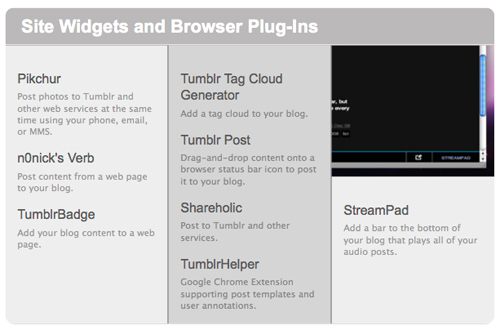
Thirdpartyapps in A Complete Guide To Tumblr

For developers, the API opens a world of options for creating apps. The API itself is relatively straightforward and anyone with basic PHP and XML skills will have a short learning curve. While dozens of Tumblr apps are already out there, there’s still plenty of room for further expansion.

Other Unique Features

Like Twitter, Tumblr lets you follow other users and view their posts in your dashboard. Tumblr also gives you the option to reblog or “heart” (the equivalent to a “Like” on Facebook) posts from anyone, whether you follow them or not.

Following other users is simple: just click the “Follow” link in the upper-right corner of their tumblelog. That’s also where you’ll find the links to heart or reblog content.
Reblogdashboard in A Complete Guide To Tumblr

Blog Options

Tumblr gives you fairly complete control over how you blog. You can set up group blogs with multiple authors. You can also set up numerous blogs under a single account (each with its own custom options), though only one username is able to follow other tumblelogs. Tumblr also lets you keep private Tumblelogs that are password-protected, so you can share them with those you know or keep them completely personal. Just make sure not to post to your public tumblelog by accident!

Getting Started

Starting out with Tumblr is easy. Just sign up on the site, enter your email address and a password and the URL you want to use (something.tumblr.com). You’ll have the option to set up a custom domain name after you’ve signed up. Once your account is set up, you can start posting right away.
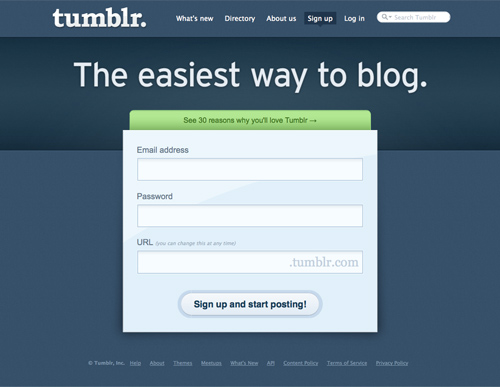
Signup in A Complete Guide To Tumblr

Themes and Customization

Hundreds of themes are available for Tumblr, most of them for free. Take some time to go through the theme options when you sign up, either to find one for your tumblelog or to get ideas to create your own theme.
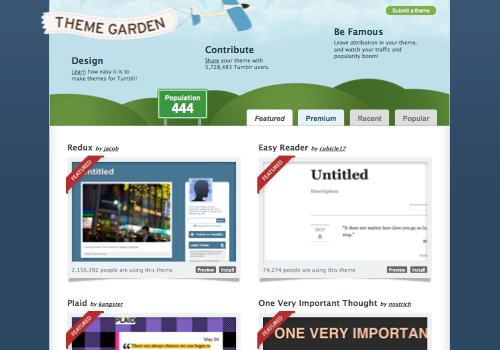
Tumblrthemes in A Complete Guide To Tumblr

One thing you may notice with Tumblr themes is that a lot of them have very narrow content areas. While wider themes are available, the vast majority are narrower than 800 pixels (and some even narrower than that).

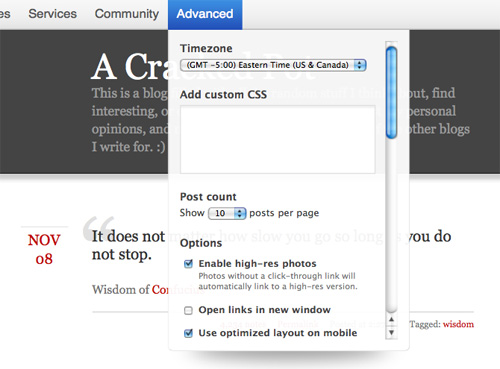
Most Tumblr themes come with some customization options that don’t require any HTML and CSS knowledge (if you plan to create some public themes, you’ll probably want to include some customization options). There’s also an area to enter custom CSS that will override existing styles.
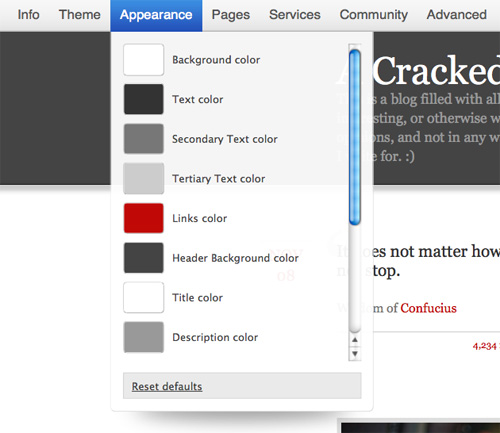
Appearanceoptions in A Complete Guide To Tumblr

Customcss in A Complete Guide To Tumblr

You can customize the HTML in any theme, too. Click on the “Customize” link from your dashboard, and then click on “Theme” and “Custom HTML.” This is also how you would create a theme from scratch. You can link to an external style sheet, too (Tumblr has a static file uploader for uploading theme assets).
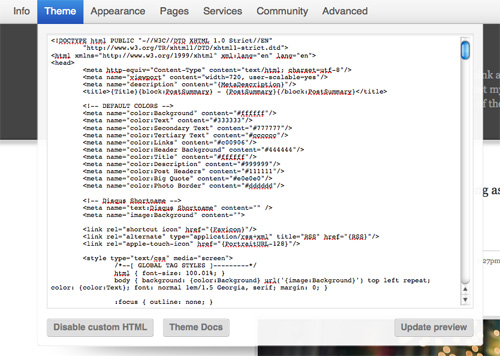
Customhtml in A Complete Guide To Tumblr

Editing an existing theme is a great way to start designing for Tumblr. It also gives you complete control over how your theme looks and works without having to start from scratch.

The Bookmarklet

The Tumblr bookmarklet makes it easy to post content from anywhere on the Web. Just drag it to your bookmarks toolbar and use it when you find something to blog about. Depending on the page’s content, a window will pop up suggesting a particular content format for your post. You can change the post type right there or accept its suggestion.
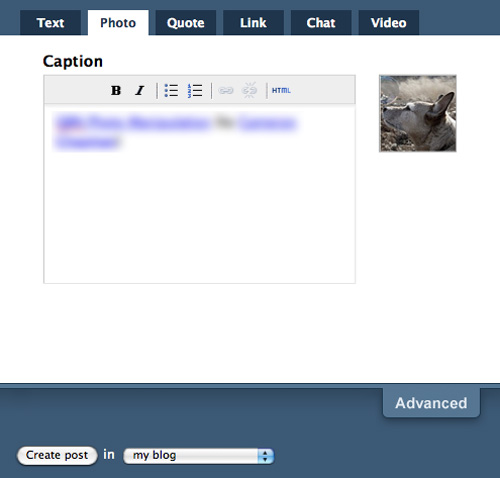
Bookmarklet in A Complete Guide To Tumblr

Most pages will default to the “Link” post format, but if you’re on Flickr, for example, it will default to the “Photo” format. Likewise, if you’re watching a YouTube video, it will default to the “Video” format.

Creating Custom Tumblr Themes

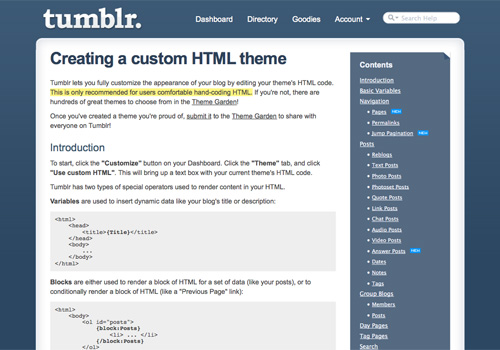
While Tumblr makes it easy to customize the HTML and CSS of almost any theme, you may want to start from scratch. If you’ve ever created a theme for another blogging platform or CMS, creating a Tumblr theme won’t be any more difficult. Even if you haven’t created a theme for another CMS, creating a Tumblr theme isn’t much more difficult than creating a standard HTML template.
Customtheme in A Complete Guide To Tumblr

Basic Structure

Tumblr themes include the same basic parts as any website. There’s usually a header and main content area, as well as an optional sidebar and footer. Beyond that, Tumblr themes are broken down into blocks. Each block on your tumblelog contains some piece of data. For example, there are blocks for each of the post types (text, photo, audio, video, etc.), as well as blocks for things like your tumblelog’s description and “Previous” and “Next” page links.

The Tumblr loop has a huge number of variables to take advantage of. You’ll need to define blocks for each post type in order to display them properly in your theme. Beyond that, you choose what to include in your theme.

A complete list of Tumblr variables can be found on the Creating a Custom HTML Theme page on Tumblr’s website. The page also includes more information on creating Tumblr themes in general.

More on Tumblr Theme Variables

Variables allow you to do various custom things with your Tumblr themes. There are basic variables for things like the theme title, portrait URLs and favicons. There are unique variables for each of the post formats, too. Some formats (like text posts) have only a handful of variables, while others have over a dozen.

Creating Public Themes

With the addition of premium themes, many designers are becoming more interested in creating their own Tumblr themes. You might want to do a few things to a public theme that you might not bother with for a personal theme, though. One of these is creating some customization options that allow users to change things like font colors and which parts of a page to show and hide. Look around at what other themes allow to be customized, and look at the variables that Tumblr uses.
Submittheme in A Complete Guide To Tumblr

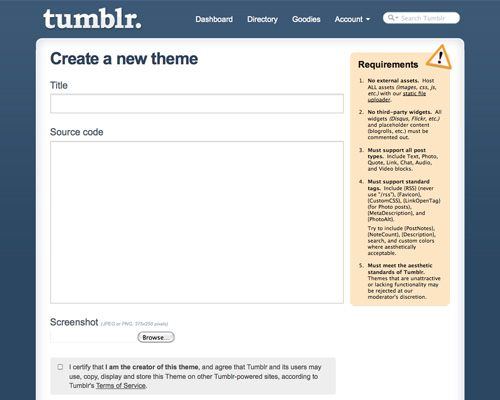
Public themes do have a few requirements that may not apply to personal themes. These are:

  • All the theme’s assets have to be hosted on Tumblr.
  • Third-party widgets have to be commented out. This means that you can include the code and instructions on how to enable it, but it must be disabled by default.
  • Your theme must support all of the different post types: text, photo, quote, link, chat, audio and video.
  • It must support the standard tags (check the variables list to see what they are).
  • It must be good-looking and fully functional. Tumblr themes are vetted for quality; unattractive ones won’t make the cut.

At the moment, when you submit a theme to Tumblr, it’s free by default. To be able to sell premium themes through the Tumblr directory, you’ll either need to ask or be invited. Overall, the premium themes program is pretty secretive.

This doesn’t mean that you can’t sell premium Tumblr themes elsewhere. Theme Forest has a number of Tumblr themes for sale. Other theme developers sell them directly through their own websites. Both are options if you want to get into the premium theme market.

Remember to include credit and a link in the footer of your theme, so that visitors can find your other themes and download them. Many users will leave this credit and link as is, giving you potential traffic for your blog.

Tumblr-Specific Memes

You may want to consider joining in on some Tumblr-specific trends, events and memes out there.

Tumblr Tuesdays and Recommended Blogs

Think of Tumblr Tuesdays as sort of like Twitter’s #FollowFriday hash tag. Tumblr has a built-in recommendation engine that feeds the directory listings of blogs that are recommended enough as well as the recommended tumblelogs that show up in your dashboard’s sidebar.

Bacon
Baconbaconbacon in A Complete Guide To Tumblr

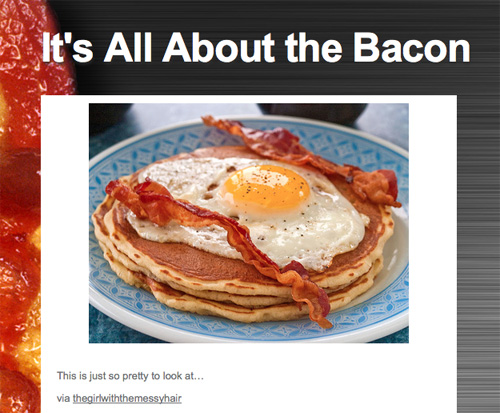
I suspect that Tumblr has a higher proportion of bacon-related blogs than on any other blogging or micro-blogging service out there. Just a quick search turns up at least half a dozen tumblelogs focused exclusively on bacon.

Unfollow Friday

Playing on Twitter’s #FollowFriday hash tag, Unfollow Friday encourages you to post annoying or disgusting things to your tumblelog in an effort to get people to unfollow you. The goal is to see how many people you can get to stop following you.

Conclusion

Whether you’re looking for a quick and easy platform to post short-format or multimedia posts or you’re interested in developing custom Tumblr themes to give away or sell, this guide should get you on your way. If you have additional resources or tips to share, please do so in the comments below!

Further Resources

(al)

Cameron Chapman is a professional Web and graphic designer with over 6 years of experience. She writes for a number of blogs, including her own, Cameron Chapman On Writing. She’s also the author of Internet Famous: A Practical Guide to Becoming an Online Celebrity.

24

Tags:

Advertising
  1. 1
    theGipper
    July 22nd, 2010 6:10 am

    Why is it that it is cool to start blogs with an expletive, and even more normal to review them like there’s nothing wrong. Crude and pottymouth is not cool, especially for a general web audience. Your review should not glorify a crass trend.

    • 2
      Vitaly Friedman
      July 22nd, 2010 6:16 am

      I think you are right. The article was updated, thank you.

    • 3
      Damon
      July 22nd, 2010 6:26 am

      Aw did the name of the article change? It used to be Fuck Yeah Tumblr? That would have been quite appropriate, really.
      It also is strange not to mention the FuckYeahTopic blogs in the Memes section.. it’s a pretty predominant one.
      And if you’re put out about seeing swearing on the internet, you might want to start getting used to it, because there’s only going to be more and more.

      • 4
        Pete Morley
        July 22nd, 2010 6:37 am

        It was the FuckYeah topics that people were taking offense to. Shame really since they are popular memes. You’d think an adult would be able to handle the odd naughty word when used in context.

      • 5
        Bobby Adamson
        July 22nd, 2010 7:07 am

        EDIT – So, I figured out that it was pretty much the title that changed and nothing really informative… you guys might want to do an edit on the post explaining that. I thought I was missing out.

    • 6
      Some Dude1
      July 23rd, 2010 11:06 am

      I can’t stand f**ks like you – if you don’t like something, f**k off… nobody asked for your opinions and morals on blog post content, nobody wants to be ‘policed’ on the internet.

      Great post – I apologize for some of the internet c*nt stains that wait for new blog posts so they can complain about them. I don’t apologize for my language ;)

    • 7
      Jake
      July 27th, 2010 2:01 am

      Fuckyeah blogs are a big part of tumblr, actually. And not everyone is scared of an ickle little swear word.

  2. 8
    Brian Alexander
    July 22nd, 2010 6:11 am

    I have not been using Tumblr that long, but the time that I have I love it!

  3. 9
    Marcos Paulo
    July 22nd, 2010 6:16 am

    I use my Tumblr for my site/portfolio.

    mppagano.tumblr.com

  4. 10
    Sławek
    July 22nd, 2010 6:18 am

    Is the fact that some blogs start with a vague ‘FuckYeah’ or ‘HellYeah’ the first and most important thing to mention when writing about Tumbler’s trends?

    First thing I thought when I saw that header: Someone hacked SM and replaced a header with ‘FuckYeah’.

    ( Edit: Nevermind, article updated – that’s better :) )

  5. 11
    Mike Smedley
    July 22nd, 2010 6:20 am

    Some really cool blogs on Tumblr – Quite hoping to start on my own theme soon, rather then mooching from those already there!!!

  6. 12
    Chaim Chaikin
    July 22nd, 2010 6:22 am

    If sd cards that are not big enough to be sd cards and not small enough to be micro-sd cards are called mini-sd cards then tumblr should be called mini-blogging.

  7. 13
    Pumpki
    July 22nd, 2010 6:23 am

    EXACTLY WHAT I NEED RIGHT NOW!!!!
    THANKS SOOO MUCH!!

    kinda funny… :)
    Always on the ball guys!

  8. 14
    Share and like
    July 22nd, 2010 6:27 am

    Great post. I can do something with this.

  9. 15
    Ted Goas
    July 22nd, 2010 6:36 am

    Huh… never heard of unfollow friday before.

    A nice followup might cover creating themes (including Tumblr hooks and shortcodes), using Tumblr on a custom domain, and extending Tumblr (if that’s possible).

    This article is nice but PAINFULLY simple. You can get most of this info from Tumblr’s about & how-to pages.

    • 16
      jtd
      July 22nd, 2010 1:48 pm

      agreed… it’s so simple it almost seems like an advertorial.
      doesn’t feel like a ‘complete guide’ at all.

      i’d much rather see a review of SquareSpace, or a comparison of blogging tools like Expression Engine vs. WordPress vs. SquareSpace, yadda yadda yadda… more of what he said above…

      definitely a noob article.

  10. 17
    tripdragon
    July 22nd, 2010 6:36 am

    Wusses if you can’t take a bit of cursing leave the internets :P . But besides the point there was to much missed for this to be remotely a complete guide.
    How to promote, how to code, daily use, etc.

  11. 18
    Garry Aylott
    July 22nd, 2010 6:46 am

    I’ve been using Tumblr for a while and it’s the easiest blogging platform to get to grips with. I use it for my design blog garryaylottdesign.co.uk and suits all my needs for now.

    Great article, thanks.

  12. 19
    Cliff
    July 22nd, 2010 6:46 am

    I gotta admit, I don’t see tumblr as professional at all. To me, tumblr is the new xanga – a blog used for high schoolers and other young folk who want to do a bit of creative writing, pass on interesting quotes and photos, and rant about their day. Honestly I would not take a blog seriously if it were a tumblr blog. Is anyone with me on that or am I just a biased asshole?

    • 20
      Damon
      July 22nd, 2010 7:03 am

      I almost agree. I think of tumblr mostly as a scrapbook and don’t expect insightful discussion.. and I kind of assume that many but maybe not most of the people using it are highschoolers or wannabe trendy hipsters. At the same time, I use it, and a lot of really cool people use it. It may just be that the format is so easy to get into that many do and there’s no overall quality filter.. but luckily you only follow the blogs you want and can happily ignore the rest.

    • 21
      Pete Morley
      July 22nd, 2010 7:13 am

      Agree with you. I’ve only just embraced WordPress as the backend for my own site, but that’s all it is, just a backend, I’ve tried to make it look as un-wordpressy as possible by using custom loops in a handbuilt template. A lot of these Tumblr sites seem like a great way of publishing content quickly and easily but that’s as far as it goes for me. It’s going to take some seriously skilled theme builders to show me the light with Tumblr. I’m sure as more designers embrace it, it’ll become more accepted, but right now it doesn’t feel as complete or as customisable as WordPress has become.

      • 22
        Damon
        July 22nd, 2010 9:33 pm

        I don’t think Tumblr has much place as any sort of CMS if that’s what you’re getting at… it’s much closer to a multimedia twitter or facebook wall, with a bit of myspace thrown in (theme customizability). I don’t see it being useful for things that it isn’t.. That said, I’ve seen people use a tumblog as a resume, so who knows.

  13. 23
    Juliann
    July 22nd, 2010 6:49 am

    I love Tumblr, the simplicity and the design. Now I’ve quit Blogger for Tumblr. I’ve two blogs there, one dedicated for my lover and another about thoughts. Things I couldn’t say on twitter because it’s too long

  14. 24
    Sergei Tatarinov
    July 22nd, 2010 6:51 am

    Don’t know what to say.. I once argued to defend smashing article, this time I can’t help but say that this article is somewhat silly. What’s next? A complete guide to posterous?
    Also, your link to unfollow friday wiki is taking me to a wrong domain, which is said to be for sale. The correct link is this: http://tumblepedia.wikidot.com/unfollow-friday .
    And there’s a full website here: http://unfollowfriday.com/ .

  15. 25
    Anant
    July 22nd, 2010 6:59 am

    Thanks! this is what i was searching for all day today…. ;)

  16. 26
    Christophe
    July 22nd, 2010 7:48 am

    what kind of moron would need a guide to use Tumbler ?? I mean, the UI is dead simple, if you manage to read and breathe by yourself you should be able to use it …

  17. 27
    jr
    July 22nd, 2010 8:06 am

    Thanks for the article…did anyone else’s virus scanner go off when you clicked on the Cameron Chapman On Writing link?

    • 28
      Sergei Tatarinov
      July 22nd, 2010 8:14 am

      It really takes me to some shitty online scanner, which is in fact, scam. Just leave it, if you have already clicked cameron’s link.

  18. 29
    Frazer Cox
    July 22nd, 2010 8:26 am

    Tumbler!!!
    Exactly what I was looking for!

    Another great article smashing

  19. 30
    Karin
    July 22nd, 2010 8:30 am

    I am not able to centralize their image and text in my tumblog. How to proceed?

  20. 31
    zach
    July 22nd, 2010 8:50 am

    You guys totally missed Tumblr’s biggest meme which is GPOYW or “gratuitous picture of yourself wednesday” where tumblr members (in mass) post pictures of themselves.

  21. 32
    David Horton
    July 22nd, 2010 8:59 am

    Think this has persuaded me to open an Tumblr account! Thanks. Bookmarked and Tweeted!

  22. 33
    Jon Raasch
    July 22nd, 2010 9:24 am

    Yeah I’ve been moving away from WordPress and using Tumblr for all my blogs. Just got too sick of updating WordPress once a month to avoid huge security flaws.

    One thing to note about tumblr: You can tie multiple blogs to one account, BUT only the primary blog can follow other blogs, and there’s no way to make one of the secondary blogs into the primary.

    • 34
      Floris Fiedeldij Dop
      July 23rd, 2010 12:14 am

      Tumblr might have the same security issues, however, since the source code isn’t downloadable, you simply won’t know.

      I rather use wordpress, which i can customize, have control over, can extend, and has auto upgrade and supported by thousands.

      Then tumblr, which (while I use it), is just a tool with a theme, hosted elsewhere.

  23. 35
    Eclipse
    July 22nd, 2010 10:18 am

    Try http://posterous.com/ as an alternative, you don’t even need a registration! You might not be able to customize it that heavily, i guess.

  24. 36
    Steven van Vessum
    July 22nd, 2010 11:33 am

    Awesome article Cameron! Consider it bookmarked!

  25. 37
    Unesm
    July 22nd, 2010 4:33 pm

    Useful guide, Tumblr becomes my favourite micro-blogging platform.

  26. 38
    Kyle Monk
    July 22nd, 2010 6:37 pm

    Its about time you covered this fabulous site!

    I think this topic does miss alot of the beauty of tumblr though while trying to explain the elements of it that are the most simple to work out!

    What I love is how organic tumblr is, I originally started using it as just a blogging tool but it soon became much more, you randomly follow a few people and start to notice that they are interacting on your dash, so you join the discussion and soon you find yourself in a community you didn’t even realise you were joining.

    I beg to differ and would say tumblr is a very viable blogging platform, you have complete control of themes, CSS, JS and HTML to build on existing themes.

    Oh and did I mention the meetups? Amazing.

    Once you filter through the 14 year olds and hipsters there are some beautiful people on there, if you take to find them you can build an extremely loyal fanbase in no time.

    Check out its potential: Kylemonk.tumblr.com

  27. 39
    Jonathan
    July 22nd, 2010 8:48 pm

    I’m only here to brag. My buddy runs the baconbaconbacon.tumblr.com blog. Tumblr is pretty amazing.

  28. 40
    Niraj Singh
    July 22nd, 2010 10:22 pm

    I have been using tumblr for quite some time and do find it very very useful. It allows for a lot of straight forward customization. I think this article is right in informing others about an alternative that helps getting a personal site/blog/micro-blog up in no time. Also updating the site is a breeze. I hardly get much time to devote on my personal site because of so many business/life pressures. Tumblr helps me in maintaining my web-presence with minimum hassles and without making too many demands on my perseverance.

    Niraj Singh

  29. 41
    Kath
    July 22nd, 2010 11:49 pm

    I always sticked to WordPress as I can install it on my server and run it there~ Was more reasonable, because my portfolio doesn’t have much content! Allthough Tumblr looks interesting… I think I’ll try it out :)

  30. 42
    Floris Fiedeldij Dop
    July 23rd, 2010 12:12 am

    I consider tumblr to be a tool, like twitter, etc, .. to help you viral your social juice, along side your real blog on your own domain, on your own host. With full control..

  31. 43
    Abdel
    July 23rd, 2010 12:32 am

    I’ve been using posterous so far, I find it simple and efficient, never tried tumblr but I would like to hear your opinions/experiences if it’s interesting to switch. thanks in advance!

  32. 44
    neonWired
    July 23rd, 2010 1:42 am

    Looks like wordpress for dummies

    • 45
      Jake
      July 27th, 2010 1:59 am

      Except that there is no inherent community between different wordpress blogs, where as you can follow other blogs on tumblr. Tumblr isn’t meant to be a CMS, so why would it need all of the pointless additives of wordpress?

      Tumblr is better because of it’s community. A wordpress-run website can’t say that.

  33. 46
    Richard Käll
    July 23rd, 2010 5:12 am

    I’m running a private tumblr, but I can’t get tags or the search function to work. If I click one of the tags the page just shows “The URL you requested could not be found.”. The search engine can’t find anything either.

    Any ideas?

  34. 47
    Gamblino
    July 23rd, 2010 5:38 am

    Fuck yeah!

  35. 48
    Speider
    July 23rd, 2010 10:21 pm

    Can I hide here for a while, Cameron? They’re getting weird on my article comments.

    LOVE this! :)

  36. 49
    aarom
    July 24th, 2010 7:46 am

    ive used tumblr for years now and have a following of 5000+ and its amazing, but ive never heard of unfollow friday, theres such a thing as follow friday, like twitter
    i asked on my blog and 100+ have never heard of unfollow friday and no one said they had heard of it, think you got that wrong SM :)

  37. 50
    WebSight Designs
    July 25th, 2010 11:13 pm

    Great article, thanks Cameron!

  38. 51
    jjparé
    August 1st, 2010 8:59 am

    As a photographer, I’ve been using it as a quick and easy way to throw together mood boards for upcoming photoshoots. The fact that I can have one main Tumblr account, and then just keep adding new blogs to that account as needed is absolutely perfect.

  39. 52
    Sarah K
    August 4th, 2010 8:19 am

    Thanks for this post. :)

    Although it may not be the most “in-depth” guide on a topic, it covered the basics very well. For those who already use Tumblr, I’m sure it didn’t tell them much that is new — but for myself, who has only vaguely heard of it and seen sites with links to it, it was reall helpful. I didn’t really know what it was or that themes could be made for it. As a long-time MySpace, Xanga, and Twitter theme building I’m really looking forward to trying out a new medium. Might be a nice change from all of the WordPress building I’ve been doing lately!

    P.S. I’m with those who would be offended by the F*** Yeah title. Although I understand that use of words like that are quite commonplace, it still limits an audience by a degree. There are always going to be some people who will not read something with a swear word in the title, whereas they might have without it. :)

Leave a Comment

Make sure you enter the * required information where indicated. Please also rate the article as it will help us decide future content and posts. Comments are moderated – and rel="nofollow" is in use. Please no link dropping, no keywords or domains as names; do not spam, and do not advertise!


Advertisement Advertise with us!
Add this widget to your site!
Visit job board Post your job