Passing The Holy Milestone: How To Meet Deadlines
For too many projects, there comes a time when every action taken, every decision and sacrifice made, is spurred on by pressure to finish. Tempers seem to shrink along with the available days, talk about “high standards” gives way to “good enough,” and people realize that deadlines are aptly named. During the last-minute crunch, someone may well wonder, how did it come to this? Could it have been prevented? Every Web project has deadlines. But not every designer or developer deals with them the same way.
What Causes A Deadline To Break?
Because a deadline marks the end of a project, everyone involved in the project must understand the deadline’s role. Most projects follow a schedule or have an estimated date by which they must be completed. The concept is simple then: when the work takes longer than expected, deadlines get missed.
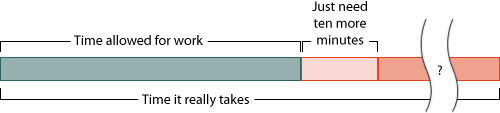
A deadline is the end point of a time estimate, making it a known quantity. But how long will the work actually take to get done?
Of course, projects can be more complicated in their details. Unexpected technical problems and unanticipated changes will affect the amount of work required. Sometimes other tasks take priority. Sometimes the time estimate wasn’t considered carefully enough.
Whatever the cause, too much work needs to be done in the available time. That’s the problem, but not the challenge.
Rate Deadlines By Severity Of Consequences
The hardest deadlines are tied to events that cannot be moved, such as a date promised to the public, an upcoming trade show or a date stipulated in a contract. Retailers know that their holiday sales must end at Christmas, and theater owners can expect movie-goers to be upset if a 1:00 pm showing doesn’t start until 2:00. Likewise, if a website is tied to a time-sensitive event, its relevance is lost once the event has passed. Hard deadlines have clear consequences when missed.
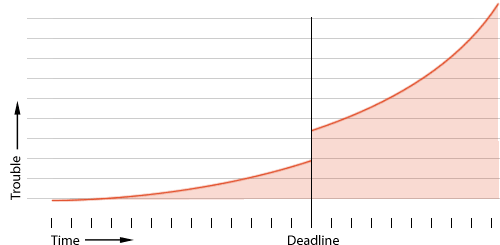
Deadlines exist for a reason. The severity of the trouble caused by missing them increases dramatically after they have passed.
Deadlines tied to less public events are no less real, but a project will soldier on if the deadline slips. Company-imposed target dates, for example, rely less on public demand than on the temperament of managers. Meetings routinely start 10 minutes late because “something came up.”
The softest deadlines lack teeth or are set at some vague point in the future. That’s not always bad: not every missed deadline will cause a life-or-death crisis. But the same methods of solving the crisis apply. There are many strategies for handling a last-minute crisis. Most involve planning, setting priorities and knowing one’s limits.
Strategies For Preventing Deadline Crises
The beginning of a project is a great time to prevent problems later on.
The first solution is both obvious and difficult: do not take on a project that cannot be completed in the given time. Declining paid work requires discipline and confidence, but if the deadline is impossible, then the project may not be worth the money. Money cannot replace time.
Because deadlines with consequences are taken more seriously, keep a written list of definitive reasons why certain tasks must be completed by a given date. Losing money, customers and other assets create real incentives to work.
Schedule deadlines as specific tasks, not the ends of phases. Rather than “Content will be completed by 4 April 2010,” state “Review the content over lunch on 4 April 2010.” This ties the deadline to an event at which results must be shown. Mini-deadlines tied to specific events are more powerful than general statements.
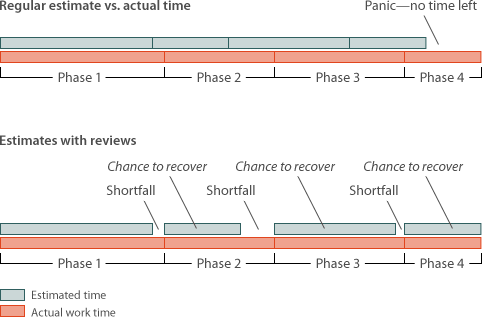
Making up for minor time discrepancies during the course of a project is easier than facing a big shortfall when no time is left.
Plan For Unpleasant Surprises
Incentive may not be the problem, though. Unexpected problems cause many people to break deadlines. Their unpredictability make these problems hard to plan for, and good intentions don’t help you see the future. The key is to recognize that, whatever their nature, problems will likely occur.
If everything seems accounted for in the project plan, then invent a problem. Keep it realistic: “reshoot staff photos” is more likely than “spontaneous server combustion,” but it doesn’t really matter. The point is to create extra time to allow for a deadline crisis. One rule of thumb is to add between half and all of a project’s expected duration. That is, increase the full time that has been budgeted by between 50 to 100% to allow for surprises.
A plan of time estimates for major tasks in a project could look something like this:
| Task: | Time allotted: |
|---|---|
| Content audit | 15 hours |
| Develop content strategy | 15 hours |
| Make WordPress theme changes | 20 hours |
| Import data from old website | 15 hours |
| Test on multiple browsers | 5 hours |
| Total | 70 hours |
Being conservative, let’s take half of 70, which is 35. Now we invent a problem: say, having to retype all content from print-outs. Is 35 hours for that ridiculous? Perhaps. But obstacles are unexpected by nature, and they always steal time from an otherwise ideal budget.
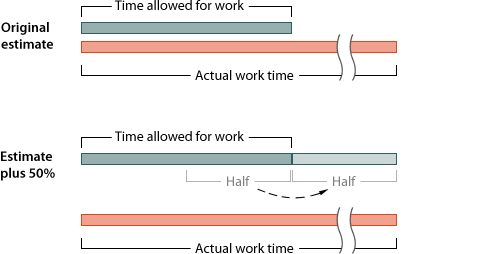
Scheduling for unknowns is hard, but acknowledging that extra time is required will better align estimates with reality.
A line item needs to be added to the budget. It could be “Time to make changes” or “Allowance for unknowns.” The description isn’t as important as the fact that you have planned for surprises.
Is half of the original budget too much? It may drive cheaper clients away, but overestimating and finishing under the deadline is better than the alternative.
Mitigate A Deadline’s Threat By Adding Other Deadlines
Implement mini-deadlines within a project’s timeline. Mini-deadlines minimize last-minute problems by serving as checkpoints to gauge how far off track the schedule is, if at all, at certain phases.
- Start
While the project is fresh in everyone’s mind, a schedule for the other phases should be set. - First quarter
Everyone involved should have a sense of whether they can work together. Work begins, and the pristine project on paper comes up against the sticky details of reality. - Halfway point
The bulk of the work happens here. If you doubled your estimate to account for surprises, you would actually be aiming to launch the project right now. - Third quarter
If everyone pushed to launch by the halfway point, then almost everything should be done by now. But it rarely is. - Deadline
Launch the project. - Review
Win or lose, everyone should ask what should have happened at each phase of the project? What should have been done to meet each mini-deadline along the way?
Notice that mini-deadlines are based on time, not task. Tasks have a way of expanding, of taking up more time than planned, which mini-deadlines should prevent. Think of a mini-deadline as a chance to review the project’s timeline. While this approach may not entirely stave off a deadline crisis, it gives you opportunities to catch and correct problems along the way.
Plan Sacrifices In Advance
Every project has absolute requirements, which are essentially the reasons the project exists at all or the problems it is designed to solve. But many also have supplemental requirements. If a project requires A, B and C, then by all means include D, E and F, but only with the understanding that they might have to wait.
For example, a newsletter is an important marketing tool for an e-commerce website, but less important than an easy-to-use cart and secure log-in page. Likewise, the top priority for a photo gallery should be to present photos. If the deadline is looming and the AJAX is buggy, then perhaps the blog should wait.
Marking certain features as secondary provides relief when things go wrong. These features don’t need to be cut, but their deadlines should be later than those of the core project.
Practice
Measure the rate at which you work by timing how long you take to perform various tasks. You want to figure out how much time you need to comfortably perform each task, not how fast you can get it done.
For example, the schedule might allow for 30 minutes to create a favicon. But in reality, it consumes 8 hours.
Wait a minute. Eight hours for a measly 16×16-pixel graphic? Isn’t that… excessive?
That’s not the point. You’re not learning the rate at which you work so that you can gasp in embarrassment at the result. Workflow efficiency can be improved later. The question is, how much time are you comfortable with right now? In this case, it’s 8 hours.
Deadlines aren’t the problem. Problems arise when the work outweighs the allotted time. Learning how long you take to accomplish certain tasks is the best way to set a realistic schedule.
Conclusion
Not every deadline drama can be prevented, but even the worst can be dealt with professionally. Prepare for surprises, break up large tasks into manageable segments and prioritize. It’s a matter of respect: deadlines mean business. Do you?
How do you prevent deadline emergencies? What’s the worst problem you’ve faced under time pressure? What’s your greatest solution? Share your story in the comments below.
(al)


Daniel
July 28th, 2010 4:56 amAwesome article!
I think that the big real problem in deadlines its that we always underestimate our capacity of putting ourselves in troubles.
My advice is: break the activities into small pieces and iterate each one.
Cheers
Rodrigo Acevedo
July 28th, 2010 5:20 amINCREDIBLE!
I love the article!
eclaw
July 28th, 2010 5:21 amGood info, thanks for this article.
I really like the trouble-time graph. :D
vmatheney
July 28th, 2010 5:25 amSome interesting concepts. Will definitely have to incorporate some of the mitigation strategies suggested. Thx!
Kwing
July 28th, 2010 5:33 amI absolutely agree on this one. That concept also applies to real life scenarios other than work.
Thanks for the wonderful idea.
colin
July 28th, 2010 5:51 amGreat article. I’m a big fan of prioritising features with the client – especially when they keep adding them!
S.M.Karthick
July 28th, 2010 5:55 amRightly said, I stopped for a moment and reliased.
Its good to read. But its hard to follow.
Sean Canton
July 28th, 2010 6:15 amTwo critiques to an excellent strategy. One, padding estimates by 50-100% may make for difficult estimates for your clients to swallow. In a job environment, your PM’s will likely want to know that you’re padding estimates, and by how much, so they have a realistic idea of the range of time you’re talking about, not to hand you more work, but to manage the project more effectively!
Anallancy
July 28th, 2010 6:53 amExcelent article. But is kind difficult to follow when you have many projects. I think the mini deadlines could help a lot, it’s more easy finish short periods than see the long time to finish.
Lokesh Yadav
July 28th, 2010 6:59 amNice Article…
I have recently faced this problem in my project. I have estimated the time and last time changes & adhoc issues left me frustrated when i missed my deadline :)
This article definitely helps me a lot in future to handle this things professionally.
Thanks again for this informative article, Ben.
Mohammed Alnasiri
July 28th, 2010 7:25 amMr : Ben Gremillion
Thank you for this great article, & I need to talk to you regarding it for purpose of translating it into another language for the sake of sharing content but I need to get your permission on that.
Thanks
easwee
July 28th, 2010 7:26 amSCRUM works really well if all team members work by it. Since we addapted it in our company meeting deadlines is not the main problem anymore.
Brad Ball
July 28th, 2010 8:40 amGreat Article… I love the idea of implementing mini-deadlines at the start of the project. I continuously deal with quickly approaching deadlines and am always looking for ways to streamline my workflow. By using mini-deadlines it allows you to have more control of the timeline.
Speider
July 28th, 2010 8:58 amMany terrific points to present to the client with the creative brief. If you lay out the possible trouble spots and the consequences (more time = more money), they are more apt to understand that a four week project will become and eight week project if there are delays on their end. The charts would help the layperson to understand the process and time needed instead of three weeks to get you the content and one week to develop and implement the project (because that NEVER happens!).
Great tips for every designer/developer!
Christina Rosepapa
July 28th, 2010 9:15 amGood article. What about clients that let the deadlines pass?
BennieBoy
July 28th, 2010 9:23 amOh the deadline.
I’ve been a part of so many deadlines from corporate to freelance to charity work and this is a great starting point. I especially like tying checkpoints to events like “Review the content over lunch on 4 April 2010.” Great Advice! It’s easy to miss a “content due” deadline by a couple of days but really hard to miss lunch.
Suggestion:
You guys should also include related posts like links to managing client expectations when you do have deadline issues (i.e. http://www.smashingmagazine.com/2008/10/09/strategies-for-successful-client-relations/)
It would be even MORE amazing if you added links to related posts/topics from the Smashing Network!
Eugenio Neves
July 28th, 2010 9:31 amI’m writing form Brazil. Can I translate this post. It’s a awesome article a I would like to spread it in portugues.
Thanks in advance
Sven
July 28th, 2010 1:24 pmeugenio, please feel free to translate at most 2 of our articles and publish them in your blog/publication. And if you do so please send us a link to the article once it’s published – we (probably) are building a list of translations for various articles…
KABUKIGIRL
July 28th, 2010 9:25 pmoh if its possible, then I will translate some to Arabic =D
and will consider sending you the link
Vanja
July 28th, 2010 10:34 amNice article. I agree with previous comment that padding an estimate with 50%-100% will hardly win you any realistic bid. Especially in the crisis aftershock environment where more and more clients are demanding fixed price and fixed schedule quotes…
One way to mitigate this is to use more formal approach to creating the estimate – like Function Point Analysis. Combining FPA and the history data (which this article point to) can give you much more confidence with fixed price quote…
And by all means use the milestones to check the progress vs. estimates – that’s a life saving habit, if you can adopt it :)
Matthew
July 28th, 2010 1:23 pmBrilliant article! – Thanks for sharing!
fklavye
July 28th, 2010 2:16 pmVery academic and great article. Thanks
Cesar
July 28th, 2010 2:39 pmVery useful article,
Guys… Is it profitable for you to translate articles into Spanish?
I’d like to read in Spanish. For now I use google translate.
Thanks for sharing.
Prez
July 28th, 2010 4:32 pmPlan (and quote) for worst case scenario. I always put on an extra 33% of `fluff’ time in my quotes to cover myself for those wonderful surprises that happen in every job. You might need to be creative in explaining the extra hours to the client though up front.
Fed
July 28th, 2010 8:57 pmI don’t think that having a 50%-100% padding time is an effective way to deal with deadlines, You should focus towards more effective control, estimation and management of the project.
Is good practice to have some time for unexpected tasks or problem, but something more realistic, adding 50 to 100% of extra time is almost to double the cost of the project “just in case”.
Bea
July 28th, 2010 9:43 pmThanks for the post, I’m in need of something like this right about now (and still is breaking a certain deadline).
I’ll try to implement something like this not only for work but for other stuff too.
Artist of Life
July 28th, 2010 11:06 pmGreat Article..Very Informative…!!
Julia May
July 28th, 2010 11:40 pmThanks much for such a useful material. Bookmarked.
Vikesh Patel
July 29th, 2010 12:23 amCreating mini deadlines sounds like a good idea.
As the project is broken down in to smaller more manageable chunks.
Also planning for problems is a good tip, as most web projects will cause you to have problems.
I try to schedule at least an extra hour at the end of each project so I have time to rectify any issues.
C2P
July 29th, 2010 2:53 amI work as the senior designer for a creative company in Thailand. I am in fact the only designer that treats with western clients that have a business here in Asia. And the amount of work that hangs on my shoulders is immense.
I have tried by all means to set deadlines very similar to your ones by prioritizing the most important features. But since I am just a puppet behind the master puppeteer, I only get insensible deadlines that affect my workload. And to go further, I not only have to deal with web design, but also with 3D design, photography, Illustrations, package design and the list it goes on and on.
My point is, being the corporate puppet, and only being one of yourself in charge of 8 projects that have in common the same deadline, the management time it just get’s blown apart.
Nox
July 29th, 2010 5:11 amVery nice one
brittanie
July 29th, 2010 6:39 amA lot of times I take on projects that involve learning a new skill. I get excited about the project and think “this will be great!” but then after two hours of thrashing online Google for the answer, I start to realize I underestimated the time it would take to finish the project. I’m usually too overzealous at the onset and need to face it with realistic expectations first, before disappointing my team later. It’s just that I don’t know how to estimate the time it takes to do a new project…
Mac
July 29th, 2010 12:52 pmThanks for the wonderful idea. The article was very informative.
Erik Posthuma
July 29th, 2010 5:41 pmHi there!
Your article popped up through randomized feedly and I’m happy it did. Thanks for a great article!
Benjamin
July 30th, 2010 12:17 amVery cool article (and I’m not just saying that because we have a tool called Milestone Planner. Our brains play tricks with us when it comes to deadlines and difficult tasks. We have to play tricks on it to get over those! Sharing the load – even if it is just telling other people about the deadline – I find helps too. A bit of accountability and a fresh set of eyes are always good.
Randy
July 30th, 2010 12:36 amA must read for Project managers. Great post!
Leon de Rijke
July 30th, 2010 1:59 amThe idea of breaking the project into smaller chunks is very good. I don’t like the idea of adding 50 to 100% “just in case” time and budget. The problem is that a task will take as much time as you will allow it to take.
E.g. you can estimate to develop a page in 8 hours. If you overestimate by 100% it will be 16 hours. The page will certainly take 16 hours to be developed because you allow it to. You’ll make it “better”, “faster” or shift the logo another 3 pixels higher etc. etc.
We also tend to suffer from the Student Syndrome, which makes it worse.
The solution to missing deadlines isn’t adding more time. It is constantly evaluating your estimates and monitoring the progress. If something takes more time, the scope should be reduced in order to meet the deadline.
Satish Chathanath
July 30th, 2010 2:54 amFunny part is Customers at times want to crash agreed deadlines for obvious reasons – beat competition and the likes ;) I think a great deal of time gets lost in loopy approvals and change of brief mid way;) But you can’t pad for all these… can you?
~ Satish Chathanath
erichyunh90
July 30th, 2010 11:42 amThis posts is awesome. The guy developing my wordpress layout right now is already close to 2 months late…
Manu Parashar
July 30th, 2010 1:13 pmNice article, Mini-deadlines tied to specific events is a good idea.. its certainly true that some of our best work will be under the spell of a deadline ..cheers
Pritesh Gajjar
July 31st, 2010 1:54 amMy Strategy to manage deadline is…
When you get 30 days for project, don’t just wait for 30th day to come near you.
Just go and reach before Meter Down :)
1. Make a basic model of the project (like how Ben said about small deadline)
2. Make sure for Critical Technical Problems.
4. Meet client requirements and Complete the Project from Technical End.
3. Give a Good Finish to the Project (Note : Good User Interface can help client to extend the deadline in many cases )
Deliver the product to client and give yourself at least 4-5 days for more surprises on your way!
Btw Article was very nice. I specially liked the graphs.
Freelancer
India
Fed
July 31st, 2010 9:51 pmI thik you’ll learn more to deal with deadlines and estimation from this article and it’s comments on sitepoint: http://www.sitepoint.com/blogs/2010/07/29/10-reasons-why-software-project-estimates-fail/
Instead of adding extra time and rating deadlines it will be better to make apropieate estimates and management of the project, even in small freelacen projects.
Max
August 1st, 2010 5:10 pmThere is a more hands on approach to this described by the dinosaurs of software development DeMarco and Lister:
http://www.amazon.com/Waltzing-Bears-Managing-Software-Projects/dp/0932633609
Manage your risks!
Ronan
August 2nd, 2010 10:15 amHooray! Totally agree with mini-deadlines. Looking a week out is my recommend.
I recently made the jump from agency to client side (to a dot com), and discovered the benefits of the hardcore Agile Development process. At Cohuman we only look a week out at a time. Every Tuesday we assess the top features (+ bugs and chores) that we need to work on and assign them points. 1 point = 1 days work. If something might take 3 or more points to complete… we consider that too big of a task to estimate time accurately against and break it down into a 1 or 2 point task. At Tuesday meeting we also recap the last week and see how accurate we have been, and track our productivity. This works for software… but it has many merits for PM in general.
Evaluating priorities is the sticky point for me. Managing ones own and others priorities is challenged by not knowing what other people are truly working on or making that judgment call oneself as to where to focus one’s time. Too frequently the squeaky wheel gets your attention over the more important one. That’s what we’re trying to fix at Cohuman… Auto-prioritization of tasks (which are mini-deadlines) & transparency into each of our to do lists! Would love people’s thoughts on how we are doing.
Aleksey V. Zapparov AKA ixti
August 2nd, 2010 12:25 pmThank you a lot for this wonderful article. It approved again some points I’ve already pointed for myself, as well as brought some light on things I always thought but never took too serious – like focusing on core functionality if something going wrong.
Thank you again!
kunle olayinka
August 3rd, 2010 3:16 amThanks for the lovely article. Just used it on a project and it really paid off. I got the project ready in time and surprising at the last minute some issues came up while uploading to the server, but i was lucky to fix it before due time.
Thanks a lot Ben.
Ankit
August 3rd, 2010 3:32 amCant see this in IE6… its distorted.
I know IE6 is too old browser but due to some reasons its still not upgraded in our company so I have no choice to use this only when in office :(
Neo M
August 3rd, 2010 3:45 amThanks for such a lovely article. This is great help to understand, manage & meet deadlines.
Dina G
August 3rd, 2010 5:37 pmThis is a great post, but I also disagree with the idea of slapping 50-100% extra onto the estimate “just incase”. I am a big fan of accounting for uncertainty, but prefer to do it by making best case / worst case scenario ranged estimates in the very beginning of a project and revising those as the project continues.
There is a concept in project management called the “Cone of Uncertainty” (http://en.wikipedia.org/wiki/Cone_of_Uncertainty) and what this says is that at the very beginning of a project the task estimate can be 1/4 – 4x the actual. This cone is wide at the beginning of a project, but gets more narrow as the project continues (and then comes to a point at the very end, when we know exactly how long everything will take :).
So, if you have clients/execs willing to work with a ranged system, you can present them a window of time for when the project will complete, and then make that window smaller and more exact as the project continues. This will safely account for uncertainty, and will eliminate the embarrassing step of continuously pushing the launch date back.
And there’s even a project management tool that will allow you to setup your schedule with these ranged estimates. LiquidPlanner (http://www.liquidplanner.com/) is designed to build a schedule around ranged, rather than single-point, estimates. LiquidPlanner will show you when you are 10% likely to complete, 50% likely to complete, 90% likely to complete, etc. So, you can use this system with your clients and give them a range of date to work with.
Again, some clients want a hard deadline and not a window (and in that case, just give them the latest date that LiquidPlanner spits out for you :).
Sagar S. Ranpise
August 3rd, 2010 10:29 pmVery nice article and thanks for sharing. I personally like to prioritize tasks and everything else is sorted out. Regarding milestones, I do keep it and try to get milestones done before the milestone date in that way it adds another day as buffer.
With Regards,
Sagar S. Ranpise
Anoop Jayaram
August 5th, 2010 1:48 amGood One. Practical and explained in the simplest way.
Thanks
Anoop Jayaram.
Jon
August 27th, 2010 3:30 amThanks for this! The “Estimates with reviews” idea is a great idea :)
Since I started working full-time freelancing the biggest problem I’ve had is under-estimating how long it actually takes me to achieve project objectives and the subsequent knock-on affect of pressurised development once the project should be finished and balancing finances since I’m currently quoting on a per-project basis.
In the future I’ll be doubling my quotations and employing more “reviews” as opposed to “deadlines”… not sure my recent clients are necessarily going to enjoy significantly larger quotes in the future :)
March 31st, 2011 12:28 amgreat article, i certainly enjoy this page, keep it.


