In Defense Of Photoshop
Waves of change are currently rippling through every aspect of the Web. The iPad and other mobile devices are changing the way we access the Internet, while HTML5 and CSS3 promise to change the way we develop it. However, another storm is brewing that threatens Photoshop’s throne as the application of choice for Web design. The battle suggests a fundamental shift in the design process from Photoshop to mark-up.
A militia of designers have assembled to launch this coup. Their propaganda is convincing, and their proposed successor is worthy, capable and sexy. Their cause is important, but their manifesto is flawed.
The Argument
The argument against Photoshop focuses on the effect of the final product. Photoshop can be used to create impeccable designs, but after hours of hard work, you end up with a static mock-up that is incapable of emulating the experience one gets when the design is converted to mark-up and viewed in the browser. HTML and CSS mock-ups require no explanation. They present the final product in the final environment. They also take full advantage of browser capabilities, such as fluid layouts, progressive enhancement and animation. These are things that Photoshop simply can’t do.
If we compare the two methodologies even closer, we find a number of other disadvantages to the Photoshop approach. For example, Photoshop’s text rendering is nothing compared that of modern Web browsers. CSS classes also make the process of updating similar elements easier than hunting down all instances within a Photoshop document. Even making certain structural changes to a website can be done more easily with CSS. Finally, I can’t overlook Photoshop’s propensity to crash, especially when opening the “Save for Web” dialog.
I admit: the benefits of mark-up are undeniable, and Photoshop doesn’t offer any of them. In fact, the mark-up generated across the entire Creative Suite is rather atrocious and unusable. Why then do I think Photoshop is still the most important Web design tool available today? The answer lies in the creative process.
Process Makes Perfect
The creative process is exactly that: a process. Clients may think we simply snap our fingers to make creative goodness flows directly from our brains to the screen, but we know better. We know that it takes hours or days of deep thought to devise the perfect solution. And if you’re anything like me, you often don’t find the perfect solution until you’ve explored a number of dead ends. Essentially, we need time and experimentation to work towards the goals of a project and determine the best way to communicate what needs to be said.
Experimentation is the key to creativity. Without it, the brain simply follows what it regards as the safest route, and the result is as mundane as the thought behind it. Most of the designers I know start all of their designs on paper: creating thumbnail sketches in order to quickly experiment with possible solutions. However, these sketches serve as jumping-off points; the design process is by no means over once the pencil is traded for mouse and keyboard.
Photoshop is vital to good Web design because it extends the process that was started on paper. It gives stakeholders a direct connection to the visuals without regard for the technical execution of the product. In other words, it accommodates visual processing. The designer is given a blank canvas—a playground for experimentation—on which anything is possible.
As designers, our medium is in a visual language. It’s a language of the subconscious, and it allows us to connect to other people through our work in ways that the spoken word cannot. Great design relies on an open dialogue between the artist and the medium. Interfering with that dialogue only impedes the process and distorts the message.
Designing with mark-up, however, creates a disconnect with the medium. Ideas no longer flow fluidly onto the screen. They must first be translated into a language that the computer understands. Like a game of telephone, this methodology requires a great deal of interpretation, which inevitably dilutes the idea and its potency. This chain of translation introduces a latency that kills experimentation and compromises the design.
The Foreman Or The Architect
Truth is often seen clearer in extremes. So, let’s try a little thought experiment. Imagine yourself as an architect tasked with designing a large corporate skyscraper. How would you proceed? If you’re like most architects, you would start by sketching, and then work your way into AutoCAD. Eventually, you’d end up with a computer-generated 3-D model. You’d probably take it even further by constructing a small-scale model. All of this processing gives you a better feel for the project without actually building it. It’d be preposterous for the architect to go out and start welding I-beams together as part of his design process; that is the foreman’s responsibility, and construction begins only once everything has been designed.
Designing with mark-up is like welding I-beams without a blueprint. The client understands—or should understand with your help—that the mock-ups are not the final product and that this actually benefits them. They want to get an idea of what the website will look like without having the entire thing built first. It allows them to change the direction of the project before investing too much. Our responsibility is to explain the differences between the mock-up and the final product. Moral of the story: don’t play foreman when you’re the architect.
A Call To Arms
Although mark-up can provide a truer experience for clients, Photoshop is clearly an important part of the design process. Ridding it from our toolbox could prove disastrous. What we need is not to change our methodology, but rather to amalgamate our tools. We need a tool that supports the creative process but at the same time gives us access to the subtleties of our medium.
Modern WYSIWYG editors are off the mark. We need something more like Photoshop, but with capabilities that allow us to create DOM elements as easily as we can create shapes. John Nack seems to be on the right track with his idea of HTML layers, which would enable users to create and style HTML elements and render them with the WebKit engine all within a standard PSD file. While this idea is not completely practical, it gives us something to work with. Imagine opening the layer styles dialog and being able to add CSS3 styling to an element. What bliss!
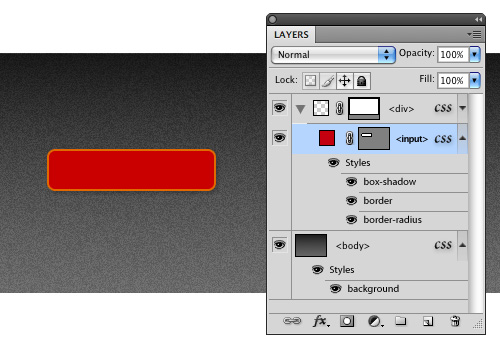
An example of what HTML layers might look like with CSS styling.
Jeffrey Zeldman makes a number of valid points about why creating such a tool is impossible:
HTML is a language with roots in library science. It doesn’t know or care what content looks like. (Even HTML5 doesn’t care what content looks like.) Neither a tool like Photoshop, which is all about pixels, nor a tool like Illustrator, which is all about vectors, can generate semantic HTML, because the visual and the semantic are two different things.
I have to agree. Any tool that is meant to translate visual elements from canvas to code will inevitably fail in the semantic realm. Computers are monolingual: they need us to make that translation. However, do we need perfectly semantic code if we’re only creating a mock-up? Why can’t we accept the reality that we’re not crafting the final product and simply spit out HTML and CSS that’s “good enough” for mock-up purposes. Once the design is approved, we’ll put on our foreman hat and begin the real construction.
Until our paradigm is rocked by some killer new app, Photoshop will reign as the best tool for designing websites. Although it doesn’t currently speak to our medium the way we wish it did, it proves itself priceless when it comes to the process of designing. Photoshop is a virtual playground of experimentation; dropping it from the process only prevents your design from being fully developed. So, before you switch to the mark-up methodology, understand that you’re sacrificing creativity for a few browser capabilities, which could be explained to clients anyway. For the sake of your client, creativity and work, stick with Photoshop.
For more on information on designing websites in Photoshop, check out my Smashing eBook Mastering Photoshop Web Design, a book for advanced and intermediate designers who want to brush up on their workflow and improve their Photoshop skills.
Further Reading
- Make Your Mockup in Markup
A walkthrough on designing in the browser. - Time to Stop Showing Clients Static Design Visuals
Describes the benefit of showing clients dynamic mock-ups. - Designing Websites in Browser (Gasp!)
A Stack Overflow discussion on the topic. - Why We Skip Photoshop
37signals’ take on things. - Designing in the Browser
A good back-and-forth from Drawar. - Why the “Design in the Browser” Argument Misses the Point
Aaron Russell outlines the benefits of Photoshop. - Feedback, Please: HTML5 Layers in Photoshop?
John Nack proposes HTML layers within Photoshop. - CSS is the New Photoshop
John Nack explains the importance of CSS in the argument. - An InDesign for HTML and CSS?
Zeldman in response to John Nack.
(al)


Di8ital Ninja
July 30th, 2010 6:10 amReal coders can code any PSD into html and css and have it work like it’s supposed to :)
alfredo
July 30th, 2010 6:28 amamen
jake
July 30th, 2010 6:10 amGreat article! I’ve just started using Balsmiq (balsamiq.com/products/mockups) and it’s really helped expedite the design process from wire-frame to photoshop.
paul del signore
July 30th, 2010 6:43 amdebating PS vs FW misses the point of the article. The main issue here is using a design tool vs designing with markup.
Tom is correct, designing a blueprint before coding makes sense… that is all part of a process.
Michel Bozgounov
July 30th, 2010 10:12 amActually, the Fw vs Ps debate is not that irrelevant. Fireworks is much closer to the real Web design than Photoshop is! Fireworks can also create clickable, interactive prototypes (HTML/CSS/images + interaction layer), that can be presented to the client for approval; once the design is approved, you can export the graphics from Fireworks and move to handcoding your layout (HTML/CSS) and interactivity (JS/AJAX) in a coding tool of your choice (CODA, Dw, etc.).
So working in Fireworks, you are faster; and you are much closer to the final results when building your web design, even while working in your graphic design editor!
Since we talk “Should we start the design in Ps or directly in code?” it is perfectly relevant to ask another question “Wouldn’t it be more appropriate to start the design in a tool that will take you faster to the final results you need — Fireworks?”… :)
Falk
August 1st, 2010 3:33 amHa, Michel
I was actually thinking, how long will it take until you start preaching about Fw again. Near enough a whole day after the article went up. What was wrong? Where you ill or on holiday?
;)
Michel Bozgounov
August 3rd, 2010 9:15 am@Falk:
If you don’t get well the point of the discussion, you better walk away from it. Just use Photoshop and don’t spend your time in vain here… ;)
Falk
August 4th, 2010 1:16 pmIt was a joke, Michel, as you started a discussion involving Fw and Ps on this thread. That was just funny. God, no reason to get all cross.
I never even picked up on the discussion, because I don’t really have an opinion on the article other than looking forward to what will be developed in the near future. I am just not feeling like I have to comment on a subject just for the subject’s sake. And this is what a lot of people do on here – and a good 50% of the comment space could have been saved by just not posting “irrelevant” opinions and how we all should get on with our lives.
Erika Tarte
July 30th, 2010 6:56 amThe arguments back and forth between PS and code might as well be between pens and pencils… because that’s essentially what we’re arguing about: sketching tools.
My biggest issue with sketching in code is that many web design/dev projects aren’t done by individuals, but involve a large team of designers/developers, many of whom posses disparate skill sets and some wouldn’t know what the heck a css class is. PS and Illustrator allow these teams to really nail down the design of IA, UI, layout, grid, look/feel, typography, etc. before development begins (when a simple request from the client, like re-conceptualizing the grid, becomes a nightmare). Sketching in code is helpful to show a client a specific interactive element (“this is how the lightbox works… this is what the drag/drop feature looks like…” etc.) but pure coded mockups lack the accessibility, adaptability, and rich visuals of a PS or Illustrator mockup.
(That being said, I make my students sketch in code…. it’s good for them! But they always ask to use PS instead.)
Don’t get me wrong, PS has outlived time in the limelight as the preferred sketching tool. Something new needs to come along, and many of the suggestions in this article for integrating CSS and other code-driven features into a PS-like environment are brilliant. I would shocked if Adobe actually implemented them, seeing how obstinate they are regarding streamlining their current products (fingers crossed that CS5 *at least* features a more streamlined UI vocabulary).
In an web design/dev age where limitations are decidedly déclassé, these insufferably limiting sketching tools, both code and PS, need to evolve, and quick!
David
July 30th, 2010 8:37 amWe use prior client projects to showcase functionality requested by the client. We also know, with 99% accuracy, what the goal of their web project is, what content they are going to present to site visitors, what features they are looking for, etc. before a comp is ever started in PS.
“Sketching in code” in a production environment is a very expensive proposition, or at least it is in our case, since all of our projects make use of API’s, WSI’s or other dynamic data sources that would require coding the connectors and interfaces to display the resulting data in the “sketch”. Sure, we could build the wireframes, and greek-up some content…but this would be a far less accurate representation of the end product and much more time consuming (aka “costly”) than generating comps in Photoshop.
Cheers.
Erika Tarte
July 30th, 2010 10:50 amI should amend my comment that I “make my students sketch in code” to reflect the fact that goal of those exercises is to learn code. Not learn design. Agreed, previous work and pre-existing demos are as far as I’d like to sketch in code for my clients. Occasionally they’ll need a custom demo to show what their product will look like in a pre-existing lightbox. C’est la vie.
Peter Bishop
July 30th, 2010 6:58 amInteresting article but I don’t see the real debate. Anyone designing in markup is missing the boat.
Darrel
July 30th, 2010 7:05 amWhich boat is that?
Glen
July 30th, 2010 7:17 amI’ve got to say, i bought a couple of fireworks books to get into it, but just haven’t had the time. Photoshop does everything you need it to, with pixel precision. As long as you have development knowledge, you can create a perfectly valid design that will translate well when coded.
The other thing is also that I do not know of one person who uses fireworks, let alone as their default app for designing. If I handed in my designs as fireworks files at work, it would confuse the hell out of the other designers… leading me to fold-out the remaining pages each and every time.
If everyone uses Photoshop, then that means we can all make changes / update / fold-out each others designs if necessary.
But with that said, i do still intend to learn all about Fireworks. Pity it’s going to be axed… is that for real?
hdoug
July 30th, 2010 7:21 amTables FTW
Alexis Brille
July 31st, 2010 6:57 am+1
John
July 30th, 2010 10:25 amhrmmm, was this a post or an extended advertisement? :)
Matt Mikulla
July 30th, 2010 10:47 amYep. Fireworks.
Gradients, patterns, vector, bitmap, adjustment layers, …
It’s so easy to design with. I pray adobe keeps developing it.
George Egonut
July 30th, 2010 2:26 pmI think the real discussion is layout software vs. coding, and I think layout software in most instances. As a musician, when I get an idea in my head, I let it go where it wants, and I don’t think about whether I can play it or not, or if the instrumentation is realistic, etc. I let the idea flow and worry about the technical later.
Likewise with web design. I design it how I want it in Photoshop and take notes on the interactions I want to take place, then I figure out how to code it later. This frees me up from thinking of an idea and altering it because “well, it would be easier this way.”
In both cases, not thinking about my technical limitations pushes me to get better by forcing me to learn new things. My two cents.
Aaron Beall
July 30th, 2010 2:38 pmNice to see Fireworks getting a lot of recognition in the comments. I’m yet another big fan of Fireworks for many, many reason. I love Photoshop for other stuff (print and obviously photo-editing.)
But regardless, both Photoshop and Fireworks are great design tools with no limits in the hands of a good designer, so I don’t see the “design in a design tool” workflow ever going anywhere. I wouldn’t have known there was much of a “war” going on if not for this article! Interesting article, thanks.
What I hope to see in the future is better design-to-production integration of specific design elements. I’m not talking about outputting a full code-generated site from PS/FW, but lots of low-level design translations where it makes sense. For instance I wish both PS and FW had an easy way to output their native styles and swatches as a clean CSS stylesheet so I didn’t have to copy paste colors and strokes widths and such all the time, or if you could select some text and copy as CSS definitions, or apply CSS style borders to objects in FW/PS and copy paste, etc. Fireworks already has a 9-slice symbol object, it would nice if you could output that to CSS3 9-slice (or whatever it’s called in CSS3 now.) This stuff will just make certain steps easier to go from design to build without alienating the designer from their natural environment with full creative freedom.
Fireworks has started to do a bit of this sort of thing, hopefully future versions will take it much further.
Mauricio
July 30th, 2010 3:47 pmIMO Fireworks is a great tool for websites on the fly but what Adobe needs to improve is it’s use of css “à la” Artisteer for example
Pickels
July 31st, 2010 2:27 amI hope some other company releases a tool to make it easier to create website designs. At the moment nothing is beating Photoshop and it really shows. Just look at prices for Adobe software in Europe.
I think that some other competitor would be really good for both Adobe and us, the end user. Cause now they can pretty much do what they want.
Pontus Ekman
July 31st, 2010 12:24 pmI’ve also been thinking about CSS layer styles within Photoshop. That would be awesome!
Noel Smart
July 31st, 2010 12:57 pmPhotoshop is terrible for web design, Fireworks is much better suited for the task. Prototyping is faster and changes are much easier since many assets are vector. Slicing is quicker and more accurate and you can build over-states for buttons etc.
Allen
July 31st, 2010 4:46 pmPhotoshop may be great for the form but its the wrong tool for the function. Design is about both.
David
July 31st, 2010 5:23 pmI think there’s definitely a workflow involved in producing a website. My team always always starts off with hand-drawn wireframes. Then we move to more precise wireframes done in illustrator. This allows us to quickly get our ideas across, enable us to discuss with our clients to work out their requirements and design with them. Then we move to creating examples of high-fidelity mock-ups in Photoshop. These examples allow clients to see how wireframes could be materialised and their branding applied to their websites. We could quickly responds to their feedback and make alterations to our wireframes and PS mock-ups if needed. Concurrently, we may choose to build technical prototype in the back-end, and bring together with the front-end once the designs have been approved. We also build front-end prototypes, if there are some interactions that we’d like to some user-testing or client demostations. They could work out fine without much styling applied at the prototype stage. I think this is quite a flexible framework. As everything is documented in versions, we can make iterations quickly and scope out our project easily.
I think most people work this way, as jumping ahead of phases is very dangerous. This is because it’s time-consuming and doesn’t allow quick iteration process. It also interrupts the flow of ideas – as there would be too much technical constraints applied too early in the design process. It may suit some teams – maybe a designer is more comfortable with mark-ups then photoshop, which is very rare. Or maybe the designer and the front-end developer is one person. But generally speaking, I’m not in favour of it.
kris
August 1st, 2010 4:51 amuseful post! :p can you please tell me the fonts used on those images? they are really, really beautiful.
Thomas Giannattasio
August 2nd, 2010 3:17 amThe font used is DIN.
kris
August 2nd, 2010 8:46 pmwow, the font is pricey. thanks for the response. :p
BobMopp
August 1st, 2010 5:22 amI think this article has a quite conservative sight onto this matter. As more and more things which were initially only available in Photoshop itself become ever more possible in Markup Language, things change. The statement that in Photoshop things are possible which aint in Coding can no longer stand as it is, but here it is still done so by the author. The argument of the necessity of Photoshop for the creative process and flow of ideas is too individual for each person.
One must abandon the believe that the process of coding belongs to the final stage of website creation. Just because it was that way in the past, does not mean it still is or will be in future, especially not with such potent tools such as HTML5 and CSS3 which are currently advancing.
The point is, one can be architect and foreman all at once, creating Blueprints while welding I-Beams, with the freedom to de- and reattach the I-Beams as many times as you want, whenever you want. The creation is no static building, once build never changed as the metaphor implies, but an extremely flexible fluid.
bhupal
August 1st, 2010 5:35 ami am developer but have bunch of interest in designs, and stick to photoshop for the mockup. it gives me some thing to rely on when i do html/css conversion.
back in my college days when i needed to work on a complete web project design by myself i landed a page by 37signal, ( http://37signals.com/svn/posts/1061-why-we-skip-photoshop ) the post argued about skipping the photoshop stuff and directly starting mockup with a bear-bone html/css structure. it was at first fascinating to me, i thought i got a great insight, no need to work for designs then.. i started working with just plane html and css. but the end result was, the design ended up to something that i would have done far better going through the photoshop step.
whatever people say, we need to have a nicely done mockup with all the details (colors, fonts, font sizes, spaces.. ) before you convert them to margin, padding and all. and this can’t be achieved in such details with anything else but photoshop. some designers may do mockup just with html/css alone, but what i want to say is stick to one which takes less time for you to the final web layout. i always liked the way it’s done with photoshop.
Katie
August 1st, 2010 5:55 pmUsing images instead off just visuals reated with css3 and html5 makes more sense anyway, and image editing programs are necessary for that.
Andre Reinegger
August 2nd, 2010 12:29 amI love to see that there are so many people out there preferring Fireworks. It really is the no. 1 tool for screen layouts!
I am always laughing when I take a look into books and articles about webdesign with Photoshop. People really have time to waste doing tasks in Photoshop for hours which takes only minutes in Fireworks.
For all those who want to see the difference and advantages using Fireworks I have recorded a Screencast at vimeo.
http://www.vimeo.com/12332496
BobMopp
August 2nd, 2010 8:48 amthanks for the insight. Might be looking into Fireworks now.
brainspills
August 2nd, 2010 12:36 amWhen we give a client a mockup in the form of a static presentation – whether a PSD or a JPEG or a PNG of the expected look of the site, we are disregarding one important aspect of design which is interaction. Some clients just can’t visualize “this list comes up when you hover on this item”, or “this lightbox opens up when you click on this image”. Sometimes, they have to “feel” it for themselves. While some clients prefer to look at “how it would look”, a great number of clients prefer to see “how will it work”, and that’s where I think a static mockup fails to present.
For me, for these kinds of clients, it’s better to present a working UI prototype rather than a mockup. You can design parts of the page in PS/AI/FW/GIMP/Paint/Whatever and stitch everything up in HTML to create the prototype. The HTML doesn’t have to be semantically sound if you think doing so will kill time – it’s a working prototype, not THE final product (just be sure that you convert it into proper semantics for production).
But then, there are clients who are more concerned with the design. Thus, there’s nothing wrong with presenting them with a static mockup. However, implying that PS is the best tool to create this is unacceptable. While PS is great tool in itself, and helped a lot in communication through design, I think labelling it as “best for creating mockups” is wrong. If this article is really about THE creative process, then I think the designer’s CHOICE FOR A TOOL is part of that creativity – be it realized on PS/FW/GIMP/…. or HTML+CSS for that matter.
Darrel
August 2nd, 2010 11:58 amWell said.
To take it further, it’s not even an issue of “some clients just can’t”–it’s actually the UX team can’t fully address all aspects of an interaction merely in their head and via a few notes in the margin of the wireframe. Interactions, when well done, actually require a lot of intricate decisions that can only be fully communicated if you take the time to actually build it.
Bill Scott points out that in a simple drag and drop scenario, there are 16 different events and 96 interesting moments that need to be accounted for. A photoshop file alone ain’t going to do that.
http://www.uie.com/events/web_app_masters/samples/bill_scott/
nate
August 2nd, 2010 6:29 amThis is just another vote for Fireworks, which has a much better interface, much more precise tools, offers pages within each file, faster/better color options (including gradients that can be adjusted and customized very quickly and easily). There is just no contest that Photoshop is better for photos, but Fireworks is certainly better for web stuff.
Douglas Bonneville
August 2nd, 2010 10:54 amA tool like Fireworks is right in the middle, because it’s interface and elements more closely model the web than does Photoshop. The basic paradigm of being pixel oriented at the foundation level is critical. I can’t count the number of Photoshop mockups I’ve seen and been handed (or created myself) that make it to the 80% mark in terms of what translated from the comp to the browser. My experience with Fireworks is that it’s about 98%, because I design with web limitations in mind, and can bridge the design gap because of that knowledge.
Essentially, if you know and understand the limitations of browsers, Fireworks is the best tool to design in, while keeping Photoshop for certain artistic sub-tasks that Fireworks is not best suited for.
Doug A
August 2nd, 2010 2:14 pmAll the tools for web design and development suck, all of them. Software in general needs to catch up, in a very large way.
What takes 2 people should only take 1, what takes 10 hours should only take 3 and what costs $2,500 should only cost $400…and this is because the tools are behind the times.
There is no reason why even complicated web development should not be achieved with a simple drag and drop.
I am convinced web D & D is kept difficult and cumbersome on purpose!
Daniel Karlsson
August 2nd, 2010 8:00 pmThe article misses why some people have started to “design” direct in html/css. To me, it’s all about the entire project management process. If you’re following a traditional waterfall project management process (problem and solution is known). Design first, develop later is absolutely the way to go and Photoshop is a fine tool. The problem is that a big part of the industry is using agile/lean/iterative project management methodologies. The do this since the problem and/or the solution is not entirely known.
The analogy with building a building and creating a website reveals how non agile the article writer thinks. Nothing wrong with that, but he uses this perception to web projects in general, and that don’t work for me.
I think a lot of designers need to take a few mins and think why the “design first” philosophy getting some beats. It’s not like developers don’t want a complete specification before they start coding. But if the specification is not there, what is there to do? One could of course make up and plan(guess) specifications and just make sure you progress on the “guess plan”, but that’s a delusional option.
Since designing/developing/testing while constantly interacting with the customer, validates your path and makes sure the final product will be what the customer expects. Since you CAN change fundamental things in software (while not in construction) the underlying thought of the article seems to me be a bit broken.
Hope this din’t come out as lecturing, just wanted to post an other perspective.
Tim
August 3rd, 2010 12:31 amThis post feels like it was created purely in order to tout the book at the end.
Adam
August 3rd, 2010 3:09 amThe concept of having html styles is amazing but i can’t see that happening anytime soon and of course we’d still have cross browser issues.
Matt Berridge
August 3rd, 2010 4:13 amI think a lot of people missed the point and it turned into a Photoshop vs Fireworks debate, rather than a design visual vs in-the-browser one.
Of course it can entirely depend on the project, but if there has been thorough Wireframing (i.e. sketches) at the beginning of the process – why not go straight to the browser if you know what’s required and it has been agreed?
Take into account new CSS3 decoration stuff like rounded corners, shadows, gradients, text stroke etc. Previously these would have been implemented as background images so it made sense to turn them into graphics prior to build. But now it seems kind of backward to try and recreate these styles in a graphics app if you’re going to implement them at build only using CSS.
Anonymo
August 3rd, 2010 7:20 amThis essay is a ludicrous exercise in inflammatory rhetoric that sets loose straw men made of stereotypes in simulated cage-fighting. I assume its major purpose is to flog the author’s new e-book, which I congratulate him on.
PhotoShop remains (and, I believe, will continue to be) one of the best-selling tools in the designer’s toolbox. I believe most people know what its limits are in the design process.
Two people in their comments mentioned ‘SiteGrinder,’ which is a very interesting, very creatively done, attempt to “bridge” the conceptual space between PhotoShop and UX design (via altering layer names, and using certain named layers with no visual content). SiteGrinder then auto-generates a complete layout with CSS and HTML from within PhotoShop using the File/Automate menu to trigger it’s rendering engine interface.
Surely the state of dynamic flux of the entire “universe” of the web … and digital design … will spawn many a strange mutant with a mixture of UX-interactivity and vector-and-bit-map design “genes.”
Can Adobe muster the strength to revamp PhotoShop in a way that incorporates what SiteGrinder does, or what FireWorks does now ? Can they afford not to muster that strength ?
When I see someone saying they’ve used a product for ten years, I wonder how many version changes, and ui changes, they’ve been through.
Anonymo is a human being in his own eyes, a human being who once had his name on two prior versions of one of Adobe’s key products mentioned in this thread.
best, Anonymo
“It is the mark of an educated mind to be able to entertain a thought without accepting it.” Aristotle
Bryan Zarbhanelian
August 3rd, 2010 6:04 pmI was actually very glad to hear so many people bashing Photoshop for web design lol. Personally I use Fireworks and I think that everything you need to do for webdesign is harder to do in Photoshop than Fireworks.
I do my own mockup and designs using Fireworks and it never has failed me.
You can checkout my new website at http://www.dotvolution.com
Simon
August 3rd, 2010 7:36 pmForgive me if it’s been mentioned… I only read the first 70 comments and then skipped ahead!
I attempt to iron out all of the interaction issues in a website within the wireframe stage. Why would you generate fully rendered pieces (PS or CSS) of a site that has not yet been approved by the client?
Wireframing is much quicker to adapt, explore, and generate, and you can quickly pull them into multiple software options to generate interactive storyboards etc. for the client – heck even PowerPoint can get the message across!
It seems to me like too many people are simply constructing the building to show the client how it would work (like the authors example). Where are the blueprints nowadays? Why aren’t we sketching the plans, drawing up blueprints and getting approval at that point… then you render it, make it pretty and start construction.
1) sketch out your ideas (pen and paper)
2) wireframe your ideas + present to client (numerous software options)
3) upon approval, generate graphical representations + present to client (Photoshop etc.)
4) upon approval, build the site. (CSS etc.)
Or is that just me?
izzat aziz
August 4th, 2010 1:30 amwell, certainly designing the site on psd first is important.
but to compare with architect.. well the difference is very much high between those two occupation.
to build house, skyscraper etc you can’t try and error.. you can try like this and like that, if it not work just bring everything down.. you can’t do like that, that why it need for plan, 3d model, or ever mini model.
but as for web design, it always possible to try out using html, you can change anytime you like without effecting much to the process.
photoshop is good thing for web design, but it not as important as plan for architect.
closer example would be better
Gavin
August 4th, 2010 7:19 amSorry but any person creating design templates in Photoshop who has no idea if their end product can be fully converted into HTML & CSS should not be anywhere near the the web development process. Its not the tool its the user that causes the problems.
You cant just boot up Photoshop and disappear of into the land of gradients, beveled buttons and pixel fairys, a designer should be completely confident that the finished graphic can be converted into fully accessible xhtml and css.
This goes for all graphics generation apps, and bashing one over the other shows a complete lack of understanding of the whole process and an over reliance on particular applications .
Joe Barthlow
August 4th, 2010 9:23 amcouldn’t agree more. plain and simple, photoshop is a production tool, not a design tool. I have often used to architect/building analogy to explain the design process. I start on paper, then move to Illustrator for design. then let the minions build the crap. I hate web design :)
bryan
August 4th, 2010 10:51 amGreat article.
Adam Joiner
August 4th, 2010 9:54 pmIf Photoshop where to create .png files for each layer, with transparency of course, and then generate CSS and HTML markup that positions the .pngs and any placed text exactly as you positioned it, wouldn’t that be a solution to our problem?
Pieter Heyman
August 5th, 2010 12:26 amHey all you webdesigners! Why don’t you prefer illustrator to design your websites? It works very intuitive for me. I think it’s very fast in experimenting and corrections afterwards (colors, fonts, size …). Even for the webdesigner who have to translate it to html and css, all the sizes, fonts and colors are easy to look up for in the illustrator document! What do you guys think?
Greetings
Pieter (Belgium)
eerkman meneerman
August 5th, 2010 1:44 amI’ve never understood why webdesigners cling so frantically to a software package that was never built to design pages full of interactive content.
Photoshop shines when you’re editing a single image.
When you build a photoshop file with tons of buttons, menu items and other elements, the file quickly becomes unusable, even for the designer who created it.
Fireworks, on the other hand, allows you to create interaction right on the spot. You can export a working model without ever touching a html file.
Prototyping in pure html+css is only an option if you want to check basic interactivity concepts, and don’t mind using placeholders that will later be filled with the actual design.
dean butler
August 5th, 2010 2:55 amExcellent post and very well written!
I take my hat of to you.
Evan Spaet
August 5th, 2010 7:28 amNice article! What does anyone think about a concept like Sitegrinder 3?
Marcello
August 10th, 2010 12:21 pmCome on, people –Photoshop was never meant to be a design tool – that’s what Adobe Illustrator is for. Do you guys now that pixel preview has been around in Illustrator for, like, 10 years? And with Illustrator CS5, working with artboards is a charm.
Don
August 10th, 2010 10:12 pmA bunch of Photoshop haters and application zealots. Wow. Unbelievable.
If you’re arguing that one tool is better than another for creating something, well then you are missing the point.
If you are evangelical about using one single tool for designing a website from start to finish, I would think twice about hiring you. In fact, this is a trait I’ve passed on in many job candidates. It’s a sign of narrow mindedness.
You plan out user experience, UI, navigation, work flow, etc, in one application, you design AESTHETICS in another, and you actually build the application using yet another tool, if applicable.
I don’t care what you like to create the aesthetic elements of your application in. As long as you know what you’re doing, and the difference between all the disciplines involved. I’ve been doing this for well over a decade now – and I can tell you – tools of the trade change. And if you move around in the industry, you better be prepared to jump in and work in whatever tools the establishment is using. Because you won’t always get the luxury of choosing.
Dwayne
August 11th, 2010 11:24 pmThere are people who seriously think coding mark-up as opposed to using Photoshop is a good idea? I would like to personally punch them in the face for being so stupid to suggest such a thing.
I am an interface developer. I don’t do the design, I do the coding. Having said that, I do admit that Photoshop is a pain in the butt and that I will hear “the fonts are a different size”, “the colours are different” and that would be because Photoshop isn’t a web design application. But I code the design up as best as I can, and tell them that is the best it can be.
If more designers actually used Fireworks instead of Photoshop, then designs would be much easier to code up and still have them look like the design. Photoshop is not for web design, it is for editing and touching up images. Just because you can design in it, doesn’t mean you should.
That’s like someone using Illustrator to design a website (trust me, I’ve seen it) and once again, just because you can doesn’t mean that you should. Fireworks was made for the web and more designers should use it. Until then, the Photoshop design will never ever ever look like the final product.
Photoshop gives you a false sense of perfection with it’s fancy anti-aliasing. Newsflash designers, no modern web browser or operating system can render your website text like the design.
Dwayne.
Benny McTavish
August 12th, 2010 5:27 amI have used Photoshop in the past but have stopped now for several reasons.
After much investigation and trying, I discovered that it was indeed not a shop and did not contain any photos.
I now just use the local shop. They have some great photos and at a great price too.
Stuart Johnston
August 12th, 2010 5:40 amBenny, you are a f**ck wit.
Benny McTavish
August 12th, 2010 5:45 amYeah? You too pal.
Stuart Johnston
August 12th, 2010 5:47 amYou’re not wrong there :)
Jon Wallace
August 12th, 2010 5:51 amCome on guys…. why not just use what you feel most comfortable with??? Why should we say PhotoShop is just for photo editing and HTML is just for build, and Fireworks is just for IA… let each individual decide as best suits their own work practice!
sam desborough
August 26th, 2010 12:18 amI think that photoshop is the key element for all future website designs with Illustrator just beside it, especially for young and upcoming web designers. The developments and updates of the software have vastly improved. So probably we will soon be able to build a whole website on photoshop soon who knows. Then we would only need to buy one set of software instead of about five others.
Remember very good designers break the rules.
Patrick D
October 5th, 2010 10:36 pmInteresting discussion – but here’s another viewpoint to throw in the mix – as a developer, all the stuff our designers work with is based on HTML. You can’t develop an application in photoshop, can you?
First, the application is designed on paper with it’s database schemas and it’s core methods, then it’s built with very basic HTML and CSS interfaces. From there, the designers create the layout BASED ON those pages. Seems like the smartest way to go in my opinion. Make the content/functionality work, make it flow right, then move to making it pretty.
Wyzyrd
February 10th, 2011 10:13 pmInteresting discussion- have to agree wholeheartedly with Patrick D.
If a site is going to be more than a digital ad-brochure, you need to know what it’s gong to display and what it’s going to do, before you show it to a web-graphic designer.THEN, they can send you mockups you can look at, in a format you don’t have to pay to look at (like .psd), annotations in plain text for things like RBG colors and fonts, and web-ready files of their graphical bling-y bits.
airtonix
August 14th, 2011 12:13 amNecro this thread to say that, as a devoted Fireworks user in the early Windows XP days : I just use inkscape.
To be honest, I think most people who think they need photoshop don’t even know what “RIP printer” and CMYK separation mean.