Lessons Learned: Productivity Tips For Running A Web Design Business

Advertisement

It didn’t work out as you expected, did it? The freelance life was supposed to give you more time with the family and free you from that incompetent boss. You even thought you might be better off financially. Instead, you’re working longer hours and under constant stress, worrying about various aspects of your business.

To relieve the pressure of entrepreneurial life and avoid burning out, freelancers and business owners need strategies. In this post, I’ll share some tactics that have helped me be more in control of my business, my projects and life in general. I hope they help you, too.

Let’s begin by putting some solid plans in place.

You Don’t Have Time Not To Plan

For a business owner, being reactive is easy. We spend our whole time fighting the most intense fire, while worrying about what the future has in store. To cut stress levels and take control of our business, we need to put a few basic plans in place.

Take, for example, the ongoing concern about where our next job will come from. Most of us just “hope” that something will turn up. This passive response can leave us victims of circumstances and full of anxiety.

We need a marketing plan that ensures a flow of business. This plan should account for the following questions:

  • Who is your target audience?
    If you take a scattershot approach to marketing, your voice will get lost in the noise of the Web. But if you target a group, like real estate agents, then you have a better chance of making an impact.
  • What differentiates you?
    With so many other Web designers out there, what makes you different? Is it your expertise in a technology, a sector or a particular user group? Is it your design style, or perhaps the way you approach projects? Whatever it is, be sure you can articulate it.
  • What channels will you use to reach your audience?
    Are there forums you should take part in or blogs you should write for? Should you be attending certain conferences or offering to write for industry publications?
  • What regular tasks do you need to complete to keep your name out there?
    How many posts will you write for industry blogs per year? How often will you take part in forums where your audience congregates? How frequently will you send out newsletters to prospective customers?

This last point is where the real danger is. The best plans are often reduced to nothing when things get busy. When you’re under pressure, marketing is the first thing to get pushed out. But pushing it out will result in worry and potentially less work down the road.
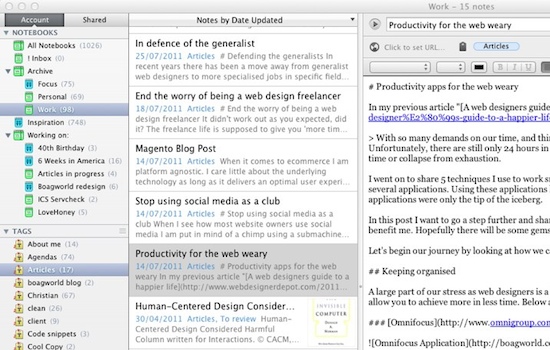
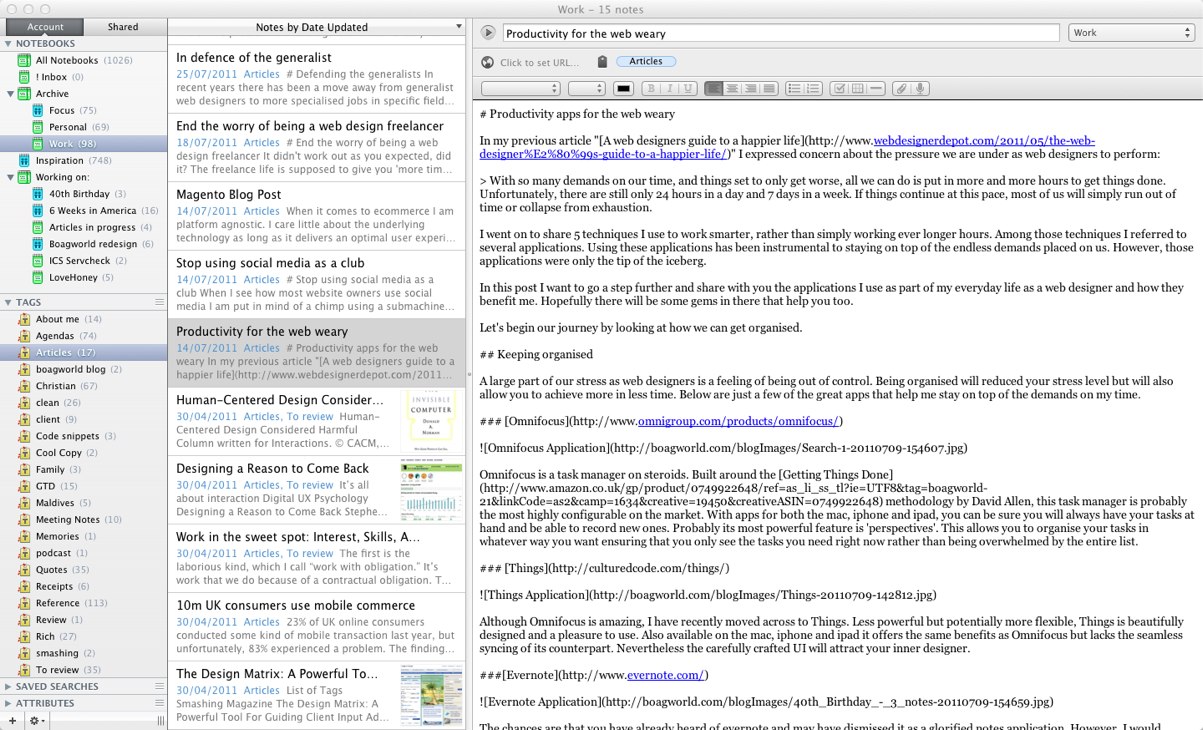
Evernote
Evernote is a great tool for recording long-term plans for your business. It is always available on your desktop, the Web and your mobile phone, so you can easily jot down new ideas. Large view.

This approach applies not only to marketing. You should have plans in place for all major areas of your business, from finance to training. Without them, your subconscious will worry about whether these areas of your business are doing well.

Sticking to a plan is tough, but that’s where routine can help.

Create A Routine

Both the blessing and curse of being your own boss is that you can set your own schedule. On the one hand, working when we want and scheduling around our family lives is great. The downside is that we are left with the sense that we should always be working.

Some say the answer to this problem is to set a rigid routine: start and finish work at the same time every day, as if you were in an office. However, this undermines the main reason for being self-employed: flexibility.

Instead, I opt for a time-independent routine. I do certain things every day, but I don’t insist that they happen at specific times. For example, I always start and end my work day by reviewing my task list and clearing emails. This helps me mentally prepare for the day and gets me into work mode. Once I have shut down at the end of the day, you won’t find me picking up work later in the evening.

Another tactic is my Friday review. Every Friday morning, I step back from the pressing business of the day and review where I stand with all of my projects and broader aims. Carrying out this weekly review gives me confidence that nothing will get missed in the whirlwind of daily life.
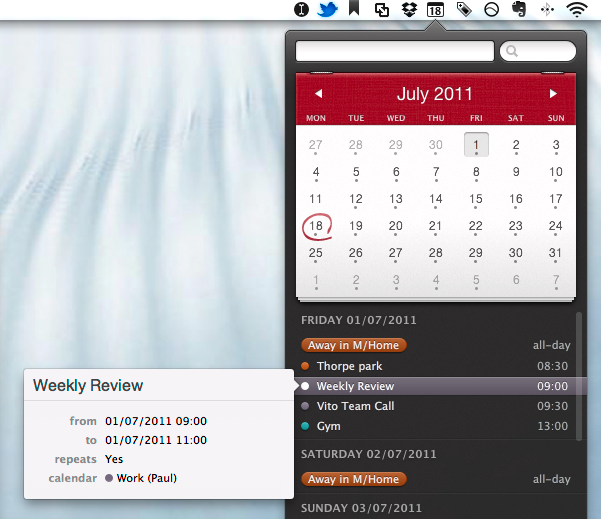
Fantastical showing my weekly review
Fantastical is a great application for managing your routine, including a weekly review. Large view.

For me, having a routine and carrying out these rituals of starting up, shutting down and reviewing weekly build confidence that I am in control and doing enough to keep my business on track.

Another crucial element in maintaining this sense of control is my task list.

One List To Rule Them All

To succeed in your business, to work less and to overcome that nagging sense of worry, you need to maintain control. Unfortunately, maintaining control is hard when tasks are coming at you from so many directions. Just a few of those tasks might be:

  • A check from a client has arrived by post and needs to be cashed.
  • You’ve received an email about a bug on a website that you recently launched.
  • You’d like to try a new CSS technique that you found in an article.
  • An angry client calls to say they are unhappy with your design.
  • A great idea for a Web app pops into your head as you’re driving to the supermarket.
  • You’ve scribbled action items into a notebook during a client meeting.

These tasks need to get done, but the items associated with them are scattered in different places. For example, you need to cash that check, but where did you put it again?

With no definitive list of all the things you have to do, there is only one place left to store this information: in your head.

Unfortunately, we forget stuff. We know we aren’t capable of remembering so many details, and so we worry. Worse still, our subconscious constantly reminds us of everything we need to do, and so we end up endlessly going over the same things — over and over again.

The solution is simple: write it down. Carry one list with all of the tasks you have to do. When you get that check, add a task for cashing, and note where you’ve put the check. If you attend a meeting and jot down action points, don’t leave them buried in your notebook. Add them to your task list, which you will be checking daily as part of your routine.
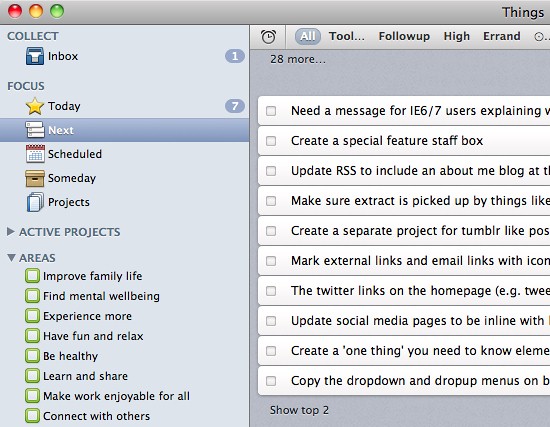
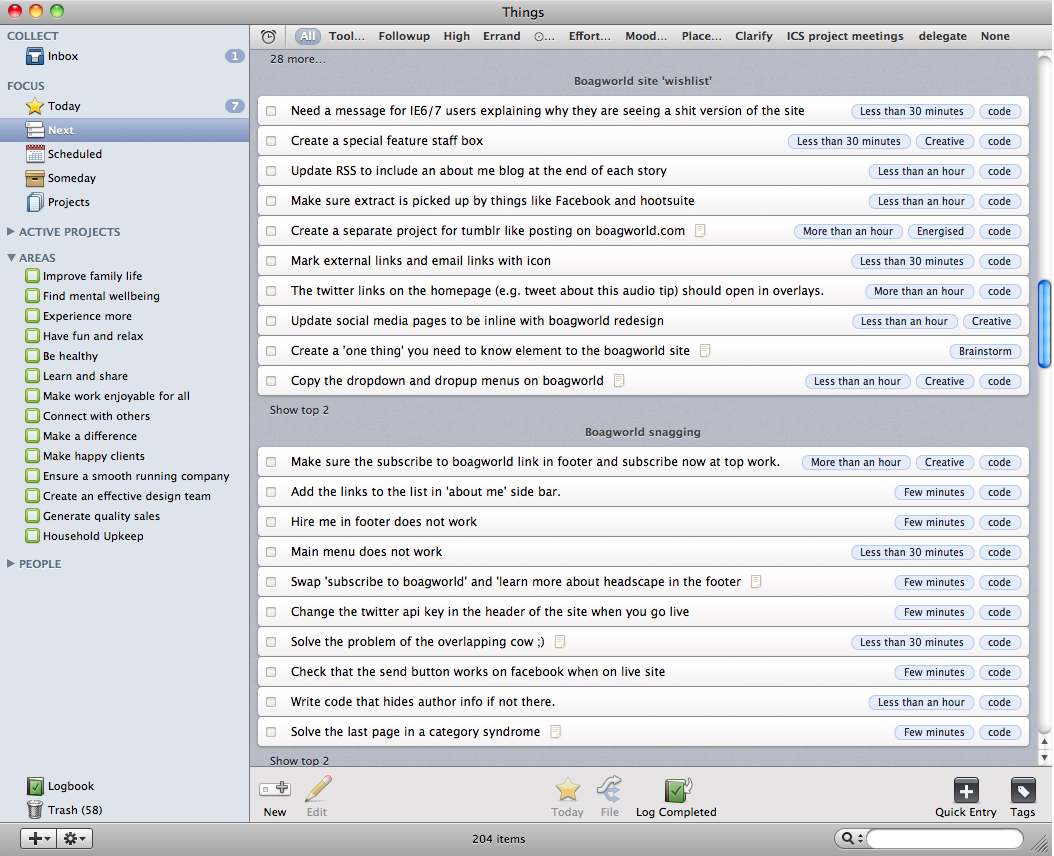
Things App for Mac
Things is one of many list apps that allow you to take your task list with you wherever you go, via the desktop, iPhone and iPad apps. Large view.

Having a single list that has all of your tasks will bring you peace of mind and make you considerably more efficient, because you won’t be wasting time tracking down emails and notes of what you have to do.

Speaking of email, almost all business owners seem to complain about this, but few do anything to solve the problem.

Solving Email Problem

Most email clients check email every five minutes. That is nearly 100 interruptions in an average working day. This constant ping of your email client instills a sense of pressure that is, in fact, usually unjustified.

After all, the majority of email we receive is either spam or non-urgent items such as newsletters. But every time that “New mail” message pops up, we feel compelled to check whether it is an urgent request from a client. This causes us to lose the flow of our work and creates a slight sense of unease that can accumulate throughout the day.

Here is a radical suggestion: turn off those notifications, and check your email only once or twice a day! I know what you’re thinking, but I promise, it is possible. Let me explain how.

As mentioned above, the majority of email either can wait or is just junk. You probably receive only a handful of emails a day (maybe even less) that need urgent action. You could probably say right now who they would be from and what they would be about.

Your computer should be telling you only about those urgent emails so that you don’t need to keep checking.

The answer is a service called AwayFind. With AwayFind, you can specify which topics and people you want to be notified instantly about, what can wait, and how to receive notifications, with options for everything from text messages to iPhone updates. This one service frees you from having to check email, enabling you to focus on what’s important.

You may be wondering how AwayFind is different from Priority Inbox in Gmail. While Priority Inbox is great, it suffers from two weaknesses:

  • It doesn’t allow you to specify what is important.
    While Gmail’s algorithms for predicting important email are good, if you’re waiting for an important email from someone, you can’t trust Gmail to flag it, and thus you won’t stop worrying.
  • You’re still required to check your email.
    Priority Inbox does not take care of email the way AwayFind does. You still suffer from the constant ping of incoming mail, and you are not freed up to close the email client.
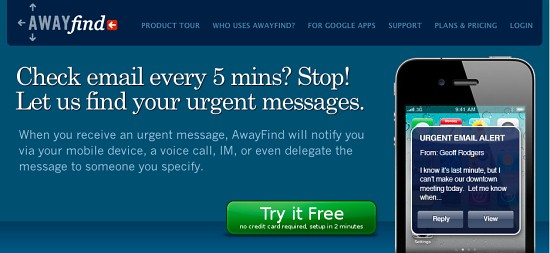
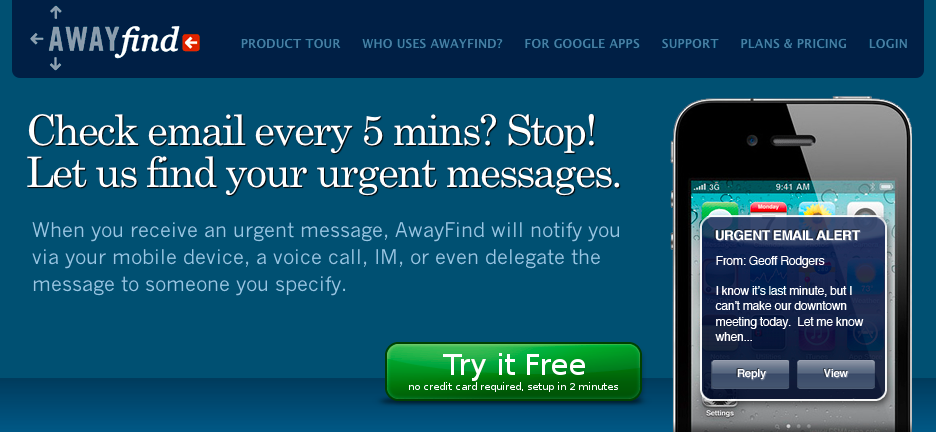
Awayfind.com
With AwayFind, you no longer need to constantly check email. Large view.

Of course, when you do check email, the junk is waiting for you. Spam filters help, but you’re still left with all of those emails that you signed up for but don’t want anymore or can’t remember subscribing to.

For this, check out Unsubscribe.com. After signing up, tell the service what email you no longer wish to receive, either by using one of the plug-ins for major email clients or by forwarding the message to the service. Unsubscribe.com then does its best to unsubscribe you and to pursue those who continue sending you junk.

unsubscribe.com
Unsubscribe.com has dramatically reduced the number of unwanted email I receive. Large view.

I have to say that Unsubscribe.com has made a phenomenal difference. I have gone from several hundred emails a day to a few dozen, and the number is going down all the time.

By combining Unsubscribe.com, AwayFind and the “one list to rule them all,” you can reach email nirvana: an empty inbox. Nothing is more satisfying or calming than one of those. All of your emails will have been unsubscribed, deleted, filed, delegated or turned into a task. Nothing is left to gnaw away at your subconscious, leaving you to wonder whether you have dealt with it.

Obviously, there are plenty of other techniques for managing email. For instance, you could start your emails with a subject line that clearly identifies the topic, perhaps including a status category: [Info], [Action], [Time-sensitive], [Low priority]. If your message can be expressed in few words, just put it in the subject line, followed by [EOM] (end of message). This saves the recipient from having to open the message. Also, ending a note with NNTR (no need to respond) is a wonderful act of generosity.

Of course, you’ll need to be sure that the recipient understands the acronyms, so perhaps you could add a short explanation in your signature. These and other guidelines are covered in the “10 Rules to Reverse the Email Spiral,” which might come in handy when you’re replying to your next email.

With email out of the way, you can finally focus on the work that needs to get done. As you will find, though, this is hard to do.

Finding Your Focus

We often use email as an excuse for our lack of productivity, when really it is a distraction for avoiding work. Like spending time on Twitter, Facebook, YouTube and indeed the whole Web, checking email is easier than getting stuff done.

Unfortunately, staying focused on a task is hard. We need to train ourselves to do this effectively.

One way to do this is the Pomodoro technique. According to this simple method, we work in concentrated blocks before taking a break for five minutes, after which we do another “sprint.”

A good starting point is to try working for 25 minutes, and then take a 5-minute break. Over time, you will find that you can increase these 25-minute blocks to something more substantial. You’ll also enjoy the challenge of seeing how many sprints you can fit into a day.
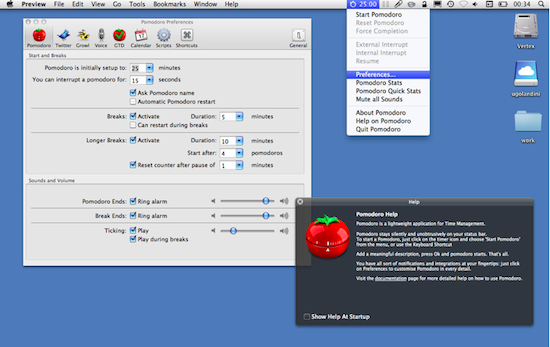
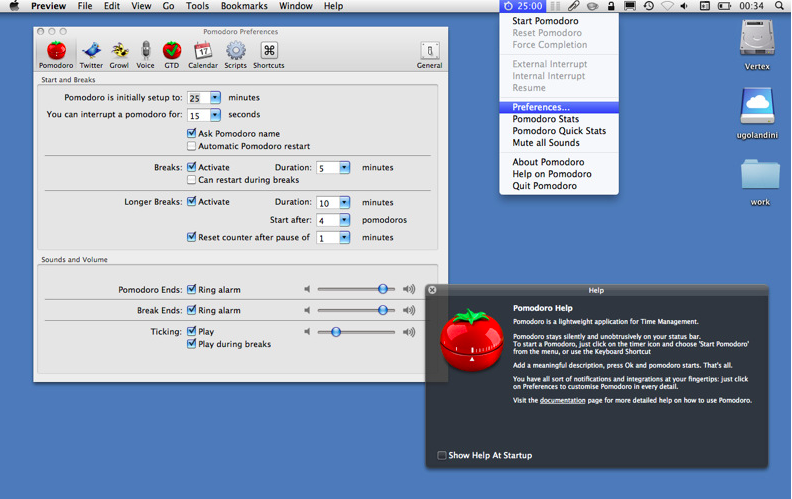
Pomodoro App
There are many applications to support the Pomodoro technique. My personal favourite is simply named Pomodoro. Large view.

Not only will this make you more productive, but by tracking how many sprints you have done in a day, you also get the peace of mind knowing that you are doing enough work. Nothing is more satisfying than knowing you have done six hours of distraction-free work in a day. Too often, we work for 10 hours or more and yet are unsure by the end of it exactly how much we have accomplished, because so much of that time was wasted reading email, answering phone calls and surfing the Web. If you have done six hours of uninterrupted sprints, then you’ll feel guilt-free when you sneak off early to play with the kids.

Of course, it is not just about how many hours you work, but about how productive you are. Fortunately, there are ways to work less but produce more.

Work Less, Produce More

As business owners, we are paid not for the hours we work, but for what we deliver, so we have to be as efficient as possible. Doing more in less time is an article in itself. But here is one principle that has served me well: recycle.

We are so busy putting out the latest fire that we fail to plan for the future. If you’re coding, say, a news listing for a website, you will probably be in such a hurry that you fail to mark it up in a way that could be reused in your next project.

Also, we often complain that we don’t have time to market ourselves because we regard that as “extra work.” But in many cases, it is just a matter of documenting what we are working on.

Let me give you a real-world example. I needed to redesign my personal website. I also needed to launch the second season of our podcast. I thought I didn’t have time for both, until it occurred to me that the second season could be about the redesign process of my website. My redesign of the website could be recycled into an episode for the show. What’s more, this process inspired tweets, forum conversations and improvements in the overall working processes of our company.

Whether you are writing a blog post, designing a website or coding an app, ask yourself whether a bit of extra work could turn it into something that serves another purpose.
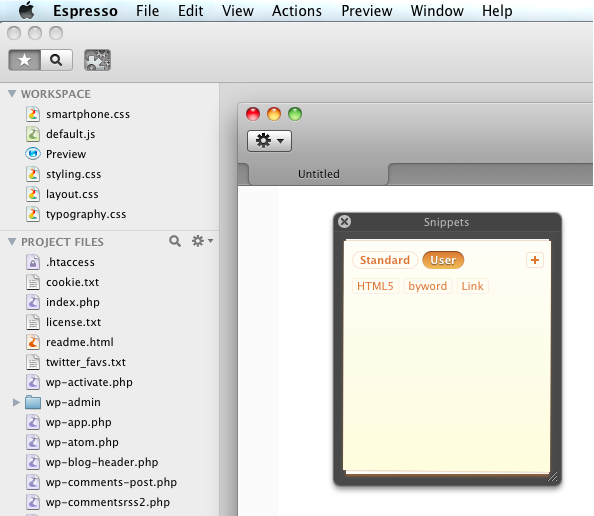
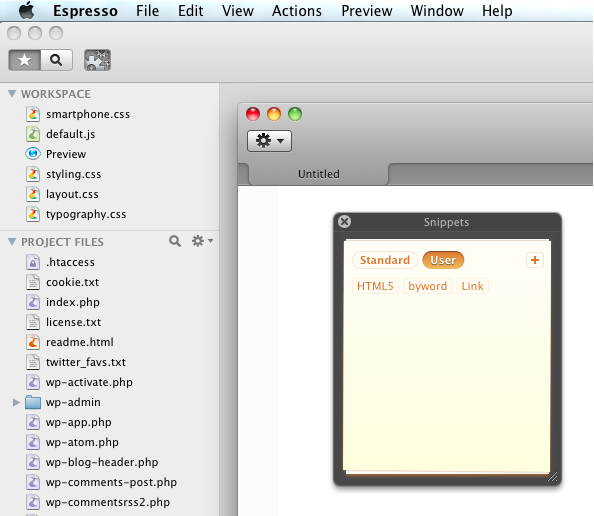
Snippets in Espresso
Reusing code through tools like Espresso is just one way to be more efficient. Large view.

Code is often recycled, but you could just as easily reuse design elements, client presentations and even responses to common objections from clients. On this last point, see my post “Where Are My Rounded Corners“: I got so fed up from having the same conversation with clients about progressive enhancement that I decided to write a document that I could just hand out. You can also use pre-written templates and resources such as Spec Work template and Wee Nudge to communicate common problems, issues and misconceptions to your clients.

By recycling, you can significantly cut your workload and your stress.

What Are Your Stress-Busting Techniques?

I have only touched the surface of worries for freelancers. We are under so much pressure that it can feel overwhelming at times. Yet we can do many more things to improve. With that in mind, let’s continue the conversation in the comments. What stresses you most, and what stress-busting techniques do you recommend?

(al)

Paul Boag is the founder of UK Web design agency Headscape, author of the Website Owners Manual and host of award-winning Web design podcast Boagworld.

  1. 1

    riverrunner

    July 20th, 2011 6:21 am

    Got to love the ‘Things’ screenshot

    “Need a message explaining to IE6/7 users”

    why they suck?

    +16
    • 2

      Paul Boag

      July 20th, 2011 10:12 am

      Pretty much yes :)

      +4
    • 3

      John

      July 20th, 2011 11:38 am

      There are so many ways that statement could end…

      - why those rounded corners aren’t there
      - why the gradients look a bit different
      - why the javascript doesn’t perform as well
      - why they need to upgrade to something better

      +7
  2. 4

    Jaime

    July 20th, 2011 6:37 am

    Good article. My husband and I are in the very slow process of building our business for web design and this has given me lots of food for thought. Thanks!

    +9
    • 5

      Delwin Campbell

      July 22nd, 2011 5:05 am

      How wonderful that you do web design as a couple! That’s fantastic. :)

      +4
      • 6

        CiNiTriQs

        December 27th, 2011 4:58 pm

        So… no pretending either of one is “working” then and hasn’t time for “household chores” ;)

        0
  3. 7

    guillaume_from_france

    July 20th, 2011 6:53 am

    I absolutly agree about the pomodoro technique ! At first sight, I though “what ? Only 25mn of work and then a break ?! This can’t be serious !”. But 3 years later (as a Ruby on Rails freelancer), I can say this is the most efficient and productive technique I’ve found to get the job done. Give it a try, seriously !

    +20
    • 8

      Muneeb Ahmad

      July 20th, 2011 8:33 am

      Ooops, I apologise for rating your comment ‘down’ I meant to rate it a thumbs-up. :D I completely agree with the Pomodoro technique and will definitely try and use it more often.

      +3
      • 9

        Anastasia

        July 21st, 2011 9:27 am

        Just caught myself on trying to do the same mistake.

        I supposed it happens because of green positive number next to thumb down icon. It’d probably make sense to have positive numbers on the left side and negative on the right…:)

        P.S. Great article!

        +6
  4. 10

    Christian

    July 20th, 2011 6:54 am

    You should check out QuickCal too. It was the first calendar app on a Mac with Natural Language Input.
    quickcalapp.com

    +1
  5. 11

    Dean

    July 20th, 2011 7:04 am

    Paul, thank you for sharing those tips. They’re just what I need – and I’m not even a web designer. I think they’re valuable advice for any freelancer or business owner. In fact, they’re so good, I’ll forgive you for spelling cheque as “check”.

    +1
    • 12

      Paul Boag

      July 20th, 2011 10:13 am

      I didn’t! That was those pesky editors. Ill have words ;)

      0
      • 13

        Francis Mweru

        July 20th, 2011 11:28 pm

        Why is it that programs such as Microsoft office “word” do not validate the word “Cheque”? It always appear as a spelling blunder!

        +2
      • 14

        Billy Graydon

        July 23rd, 2011 10:51 am

        I have that problem too – with both people and spell checkers. In reality, check is not absolutely wrong, it is just the American spelling. However, for those of us who prefer to stick to the proper British spellings, all of those American editors/checkers can be a pain. The worst, I find, is when they try to Americanise words that do not have American spellings, like advertise (as opposed to advertize, which is wrong).

        +1
    • 15

      Francis Mweru

      July 20th, 2011 11:26 pm

      Why is it the programs such as Microsoft office “word” do not validate the word “Cheque”?
      It always appear as a spelling blunder!

      +1
      • 16

        Bil Rumph

        July 21st, 2011 2:40 pm

        If you run into a word that is spelled wright and word marks it as wrong, just add it to the library. Have a great day! :)

        +1
      • 17

        Billy Graydon

        July 23rd, 2011 10:56 am

        To fix this:
        Office button
        > Word options
        > Popular
        > Language settings
        > Under ‘available editing languages’ select English (UK)
        > Click ‘add’
        > Under ‘enabled editing languages’ ensure that English (UK) is selected.
        > Under ‘primary editing language’ ensure that English (UK) is selected.
        > Click OK
        > Click OK again

        Done.

        Now cheque works!

        +1
    • 18

      Mark Cossey

      July 21st, 2011 6:17 am

      SM specify American English for their blog posts (I had to use the word ‘soccer’ for one of my posts, much to my embarrassment).

      Great post Paul – thank you.

      +4
  6. 19

    Alex

    July 20th, 2011 7:32 am

    Great tips. It all rings very true to me – I’m in my first year of running my own business full time.

    You’ve tempted me to try out the pomodoro technique, I’ve heard a lot about it but been sceptical, but anything that helps bring focus can’t be bad.

    0
  7. 20

    Federico Fernandez

    July 20th, 2011 7:33 am

    What a great post! excellent tips to get organized… thank you!

    +1
  8. 21

    Chris Horner

    July 20th, 2011 7:42 am

    The email productivity tips are great. I’ve been doing most of those for the better part of two years now and it makes a TON of difference in productivity. You can get the truly important stuff done quicker without the constant disruption.

    0
  9. 22

    darwin

    July 20th, 2011 7:58 am

    great article and advice…..thx for sharing this :)

    0
  10. 23

    Greg

    July 20th, 2011 9:02 am

    Great article but it’s very mac centric. I’d love to hear of alternative software that could be incorporated into this type of workflow that doesn’t require owning a mac.

    +7
    • 24

      Paul Boag

      July 20th, 2011 10:15 am

      Yes sorry about that. It reflected my own experiences and I am a mac user. I am sure somebody will come along with a PC alternative.

      0
      • 25

        Rob

        July 20th, 2011 8:20 pm

        Paul, you’re such a Mac Fetishist! J/K I’ve loved you and Markus since you guys started doing the Podcast, I remember listening to it way back when I was a young nerdling in training.

        Here’s a quick run down of some of the Apps I’ve played with. I also use a Linux laptop but don’t do as much organizing through it, I like my desktop for that.

        Notes: Evernote (it works under Windows)

        ToDo: Wunderlist or Basecamp

        Timekeeping: Klok or Freshbooks (I invoice through Freshbooks so I have started using that when I need to time things, which is not all that often)

        Email: Simple solution, use different addresses and only keep the WORK email open while working. I also try to check my personal email a maximum of once an hour. My personal email address is also used for various signups and I try to keep business signups very clean from newsletters and other junk. The only reason I leave my email open is because it is VERY clean. My work email gets spammed once a day by linked-in and the remainder of my email is about 75% actual email. Stay on top of things, don’t give your working email out to everyone, only people you are working with. It’s not like it’s hard to get multiple email addresses.

        As for staying on task: I do not use a program to help with this. Quite simply, I try to take 10 minutes of break per hour worked. This means, work from 11-11:50am take ten to stretch, maybe read a blog or sift through some personal email. I will sometimes take more frequent breaks if I’m stuck on something. Over time, you may find that if something is particularly difficult, stepping away from it is not a bad idea. Don’t abuse this and become lazy.

        Like Paul said, there should be some time to review where you are versus where you should be. The more frequent you do this, the more on task you find yourself.

        I hope these help! :)

        +3
  11. 26

    Scott

    July 20th, 2011 9:03 am

    This describes my life exactly, these techniques are exactly what I need. Thanks for the article!

    0
  12. 27

    Parallaq

    July 20th, 2011 9:18 am

    Great article Paul! Nice to see some business related tips again.

    0
  13. 28

    Miguel Khoury

    July 20th, 2011 9:31 am

    Great article!!

    0
  14. 29

    Paul X.O.

    July 20th, 2011 9:34 am

    This was a great article. Too bad it’s only from a MAC users perspective. Most, if not all the tools you mention are MAC only. Oh well. I like your thinking though.

    +2
    • 30

      Paul Boag

      July 20th, 2011 10:16 am

      I agree it was a little mac centric (personal bias). However, evernote, awayfind.com, unsubscribe.com and pomodoro are all cross platform.

      0
  15. 31

    annabelm

    July 20th, 2011 9:41 am

    Great article Paul. Thanks for the advice. I did notice you use Things and Evernote, why use both? Can’t Evernote collect your to-do list and tag them with your relevant goals?

    Just curious, as to your reasoning. If there was a big benefit you found with Things. I’m always trying to collect lists and info in one place and have been trying to consolidate on Evernote myself.

    +1
    • 32

      Paul Boag

      July 20th, 2011 10:17 am

      Evernote only has a very basic todo function. I am a huge “Getting Things Done” fan so I wanted a list app that applies those principles.

      0
  16. 33

    Erika

    July 20th, 2011 9:54 am

    Nice one. These are good tips for productivity in general, beyond graphic designers. Thanks!

    The “Mac-Centric” aspect didn’t bother me. I think the article is written with enough tips/reminders that the specific tools can be taken with a grain of salt.

    +2
  17. 34

    Brad

    July 20th, 2011 10:02 am

    Great article… With a ton of great resources. Thanks

    0
  18. 35

    Jacob McDaniel

    July 20th, 2011 10:30 am

    Another great little tool for to-do-lists is Doomi for Mac. It’s a little Adobe Air App, I love it!

    Great article, always great stuff Paul. Thanks!

    0
  19. 36

    Matt

    July 20th, 2011 11:40 am

    Great article, But I strongly recommend http://www.potionfactory.com/thehitlist over Things. I bought things a while back and it never really helped me. I think it was the interface. Don’t get me wrong I like things, but when it comes to productivity get The Hit List. It’s really been keeping me on track.

    +2
  20. 37

    mthrlwd

    July 20th, 2011 12:12 pm

    this article resulted in a spiritual experience for me…
    thanks, paul.

    0
    • 38

      Paul Boag

      July 20th, 2011 11:54 pm

      Wow! I never knew I had such power ;-)

      0
  21. 39

    CPDScott

    July 20th, 2011 12:57 pm

    I also suggest blocking Facebook from your work computer (block the IP from your router if you have to). When getting into “the zone” in web design you have to be fully engaged in either a creative mindset or a problem solving (coding) mindset… taking breaks to see the latest Facebook feed can break that completely, which I have often been guilty of.

    +1
  22. 40

    Ankit Singh Bhandari

    July 20th, 2011 1:23 pm

    A great article… Regarding the task list program, you should checkout Wunderlist, its freeee…it has a great UI & comes across most of the platforms(iOS,Android,Windows, Mac + Web App)

    +1
  23. 41

    Rommel Castro A

    July 20th, 2011 2:57 pm

    not everyone use Mac (:

    +5
    • 42

      Andreas Ek

      July 30th, 2011 1:22 am

      Soon they will…

      -2
  24. 43

    Bridgette Birdie

    July 20th, 2011 3:45 pm

    Really enjoyed this article. I’m not a web designer but am in the process of starting my own marcom and events business after working in corporate industry for umpteen years. I found your tips completely relevant and helpful. Thank you!

    +1
  25. 44

    Jon Laing

    July 20th, 2011 5:52 pm

    This article couldn’t have been more appropriately timed. I just graduated college and started freelancing full time. I never thought the hardest part of being a web designer would be organizing. These tips are invaluable, thank you!

    0
  26. 45

    Jenn

    July 20th, 2011 6:11 pm

    I’ve bookmarked this post! It’s probably something I should read monthly. We’re all so inundated with information coming at us in every which way, whether we are freelancers or work in an office for another boss. It’s so important to have a routine and keep lists. Reading “The Way We’re Working Isn’t Working” by Tony Schwartz would be a really helpful resource for any working person, in order to achieve a higher level of efficiency and working deeper and more intensely – in shorter bursts.

    I find what really helps me is just letting go and closing my e-mail, and checking it only at certain points in the day (beginning, before lunch, after lunch, end of the day).

    0
  27. 46

    Nichole

    July 20th, 2011 7:42 pm

    Great article. The toughest part for me (interactive designer for 10 years, freelance for about 5) is the juggling. When things slow down, working to get more, when it starts to roll in, juggling; responding to new requests, responding to old requests, creating inspiring and compelling work that gets you more work, and dealing with other random things that pop up during a day. (Still don’t understand why 100 things will happen in one day, then the next day is quiet!)

    I will be trying the Pomodoro technique, and shutting down email a lot more. Thanks for the tips.

    How do I bust stress? By getting AWAY from the computer. Working out does it for me (Bikram yoga, something challenging to get your mind focused on something else), that and doing something tactile like reading or painting. I can’t say enough about 20-minute meditation breaks.

    +3
    • 47

      Tom

      August 2nd, 2011 7:47 am

      I agree 100% with your post. However – I am not there yet. I constantly deal with stress and anxiety regarding workloads. I juggle 8-10 jobs at any one time. These are everything from website development to brochure design.

      I also work from home – which means work is usually 7 days a week. Getting over the psychological hump of stepping away has been a bit of an obstacle. I finally quit replying to emails after 5 pm and on weekends – I host sites though – so always have to be cognizant of sites down etc.

      I will also try the Pomodoro App. and need to start getting to the gym.

      Good luck to you!

      +1
  28. 48

    Peach

    July 20th, 2011 8:42 pm

    Very interesting article. Although, I’m no full-time freelance, but I have several slashes in what I do such as full time UI Designer, Freelance Web Designer/Developer, running my startup, http://MyColorscreen.com, and pursuing Master degree, I still find this article useful for everything i do. Finding focus, creating routine, all these tips can be applied to both full time, startup tasks, or even schools.

    Thanks for writing this up. :)

    -4
  29. 49

    Denis

    July 20th, 2011 9:29 pm

    A good little font stack resource I like to use is http://cssfontstack.com

    Great article.

    d.

    0
  30. 50

    sameera207

    July 20th, 2011 10:39 pm

    Really good article, I’m currently working for a company and planning to move as freelance (or have my own company), this gives me lots of key points to be remembered.

    thanks again

    0
  31. 51

    Boghy

    July 20th, 2011 10:45 pm

    Very good article! It inspired me a lot!

    0
  32. 52

    Niraj Shakya

    July 21st, 2011 12:51 am

    really helpful article ..thnx paul

    +1
  33. 53

    jamesb

    July 21st, 2011 1:11 am

    Great article – pretty much works on pc as well (I run a creative studio on PCs – crazy I know!). GTD rules!

    I use Nozbe for a great to do list manager. Interface could still do with some polish, but great functionality and iphone/ipad apps to sync as well. It also links with evernote.

    0
  34. 54

    swapnil

    July 21st, 2011 1:17 am

    why is there nothing for windows ?

    +1
  35. 55

    Jim

    July 21st, 2011 2:35 am

    Good article! I will give Espresso a try… By the way, I just recently switched from PC to a Mac… What program works best for you for coding (php and css) – besides Dreamweaver? Thanks for giving me a hint :)

    0
    • 56

      Mayo

      July 21st, 2011 4:25 am

      I use Aptana Studio for coding. It’s pretty nice. Also TextWrangler coupled with CyberDuck for quick updates and it’s very powerful find and replace feature. Panic’s Coda and BBEDit and TextMate are popular choices as well. Hope that helps. To each is own, just see what works best for you and your workflow.

      +3
      • 57

        Jim

        July 21st, 2011 7:52 am

        Thanks for your reply! I’ll have a closer look at your suggestions!

        0
  36. 58

    Paul

    July 21st, 2011 3:56 am

    for PC users :
    Doit.im seems to be an alternative to Things
    Workrave can be used as a Pomodoro app by setting the timer to 25 minutes, it will even block access to the PC forcing you to pause and even show you some stretching exercises
    for the routine calendar, there’s Rainlendar or the desktop Google calendar.

    0
  37. 59

    Jason

    July 21st, 2011 5:31 am

    Content, Content, Content… if anyone can direct me to a client based interface so clients can generate content for a new website please let me know. info@strongvine.com

    The issue we face is very simple, we cant get content from the client. I was hoping that some company has developed a very simple software to collect content from the client. We have tried building a simple CMS so the client can log-in and start filling pages with content before the actual site was built but from the client point is was a little hard to follow. My dream would be a online software that a development company could design a very simple wire from website with buttons. Each button would link to a simple flat page were client could add, cut/paste, upload etc… content images… etc.

    Let me know if anyone can help with this or can let me know if I can get my hands on this sort of tool.

    Content is a PAIN!!!!!! ;)

    0
    • 60

      Natalie

      July 21st, 2011 10:58 am

      Jason, check out http://www.jumpchart.com

      It sounds like just what you need!

      Thanks for a great post Paul! I am forever trying to streamline and work more productively. You have given some invaluable points.

      0
    • 61

      Danielle

      July 28th, 2011 1:54 pm

      There’s a simple way to get around the content problem; http://generator.lorem-ipsum.info/ :]

      0
  38. 62

    Joel Silva

    July 21st, 2011 6:01 am

    Hi, Great Article! Can anyone tell me the name of the calendar program on the first picture? I want to have it.

    :D

    Good Job!

    0
    • 63

      Joel Silva

      July 21st, 2011 6:06 am

      Sorry I don’t have the legend yet.

      Now I read.

      Fantastic! lol

      0
  39. 64

    Ryan

    July 21st, 2011 6:28 am

    I like the different “Stars” you can use to label your messages in Google’s Priority Inbox. It helps me remember what I’ve done and what I need to do.

    +1
  40. 65

    madanpatil

    July 21st, 2011 6:44 am

    Useful tools described, nice and helpful tips.
    Thanks, Madan

    0
  41. 66

    the_guv

    July 21st, 2011 7:08 am

    Tx Paul.

    (Zim’s very nice … a *desktop* wiki, so no web server query-load and it works on Tux, Macs, Doze, meaning you can trawl docs around on a stick.)

    0
  42. 67

    Gail Kasper

    July 21st, 2011 8:39 am

    These are some great tips.. Thank you for sharing! All new and seasoned business owners alike can relate to this.. My Systematic Attitude Development-Technique is similar in that it stresses the logical versus emotional way of thinking, for every aspect of your life to help you move forward to your goals and everyday tasks…

    0
  43. 68

    Gonzo the Great

    July 21st, 2011 9:25 am

    Hi Paul,

    an inspiring read and sounding very familiar! I’ve checked the unsubscribe-site and started to use the free-account, but already thinking to buy it for a year. Thanks for sharing this resource!

    A daily to-do list has already proved I’m more in control of my business, but reading all your pro’s just affirm my choice made more then a year ago. Thanks for these great tips and good solutions, cheers & ciao ..

    0
  44. 69

    Erik Ford

    July 21st, 2011 9:52 am

    Very well written article! As a small business owner, I had to come to grips with the fact that more hours and more stress was actually a part of the job description. There are a few things we did, that you don’t necessarily cover, that others may find helpful.

    First off, we hired a CPA to handle all of our finances (payroll, taxes, expenses, etc.). In doing so, we were forced to actually set up operating costs budgets and cash flow projections. I hate number crunching, but have found this to be invaluable. We now know, on a monthly basis, what our cash flow looks like and whether we are meeting projections. This let’s us be agile enough to make hard decisions about where our expenses are going month by month. If we are consecutively missing our numbers, we adjust the budgets accordingly.

    Does this de-stress my life in any way? Nope. But, I now have a clearer picture on the health of the company and can make informed decisions.

    Secondly, I know everyone’s budget may not be able to handle the following SaaS applications we use, but I find them to be more of an asset than Things and Billings, which I used as a freelancer back in the day. The first is Basecamp and the second is Intervals.

    Basecamp allows us to manage all of our project (clients and internal) in a cloud based manner. If I am home, or on the go, I have access to milestones, messages, to-dos for everything that is currently active. My morning ritual always starts with (after a fresh cup of coffee) checking my Basecamp dashboard for incoming data about every project. It’s way more feature rich than I can explain in a comment, but this has changed our productivity 1000%.

    I learned, the hard way, that you must bill clients accordingly. In the past, trying to manage multiple active client budgets and hours worked was a best guess scenario. Even with apps like Billings. We needed something that allowed all of the principals to track their hours in a central location and Billings just didn’t cut it especially since it is Mac centric and one of the 3 partners is on a PC.

    Enter Intervals. We track every billable hour in one central locale. Each of the partners have access and we can reassign tasks to one another seamlessly without losing the data of a previous persons work. We can invoice right from the app and keep track of client billing. It also has a project management feature but it would mean giving clients more access to sensitive info than I am comfortable with.

    This small business owner thing is a work-in-progress and you have to be willing and able to make adjustments on the fly. Planning is critical and, if you are operating any kind of business without one, you are setting yourself up for failure.

    Sorry for being verbose, but hopefully others will find this helpful.

    +2
  45. 70

    Jeff Adams

    July 21st, 2011 10:36 am

    Awesome article. You really nailed it with the e-mail thing – I’m sure I don’t get anywhere near as much as alot of folks but what I find out works is in Outlook 2010 you can set up rules so for me I basically send e-mails from certain people into speciific folders – works like a charm alongside a client list because I can go through the list and e-mail back the right people in one hit.

    I wrote an article about why things don’t get done – http://jeffadams.co.uk/2011/07/21/the-top-reasons-things-don%E2%80%99t-get-done/

    +1
  46. 71

    sAerts

    July 21st, 2011 12:09 pm

    Great article!

    I’m only missing one important factor (from my experience)
    —> MOOD
    I’m by far more productive in the morning! So arranging your workload according time is also very usefull…
    For example: i arrange appointments mostly at the end of the week (in the afternoon) … quotes and administration on one evening…or just before dinner :)

    Combining those things helps me to stay organised and be productive at the right time… I also have those ‘off’ days when i’m not as productive as I would like to be! Then I get in those tutorials or articles i stored in my bookmarks to get inspired …

    0
  47. 72

    Anca

    July 21st, 2011 4:30 pm

    Priceless article! I had to learn some of those lessons the hard way…
    Thank you for the idea of a weekly review, I can’t believe I am not already doing that.
    It’s amazing how small simple things can be so powerful!

    0
  48. 73

    Froi

    July 21st, 2011 5:38 pm

    Thanks for posting this article, this pretty much what I need to get a grip of the freelance life. Keep up the great posting…

    0
  49. 74

    Vincent Zhong

    July 21st, 2011 8:08 pm

    Really good post, I just email my wife saying we should read it together tonight then make some plans…

    0
  50. 75

    Michelle

    July 21st, 2011 8:24 pm

    Here’s my tip… I’ve wasted a lot of time and energy trying to find the perfect task manager or work-flow management system for my web design business. I eventually realised it was overkill for a one person company. What works best for me is a basic Word document. It’s called ‘Tasks for the week beginning …”. It has the following headings, client task list, Web Matters task list (my own admin and marketing), websites in production, proposals to do; sites live this week, new website enquiries. Each heading has bullet points with what’s to be completed. When I’ve completed a task I use the strike through on Word. I also have a section called ‘Notes and Achievements for the Week’. I have the Word document open all of the time so I can strike out tasks, add new ones, or write down things I’ve figured out during the week. Each Monday I print out the prior week’s task list and file it in a bright pink folder, then save the file with a new name for this week and delete the completed tasks and add in the new ones. At any point I can pick up that folder and see how I’ve been progressing (which tasks keep getting carried over) and what I have learned. It doesn’t have an Iphone or Android app, but I’ve decided on having a life :)

    +1
    • 76

      merlinnz

      August 8th, 2011 1:38 am

      I agree, you need to ‘get a life’. You can spend an enormous amount of time and energy getting organised to get organised in some geeky way that would impress other geeks. I have used OmniFocus in the past but the idea of using Word in the way that you suggested is awesome.

      0
  51. 77

    Avangelist

    July 22nd, 2011 12:39 am

    Love your podcast, love your writing even more, want more more more more.

    0
  52. 78

    Collet Benoit

    July 22nd, 2011 12:59 am

    Your article is really interesting, but I don’t understand your title: your article is not really about the web design business, you give tips for all people working from home, or having autonomy in their job, so they can organize themselves without having a boss telling them what to do and when to do it!
    Thanks for all those tips anyway! =)

    0
  53. 79

    Phil Weyman

    July 22nd, 2011 2:13 am

    Great article with lots of advice – I feel that for me the problem is actually getting in to a routine whereby I check all these programs that I’m using to help my organisation.

    It’s a bit like the joke about the guy who bought the “How to avoid Procrastination” book, when asked how it was coming along replied “I haven’t got round to reading it yet”.

    To begin you just need one tool. I have tried many along the way and the only thing that I keep coming back to is Evernote. It’s easy to use, and above all syncs across devices – and it’s free!
    Once in the habit of using it and are familiar, then tackle another that does something different, like a calendar,

    There are definitely other apps mentioned in this article that I will be checking out, I really like the Friday morning assessment too.

    I’ve been freelance for a long time and it’s articles like this that still reveal a fresh perspective on doing things and offer motivation too, because, as we all know, when you are doing everything yourself it’s nice for someone else to offer guidance and help!

    0
  54. 80

    Nick

    July 22nd, 2011 2:15 am

    Great article – I’ve been using Things and Evernote to get myself organised lately and it’s really helping! I also like the idea of re-using code and email content as I seem to spend a lot of time typing the same stuff.

    Going to check out that Pomodoro app now :)

    Nick

    0
  55. 81

    Matt Ryan

    July 22nd, 2011 5:45 am

    Great article! I am definitely going to give some of these techniques a go!

    0
  56. 82

    Miles Bodzin

    July 22nd, 2011 5:45 am

    Great post. I was just discussing these topics with some of my key staff last week. You have some great suggestion I plan on sharing with them.
    Thanks!

    0
  57. 83

    Lauren

    July 22nd, 2011 6:18 am

    So your article got me looking at Fantastical. It’s AWESOME. Provides almost all the things that ical lacks. Combine it with Todoist, and I’ve got everything I need :)

    Thanks for this great article.

    0
  58. 84

    Allen Snook

    July 22nd, 2011 10:14 am

    “When you’re under pressure, marketing is the first thing to get pushed out.” – very true! Still trying to find a sustainable pace here. I completely agree with the lists – I hate “to do” lists, but I’d be adrift without the “to do” list I keep on my iPad.

    Great article… now with proposals mailed out, I will take some time, as you suggest, to revisit plans.

    0
  59. 85

    Ulf

    July 22nd, 2011 10:17 am

    Concentrate(Mac only) is an amazing app for staying focused while you work. If you haven’t heard of it be sure to check it out – http://getconcentrating.com/

    0
  60. 86

    Lynn

    July 22nd, 2011 10:56 am

    Hey Paul – I am not a web designer and have to say that this article is “the bees knees” for anyone who runs their own business that has a strong online component!

    I am a big big fan of Evernote for all the reasons you mention plus as a quick place to record my thoughts for my Idea Garden (thanks to Charlie Gilkey over at Productive Flourishing for that gem http://www.productiveflourishing.com/do-you-have-an-idea-garden/).

    I use Vitamin-R http://www.publicspace.net/Vitamin-R/ for getting focus when I am scattered which is based on the Pomodoro principles of time-slicing.

    Finally I am also loving TeamBox http://teambox.com/ for working with clients – great integration with Google Docs for collaborative work.

    Thanks!

    0
  61. 87

    Michele Alise

    July 22nd, 2011 11:17 am

    Bookmarking this in ‘time management resources’. I agree that freelancers and entrepreneurs need to keep track of their time just like lawyers and doctors. I use ClockingIt project management, which I love and it’s free. Whatever you use, the key is consistency. It’s eye-opening to go back to your reports and see exactly what your time is being spent on. Absolutely going to try the away find, email is a killer for me! Thanks for such a useful article.

    0
  62. 88

    Ignacio

    July 22nd, 2011 10:27 pm

    I have to recommend the pomodoro technique the most, it can really change your productivity.
    The only thing I would not recommend is using tons of apps to manage your work, that will never work. Choose one and stick to it.

    0
  63. 89

    Rachel

    July 23rd, 2011 1:29 am

    One of the worst problems I have, particularly when working at home, is getting rid of distractions. This has given me loads of ideas to try and combat those. Great article with brilliant advice :)

    0
  64. 90

    Nathan

    July 23rd, 2011 4:25 am

    This is a fantastic article. I am very interested in trying out the Pomodoro technique as I think concentrating one on thing is a bit of a problem for me.

    Many thanks

    0
  65. 91

    Kurniawan Joko Purnomo

    July 23rd, 2011 9:25 pm

    Thans for great sharing , i just start my own business in web design and need some article or tips and find it in your article.

    0
  66. 92

    BirdJones

    July 24th, 2011 8:05 am

    Here’s the message to newbies: If you buy a couple hundred dollars worth of applications, your work problems will be solved. Good luck!

    0
  67. 93

    Laziz

    July 24th, 2011 9:07 pm

    Nice man. Extremely informative post. I’ll be sure to pass this along to my tech guys.
    Delicious Recipes

    +1
  68. 94

    Nirmal

    July 25th, 2011 12:38 am

    Wont you suggest any apps for windows?

    +1
  69. 95

    Mick

    July 25th, 2011 12:58 am

    Great article, some very handy tips but it certainly needs more Windows alternatives!

    0
  70. 96

    Michael

    July 25th, 2011 4:53 am

    Great article. I use SimpleNote for my ‘one list’ as it’s available everywhere. Must admit that Workflowy looks interesting too except that there’s no dedicated phone app. Intend to have a look at DoIt too

    0
  71. 97

    Tim Petch

    July 25th, 2011 5:30 am

    Evernote is brilliant, i would be lost without it these days, it has no restrictions so you can write notes or to do lists how you wish to write them and its free and available across platforms with a great iphone app too! I have recently purchased billings but haven’t had enough time to set it up and looks like it might take some time!
    Cheers for the list Paul! Great to see the return of boagworld!

    0
  72. 98

    Gareth Healey

    July 25th, 2011 7:28 am

    Great article Paul. I’ve started using a few of these resources myself. I am a big fan of the podcast and know you have used Coda. Have you dropped Coda in favour of Espresso?

    0
  73. 99

    vervex

    July 25th, 2011 4:47 pm

    Interesting article with some neat tricks, specially the detailed marketing plan as well as the to-do list (something I use on a daily basis!). Deadlines stress me a bit but they also drive me. No, my pet peeve is not finding inspiration for my design work. Problem is usually solved by a walk outside to clear my mind :)

    0
  74. 100

    castricreativa

    July 25th, 2011 9:18 pm

    Great article…! I ‘ll definitely going to give some of these tips as practical way.

    0
  75. 101

    Guru

    July 26th, 2011 2:44 am

    Great articles. These thing what I really need in my day to day work.
    Nice to see you some more tips again.

    0
  76. 102

    Max

    July 26th, 2011 2:58 pm

    Dude, you are a simple web designer, quite mediocre by the way. The way you wrote this article is like you are CEO of DELL.

    0
  77. 103

    Roy Povarchik

    July 27th, 2011 11:30 am

    That’s a great post!
    I’m not a web designer (i’m a branding and marketing consultant for start-ups and small companies) but this tips really focused me on some of my issues as a free lancer.

    Thanks!

    0
  78. 104

    Anthony

    July 28th, 2011 4:02 am

    Great article. It is so relevant for me right at this moment as my freelance web business has started to take off, and all of these tips and tricks will serve me well. I am guilty of every one of the time wasters, so all I need to to is find PC versions of those Mac apps, or bring the Macbook Air downstairs!

    I do have a question, my biggest hurdle is getting the collateral from the client to be able to build the website, such as text and images for each page. I seem to sit in limbo waiting and then all of sudden, I get three clients back to me with the data in one day. It can be a bit overwhelming. Has anyone else experienced this and found a way to combat it?

    0
  79. 105

    Dave Walker

    July 29th, 2011 4:09 pm

    Nice article Paul. Experienced most of that and am still guilty of most!

    A note to Anthony above –

    I ensure that the client knows I won’t start any work until they’ve given me enough detail.

    I do this with the client accentuating the positive.

    I’ll quote them a specified time the site will take, say 2 weeks, but make sure they know I won’t actually start the work until all info is supplied.

    I also keep the client updated, so that if you do end up waiting on them, they are aware of it and will take that into consideration when getting close to a deadline.

    Regards,

    Dave

    0
  80. 106

    Henrik Hedberg

    July 30th, 2011 10:35 pm

    You’ve nailed some very important points here, I think these are the fundamentals any freelancer must master. I feel so guilty now.. :)

    For me, the Pomodoro timer has been the best distraction-fighter so far. It really works. There’s a web version of the pomodoro timer also, but it won’t record your time for reference. You can find it at timerdoro.com.

    0
  81. 107

    Nick Toye

    August 1st, 2011 4:28 am

    I find Daylite and Billings is also very useful for managing my day-to-day business operations.

    0
  82. 108

    juegos de chicas

    August 2nd, 2011 9:41 am

    Really nice tips! thanks

    +1
  83. 109

    Matt M

    August 21st, 2011 6:17 pm

    Great article. I posted a blog on our website talking about a few of the things I do to stay on task and focused without drowning in the process. Simple things but they go far.

    http://www.back40design.com/news/m.blog/22/5-tips-for-a-better-workflow

    +1
  84. 110

    Tricia Joseoh

    February 7th, 2012 3:11 pm

    Yes, again, great article. I stubbled upon this after getting overwhelmed r&ding (for the second time) the ‘best’ tool for our web development company to use for project management, time tracking, collaboration, ticketing, crm and proposal building. At one point we were using filemaker, basecamp, harvest, and zendesk. Just too much. But then you start to demo all of the big hosted solutions out there that claim to do it all and it’s hard to get a team (we have 4 people) to really use it in a way that makes you feel more efficient. My heart says to keep it simple, but then you start telling yourself, “well, but we need to track our time to find out where we are going over budget, and we need a central location where all of us can see what’s going on production wise, and assign update and support issues to the right person, etc.” Then I find myself spending 5 more hours testing proworkflow, activecollab, liquidplanner, clarizen, and the like. Any advice? Thank you again for a great article.

    0
  1. 1

    guillaume_from_france

    July 20th, 2011 6:53 am

    I absolutly agree about the pomodoro technique ! At first sight, I though “what ? Only 25mn of work and then a break ?! This can’t be serious !”. But 3 years later (as a Ruby on Rails freelancer), I can say this is the most efficient and productive technique I’ve found to get the job done. Give it a try, seriously !

    +20
  2. 2

    riverrunner

    July 20th, 2011 6:21 am

    Got to love the ‘Things’ screenshot

    “Need a message explaining to IE6/7 users”

    why they suck?

    +16
  3. 3

    Jaime

    July 20th, 2011 6:37 am

    Good article. My husband and I are in the very slow process of building our business for web design and this has given me lots of food for thought. Thanks!

    +9
  4. 4

    Greg

    July 20th, 2011 9:02 am

    Great article but it’s very mac centric. I’d love to hear of alternative software that could be incorporated into this type of workflow that doesn’t require owning a mac.

    +7
  5. 5

    John

    July 20th, 2011 11:38 am

    There are so many ways that statement could end…

    - why those rounded corners aren’t there
    - why the gradients look a bit different
    - why the javascript doesn’t perform as well
    - why they need to upgrade to something better

    +7
  6. 6

    Anastasia

    July 21st, 2011 9:27 am

    Just caught myself on trying to do the same mistake.

    I supposed it happens because of green positive number next to thumb down icon. It’d probably make sense to have positive numbers on the left side and negative on the right…:)

    P.S. Great article!

    +6
  7. 7

    Rommel Castro A

    July 20th, 2011 2:57 pm

    not everyone use Mac (:

    +5
  8. 8

    Paul Boag

    July 20th, 2011 10:12 am

    Pretty much yes :)

    +4
  9. 9

    Delwin Campbell

    July 22nd, 2011 5:05 am

    How wonderful that you do web design as a couple! That’s fantastic. :)

    +4
  10. 10

    Mark Cossey

    July 21st, 2011 6:17 am

    SM specify American English for their blog posts (I had to use the word ‘soccer’ for one of my posts, much to my embarrassment).

    Great post Paul – thank you.

    +4
  11. 11

    Muneeb Ahmad

    July 20th, 2011 8:33 am

    Ooops, I apologise for rating your comment ‘down’ I meant to rate it a thumbs-up. :D I completely agree with the Pomodoro technique and will definitely try and use it more often.

    +3
  12. 12

    Nichole

    July 20th, 2011 7:42 pm

    Great article. The toughest part for me (interactive designer for 10 years, freelance for about 5) is the juggling. When things slow down, working to get more, when it starts to roll in, juggling; responding to new requests, responding to old requests, creating inspiring and compelling work that gets you more work, and dealing with other random things that pop up during a day. (Still don’t understand why 100 things will happen in one day, then the next day is quiet!)

    I will be trying the Pomodoro technique, and shutting down email a lot more. Thanks for the tips.

    How do I bust stress? By getting AWAY from the computer. Working out does it for me (Bikram yoga, something challenging to get your mind focused on something else), that and doing something tactile like reading or painting. I can’t say enough about 20-minute meditation breaks.

    +3
  13. 13

    Rob

    July 20th, 2011 8:20 pm

    Paul, you’re such a Mac Fetishist! J/K I’ve loved you and Markus since you guys started doing the Podcast, I remember listening to it way back when I was a young nerdling in training.

    Here’s a quick run down of some of the Apps I’ve played with. I also use a Linux laptop but don’t do as much organizing through it, I like my desktop for that.

    Notes: Evernote (it works under Windows)

    ToDo: Wunderlist or Basecamp

    Timekeeping: Klok or Freshbooks (I invoice through Freshbooks so I have started using that when I need to time things, which is not all that often)

    Email: Simple solution, use different addresses and only keep the WORK email open while working. I also try to check my personal email a maximum of once an hour. My personal email address is also used for various signups and I try to keep business signups very clean from newsletters and other junk. The only reason I leave my email open is because it is VERY clean. My work email gets spammed once a day by linked-in and the remainder of my email is about 75% actual email. Stay on top of things, don’t give your working email out to everyone, only people you are working with. It’s not like it’s hard to get multiple email addresses.

    As for staying on task: I do not use a program to help with this. Quite simply, I try to take 10 minutes of break per hour worked. This means, work from 11-11:50am take ten to stretch, maybe read a blog or sift through some personal email. I will sometimes take more frequent breaks if I’m stuck on something. Over time, you may find that if something is particularly difficult, stepping away from it is not a bad idea. Don’t abuse this and become lazy.

    Like Paul said, there should be some time to review where you are versus where you should be. The more frequent you do this, the more on task you find yourself.

    I hope these help! :)

    +3
  14. 14

    Mayo

    July 21st, 2011 4:25 am

    I use Aptana Studio for coding. It’s pretty nice. Also TextWrangler coupled with CyberDuck for quick updates and it’s very powerful find and replace feature. Panic’s Coda and BBEDit and TextMate are popular choices as well. Hope that helps. To each is own, just see what works best for you and your workflow.

    +3
  15. 15

    Francis Mweru

    July 20th, 2011 11:28 pm

    Why is it that programs such as Microsoft office “word” do not validate the word “Cheque”? It always appear as a spelling blunder!

    +2
  16. 16

    Matt

    July 20th, 2011 11:40 am

    Great article, But I strongly recommend http://www.potionfactory.com/thehitlist over Things. I bought things a while back and it never really helped me. I think it was the interface. Don’t get me wrong I like things, but when it comes to productivity get The Hit List. It’s really been keeping me on track.

    +2
  17. 17

    Paul X.O.

    July 20th, 2011 9:34 am

    This was a great article. Too bad it’s only from a MAC users perspective. Most, if not all the tools you mention are MAC only. Oh well. I like your thinking though.

    +2
  18. 18

    Erika

    July 20th, 2011 9:54 am

    Nice one. These are good tips for productivity in general, beyond graphic designers. Thanks!

    The “Mac-Centric” aspect didn’t bother me. I think the article is written with enough tips/reminders that the specific tools can be taken with a grain of salt.

    +2
  19. 19

    Erik Ford

    July 21st, 2011 9:52 am

    Very well written article! As a small business owner, I had to come to grips with the fact that more hours and more stress was actually a part of the job description. There are a few things we did, that you don’t necessarily cover, that others may find helpful.

    First off, we hired a CPA to handle all of our finances (payroll, taxes, expenses, etc.). In doing so, we were forced to actually set up operating costs budgets and cash flow projections. I hate number crunching, but have found this to be invaluable. We now know, on a monthly basis, what our cash flow looks like and whether we are meeting projections. This let’s us be agile enough to make hard decisions about where our expenses are going month by month. If we are consecutively missing our numbers, we adjust the budgets accordingly.

    Does this de-stress my life in any way? Nope. But, I now have a clearer picture on the health of the company and can make informed decisions.

    Secondly, I know everyone’s budget may not be able to handle the following SaaS applications we use, but I find them to be more of an asset than Things and Billings, which I used as a freelancer back in the day. The first is Basecamp and the second is Intervals.

    Basecamp allows us to manage all of our project (clients and internal) in a cloud based manner. If I am home, or on the go, I have access to milestones, messages, to-dos for everything that is currently active. My morning ritual always starts with (after a fresh cup of coffee) checking my Basecamp dashboard for incoming data about every project. It’s way more feature rich than I can explain in a comment, but this has changed our productivity 1000%.

    I learned, the hard way, that you must bill clients accordingly. In the past, trying to manage multiple active client budgets and hours worked was a best guess scenario. Even with apps like Billings. We needed something that allowed all of the principals to track their hours in a central location and Billings just didn’t cut it especially since it is Mac centric and one of the 3 partners is on a PC.

    Enter Intervals. We track every billable hour in one central locale. Each of the partners have access and we can reassign tasks to one another seamlessly without losing the data of a previous persons work. We can invoice right from the app and keep track of client billing. It also has a project management feature but it would mean giving clients more access to sensitive info than I am comfortable with.

    This small business owner thing is a work-in-progress and you have to be willing and able to make adjustments on the fly. Planning is critical and, if you are operating any kind of business without one, you are setting yourself up for failure.

    Sorry for being verbose, but hopefully others will find this helpful.

    +2
  20. 20

    Laziz

    July 24th, 2011 9:07 pm

    Nice man. Extremely informative post. I’ll be sure to pass this along to my tech guys.
    Delicious Recipes

    +1
  21. 21

    Federico Fernandez

    July 20th, 2011 7:33 am

    What a great post! excellent tips to get organized… thank you!

    +1
  22. 22

    Dean

    July 20th, 2011 7:04 am

    Paul, thank you for sharing those tips. They’re just what I need – and I’m not even a web designer. I think they’re valuable advice for any freelancer or business owner. In fact, they’re so good, I’ll forgive you for spelling cheque as “check”.

    +1
  23. 23

    Francis Mweru

    July 20th, 2011 11:26 pm

    Why is it the programs such as Microsoft office “word” do not validate the word “Cheque”?
    It always appear as a spelling blunder!

    +1
  24. 24

    Bridgette Birdie

    July 20th, 2011 3:45 pm

    Really enjoyed this article. I’m not a web designer but am in the process of starting my own marcom and events business after working in corporate industry for umpteen years. I found your tips completely relevant and helpful. Thank you!

    +1
  25. 25

    Niraj Shakya

    July 21st, 2011 12:51 am

    really helpful article ..thnx paul

    +1
  26. 26

    swapnil

    July 21st, 2011 1:17 am

    why is there nothing for windows ?

    +1
  27. 27

    Ankit Singh Bhandari

    July 20th, 2011 1:23 pm

    A great article… Regarding the task list program, you should checkout Wunderlist, its freeee…it has a great UI & comes across most of the platforms(iOS,Android,Windows, Mac + Web App)

    +1
  28. 28

    CPDScott

    July 20th, 2011 12:57 pm

    I also suggest blocking Facebook from your work computer (block the IP from your router if you have to). When getting into “the zone” in web design you have to be fully engaged in either a creative mindset or a problem solving (coding) mindset… taking breaks to see the latest Facebook feed can break that completely, which I have often been guilty of.

    +1
  29. 29

    annabelm

    July 20th, 2011 9:41 am

    Great article Paul. Thanks for the advice. I did notice you use Things and Evernote, why use both? Can’t Evernote collect your to-do list and tag them with your relevant goals?

    Just curious, as to your reasoning. If there was a big benefit you found with Things. I’m always trying to collect lists and info in one place and have been trying to consolidate on Evernote myself.

    +1
  30. 30

    Christian

    July 20th, 2011 6:54 am

    You should check out QuickCal too. It was the first calendar app on a Mac with Natural Language Input.
    quickcalapp.com

    +1

Leave a Comment

Yay! You've decided to leave a comment. That's fantastic! Please keep in mind that comments are moderated and rel="nofollow" is in use. So, please do not use a spammy keyword or a domain as your name, or it will be deleted. Let's have a personal and meaningful conversation instead. Thanks for dropping by!

↑ Back to top