
How To Use Textures In Web Design

Email Newsletter
Weekly tips on front-end & UX.
Trusted by 182,000+ folks.

 Celebrating 10 million developers


Texture is becoming integral to design. It’s gone beyond being a trend — it’s now a simple and effective way to add depth to a website. Wielding the power of texture is a great responsibility. It increases the effectiveness of websites and is a quality tool in the arsenal of designers. It can guide the user’s eye and emphasize the importance of key elements.
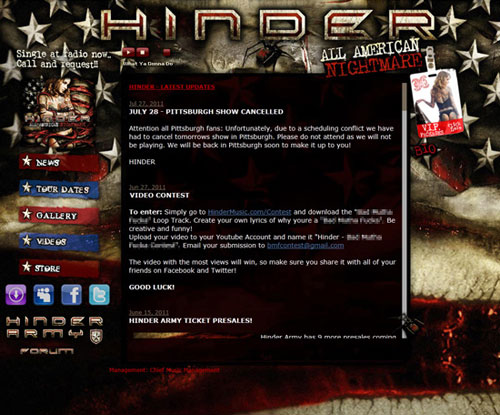
However, texture has long been synonymous with “dirty” or “grungy” design. Its overuse can be seen throughout the world of music group websites and has left a bad taste in the mouths of designers. Due to its frequent misuse, its benefits have long been overlooked. Texture can bring a website together, but should not be the main focus.
Textures vs. Patterns
Before we get into textures in depth, let’s distinguish between patterns and textures. These words are often used synonymously. Patterns are typically small, repeating, tileable elements, whereas textures tend to be much bigger images that don’t repeat. Imagine a Venn diagram, with textures on the left and patterns on the right, with a little overlap in the middle. So, some textures are also patterns. Several of the tileable texture packs found on Tileables are good examples.
The Function Of Textures
We love texture on the Web for a multitude of reasons. Design decisions shouldn’t be made simply on the basis of, “Oh, well. It looks good.” Design should serve a purpose, and each decision about texture should be made by weighing the pros and cons. Let’s start by going over some of the key benefits.
Grabbing Attention With A Call to Action
Texture can highlight elements such as titles, headings, icons and buttons. It draws the eye to calls to action and main headings. This is perhaps the clearest way that the trend towards textures is catching on.
When used minimally, texture separates the content from the rest of the website. It guides the user’s eye directly to the intended element. It can be a great way to separate key branding elements.
You can grab attention in different ways, but two common ways can be easily demonstrated with branding: a textured logo against a clean background, and a clean logo against a textured background.


Enhancing Information Architecture
Texture can be used to guide the eye. And like lines, boxes and contrast, it can be used to separate content into logical divisions. Using it effectively in conjunction with other methods is vital. The goal is not to abandon other methods of information architecture, but to enhance their effectiveness.
See how you can use textures without violating best practices? High contrast and legibility are evident and work in tandem with the texture.

Above, each element is individually textured for a particular purpose. Sky’s Guide Service divides the content into logical sections, and the user sees where they start and end. Texture enhances the information architecture by creating logical content areas that help the user process the information accurately.
Also, the texture perfectly suits the style and topic of the website. All of the elements are custom-tailored to fit a logical theme, thus enhancing the website’s overall message.
Building An Atmosphere And Bolstering Identity
More and more, clients want website designs that do more than display their content in a user-friendly way. They want websites that enhance their identity and enable users to identify with the brand. Texture can be used to achieve this in many ways.

Deidre “Deda” Bain does exactly this for her personal brand. Her use of texture helps to put a face — almost literally — to the service. Without the texture, the website would be rather bland and would lack the personality of its creator. With legibility and a proper information architecture, the design would still be nice, but that extra something would be missing.
Texture adds to the “intangibles” of Web design: that wow factor and sexiness of a memorable website.
Tips And General Advice
All of this is fine and dandy, but you’ll want to avoid common traps while refining certain techniques and modes of thought.
Maintain Legibility
Never (ever!) sacrifice legibility for texture. Many of us make this mistake, and will continue to for a while to come. Legibility on the Web is paramount in importance. If a user can’t even read the message, then what’s the point in composing it, let alone texturing it?
Avoid doing this to your type:

Don’t Beat a Dead Horse
In print, texture is hard to overdo — depending on the genre, of course. On the Web, however, texture can be extremely distracting when used in “bulk.”
Practice Means Improvement
Experiment with your designs. Try new things. Apply textures in places where you wouldn’t normally put them. Use textures that you’ve never used before. You never know what you’ll discover until you try it.
If It Serves No Purpose, Take It Out
Refine your technique before using it on a client’s website. Always make sure that your use of texture is based on a sound plan, as would be the case with any website you create. If you can’t justify something that you’ve done as being an improvement, take it out.
There’s no point in overdoing texture. The entire purpose of the Web is to disseminate information. How can you accomplish this if your content is unreadable? Besides, subtlety and nuance are a better way to demonstrate mastery of a subject.
Consider the Effect You Are Trying To Achieve
As we know from experience, getting carried away with texture is all too easy. Keeping in mind the final effect you are trying to achieve is the best way to avoid this. If you want a subtle textured background, just do it and then move on to the next item on your list. Otherwise, you’ll never get it done.
Collect Resources So That You Don’t Have to Search Later
You can save a huge amount of time by downloading and archiving resources that seem useful to you. Keeping your files organized is a great back-up plan. Trust us: nothing is more frustrating than coming across the perfect brush pack and not being able to remember where you found it. Our list of brushes is long and diverse. We’ve been collecting the brushes over the years from websites such as deviantART and Brusheezy, from the freebie sections of various design blogs, and by making our own.
Learn Masks
Learning to work with layer masks will save you a lot of time in the long run and will be a strong tool in your arsenal. Masks are also a fantastic way to non-destructively experiment with your designs. A lot of great tutorials are out there; a quick Google search led me to Understanding Layer Masks in Photoshop.
Don’t Sacrifice Quality for Loading Time
There are plenty of interesting ways to keep textures from killing loading times. But don’t sacrifice the quality of the texture too much, because rather than appearing finished and professional, the website will look outdated right out of the gate. Repeating texture patterns are a good way to save on the loading times of backgrounds and larger elements.
Of course, we want to design with the Web’s inherent constraints in mind, but as Internet connection speeds rise globally, loading time shouldn’t be your primary concern. Nevertheless, use texture within reason: a website with a lot of textures will inevitably have a long loading time. A simple method to get around file size is to use repeating textures, especially for backgrounds. Tileables is a fantastic resource to get started. And we’re always learning about CSS Sprites and using Smush.it to further compress our files.

Choose Textures Logically
Lastly, and perhaps as important as maintaining legibility, choose textures that are logical for your design. If you’re building a website for a furniture store, then rusty textures wouldn’t make a whole lot of sense. Textures are meant to build identity, not to confuse the visitor, regardless of whether they look good. Usability should always take precedence.
Textures: A D.I.Y. Attitude
One of the many ways to get textures is to create them yourself. We are big proponents of this because it can save you time and give the exact result you’re looking for. And don’t worry: it’s not as difficult as it looks.
Snap Some Photos
The simplest method is to grab your trusty digital camera and snap shots of textures that are around you, especially ones that you’ve never considered to be “textures.” Unique textures can advance your style. For example, would you consider the top of a cake or bubbles in a sink as workable textures? They’re all around you.

If you look around yourself, you will see plenty of grunge: worn-down buildings, concrete walls, rusted metal, tree bark, weathered wood. These are all fantastic specimens. In fact, a decent point-and-shoot camera is enough to start. We started shooting our own textures with an old Nikon Coolpix 4200, which worked flawlessly.
When you shoot, you could use full auto mode. But don’t use flash, because it will “flatten” the image and remove most of the detail in the texture, especially in close-up shots. Let the camera do the work, and always take multiple shots of a texture to get the best possible result. You can always rely on post-processing in your favorite image editor.
Scanners Work, Too
Another great tool is the good ol’ flatbed scanner. Old paper, cardboard, mouse pads (shout out to Trent Walton for this idea), paper bags, skin — the list of what you can scan goes on. Scan at a very high resolution, 600 to 1200 DPI, so that the texture is of high quality and can be adapted to any project, including large print pieces. High-resolution scans also allow you to isolate particular spots in an image to use as a texture.
Once you’re comfortable with that, you can start creating elements using traditional art techniques. For example, apply a bit of charcoal to some beautiful heavy paper, which could be the finishing touch for that grunge background you’ve been after. What about acrylic paint splatters to add depth to your UI? Or coffee stains on paper? The possibilities are endless!
Icing On The Cake
You can always spice up the process by combining textures. Using the layer blending modes in Photoshop, you can combine various textures into one. Caleb of Lost and Taken has posted an in-depth walkthrough of the process that he follows to create his packs.
Believe it or not, Photoshop’s somewhat gimmicky filters can also be used to create textures. Noise textures are a snap with the Noise filter. Playing with the values and levels of the filter, you can obtain results for a wide range of needs. There’s also the Texturize filter, although it’s rather gimmicky and rarely useful. Still, it could help you achieve part of the effect you’re going for.


If you’re interested in learning the basic techniques of applying texture to elements, we’ve produced several videos to get you started. More advanced users may already know these techniques but might want to brush up on them anyway. Either way, we hope you find them useful.
A demonstration of using brushes, levels and layers to create texture.
A demonstration of using texture files, packs, levels and layers to create texture.
A combination of the two techniques above, with an overview of more advanced ideas.
Articles and Resources
Articles and Tutorials
- Adding Texture in Photoshop, Method and Craft
- Creating Tileable Textures, Method and Craft
- Vintage Effects Within Illustrator, Method and Craft
- Design a Vintage Poster With Vector Pack 16, Part 1, GoMediaZine
- Design a Vintage Poster, Part 2, GoMediaZine
Free Resources
Premium Resources
Further Reading
- 100 Beautiful Free Textures
- Techniques For Creating Custom Textures In Photoshop
- Photoshop: Noise, Textures, Gradients and Rounded Rectangles
- 40 Dirty Photoshop Grunge Tutorials
 (al, tg, vf, mrn)

