GuideGuide: Free Plugin For Dealing With Grids In Photoshop
This article is the fourth in our new series that introduces the latest, useful and freely available tools and techniques, developed and released by active members of the Web design community. The first article covered PrefixFree; the second introduced Foundation, a responsive framework; the third presented Sisyphus.js, a library for Gmail-like client-side drafts. Today we are happy to present Cameron McEfee’s Photoshop extension GuideGuide which provides a tool to create pixel accurate columns, rows, midpoints and baselines.
Take a moment and think about creating a multi-column grid in a Photoshop comp. Have your palms started to sweat? Yes, creating grids in Photoshop is a pain indeed. Some designers just estimate and drag guides arbitrarily onto the stage. Others draw vector shapes, duplicate them to represent columns, then stretch them to fit their design. The hardy few who don’t say things like, “I’m a designer, not a mathematician,” generally use a little math and logic to calculate their grid. If you were to boil that math down, it probably ends up looking something like this:
(siteWidth - (gutterWidth × (numberOfColumns - 1) ) ÷ numberOfColumns = columnWidth
I was sitting at my desk one day doing this exact equation when I thought, “Man, this looks just like code. I wish someone would make a plugin that would do this for me.” Several months and many grids later, it occurred to me that I could probably build the plugin myself.
Enter: GuideGuide
I created GuideGuide for the sole purpose of making one of the most time consuming parts of Photoshop based design as easy as possible. Enter in a few numbers and GuideGuide will draw a grid on your document using Photoshop’s guides. You’ll become drunk with power the first time you watch it happen, I promise. Even better, GuideGuide’s real power is Photoshop’s marquee. If you have an active selection in your Photoshop document, GuideGuide creates the grid you specify within the selection’s boundaries. Anything GuideGuide can do, can be done using either the document or a selection.
Columns and Rows
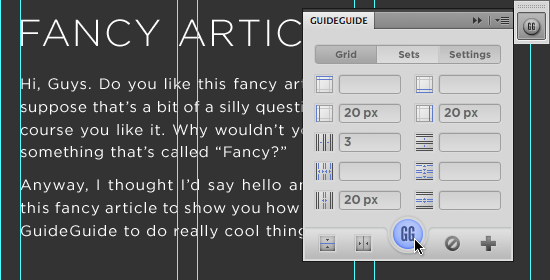
Designing a site that needs multiple columns and gutters? GuideGuide has your back.
Midpoints
GuideGuide makes finding the midpoint of items within your design a breeze. Simply draw a selection or ⌘ + click (ctrl + click on Windows) to create a selection around the item you want to find the midpoint of. To find its midpoint, click one of the midpoint buttons.
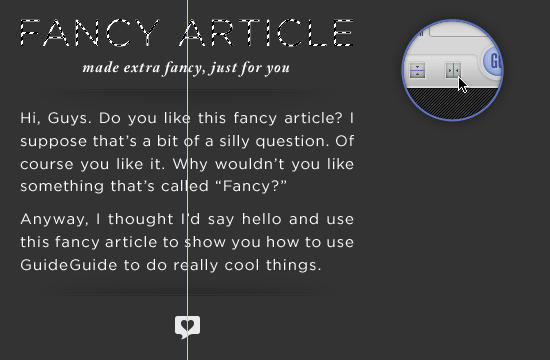
GuideGuide places a guide at the midpoint of the selection. Now you can easily center align elements under the original item.
Save It For Later
If you find yourself frequently using the same grid over and over, you can save it as a set for later use.
The Fun Part
Sure, GuideGuide has its basic rows, columns and midpoints, but with a little creativity it can do a whole lot more.
Measure Navigation
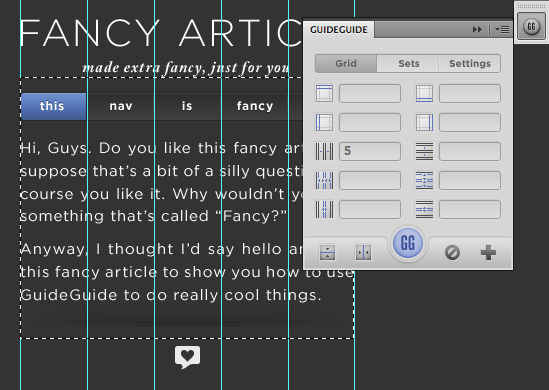
I hate figuring out how wide a navigation element needs to be to evenly fit across the width of a site. Instead, I let GuideGuide do the work for me.
- Make a selection the width of your site
- Enter your info, thinking of the columns field as the number of navigation items and the gutter field as the space you want between each item (if you want it).
Element Padding
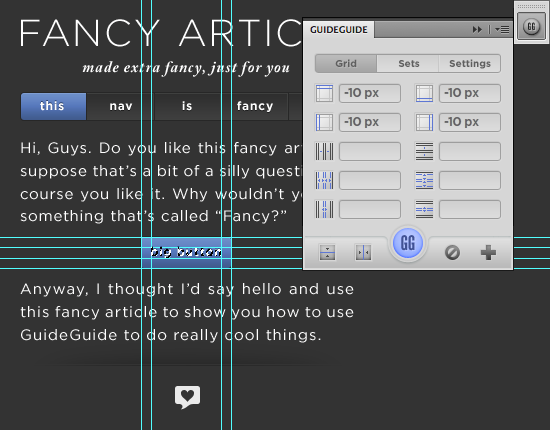
Want to draw a box around an item but don’t feel like measuring it out exactly?
⌘+click(ctrl+clickon Windows) the item to make a selection around it.- Enter a negative margin in one of GuideGuide’s margin fields, and click the icon next to it. GuideGuide will fill that value into all the margin fields.
- Use the newly placed guides to draw your box.
Baseline Grid
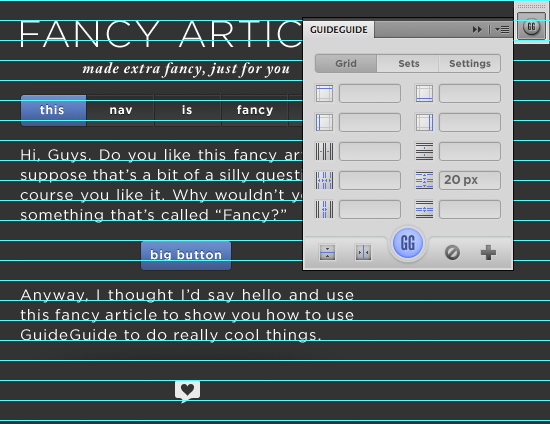
Using GuideGuide’s explicit row height, you can easily create a baseline grid for your design.
- Enter your desired line height in the row height field.
- Align your type and other elements to your new baseline grid.
Thoughts?
Do you have an unconventional use for GuideGuide? Post it in the comments of this post. I love hearing the clever and unusual ways people use GuideGuide. Found a bug or have a feature request? If you’d like to request a feature or have found something that is broken, please create an issue on GuideGuide’s support repo over on GitHub.
To download GuideGuide and learn more about some of its hidden features, head on over to guideguide.me. OS X Lion users with CS5 will need to download a patch for Adobe Extension Manager before they will be able to install GuideGuide.
(il)


Fatih Hamzah
January 3rd, 2012 3:41 pmits about Layout, right? :)
awesome guide!
Jake Dickinson
January 3rd, 2012 4:00 pmOne of, if not the best Photoshop plugin well worth getting!
Thanks Cameron
Jacob Andersson
January 3rd, 2012 4:00 pmThanks a lot! I’ve been looking for something like this for ages!
Jelmer
January 3rd, 2012 4:02 pmI have used GuideGuide for quite some time now, and I have to say, it’s one of the most useful tools I have for creating web designs. I have to update this plugin though (doesn’t this happen automatically in Photoshop?).
Cameron McEfee
January 3rd, 2012 4:45 pmUnfortunately, no. You’ll need download this version and install it. When I built the first version I wasn’t expecting it to take off, so I didn’t build in the update functionality.
qbin2001
January 3rd, 2012 6:17 pmI love this little thing!
One question is there a way to add shortcuts to the sets? I use “outline” (untill now without GG) all the time, and I wish I could do it even faster.
Thank You for this little treasure! It will make my work much, much easier! :-)
Cameron McEfee
January 5th, 2012 8:55 pmThat’s a good question. It would be cool to be able to hotkey sets. I’ll look into it.
Tony
January 3rd, 2012 4:06 pmCan’t wait to check this out :)
Rutger
January 3rd, 2012 4:12 pmFINALLY! This is great!! Have been wanting & waiting for something like this for ages!
Anonymous
January 3rd, 2012 4:20 pmIs it possible to install on photoshop elements too?
Vincent
January 3rd, 2012 4:24 pmFinally, I found it again.
I lost my copy and bookmark of the site. Thank you very much for sharing this awesome plugin.
Jared Tohlen
January 3rd, 2012 4:24 pmAwesome tool, looking forward to using it. Something like it in Illustrator would be nice!
ftwcreative
January 3rd, 2012 4:26 pmOh how exciting gg has finally been updated as promised. Been using this for the past year and love it.
Raziel1
January 3rd, 2012 6:10 pmOr you could just use the program which already has this features and much more build right into it-> Adobe Fireworks.
Photoshop is not ment for Webdesign. The whole interface, tools, the way they are used, the layer system makes it very hard compared to using Fireworks for this task.
Matt
January 21st, 2012 4:18 pmTrue about Fireworks, but for many like me, Photoshop was a gateway into web design. So we end up using the tools that we know best. Ultimately, good design is the result of a good designer, not the tool they use.
Michel Bozgounov
January 21st, 2012 4:35 pmGood points!
However, each tool has its strengths and weaknesses. You wouldn’t normally use Fireworks for print, yes? The same way, Photoshop may feel quite awkward and slow when used for web/screen design — after all, it wasn’t built for that, but for photographers and heavy bitmap editing. Yes, some web features were later added “on top”, but even now, its layer-based system and lack of “real” vectors makes screen/UI design with it a bit of a pain…
Absolutely true! Tools, on the other hand, allow us to perform certain tasks, the easy way or the hard way. Imagine 2 hours per day saved, just because you spent 10 or 20 hours to learn a new tool — would you invest the time? Yes, there is some time investment, but in the long run, you would be winning… Just sayin’ :)
bee
February 22nd, 2012 3:27 pmI have to design a poster today but the customer wants me to do it in PS, not InDesign. This tool is so helpful, thanks a lot!
bee
February 22nd, 2012 3:30 pmAnd I just had the idea that you can make perfect dyptichons, tryptichons etc. with this tool!
Umar
January 3rd, 2012 6:24 pmHello, I am using PS CS5 on Windows 7 and not able to install the plugin, any advice?
Leon Ouwendijk
January 3rd, 2012 8:35 pmWorks fine in PS 5.0 and 5.1 on windows 7 here (64-bit).
Did you follow Cameron’s instructions carefully?
Umar
January 3rd, 2012 8:41 pmHi Leon, thanks for your reply but in downloaded zip there is no extension for windows but only for mac .. can you give me the right link to download .mxp or email me please.
Cameron McEfee
January 3rd, 2012 8:52 pmThe extension is not OS specific. It will work for both Windows and OSX systems.
Caleb White
February 8th, 2012 12:37 amWhen I installed it on my windows machine Adobe extension manager had to be running as administrator to install the plugin. After that it installed and works great.
Dave
January 3rd, 2012 6:44 pmThis is great. Thanks.
I continue to wait for Photoshop to allow the user to right click a line and choose from a selection of guide line colors – helping to distinguish a single or, perhaps, group of line(s) in an otherwise sea of turquoise.
Leon Ouwendijk
January 3rd, 2012 8:33 pmI don’t build complete (baseline) grids as I find typography in Photoshop rather cumbersome but to distinguish gutters from columns and rows, that would be a very useful function indeed.
Michael Arnaldo
January 3rd, 2012 7:07 pmGreat tool! I’ve always dreaded calculating width’s in PS.
Ithi
January 3rd, 2012 7:08 pmI can just Thank You! :) Great plugin!
xetoya
January 3rd, 2012 7:18 pmI’ve been using it for about a year now. Very helpful. Thanks, Cameron!
Leon Ouwendijk
January 3rd, 2012 8:25 pmAwesome tool, been using it for a while now. Mostly to create a ‘rule of thirds’ grid quick and easy. This article pointed me towards some very useful other features though. Thanx!
Frankly, I think it’s ridiculous it isn’t already part of Photoshop right out of the box. Pay attention to Cameron, Adobe!
André
January 3rd, 2012 9:29 pmSimply amazing! The best guide tool for Photoshop so far, thanks for this man!
Sami
January 3rd, 2012 10:51 pmThis is wonderful! I can’t wait to install and start using.
artfanvikram
January 4th, 2012 5:41 amyou’re great, thank you for the beautiful plugin that helps make my work elegant.
Happy New Year to one and ALL.
anjhero
January 4th, 2012 5:49 amthis sounds awesome! downloading it already. can’t wait to use it!
Ashraf Khattab
January 4th, 2012 8:28 amThe link for CS4 downloads the plugin for CS5 :(
mono
January 4th, 2012 8:29 amI’ve been using this for quite a while, I’ts an amazing tool, love it!!
Jon
January 4th, 2012 9:26 amThanks Cameron! A really nice plugin!
Noel Tock
January 4th, 2012 9:40 amIt’d be interesting to see how many people actually still use grids in PS (to create a “full” design before coding) or develop directly in-browser?
Simon France
January 4th, 2012 10:39 amThis is exactly what I have been after for years, no more calculator needed!!! Is their a CS3 version available?
Margaret
January 4th, 2012 10:48 amWell, I might be a noob. I like what you can do with GuideGuide, so I installed it. But this is my first time using Adobe Extensions. And now I am puzzled. Where can I open the GuideGuide window in photoshop? (I am running photoshop cs5 on a windows computer)
Scott
January 4th, 2012 2:44 pmUnder your Window menu, there’s a sub-menu for Extensions. It should be there; just click it and the panel should pop-up!
bee
February 22nd, 2012 3:25 pmThanks, I had the same problem :)
Tomas
January 4th, 2012 11:43 amAmazing! This is going to save me a lot of time. Thank you Cameron.
adumpaul
January 4th, 2012 12:13 pmNice guide line of photoshop.Thank you for sharing.
alice
January 4th, 2012 12:37 pmdownloaded this morning and already used in some projects, it works perfectly well and i really needed this kind of tool! thank you soooo much!!!!!
(@Margaret: you can open it by clicking window>extensions)
Leon
January 4th, 2012 1:01 pmAfter installing and opening photoshop I don’t see plugin window. Do I need to open it in some way? Everything seems to be installed correctly. I’m on windows 7 64bit CS5.
braaad
January 4th, 2012 1:17 pmI use this awesome program called ILLUSTRATOR. Amazing ;-) Why some designers insist on using p/s for layout is beyond me.
Thomeinika
January 4th, 2012 2:34 pmVERY HANDY GuideGuide feature that is not mentioned on the official site: by playing around, I just discovered that if you create a (round, rectangular…) selection and afterwards create guides, those guides are created within the selection.
Thanks for that great tool :-)
Ben
January 4th, 2012 2:52 pmI’ve been using GuideGuide for a little over a year now and it’s an absolutely amazing tool. I couldn’t imagine living without it nowadays. It helps tremendously with throwing together web comps and saves loads of time.
Thanks, Cameron!
Sylvia
January 4th, 2012 3:12 pmWow, I just tried this plugin and it is exactly what I have been missing all the time. Makes work so much easier. Thanks a lot!
Anthony
January 4th, 2012 4:16 pmNow if I could have layers of guides, things would be perfect! If anyone knows how this can be done, other than screen caps, let me know @elementvine (on the tweeter)
Cameron McEfee
January 4th, 2012 6:19 pmI looked into providing this feature with GuideGuide, but Photoshop unfortunately has no way to group/individualize the guides the way Illustrator does. The closest thing you could do is use guide sets to redraw guides each time, but that tends to be a very slow workaround.
Rusmir
January 4th, 2012 4:41 pmThank you for this update. The first version i am using very often in business, but this is a big improvement. Thanks :D
ilithya
January 4th, 2012 4:52 pmThis is so cool!
I’ve been looking for something like this in Photoshop, but didn’t have any luck.
And I totally relate when you were mentioned first in the article the whole math thing. It literally takes so long to build the grid myself every time I come up with a layout that uses different measurements in width size and grid than a previous one.
Thank you so much!
Joe
January 4th, 2012 9:22 pmVery helpful and generous, Thank you very much!
Tyler
January 4th, 2012 9:48 pmI’m one of the hardy few that isn’t afraid of a little math, but I relish the chance to put away the calculator. Great idea, Cameron!
Alessio
January 5th, 2012 11:29 amAbsolutely OUTSTANDING. It simply works!
The matter is not hat help you on making right grids, but that you can actually try different layouts in seconds. Since I’m lazy sometimes I accept the first grid just because it could be boring preparing another one. That won’t happen anymore. THANKS!
David
January 5th, 2012 12:24 pmThis was a really useful extention.
Thanks!
Kay Gregory-Clark
January 5th, 2012 4:21 pmI do not yet see an answer about whether the guide works with Photoshop Elements….would like to know before I download. The guide does sound fantastic!
Nadja Röllgen
January 5th, 2012 4:38 pmI just installed the tool on my Win PS 5.1 64 bit and it works perfectly! I just wondering how i worked without it ever before :) Thanks a million, Cameron!!!
JCC
January 6th, 2012 12:21 pmCan we have an option for PS CS3?
Mike Dove
January 6th, 2012 1:51 pmJust been receiving high-fives from my colleagues for stumbling on this gem :) Any chance of a Fireworks version though? I am forced to use Photoshop at work but at home I much prefer doing layouts in Adobe’s yellow peril :D
Rob Duckers
January 6th, 2012 2:58 pmBrilliant, and timely too – thanks!
Juniper
January 6th, 2012 7:36 pmThank you so much! This is such a big help!
Michael
January 7th, 2012 1:09 pmAnybody knows how to install this in PS Elements 10?
Carlos R.
January 8th, 2012 10:21 pmthe first version of this rocked! can’t wait to use the new features!
Ilya Petrovsky
January 9th, 2012 3:51 amGreat small useful tool.
Just what I’ve been lloking for.
Thanks a lot.
rupal
January 10th, 2012 6:00 pmVery excited to see how it works…however I am having issue installing this plugin.
It says ‘it cant copy it to the designated folder I have installed the patch already… did anybody have that issue?
Cameron McEfee
January 17th, 2012 3:27 amThis is a common issue for Mac users. Double check to see that you have write permission to write to the folder mentioned in your error. Right click on the folder and “get info.” At the bottom under “Sharing & Permissions” Make sure your user has Read & Write permission.
rupal
January 10th, 2012 8:25 pmanybody having issues installing the plugin on OS Lion, even after installing the patch?
mar
January 10th, 2012 10:52 pmThank you for the information, I was actually looking for something like this a month ago but never found it. Anyways, I ended up buying a set of Photoshop actions to do the grids for me.
Denis
January 13th, 2012 11:45 amJust brilliant! Thank you SO much, Cameron. Now it’s just a must-have thing for every designer.
Erik
January 16th, 2012 9:59 amGreat tool! Thank you so much, Cameron :)
David
January 18th, 2012 1:06 amThere seems to be some confusion as to the nature of ‘enabling’ or finding GuideGuide once installed. It should be noted that the author of this article is unfortunate in calling it a plugin; its a custom panel. You can show panels by going to ‘Window > Extensions’. Hope this clears up any confusion.
I too have been using this panel for over a year. It’s a huge time saver! I use it primarily for laying out columns and baseline vertical rhythm guides in website mock ups.
Tales
February 1st, 2012 12:09 pmReally great man.
Thank you!
Praveen Kumar Kunala
March 4th, 2012 1:29 pmThanks a lot..It is very useful…
marga
March 17th, 2012 1:34 amOMG this is such a blessings! thank you for creating such! makes life easier!
Mehmet Gultas
March 19th, 2012 6:30 pmThis equation lacks a parenthesis.
Mehmet Gultas
March 19th, 2012 6:32 pmYeah, I know, this is not a math101 but this equation seems to lack a parenthesis.
tonijn
April 23rd, 2012 2:32 pmCould be a bit OT but personally I still find it difficult to believe Photoshop can be used as a proper tool for web design.
Vishu
April 29th, 2012 8:50 pmIt’s an awesome tool, been using guideguide for some time now and I must say it has been a HUGE timesaver!
Note
July 7th, 2012 2:19 pmVery useful tool. Thank you ^.^
Kaz
July 10th, 2012 9:30 amIs there a CS2 version?
Dennis
August 6th, 2012 9:22 pmCan you print the grid?
zulidelavega
February 3rd, 2013 5:08 pmI’m zuli from indonesia.
I wonder,
what have the photoshop had a line bleeds like in illustrator to the printing process?
graphicool
April 15th, 2013 11:11 pmI can see all kinds of possible uses for this, and I’m wondering how difficult it would be to adapt this panel for use with InDesign, since it looks much more powerful than the existing INDD guide tools (nudge, paste multiple, etc.), even though they are better than what PS has. Any thoughts?
Steve
June 5th, 2013 5:14 pmThe question was already asked in the comments about printing but I don’t see that it was answered. Is there a way to print the image created in Photoshop with the GuideGuide lines on it? If not, is that something that could be considered for the near future?