Video TutorialReviewing Adobe Illustrator’s Extensive Gradients Toolset

While vector based artwork lets designers take advantage of small file sizes and lossless scaling it can also be limiting when trying to add depth and richness to a design. Adobe Illustrator offers a plethora of gradient tools that can help artist produce more organic and vivid pieces.
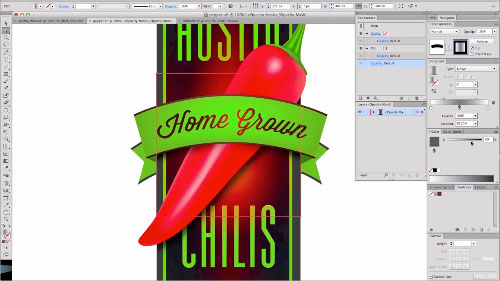
This extended video tutorial covers a wide variety of topics including basic gradient tools (0:30), the appearance pannel and multiple gradient fill layers (2:30), creating gradients with the blending tool (3:45), gradient strokes (6:30), gradient mesh (7:45), using gradients with type (14:00), wrapping gradients with envelope distort (16:30), and using opacity masks.
Highlights and Takeaways:
- Use the gradient tool (from the tool palette) rather then the gradient window to edit your gradients within the context of the object.
- Gradients can have several sliders each of which has its own opacity.
- The appearance window lets you add multiple gradient fills and strokes to a single object.
- Every fill or stroke applied to an object can have a unique opacity and blending mode, and each stroke can have a different line weight.
- Gradient strokes can be applied within, along, or across an object’s stroke for a variety of effects.
- Use the blend tool (set to smooth color) to create gradients that align more closely to complex or organic shapes.
- The gradient mesh tool is great for developing complex vectors that can be used to illustrate organic shapes, but they can also be hard to work with pretty quickly. To avoid frustration, start with the basic shape (like a circle) that most clearly matches the object you want to illustrate and try to shape it to match before adding additional points.
- When creating a gradient mesh, be sure to set the fill for your base shape to the most prevalent color on the object you are trying to illustrate.
- When using an image for reference, make the image layer a template. This will allow you to switch to outline mode without hiding the image.
- You can use the envelope distort command to bend rectilinear gradient shapes into natural curves.
- Gradient opacity masks let you fade the opacity of an object (or group) to create natural blends.
Please feel free to add your favorit gradient tips and tricks!


Penio Dachev
October 3rd, 2012 2:25 pmNice techniques!
Thanks for sharing!
savita
May 7th, 2013 10:45 amNice work…..
Thanks for sharing!
Nick Adams
October 3rd, 2012 7:01 pmLoved this tutorial. I primarily work in photoshop and it’s easy for me to get stuck using it exclusively because obtaining gradient effects that work well in Illustrator has always been a stumbling block of mine. I had no idea you could do so much robust gradient work with the newer versions of Illustrator.
Excited to try this out on my next project!
Nick
Adrian Taylor
October 3rd, 2012 11:06 pmThanks for the kind words folk.
@Nick Adams: I end up in Photoshop most of the time but when I need to do something more vector based it’s nice to know that illustrator has a few tricks up its sleeve to achieve more organic looks.
Tony
October 4th, 2012 7:45 amNice tutorial, this gave me alot of inspiration to start working with Illustrator more often. Adrian Taylor, i need to send you a message – where can i e-mail you?
Adrian Taylor
October 4th, 2012 3:15 pmTony, best way to reach me is through the contact form on my company’s site:
http://pushstartcreative.com/thanks.html#contact
FRANCK BRUNET
October 4th, 2012 7:23 pmI wanted ti thank you for your clear explaination. You made me discover the illimited world of gradiant in Illustrator !
Thanks.
christine
October 4th, 2012 9:22 pmCorrect me if I’m wrong, but I assume applying a gradient to a stroke is a feature of CS5.5. I’m running CS5 and the only way I know how to apply a gradient to a stroke is by Object>Path>Outline Stroke.
Great tutorial otherwise, I’m excited to implement some of these methods in my own work.
Ben Eriksen
October 5th, 2012 5:21 amAwesome tutorial! What other video tutorials do you have?! Going to take a look. Thanks for the inspiration.
Karl Wenn
October 6th, 2012 12:46 amA plethora?!
Nod
October 6th, 2012 7:36 amGood article, love your site.
cheers!
Jack
October 8th, 2012 6:24 pmGreat tutorial. It will stretch my understanding to encompass new things. Thanks.
I do agree with christine’s comment above.
With my somewhat limited experience with Illustrator, how, again, do you apply a gradient to a stroke? I use Illustrator 5.5 on two operating systems. Win 7 64bit and win7 ultimate.
Advice or direction is encouraged..!
Eddie Sanchez
October 8th, 2012 6:41 pmWow! What a great tutorial. So many little lessons within this great exercise!
Thanks for sharing with the community.
kartofelek007
October 8th, 2012 9:05 pmOne of the best tutorial. We want more :}
torkunc
October 8th, 2012 10:21 pmthis is one of the best tutorials I ve seen about the gradients.
thnx dude!
CritiqueMe
October 9th, 2012 10:13 pmGreat article, I think Illustrator is often overshadowed by Photoshop when it comes to creating imagery and I can’t get enough of Illustrator. Love your tips!
Alex Sanso
October 12th, 2012 8:45 pmGreat tutorial; thank you! Little did I know how much gradient power is within Illustrator. Will refer back to this a lot!
Priyanka
October 15th, 2012 12:21 pmBrilliant tutorial. Very helpful as well. Definitely sharing this one with my class mates. :)
H. Max Marance
January 6th, 2013 9:19 pmExcellent video, Adrian’s also a fine presenter and designer. I believe the actual gradient mesh discussion in the video begins more like 10:30 than 7:45 as stated in the blurb. Just clarifying so people can get to that part more quickly. 7:45 is around where AT starts building the outline of the red area of the pepper.
Aleksander Pujszo
March 27th, 2013 6:32 pmGreat! Thanks!
Heiko Röhr
April 8th, 2013 9:43 amReally nice! Thank you, learned a lot =)
Chad Rogez
May 29th, 2013 12:48 amWhen I first switched from Freehand to Illustrator I hated the gradiant tools that were encompassed within Illustrator. I have grown to love them and it’s nice to have seen the major migration in control the last few upgrades. Thanks for sharing!